
SpringBoot中使用Zuul
Zuul提供了服务网关的功能,可以实现负载均衡、反向代理、动态路由、请求转发等功能。
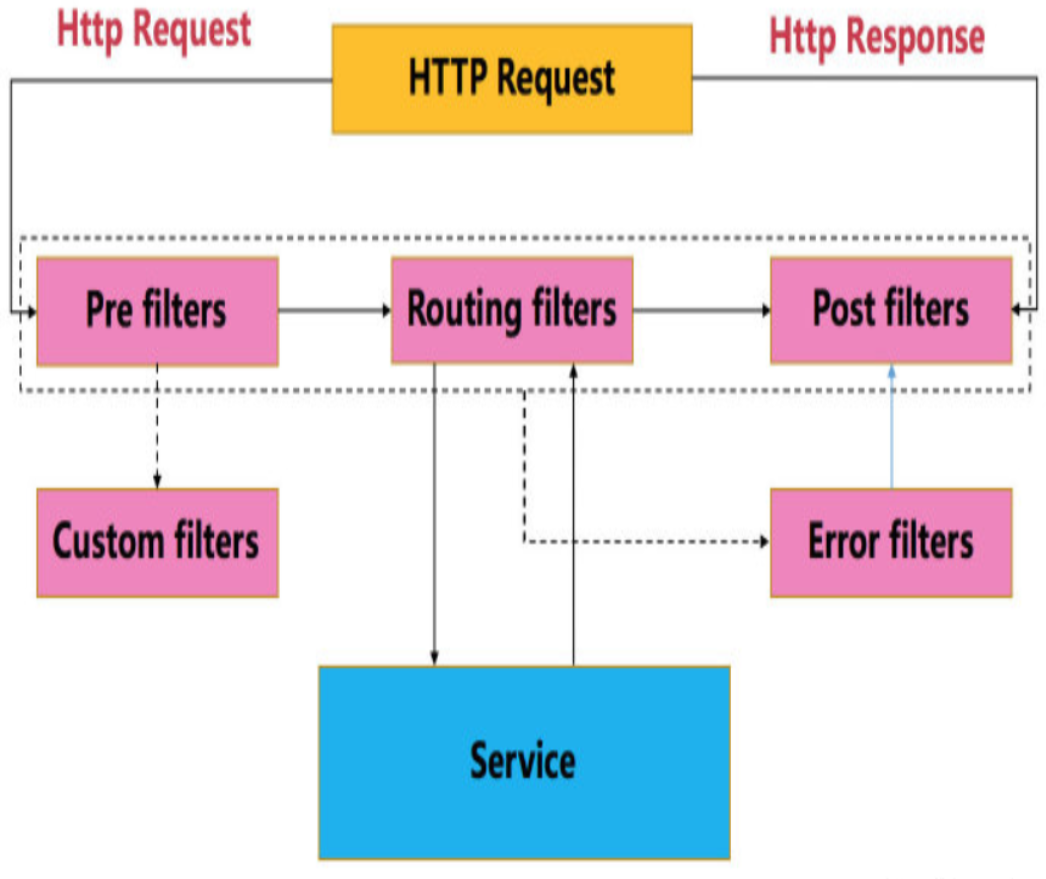
Zuul大部分功能是通过过滤器实现的,除了标准的四种过滤器类型,还支持自定义过滤器。
使用@EnableZuulProxy注解,Spring容器初始化时,会将Zuul的相关配置初始化,其中包含一个Spring Boot的Bean:ServletRegistrationBean,该类主要用于注册Servlet。在Servlet的service方法中,执行各种Zuul过滤器。下图为HTTP请求在ZuulServlet中的生命周期。
Spring Boot Web项目中整合Zuul:
一、创建hello源服务项目
1、创建项目
开发工具:IntelliJ IDEA 2019.2.3
IDEA中创建一个新的SpringBoot项目,名称为“hello-server”,SpringBoot版本选择2.1.10,在选择Dependencies(依赖)的界面勾选Web -> Spring Web。
2、修改启动类代码
添加一个hello服务
package com.example.helloserver;

import org.springframework.boot.SpringApplication;

import org.springframework.boot.autoconfigure.SpringBootApplication;

import org.springframework.web.bind.annotation.GetMapping;

import org.springframework.web.bind.annotation.PathVariable;

import org.springframework.web.bind.annotation.RestController;

@SpringBootApplication

@RestController

public class HelloServerApplication {

    public static void main(String[] args) {

        SpringApplication.run(HelloServerApplication.class, args);

    }

    @GetMapping("/hello/{name}")

    public String hello(@PathVariable String name){

        return "hello " + name;

    }

}
3、修改配置application.yml,指定端口号8090
server:

  port: 8090
二、测试路由功能
1、创建项目
IDEA中创建一个新的SpringBoot项目,名称为“zuul-router”,SpringBoot版本选择2.1.10,在选择Dependencies(依赖)的界面勾选Web -> Spring Web,Spring Cloud Routing -> Zuul。
主要添加了spring-boot-starter-web和spring-cloud-starter-netflix-zuul两个依赖项。
pom.xml完整内容如下:
<?xml version="1.0" encoding="UTF-8"?>

<project xmlns="http://maven.apache.org/POM/4.0.0" xmlns:xsi="http://www.w3.org/2001/XMLSchema-instance"

         xsi:schemaLocation="http://maven.apache.org/POM/4.0.0 https://maven.apache.org/xsd/maven-4.0.0.xsd">

    <modelVersion>4.0.0</modelVersion>

    <parent>

        <groupId>org.springframework.boot</groupId>

        <artifactId>spring-boot-starter-parent</artifactId>

        <version>2.1.10.RELEASE</version>

        <relativePath/> <!-- lookup parent from repository -->

    </parent>

    <groupId>com.example</groupId>

    <artifactId>zuul-router</artifactId>

    <version>0.0.1-SNAPSHOT</version>

    <name>zuul-router</name>

    <description>Demo project for Spring Boot</description>

    <properties>

        <java.version>1.8</java.version>

        <spring-cloud.version>Greenwich.SR4</spring-cloud.version>

    </properties>

    <dependencies>

        <dependency>

            <groupId>org.springframework.boot</groupId>

            <artifactId>spring-boot-starter-web</artifactId>

        </dependency>

        <dependency>

            <groupId>org.springframework.cloud</groupId>

            <artifactId>spring-cloud-starter-netflix-zuul</artifactId>

        </dependency>

        <dependency>

            <groupId>org.springframework.boot</groupId>

            <artifactId>spring-boot-starter-test</artifactId>

            <scope>test</scope>

        </dependency>

    </dependencies>

    <dependencyManagement>

        <dependencies>

            <dependency>

                <groupId>org.springframework.cloud</groupId>

                <artifactId>spring-cloud-dependencies</artifactId>

                <version>${spring-cloud.version}</version>

                <type>pom</type>

                <scope>import</scope>

            </dependency>

        </dependencies>

    </dependencyManagement>

    <build>

        <plugins>

            <plugin>

                <groupId>org.springframework.boot</groupId>

                <artifactId>spring-boot-maven-plugin</artifactId>

            </plugin>

        </plugins>

    </build>

</project>
2、修改启动类代码
增加注解@EnableZuulProxy
package com.example.zuulrouter;

import org.springframework.boot.SpringApplication;

import org.springframework.boot.autoconfigure.SpringBootApplication;

import org.springframework.cloud.netflix.zuul.EnableZuulProxy;

@SpringBootApplication

@EnableZuulProxy

public class ZuulRouterApplication {

    public static void main(String[] args) {

        SpringApplication.run(ZuulRouterApplication.class, args);

    }

}
3、修改配置application.yml
zuul:

  routes:

    test:

      url: http://localhost:8090
加入以上配置后,发送给http://localhost:8080/test的所有请求会被转发到8090端口。
在浏览器访问http://localhost:8080/test/hello/lc,页面输出:hello lc
上面路由配置省略了path,默认情况下用routeId“test”作为path。
修改为:
zuul:

  routes:

    test:

      path: /a/**

      url: http://localhost:8090

    b:

      url: https://www.cnblogs.com/gdjlc
现在浏览器访问http://localhost:8080/a/hello/lc,页面输出:hello lc
访问http://localhost:8080/b,页面显示https://www.cnblogs.com/gdjlc的内容
SpringBoot中使用Zuul的更多相关文章
- SpringBoot中yaml配置对象
转载请在页首注明作者与出处 一:前言 YAML可以代替传统的xx.properties文件,但是它支持声明map,数组,list,字符串,boolean值,数值,NULL,日期,基本满足开发过程中的所 ...
- 如何在SpringBoot中使用JSP ?但强烈不推荐,果断改Themeleaf吧
做WEB项目,一定都用过JSP这个大牌.Spring MVC里面也可以很方便的将JSP与一个View关联起来,使用还是非常方便的.当你从一个传统的Spring MVC项目转入一个Spring Boot ...
- springboot中swaggerUI的使用
demo地址:demo-swagger-springboot springboot中swaggerUI的使用 1.pom文件中添加swagger依赖 2.从github项目中下载swaggerUI 然 ...
- spring-boot+mybatis开发实战:如何在spring-boot中使用myabtis持久层框架
前言: 本项目基于maven构建,使用mybatis-spring-boot作为spring-boot项目的持久层框架 spring-boot中使用mybatis持久层框架与原spring项目使用方式 ...
- 由浅入深学习springboot中使用redis
很多时候,我们会在springboot中配置redis,但是就那么几个配置就配好了,没办法知道为什么,这里就详细的讲解一下 这里假设已经成功创建了一个springboot项目. redis连接工厂类 ...
- Springboot中使用AOP统一处理Web请求日志
title: Springboot中使用AOP统一处理Web请求日志 date: 2017-04-26 16:30:48 tags: ['Spring Boot','AOP'] categories: ...
- SpringBoot 中常用注解
本篇博文将介绍几种SpringBoot 中常用注解 其中,各注解的作用为: @PathVaribale 获取url中的数据 @RequestParam 获取请求参数的值 @GetMapping 组合注 ...
- SpringBoot中关于Mybatis使用的三个问题
SpringBoot中关于Mybatis使用的三个问题 转载请注明源地址:http://www.cnblogs.com/funnyzpc/p/8495453.html 原本是要讲讲PostgreSQL ...
- 在SpringBoot中配置aop
前言 aop作为spring的一个强大的功能经常被使用,aop的应用场景有很多,但是实际的应用还是需要根据实际的业务来进行实现.这里就以打印日志作为例子,在SpringBoot中配置aop 已经加入我 ...
随机推荐
- [TimLinux] Python 迭代器(iterator)和生成器(generator)
1. 可迭代对象 from collection import Iterable class Iterable(metaclass=ABCMeta): ... def __iter__(self): ...
- ARTS-S C语言多线程传参数
#include <stdio.h> #include <stdlib.h> #include <pthread.h> #include <unistd.h& ...
- ARTS-S redis3.2.10通过ip访问
只用把配制文件里的bind 127.0.0.1改成0.0.0.0,然后重启即可.不用再有别的配制.
- 基于STM32F1 的BASIC解码实验 vb basic 液晶显示执行过程及结果
基于STM32F1 的BASIC解码实验 1.basic程序以文件形式存储 2.程序文件存储在sd卡 3.解释结果显示在液晶屏上 主函数部分 int main(void){ u16 i,j; dela ...
- 《手把手教你》系列进阶篇之4-python+ selenium自动化测试 - python几种超神操作你都知道吗?(详细教程)
1. 简介 今天分享和讲解的超神操作,对于菜鸟来说是超神的操作,对于大佬来说也就是几个简单方法的封装和调用.这里讲解和分享这部分主要是为了培养小伙伴们和童鞋们的面向对象的开发思维,对比这样做的好处让你 ...
- linux—chmod
chmod -options -c 只输出被改变的文件信息 -f , --silent, --quite 当chmod不能改变文件模式时,不通知用户 -R 递归 ...
- 【Web技术】314- 前端组件设计原则
点击上方"前端自习课"关注,学习起来~ 译者:@没有好名字了译文:https://github.com/lightningminers/article/issues/36,http ...
- 【MySQL】ERROR 1045 (28000): Access denied for user 'root'@'localhost' (using password: YES)
问题现象: ERROR 1045 (28000): Access denied for user 'root'@'localhost' (using password: YES) 拒绝访问root用户 ...
- JAVA 锁的终极状态
自旋锁 背景:互斥同步对性能最大的影响是阻塞,挂起和恢复线程都需要转入内核态中完成:并且通常情况下,共享数据的锁定状态只持续很短的一段时间,为了这很短的一段时间进行上下文切换并不值得. 原理:当一条线 ...
- Spring Ioc Configration - Annotation
1.配置类注解@Configuration. 2.Bean注解 @Bean. 3.导入其他配置类@Import. 4.回调函数 @Bean(initMethod = "init", ...