
SpringBoot中使用Zuul
Zuul提供了服务网关的功能,可以实现负载均衡、反向代理、动态路由、请求转发等功能。
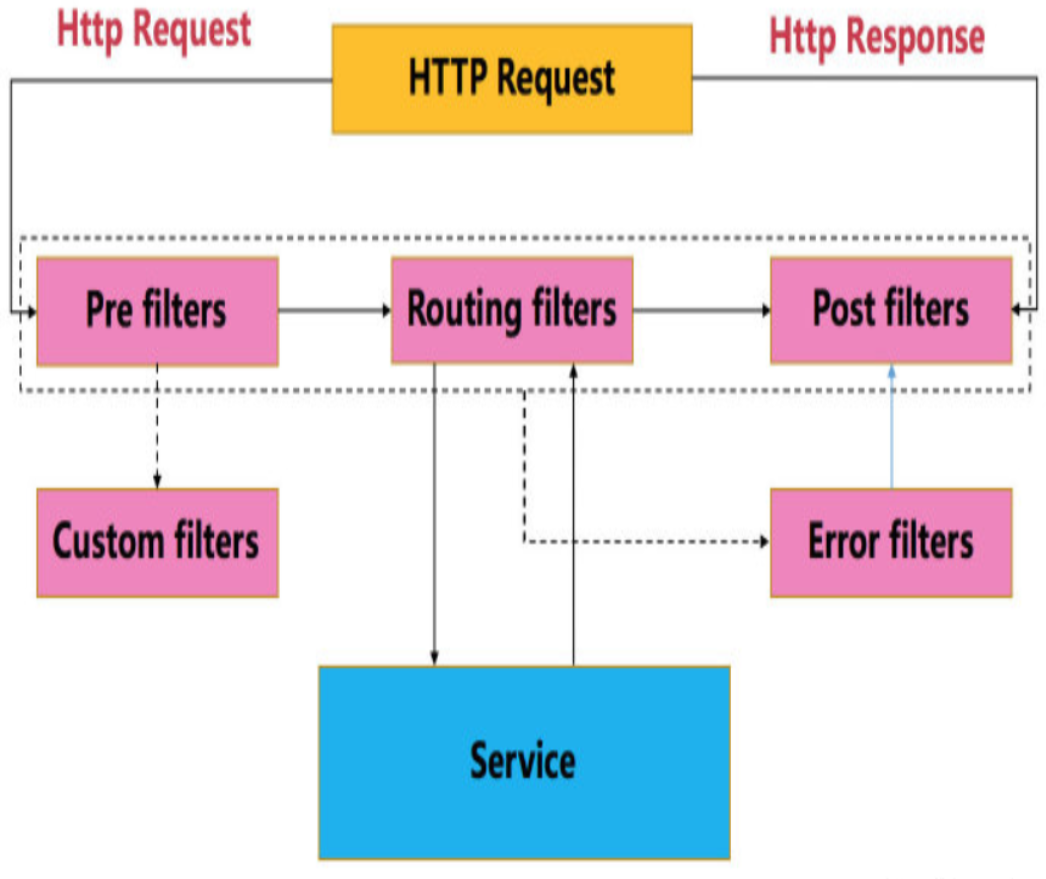
Zuul大部分功能是通过过滤器实现的,除了标准的四种过滤器类型,还支持自定义过滤器。
使用@EnableZuulProxy注解,Spring容器初始化时,会将Zuul的相关配置初始化,其中包含一个Spring Boot的Bean:ServletRegistrationBean,该类主要用于注册Servlet。在Servlet的service方法中,执行各种Zuul过滤器。下图为HTTP请求在ZuulServlet中的生命周期。
Spring Boot Web项目中整合Zuul:
一、创建hello源服务项目
1、创建项目
开发工具:IntelliJ IDEA 2019.2.3
IDEA中创建一个新的SpringBoot项目,名称为“hello-server”,SpringBoot版本选择2.1.10,在选择Dependencies(依赖)的界面勾选Web -> Spring Web。
2、修改启动类代码
添加一个hello服务
package com.example.helloserver;

import org.springframework.boot.SpringApplication;

import org.springframework.boot.autoconfigure.SpringBootApplication;

import org.springframework.web.bind.annotation.GetMapping;

import org.springframework.web.bind.annotation.PathVariable;

import org.springframework.web.bind.annotation.RestController;

@SpringBootApplication

@RestController

public class HelloServerApplication {

    public static void main(String[] args) {

        SpringApplication.run(HelloServerApplication.class, args);

    }

    @GetMapping("/hello/{name}")

    public String hello(@PathVariable String name){

        return "hello " + name;

    }

}
3、修改配置application.yml,指定端口号8090
server:

  port: 8090
二、测试路由功能
1、创建项目
IDEA中创建一个新的SpringBoot项目,名称为“zuul-router”,SpringBoot版本选择2.1.10,在选择Dependencies(依赖)的界面勾选Web -> Spring Web,Spring Cloud Routing -> Zuul。
主要添加了spring-boot-starter-web和spring-cloud-starter-netflix-zuul两个依赖项。
pom.xml完整内容如下:
<?xml version="1.0" encoding="UTF-8"?>

<project xmlns="http://maven.apache.org/POM/4.0.0" xmlns:xsi="http://www.w3.org/2001/XMLSchema-instance"

         xsi:schemaLocation="http://maven.apache.org/POM/4.0.0 https://maven.apache.org/xsd/maven-4.0.0.xsd">

    <modelVersion>4.0.0</modelVersion>

    <parent>

        <groupId>org.springframework.boot</groupId>

        <artifactId>spring-boot-starter-parent</artifactId>

        <version>2.1.10.RELEASE</version>

        <relativePath/> <!-- lookup parent from repository -->

    </parent>

    <groupId>com.example</groupId>

    <artifactId>zuul-router</artifactId>

    <version>0.0.1-SNAPSHOT</version>

    <name>zuul-router</name>

    <description>Demo project for Spring Boot</description>

    <properties>

        <java.version>1.8</java.version>

        <spring-cloud.version>Greenwich.SR4</spring-cloud.version>

    </properties>

    <dependencies>

        <dependency>

            <groupId>org.springframework.boot</groupId>

            <artifactId>spring-boot-starter-web</artifactId>

        </dependency>

        <dependency>

            <groupId>org.springframework.cloud</groupId>

            <artifactId>spring-cloud-starter-netflix-zuul</artifactId>

        </dependency>

        <dependency>

            <groupId>org.springframework.boot</groupId>

            <artifactId>spring-boot-starter-test</artifactId>

            <scope>test</scope>

        </dependency>

    </dependencies>

    <dependencyManagement>

        <dependencies>

            <dependency>

                <groupId>org.springframework.cloud</groupId>

                <artifactId>spring-cloud-dependencies</artifactId>

                <version>${spring-cloud.version}</version>

                <type>pom</type>

                <scope>import</scope>

            </dependency>

        </dependencies>

    </dependencyManagement>

    <build>

        <plugins>

            <plugin>

                <groupId>org.springframework.boot</groupId>

                <artifactId>spring-boot-maven-plugin</artifactId>

            </plugin>

        </plugins>

    </build>

</project>
2、修改启动类代码
增加注解@EnableZuulProxy
package com.example.zuulrouter;

import org.springframework.boot.SpringApplication;

import org.springframework.boot.autoconfigure.SpringBootApplication;

import org.springframework.cloud.netflix.zuul.EnableZuulProxy;

@SpringBootApplication

@EnableZuulProxy

public class ZuulRouterApplication {

    public static void main(String[] args) {

        SpringApplication.run(ZuulRouterApplication.class, args);

    }

}
3、修改配置application.yml
zuul:

  routes:

    test:

      url: http://localhost:8090
加入以上配置后,发送给http://localhost:8080/test的所有请求会被转发到8090端口。
在浏览器访问http://localhost:8080/test/hello/lc,页面输出:hello lc
上面路由配置省略了path,默认情况下用routeId“test”作为path。
修改为:
zuul:

  routes:

    test:

      path: /a/**

      url: http://localhost:8090

    b:

      url: https://www.cnblogs.com/gdjlc
现在浏览器访问http://localhost:8080/a/hello/lc,页面输出:hello lc
访问http://localhost:8080/b,页面显示https://www.cnblogs.com/gdjlc的内容
SpringBoot中使用Zuul的更多相关文章
- SpringBoot中yaml配置对象
转载请在页首注明作者与出处 一:前言 YAML可以代替传统的xx.properties文件,但是它支持声明map,数组,list,字符串,boolean值,数值,NULL,日期,基本满足开发过程中的所 ...
- 如何在SpringBoot中使用JSP ?但强烈不推荐,果断改Themeleaf吧
做WEB项目,一定都用过JSP这个大牌.Spring MVC里面也可以很方便的将JSP与一个View关联起来,使用还是非常方便的.当你从一个传统的Spring MVC项目转入一个Spring Boot ...
- springboot中swaggerUI的使用
demo地址:demo-swagger-springboot springboot中swaggerUI的使用 1.pom文件中添加swagger依赖 2.从github项目中下载swaggerUI 然 ...
- spring-boot+mybatis开发实战:如何在spring-boot中使用myabtis持久层框架
前言: 本项目基于maven构建,使用mybatis-spring-boot作为spring-boot项目的持久层框架 spring-boot中使用mybatis持久层框架与原spring项目使用方式 ...
- 由浅入深学习springboot中使用redis
很多时候,我们会在springboot中配置redis,但是就那么几个配置就配好了,没办法知道为什么,这里就详细的讲解一下 这里假设已经成功创建了一个springboot项目. redis连接工厂类 ...
- Springboot中使用AOP统一处理Web请求日志
title: Springboot中使用AOP统一处理Web请求日志 date: 2017-04-26 16:30:48 tags: ['Spring Boot','AOP'] categories: ...
- SpringBoot 中常用注解
本篇博文将介绍几种SpringBoot 中常用注解 其中,各注解的作用为: @PathVaribale 获取url中的数据 @RequestParam 获取请求参数的值 @GetMapping 组合注 ...
- SpringBoot中关于Mybatis使用的三个问题
SpringBoot中关于Mybatis使用的三个问题 转载请注明源地址:http://www.cnblogs.com/funnyzpc/p/8495453.html 原本是要讲讲PostgreSQL ...
- 在SpringBoot中配置aop
前言 aop作为spring的一个强大的功能经常被使用,aop的应用场景有很多,但是实际的应用还是需要根据实际的业务来进行实现.这里就以打印日志作为例子,在SpringBoot中配置aop 已经加入我 ...
随机推荐
- mac 开关机
last | grep reboot (查看开机时间记录) last | grep shutdown (查看关机时间记录)
- hdu3999 The order of a Tree
题目链接:http://acm.hdu.edu.cn/showproblem.php?pid=3999 题意:给一序列,按该序列插入二叉树,给出字典序最小的插入方法建相同的一棵树出来.即求二叉树的先序 ...
- 强化学习二:Markov Processes
一.前言 在第一章强化学习简介中,我们提到强化学习过程可以看做一系列的state.reward.action的组合.本章我们将要介绍马尔科夫决策过程(Markov Decision Processes ...
- python pyHook安装
Hook安装 哇 这东西可真费劲 主要有pyhook和pyhook3 两种 每个都要根据系统版本和python版本 分成各种小版本 具体安装 一.可以在cmd 中输入 pip install pyh ...
- Docker系列-(2) 镜像制作与发布
上篇文章引入了Docker的基本原理和操作,本节文章主要介绍如何制作Docker镜像和发布. 镜像文件结构 Docker镜像的本质是一系列文件的集合,这些文件依次叠加,形成了最后的镜像文件,类似于下图 ...
- 使用jmeter进行接口测试
目录 jmeter介绍 jmeter安装 修改UTF-8 jmeter主要测试组件 jmeter元件作用域与执行顺序 使用Jmeter进行接口测试 jmeter介绍 JMeter是Apache基金会J ...
- 进程-(process)、线程-(Thread)
进程和线程之间的区别: 内存之间的区别: 进程之间不可以共享内存空间,每个进程都有各自独立的内存空间: 线程之间则是可以共享一个进程里的内存空间: 通信机制方面的区别 默认情况下,进程之间很难互通的, ...
- 【Java Web开发学习】Servlet、Filter、Listener
[Java Web开发学习]Servlet 转发:https://www.cnblogs.com/yangchongxing/p/9274739.html 1.Servlet package cn.y ...
- 【开发必备】2018最新中国国内可用API合集
中国国内可用API合集 笔记 OneNote - OneNote支持获取,复制,创建,更新,导入与导出笔记,支持为笔记添加多媒体内容,管理权限等.提供SDK和Demo. 为知笔记 - 为知笔记Wind ...
- springboot搭建项目,实现Java生成随机图片验证码。
这篇文章主要介绍了如何通过Java如何生成验证码并验证.验证码的作用我想必大家都知道,话不多说开始实施! 首先创建一个springboot项目以下是项目结构,内有utli工具类.存放生成图片验证码方法 ...