
asp.net core web api 生成 swagger 文档
asp.net core web api 生成 swagger 文档
Intro
在前后端分离的开发模式下,文档就显得比较重要,哪个接口要传哪些参数,如果一两个接口还好,口头上直接沟通好就可以了,如果接口多了就有点不适用了,没有接口文档会大大提高前后端的沟通成本。而 asp.net core 可以通过 Swashbuckle.AspNetCore 很方便的集成 swagger 文档,相比之下 nodejs(express) 和 swagger 集成就很麻烦了,大概这就是强类型语言的优势吧。C# 是最好的编程语言~~~
集成 swagger
配置 model 以及 api 项目生成 xml 文档
在对应项目的项目文件中加入下面的代码,配置生成 xml 文档
  <PropertyGroup>

    <GenerateDocumentationFile>true</GenerateDocumentationFile>

    <NoWarn>$(NoWarn);1591</NoWarn>

  </PropertyGroup>
在 Web 项目上引用
Swashbuckle.AspNetCore配置 web 项目使用 swagger
配置 ConfigureServices,配置示例代码
services.AddSwaggerGen(options =>

{

    options.SwaggerDoc(ApplicationHelper.ApplicationName, new Info { Title = "活动室预约系统 API", Version = "1.0" });

    options.IncludeXmlComments(Path.Combine(AppContext.BaseDirectory, $"{typeof(Notice).Assembly.GetName().Name}.xml")); //使用Model项目的xml文档

    options.IncludeXmlComments(Path.Combine(AppContext.BaseDirectory, $"{typeof(NoticeController).Assembly.GetName().Name}.xml"), true); //使用ApiController项目的xml文档

});
配置 Configure ,配置示例代码
app

.UseSwagger()

.UseSwaggerUI(c =>

{

    // c.RoutePrefix = string.Empty; //配置swagger ui前缀,默认值是 "swagger",你可以使用 "string.Empty"来配置首页就是 swagger ui

    c.SwaggerEndpoint($"/swagger/{ApplicationHelper.ApplicationName}/swagger.json", "活动室预约系统 API");

    c.DocumentTitle = "活动室预约系统 API";

});
现在重新启动项目,访问 "/swagger" 就可以看到效果了
其他小技巧
忽略某些api,可以在controller 上加Attribute
[ApiExplorerSettings(IgnoreApi = true)],这个Attribute 支持继承,也就是说你可以在一个BaseController 上加这个 Attribute ,这样继承于这个 BaseController 的 Controller 的接口都不会显示在 swagger 文档中添加自定义请求头参数,可以自定义一个 OperationFilter
定义 OperationFilter 示例
public class AuthorizationOperationFilter : IOperationFilter

{

    public void Apply(Operation operation, OperationFilterContext context)

    {

        if (operation.Parameters == null)

        {

            operation.Parameters = new List<IParameter>();

        }

        var filterPipeline = context.ApiDescription.ActionDescriptor.FilterDescriptors;

        var isAuthorized = filterPipeline.Any(filter => filter.Filter is AuthorizeFilter);

        var allowAnonymous = filterPipeline.Any(filter => filter.Filter is IAllowAnonymousFilter);

        if (isAuthorized && !allowAnonymous)

        {

            operation.Parameters.Add(new NonBodyParameter()

            {

                Name = "Authorization",

                In = "header",

                Type = "string",

                Description = "access token",

                Required = true

            });

        }

    }

}

public class ApiVersionOperationFilter : IOperationFilter

{

    public void Apply(Operation operation, OperationFilterContext context)

    {

        if (operation.Parameters == null)

        {

            operation.Parameters = new List<IParameter>();

        }

        context.ApiDescription.TryGetMethodInfo(out var methodInfo);

        if (methodInfo.DeclaringType.IsDefined(typeof(ApiVersionAttribute), true))

        {

            operation.Parameters.Add(new NonBodyParameter()

            {

                Name = "Api-Version",

                In = "header",

                Type = "string",

                Description = "Api-Version",

                Required = true,

                Default = "1.0"

            });

        }

    }

}
配置 swagger 使用 OperationFilter
services.AddSwaggerGen(options =>

{

    // ...

    options.OperationFilter<AuthorizationOperationFilter>();

});
直接配置使用全局Auth
 options.AddSecurityDefinition("Bearer", new ApiKeyScheme

 {

     Name = "Authorization",

     In = "header",

     Description = "Bearer token"

 });

 options.AddSecurityRequirement(new Dictionary<string, IEnumerable<string>>

 {

     { "Bearer", Enumerable.Empty<string>() }

 });
更多技术及骚操作参考官方文档介绍 https://github.com/domaindrivendev/Swashbuckle.AspNetCore
示例
API 接口 swagger 文档 https://reservation.weihanli.xyz/swagger/index.html
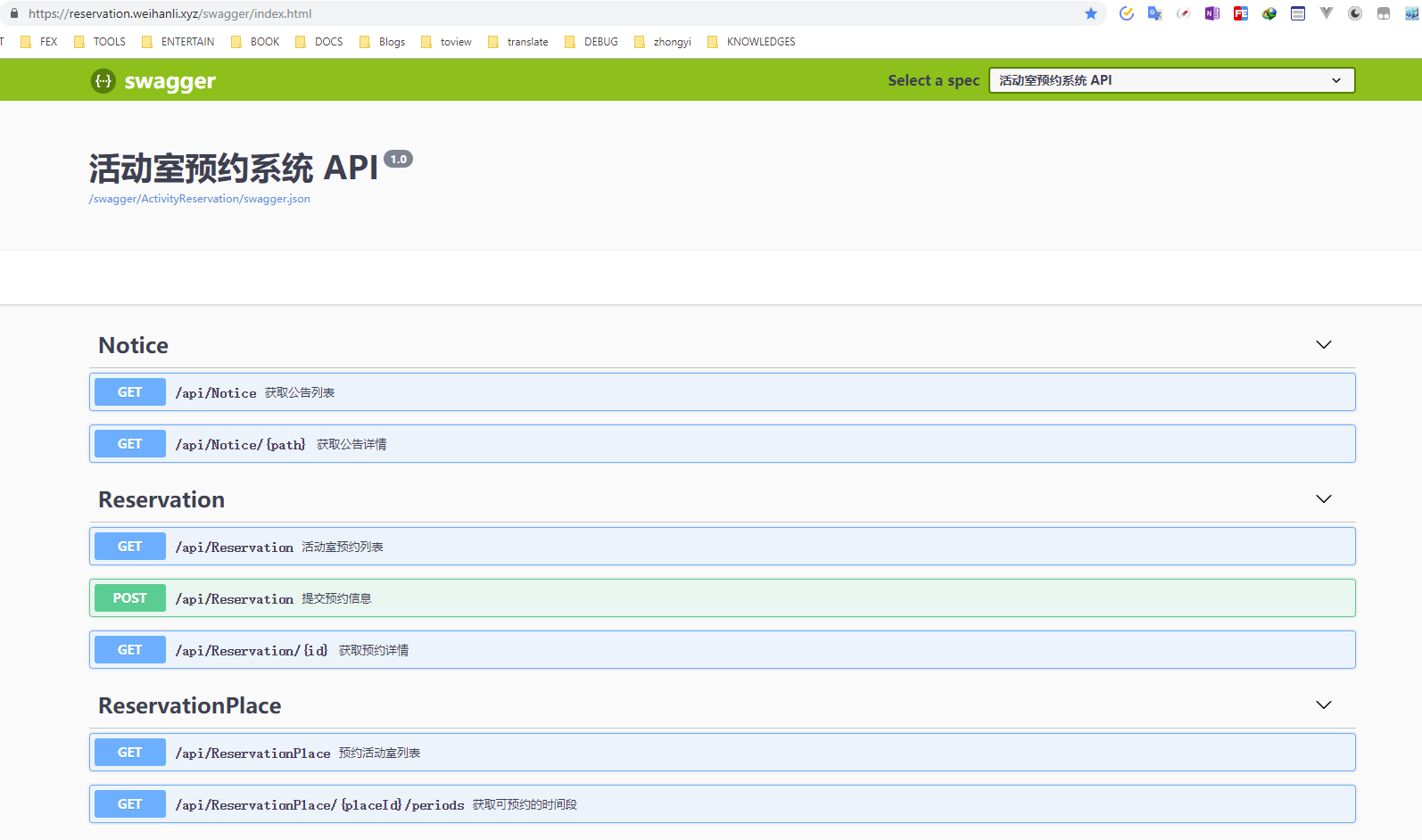
这个API 接口文档只显示了API接口,服务器端其他的Controller 使用了上面提到的 [ApiExplorerSettings(IgnoreApi = true)] 忽略了
最近我的活动室预约的项目增加了一个前后端分离的 angular + marterial 的客户端,体验地址 https://reservation-client.weihanli.xyz/
Reference
- https://github.com/domaindrivendev/Swashbuckle.AspNetCore
- https://github.com/WeihanLi/ActivityReservation/tree/dev/ActivityReservation
asp.net core web api 生成 swagger 文档的更多相关文章
- asp.net core 2.1 生成swagger文档
新建asp.netcore2.1 api项目 “WebApplication1” 在nuget管理器中添加对Swashbuckle.AspNetCore 3.0.0.Microsoft.AspNetC ...
- Asp.Net Core Web Api 使用 Swagger 生成 api 说明文档
最近使用 Asp.Net Core Web Api 开发项目服务端.Swagger 是最受欢迎的 REST APIs 文档生成工具之一,进入我的视野.以下为学习应用情况的整理. 一.Swagger 介 ...
- 使用 Swagger 自动生成 ASP.NET Core Web API 的文档、在线帮助测试文档(ASP.NET Core Web API 自动生成文档)
对于开发人员来说,构建一个消费应用程序时去了解各种各样的 API 是一个巨大的挑战.在你的 Web API 项目中使用 Swagger 的 .NET Core 封装 Swashbuckle 可以帮助你 ...
- ASP.NET Core 中文文档 第二章 指南 (09) 使用 Swagger 生成 ASP.NET Web API 在线帮助测试文档
原文:ASP.NET Web API Help Pages using Swagger 作者:Shayne Boyer 翻译:谢炀(kiler) 翻译:许登洋(Seay) 对于开发人员来说,构建一个消 ...
- 在ASP.NET Core Web API上使用Swagger提供API文档
我在开发自己的博客系统(http://daxnet.me)时,给自己的RESTful服务增加了基于Swagger的API文档功能.当设置IISExpress的默认启动路由到Swagger的API文档页 ...
- ASP.NET Core Web API中使用Swagger
本节导航 Swagger介绍 在ASP.NET CORE 中的使用swagger 在软件开发中,管理和测试API是一件重要而富有挑战性的工作.在我之前的文章<研发团队,请管好你的API文档& ...
- 如何在ASP.NET Core Web API测试中使用Postman
使用Postman进行手动测试 如果您是开发人员,测试人员或管理人员,则在构建和使用应用程序时,有时了解各种API方法可能是一个挑战. 使用带有.NET Core的Postman为您的Web API生 ...
- List多个字段标识过滤 IIS发布.net core mvc web站点 ASP.NET Core 实战:构建带有版本控制的 API 接口 ASP.NET Core 实战:使用 ASP.NET Core Web API 和 Vue.js 搭建前后端分离项目 Using AutoFac
List多个字段标识过滤 class Program{ public static void Main(string[] args) { List<T> list = new List& ...
- 或许是你应该了解的一些 ASP.NET Core Web API 使用小技巧
一.前言 在目前的软件开发的潮流中,不管是前后端分离还是服务化改造,后端更多的是通过构建 API 接口服务从而为 web.app.desktop 等各种客户端提供业务支持,如何构建一个符合规范.容易理 ...
随机推荐
- Pipe——高性能IO(一)
System.IO.Pipelines是一个新的库,旨在简化在.NET中执行高性能IO的过程.它是一个依赖.NET Standard的库,适用于所有.NET实现. Pipelines诞生于.NET C ...
- ubuntu 安装谷歌浏览器
如何在ubuntu 中安装谷歌浏览器, 对于一个刚刚接触ubuntu的人来说,希望安装软件更加的简单,明了.最好能够像在windows下面安装软件一样. 先来介绍一下如何快速的安装谷歌浏览器,以下的方 ...
- 如何使redis中存放的都是热点数据?
当redis使用的内存超过设置的最大内存时,会触发redis的key淘汰机制,在redis3.0中的6中淘汰策略如下: (1)noeviction :不删除策略.当达到最大内存限制时,如果需要使用更多 ...
- JS获取url请求参数
JS获取url请求参数,代码如下: // 获取url请求参数 function getQueryParams() { var query = location.search.substring(1) ...
- C++入门到理解之文件操作(文本文件的读写+二进制文件的读写)
原文地址http://www.javayihao.top/detail/168 一:概述 1.程序在运行中产生的数据都是临时数据,程序一旦运行结束会被释放,可以通过文件相关的操作将数据持久保存. 2. ...
- Linux加密known_hosts文件中的IP
如何加密known_hosts中的IP地址 很多挖矿会去自动匹配known_hosts文件中的IP地址,然后尝试免密登录,进一步感染更多的主机,所以对该文件进行加密可以阻止这一点. 修改 /etc/s ...
- Swift零基础教程2019最新版(一)搭建开发环境
Swift简单介绍 Swift是苹果强力推荐的新型开发语言,能开发苹果下属所有软件平台(iOS,iPadOS,macOS,watchOS,tvOS)初学者如果想进入苹果的开发体系,从Swift开始学习 ...
- SQL Server查询数据库表字段类型
select b.name,a.name,c.name,a.xprec,a.xscalefrom syscolumns aleft outer join sysobjects b ON a.id=b ...
- 读书笔记_python网络编程3(5)
5. 网络数据与网络错误 应该如何准备需要传输的数据? 应该如何对数据进行编码与格式化? Py程序需要提供哪些类型的错误? 5.1. 字节与字符串 PC与网卡都支持将字节作为通用传输单元.字节将8比特 ...
- mssql sqlserver 将逗号分隔的一列数据转换为多列数据的方法分享
转自:http://www.maomao365.com/?p=10278 摘要: 下文讲述sqlserver中将使用逗号组合的单列数据,分隔为多列数据的方法 实验环境:sql server 2012 ...