
(三十五)c#Winform自定义控件-Tab页
官网
前提
入行已经7,8年了,一直想做一套漂亮点的自定义控件,于是就有了本系列文章。
GitHub:https://github.com/kwwwvagaa/NetWinformControl
码云:https://gitee.com/kwwwvagaa/net_winform_custom_control.git
如果觉得写的还行,请点个 star 支持一下吧
欢迎前来交流探讨: 企鹅群568015492 idkey=6e08741ef16fe53bf0314c1c9e336c4f626047943a8b76bac062361bab6b4f8d">
目录
https://www.cnblogs.com/bfyx/p/11364884.html
准备工作
此控件在https://www.cnblogs.com/belx/articles/9188577.html基础上调整修改,特此感谢
开始
添加一个用户组件,命名TabControlExt,继承自TabControl
几个重写属性
  private Color _backColor = Color.White;

         [Browsable(true)]

         [EditorBrowsable(EditorBrowsableState.Always)]

         [DefaultValue(typeof(Color), "White")]

         public override Color BackColor

         {

             get { return _backColor; }

             set

             {

                 _backColor = value;

                 base.Invalidate(true);

             }

         }

         private Color _borderColor = Color.FromArgb(, , );

         [DefaultValue(typeof(Color), "232, 232, 232")]

         [Description("TabContorl边框色")]

         public Color BorderColor

         {

             get { return _borderColor; }

             set

             {

                 _borderColor = value;

                 base.Invalidate(true);

             }

         }

         private Color _headSelectedBackColor = Color.FromArgb(, , );

         [DefaultValue(typeof(Color), "255, 85, 51")]

         [Description("TabPage头部选中后的背景颜色")]

         public Color HeadSelectedBackColor

         {

             get { return _headSelectedBackColor; }

             set { _headSelectedBackColor = value; }

         }

         private Color _headSelectedBorderColor = Color.FromArgb(, , );

         [DefaultValue(typeof(Color), "232, 232, 232")]

         [Description("TabPage头部选中后的边框颜色")]

         public Color HeadSelectedBorderColor

         {

             get { return _headSelectedBorderColor; }

             set { _headSelectedBorderColor = value; }

         }

         private Color _headerBackColor = Color.White;

         [DefaultValue(typeof(Color), "White")]

         [Description("TabPage头部默认背景颜色")]

         public Color HeaderBackColor

         {

             get { return _headerBackColor; }

             set { _headerBackColor = value; }

         }
重写背景
 protected override void OnPaintBackground(PaintEventArgs pevent)

         {

             if (this.DesignMode == true)

             {

                 LinearGradientBrush backBrush = new LinearGradientBrush(

                             this.Bounds,

                             SystemColors.ControlLightLight,

                             SystemColors.ControlLight,

                             LinearGradientMode.Vertical);

                 pevent.Graphics.FillRectangle(backBrush, this.Bounds);

                 backBrush.Dispose();

             }

             else

             {

                 this.PaintTransparentBackground(pevent.Graphics, this.ClientRectangle);

             }

         }

  /// <summary>

         ///  TabContorl 背景色设置

         /// </summary>

         /// <param name="g"></param>

         /// <param name="clipRect"></param>

         protected void PaintTransparentBackground(Graphics g, Rectangle clipRect)

         {

             if ((this.Parent != null))

             {

                 clipRect.Offset(this.Location);

                 PaintEventArgs e = new PaintEventArgs(g, clipRect);

                 GraphicsState state = g.Save();

                 g.SmoothingMode = SmoothingMode.HighSpeed;

                 try

                 {

                     g.TranslateTransform((float)-this.Location.X, (float)-this.Location.Y);

                     this.InvokePaintBackground(this.Parent, e);

                     this.InvokePaint(this.Parent, e);

                 }

                 finally

                 {

                     g.Restore(state);

                     clipRect.Offset(-this.Location.X, -this.Location.Y);

                     //新加片段,待测试

                     using (SolidBrush brush = new SolidBrush(_backColor))

                     {

                         clipRect.Inflate(, );

                         g.FillRectangle(brush, clipRect);

                     }

                 }

             }

             else

             {

                 System.Drawing.Drawing2D.LinearGradientBrush backBrush = new System.Drawing.Drawing2D.LinearGradientBrush(this.Bounds, SystemColors.ControlLightLight, SystemColors.ControlLight, System.Drawing.Drawing2D.LinearGradientMode.Vertical);

                 g.FillRectangle(backBrush, this.Bounds);

                 backBrush.Dispose();

             }

         }
重绘
  protected override void OnPaint(PaintEventArgs e)

         {

             // Paint the Background

             base.OnPaint(e);

             this.PaintTransparentBackground(e.Graphics, this.ClientRectangle);

             this.PaintAllTheTabs(e);

             this.PaintTheTabPageBorder(e);

             this.PaintTheSelectedTab(e);

         }
辅助函数
 private void PaintAllTheTabs(System.Windows.Forms.PaintEventArgs e)

         {

             if (this.TabCount > )

             {

                 for (int index = ; index < this.TabCount; index++)

                 {

                     this.PaintTab(e, index);

                 }

             }

         }

         private void PaintTab(System.Windows.Forms.PaintEventArgs e, int index)

         {

             GraphicsPath path = this.GetTabPath(index);

             this.PaintTabBackground(e.Graphics, index, path);

             this.PaintTabBorder(e.Graphics, index, path);

             this.PaintTabText(e.Graphics, index);

             this.PaintTabImage(e.Graphics, index);

         }

         /// <summary>

         /// 设置选项卡头部颜色

         /// </summary>

         /// <param name="graph"></param>

         /// <param name="index"></param>

         /// <param name="path"></param>

         private void PaintTabBackground(System.Drawing.Graphics graph, int index, System.Drawing.Drawing2D.GraphicsPath path)

         {

             Rectangle rect = this.GetTabRect(index);

             System.Drawing.Brush buttonBrush = new System.Drawing.Drawing2D.LinearGradientBrush(rect, _headerBackColor, _headerBackColor, LinearGradientMode.Vertical);  //非选中时候的 TabPage 页头部背景色

             graph.FillPath(buttonBrush, path);

             //if (index == this.SelectedIndex)

             //{

             //    //buttonBrush = new System.Drawing.SolidBrush(_headSelectedBackColor);

             //    graph.DrawLine(new Pen(_headerBackColor), rect.Right+2, rect.Bottom, rect.Left + 1, rect.Bottom);

             //}

             buttonBrush.Dispose();

         }

         /// <summary>

         /// 设置选项卡头部边框色

         /// </summary>

         /// <param name="graph"></param>

         /// <param name="index"></param>

         /// <param name="path"></param>

         private void PaintTabBorder(System.Drawing.Graphics graph, int index, System.Drawing.Drawing2D.GraphicsPath path)

         {

             Pen borderPen = new Pen(_borderColor);// TabPage 非选中时候的 TabPage 头部边框色

             if (index == this.SelectedIndex)

             {

                 borderPen = new Pen(_headSelectedBorderColor); // TabPage 选中后的 TabPage 头部边框色

             }

             graph.DrawPath(borderPen, path);

             borderPen.Dispose();

         }

         private void PaintTabImage(System.Drawing.Graphics g, int index)

         {

             Image tabImage = null;

             if (this.TabPages[index].ImageIndex > - && this.ImageList != null)

             {

                 tabImage = this.ImageList.Images[this.TabPages[index].ImageIndex];

             }

             else if (this.TabPages[index].ImageKey.Trim().Length >  && this.ImageList != null)

             {

                 tabImage = this.ImageList.Images[this.TabPages[index].ImageKey];

             }

             if (tabImage != null)

             {

                 Rectangle rect = this.GetTabRect(index);

                 g.DrawImage(tabImage, rect.Right - rect.Height - , , rect.Height - , rect.Height - );

             }

         }

         private void PaintTabText(System.Drawing.Graphics graph, int index)

         {

             string tabtext = this.TabPages[index].Text;

             System.Drawing.StringFormat format = new System.Drawing.StringFormat();

             format.Alignment = StringAlignment.Near;

             format.LineAlignment = StringAlignment.Center;

             format.Trimming = StringTrimming.EllipsisCharacter;

             Brush forebrush = null;

             if (this.TabPages[index].Enabled == false)

             {

                 forebrush = SystemBrushes.ControlDark;

             }

             else

             {

                 forebrush = SystemBrushes.ControlText;

             }

             Font tabFont = this.Font;

             if (index == this.SelectedIndex)

             {

                 if (this.TabPages[index].Enabled != false)

                 {

                     forebrush = new SolidBrush(_headSelectedBackColor);

                 }

             }

             Rectangle rect = this.GetTabRect(index);

             var txtSize = ControlHelper.GetStringWidth(tabtext, graph, tabFont);

             Rectangle rect2 = new Rectangle(rect.Left + (rect.Width - txtSize) /  - , rect.Top, rect.Width, rect.Height);

             graph.DrawString(tabtext, tabFont, forebrush, rect2, format);

         }

         /// <summary>

         /// 设置 TabPage 内容页边框色

         /// </summary>

         /// <param name="e"></param>

         private void PaintTheTabPageBorder(System.Windows.Forms.PaintEventArgs e)

         {

             if (this.TabCount > )

             {

                 Rectangle borderRect = this.TabPages[].Bounds;

                 //borderRect.Inflate(1, 1);

                 Rectangle rect = new Rectangle(borderRect.X - , borderRect.Y-, borderRect.Width + , borderRect.Height+);

                 ControlPaint.DrawBorder(e.Graphics, rect, this.BorderColor, ButtonBorderStyle.Solid);

             }

         }

         /// <summary>

         /// // TabPage 页头部间隔色

         /// </summary>

         /// <param name="e"></param>

         private void PaintTheSelectedTab(System.Windows.Forms.PaintEventArgs e)

         {

             if (this.SelectedIndex == -)

                 return;

             Rectangle selrect;

             int selrectRight = ;

             selrect = this.GetTabRect(this.SelectedIndex);

             selrectRight = selrect.Right;

             e.Graphics.DrawLine(new Pen(_headSelectedBackColor), selrect.Left, selrect.Bottom + , selrectRight, selrect.Bottom + );

         }

         private GraphicsPath GetTabPath(int index)

         {

             System.Drawing.Drawing2D.GraphicsPath path = new System.Drawing.Drawing2D.GraphicsPath();

             path.Reset();

             Rectangle rect = this.GetTabRect(index);

             switch (Alignment)

             {

                 case TabAlignment.Top:

                     break;

                 case TabAlignment.Bottom:

                     break;

                 case TabAlignment.Left:

                     break;

                 case TabAlignment.Right:

                     break;

             }

             path.AddLine(rect.Left, rect.Top, rect.Left, rect.Bottom + );

             path.AddLine(rect.Left, rect.Top, rect.Right , rect.Top);

             path.AddLine(rect.Right , rect.Top, rect.Right , rect.Bottom + );

             path.AddLine(rect.Right , rect.Bottom + , rect.Left, rect.Bottom + );

             return path;

         }
2个重写函数处理字体相关
  [DllImport("user32.dll")]

         private static extern IntPtr SendMessage(IntPtr hWnd, int Msg, IntPtr wParam, IntPtr lParam);

         private const int WM_SETFONT = 0x30;

         private const int WM_FONTCHANGE = 0x1d;

         protected override void OnCreateControl()

         {

             base.OnCreateControl();

             this.OnFontChanged(EventArgs.Empty);

         }

         protected override void OnFontChanged(EventArgs e)

         {

             base.OnFontChanged(e);

             IntPtr hFont = this.Font.ToHfont();

             SendMessage(this.Handle, WM_SETFONT, hFont, (IntPtr)(-));

             SendMessage(this.Handle, WM_FONTCHANGE, IntPtr.Zero, IntPtr.Zero);

             this.UpdateStyles();

         }
完整代码
 using System;

 using System.Collections.Generic;

 using System.ComponentModel;

 using System.Diagnostics;

 using System.Drawing;

 using System.Drawing.Drawing2D;

 using System.Linq;

 using System.Runtime.InteropServices;

 using System.Text;

 using System.Windows.Forms;

 namespace HZH_Controls.Controls

 {

     public class TabControlExt : TabControl

     {

         public TabControlExt()

             : base()

         {

             SetStyles();

             this.Multiline = true;

             this.ItemSize = new Size(this.ItemSize.Width, );

         }

         private void SetStyles()

         {

             base.SetStyle(

                 ControlStyles.UserPaint |

                 ControlStyles.DoubleBuffer |

                 ControlStyles.OptimizedDoubleBuffer |

                 ControlStyles.AllPaintingInWmPaint |

                 ControlStyles.ResizeRedraw |

                 ControlStyles.SupportsTransparentBackColor, true);

             base.UpdateStyles();

         }

         private Color _backColor = Color.White;

         [Browsable(true)]

         [EditorBrowsable(EditorBrowsableState.Always)]

         [DefaultValue(typeof(Color), "White")]

         public override Color BackColor

         {

             get { return _backColor; }

             set

             {

                 _backColor = value;

                 base.Invalidate(true);

             }

         }

         private Color _borderColor = Color.FromArgb(, , );

         [DefaultValue(typeof(Color), "232, 232, 232")]

         [Description("TabContorl边框色")]

         public Color BorderColor

         {

             get { return _borderColor; }

             set

             {

                 _borderColor = value;

                 base.Invalidate(true);

             }

         }

         private Color _headSelectedBackColor = Color.FromArgb(, , );

         [DefaultValue(typeof(Color), "255, 85, 51")]

         [Description("TabPage头部选中后的背景颜色")]

         public Color HeadSelectedBackColor

         {

             get { return _headSelectedBackColor; }

             set { _headSelectedBackColor = value; }

         }

         private Color _headSelectedBorderColor = Color.FromArgb(, , );

         [DefaultValue(typeof(Color), "232, 232, 232")]

         [Description("TabPage头部选中后的边框颜色")]

         public Color HeadSelectedBorderColor

         {

             get { return _headSelectedBorderColor; }

             set { _headSelectedBorderColor = value; }

         }

         private Color _headerBackColor = Color.White;

         [DefaultValue(typeof(Color), "White")]

         [Description("TabPage头部默认背景颜色")]

         public Color HeaderBackColor

         {

             get { return _headerBackColor; }

             set { _headerBackColor = value; }

         }

         protected override void OnPaintBackground(PaintEventArgs pevent)

         {

             if (this.DesignMode == true)

             {

                 LinearGradientBrush backBrush = new LinearGradientBrush(

                             this.Bounds,

                             SystemColors.ControlLightLight,

                             SystemColors.ControlLight,

                             LinearGradientMode.Vertical);

                 pevent.Graphics.FillRectangle(backBrush, this.Bounds);

                 backBrush.Dispose();

             }

             else

             {

                 this.PaintTransparentBackground(pevent.Graphics, this.ClientRectangle);

             }

         }

         /// <summary>

         ///  TabContorl 背景色设置

         /// </summary>

         /// <param name="g"></param>

         /// <param name="clipRect"></param>

         protected void PaintTransparentBackground(Graphics g, Rectangle clipRect)

         {

             if ((this.Parent != null))

             {

                 clipRect.Offset(this.Location);

                 PaintEventArgs e = new PaintEventArgs(g, clipRect);

                 GraphicsState state = g.Save();

                 g.SmoothingMode = SmoothingMode.HighSpeed;

                 try

                 {

                     g.TranslateTransform((float)-this.Location.X, (float)-this.Location.Y);

                     this.InvokePaintBackground(this.Parent, e);

                     this.InvokePaint(this.Parent, e);

                 }

                 finally

                 {

                     g.Restore(state);

                     clipRect.Offset(-this.Location.X, -this.Location.Y);

                     //新加片段,待测试

                     using (SolidBrush brush = new SolidBrush(_backColor))

                     {

                         clipRect.Inflate(, );

                         g.FillRectangle(brush, clipRect);

                     }

                 }

             }

             else

             {

                 System.Drawing.Drawing2D.LinearGradientBrush backBrush = new System.Drawing.Drawing2D.LinearGradientBrush(this.Bounds, SystemColors.ControlLightLight, SystemColors.ControlLight, System.Drawing.Drawing2D.LinearGradientMode.Vertical);

                 g.FillRectangle(backBrush, this.Bounds);

                 backBrush.Dispose();

             }

         }

         protected override void OnPaint(PaintEventArgs e)

         {

             // Paint the Background

             base.OnPaint(e);

             this.PaintTransparentBackground(e.Graphics, this.ClientRectangle);

             this.PaintAllTheTabs(e);

             this.PaintTheTabPageBorder(e);

             this.PaintTheSelectedTab(e);

         }

         private void PaintAllTheTabs(System.Windows.Forms.PaintEventArgs e)

         {

             if (this.TabCount > )

             {

                 for (int index = ; index < this.TabCount; index++)

                 {

                     this.PaintTab(e, index);

                 }

             }

         }

         private void PaintTab(System.Windows.Forms.PaintEventArgs e, int index)

         {

             GraphicsPath path = this.GetTabPath(index);

             this.PaintTabBackground(e.Graphics, index, path);

             this.PaintTabBorder(e.Graphics, index, path);

             this.PaintTabText(e.Graphics, index);

             this.PaintTabImage(e.Graphics, index);

         }

         /// <summary>

         /// 设置选项卡头部颜色

         /// </summary>

         /// <param name="graph"></param>

         /// <param name="index"></param>

         /// <param name="path"></param>

         private void PaintTabBackground(System.Drawing.Graphics graph, int index, System.Drawing.Drawing2D.GraphicsPath path)

         {

             Rectangle rect = this.GetTabRect(index);

             System.Drawing.Brush buttonBrush = new System.Drawing.Drawing2D.LinearGradientBrush(rect, _headerBackColor, _headerBackColor, LinearGradientMode.Vertical);  //非选中时候的 TabPage 页头部背景色

             graph.FillPath(buttonBrush, path);

             //if (index == this.SelectedIndex)

             //{

             //    //buttonBrush = new System.Drawing.SolidBrush(_headSelectedBackColor);

             //    graph.DrawLine(new Pen(_headerBackColor), rect.Right+2, rect.Bottom, rect.Left + 1, rect.Bottom);

             //}

             buttonBrush.Dispose();

         }

         /// <summary>

         /// 设置选项卡头部边框色

         /// </summary>

         /// <param name="graph"></param>

         /// <param name="index"></param>

         /// <param name="path"></param>

         private void PaintTabBorder(System.Drawing.Graphics graph, int index, System.Drawing.Drawing2D.GraphicsPath path)

         {

             Pen borderPen = new Pen(_borderColor);// TabPage 非选中时候的 TabPage 头部边框色

             if (index == this.SelectedIndex)

             {

                 borderPen = new Pen(_headSelectedBorderColor); // TabPage 选中后的 TabPage 头部边框色

             }

             graph.DrawPath(borderPen, path);

             borderPen.Dispose();

         }

         private void PaintTabImage(System.Drawing.Graphics g, int index)

         {

             Image tabImage = null;

             if (this.TabPages[index].ImageIndex > - && this.ImageList != null)

             {

                 tabImage = this.ImageList.Images[this.TabPages[index].ImageIndex];

             }

             else if (this.TabPages[index].ImageKey.Trim().Length >  && this.ImageList != null)

             {

                 tabImage = this.ImageList.Images[this.TabPages[index].ImageKey];

             }

             if (tabImage != null)

             {

                 Rectangle rect = this.GetTabRect(index);

                 g.DrawImage(tabImage, rect.Right - rect.Height - , , rect.Height - , rect.Height - );

             }

         }

         private void PaintTabText(System.Drawing.Graphics graph, int index)

         {

             string tabtext = this.TabPages[index].Text;

             System.Drawing.StringFormat format = new System.Drawing.StringFormat();

             format.Alignment = StringAlignment.Near;

             format.LineAlignment = StringAlignment.Center;

             format.Trimming = StringTrimming.EllipsisCharacter;

             Brush forebrush = null;

             if (this.TabPages[index].Enabled == false)

             {

                 forebrush = SystemBrushes.ControlDark;

             }

             else

             {

                 forebrush = SystemBrushes.ControlText;

             }

             Font tabFont = this.Font;

             if (index == this.SelectedIndex)

             {

                 if (this.TabPages[index].Enabled != false)

                 {

                     forebrush = new SolidBrush(_headSelectedBackColor);

                 }

             }

             Rectangle rect = this.GetTabRect(index);

             var txtSize = ControlHelper.GetStringWidth(tabtext, graph, tabFont);

             Rectangle rect2 = new Rectangle(rect.Left + (rect.Width - txtSize) /  - , rect.Top, rect.Width, rect.Height);

             graph.DrawString(tabtext, tabFont, forebrush, rect2, format);

         }

         /// <summary>

         /// 设置 TabPage 内容页边框色

         /// </summary>

         /// <param name="e"></param>

         private void PaintTheTabPageBorder(System.Windows.Forms.PaintEventArgs e)

         {

             if (this.TabCount > )

             {

                 Rectangle borderRect = this.TabPages[].Bounds;

                 //borderRect.Inflate(1, 1);

                 Rectangle rect = new Rectangle(borderRect.X - , borderRect.Y - , borderRect.Width + , borderRect.Height + );

                 ControlPaint.DrawBorder(e.Graphics, rect, this.BorderColor, ButtonBorderStyle.Solid);

             }

         }

         /// <summary>

         /// // TabPage 页头部间隔色

         /// </summary>

         /// <param name="e"></param>

         private void PaintTheSelectedTab(System.Windows.Forms.PaintEventArgs e)

         {

             if (this.SelectedIndex == -)

                 return;

             Rectangle selrect;

             int selrectRight = ;

             selrect = this.GetTabRect(this.SelectedIndex);

             selrectRight = selrect.Right;

             e.Graphics.DrawLine(new Pen(_headSelectedBackColor), selrect.Left, selrect.Bottom + , selrectRight, selrect.Bottom + );

         }

         private GraphicsPath GetTabPath(int index)

         {

             System.Drawing.Drawing2D.GraphicsPath path = new System.Drawing.Drawing2D.GraphicsPath();

             path.Reset();

             Rectangle rect = this.GetTabRect(index);

             switch (Alignment)

             {

                 case TabAlignment.Top:

                     break;

                 case TabAlignment.Bottom:

                     break;

                 case TabAlignment.Left:

                     break;

                 case TabAlignment.Right:

                     break;

             }

             path.AddLine(rect.Left, rect.Top, rect.Left, rect.Bottom + );

             path.AddLine(rect.Left, rect.Top, rect.Right, rect.Top);

             path.AddLine(rect.Right, rect.Top, rect.Right, rect.Bottom + );

             path.AddLine(rect.Right, rect.Bottom + , rect.Left, rect.Bottom + );

             return path;

         }

         [DllImport("user32.dll")]

         private static extern IntPtr SendMessage(IntPtr hWnd, int Msg, IntPtr wParam, IntPtr lParam);

         private const int WM_SETFONT = 0x30;

         private const int WM_FONTCHANGE = 0x1d;

         protected override void OnCreateControl()

         {

             base.OnCreateControl();

             this.OnFontChanged(EventArgs.Empty);

         }

         protected override void OnFontChanged(EventArgs e)

         {

             base.OnFontChanged(e);

             IntPtr hFont = this.Font.ToHfont();

             SendMessage(this.Handle, WM_SETFONT, hFont, (IntPtr)(-));

             SendMessage(this.Handle, WM_FONTCHANGE, IntPtr.Zero, IntPtr.Zero);

             this.UpdateStyles();

         }

     }

 }
用处及效果
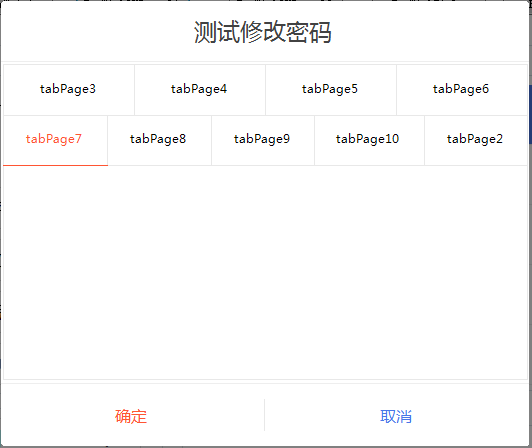
最后的话
如果你喜欢的话,请到 https://gitee.com/kwwwvagaa/net_winform_custom_control 点个星 星吧
(三十五)c#Winform自定义控件-Tab页的更多相关文章
- (三十)c#Winform自定义控件-文本框(三)
前提 入行已经7,8年了,一直想做一套漂亮点的自定义控件,于是就有了本系列文章. 开源地址:https://gitee.com/kwwwvagaa/net_winform_custom_control ...
- (三十五)c#Winform自定义控件-下拉框
前提 入行已经7,8年了,一直想做一套漂亮点的自定义控件,于是就有了本系列文章. GitHub:https://github.com/kwwwvagaa/NetWinformControl 码云:ht ...
- 《手把手教你》系列技巧篇(三十五)-java+ selenium自动化测试-单选和多选按钮操作-下篇(详解教程)
1.简介 今天这一篇宏哥主要是讲解一下,如何使用list容器来遍历多选按钮.大致两部分内容:一部分是宏哥在本地弄的一个小demo,另一部分,宏哥是利用JQueryUI网站里的多选按钮进行实战. 2.d ...
- NeHe OpenGL教程 第三十五课:播放AVI
转自[翻译]NeHe OpenGL 教程 前言 声明,此 NeHe OpenGL教程系列文章由51博客yarin翻译(2010-08-19),本博客为转载并稍加整理与修改.对NeHe的OpenGL管线 ...
- JAVA之旅(三十五)——完结篇,终于把JAVA写完了,真感概呐!
JAVA之旅(三十五)--完结篇,终于把JAVA写完了,真感概呐! 这篇博文只是用来水经验的,写这个系列是因为我自己的java本身也不是特别好,所以重温了一下,但是手比较痒于是就写出了这三十多篇博客了 ...
- Java进阶(三十五)java int与integer的区别
Java进阶(三十五)java int与Integer的区别 前言 int与Integer的区别从大的方面来说就是基本数据类型与其包装类的区别: int 是基本类型,直接存数值,而Integer是对象 ...
- Gradle 1.12用户指南翻译——第三十五章. Sonar 插件
本文由CSDN博客万一博主翻译,其他章节的翻译请参见: http://blog.csdn.net/column/details/gradle-translation.html 翻译项目请关注Githu ...
- SQL注入之Sqli-labs系列第三十四关(基于宽字符逃逸POST注入)和三十五关
开始挑战第三十四关和第三十五关(Bypass add addslashes) 0x1查看源码 本关是post型的注入漏洞,同样的也是将post过来的内容进行了 ' \ 的处理. if(isset($_ ...
- “全栈2019”Java多线程第三十五章:如何获取线程被等待的时间?
难度 初级 学习时间 10分钟 适合人群 零基础 开发语言 Java 开发环境 JDK v11 IntelliJ IDEA v2018.3 文章原文链接 "全栈2019"Java多 ...
随机推荐
- centos7 + Nginx+ HTTPS + uwsgi + python3.6 + Docker + Django1.11 + mysql 5.6 + virtualenv 环境搭建
环境搭建: 系统: centos7.2 x64 开发环境: python3.6 Django 1.11 虚拟环境: [Docker](https://www.runoob.com/dock ...
- 堡垒机-jumpserver
目录 官方网站 Jumpserver 软件包环境要求: 环境 手动本地jumpserver-服务端搭建 初始化一些系统环境设置: 安装相关软件 安装 组件 自建服务器极速安装步骤 0. 防火墙.Sel ...
- VC win32 static library静态链接库简单示例
中午在宿舍闲来没事,看到网上一篇帖子,关于静态链接库的英文示例.它在.Net上开发,我将其移到VC上开发,因此对其代码做了相应修改.帖子内容如下:(代码我已修改).原帖见:http://msdn.mi ...
- 用Python玩数据-笔记整理-第二章
条件结构: if语句: if expression: #比较/成员/逻辑运算符 expr_true_suite #代码块必须缩进4个空格 else语句: if expression: expr_tru ...
- Java编程思想:序列化深层部分
import java.io.*; import java.util.ArrayList; import java.util.List; public class Test { public stat ...
- C# Winform --xml文件
背景: 在工作中,学习和使用OPC Server/Client系统时,发现开发的设计结构是把设备PLC的TAGLIST写为XML文件,在程序启动的时候载入从而完成自动配置. 从而开始了C# ASP.N ...
- [Windows无法连接到 System Event Notification Service服务]解决方案
我之前使用Windows的过程的有出现过以下问题,之前因为比较急就匆忙解决了没来得及把解决方法写下来. 正好今天有个朋友电脑也出现此问题过来找我寻求解决方法,便把解决方法写了下来. 电脑出现的问题,如 ...
- .net持续集成sonarqube篇之sonarqube基本操作(二)
系列目录 Activity界面操作 Activity界面主要是对多次构建管理界面,主要是帮助管理员快速了解项目每次构建与以往构建相比问题是增加了还是减少了等指标.由于目前我们仅进行了一次构建,因此没有 ...
- 使用c++开发跨平台的程序
使用c++开发跨平台的程序 背景 在开发过程中,使用c++作为开发语言,通常被认为是痛苦的,啰嗦的,超长开发时间的.最近几年有各种各样的语言被广泛使用,相对比来说c++不是那么出彩.c++虽然年龄大, ...
- Android生成随机数
此方法通过把当前时刻长整型数传给Random对象,让它产生的值随着时间而变化. String s = ""; Random ran =new Random(System.curre ...