
Spring+Mybatis整合的练手小项目(一)项目部署
声明:教程是网上找的,代码是自己敲的
项目目录大致如下:
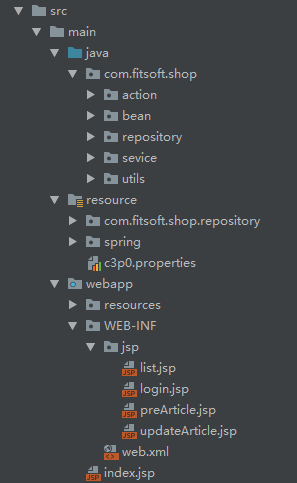
1. 首先创建Maven工程,在pom.xml中加入项目所需依赖:
<?xml version="1.0" encoding="UTF-8"?>

<project xmlns="http://maven.apache.org/POM/4.0.0"

         xmlns:xsi="http://www.w3.org/2001/XMLSchema-instance"

         xsi:schemaLocation="http://maven.apache.org/POM/4.0.0 http://maven.apache.org/xsd/maven-4.0.0.xsd">

    <modelVersion>4.0.0</modelVersion>

    <groupId>com.fitsoft</groupId>

    <artifactId>shopmgr</artifactId>

    <version>1.0-SNAPSHOT</version>

    <packaging>war</packaging>

    <!-- 配置的全局的属性 -->

    <properties>

        <junit.version>4.11</junit.version>

        <jsp.api.version>8.5.5</jsp.api.version>

        <jstl.version>1.2</jstl.version>

        <spring.version>4.1.6.RELEASE</spring.version>

        <aspectjweaver.version>1.8.5</aspectjweaver.version>

        <mybatis.version>3.2.8</mybatis.version>

        <mybatis.spring.version>1.2.2</mybatis.spring.version>

        <c3p0.version>0.9.5</c3p0.version>

        <mysql.version>8.0.11</mysql.version>

        <log4j.version>1.2.17</log4j.version>

        <json.version>2.4</json.version>

    </properties>

    <!-- 配置项目需要哪些jar包 -->

    <dependencies>

        <!-- junit -->

        <dependency>

            <groupId>junit</groupId>

            <artifactId>junit</artifactId>

            <version>${junit.version}</version>

            <!-- 该jar包保留到测试 -->

            <scope>test</scope>

        </dependency>

        <!-- jsp-api、servlet-api、el -->

        <dependency>

            <groupId>org.apache.tomcat</groupId>

            <artifactId>tomcat-jsp-api</artifactId>

            <version>${jsp.api.version}</version>

            <!-- 该jar包最终由Web容器提供 -->

            <scope>provided</scope>

        </dependency>

        <!-- jstl -->

        <dependency>

            <groupId>jstl</groupId>

            <artifactId>jstl</artifactId>

            <version>${jstl.version}</version>

        </dependency>

        <!-- Spring4 -->

        <dependency>

            <groupId>org.springframework</groupId>

            <artifactId>spring-web</artifactId>

            <version>${spring.version}</version>

        </dependency>

        <dependency>

            <groupId>org.springframework</groupId>

            <artifactId>spring-orm</artifactId>

            <version>${spring.version}</version>

        </dependency>

        <!-- aspectjweaver -->

        <dependency>

            <groupId>org.aspectj</groupId>

            <artifactId>aspectjweaver</artifactId>

            <version>${aspectjweaver.version}</version>

        </dependency>

        <!-- mybatis3 -->

        <dependency>

            <groupId>org.mybatis</groupId>

            <artifactId>mybatis</artifactId>

            <version>${mybatis.version}</version>

        </dependency>

        <dependency>

            <groupId>org.mybatis</groupId>

            <artifactId>mybatis-spring</artifactId>

            <version>${mybatis.spring.version}</version>

        </dependency>

        <!-- c3p0 -->

        <dependency>

            <groupId>com.mchange</groupId>

            <artifactId>c3p0</artifactId>

            <version>${c3p0.version}</version>

        </dependency>

        <!-- mysql -->

        <dependency>

            <groupId>mysql</groupId>

            <artifactId>mysql-connector-java</artifactId>

            <version>${mysql.version}</version>

        </dependency>

        <!-- log4j -->

        <dependency>

            <groupId>log4j</groupId>

            <artifactId>log4j</artifactId>

            <version>${log4j.version}</version>

        </dependency>

        <!-- json-lib -->

        <dependency>

            <groupId>net.sf.json-lib</groupId>

            <artifactId>json-lib</artifactId>

            <version>${json.version}</version>

            <!-- 指定jar包jdk版本的依赖 -->

            <classifier>jdk15</classifier>

        </dependency>

    </dependencies>

</project>
2. 由于项目使用c3p0连接池,因此需要在resource目录下配置c3p0.properties,主要配置数据库驱动、地址、用户名、密码等属性。文件内容如下:
#连接数据库的地址

#配置数据库的驱动

c3p0.driverClass=com.mysql.cj.jdbc.Driver

c3p0.jdbcUrl=jdbc:mysql://localhost:3306/imoocdb?&characterEncoding=utf8&useSSL=false&serverTimezone=GMT&rewriteBatchedStatements=true&allowPublicKeyRetrieval=true

c3p0.user=root

c3p0.password=

#c3p0.maxPoolSize=20

#c3p0.minPoolSize=2

#c3p0.initialPoolSize=2

#c3p0.maxIdleTime=60
3. 项目启动首先要进入web.xml文件,因此Spring的监听器就放在这里配置
<?xml version="1.0" encoding="UTF-8"?>

<web-app xmlns="http://xmlns.jcp.org/xml/ns/javaee"

         xmlns:xsi="http://www.w3.org/2001/XMLSchema-instance"

         xsi:schemaLocation="http://xmlns.jcp.org/xml/ns/javaee http://xmlns.jcp.org/xml/ns/javaee/web-app_4_0.xsd"

         version="4.0">

    <!-- 配置Spring的核心监听器 -->

    <!-- 提取Spring的配置文件 -->

    <context-param>

        <param-name>contextConfigLocation</param-name>

        <param-value>classpath:/spring/application*.xml</param-value>

    </context-param>

    <listener>

        <listener-class>org.springframework.web.context.ContextLoaderListener</listener-class>

    </listener>

</web-app>
4. 监听器用来加载application.xml的配置文件,注释太详细,不多说:
<?xml version="1.0" encoding="UTF-8"?>

<beans xmlns="http://www.springframework.org/schema/beans"

       xmlns:xsi="http://www.w3.org/2001/XMLSchema-instance"

       xmlns:p="http://www.springframework.org/schema/p"

       xmlns:c="http://www.springframework.org/schema/c"

       xmlns:tx="http://www.springframework.org/schema/tx"

       xmlns:aop="http://www.springframework.org/schema/aop"

       xmlns:context="http://www.springframework.org/schema/context"

       xmlns:util="http://www.springframework.org/schema/util"

       xsi:schemaLocation="http://www.springframework.org/schema/beans

                        http://www.springframework.org/schema/beans/spring-beans-4.0.xsd

                        http://www.springframework.org/schema/tx

                        http://www.springframework.org/schema/tx/spring-tx-4.0.xsd

                        http://www.springframework.org/schema/context

                        http://www.springframework.org/schema/context/spring-context-4.0.xsd

                        ">

    <!-- 配置一个扫描器 -->

    <context:component-scan base-package="com.fitsoft.shop"/>

    <!-- 配置数据源的配置 C3P0作为数据源 -->

    <bean id="dataSource" class="com.mchange.v2.c3p0.ComboPooledDataSource" destroy-method="close"/>

    <!-- 配置连接工厂sqlSessionFactory

        Spring + Mybatis

        -->

    <bean id="sqlSessionFactory" class="org.mybatis.spring.SqlSessionFactoryBean" p:dataSource-ref="dataSource">

        <!-- 扫描类型,为类型配置别名,默认配置的别名就是类名

             以后映射文件中无需写类型的全限名

        -->

        <property name="typeAliasesPackage" value="com.fitsoft.shop.bean"/>

    </bean>

    <!-- 配置扫描数据访问层接口的路径,为数据访问层接口做实现类对象 -->

    <bean class="org.mybatis.spring.mapper.MapperScannerConfigurer" p:sqlSessionFactoryBeanName="sqlSessionFactory">

        <!-- 配置数据访问接口:采用包扫描的方式到基础包下扫描所有的类,作为MyBatis2的数据访问接口,

            并创建这些类的代理对象,创建出来后会把这些代理对象交给Spring容器管理,bean的id名默认为接口的类名前面首字母小写

           多个包之间用;分隔 -->

        <property name="basePackage" value="com.fitsoft.shop.repository"/>

    </bean>

    <!-- 配置事务管理器 -->

    <bean id="transactionManager" class="org.springframework.jdbc.datasource.DataSourceTransactionManager" p:dataSource-ref="dataSource"/>

    <!-- 申明式事务,使用事务注解的方式去控制业务层的事务 开启annotation注解事务 -->

    <tx:annotation-driven transaction-manager="transactionManager"/>

</beans>
Spring+Mybatis整合的练手小项目(一)项目部署的更多相关文章
- Springmvc+Spring+Mybatis整合开发(架构搭建)
Springmvc+Spring+Mybatis整合开发(架构搭建) 0.项目结构 Springmvc:web层 Spring:对象的容器 Mybatis:数据库持久化操作 1.导入所有需要的jar包 ...
- Spring + mybatis整合方案总结 结合实例应用
Spring + mybatis整合实例应用 项目结构图 (Spring3.0.2 +mybatis3.0.4) 方案一: 通过配置文件整合Spring和mybatis 应用数据库 -- --数据库 ...
- SSM 即所谓的 Spring MVC + Spring + MyBatis 整合开发。
SSM 即所谓的 Spring MVC + Spring + MyBatis 整合开发.是目前企业开发比较流行的架构.代替了之前的SSH(Struts + Spring + Hibernate) 计划 ...
- Spring+Mybatis整合时 Failed to read candidate component class,Caused by:IllegalArgumentException
Spring+Mybatis整合时Caused by: java.lang.IllegalArgumentException错误 org.springframework.beans.factory.B ...
- 3.springMVC+spring+Mybatis整合Demo(单表的增删该查,这里主要是贴代码,不多解释了)
前面给大家讲了整合的思路和整合的过程,在这里就不在提了,直接把springMVC+spring+Mybatis整合的实例代码(单表的增删改查)贴给大家: 首先是目录结构: 仔细看看这个目录结构:我不详 ...
- SpringMVC+Spring+Mybatis整合
SpringMVC+Spring+Mybatis整合 导包 配置jdbc.properties.log4j.properties jdbc.driver=com.mysql.jdbc.Driver j ...
- 【Python】【辅助程序】练手小程序:记录外网动态IP地址
练手小程序 程序作用:对IP实时记录: 1.定时获取外网IP,存储在本地文件中: 编写思路: 1)收集获取外网的API接口 http://bbs.125.la/thread-1383897 ...
- 【Python精华】100个Python练手小程序
100个Python练手小程序,学习python的很好的资料,覆盖了python中的每一部分,可以边学习边练习,更容易掌握python. [程序1] 题目:有1.2.3.4个数字,能组成多少个互不相同 ...
- 整理了适合新手的20个Python练手小程序
100个Python练手小程序,学习python的很好的资料,覆盖了python中的每一部分,可以边学习边练习,更容易掌握python. 本文附带基础视频教程:私信回复[基础]就可以获取的 [程序1] ...
随机推荐
- 2.php语言基础
HP简介 PHP超文本预处理器.是嵌入HTML文件中的服务器端脚本程序.换句话:PHP只能运行在服务器上. 一个HTML文件中,可以包含的代码:HTML代码.CSS代码.JS代码.PHP代码等. PH ...
- 解决php - Laravel rules preg_match(): No ending delimiter '/' found 问题
### 说明解决php - Laravel preg_match(): No ending delimiter '/' found 一.遇到问题的原因本正常添加如下 public function r ...
- iOS学习——iOS 宏(define)与常量(const)的正确使用
概述 在iOS开发中,经常用到宏定义,或用const修饰一些数据类型,经常有开发者不知怎么正确使用,导致项目中乱用宏与const修饰.你能区分下面的吗?知道什么时候用吗? #define HSCode ...
- 从 Python 之父的对话聊起,关于知识产权、知识共享与文章翻译
一.缘起 前不久,我在翻译 Guido van Rossum(Python之父)的文章时,给他留言,申请非商业用途的翻译授权. 过程中起了点小误会,略去不表,最终的结果是:他的文章以CC BY-NC- ...
- 如何让springboot打包的项目部署在阿里云上使用https和http方式访问
前言 问题描述:怎么让springboot部署在服务器上使用https协议方式访问我们的接口或者域名,目的是某些平台请求的是https协议,而不是https 部署环境:阿里云 centos7服务器,s ...
- 蓝桥杯c语言基础题
问题描述 Fibonacci数列的递推公式为:Fn=Fn-1+Fn-2,其中F1=F2=1. 当n比较大时,Fn也非常大,现在我们想知道,Fn除以10007的余数是多少. 输入格式 输入包含一个整数n ...
- app发布当天,用户无法登录
原因:当用户登录时候有商城用户的触发器存在,它会让商城用户也更新成登录状态. 由于用户量大,导致数据库锁死. 最后解决案:删掉触发器,在app的接口登录程序里,追加商城用户更新成登录的操作. 他案1: ...
- 二阶段js 入门知识点 自我总结复习
二阶段自我总复习 1.javascript基础 : 客户端 安全性 跨平台 脚本语言 三大结构: 顺序 .选择.循环 顺序:运算符和表达式 ...
- 16.XML语法、CDATA、约束(DTD、Schema)讲解
xml主要用来描述数据,比如配置文件,网络之间传输数据等,并且在android中也经常用xml来布局,,接下来便来学习xml常用的东西 1.XML语法 xml语法分为: 1.1 文档声明 必须位于文档 ...
- (四十八)c#Winform自定义控件-下拉按钮
前提 入行已经7,8年了,一直想做一套漂亮点的自定义控件,于是就有了本系列文章. GitHub:https://github.com/kwwwvagaa/NetWinformControl 码云:ht ...