
ElasticSearch(三):通分词器(Analyzer)进行分词(Analysis)
ElasticSearch(三):通过分词器(Analyzer)进行分词(Analysis)
## Analysis与Analyzer
* Analysis文本分析就是把全文转换成一系列单词的过程,也叫做分词。
* Analysis是通过Analyzer来实现的,它是专门处理分词的组件。可以使用ElasticSearch内置的分词器,也可以按需定制化分词器。
* 除了在数据写入时用分词器转换词条,在匹配查询语句时,也需要用相同的分词器对查询语句进行分析。
Analyzer的组成
分词器是专门处理分词的组件,Analyzer由三个部分组成:
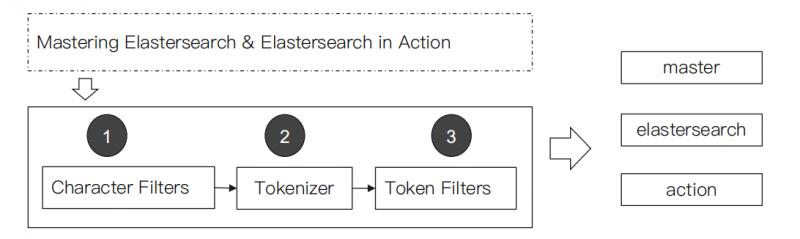
- Character Filters:主要作用是对原始文本进行处理,例如去除HTML标签。
- Tokenizer:主要作用是按照规则来切分单词。
- Token Filter:将切分好的单词进行加工,例如:小写转换、删除停用词、增加同义词。
ElasticSearch的内置分词器
- Standard Analyzer:默认分词器,按词切分,小写处理。
#standard

GET _analyze

{

  "analyzer": "standard",

  "text": "2 running Quick brown-foxes leap over lazy dogs in the summer evening."

}
#分词结果:Quick小写处理, brown-foxes被切分为 brown,foxes

{

  "tokens" : [

    {

      "token" : "2",

      "start_offset" : 0,

      "end_offset" : 1,

      "type" : "<NUM>",

      "position" : 0

    },

    {

      "token" : "running",

      "start_offset" : 2,

      "end_offset" : 9,

      "type" : "<ALPHANUM>",

      "position" : 1

    },

    {

      "token" : "quick",#小写处理

      "start_offset" : 10,

      "end_offset" : 15,

      "type" : "<ALPHANUM>",

      "position" : 2

    },

    {

      "token" : "brown",

      "start_offset" : 16,

      "end_offset" : 21,

      "type" : "<ALPHANUM>",

      "position" : 3

    },

    {

      "token" : "foxes",

      "start_offset" : 22,

      "end_offset" : 27,

      "type" : "<ALPHANUM>",

      "position" : 4

    },

    {

      "token" : "leap",

      "start_offset" : 28,

      "end_offset" : 32,

      "type" : "<ALPHANUM>",

      "position" : 5

    },

    {

      "token" : "over",

      "start_offset" : 33,

      "end_offset" : 37,

      "type" : "<ALPHANUM>",

      "position" : 6

    },

    {

      "token" : "lazy",

      "start_offset" : 38,

      "end_offset" : 42,

      "type" : "<ALPHANUM>",

      "position" : 7

    },

    {

      "token" : "dogs",

      "start_offset" : 43,

      "end_offset" : 47,

      "type" : "<ALPHANUM>",

      "position" : 8

    },

    {

      "token" : "in",

      "start_offset" : 48,

      "end_offset" : 50,

      "type" : "<ALPHANUM>",

      "position" : 9

    },

    {

      "token" : "the",

      "start_offset" : 51,

      "end_offset" : 54,

      "type" : "<ALPHANUM>",

      "position" : 10

    },

    {

      "token" : "summer",

      "start_offset" : 55,

      "end_offset" : 61,

      "type" : "<ALPHANUM>",

      "position" : 11

    },

    {

      "token" : "evening",

      "start_offset" : 62,

      "end_offset" : 69,

      "type" : "<ALPHANUM>",

      "position" : 12

    }

  ]

}
- Simple Analyzer:按照非字母切分(符号被过滤),小写处理。
#simpe

GET _analyze

{

  "analyzer": "simple",

  "text": "2 running Quick brown-foxes leap over lazy dogs in the summer evening."

}
#分词结果:数字2被过滤,Quick小写处理, brown-foxes被切分为 brown,foxes

{

  "tokens" : [

    {

      "token" : "running",

      "start_offset" : 2,

      "end_offset" : 9,

      "type" : "word",

      "position" : 0

    },

    {

      "token" : "quick",

      "start_offset" : 10,

      "end_offset" : 15,

      "type" : "word",

      "position" : 1

    },

    {

      "token" : "brown",

      "start_offset" : 16,

      "end_offset" : 21,

      "type" : "word",

      "position" : 2

    },

    {

      "token" : "foxes",

      "start_offset" : 22,

      "end_offset" : 27,

      "type" : "word",

      "position" : 3

    },

    {

      "token" : "leap",

      "start_offset" : 28,

      "end_offset" : 32,

      "type" : "word",

      "position" : 4

    },

    {

      "token" : "over",

      "start_offset" : 33,

      "end_offset" : 37,

      "type" : "word",

      "position" : 5

    },

    {

      "token" : "lazy",

      "start_offset" : 38,

      "end_offset" : 42,

      "type" : "word",

      "position" : 6

    },

    {

      "token" : "dogs",

      "start_offset" : 43,

      "end_offset" : 47,

      "type" : "word",

      "position" : 7

    },

    {

      "token" : "in",

      "start_offset" : 48,

      "end_offset" : 50,

      "type" : "word",

      "position" : 8

    },

    {

      "token" : "the",

      "start_offset" : 51,

      "end_offset" : 54,

      "type" : "word",

      "position" : 9

    },

    {

      "token" : "summer",

      "start_offset" : 55,

      "end_offset" : 61,

      "type" : "word",

      "position" : 10

    },

    {

      "token" : "evening",

      "start_offset" : 62,

      "end_offset" : 69,

      "type" : "word",

      "position" : 11

    }

  ]

}
- Stop Analyzer:停用词过滤(is/a/the),小写处理。
#stop

GET _analyze

{

  "analyzer": "stop",

  "text": "2 running Quick brown-foxes leap over lazy dogs in the summer evening."

}
#分词结果:2,in,the被过滤,Quick小写处理, brown-foxes被切分为 brown,foxes

{

  "tokens" : [

    {

      "token" : "running",

      "start_offset" : 2,

      "end_offset" : 9,

      "type" : "word",

      "position" : 0

    },

    {

      "token" : "quick",

      "start_offset" : 10,

      "end_offset" : 15,

      "type" : "word",

      "position" : 1

    },

    {

      "token" : "brown",

      "start_offset" : 16,

      "end_offset" : 21,

      "type" : "word",

      "position" : 2

    },

    {

      "token" : "foxes",

      "start_offset" : 22,

      "end_offset" : 27,

      "type" : "word",

      "position" : 3

    },

    {

      "token" : "leap",

      "start_offset" : 28,

      "end_offset" : 32,

      "type" : "word",

      "position" : 4

    },

    {

      "token" : "over",

      "start_offset" : 33,

      "end_offset" : 37,

      "type" : "word",

      "position" : 5

    },

    {

      "token" : "lazy",

      "start_offset" : 38,

      "end_offset" : 42,

      "type" : "word",

      "position" : 6

    },

    {

      "token" : "dogs",

      "start_offset" : 43,

      "end_offset" : 47,

      "type" : "word",

      "position" : 7

    },

    {

      "token" : "summer",

      "start_offset" : 55,

      "end_offset" : 61,

      "type" : "word",

      "position" : 10

    },

    {

      "token" : "evening",

      "start_offset" : 62,

      "end_offset" : 69,

      "type" : "word",

      "position" : 11

    }

  ]

}
- WhiteSpace Analyzer:按照空格切分,不转小写。
#whitespace

GET _analyze

{

  "analyzer": "whitespace",

  "text": "2 running Quick brown-foxes leap over lazy dogs in the summer evening."

}
#分词结果:按空格切分

{

  "tokens" : [

    {

      "token" : "2",

      "start_offset" : 0,

      "end_offset" : 1,

      "type" : "word",

      "position" : 0

    },

    {

      "token" : "running",

      "start_offset" : 2,

      "end_offset" : 9,

      "type" : "word",

      "position" : 1

    },

    {

      "token" : "Quick",

      "start_offset" : 10,

      "end_offset" : 15,

      "type" : "word",

      "position" : 2

    },

    {

      "token" : "brown-foxes",

      "start_offset" : 16,

      "end_offset" : 27,

      "type" : "word",

      "position" : 3

    },

    {

      "token" : "leap",

      "start_offset" : 28,

      "end_offset" : 32,

      "type" : "word",

      "position" : 4

    },

    {

      "token" : "over",

      "start_offset" : 33,

      "end_offset" : 37,

      "type" : "word",

      "position" : 5

    },

    {

      "token" : "lazy",

      "start_offset" : 38,

      "end_offset" : 42,

      "type" : "word",

      "position" : 6

    },

    {

      "token" : "dogs",

      "start_offset" : 43,

      "end_offset" : 47,

      "type" : "word",

      "position" : 7

    },

    {

      "token" : "in",

      "start_offset" : 48,

      "end_offset" : 50,

      "type" : "word",

      "position" : 8

    },

    {

      "token" : "the",

      "start_offset" : 51,

      "end_offset" : 54,

      "type" : "word",

      "position" : 9

    },

    {

      "token" : "summer",

      "start_offset" : 55,

      "end_offset" : 61,

      "type" : "word",

      "position" : 10

    },

    {

      "token" : "evening.",

      "start_offset" : 62,

      "end_offset" : 70,

      "type" : "word",

      "position" : 11

    }

  ]

}
- Keyword Analyzer:不分词,直接将输入当作输出。
#keyword

GET _analyze

{

  "analyzer": "keyword",

  "text": "2 running Quick brown-foxes leap over lazy dogs in the summer evening."

}
#分词结果:

{

  "tokens" : [

    {

      "token" : "2 running Quick brown-foxes leap over lazy dogs in the summer evening.",

      "start_offset" : 0,

      "end_offset" : 70,

      "type" : "word",

      "position" : 0

    }

  ]

}
- Pattern Analyzer:正则表达式分词,默认\W+(非字符分隔)。
#pattern

GET _analyze

{

  "analyzer": "pattern",

  "text": "2 running Quick brown-foxes leap over lazy dogs in the summer evening."

}
#分词结果:

{

  "tokens" : [

    {

      "token" : "2",

      "start_offset" : 0,

      "end_offset" : 1,

      "type" : "word",

      "position" : 0

    },

    {

      "token" : "running",

      "start_offset" : 2,

      "end_offset" : 9,

      "type" : "word",

      "position" : 1

    },

    {

      "token" : "quick",

      "start_offset" : 10,

      "end_offset" : 15,

      "type" : "word",

      "position" : 2

    },

    {

      "token" : "brown",

      "start_offset" : 16,

      "end_offset" : 21,

      "type" : "word",

      "position" : 3

    },

    {

      "token" : "foxes",

      "start_offset" : 22,

      "end_offset" : 27,

      "type" : "word",

      "position" : 4

    },

    {

      "token" : "leap",

      "start_offset" : 28,

      "end_offset" : 32,

      "type" : "word",

      "position" : 5

    },

    {

      "token" : "over",

      "start_offset" : 33,

      "end_offset" : 37,

      "type" : "word",

      "position" : 6

    },

    {

      "token" : "lazy",

      "start_offset" : 38,

      "end_offset" : 42,

      "type" : "word",

      "position" : 7

    },

    {

      "token" : "dogs",

      "start_offset" : 43,

      "end_offset" : 47,

      "type" : "word",

      "position" : 8

    },

    {

      "token" : "in",

      "start_offset" : 48,

      "end_offset" : 50,

      "type" : "word",

      "position" : 9

    },

    {

      "token" : "the",

      "start_offset" : 51,

      "end_offset" : 54,

      "type" : "word",

      "position" : 10

    },

    {

      "token" : "summer",

      "start_offset" : 55,

      "end_offset" : 61,

      "type" : "word",

      "position" : 11

    },

    {

      "token" : "evening",

      "start_offset" : 62,

      "end_offset" : 69,

      "type" : "word",

      "position" : 12

    }

  ]

}
- Language:提供了30多种常见语言的分词器。
#english

GET _analyze

{

  "analyzer": "english",

  "text": "2 running Quick brown-foxes leap over lazy dogs in the summer evening."

}
#分词结果:running转为run,Quick转为quick,brown-foxes 转为brown、fox,in、the过滤等等

{

  "tokens" : [

    {

      "token" : "2",

      "start_offset" : 0,

      "end_offset" : 1,

      "type" : "<NUM>",

      "position" : 0

    },

    {

      "token" : "run",

      "start_offset" : 2,

      "end_offset" : 9,

      "type" : "<ALPHANUM>",

      "position" : 1

    },

    {

      "token" : "quick",

      "start_offset" : 10,

      "end_offset" : 15,

      "type" : "<ALPHANUM>",

      "position" : 2

    },

    {

      "token" : "brown",

      "start_offset" : 16,

      "end_offset" : 21,

      "type" : "<ALPHANUM>",

      "position" : 3

    },

    {

      "token" : "fox",

      "start_offset" : 22,

      "end_offset" : 27,

      "type" : "<ALPHANUM>",

      "position" : 4

    },

    {

      "token" : "leap",

      "start_offset" : 28,

      "end_offset" : 32,

      "type" : "<ALPHANUM>",

      "position" : 5

    },

    {

      "token" : "over",

      "start_offset" : 33,

      "end_offset" : 37,

      "type" : "<ALPHANUM>",

      "position" : 6

    },

    {

      "token" : "lazi",

      "start_offset" : 38,

      "end_offset" : 42,

      "type" : "<ALPHANUM>",

      "position" : 7

    },

    {

      "token" : "dog",

      "start_offset" : 43,

      "end_offset" : 47,

      "type" : "<ALPHANUM>",

      "position" : 8

    },

    {

      "token" : "summer",

      "start_offset" : 55,

      "end_offset" : 61,

      "type" : "<ALPHANUM>",

      "position" : 11

    },

    {

      "token" : "even",

      "start_offset" : 62,

      "end_offset" : 69,

      "type" : "<ALPHANUM>",

      "position" : 12

    }

  ]

}
- Custom Analyzer:自定义分词器。
#需要安装analysis-icu插件

POST _analyze

{

  "analyzer": "icu_analyzer",

  "text": "他说的确实在理”"

}
#返回结果

{

  "tokens" : [

    {

      "token" : "他",

      "start_offset" : 0,

      "end_offset" : 1,

      "type" : "<IDEOGRAPHIC>",

      "position" : 0

    },

    {

      "token" : "说的",

      "start_offset" : 1,

      "end_offset" : 3,

      "type" : "<IDEOGRAPHIC>",

      "position" : 1

    },

    {

      "token" : "确实",

      "start_offset" : 3,

      "end_offset" : 5,

      "type" : "<IDEOGRAPHIC>",

      "position" : 2

    },

    {

      "token" : "在",

      "start_offset" : 5,

      "end_offset" : 6,

      "type" : "<IDEOGRAPHIC>",

      "position" : 3

    },

    {

      "token" : "理",

      "start_offset" : 6,

      "end_offset" : 7,

      "type" : "<IDEOGRAPHIC>",

      "position" : 4

    }

  ]

}
中文分词比较:
POST _analyze

{

  "analyzer": "standard",

  "text": "他说的确实在理”"

}
#返回结果

{

  "tokens" : [

    {

      "token" : "他",

      "start_offset" : 0,

      "end_offset" : 1,

      "type" : "<IDEOGRAPHIC>",

      "position" : 0

    },

    {

      "token" : "说",

      "start_offset" : 1,

      "end_offset" : 2,

      "type" : "<IDEOGRAPHIC>",

      "position" : 1

    },

    {

      "token" : "的",

      "start_offset" : 2,

      "end_offset" : 3,

      "type" : "<IDEOGRAPHIC>",

      "position" : 2

    },

    {

      "token" : "确",

      "start_offset" : 3,

      "end_offset" : 4,

      "type" : "<IDEOGRAPHIC>",

      "position" : 3

    },

    {

      "token" : "实",

      "start_offset" : 4,

      "end_offset" : 5,

      "type" : "<IDEOGRAPHIC>",

      "position" : 4

    },

    {

      "token" : "在",

      "start_offset" : 5,

      "end_offset" : 6,

      "type" : "<IDEOGRAPHIC>",

      "position" : 5

    },

    {

      "token" : "理",

      "start_offset" : 6,

      "end_offset" : 7,

      "type" : "<IDEOGRAPHIC>",

      "position" : 6

    }

  ]

}
ElasticSearch(三):通分词器(Analyzer)进行分词(Analysis)的更多相关文章
- Elasticsearch(10) --- 内置分词器、中文分词器
Elasticsearch(10) --- 内置分词器.中文分词器 这篇博客主要讲:分词器概念.ES内置分词器.ES中文分词器. 一.分词器概念 1.Analysis 和 Analyzer Analy ...
- ElasticSearch7.3 学习之倒排索引揭秘及初识分词器(Analyzer)
一.倒排索引 1. 构建倒排索引 例如说有下面两个句子doc1,doc2 doc1:I really liked my small dogs, and I think my mom also like ...
- es的分词器analyzer
analyzer 分词器使用的两个情形: 1,Index time analysis. 创建或者更新文档时,会对文档进行分词2,Search time analysis. 查询时,对查询语句 ...
- Lucene.net(4.8.0)+PanGu分词器问题记录一:分词器Analyzer的构造和内部成员ReuseStategy
前言:目前自己在做使用Lucene.net和PanGu分词实现全文检索的工作,不过自己是把别人做好的项目进行迁移.因为项目整体要迁移到ASP.NET Core 2.0版本,而Lucene使用的版本是3 ...
- Lucene.net(4.8.0) 学习问题记录一:分词器Analyzer的构造和内部成员ReuseStategy
前言:目前自己在做使用Lucene.net和PanGu分词实现全文检索的工作,不过自己是把别人做好的项目进行迁移.因为项目整体要迁移到ASP.NET Core 2.0版本,而Lucene使用的版本是3 ...
- Elasticsearch修改分词器以及自定义分词器
Elasticsearch修改分词器以及自定义分词器 参考博客:https://blog.csdn.net/shuimofengyang/article/details/88973597
- 【Lucene3.6.2入门系列】第05节_自定义停用词分词器和同义词分词器
首先是用于显示分词信息的HelloCustomAnalyzer.java package com.jadyer.lucene; import java.io.IOException; import j ...
- Lucene学习-深入Lucene分词器,TokenStream获取分词详细信息
Lucene学习-深入Lucene分词器,TokenStream获取分词详细信息 在此回复牛妞的关于程序中分词器的问题,其实可以直接很简单的在词库中配置就好了,Lucene中分词的所有信息我们都可以从 ...
- 自然语言处理之中文分词器-jieba分词器详解及python实战
(转https://blog.csdn.net/gzmfxy/article/details/78994396) 中文分词是中文文本处理的一个基础步骤,也是中文人机自然语言交互的基础模块,在进行中文自 ...
- 【ELK】【docker】【elasticsearch】2.使用elasticSearch+kibana+logstash+ik分词器+pinyin分词器+繁简体转化分词器 6.5.4 启动 ELK+logstash概念描述
官网地址:https://www.elastic.co/guide/en/elasticsearch/reference/current/docker.html#docker-cli-run-prod ...
随机推荐
- idea中的java web项目(添加jar包介绍)和java maven web项目目录结构
java web项目 web项目下web根目录名称是可以更改的 idea中新建java web项目,默认src为Sources Root,当然也可以手动改,在Sources Root下右键只能新建Pa ...
- Jmeter Json List Element Assertion使用详解
使用背景: jmeter4.0本身提供json Assertion断言,但当我们想要对返回的json list中的多个字段进行断言的时候,我们就会感到很无力.那么此时我们就可以通过Json List ...
- Feign【文件上传】
话不多说,上代码.... 项目公共依赖配置: <parent> <groupId>org.springframework.boot</groupId> <ar ...
- 深入理解C# 委托(delegate)-戈多编程
今天来谈谈委托,深入理解委托,本文来自各大神经验总结. 1.委托是什么? 委托类型的声明与方法签名相似. 它有一个返回值和任意数目任意类型的参数,是一种可用于封装命名方法或匿名方法的引用类型. 委托类 ...
- bugku细心地大象
解压得到图片,查看属性,发现一段编码. 用winhex打开图片,发现头文件是错的,正常jpg文件头文件为FF D8 FF E0 说明不是图片,是zip的文件头,更换格式. 丢到kali用binwalk ...
- 网关服务自定义路由规则(springcloud+nacos)
1. 场景描述 需要给各个网关服务类提供自定义配置路由规则,实时生效,不用重启网关(重启风险大),目前已实现,动态加载自定义路由文件,动态加载路由文件中的路由规则,只需在规则文件中配置下规则就可以了 ...
- DRF框架学习总结
DRF框架安装配置及其功能概述 Django与DRF 源码视图解析 DRF框架序列化和返序列化 DRF框架serializers中ModelSerializer类简化序列化和反序列化操作 DRF源码s ...
- PHP ksort
1.例子一: <?php /** * 根据 c1 对元素排序 */ $arrays = [ 'b' => [ 'c1' => 10, 'c2' => 5, ], 'a' =&g ...
- Python编程系列---获取请求报文行中的URL的几种方法总结
在浏览器访问web服务器的时候,服务器收到的是一个请求报文,大概GET请求的格式大概如下: 先随便拿到一个请求报文,蓝色即为我们要获取的 GET /index.html HTTP/1.1 Hos ...
- 19.Tomcat集群架构
1.Nginx+Tomcat集群架构介绍 2.Nginx+Tomcat集群架构实战 [root@lb01 conf.d]# cat proxy_zrlog.cheng.com.conf upstrea ...