
fastjson自由:controller上指定active profile,让你想序列化什么字段就序列化什么字段
一、前言
最近有个需求,其实这个需求以前就有,比如定义了一个vo,包含了10个字段,
在接口A里,要返回全部字段;
但是在接口B里呢,需要复用这个 vo, 但是只需要返回其中8个字段。
可能呢,有些同学会选择重新定义一个新的vo,但这样,会导致vo类数量特别多;你说,要是全部字段都返回吧,则会给前端同学造成困扰。
针对需要排除部分字段,希望能达到下面这样的效果:
1、在controller上指定一个profile 
2、在profile要应用到的class类型中,在field上添加注解

3、请求接口,返回的结果,如下:
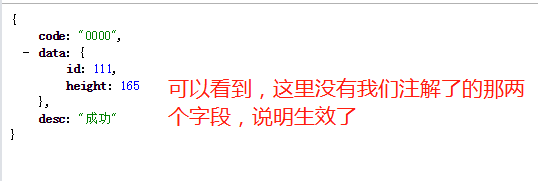
4、如果注释掉注解那两行,则效果如下:

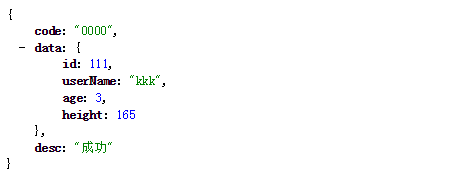
针对仅需要包含部分字段,希望能达到下面的效果:
1、在controller上指定profile
/**

     * 测试include类型的profile,这里指定了:

     * 激活profile为 includeProfile

     * User中,对应的field将会被序列化,其他字段都不会被序列化

     */

    @GetMapping("/test.do")

    @ActiveFastJsonProfileInController(profile = "includeProfile",clazz = User.class)

    public CommonMessage<User> test() {

        User user = new User();

        user.setId(111L);

        user.setAge(8);

        user.setUserName("kkk");

        user.setHeight(165);

        CommonMessage<User> message = new CommonMessage<>();

        message.setCode("0000");

        message.setDesc("成功");

        message.setData(user);

        return message;

    }
2、在ActiveFastJsonProfileInController注解的clazz指定的类中,对需要序列化的字段进行注解:
@Data

public class User {

    @FastJsonFieldProfile(profiles = {"includeProfile"},profileType = FastJsonFieldProfileType.INCLUDE)

    private Long id;

    private String userName;

    private Integer age;

    @FastJsonFieldProfile(profiles = {"includeProfile"},profileType = FastJsonFieldProfileType.INCLUDE)

    private Integer height;

}
3、请求结果如下:
{

   code: "0000",

   data: {

       id: 111,

       height: 165

   },

   desc: "成功"

}
二、实现思路
思路如下:
- 自定义注解,加在controller方法上,指定要激活的profile、以及对应的class
- 启动过程中,解析上述注解信息,构造出以下map:

- 添加
controllerAdvice,实现org.springframework.web.servlet.mvc.method.annotation.ResponseBodyAdvice接口,对返回的responseBody进行处理 - 在
controllerAdvice中,获取请求路径,然后根据请求路径,去第二步的map中,查询激活的profile和class信息 - 根据第四步获取到的:激活的profile和class信息,计算出对应的field集合,比如,根据profile拿到一个字段集合:{name,age},而这两个字段都是 exclude 类型的,所以不能对着两个字段进行序列化
- 根据第五步的field集合,对
responseBody对象进行处理,不对排除集合中的字段序列化
这么讲起来,还是比较抽象,具体可以看第一章的效果截图。
三、实现细节
使用fastjson进行序列化
spring boot版本为2.1.10,网上有很多文章,都是说的1.x版本时候的方法,在2.1版本并不适用。因为默认使用是jackson,所以我们这里将fastjson的HttpMessageConverter的顺序提前了:
@Configuration

public class WebMvcConfig extends WebMvcConfigurationSupport {

    @Override

    protected void extendMessageConverters(List<HttpMessageConverter<?>> converters) {

        super.extendMessageConverters(converters);

        FastJsonHttpMessageConverter converter = new FastJsonHttpMessageConverter();

        Charset defaultCharset = Charset.forName("utf-8");

        FastJsonConfig fastJsonConfig = new FastJsonConfig();

        fastJsonConfig.setCharset(defaultCharset);

        converter.setFastJsonConfig(fastJsonConfig);

        converter.setDefaultCharset(defaultCharset);

        //将fastjson的消息转换器提到第一位

        converters.add(0, converter);

    }

}
读取controller上方法的注解信息,并构造map
这里,要点是,获取到RequestMapping注解上的url,以及对应方法上的自定义注解:
RequestMappingHandlerMapping handlerMapping = applicationContext.getBean(RequestMappingHandlerMapping.class);

//获取handlerMapping的map

Map<RequestMappingInfo, HandlerMethod> handlerMethods = handlerMapping.getHandlerMethods();

for (HandlerMethod handlerMethod : handlerMethods.values()) {

    Class<?> beanType = handlerMethod.getBeanType();//获取所在类

    //获取方法上注解

    RequestMapping requestMapping = handlerMethod.getMethodAnnotation(RequestMapping.class);

}
动态注册bean
上面构造了map后,本身可以直接保存到一个public static字段,但感觉不是很优雅,于是,构造了一个bean(包含上述的map),注册到spring中:
//bean的类定义

@Data

public class VoProfileRegistry {

    private ConcurrentHashMap<String,ActiveFastJsonProfileInController> hashmap = new ConcurrentHashMap<String,ActiveFastJsonProfileInController>();

}

//动态注册到spring

applicationContext.registerBean(VoProfileRegistry.class);

VoProfileRegistry registry = myapplicationContext.getBean(VoProfileRegistry.class);

registry.setHashmap(hashmap);
在controllerAdvice中,对返回的responseBody进行处理时,根据请求url,从上述的map中,获取profile等信息:
org.springframework.web.servlet.mvc.method.annotation.ResponseBodyAdvice#beforeBodyWrite

@Override

public CommonMessage<Object> beforeBodyWrite(CommonMessage<Object> body, MethodParameter returnType, MediaType selectedContentType,

                                  Class<? extends HttpMessageConverter<?>> selectedConverterType, ServerHttpRequest request,

                                  ServerHttpResponse response) {

        String requestPath = request.getURI().getPath();

        log.info("path:{}",requestPath);

        VoProfileRegistry voProfileRegistry = applicationContext.getBean(VoProfileRegistry.class);

        ConcurrentHashMap<String, ActiveFastJsonProfileInController> hashmap = voProfileRegistry.getHashmap();

    	//从map中获取该url,激活的profile等信息

        ActiveFastJsonProfileInController activeFastJsonProfileInControllerAnnotation = hashmap.get(requestPath);

        if (activeFastJsonProfileInControllerAnnotation == null) {

            log.info("no matched json profile,skip");

            return body;

        }

    	......//进行具体的对responseBody进行过滤

    }
四、总结与源码
如果使用 fastjson的话,是支持propertyFilter的,具体可以了解下,也是对字段进行include和exclude,但感觉不是特别方便,尤其是粒度要支持到接口级别。
另外,本来,我也有另一个方案:在controllerAdvice里,获取到要排除的字段集合后,设置到ThreadLocal变量中,然后修改fastjson的源码,(fastjson对类进行序列化时,要获取class的field集合,可以在那个地方,对field集合进行处理),但是吧,那样麻烦不少,想了想就算了。
大家有什么意见和建议都可以提,也欢迎加群讨论。
源码在码云上(github太慢了):
https://gitee.com/ckl111/json-profile
fastjson自由:controller上指定active profile,让你想序列化什么字段就序列化什么字段的更多相关文章
- 如果在配置中将“system.serviceModel/serviceHostingEnvironment/multipleSiteBindingsEnabled”设置为 true,则需要终结点指定相对地址。如果在终结点上指定相对侦听 URI,则该地址可以是绝对地址。若要解决此问题,请为终结点“http://localhost/Service1.svc”指定相对 URI。
问题: 如果在配置中将"system.serviceModel/serviceHostingEnvironment/multipleSiteBindingsEnabled"设置为 ...
- C#移除URL上指定的参数
/// <summary> /// 移除URL上指定的参数,不区分参数大小写 /// </summary> public static ...
- Spring Boot 启动:No active profile set, falling back to default profiles: default
启动 Spring Boot 失败,但是没有出现多余的异常信息: 检查之后发现是依赖的问题(之前依赖的是 spring-boot-starter),修改即可: 方法二: pom.xml加上下面两个依赖 ...
- SpringBoot Cmd运行Jar文件指定active文件的命令如下
SpringBoot Cmd运行Jar文件指定active文件的命令如下 SpringBoot 命令行指定配置文件运行 ================================ ©Copyri ...
- No active profile set, falling back to default profiles: default
No active profile set, falling back to default profiles: default 这个错误是由于idea没有设置默认启动环境,设置即可
- 为什么Domain controller上的time synchronization非常重要?
虚拟机默认情况下所拥有的资源都是不同的, 比如说CPU clock. 在一个忙碌的系统中, 虚拟机甚至可能在很短的一段时间内被拒绝分配资源给它, 这种情况还可能发生在高系统负荷, VMotion, B ...
- spring boot 启动报错No active profile set, falling back to default profiles
报错No active profile set, falling back to default profiles pom.xml加上下面两个依赖 <dependency> <gro ...
- springboot启动失败( No active profile set, falling back to default profiles: default)
问题: springboot启动失败( No active profile set, falling back to default profiles: default) 解决方法 在pom.xml文 ...
- Java获取Linux上指定文件夹下所有第一级子文件夹
说明:需要只获得第一级文件夹目录 package com.sunsheen.jfids.studio.monitor.utils; import java.io.BufferedReader; imp ...
随机推荐
- 洛谷:P3384 [HNOI2004]宠物收养场
原题地址:https://www.luogu.org/problemnew/show/P3384 题目简述 给定一些序列(没有重复数字),每个序列支持: 给定一些数k(对于每个序列不重复),每次在序列 ...
- 快学Scala 第十一课 (类继承)
类继承: class People { } class Emp extends People{ } 和Java一样,final的类不能被继承.final的字段和方法不能被override. 在Scal ...
- 自创ant-design-pro组件
ant design蚂蚁金服基于react打造的一个服务于企业级产品的UI框架.而ant design pro呢?就是基于Ant Design这个框架搭建的中后台管理控制台的脚手架. 话不多说,今天给 ...
- java第3天:Scanner,Random,ArrayList
第一章:Scanner从入门到放弃 1 API的概述和使用步骤 API简称应用程序编程接口,是JDK给我们提供好的可以直接使用的类和方法,是程序员随手使用的字典. *** 2 Scanner的概述 2 ...
- 最强最全的Java后端知识体系
目录 最全的Java后端知识体系 Java基础 算法和数据结构 Spring相关 数据库相关 方法论 工具清单 文档 @(最强最全的Java后端知识体系) 最全的Java后端知识体系 最全的Java后 ...
- appium-doctor报错“JAVA_HOME is set but does not exist on the file system at "D:\work\eclipse\Java\jdk1.7.0_67;"”解决办法
卸载了jdk重新安装,重新配置环境就可以了
- 像智能手机一样管理云端应用:阿里云联合微软全球首发开放应用模型(OAM)
2019 年 10 月 17 日上午 9 点 15 分,阿里巴巴合伙人.阿里云智能基础产品事业部总经理蒋江伟在 QCon 上海<基于云架构的研发模式演进>主题演讲中,正式宣布: " ...
- java位运算,逻辑运算符
位运算逻辑运算符包括: 与(&),非(~),或(|),异或(^). &: 条件1&条件2 ,只有条件1和条件2都满足, 整个表达式才为真true, 只要有1个为false ...
- Linux系统取证实践
目录 0x00 本课概述 0x01 用到命令 0x00 本课概述 本课时学习Linux系统下取证分析命令. 0x01 用到命令 1.top命令 2.ps命令 3.kill命令 4.linux系统日 ...
- 一文了解Mysql
文章原创于公众号:程序猿周先森.本平台不定时更新,喜欢我的文章,欢迎关注我的微信公众号. Redis系列到上一篇已经全部结束了,从本篇开始进入Mysql系列文章专题.本篇作为Mysql系列专题的开篇文 ...