
Data Deduplication Workflow Part 1
Data deduplication provides a new approach to store data and eliminate duplicate data in chunk level.
A typical data deduplication workflow can be explained like this.
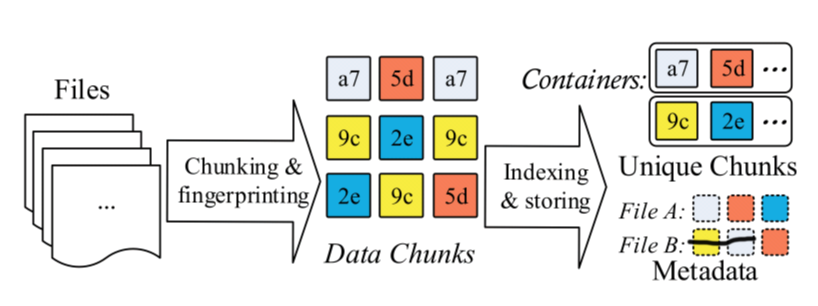
File metadata describes how to restore the file use unique chunks.
Chunk level deduplication approach has five key stages.
- Chunking
- Fingerprinting
- Indexing fringerprints
- Further compression
- Storage management
Different Stage has its own challenges, which may become the bottleneck for restoring file or compressing files.
Chunking
At the chunking stage, we should split the data stream into chunks, which can be presented at the fingerprints.
The different method splitting data streaming has different result and different efficiency.
The splitting method can be divided into two categories:
Fixed Size Chunking, which just split the data stream into fixed size chunk, simply and easily .
Content Defined Chunking, which split the data into variable size chunk, depending on the content.
Although fixed size chunking is simple and quick, the biggest problem is Boundary Shift. Boundary Shift Problem is when little part of data stream is modified, all the subsequent chunks will be changed, because of the boundary is shifted.
Content defined chunking uses a sliding-window technique on the content of data stream and computes a hash value of the window. If the hash value is satisfied some predefined conditions, it will generate a chunk.
Chunk's size can also be optimized. If we use CDC (content defined chunking), the size of chunking can not be in charge. On some extremely condition, it will generate too large or too small chunking. If a chunking is too large, the compression ratio will decrease. Because the large chunk can hide duplicates from being detected. If a chunking is too small, the file metadata will increase. What's more, it can cause indexing fingerprints problem. So we can define the max and min chunk size.
Chunking still has some problems such as how to detect the deduplicate accurately, how to accelerate computing time cost.
Data Deduplication Workflow Part 1的更多相关文章
- Data De-duplication
偶尔看到data deduplication的博客,还挺有意思,记录之 http://blog.csdn.net/liuben/article/details/5829083?reload http: ...
- 大数据去重(data deduplication)方案
数据去重(data deduplication)是大数据领域司空见惯的问题了.除了统计UV等传统用法之外,去重的意义更在于消除不可靠数据源产生的脏数据--即重复上报数据或重复投递数据的影响,使计算产生 ...
- Note: Transparent data deduplication in the cloud
What Design and implement ClearBox which allows a storage service provider to transparently attest t ...
- 论文阅读 Prefetch-aware fingerprint cache management for data deduplication systems
论文链接 https://link.springer.com/article/10.1007/s11704-017-7119-0 这篇论文试图解决的问题是在cache 环节之前,prefetch-ca ...
- Data Deduplication in Windows Server 2012
https://blogs.technet.microsoft.com/filecab/2012/05/20/introduction-to-data-deduplication-in-windows ...
- Note: File Recipe Compression in Data Deduplication Systems
Zero-Chunk Suppression 检测全0数据块,将其用预先计算的自身的指纹信息代替. Detect zero chunks and replace them with a special ...
- SharePoint 2013 create workflow by SharePoint Designer 2013
这篇文章主要基于上一篇http://www.cnblogs.com/qindy/p/6242714.html的基础上,create a sample workflow by SharePoint De ...
- Seven Python Tools All Data Scientists Should Know How to Use
Seven Python Tools All Data Scientists Should Know How to Use If you’re an aspiring data scientist, ...
- 重复数据删除(De-duplication)技术研究(SourceForge上发布dedup util)
dedup util是一款开源的轻量级文件打包工具,它基于块级的重复数据删除技术,可以有效缩减数据容量,节省用户存储空间.目前已经在Sourceforge上创建项目,并且源码正在不断更新中.该工具生成 ...
随机推荐
- IDEA 学习笔记之 Web项目开发
Web项目开发: 添加新模块: 起名: 添加jars: 添加Tomcat/local: 添加项目: 启动Tomcat: 看到web页面: 修改页面: 重新部署页面:
- 快学Scala 第十四课 (读取行,读取字符, 控制台读取)
读取行: import scala.io.Source object FileReader { def main(args: Array[String]): Unit = { val source = ...
- BT面板安装php报错configure: error: C preprocessor “/lib/cpp” fails sanity check
使用宝塔面板安装扩展时已经显示添加安装成功了,待我刷新浏览器之后没有安装成功.看了一下执行日志. 缺少必要的C++库,如下命令重装解决. yum reinstall glibc-headers gcc ...
- Vue入门教程 第二篇 (数据绑定与响应式)
数据绑定 Vue.js 的核心是一个允许采用简洁的模板语法来声明式地将数据渲染进 DOM 的系统: <div id="app"> {{ message }} </ ...
- POJ - 2393Yogurt factory
The cows have purchased a yogurt factory that makes world-famous Yucky Yogurt. Over the next N (1 &l ...
- Spring Boot 2.2 正式发布,大幅性能提升 + Java 13 支持
之前 Spring Boot 2.2没能按时发布,是由于 Spring Framework 5.2 的发布受阻而推迟.这次随着 Spring Framework 5.2.0 成功发布之后,Spring ...
- Java集合框架,你了解多少?相信你看了这篇汇总一目了然!
相信大多数的程序员都知道,Dictionary.Vertor.Stack和Properties这些类被用来存储和操作对象组.但是他们缺少一个核心的主题的. 集合框架设计成要满足以下的几个目标 第一条: ...
- top命令之性能分析
top命令详解 当前时间20:27:12 当前系统运行时间3:18秒 1个用户 系统负载平均长度为0.00,0.00,0.00(分别为1分钟.5分钟.15分钟前到现在的平均值) 第二行为进程 ...
- 从零开始实现ASP.NET Core MVC的插件式开发(六) - 如何加载插件引用
标题:从零开始实现ASP.NET Core MVC的插件式开发(六) - 如何加载插件引用. 作者:Lamond Lu 地址:https://www.cnblogs.com/lwqlun/p/1171 ...
- PHP compact
1.函数的作用:将变量转成数组 2.函数的参数: @params string $varname1 @params string $varname2 ... @params array $varnam ...