
Python 中国象棋源码 V1
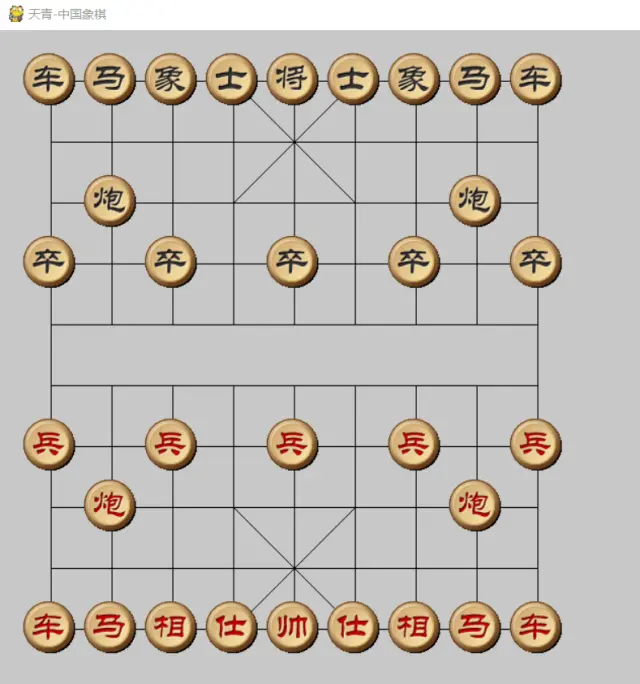
chinachess.py 为主文件
import pygame

import time

import constants

import pieces

import computer

class MainGame():

    window = None

    Start_X = constants.Start_X

    Start_Y = constants.Start_Y

    Line_Span = constants.Line_Span

    Max_X = Start_X +  * Line_Span

    Max_Y = Start_Y +  * Line_Span

    player1Color = constants.player1Color

    player2Color = constants.player2Color

    Putdownflag = player1Color

    piecesSelected = None

    button_go = None

    piecesList = []

    def start_game(self):

        MainGame.window = pygame.display.set_mode([constants.SCREEN_WIDTH, constants.SCREEN_HEIGHT])

        pygame.display.set_caption("天青-中国象棋")

        MainGame.button_go = Button(MainGame.window, "重新开始", constants.SCREEN_WIDTH - , )  # 创建开始按钮

        self.piecesInit()

        while True:

            time.sleep(0.1)

            # 获取事件

            MainGame.window.fill(constants.BG_COLOR)

            self.drawChessboard()

            #MainGame.button_go.draw_button()

            self.piecesDisplay()

            self.VictoryOrDefeat()

            self.Computerplay()

            self.getEvent()

            pygame.display.update()

            pygame.display.flip()

    def drawChessboard(self):

        mid_end_y = MainGame.Start_Y +  * MainGame.Line_Span

        min_start_y = MainGame.Start_Y +  * MainGame.Line_Span

        for i in range(, ):

            x = MainGame.Start_X + i * MainGame.Line_Span

            if i== or i ==:

                y = MainGame.Start_Y + i * MainGame.Line_Span

                pygame.draw.line(MainGame.window, constants.BLACK, [x, MainGame.Start_Y], [x, MainGame.Max_Y], )

            else:

                pygame.draw.line(MainGame.window, constants.BLACK, [x, MainGame.Start_Y], [x, mid_end_y], )

                pygame.draw.line(MainGame.window, constants.BLACK, [x, min_start_y], [x, MainGame.Max_Y], )

        for i in range(, ):

            x = MainGame.Start_X + i * MainGame.Line_Span

            y = MainGame.Start_Y + i * MainGame.Line_Span

            pygame.draw.line(MainGame.window, constants.BLACK, [MainGame.Start_X, y], [MainGame.Max_X, y], )

        speed_dial_start_x =  MainGame.Start_X +  * MainGame.Line_Span

        speed_dial_end_x =  MainGame.Start_X +  * MainGame.Line_Span

        speed_dial_y1 = MainGame.Start_Y +  * MainGame.Line_Span

        speed_dial_y2 = MainGame.Start_Y +  * MainGame.Line_Span

        speed_dial_y3 = MainGame.Start_Y +  * MainGame.Line_Span

        speed_dial_y4 = MainGame.Start_Y +  * MainGame.Line_Span

        pygame.draw.line(MainGame.window, constants.BLACK, [speed_dial_start_x, speed_dial_y1], [speed_dial_end_x, speed_dial_y2], )

        pygame.draw.line(MainGame.window, constants.BLACK, [speed_dial_start_x, speed_dial_y2],

                         [speed_dial_end_x, speed_dial_y1], )

        pygame.draw.line(MainGame.window, constants.BLACK, [speed_dial_start_x, speed_dial_y3],

                         [speed_dial_end_x, speed_dial_y4], )

        pygame.draw.line(MainGame.window, constants.BLACK, [speed_dial_start_x, speed_dial_y4],

                         [speed_dial_end_x, speed_dial_y3], )

    def piecesInit(self):

        MainGame.piecesList.append(pieces.Rooks(MainGame.player2Color, ,))

        MainGame.piecesList.append(pieces.Rooks(MainGame.player2Color,  , ))

        MainGame.piecesList.append(pieces.Elephants(MainGame.player2Color,  , ))

        MainGame.piecesList.append(pieces.Elephants(MainGame.player2Color,  , ))

        MainGame.piecesList.append(pieces.King(MainGame.player2Color, , ))

        MainGame.piecesList.append(pieces.Knighs(MainGame.player2Color,  , ))

        MainGame.piecesList.append(pieces.Knighs(MainGame.player2Color,  , ))

        MainGame.piecesList.append(pieces.Cannons(MainGame.player2Color,  , ))

        MainGame.piecesList.append(pieces.Cannons(MainGame.player2Color, , ))

        MainGame.piecesList.append(pieces.Mandarins(MainGame.player2Color,  , ))

        MainGame.piecesList.append(pieces.Mandarins(MainGame.player2Color, , ))

        MainGame.piecesList.append(pieces.Pawns(MainGame.player2Color, , ))

        MainGame.piecesList.append(pieces.Pawns(MainGame.player2Color, , ))

        MainGame.piecesList.append(pieces.Pawns(MainGame.player2Color, , ))

        MainGame.piecesList.append(pieces.Pawns(MainGame.player2Color, , ))

        MainGame.piecesList.append(pieces.Pawns(MainGame.player2Color, , ))

        MainGame.piecesList.append(pieces.Rooks(MainGame.player1Color,  , ))

        MainGame.piecesList.append(pieces.Rooks(MainGame.player1Color,  , ))

        MainGame.piecesList.append(pieces.Elephants(MainGame.player1Color, , ))

        MainGame.piecesList.append(pieces.Elephants(MainGame.player1Color, , ))

        MainGame.piecesList.append(pieces.King(MainGame.player1Color,  , ))

        MainGame.piecesList.append(pieces.Knighs(MainGame.player1Color, , ))

        MainGame.piecesList.append(pieces.Knighs(MainGame.player1Color, , ))

        MainGame.piecesList.append(pieces.Cannons(MainGame.player1Color,  , ))

        MainGame.piecesList.append(pieces.Cannons(MainGame.player1Color,  , ))

        MainGame.piecesList.append(pieces.Mandarins(MainGame.player1Color,  , ))

        MainGame.piecesList.append(pieces.Mandarins(MainGame.player1Color,  , ))

        MainGame.piecesList.append(pieces.Pawns(MainGame.player1Color, , ))

        MainGame.piecesList.append(pieces.Pawns(MainGame.player1Color, , ))

        MainGame.piecesList.append(pieces.Pawns(MainGame.player1Color, , ))

        MainGame.piecesList.append(pieces.Pawns(MainGame.player1Color, , ))

        MainGame.piecesList.append(pieces.Pawns(MainGame.player1Color, , ))

    def piecesDisplay(self):

        for item in MainGame.piecesList:

            item.displaypieces(MainGame.window)

            #MainGame.window.blit(item.image, item.rect)

    def getEvent(self):

        # 获取所有的事件

        eventList = pygame.event.get()

        for event in eventList:

            if event.type == pygame.QUIT:

                self.endGame()

            elif event.type == pygame.MOUSEBUTTONDOWN:

                pos = pygame.mouse.get_pos()

                mouse_x = pos[]

                mouse_y = pos[]

                if (

                        mouse_x > MainGame.Start_X - MainGame.Line_Span /  and mouse_x < MainGame.Max_X + MainGame.Line_Span / ) and (

                        mouse_y > MainGame.Start_Y - MainGame.Line_Span /  and mouse_y < MainGame.Max_Y + MainGame.Line_Span / ):

                    # print( str(mouse_x) + "" + str(mouse_y))

                    # print(str(MainGame.Putdownflag))

                    if MainGame.Putdownflag != MainGame.player1Color:

                        return

                    click_x = round((mouse_x - MainGame.Start_X) / MainGame.Line_Span)

                    click_y = round((mouse_y - MainGame.Start_Y) / MainGame.Line_Span)

                    click_mod_x = (mouse_x - MainGame.Start_X) % MainGame.Line_Span

                    click_mod_y = (mouse_y - MainGame.Start_Y) % MainGame.Line_Span

                    if abs(click_mod_x - MainGame.Line_Span / ) >=  and abs(

                            click_mod_y - MainGame.Line_Span / ) >= :

                        # print("有效点:x="+str(click_x)+" y="+str(click_y))

                        # 有效点击点

                        self.PutdownPieces(MainGame.player1Color, click_x, click_y)

                else:

                    print("out")

                if MainGame.button_go.is_click():

                    #self.restart()

                    print("button_go click")

                else:

                    print("button_go click out")

    def PutdownPieces(self, t, x, y):

        selectfilter=list(filter(lambda cm: cm.x == x and cm.y == y and cm.player == MainGame.player1Color,MainGame.piecesList))

        if len(selectfilter):

            MainGame.piecesSelected = selectfilter[]

            return

        if MainGame.piecesSelected :

            #print("")

            arr = pieces.listPiecestoArr(MainGame.piecesList)

            if MainGame.piecesSelected.canmove(arr, x, y):

                self.PiecesMove(MainGame.piecesSelected, x, y)

                MainGame.Putdownflag = MainGame.player2Color

        else:

            fi = filter(lambda p: p.x == x and p.y == y, MainGame.piecesList)

            listfi = list(fi)

            if len(listfi) != :

                MainGame.piecesSelected = listfi[]

    def PiecesMove(self,pieces,  x , y):

        for item in  MainGame.piecesList:

            if item.x ==x and item.y == y:

                MainGame.piecesList.remove(item)

        pieces.x = x

        pieces.y = y

        print("move to " +str(x) +" "+str(y))

        return True

    def Computerplay(self):

        if MainGame.Putdownflag == MainGame.player2Color:

            print("轮到电脑了")

            computermove = computer.getPlayInfo(MainGame.piecesList)

            #if computer==None:

                #return

            piecemove = None

            for item in MainGame.piecesList:

                if item.x == computermove[] and item.y == computermove[]:

                    piecemove= item

            self.PiecesMove(piecemove, computermove[], computermove[])

            MainGame.Putdownflag = MainGame.player1Color

    #判断游戏胜利

    def VictoryOrDefeat(self):

        txt =""

        result = [MainGame.player1Color,MainGame.player2Color]

        for item in MainGame.piecesList:

            if type(item) ==pieces.King:

                if item.player == MainGame.player1Color:

                    result.remove(MainGame.player1Color)

                if item.player == MainGame.player2Color:

                    result.remove(MainGame.player2Color)

        if len(result)==:

            return

        if result[] == MainGame.player1Color :

            txt = "失败!"

        else:

            txt = "胜利!"

        MainGame.window.blit(self.getTextSuface("%s" % txt), (constants.SCREEN_WIDTH - , ))

        MainGame.Putdownflag = constants.overColor

    def getTextSuface(self, text):

        pygame.font.init()

        # print(pygame.font.get_fonts())

        font = pygame.font.SysFont('kaiti', )

        txt = font.render(text, True, constants.TEXT_COLOR)

        return txt

    def endGame(self):

        print("exit")

        exit()

if __name__ == '__main__':

    MainGame().start_game()
import pygame

SCREEN_WIDTH=

SCREEN_HEIGHT=

Start_X =

Start_Y =

Line_Span =

player1Color =

player2Color =

overColor =

BG_COLOR=pygame.Color(, , )

Line_COLOR=pygame.Color(, , )

TEXT_COLOR=pygame.Color(, , )

# 定义颜色

BLACK = ( , , )

WHITE = (, , )

RED = (, , )

GREEN = ( , , )

BLUE = ( , , )

repeat =

pieces_images = {

    'b_rook': pygame.image.load("imgs/s2/b_c.gif"),

    'b_elephant': pygame.image.load("imgs/s2/b_x.gif"),

    'b_king': pygame.image.load("imgs/s2/b_j.gif"),

    'b_knigh': pygame.image.load("imgs/s2/b_m.gif"),

    'b_mandarin': pygame.image.load("imgs/s2/b_s.gif"),

    'b_cannon': pygame.image.load("imgs/s2/b_p.gif"),

    'b_pawn': pygame.image.load("imgs/s2/b_z.gif"),

    'r_rook': pygame.image.load("imgs/s2/r_c.gif"),

    'r_elephant': pygame.image.load("imgs/s2/r_x.gif"),

    'r_king': pygame.image.load("imgs/s2/r_j.gif"),

    'r_knigh': pygame.image.load("imgs/s2/r_m.gif"),

    'r_mandarin': pygame.image.load("imgs/s2/r_s.gif"),

    'r_cannon': pygame.image.load("imgs/s2/r_p.gif"),

    'r_pawn': pygame.image.load("imgs/s2/r_z.gif"),

}
import pygame

import constants

class  Pieces():

    def __init__(self, player,  x, y):

        self.imagskey = self.getImagekey()

        self.image = constants.pieces_images[self.imagskey]

        self.x = x

        self.y = y

        self.player = player

        self.rect = self.image.get_rect()

        self.rect.left = constants.Start_X + x * constants.Line_Span - self.image.get_rect().width /

        self.rect.top = constants.Start_Y + y * constants.Line_Span - self.image.get_rect().height /

    def displaypieces(self,screen):

        #print(str(self.rect.left))

        self.rect.left = constants.Start_X + self.x * constants.Line_Span - self.image.get_rect().width /

        self.rect.top = constants.Start_Y + self.y * constants.Line_Span - self.image.get_rect().height /

        screen.blit(self.image,self.rect);

        #self.image = self.images

        #MainGame.window.blit(self.image,self.rect)

    def canmove(self, arr, moveto_x, moveto_y):

        pass

    def getImagekey(self):

        return None

    def getScoreWeight(self,listpieces):

        return  None

class Rooks(Pieces):

    def __init__(self, player,  x, y):

        self.player = player

        super().__init__(player,  x, y)

    def getImagekey(self):

        if self.player == constants.player1Color:

            return "r_rook"

        else:

            return "b_rook"

    def canmove(self, arr, moveto_x, moveto_y):

        if self.x == moveto_x and self.y == moveto_y:

            return False

        if arr[moveto_x][moveto_y] ==self.player :

            return  False

        if self.x == moveto_x:

            step = - if self.y > moveto_y else

            for i in range(self.y +step, moveto_y, step):

                if arr[self.x][i] != :

                    return False

            #print(" move y")

            return True

        if self.y == moveto_y:

            step = - if self.x > moveto_x else

            for i in range(self.x + step, moveto_x, step):

                if arr[i][self.y] != :

                    return False

            return True

    def getScoreWeight(self, listpieces):

        score =

        return score

class Knighs(Pieces):

    def __init__(self, player,  x, y):

        self.player = player

        super().__init__(player,  x, y)

    def getImagekey(self):

        if self.player == constants.player1Color:

            return "r_knigh"

        else:

            return "b_knigh"

    def canmove(self, arr, moveto_x, moveto_y):

        if self.x == moveto_x and self.y == moveto_y:

            return False

        if arr[moveto_x][moveto_y] == self.player:

            return False

        #print(str(self.x) +""+str(self.y))

        move_x = moveto_x-self.x

        move_y = moveto_y - self.y

        if abs(move_x) ==  and abs(move_y) == :

            step =  if move_y >  else -

            if arr[self.x][self.y + step] == :

                return True

        if abs(move_x) ==  and abs(move_y) == :

            step =  if move_x > else -

            if arr[self.x +step][self.y] == :

                return  True

    def getScoreWeight(self, listpieces):

        score =

        return score

class Elephants(Pieces):

    def __init__(self, player, x, y):

        self.player = player

        super().__init__(player, x, y)

    def getImagekey(self):

        if self.player == constants.player1Color:

            return "r_elephant"

        else:

            return "b_elephant"

    def canmove(self, arr, moveto_x, moveto_y):

        if self.x == moveto_x and self.y == moveto_y:

            return False

        if arr[moveto_x][moveto_y] == self.player:

            return False

        if self.y <= and moveto_y >= or self.y >= and moveto_y <=:

            return  False

        move_x = moveto_x - self.x

        move_y = moveto_y - self.y

        if abs(move_x) ==  and abs(move_y) == :

            step_x =  if move_x >  else -

            step_y =  if move_y >  else -

            if arr[self.x + step_x][self.y + step_y] == :

                return True

    def getScoreWeight(self, listpieces):

        score =

        return score

class Mandarins(Pieces):

    def __init__(self, player,  x, y):

        self.player = player

        super().__init__(player,  x, y)

    def getImagekey(self):

        if self.player == constants.player1Color:

            return "r_mandarin"

        else:

            return "b_mandarin"

    def canmove(self, arr, moveto_x, moveto_y):

        if self.x == moveto_x and self.y == moveto_y:

            return False

        if arr[moveto_x][moveto_y] == self.player:

            return False

        if moveto_x < or moveto_x >:

            return False

        if moveto_y >  and moveto_y < :

            return False

        move_x = moveto_x - self.x

        move_y = moveto_y - self.y

        if abs(move_x) ==  and abs(move_y) == :

            return True

    def getScoreWeight(self, listpieces):

        score =

        return score

class King(Pieces):

    def __init__(self, player, x, y):

        self.player = player

        super().__init__(player, x, y)

    def getImagekey(self):

        if self.player == constants.player1Color:

            return "r_king"

        else:

            return "b_king"

    def canmove(self, arr, moveto_x, moveto_y):

        if self.x == moveto_x and self.y == moveto_y:

            return False

        if arr[moveto_x][moveto_y] == self.player:

            return False

        if moveto_x <  or moveto_x > :

            return False

        if moveto_y >  and moveto_y < :

            return False

        move_x = moveto_x - self.x

        move_y = moveto_y - self.y

        if abs(move_x) + abs(move_y) == :

            return True

    def getScoreWeight(self, listpieces):

        score =

        return score

class Cannons(Pieces):

    def __init__(self, player,  x, y):

        self.player = player

        super().__init__(player, x, y)

    def getImagekey(self):

        if self.player == constants.player1Color:

            return "r_cannon"

        else:

            return "b_cannon"

    def canmove(self, arr, moveto_x, moveto_y):

        if self.x == moveto_x and self.y == moveto_y:

            return False

        if arr[moveto_x][moveto_y] == self.player:

            return False

        overflag = False

        if self.x == moveto_x:

            step = - if self.y > moveto_y else

            for i in range(self.y + step, moveto_y, step):

                if arr[self.x][i] != :

                    if overflag:

                        return False

                    else:

                        overflag = True

            if overflag and arr[moveto_x][moveto_y] == :

                return False

            if not overflag and arr[self.x][moveto_y] != :

                return False

            return True

        if self.y == moveto_y:

            step = - if self.x > moveto_x else

            for i in range(self.x + step, moveto_x, step):

                if arr[i][self.y] != :

                    if overflag:

                        return False

                    else:

                        overflag = True

            if overflag and arr[moveto_x][moveto_y] == :

                return False

            if not overflag and arr[moveto_x][self.y] != :

                return False

            return True

    def getScoreWeight(self, listpieces):

        score =

        return score

class Pawns(Pieces):

    def __init__(self, player, x, y):

        self.player = player

        super().__init__(player,  x, y)

    def getImagekey(self):

        if self.player == constants.player1Color:

            return "r_pawn"

        else:

            return "b_pawn"

    def canmove(self, arr, moveto_x, moveto_y):

        if self.x == moveto_x and self.y == moveto_y:

            return False

        if arr[moveto_x][moveto_y] == self.player:

            return False

        move_x = moveto_x - self.x

        move_y = moveto_y - self.y

        if self.player == constants.player1Color:

            if self.y >   and move_x !=  :

                return  False

            if move_y > :

                return  False

        elif self.player == constants.player2Color:

            if self.y <=   and move_x !=  :

                return  False

            if move_y < :

                return False

        if abs(move_x) + abs(move_y) == :

            return True

    def getScoreWeight(self, listpieces):

        score =

        return score

def listPiecestoArr(piecesList):

    arr = [[ for i in range()] for j in range()]

    for i in range(, ):

        for j in range(, ):

            if len(list(filter(lambda cm: cm.x == i and cm.y == j and cm.player == constants.player1Color,

                               piecesList))):

                arr[i][j] = constants.player1Color

            elif len(list(filter(lambda cm: cm.x == i and cm.y == j and cm.player == constants.player2Color,

                                 piecesList))):

                arr[i][j] = constants.player2Color

    return arr
import constants

#import time

from pieces import listPiecestoArr

def getPlayInfo(listpieces):

    pieces = movedeep(listpieces , ,constants.player2Color)

    return [pieces[].x,pieces[].y, pieces[], pieces[]]

def movedeep(listpieces, deepstep, player):

    arr = listPiecestoArr(listpieces)

    listMoveEnabel = []

    for i in range(, ):

        for j in range(, ):

            for item in listpieces:

                if item.player == player and item.canmove(arr, i, j):

                    #标记是否有子被吃 如果被吃 在下次循环时需要补会

                    piecesremove = None

                    for itembefore in listpieces:

                        if itembefore.x == i and itembefore.y == j:

                            piecesremove= itembefore

                            break

                    if piecesremove != None:

                        listpieces.remove(piecesremove)

                    #记录移动之前的位置

                    move_x = item.x

                    move_y = item.y

                    item.x = i

                    item.y = j

                    #print(str(move_x) + "," + str(move_y) + "," + str(item.x) + "  ,  " + str(item.y))

                    scoreplayer1 =

                    scoreplayer2 =

                    for itemafter in listpieces:

                        if itemafter.player == constants.player1Color:

                            scoreplayer1 += itemafter.getScoreWeight(listpieces)

                        elif  itemafter.player == constants.player2Color:

                            scoreplayer2 += itemafter.getScoreWeight(listpieces)

                    #print("得分:"+item.imagskey +", "+str(len(moveAfterListpieces))+","+str(i)+","+str(j)+"," +str(scoreplayer1) +"  ,  "+ str(scoreplayer2) )

                    #print(str(deepstep))

                    #如果得子 判断对面是否可以杀过来,如果又被杀,而且子力评分低,则不干

                    arrkill = listPiecestoArr(listpieces)

                    if scoreplayer2 > scoreplayer1 :

                        for itemkill in listpieces:

                            if itemkill.player == constants.player1Color and itemkill.canmove(arrkill, i, j):

                                scoreplayer2=scoreplayer1

                    if deepstep >  :

                        nextplayer = constants.player1Color if player == constants.player2Color else constants.player2Color

                        nextpiecesbest= movedeep(listpieces, deepstep -, nextplayer)

                        listMoveEnabel.append([item, i, j, nextpiecesbest[], nextpiecesbest[], nextpiecesbest[]])

                    else:

                        #print(str(len(listpieces)))

                        #print("得分:" + item.imagskey + ", " + str(len(listpieces)) + "," + str(move_x) + "," + str(move_y) + "," + str(i) + "  ,  " + str(j))

                        if player == constants.player2Color:

                            listMoveEnabel.append([item, i, j, scoreplayer1, scoreplayer2, scoreplayer1 - scoreplayer2])

                        else:

                            listMoveEnabel.append([item, i, j, scoreplayer1, scoreplayer2, scoreplayer2 - scoreplayer1])

                    #print("得分:"+str(scoreplayer1))

                    item.x = move_x

                    item.y = move_y

                    if piecesremove != None:

                        listpieces.append(piecesremove)

    list_scorepalyer1 = sorted(listMoveEnabel, key=lambda tm: tm[], reverse=True)

    piecesbest = list_scorepalyer1[]

    if deepstep == :

        print(list_scorepalyer1)

    return piecesbest
关注微信公众号“ python社区营 ”分享技术干货,提供学习资源
Python 中国象棋源码 V1的更多相关文章
- android 在线升级借助开源中国App源码
android 在线升级借助开源中国App源码 http://www.cnblogs.com/luomingui/p/3949429.html android 在线升级借助开源中国App源码分析如下: ...
- python的paramiko源码修改了一下,写了个操作命令的日志审计 bug修改
python的paramiko源码修改了一下,写了个操作命令的日志审计,但是记录的日志中也将backspace删除键记录成^H这个了,于是改了一下代码,用字符串的特性. 字符串具有列表的特性 > ...
- Python解析器源码加密系列之(二):一次使用标准c的FILE*访问内存块的尝试
摘要:由于近期打算修改Python解释器以实现pyc文件的加密/解密,出于保密的要求,解密之后的数据只能放在内存中,不能写入到文件中.但是后续的解析pyc文件的代码又只能接受FILE*作为入参,所以就 ...
- Python 3.5源码编译安装
系统环境:CentOS 6.8-Minimal 安装Python依赖包: [root@Python src]# yum install zlib-devel bzip2-devel openssl-d ...
- Python:Sqlmap源码精读之解析xml
XML <?xml version="1.0" encoding="UTF-8"?> <root> <!-- MySQL --&g ...
- 读懂掌握 Python logging 模块源码 (附带一些 example)
搜了一下自己的 Blog 一直缺乏一篇 Python logging 模块的深度使用的文章.其实这个模块非常常用,也有非常多的滥用.所以看看源码来详细记录一篇属于 logging 模块的文章. 整个 ...
- Python paramiko 修改源码实现用户命令抓取
paramiko 源码修改 paramiko主要用来实现ssh客户端.服务端链接,上一节我们说到了堡垒机,堡垒机内有一个需求是“用户行为审计”,在这里我们就可以通过修改paramiko内文件的源码来实 ...
- 【Python】Webpy 源码学习
那么webpy是什么呢? 阅读它的源码我们又能学到什么呢? 简单说webpy就是一个开源的web应用框架(官方首页:http://webpy.org/) 它的源代码非常整洁精干,学习它一方面可以让我们 ...
- Python Web Flask源码解读(一)——启动流程
关于我 一个有思想的程序猿,终身学习实践者,目前在一个创业团队任team lead,技术栈涉及Android.Python.Java和Go,这个也是我们团队的主要技术栈. Github:https:/ ...
随机推荐
- xpath的|
xpath的| 相当与交集 本爬虫爬取的是热门城市和全国城市,但是由于爬取的规则不同,所以在同一个xpath中使用了两种规则 import requests from lxml import etre ...
- angularJS使用ocLazyLoad实现js延迟加载
最近开发一个系统遇到了一个问题,用angular路由一个html片段,该片段需要使用一个js插件来实现一个富文本编辑器.关键问题在于必须要在片段加载后通过js与dom元素进行绑定.一开始想当然以为直接 ...
- 转:spring4.0之二:@Configuration的使用
从Spring3.0,@Configuration用于定义配置类,可替换xml配置文件,被注解的类内部包含有一个或多个被@Bean注解的方法,这些方法将会被AnnotationConfigApplic ...
- Ctrl + Shift + F7 ; F3、Shift + F3
pycharm 查找并高亮参数 选中某一参数,Ctrl + Shift + F7 高亮所有该文件中所有该参数 接下来, 按 F3 在所有高亮选择中向下移动一个, Shift + F3 在所有高亮选择 ...
- 遍历json数据的几种方式。
json(JavaScript Object Notation),json是一种多用于存储和交换文本信息的语法.他能够进行数据的传输,通常和ajax一起使用.它具有体积小.速度快,易解析等诸多优点. ...
- 洛谷 题解 2165 [AHOI2009]飞行棋
本蒟蒻又来发题解了, 看到这个题目,本蒟蒻直接开始推公式.. 嗯,可以通过弧长,推出弦长(l = 2 * r * cos(90 * l / (r * Π)); 然后对比各条弦长的平方和与直径的平方. ...
- luogu P4065 [JXOI2017]颜色 |随机化+前缀和
题目描述 可怜有一个长度为 n 的正整数序列 Ai,其中相同的正整数代表着相同的颜色. 现在可怜觉得这个序列太长了,于是她决定选择一些颜色把这些颜色的所有位置都删去. 删除颜色 i 可以定义为把所有满 ...
- luogu P3152 正整数序列
题目描述 kkk制造了一个序列,这个序列里的数全是由正整数构成的.你别认为她的数列很神奇--其实就是1, 2, -, n而已.当然,n是给定的.kkk的同学lzn认为0是一个好数字(看上去很饱满有木有 ...
- openlayers4 入门开发系列结合 echarts4 实现统计图(附源码下载)
前言 openlayers4 官网的 api 文档介绍地址 openlayers4 api,里面详细的介绍 openlayers4 各个类的介绍,还有就是在线例子:openlayers4 官网在线例子 ...
- CF 526F Max Mex(倍增求LCA+线段树路径合并)
Max Mex 题目地址:https://codeforces.com/contest/1084/problem/F 然后合并时注意分情况讨论: 参考代码: #include<bits/stdc ...