
九、chart控件的使用(图表数据的展示)
chart属于老插件网上还有新的插件功能也更多)
Chart控件是VS自带的控件,只是比较老了,功能肯定不如现在出来的某些插件强,不过对于简单的显示还是够用;那么现在来看看chart控件的使用方法:
1.ChartAreas属性
ChartAreas属性指绘图区,一个控件可以有多个绘图区,比如我要在同一个控件内显示饼图和柱状图,肯定不能放在同一个ChartAreas区域内,应该在同一个Chart控件里增加两个ChartAreas并分别绑定Series对象。所以ChartAreas属性对应的是一个集合。
2.Series属性
Series属性就是各种图表的图形啦,比如我们要显示某月的天气变化,那么应该有这样两组数据,一组是天数,一组是每天对应的温度值,同时绑定到Series对象中,再将Series对象Add()到Chart控件的Series属性里即可。为了横向比较,例如我要看本月与上月的天气曲线变化图,并同时显示在同一个ChartAreas中,那该怎么办呢?很简单,再实例一个Series对象,将上月的天数数组与温度值数组绑定到一个新的Series2实例中,再将Series2实例Add()到Chart控件的Series属性里,此时,Chart控件的第一个绘图区ChartArea里就会有两条曲线。
3.Legends属性
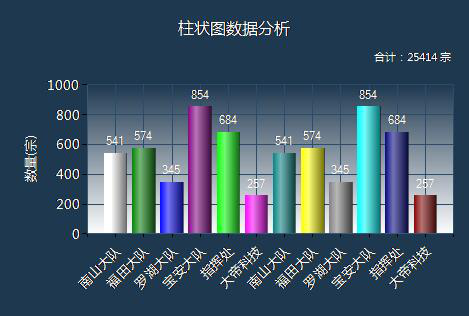
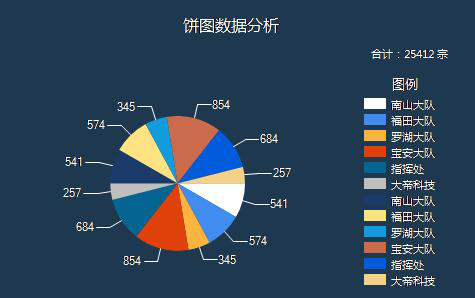
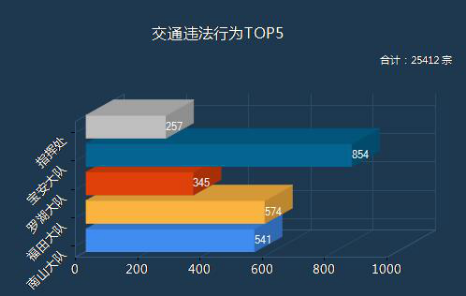
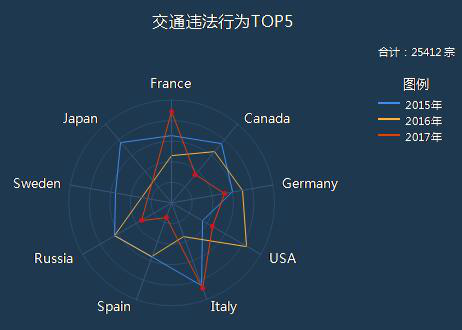
Legend就是指一个图标的图例,当一个Series属性有多个Series时,或是一个Series有几组数据时,为了区分各自的颜色,通常每个Serie对象一种颜色,这就需要用到图例来指明哪个颜色的代表的是什么数据。如下图所示:
4.关于数据的绑定
将要显示的X轴和Y轴的数据分别放到两个数组里在, 然后绑定即可。
cht1.Series[0].Points.DataBindXY(x, y);
完整的代码如下:
using System;

using System.Collections.Generic;

using System.Linq;

using System.Web;

using System.Web.UI;

using System.Web.UI.WebControls;

using System.Drawing;

using System.Web.UI.DataVisualization.Charting;

public partial class _Default : System.Web.UI.Page

{

    protected void Page_Load(object sender, EventArgs e)

    {

        string[] x = new string[] { "南山大队", "福田大队", "罗湖大队", "宝安大队", "指挥处", "大帝科技", "南山大队", "福田大队", "罗湖大队", "宝安大队", "指挥处", "大帝科技"};

        double[] y = new double[] { , , , , , , , , , , ,  };

        string[] z = new string[] { "", "", "", "", "", "", "", "", "", "", "", "" };

        string[] a = new string[] { "南山大队", "福田大队", "罗湖大队", "宝安大队", "指挥处", };

        double[] b = new double[] { , , , ,  };

        #region 柱状图

        //标题

        cht1.Titles.Add("柱状图数据分析");

        cht1.Titles[].ForeColor = Color.White;

        cht1.Titles[].Font = new Font("微软雅黑", 12f, FontStyle.Regular);

        cht1.Titles[].Alignment = ContentAlignment.TopCenter;

        cht1.Titles.Add("合计:25414 宗");

        cht1.Titles[].ForeColor = Color.White;

        cht1.Titles[].Font = new Font("微软雅黑", 8f, FontStyle.Regular);

        cht1.Titles[].Alignment = ContentAlignment.TopRight;

        //控件背景

        cht1.BackColor = Color.Transparent;

        //图表区背景

        cht1.ChartAreas[].BackColor = Color.Transparent;

        cht1.ChartAreas[].BorderColor = Color.Transparent;

        //X轴标签间距

        cht1.ChartAreas[].AxisX.Interval = ;

        cht1.ChartAreas[].AxisX.LabelStyle.IsStaggered = true;

        cht1.ChartAreas[].AxisX.LabelStyle.Angle = -;

        cht1.ChartAreas[].AxisX.TitleFont = new Font("微软雅黑", 14f, FontStyle.Regular);

        cht1.ChartAreas[].AxisX.TitleForeColor = Color.White;

        //X坐标轴颜色

        cht1.ChartAreas[].AxisX.LineColor = ColorTranslator.FromHtml("#38587a"); ;

        cht1.ChartAreas[].AxisX.LabelStyle.ForeColor = Color.White;

        cht1.ChartAreas[].AxisX.LabelStyle.Font = new Font("微软雅黑", 10f, FontStyle.Regular);

        //X坐标轴标题

        //cht1.ChartAreas[0].AxisX.Title = "数量(宗)";

        //cht1.ChartAreas[0].AxisX.TitleFont = new Font("微软雅黑", 10f, FontStyle.Regular);

        //cht1.ChartAreas[0].AxisX.TitleForeColor = Color.White;

        //cht1.ChartAreas[0].AxisX.TextOrientation = TextOrientation.Horizontal;

        //cht1.ChartAreas[0].AxisX.ToolTip = "数量(宗)";

        //X轴网络线条

        cht1.ChartAreas[].AxisX.MajorGrid.Enabled = true;

        cht1.ChartAreas[].AxisX.MajorGrid.LineColor = ColorTranslator.FromHtml("#2c4c6d");

        //Y坐标轴颜色

        cht1.ChartAreas[].AxisY.LineColor = ColorTranslator.FromHtml("#38587a");

        cht1.ChartAreas[].AxisY.LabelStyle.ForeColor = Color.White;

        cht1.ChartAreas[].AxisY.LabelStyle.Font = new Font("微软雅黑", 10f, FontStyle.Regular);

        //Y坐标轴标题

        cht1.ChartAreas[].AxisY.Title = "数量(宗)";

        cht1.ChartAreas[].AxisY.TitleFont = new Font("微软雅黑", 10f, FontStyle.Regular);

        cht1.ChartAreas[].AxisY.TitleForeColor = Color.White;

        cht1.ChartAreas[].AxisY.TextOrientation = TextOrientation.Rotated270;

        cht1.ChartAreas[].AxisY.ToolTip = "数量(宗)";

        //Y轴网格线条

        cht1.ChartAreas[].AxisY.MajorGrid.Enabled = true;

        cht1.ChartAreas[].AxisY.MajorGrid.LineColor = ColorTranslator.FromHtml("#2c4c6d");

        cht1.ChartAreas[].AxisY2.LineColor = Color.Transparent;

        cht1.ChartAreas[].BackGradientStyle = GradientStyle.TopBottom;

        Legend legend = new Legend("legend");

        legend.Title = "legendTitle";

        cht1.Series[].XValueType = ChartValueType.String;  //设置X轴上的值类型

        cht1.Series[].Label = "#VAL";                //设置显示X Y的值

        cht1.Series[].LabelForeColor = Color.White;

        cht1.Series[].ToolTip = "#VALX:#VAL";     //鼠标移动到对应点显示数值

        cht1.Series[].ChartType = SeriesChartType.Column;    //图类型(折线)

        cht1.Series[].Color = Color.Lime;

        cht1.Series[].LegendText = legend.Name;

        cht1.Series[].IsValueShownAsLabel = true;

        cht1.Series[].LabelForeColor = Color.White;

        cht1.Series[].CustomProperties = "DrawingStyle = Cylinder";

        cht1.Legends.Add(legend);

        cht1.Legends[].Position.Auto = false;

        //绑定数据

        cht1.Series[].Points.DataBindXY(x, y);

        cht1.Series[].Points[].Color = Color.White;

        cht1.Series[].Palette = ChartColorPalette.Bright;

        #endregion

        #region 饼图

        //标题

        cht2.Titles.Add("饼图数据分析");

        cht2.Titles[].ForeColor = Color.White;

        cht2.Titles[].Font = new Font("微软雅黑", 12f, FontStyle.Regular);

        cht2.Titles[].Alignment = ContentAlignment.TopCenter;

        cht2.Titles.Add("合计:25412 宗");

        cht2.Titles[].ForeColor = Color.White;

        cht2.Titles[].Font = new Font("微软雅黑", 8f, FontStyle.Regular);

        cht2.Titles[].Alignment = ContentAlignment.TopRight;

        //控件背景

        cht2.BackColor = Color.Transparent;

        //图表区背景

        cht2.ChartAreas[].BackColor = Color.Transparent;

        cht2.ChartAreas[].BorderColor = Color.Transparent;

        //X轴标签间距

        cht2.ChartAreas[].AxisX.Interval = ;

        cht2.ChartAreas[].AxisX.LabelStyle.IsStaggered = true;

        cht2.ChartAreas[].AxisX.LabelStyle.Angle = -;

        cht2.ChartAreas[].AxisX.TitleFont = new Font("微软雅黑", 14f, FontStyle.Regular);

        cht2.ChartAreas[].AxisX.TitleForeColor = Color.White;

        //X坐标轴颜色

        cht2.ChartAreas[].AxisX.LineColor = ColorTranslator.FromHtml("#38587a"); ;

        cht2.ChartAreas[].AxisX.LabelStyle.ForeColor = Color.White;

        cht2.ChartAreas[].AxisX.LabelStyle.Font = new Font("微软雅黑", 10f, FontStyle.Regular);

        //X坐标轴标题

        cht2.ChartAreas[].AxisX.Title = "数量(宗)";

        cht2.ChartAreas[].AxisX.TitleFont = new Font("微软雅黑", 10f, FontStyle.Regular);

        cht2.ChartAreas[].AxisX.TitleForeColor = Color.White;

        cht2.ChartAreas[].AxisX.TextOrientation = TextOrientation.Horizontal;

        cht2.ChartAreas[].AxisX.ToolTip = "数量(宗)";

        //X轴网络线条

        cht2.ChartAreas[].AxisX.MajorGrid.Enabled = true;

        cht2.ChartAreas[].AxisX.MajorGrid.LineColor = ColorTranslator.FromHtml("#2c4c6d");

        //Y坐标轴颜色

        cht2.ChartAreas[].AxisY.LineColor = ColorTranslator.FromHtml("#38587a");

        cht2.ChartAreas[].AxisY.LabelStyle.ForeColor = Color.White;

        cht2.ChartAreas[].AxisY.LabelStyle.Font = new Font("微软雅黑", 10f, FontStyle.Regular);

        //Y坐标轴标题

        cht2.ChartAreas[].AxisY.Title = "数量(宗)";

        cht2.ChartAreas[].AxisY.TitleFont = new Font("微软雅黑", 10f, FontStyle.Regular);

        cht2.ChartAreas[].AxisY.TitleForeColor = Color.White;

        cht2.ChartAreas[].AxisY.TextOrientation = TextOrientation.Rotated270;

        cht2.ChartAreas[].AxisY.ToolTip = "数量(宗)";

        //Y轴网格线条

        cht2.ChartAreas[].AxisY.MajorGrid.Enabled = true;

        cht2.ChartAreas[].AxisY.MajorGrid.LineColor = ColorTranslator.FromHtml("#2c4c6d");

        cht2.ChartAreas[].AxisY2.LineColor = Color.Transparent;

        //背景渐变

        cht2.ChartAreas[].BackGradientStyle = GradientStyle.None;

        //图例样式

        Legend legend2 = new Legend("#VALX");

        legend2.Title = "图例";

        legend2.TitleBackColor = Color.Transparent;

        legend2.BackColor = Color.Transparent;

        legend2.TitleForeColor = Color.White;

        legend2.TitleFont = new Font("微软雅黑", 10f, FontStyle.Regular);

        legend2.Font = new Font("微软雅黑", 8f, FontStyle.Regular);

        legend2.ForeColor = Color.White;

        cht2.Series[].XValueType = ChartValueType.String;  //设置X轴上的值类型

        cht2.Series[].Label = "#VAL";                //设置显示X Y的值

        cht2.Series[].LabelForeColor = Color.White;

        cht2.Series[].ToolTip = "#VALX:#VAL(宗)";     //鼠标移动到对应点显示数值

        cht2.Series[].ChartType = SeriesChartType.Pie;    //图类型(折线)

        cht2.Series[].Color = Color.Lime;

        cht2.Series[].LegendText = legend2.Name;

        cht2.Series[].IsValueShownAsLabel = true;

        cht2.Series[].LabelForeColor = Color.White;

        cht2.Series[].CustomProperties = "DrawingStyle = Cylinder";

        cht2.Series[].CustomProperties = "PieLabelStyle = Outside";

        cht2.Legends.Add(legend2);

        cht2.Legends[].Position.Auto = true;

        cht2.Series[].IsValueShownAsLabel = true;

        //是否显示图例

        cht2.Series[].IsVisibleInLegend = true;

        cht2.Series[].ShadowOffset = ;

        //饼图折线

        cht2.Series[]["PieLineColor"] = "White";

        //绑定数据

        cht2.Series[].Points.DataBindXY(x, y);

        cht2.Series[].Points[].Color = Color.White;

        //绑定颜色

        cht2.Series[].Palette = ChartColorPalette.BrightPastel;

        #endregion

        #region Bar图

        //标题

        cht3.Titles.Add("交通违法行为TOP5");

        cht3.Titles[].ForeColor = Color.White;

        cht3.Titles[].Font = new Font("微软雅黑", 12f, FontStyle.Regular);

        cht3.Titles[].Alignment = ContentAlignment.TopCenter;

        cht3.Titles.Add("合计:25412 宗 ");

        cht3.Titles[].ForeColor = Color.White;

        cht3.Titles[].Font = new Font("微软雅黑", 8f, FontStyle.Regular);

        cht3.Titles[].Alignment = ContentAlignment.TopRight;

        //控件背景

        cht3.BackColor = Color.Transparent;

        //图表区背景

        cht3.ChartAreas[].BackColor = Color.Transparent;

        cht3.ChartAreas[].BorderColor = Color.Transparent;

        //X轴标签间距

        cht3.ChartAreas[].AxisX.Interval = ;

        cht3.ChartAreas[].AxisX.LabelStyle.IsStaggered = true;

        cht3.ChartAreas[].AxisX.LabelStyle.Angle = -;

        cht3.ChartAreas[].AxisX.TitleFont = new Font("微软雅黑", 14f, FontStyle.Regular);

        cht3.ChartAreas[].AxisX.TitleForeColor = Color.White;

        //X坐标轴颜色

        cht3.ChartAreas[].AxisX.LineColor = ColorTranslator.FromHtml("#38587a"); ;

        cht3.ChartAreas[].AxisX.LabelStyle.ForeColor = Color.White;

        cht3.ChartAreas[].AxisX.LabelStyle.Font = new Font("微软雅黑", 10f, FontStyle.Regular);

        //X坐标轴标题

        //cht3.ChartAreas[0].AxisX.Title = "数量(宗)";

        //cht3.ChartAreas[0].AxisX.TitleFont = new Font("微软雅黑", 10f, FontStyle.Regular);

        //cht3.ChartAreas[0].AxisX.TitleForeColor = Color.White;

        //cht3.ChartAreas[0].AxisX.TextOrientation = TextOrientation.Auto;

        //cht3.ChartAreas[0].AxisX.ToolTip = "数量(宗)";

        //X轴网络线条

        cht3.ChartAreas[].AxisX.MajorGrid.Enabled = true;

        cht3.ChartAreas[].AxisX.MajorGrid.LineColor = ColorTranslator.FromHtml("#2c4c6d");

        //Y坐标轴颜色

        cht3.ChartAreas[].AxisY.LineColor = ColorTranslator.FromHtml("#38587a");

        cht3.ChartAreas[].AxisY.LabelStyle.ForeColor = Color.White;

        cht3.ChartAreas[].AxisY.LabelStyle.Font = new Font("微软雅黑", 10f, FontStyle.Regular);

        //Y坐标轴标题

        //cht3.ChartAreas[0].AxisY.Title = "数量(宗)";

        //cht3.ChartAreas[0].AxisY.TitleFont = new Font("微软雅黑", 10f, FontStyle.Regular);

        //cht3.ChartAreas[0].AxisY.TitleForeColor = Color.White;

        //cht3.ChartAreas[0].AxisY.TextOrientation = TextOrientation.Auto;

        //cht3.ChartAreas[0].AxisY.ToolTip = "数量(宗)";

        //Y轴网格线条

        cht3.ChartAreas[].AxisY.MajorGrid.Enabled = true;

        cht3.ChartAreas[].AxisY.MajorGrid.LineColor = ColorTranslator.FromHtml("#2c4c6d");

        cht3.ChartAreas[].AxisY2.LineColor = Color.Transparent;

        cht3.ChartAreas[].AxisX.IsMarginVisible = false;

        cht3.ChartAreas[].Area3DStyle.Enable3D = true;

        //背景渐变

        cht2.ChartAreas[].BackGradientStyle = GradientStyle.None;

        //图例样式

        Legend legend3 = new Legend("#VALX");

        legend3.Title = "图例";

        legend3.TitleBackColor = Color.Transparent;

        legend3.BackColor = Color.Transparent;

        legend3.TitleForeColor = Color.White;

        legend3.TitleFont = new Font("微软雅黑", 10f, FontStyle.Regular);

        legend3.Font = new Font("微软雅黑", 8f, FontStyle.Regular);

        legend3.ForeColor = Color.White;

        cht3.Series[].XValueType = ChartValueType.String;  //设置X轴上的值类型

        cht3.Series[].Label = "#VAL";                //设置显示X Y的值

        cht3.Series[].LabelForeColor = Color.White;

        cht3.Series[].ToolTip = "#VALX:#VAL(宗)";     //鼠标移动到对应点显示数值

        cht3.Series[].ChartType = SeriesChartType.Bar;    //图类型(折线)

        cht3.Series[].Color = Color.Lime;

        //cht3.Series[0].LegendText = legend3.Name;

        cht3.Series[].IsValueShownAsLabel = true;

        cht3.Series[].LabelForeColor = Color.White;

        cht3.Series[].CustomProperties = "DrawingStyle = Cylinder";

        cht3.Series[].CustomProperties = "PieLabelStyle = Outside";

        //cht3.Legends.Add(legend3);

        //cht3.Legends[0].Position.Auto = true;

        //是否显示图例

        cht3.Series[].IsVisibleInLegend = true;

        cht3.Series[].ShadowOffset = ;

        //饼图折线

        cht3.Series[]["PieLineColor"] = "White";

        //绑定数据

        cht3.Series[].Points.DataBindXY(a, b);

        //cht3.Series[0].Points[0].Color = Color.White;

        //绑定颜色

        cht3.Series[].Palette = ChartColorPalette.BrightPastel;

        //for (int n = 0; n < x.Length; n++)

        //{

        //    int ptIdx = cht3.Series[0].Points.AddY(Convert.ToDouble(y[n]));

        //    DataPoint pt = this.cht3.Series[0].Points[ptIdx];

        //    pt.LegendText = x[n] + " " + "#PERCENT{P2}" + " [ " + "#VAL{D} 次" + " ]";//右边标签列显示的文字

        //    pt.Label = x[n] + " " + "#PERCENT{P2}" + " [ " + "#VAL{D} 次" + " ]"; //圆饼外显示的信息

        //    //  pt.LabelToolTip = "#PERCENT{P2}";

        //    //pt.LabelBorderColor = Color.Red;//文字背景色

        //}

        #endregion

        #region 雷达图

       // //标题

        cht4.Titles.Add("交通违法行为TOP5");

        cht4.Titles[].ForeColor = Color.White;

        cht4.Titles[].Font = new Font("微软雅黑", 12f, FontStyle.Regular);

        cht4.Titles[].Alignment = ContentAlignment.TopCenter;

        cht4.Titles.Add("合计:25412 宗 ");

        cht4.Titles[].ForeColor = Color.White;

        cht4.Titles[].Font = new Font("微软雅黑", 8f, FontStyle.Regular);

        cht4.Titles[].Alignment = ContentAlignment.TopRight;

        //控件背景

        cht4.BackColor = Color.Transparent;

        cht4.ChartAreas[].BackColor = Color.Transparent;

        cht4.ChartAreas[].BorderColor = Color.Transparent;

        //X轴标签间距

        cht4.ChartAreas[].AxisX.Interval = ;

        cht4.ChartAreas[].AxisX.LabelStyle.IsStaggered = true;

        cht4.ChartAreas[].AxisX.LabelStyle.Angle = -;

        cht4.ChartAreas[].AxisX.TitleFont = new Font("微软雅黑", 14f, FontStyle.Regular);

        cht4.ChartAreas[].AxisX.TitleForeColor = Color.White;

        //X坐标轴颜色

        cht4.ChartAreas[].AxisX.LineColor = ColorTranslator.FromHtml("#38587a"); ;

        cht4.ChartAreas[].AxisX.LabelStyle.ForeColor = Color.White;

        cht4.ChartAreas[].AxisX.LabelStyle.Font = new Font("微软雅黑", 10f, FontStyle.Regular);

        //X坐标轴标题

        //cht4.ChartAreas[0].AxisX.Title = "数量(宗)";

        //cht4.ChartAreas[0].AxisX.TitleFont = new Font("微软雅黑", 10f, FontStyle.Regular);

        //cht4.ChartAreas[0].AxisX.TitleForeColor = Color.White;

        //cht4.ChartAreas[0].AxisX.TextOrientation = TextOrientation.Auto;

        //cht4.ChartAreas[0].AxisX.ToolTip = "数量(宗)";

        //X轴网络线条

        cht4.ChartAreas[].AxisX.MajorGrid.Enabled = true;

        cht4.ChartAreas[].AxisX.MajorGrid.LineColor = ColorTranslator.FromHtml("#2c4c6d");

        //Y坐标轴颜色

        cht4.ChartAreas[].AxisY.LineColor = ColorTranslator.FromHtml("#38587a");

        cht4.ChartAreas[].AxisY.LabelStyle.ForeColor = Color.White;

        cht4.ChartAreas[].AxisY.LabelStyle.Font = new Font("微软雅黑", 10f, FontStyle.Regular);

        //Y坐标轴标题

        //cht4.ChartAreas[0].AxisY.Title = "数量(宗)";

        //cht4.ChartAreas[0].AxisY.TitleFont = new Font("微软雅黑", 10f, FontStyle.Regular);

        //cht4.ChartAreas[0].AxisY.TitleForeColor = Color.White;

        //cht4.ChartAreas[0].AxisY.TextOrientation = TextOrientation.Auto;

        //cht4.ChartAreas[0].AxisY.ToolTip = "数量(宗)";

        //Y轴网格线条

        cht4.ChartAreas[].AxisY.MajorGrid.Enabled = true;

        cht4.ChartAreas[].AxisY.MajorGrid.LineColor = ColorTranslator.FromHtml("#2c4c6d");

        cht4.ChartAreas[].AxisY2.LineColor = Color.Transparent;

        cht4.ChartAreas[].AxisX.IsMarginVisible = false;

        cht4.ChartAreas[].Area3DStyle.Enable3D = true;

        cht4.ChartAreas[].AxisX.IsInterlaced = false;

        cht4.ChartAreas[].AxisX.IsMarginVisible = false;

        //刻度线

        cht4.ChartAreas[].AxisY.MajorTickMark.Enabled = false;

        //cht4.ChartAreas[0].AxisX.MajorGrid.Enabled = false;

        //cht4.ChartAreas[0].AxisY.MajorGrid.Enabled = false;

        //cht4.ChartAreas[0].AxisX.MajorTickMark.Enabled = false;

        cht4.ChartAreas[].AxisY.LabelStyle.Enabled = false;

        //背景渐变

        cht4.ChartAreas[].BackGradientStyle = GradientStyle.None;

        //cht4.ChartAreas[0].AxisX2.InterlacedColor = Color.Red;

        //cht4.ChartAreas[0].AxisY2.InterlacedColor = Color.Red;

        //cht4.ChartAreas[0].BorderWidth = 0;

        //cht4.ChartAreas[0].BackSecondaryColor = Color.Red;

        //cht4.ChartAreas[0].BackImageTransparentColor = Color.Red;

        //cht4.ChartAreas[0].AxisX.InterlacedColor = Color.Red;

        //cht4.ChartAreas[0].AxisX.LineColor = Color.Red;

        //cht4.ChartAreas[0].AxisX2.LineColor = Color.Red;

        //cht4.ChartAreas[0].AxisX2.MajorGrid.LineColor = Color.Red;

        //cht4.ChartAreas[0].AxisX2.MajorTickMark.LineColor = Color.Red;

        //cht4.ChartAreas[0].AxisX2.MinorTickMark.LineColor = Color.Red;

        //cht4.ChartAreas[0].AxisY.InterlacedColor = Color.Red;

        //cht4.ChartAreas[0].AxisY.LineColor = Color.Red;

        //cht4.ChartAreas[0].AxisY2.InterlacedColor = Color.Red;

        //cht4.ChartAreas[0].AxisY2.LineColor = Color.Red;

        //cht4.ChartAreas[0].AxisY2.MajorGrid.LineColor = Color.Red;

        //cht4.ChartAreas[0].AxisY2.MajorTickMark.LineColor = Color.Red;

        //cht4.ChartAreas[0].AxisY2.MinorTickMark.LineColor = Color.Red;

        //图例样式

        Legend legend4 = new Legend();

        legend4.Title = "图例";

        legend4.TitleBackColor = Color.Transparent;

        legend4.BackColor = Color.Transparent;

        legend4.TitleForeColor = Color.White;

        legend4.TitleFont = new Font("微软雅黑", 10f, FontStyle.Regular);

        legend4.Font = new Font("微软雅黑", 8f, FontStyle.Regular);

        legend4.ForeColor = Color.White;

        cht4.Legends.Add(legend4);

        cht4.Legends[].Position.Auto = true;

        //Series1

        cht4.Series[].XValueType = ChartValueType.String;

        cht4.Series[].Label = "#VAL";

        cht4.Series[].LabelForeColor = Color.White;

        cht4.Series[].ToolTip = "#LEGENDTEXT:#VAL(宗)";

        cht4.Series[].ChartType = SeriesChartType.Radar;

        cht4.Series[]["RadarDrawingStyle"] = "Line";

        cht4.Series[].LegendText = "2015年";

        cht4.Series[].IsValueShownAsLabel = true;

        //Series2

        cht4.Series.Add(new Series("Series2"));

        cht4.Series[].Label = "#VAL";

        cht4.Series[].LabelForeColor = Color.White;

        cht4.Series[].ToolTip = "#LEGENDTEXT:#VAL(宗)";

        cht4.Series[].ChartType = SeriesChartType.Radar;

        cht4.Series[]["RadarDrawingStyle"] = "Line";

        cht4.Series[].LegendText = "2016年";

        cht4.Series[].IsValueShownAsLabel = true;

        //Series3

        cht4.Series.Add(new Series("Series3"));

        cht4.Series[].Label = "#VAL";

        cht4.Series[].LabelForeColor = Color.White;

        cht4.Series[].ToolTip = "#LEGENDTEXT:#VAL(宗)";

        cht4.Series[].ChartType = SeriesChartType.Radar;

        cht4.Series[]["RadarDrawingStyle"] = "Line";

        cht4.Series[].LegendText = "2017年";

        cht4.Series[].IsValueShownAsLabel = true;

        double[] yValues = { 65.62, 75.54, 60.45, 34.73, 85.42, 55.9, 63.6, 55.2, 77.1 };

        string[] xValues = { "France", "Canada", "Germany", "USA", "Italy", "Spain", "Russia", "Sweden", "Japan" };

        //Seris2

        double[] y2 = { 45.62, 65.54, 70.45, 84.73, 35.42, 55.9, 63.6 };

        double[] y3 = { 88.62, 35.54, 52.45, 45.73, 88.42, 14.9, 33.6 };

        this.cht4.Series[].Points.DataBindXY(xValues, yValues);

        this.cht4.Series[].Points.DataBindY(y2);

        this.cht4.Series[].Points.DataBindY(y3);

        //设置X轴显示间隔为1,X轴数据比较多的时候比较有用

        cht4.ChartAreas[].AxisX.LabelStyle.Interval = ;

        //设置XY轴标题的名称所在位置位远

        cht4.ChartAreas[].AxisX.TitleAlignment = StringAlignment.Near;

        for (int i = ; i < cht4.Series[].Points.Count; i++)

        {

            cht4.Series[].Points[i].MarkerStyle = MarkerStyle.Circle;//设置折点的风格

            cht4.Series[].Points[i].MarkerColor = Color.Red;//设置seires中折点的颜色

        //    cht4.Series[1].Points[i].MarkerStyle = MarkerStyle.Square;//设置折点的风格

        //    cht4.Series[1].Points[i].MarkerColor = Color.Blue;//设置seires中折点的颜色

        //    cht4.Series[2].Points[i].MarkerStyle = MarkerStyle.Square;//设置折点的风格

        //    cht4.Series[2].Points[i].MarkerColor = Color.Green;//设置seires中折点的颜色          }

        for (int i = ; i < cht4.Series.Count; i++)

        {

            for (int j = ; j < cht4.Series[i].Points.Count; j++)

            {

                cht4.Series[i].Points[j].Label = " ";

                //cht4.Series[i].Points[j].LabelToolTip = "string.Empty";            }

        }

        //cht4.ImageType = ChartImageType.Jpeg;

        //反锯齿

        cht4.AntiAliasing = AntiAliasingStyles.All;

        //调色板 磨沙:SemiTransparent

        cht4.Palette = ChartColorPalette.BrightPastel;

        cht4.Series[].ChartType = SeriesChartType.Radar;

        cht4.Series[].ChartType = SeriesChartType.Radar;

        cht4.Series[].ChartType = SeriesChartType.Radar;

        cht4.Width = ;

        cht4.Height = ;

        #endregion

        /*

             #VALX      显示当前图例的X轴的对应文本(或数据)

             #VAL, #VALY,  显示当前图例的Y轴的对应文本(或数据)

             #VALY2, #VALY3, 显示当前图例的辅助Y轴的对应文本(或数据)

             #SER:      显示当前图例的名称

             #LABEL       显示当前图例的标签文本

             #INDEX      显示当前图例的索引

             #PERCENT       显示当前图例的所占的百分比

             #TOTAL      总数量

             #LEGENDTEXT      图例文本

             */

    }

}
九、chart控件的使用(图表数据的展示)的更多相关文章
- 用Chart控件绘制动态图表
进行程序设计时,选用一个合适的ActiveX控件,有时可大大减少编程工作量.ActiveX 控件(又称OCX)基于COM技术,作为独立的软件模块,它可以在任何程序设计语言中插入使用.本文仅以VC++为 ...
- C# Chart控件教程
一.什么是Micosoft.Chart.Controls Micosoft.Chart.Controls是微软自带的一个图形可视化的组件,可以在Web程序和窗体程序中(Windowsform)中使用. ...
- ASP.NET中的chart控件绑定SQL Server数据库
网上很多的chart控件的实例都没有绑定数据库,经过一番摸索后,终于实现了chart控件绑定数据库. 首先,在Visual Studio中建立一个网站,新建一个WebForm项目,名称为ChartTe ...
- C# Chart控件,chart、Series、ChartArea曲线图绘制的重要属性
http://blog.sina.com.cn/s/blog_621e24e20101cp64.html 为避免耽误不喜欢这种曲线图效果的亲们的时间,先看一下小DEMO效果图: 先简单说一下,从图中可 ...
- javascript曲线图和面积图Line & Area chart控件功能及下载
Line & Area chart 控件是一款新型的.可用性极强的曲线图和面积图产品.一个您网站的访问者可以放大他感兴趣的一段区域,打开和关闭数值气球,并可显示和隐藏图表.您能创建简单.堆积. ...
- 使用WinForm Chart控件 制作饼装,柱状,折线图
http://blog.csdn.net/dream2050csdn/article/details/53510340 chart控件的属性很多,主要用到Chart控件图表区域的属性有五个属性 1.A ...
- VS2010 Chart控件(一)Chart控件在ASP.NET网站中的应用示例详解(C#语言)
步骤如下: 1. Chart控件(一)Chart控件在ASP.NET网站中的应用示例详解(C#语言)" title="VS2010 Chart控件(一)Chart控件在ASP.NE ...
- Chart控件,chart、Series、ChartArea曲线图绘制的重要属性介绍
先简单说一下,从图中可以看到一个chart可以绘制多个ChartArea,每个ChartArea都可以绘制多条Series.ChartArea就是就是绘图区域,可以有多个ChartArea叠加在一起, ...
- C# chart控件基础使用
基本介绍:chart(图表) 功能:主要用来绘制折线图,柱状图与饼状图,也可达到动态效果(例如作示波器): 需要说明 一个chart可以包含多个chartArea. chartArea是具体的坐标区域 ...
随机推荐
- Vbox中Linux虚拟机网络配置(比较实用)
好久没写过东西了,主要大部分都是来自对生活的感悟,很少有实实在在的关于学得有成就感的技术可以“炫耀”,所以也就懒得在这个上面登了. 实验室很早就有位师兄曾在吃饭的路上问过我们这群小弟,你们知道Vbox ...
- C语言实现常用数据结构——二叉树
#include<stdio.h> #include<stdlib.h> #define SIZE 10 typedef struct Tree { int data; str ...
- 03 Javascript的数据类型
数据类型包括:基本数据类型和引用数据类型 基本数据类型指的是简单的数据段,引用数据类型指的是有多个值构成的对象. 当我们把变量赋值给一个变量时,解析器首先要确认的就是这个值是基本类型值还是引用类型值 ...
- Flask学习之旅--简易留言板
一.写在前面 正所谓“纸上得来终觉浅,方知此事要躬行”,在看文档和视频之余,我觉得还是要动手做点什么东西才能更好地学习吧,毕竟有些东西光看文档真的难以理解,于是就试着使用Flask框架做了一个简易留言 ...
- vi,etc目录文件,环境变量,别名功能
1 vi命令使用技巧补充 1.1 如何快速编辑文本内容 yy ---快速复制文件内容 3yy ---复制三行内容 p ---快速粘贴文本内容 3p ---粘贴三行内容 dd ---快速删除文件内容 ...
- Neo4j 爬坑笔记for3.2.6
官网语法,非常详尽:http://neo4j.com/docs/developer-manual/current/cypher/clauses/match/ A:请对应版本号,不同大版本可能会有很大区 ...
- MediatR一个.net中简单好用的中介者模式实现方案
MediatRGit地址:https://github.com/jbogard/MediatR 1.安装妞盖特包 一般来说只需要安装一个MediatR就行了,.net core程序需要再安装一个Med ...
- Ruby中的各种比较方式对比
Ruby中设计了很多种比较方式,所有对象都能进行==.!=.===.<=>.eql?.equal?这几种比较.此外,当实现了<=>之后,如果还include了Comparabl ...
- 嵌入式物联网32 ARM linux 等创客学院学习视频共享给大家
大家手机号登录学习链接即可观看 有坛友说手机号登录不上 具体自测 http://www.makeru.com.cn/live/1392_303.html?s=60220走进嵌入式http:// ...
- 《Python 3网络爬虫开发实战中文》超清PDF+源代码+书籍软件包
<Python 3网络爬虫开发实战中文>PDF+源代码+书籍软件包 下载: 链接:https://pan.baidu.com/s/18yqCr7i9x_vTazuMPzL23Q 提取码:i ...