
day(66)作业
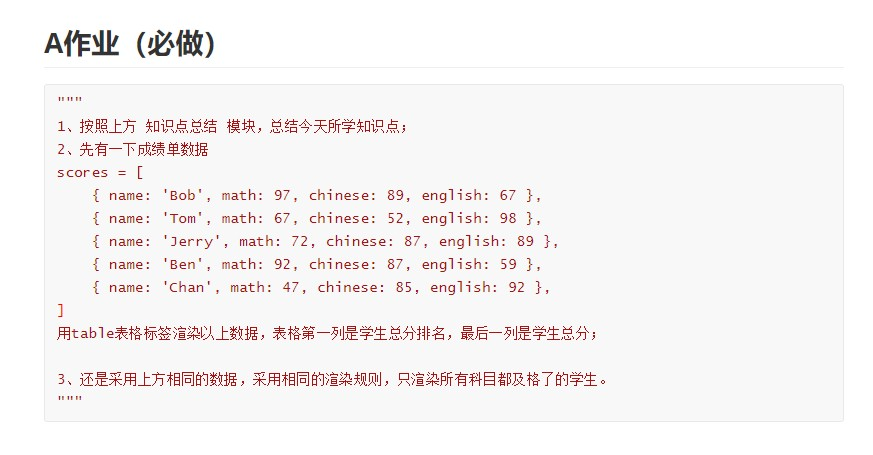
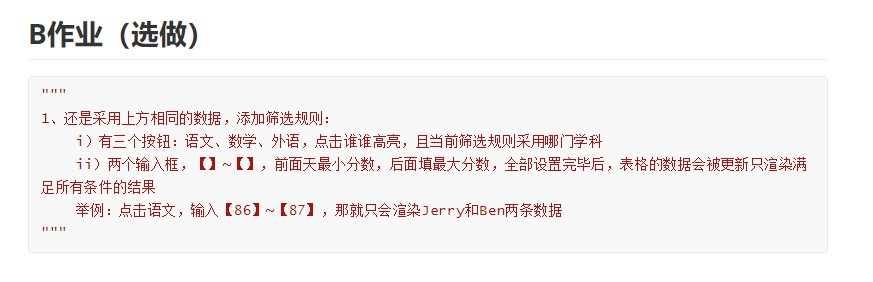
<!DOCTYPE html>
<html lang="en">
<head>
    <meta charset="UTF-8">
    <title>作业</title>
</head>
<body>
<div id="app">
    <h1 class="text-center">学生成绩总分排名表</h1>
    <table class="table table-hover">
        <thead>
        <tr>
            <th>姓名</th>
            <th>数学</th>
            <th>语文</th>
            <th>英语</th>
            <th>总分</th>
        </tr>
        </thead>
        <tbody>

        <tr v-for="dic in order_scores">
            <th>{{ dic['name'] }}</th>
            <th>{{ dic['math'] }}</th>
            <th>{{ dic['chinese'] }}</th>
            <th>{{ dic['english'] }}</th>
            <th>{{ dic['math']+dic['chinese']+dic['english'] }}</th>
        </tr>
        </tbody>
    </table>

    <h1 class="text-center">学生成绩及格表</h1>
    <table class="table table-hover">
        <thead>
        <tr>
            <th>姓名</th>
            <th>数学</th>
            <th>语文</th>
            <th>英语</th>
            <th>总分</th>
        </tr>
        </thead>
        <tbody>

        <tr v-for="dic in pass_score">
            <th>{{ dic['name'] }}</th>
            <th>{{ dic['math'] }}</th>
            <th>{{ dic['chinese'] }}</th>
            <th>{{ dic['english'] }}</th>
            <th>{{ dic['math']+dic['chinese']+dic['english'] }}</th>
        </tr>
        </tbody>
    </table>

    <h1 class="text-center">学生成绩查询表</h1>
    <p>
        <button type="button" @click="subject('math')">数学</button>
        <button type="button" @click="subject('chinese')">语文</button>
        <button type="button" @click="subject('english')">英语</button>
    </p>
    <p>请输入分数
        <input type="number" v-model="start" min="0" max="100">~
        <input type="number" v-model="end" min="0" max="100">
    </p>
    <table class="table table-hover">
        <thead>
        <tr>
            <th>姓名</th>
            <th :style="{backgroundColor: math}">数学</th>
            <th :style="{backgroundColor: chinese}">语文</th>
            <th :style="{backgroundColor: english}">英语</th>
            <th>总分</th>
        </tr>
        </thead>
        <tbody>
        <tr v-for="dic in scores">
            <th>{{ dic['name'] }}</th>
            <th :style="{backgroundColor: math}">{{ dic.math }}</th>
            <th :style="{backgroundColor: chinese}">{{ dic.chinese }}</th>
            <th :style="{backgroundColor: english}">{{ dic.english }}</th>
            <th>{{ dic['math']+dic['chinese']+dic['english'] }}</th>
        </tr>
        </tbody>
    </table>
</div>
</body>
<script src="js/vue.js"></script>
<script>
    new Vue({
        el: '#app',
        data: {
            scores: [
                {name: 'Bob', math: 97, chinese: 89, english: 67},
                {name: 'Tom', math: 67, chinese: 52, english: 98},
                {name: 'Jerry', math: 72, chinese: 87, english: 89},
                {name: 'Ben', math: 92, chinese: 87, english: 59},
                {name: 'Chan', math: 47, chinese: 85, english: 92},
            ],

            english: "",
            chinese: "",
            math: "",

            start: '',
            end: '',

            page: ''

        },
        methods: {
            subject(sub) {
                if (sub === "math") {
                    this.math = "red";
                    this.english = '';
                    this.chinese = '';
                } else if (sub === "english") {
                    this.english = "red";
                    this.math = "";
                    this.chinese = "";
                } else {
                    this.math = '';
                    this.english = '';
                    this.chinese = "red";
                }

            }
        },
        computed: {
            order_scores: function () {
                let arr = this.scores;

                for (let i = 0; i < arr.length; i++) {
                    for (let j = 0; j < arr.length - 1; j++) {
                        let sum1 = arr[j].math + arr[j].chinese + arr[j].english;
                        let sum2 = arr[j + 1].math + arr[j + 1].chinese + arr[j + 1].english;
                        if (sum1 < sum2) {
                            let temp = arr[j + 1];
                            arr[j + 1] = arr[j];
                            arr[j] = temp;
                        }
                    }
                }
                return arr
            },

            pass_score: function () {
                let arr = this.scores;
                let arr1 = [];
                for (let i = 0; i < arr.length; i++) {
                    if (arr[i].math >= 60 && arr[i].chinese >= 60 && arr[i].english >= 60) {
                        arr1[i] = arr[i]
                    }
                }

                return arr1
            },
        }

    })
</script>
</html>
day(66)作业的更多相关文章
- C 语言学习 第12次作业总结
作业总结 本次课堂的内容为字符串相关的几个函数还有结构体. 字符串相关函数 在此之前的课程中,输入主要都是使用scanf这个函数.而在这节课上,冯老师讲解了字符串获取函数gets.在不需要控制符的情况 ...
- python之路第二篇(基础篇)
入门知识: 一.关于作用域: 对于变量的作用域,执行声明并在内存中存在,该变量就可以在下面的代码中使用. if 10 == 10: name = 'allen' print name 以下结论对吗? ...
- SpringBoot-ElasticJob封装快速上手使用(分布式定时器)
elastic-job-spring-boot qq交流群:812321371 1 简介 Elastic-Job是一个分布式调度解决方案,由两个相互独立的子项目Elastic-Job-Lite和Ela ...
- C语言学习 第九次作业总结
本次作业练习的内容是二维数组.下面我先简单的说下二维数组的基本知识点: 二维数组其实这个中文概念颇有误导--会让人感觉这是一个两个维度的概念.所以很多的国外的C语言书籍上会称这种数组为多下标数组:即首 ...
- C语言学习 第七次作业总结
C语言学习 第七次作业总结 数组可以分为数组和多下标数组(在传统的国内C语言书本中,将其称为二/多维数组). 数组名称 在之前的课程中,大家应该都有印象,对于int a这样的定义,会为变量 a 声明一 ...
- 耿丹CS16-2班课堂测试作业汇总
Deadline: 2016-11-01 11:59 作业内容 课堂测试作业总结 00.题目得5分,多半扣在格式上,有些同学代码写得很过分,已经很仁慈对待,同学们珍惜之: 01.界面设计得分不好,换行 ...
- SQL SERVER 中如何用脚本管理作业
在SQL SERVER中用脚本管理作业,在绝大部分场景下,脚本都比UI界面管理作业要高效.简洁.打个简单的比方,如果你要查看作业的运行时长,如果用UI界面查看,100个作业,你就得在历史记录里面至少查 ...
- Python学习day3作业
days3作业 作业需求 HAproxy配置文件操作 根据用户输入,输出对应的backend下的server信息 可添加backend 和sever信息 可修改backend 和sever信息 可删除 ...
- 作业成绩 final-review 20161201-1203 15:05
final-review阶段,20161201-20161203 15:05 final 评论II截止 20161204 09:00 申诉截止时间 20161207 12:00,微信联系杨贵福. 凡描 ...
随机推荐
- 字节跳动——IT技术工程师面试题
.自我介绍 .项目介绍 .争对个人项目进行提问 .场景模拟 .1如何知道用户的指定视频(类似于QQ发视频)的服务是正常的 .使用appum进行自动化测试 .使用bat脚本获取进程状态,然后定时发送em ...
- Redis缓存NoSQL
下面是一些关于Redis比较好的文章,因为篇幅较大,我就将其折叠起来了.不太喜欢分不同的笔记去记载,除非真的很多很多.所以本文不仅要对Redis做简单的介绍,还要分别介绍Redis中的五种结构,并会贴 ...
- MySQL Aborted_clients和 Aborted_connects状态变量详解
Aborted_clients和 Aborted_connects状态变量详解 By:授客 QQ:1033553122 状态变量定义 Aborted_clients 因客户端消亡时未恰当的关闭连接 ...
- Android Fragment 多层叠加时点击穿透解决方案
一.问题现象 多层fragment叠加时,点击上层fragment会使下层fragment的控件对应点击事件响应,这种现象就是点击穿透. 对于这种情况,我们一般都是对baseFragment进行vie ...
- Dockerfile优化
总结: 1.编写.dockerignore文件 2.容器只运行单个应用 3.将多个RUN指令合并为一个 4.基础镜像的标签不要用latest 5.每个RUN指令后删除多余文件 6.选择合适的基础镜像( ...
- dom元素的tabindex属性介绍及在vue项目中的应用
dom元素的tabindex属性介绍及在vue项目中的应用 tabindex属性作用 让普通dom元素变为可聚焦的元素 让普通dom元素可以参与顺序键盘导航(通常使用Tab键,因此得名). tabin ...
- MySql索引背后的数据结构及算法
本文以MySQL数据库为研究对象,讨论与数据库索引相关的一些话题.特别需要说明的是,MySQL支持诸多存储引擎,而各种存储引擎对索引的支持也各不相同,因此MySQL数据库支持多种索引类型,如BTree ...
- FormData使用方法详解,以及在IE9环境下,前端的文件上传问题
FormData的主要用途有两个: 1.将form表单元素的name与value进行组合,实现表单数据的序列化,从而减少表单元素的拼接,提高工作效率. 2.异步上传文件 一.创建formData对象 ...
- idea实战技巧
一.背景 为什么想写这个,因为编码一线更多的是实战,实战中,可能一个快捷键,一个小技巧,就能省很多时间. 本文会持续记录,持续更新. 二.技巧 1.全局替换(带正则) 场景是: 多profile的情况 ...
- queue队列基础讲解
前言 似乎这种对蒟蒻最重要的概念都搜不到,对巨佬来说也根本不必要提及. 导致我也不懂. Queue 意义 queue,队列,一种数据结构. 队列是一种操作受限制的线性表: 特点: 1.元素先进先出. ...