
Part 30 AngularJS routeparams example
Here is what we want to do : When we navigate to /students, the list of student names must be displayed as hyperlinks. 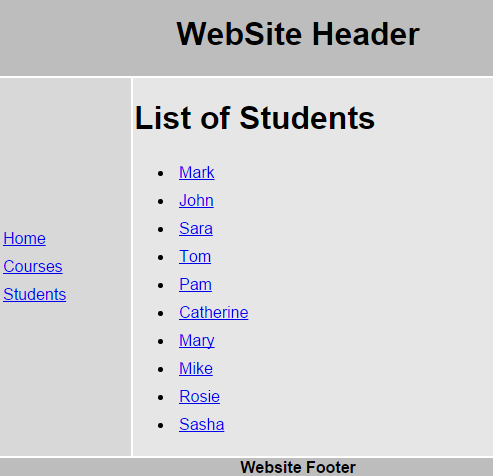
When we click on any student name, the respective student details should be displayed as shown below. When we click on "Back to Students list" it should take us back to students list page. 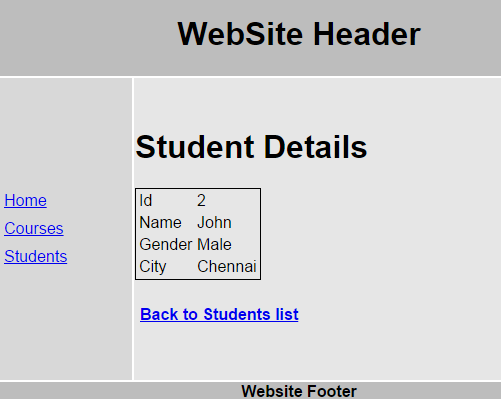
Here are the steps to achieve this
Step 1 : The first step is to add a Web Method to our ASP.NET web service, which will retrieve student by their id. Add the following Web Method in StudentService.asmx.cs
[WebMethod]

public void GetStudent(int id)

{

    Student student = new Student();

    string cs = ConfigurationManager.ConnectionStrings["DBCS"].ConnectionString;

    using (SqlConnection con = new SqlConnection(cs))

    {

        SqlCommand cmd = new

            SqlCommand("Select * from tblStudents where id = @id", con);

        SqlParameter param = new SqlParameter()

        {

            ParameterName = "@id",

            Value = id

        };

        cmd.Parameters.Add(param);

        con.Open();

        SqlDataReader rdr = cmd.ExecuteReader();

        while (rdr.Read())

        {

            student.id = Convert.ToInt32(rdr["Id"]);

            student.name = rdr["Name"].ToString();

            student.gender = rdr["Gender"].ToString();

            student.city = rdr["City"].ToString();

        }

    }

    JavaScriptSerializer js = new JavaScriptSerializer();

    Context.Response.Write(js.Serialize(student));

}
After adding the above method, the complete code in StudentService.asmx.cs should be as shown below.
using System;

using System.Collections.Generic;

using System.Configuration;

using System.Data.SqlClient;

using System.Web.Script.Serialization;

using System.Web.Services;

namespace Demo

{

    [WebService(Namespace = "http://tempuri.org/")]

    [WebServiceBinding(ConformsTo = WsiProfiles.BasicProfile1_1)]

    [System.ComponentModel.ToolboxItem(false)]

    [System.Web.Script.Services.ScriptService]

    public class StudentService : System.Web.Services.WebService

    {

        [WebMethod]

        public void GetAllStudents()

        {

            List<Student> listStudents = new List<Student>();

            string cs = ConfigurationManager.ConnectionStrings["DBCS"].ConnectionString;

            using (SqlConnection con = new SqlConnection(cs))

            {

                SqlCommand cmd = new SqlCommand("Select * from tblStudents", con);

                con.Open();

                SqlDataReader rdr = cmd.ExecuteReader();

                while (rdr.Read())

                {

                    Student student = new Student();

                    student.id = Convert.ToInt32(rdr["Id"]);

                    student.name = rdr["Name"].ToString();

                    student.gender = rdr["Gender"].ToString();

                    student.city = rdr["City"].ToString();

                    listStudents.Add(student);

                }

            }

            JavaScriptSerializer js = new JavaScriptSerializer();

            Context.Response.Write(js.Serialize(listStudents));

        }

        [WebMethod]

        public void GetStudent(int id)

        {

            Student student = new Student();

            string cs = ConfigurationManager.ConnectionStrings["DBCS"].ConnectionString;

            using (SqlConnection con = new SqlConnection(cs))

            {

                SqlCommand cmd = new

                    SqlCommand("Select * from tblStudents where id = @id", con);

                SqlParameter param = new SqlParameter()

                {

                    ParameterName = "@id",

                    Value = id

                };

                cmd.Parameters.Add(param);

                con.Open();

                SqlDataReader rdr = cmd.ExecuteReader();

                while (rdr.Read())

                {

                    student.id = Convert.ToInt32(rdr["Id"]);

                    student.name = rdr["Name"].ToString();

                    student.gender = rdr["Gender"].ToString();

                    student.city = rdr["City"].ToString();

                }

            }

            JavaScriptSerializer js = new JavaScriptSerializer();

            Context.Response.Write(js.Serialize(student));

        }

    }

}
Step 2 : Change the HTML in students.html partial template as shown below. Notice student name is now wrapped in an anchor tag. This will display student name as a hyperlink. If you click on a student name with id = 1, then we will be redirected to /students/1
<h1>List of Students</h1>

<ul>

    <li ng-repeat="student in students">

        <a href="students/{{student.id}}">

            {{student.name}}

        </a>

    </li>

</ul>
Step 3 : Now let's create an angularjs route with parameters. Add the following route inscript.js file. Our next step is to create studentDetails.html partial template andstudentDetailsController.
.when("/students/:id", {

    templateUrl: "Templates/studentDetails.html",

    controller: "studentDetailsController"

})
With the above change, the code in script.js should now look as shown below. Please pay attention to the code highlighted in yellow.
/// <reference path="angular.min.js" />

/// <reference path="angular-route.min.js" />

var app = angular

            .module("Demo", ["ngRoute"])

            .config(function ($routeProvider, $locationProvider) {

                $routeProvider

                    .when("/home", {

                        templateUrl: "Templates/home.html",

                        controller: "homeController"

                    })

                    .when("/courses", {

                        templateUrl: "Templates/courses.html",

                        controller: "coursesController"

                    })

                    .when("/students", {

                        templateUrl: "Templates/students.html",

                        controller: "studentsController"

                    })

                    .when("/students/:id", {

                        templateUrl: "Templates/studentDetails.html",

                        controller: "studentDetailsController"

                    })

                    .otherwise({

                        redirectTo: "/home"

                    })

                $locationProvider.html5Mode(true);

            })

            .controller("homeController", function ($scope) {

                $scope.message = "Home Page";

            })

            .controller("coursesController", function ($scope) {

                $scope.courses = ["C#", "VB.NET", "ASP.NET", "SQL Server"];

            })

             .controller("studentsController", function ($scope, $http) {

                 $http.get("StudentService.asmx/GetAllStudents")

                                        .then(function (response) {

                                            $scope.students = response.data;

                                        })

             })
Step 4 : Right click on Templates folder in solution explorer and add a new HTMLpage. Name it studentDetails.html. Copy and paste the following HTML.
<h1>Student Details</h1>

<table style="border:1px solid black">

    <tr>

        <td>Id</td>

        <td>{{student.id}}</td>

    </tr>

    <tr>

        <td>Name</td>

        <td>{{student.name}}</td>

    </tr>

    <tr>

        <td>Gender</td>

        <td>{{student.gender}}</td>

    </tr>

    <tr>

        <td>City</td>

        <td>{{student.city}}</td>

    </tr>

</table>

<h4><a href="students">Back to Students list</a></h4>
Step 5 : Add studentDetailsController in script.js which calls GetStudent web method and returns the requested student data.
.controller("studentDetailsController", function ($scope, $http, $routeParams) {

    $http({

        url: "StudentService.asmx/GetStudent",

        method: "get",

        params: { id: $routeParams.id }

    }).then(function (response) {

        $scope.student = response.data;

    })

})
With the above change, the code in script.js should now look as shown below. Please pay attention to the code highlighted in yellow.
/// <reference path="angular.min.js" />

/// <reference path="angular-route.min.js" />

var app = angular

            .module("Demo", ["ngRoute"])

            .config(function ($routeProvider, $locationProvider) {

                $routeProvider

                    .when("/home", {

                        templateUrl: "Templates/home.html",

                        controller: "homeController"

                    })

                    .when("/courses", {

                        templateUrl: "Templates/courses.html",

                        controller: "coursesController"

                    })

                    .when("/students", {

                        templateUrl: "Templates/students.html",

                        controller: "studentsController"

                    })

                    .when("/students/:id", {

                        templateUrl: "Templates/studentDetails.html",

                        controller: "studentDetailsController"

                    })

                    .otherwise({

                        redirectTo: "/home"

                    })

                $locationProvider.html5Mode(true);

            })

            .controller("homeController", function ($scope) {

                $scope.message = "Home Page";

            })

            .controller("coursesController", function ($scope) {

                $scope.courses = ["C#", "VB.NET", "ASP.NET", "SQL Server"];

            })

             .controller("studentsController", function ($scope, $http) {

                 $http.get("StudentService.asmx/GetAllStudents")

                                        .then(function (response) {

                                            $scope.students = response.data;

                                        })

             })

            .controller("studentDetailsController", function ($scope, $http, $routeParams) {

                $http({

                    url: "StudentService.asmx/GetStudent",

                    method: "get",

                    params: { id: $routeParams.id }

                }).then(function (response) {

                    $scope.student = response.data;

                })

            })
Part 30 AngularJS routeparams example的更多相关文章
- 30.angularJS第一个实例
转自:https://www.cnblogs.com/best/tag/Angular/ AngularJS 通过 ng-directives 扩展了 HTML. ng-app 指令定义一个 Angu ...
- 挖SRC逻辑漏洞心得分享
文章来源i春秋 白帽子挖洞的道路还漫长的很,老司机岂非一日一年能炼成的. 本文多处引用了 YSRC 的 公(qi)开(yin)漏(ji)洞(qiao).挖SRC思路一定要广!!!!漏洞不会仅限于SQL ...
- 30分钟快速掌握AngularJs
[后端人员耍前端系列]AngularJs篇:30分钟快速掌握AngularJs 一.前言 对于前端系列,自然少不了AngularJs的介绍了.在前面文章中,我们介绍了如何使用KnockoutJs来 ...
- AngularJS 30分钟快速入门【译】
引用自:http://www.revillweb.com/tutorials/angularjs-in-30-minutes-angularjs-tutorial/,翻译如下: 简介 我三年前开始使用 ...
- [后端人员耍前端系列]AngularJs篇:30分钟快速掌握AngularJs
一.前言 对于前端系列,自然少不了AngularJs的介绍了.在前面文章中,我们介绍了如何使用KnockoutJs来打造一个单页面程序,后面一篇文章将介绍如何使用AngularJs的开发一个单页面应用 ...
- angularjs路由传值$routeParams
AngularJS利用路由传值, 1.导包 <script src="angular.min.js"></script> <script src=&q ...
- 7_nodejs angularjs
webstrom使用: ctrl+b/点击,代码导航,自动跳转到定义 ctrl+n跳转指定类 ctrl+d复制当前行ctrl+enter另起一行ctrl+y删除当前行 ctrl+alt/shift+b ...
- AngularJS之代码风格36条建议【一】(九)
前言 其实在新学一门知识时,我们应该注意下怎么书写代码更加规范,从开始就注意养成一个良好的习惯无论是对于bug的查找还是走人后别人熟悉代码都是非常好的,利人利己的事情何乐而不为呢,关于AngularJ ...
- angularjs学习总结 详细教程(转载)
1 前言 前端技术的发展是如此之快,各种优秀技术.优秀框架的出现简直让人目不暇接,紧跟时代潮流,学习掌握新知识自然是不敢怠慢. AngularJS是google在维护,其在国外已经十分火热,可是国内的 ...
随机推荐
- 鸿蒙内核源码分析(时钟任务篇) | 触发调度谁的贡献最大 | 百篇博客分析OpenHarmony源码 | v3.05
百篇博客系列篇.本篇为: v03.xx 鸿蒙内核源码分析(时钟任务篇) | 触发调度谁的贡献最大 | 51.c.h .o 任务管理相关篇为: v03.xx 鸿蒙内核源码分析(时钟任务篇) | 触发调度 ...
- 51nod1821-最优集合【贪心】
正题 题目链接:http://www.51nod.com/Challenge/Problem.html#problemId=1821 题目大意 \(n\)个可重集合,\(T\)次询问,询问将集合\(S ...
- Loj#6053-简单的函数【Min25筛】
正题 题目链接:https://loj.ac/p/6053 题目大意 定义一个积性函数\(f(p^c)=p\ xor\ c\),求\(\sum_{i=1}^nf(i)\) 解题思路 异或这个东西不太好 ...
- CF1511G-Chips on a Board【倍增】
正题 题目链接:https://www.luogu.com.cn/problem/CF1511G 题目大意 给出\(n*m\)的棋盘上每一行有一个棋子,双方轮流操作可以把一个棋子向左移动若干步(不能不 ...
- Python - __all__ 变量
import * 当我们向文件导入某个模块时,导入的是该模块中那些名称不以下划线(单下划线 _ 或者双下划线 __ )开头的变量.函数和类 因此,如果不想模块文件中的某个对象被引入到其它文件中使用,可 ...
- 第30篇-main()方法的执行
在第7篇详细介绍过为Java方法创建的栈帧,如下图所示. 调用完generate_fixed_frame()函数后一些寄存器中保存的值如下: rbx:Method* ecx:invocation co ...
- 沟谷网络的提取及沟壑密度的计算(ArcPy实现)
一.背景 沟壑密度是描述地面被水道切割破碎程度的一个指标.沟壑密度是气候.地形.岩性.植被等因素综合影响的反映.沟壑密度越大,地面越破碎,平均坡度增大,地表物质稳定性降低,且易形成地表径流,土壤侵蚀加 ...
- Linux tomcat 部署war包
将打包好的 war包放在 webapps的文件夹下 在tomcat/conf 文件夹下的 server.xml 里填加 <Context path="" docBase=&q ...
- 这么多TiDB负载均衡方案总有一款适合你
[是否原创]是 [首发渠道]TiDB 社区 前言 分布式关系型数据库TiDB是一种计算和存储分离的架构,每一层都可以独立地进行水平扩展,这样就可以做到有的放矢,对症下药. 从TiDB整体架构图可以看到 ...
- Ajax样例
$.ajax({ url : "newsservlet",//请求地址 dataType : "json",//数据格式 type : "post&q ...