
Part 30 AngularJS routeparams example
Here is what we want to do : When we navigate to /students, the list of student names must be displayed as hyperlinks. 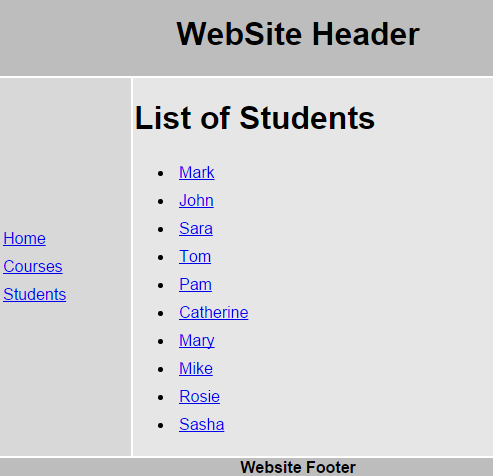
When we click on any student name, the respective student details should be displayed as shown below. When we click on "Back to Students list" it should take us back to students list page. 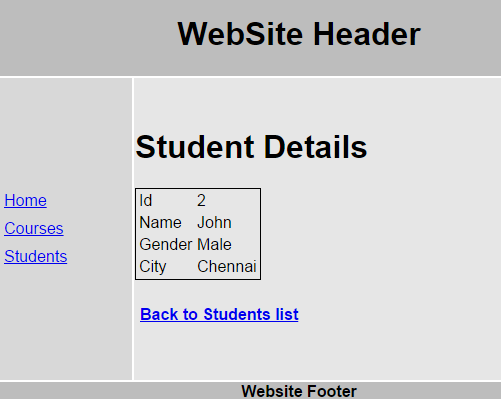
Here are the steps to achieve this
Step 1 : The first step is to add a Web Method to our ASP.NET web service, which will retrieve student by their id. Add the following Web Method in StudentService.asmx.cs
[WebMethod]

public void GetStudent(int id)

{

    Student student = new Student();

    string cs = ConfigurationManager.ConnectionStrings["DBCS"].ConnectionString;

    using (SqlConnection con = new SqlConnection(cs))

    {

        SqlCommand cmd = new

            SqlCommand("Select * from tblStudents where id = @id", con);

        SqlParameter param = new SqlParameter()

        {

            ParameterName = "@id",

            Value = id

        };

        cmd.Parameters.Add(param);

        con.Open();

        SqlDataReader rdr = cmd.ExecuteReader();

        while (rdr.Read())

        {

            student.id = Convert.ToInt32(rdr["Id"]);

            student.name = rdr["Name"].ToString();

            student.gender = rdr["Gender"].ToString();

            student.city = rdr["City"].ToString();

        }

    }

    JavaScriptSerializer js = new JavaScriptSerializer();

    Context.Response.Write(js.Serialize(student));

}
After adding the above method, the complete code in StudentService.asmx.cs should be as shown below.
using System;

using System.Collections.Generic;

using System.Configuration;

using System.Data.SqlClient;

using System.Web.Script.Serialization;

using System.Web.Services;

namespace Demo

{

    [WebService(Namespace = "http://tempuri.org/")]

    [WebServiceBinding(ConformsTo = WsiProfiles.BasicProfile1_1)]

    [System.ComponentModel.ToolboxItem(false)]

    [System.Web.Script.Services.ScriptService]

    public class StudentService : System.Web.Services.WebService

    {

        [WebMethod]

        public void GetAllStudents()

        {

            List<Student> listStudents = new List<Student>();

            string cs = ConfigurationManager.ConnectionStrings["DBCS"].ConnectionString;

            using (SqlConnection con = new SqlConnection(cs))

            {

                SqlCommand cmd = new SqlCommand("Select * from tblStudents", con);

                con.Open();

                SqlDataReader rdr = cmd.ExecuteReader();

                while (rdr.Read())

                {

                    Student student = new Student();

                    student.id = Convert.ToInt32(rdr["Id"]);

                    student.name = rdr["Name"].ToString();

                    student.gender = rdr["Gender"].ToString();

                    student.city = rdr["City"].ToString();

                    listStudents.Add(student);

                }

            }

            JavaScriptSerializer js = new JavaScriptSerializer();

            Context.Response.Write(js.Serialize(listStudents));

        }

        [WebMethod]

        public void GetStudent(int id)

        {

            Student student = new Student();

            string cs = ConfigurationManager.ConnectionStrings["DBCS"].ConnectionString;

            using (SqlConnection con = new SqlConnection(cs))

            {

                SqlCommand cmd = new

                    SqlCommand("Select * from tblStudents where id = @id", con);

                SqlParameter param = new SqlParameter()

                {

                    ParameterName = "@id",

                    Value = id

                };

                cmd.Parameters.Add(param);

                con.Open();

                SqlDataReader rdr = cmd.ExecuteReader();

                while (rdr.Read())

                {

                    student.id = Convert.ToInt32(rdr["Id"]);

                    student.name = rdr["Name"].ToString();

                    student.gender = rdr["Gender"].ToString();

                    student.city = rdr["City"].ToString();

                }

            }

            JavaScriptSerializer js = new JavaScriptSerializer();

            Context.Response.Write(js.Serialize(student));

        }

    }

}
Step 2 : Change the HTML in students.html partial template as shown below. Notice student name is now wrapped in an anchor tag. This will display student name as a hyperlink. If you click on a student name with id = 1, then we will be redirected to /students/1
<h1>List of Students</h1>

<ul>

    <li ng-repeat="student in students">

        <a href="students/{{student.id}}">

            {{student.name}}

        </a>

    </li>

</ul>
Step 3 : Now let's create an angularjs route with parameters. Add the following route inscript.js file. Our next step is to create studentDetails.html partial template andstudentDetailsController.
.when("/students/:id", {

    templateUrl: "Templates/studentDetails.html",

    controller: "studentDetailsController"

})
With the above change, the code in script.js should now look as shown below. Please pay attention to the code highlighted in yellow.
/// <reference path="angular.min.js" />

/// <reference path="angular-route.min.js" />

var app = angular

            .module("Demo", ["ngRoute"])

            .config(function ($routeProvider, $locationProvider) {

                $routeProvider

                    .when("/home", {

                        templateUrl: "Templates/home.html",

                        controller: "homeController"

                    })

                    .when("/courses", {

                        templateUrl: "Templates/courses.html",

                        controller: "coursesController"

                    })

                    .when("/students", {

                        templateUrl: "Templates/students.html",

                        controller: "studentsController"

                    })

                    .when("/students/:id", {

                        templateUrl: "Templates/studentDetails.html",

                        controller: "studentDetailsController"

                    })

                    .otherwise({

                        redirectTo: "/home"

                    })

                $locationProvider.html5Mode(true);

            })

            .controller("homeController", function ($scope) {

                $scope.message = "Home Page";

            })

            .controller("coursesController", function ($scope) {

                $scope.courses = ["C#", "VB.NET", "ASP.NET", "SQL Server"];

            })

             .controller("studentsController", function ($scope, $http) {

                 $http.get("StudentService.asmx/GetAllStudents")

                                        .then(function (response) {

                                            $scope.students = response.data;

                                        })

             })
Step 4 : Right click on Templates folder in solution explorer and add a new HTMLpage. Name it studentDetails.html. Copy and paste the following HTML.
<h1>Student Details</h1>

<table style="border:1px solid black">

    <tr>

        <td>Id</td>

        <td>{{student.id}}</td>

    </tr>

    <tr>

        <td>Name</td>

        <td>{{student.name}}</td>

    </tr>

    <tr>

        <td>Gender</td>

        <td>{{student.gender}}</td>

    </tr>

    <tr>

        <td>City</td>

        <td>{{student.city}}</td>

    </tr>

</table>

<h4><a href="students">Back to Students list</a></h4>
Step 5 : Add studentDetailsController in script.js which calls GetStudent web method and returns the requested student data.
.controller("studentDetailsController", function ($scope, $http, $routeParams) {

    $http({

        url: "StudentService.asmx/GetStudent",

        method: "get",

        params: { id: $routeParams.id }

    }).then(function (response) {

        $scope.student = response.data;

    })

})
With the above change, the code in script.js should now look as shown below. Please pay attention to the code highlighted in yellow.
/// <reference path="angular.min.js" />

/// <reference path="angular-route.min.js" />

var app = angular

            .module("Demo", ["ngRoute"])

            .config(function ($routeProvider, $locationProvider) {

                $routeProvider

                    .when("/home", {

                        templateUrl: "Templates/home.html",

                        controller: "homeController"

                    })

                    .when("/courses", {

                        templateUrl: "Templates/courses.html",

                        controller: "coursesController"

                    })

                    .when("/students", {

                        templateUrl: "Templates/students.html",

                        controller: "studentsController"

                    })

                    .when("/students/:id", {

                        templateUrl: "Templates/studentDetails.html",

                        controller: "studentDetailsController"

                    })

                    .otherwise({

                        redirectTo: "/home"

                    })

                $locationProvider.html5Mode(true);

            })

            .controller("homeController", function ($scope) {

                $scope.message = "Home Page";

            })

            .controller("coursesController", function ($scope) {

                $scope.courses = ["C#", "VB.NET", "ASP.NET", "SQL Server"];

            })

             .controller("studentsController", function ($scope, $http) {

                 $http.get("StudentService.asmx/GetAllStudents")

                                        .then(function (response) {

                                            $scope.students = response.data;

                                        })

             })

            .controller("studentDetailsController", function ($scope, $http, $routeParams) {

                $http({

                    url: "StudentService.asmx/GetStudent",

                    method: "get",

                    params: { id: $routeParams.id }

                }).then(function (response) {

                    $scope.student = response.data;

                })

            })
Part 30 AngularJS routeparams example的更多相关文章
- 30.angularJS第一个实例
转自:https://www.cnblogs.com/best/tag/Angular/ AngularJS 通过 ng-directives 扩展了 HTML. ng-app 指令定义一个 Angu ...
- 挖SRC逻辑漏洞心得分享
文章来源i春秋 白帽子挖洞的道路还漫长的很,老司机岂非一日一年能炼成的. 本文多处引用了 YSRC 的 公(qi)开(yin)漏(ji)洞(qiao).挖SRC思路一定要广!!!!漏洞不会仅限于SQL ...
- 30分钟快速掌握AngularJs
[后端人员耍前端系列]AngularJs篇:30分钟快速掌握AngularJs 一.前言 对于前端系列,自然少不了AngularJs的介绍了.在前面文章中,我们介绍了如何使用KnockoutJs来 ...
- AngularJS 30分钟快速入门【译】
引用自:http://www.revillweb.com/tutorials/angularjs-in-30-minutes-angularjs-tutorial/,翻译如下: 简介 我三年前开始使用 ...
- [后端人员耍前端系列]AngularJs篇:30分钟快速掌握AngularJs
一.前言 对于前端系列,自然少不了AngularJs的介绍了.在前面文章中,我们介绍了如何使用KnockoutJs来打造一个单页面程序,后面一篇文章将介绍如何使用AngularJs的开发一个单页面应用 ...
- angularjs路由传值$routeParams
AngularJS利用路由传值, 1.导包 <script src="angular.min.js"></script> <script src=&q ...
- 7_nodejs angularjs
webstrom使用: ctrl+b/点击,代码导航,自动跳转到定义 ctrl+n跳转指定类 ctrl+d复制当前行ctrl+enter另起一行ctrl+y删除当前行 ctrl+alt/shift+b ...
- AngularJS之代码风格36条建议【一】(九)
前言 其实在新学一门知识时,我们应该注意下怎么书写代码更加规范,从开始就注意养成一个良好的习惯无论是对于bug的查找还是走人后别人熟悉代码都是非常好的,利人利己的事情何乐而不为呢,关于AngularJ ...
- angularjs学习总结 详细教程(转载)
1 前言 前端技术的发展是如此之快,各种优秀技术.优秀框架的出现简直让人目不暇接,紧跟时代潮流,学习掌握新知识自然是不敢怠慢. AngularJS是google在维护,其在国外已经十分火热,可是国内的 ...
随机推荐
- redis无法连接
Exception in thread "main" redis.clients.jedis.exceptions.JedisDataException: DENIED Redi ...
- 数据结构与算法——迪杰斯特拉(Dijkstra)算法
tip:这个算法真的很难讲解,有些地方只能意会了,多思考多看几遍还是可以弄懂的. 应用场景-最短路径问题 战争时期,胜利乡有 7 个村庄 (A, B, C, D, E, F, G) ,现在有六个邮差, ...
- dev分支和release是什么
master(主分支) 存在一条主分支(master).所有用户可见的正式版本,都从master发布(也是用于部署生产环境的分支,确保master分支稳定性).主分支作为稳定的唯一代码库,不做任何开发 ...
- Docker 常见命令
Docker 运行流程 辅助命令 # 1.安装完成辅助命令 docker version -------------------------- 查看docker的信息 docker info ---- ...
- 解决Mybatis 报错Invalid bound statement (not found)
解决Mybatis 报错Invalid bound statement (not found) 出现此错误的原因 1.xml文件不存在 2.xml文件和mapper没有映射上 namespace指定映 ...
- 【数据结构与算法Python版学习笔记】目录索引
引言 算法分析 基本数据结构 概览 栈 stack 队列 Queue 双端队列 Deque 列表 List,链表实现 递归(Recursion) 定义及应用:分形树.谢尔宾斯基三角.汉诺塔.迷宫 优化 ...
- 自动化键盘,python
国际惯例先上源https://github.com/boppreh/keyboard#键盘输入 from pynput.keyboard import Key,Controller,Listener ...
- 【二食堂】Alpha - 测试报告
TextMarking Alpha阶段测试报告 前后端测试过程及结果 在Alpha阶段,测试工作紧跟后端开发进度,一下是我们所做的一些测试工作. 后端单元测试 测试代码可以在git仓库中查看,后端对所 ...
- QMake(Qt项目构建)
qmake工具能够简化不同平台上的项目构建.可以自动产生Makefiles文件,仅仅需要少量的信息就可以生成Makefile文件.同时qmake也可以构建不是Qt的项目.qmake基于项目文件中的信息 ...
- [LGP1866]编号
传送门 题意:找n个数,使得 $ 1 \leq a_i \leq Maxnumber_i $ 求有多少种组合 这题我们可以看到,还有一种无解的情况 我们可以先判断无解的情况 首先把Maxnumber数 ...