
jenkins持续集成go应用
上文讲到使用supervisor管理我们的终端应用,这次讲一下使用jenkins持续集成
下面分别讲一下pipeline里每一个段落的含义
agent any 使用任意节点构建
parameters 模块使用参数化构建
environment 脚本全局变量
options 脚本定义参数,超时时间等
stage 每个步骤
checkout 拉取代码命令
when 当全局变量environment的value期待值符合的时候执行steps
post 结束后执行,always代表无论项目是否执行成功都要执行模块里的内容。常用的还有changed,failure,success,unstable
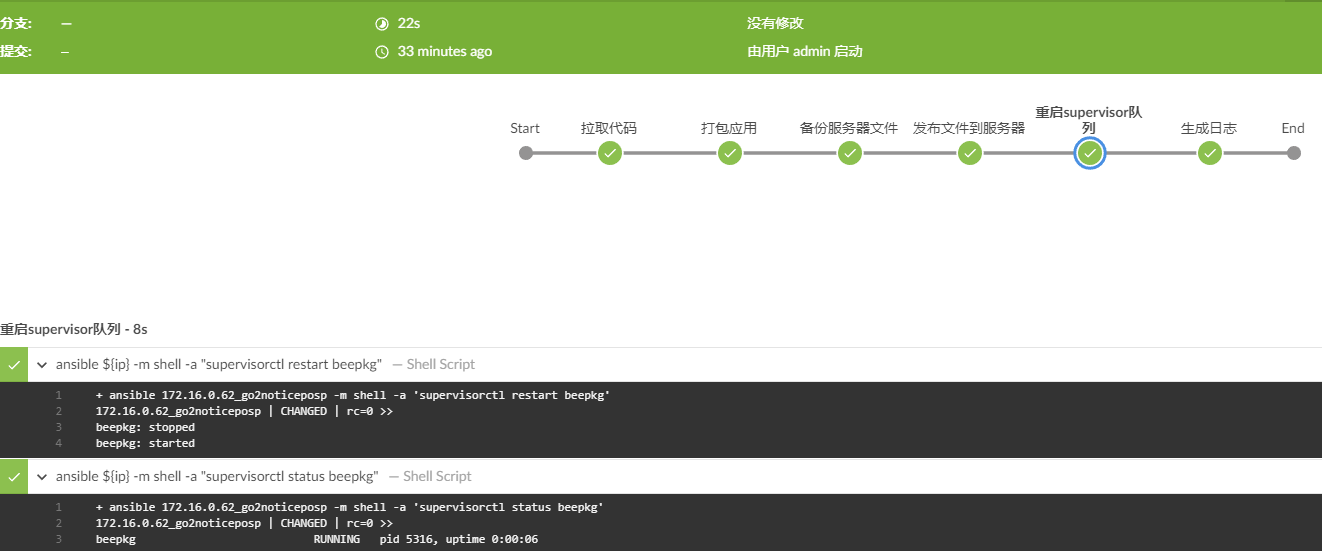
其他地方大多数使用了ansible和shell命令,比如ansible ${ip} -m shell -a "supervisorctl restart beepkg" 是使用ansible的shell 调用$ip的supervisorctl 重启beepkg队列
def createVersion() {

    // 定义一个版本号作为当次构建的版本,输出结果 20191210175842_69

    return new Date().format('yyyyMMddHHmmss') + "_${env.BUILD_ID}"

}

pipeline{

    agent any

    parameters {

        gitParameter branch: '', branchFilter: '.*', defaultValue: 'master', description: '选择代码分支', name: 'branch', quickFilterEnabled: false, selectedValue: 'NONE', sortMode: 'NONE', tagFilter: '*', type: 'PT_BRANCH'

        choice choices: ['吴增辉'], description: '填写开发人员', name: 'developer'

        choice choices: ['yes','no'], description: '是否备份', name: 'backup'

        text defaultValue: '', description: '请填写更新日志', name: 'record'

    }

    environment {

        def ip = "172.16.0.62_go2noticeposp"

        def remotedir = "/data/beego/cups-api"

        def _version = createVersion()

        def tmpdir = "/tmp/cups-api_${_version}"

    }

    options {

        disableConcurrentBuilds()

        timeout(time: 3, unit: 'MINUTES')

        buildDiscarder(logRotator(numToKeepStr: '10'))

    }

    stages{

        stage('拉取代码'){

            steps{

                deleteDir()

                checkout([$class: 'GitSCM', branches: [[name: '$branch']], doGenerateSubmoduleConfigurations: false, extensions: [], submoduleCfg: [], userRemoteConfigs: [[credentialsId: '9df82ae3-5563-4d32-808b-00e8aa9ae26c', url: 'git@192.168.80.13:wuzh/cups-api.git']]])

            }

        }

        stage('打包应用'){

            options {

                timeout(time: 4, unit: 'MINUTES')

            }

            steps{

                sh label: '', script: '/root/go/bin/bee pack'

            }

        }

        stage('备份服务器文件'){

            when {

                environment name: 'backup',

                value: 'yes'

            }

            steps{

                sh label: '', script: '''ansible ${ip} -m file -a "path=$tmpdir state=directory"

                ansible ${ip} -m shell -a "rsync -qa $remotedir/*  $tmpdir --exclude=\'logs\'"'''

            }

        }

        stage('发布文件到服务器'){

            steps{

                sh label: '', script: 'tar -zxf ${WORKSPACE}/go_online-cups-api.tar.gz'

                sh label: '', script: 'ansible ${ip} -m synchronize -a "src=${WORKSPACE}/go_online-cups-api dest=$remotedir delete=no archive=yes compress=yes rsync_opts=--exclude=\'conf\'"'

            }

        }

        stage('重启supervisor队列'){

            steps{

                sh label: '', script: 'ansible ${ip} -m shell -a "supervisorctl restart beepkg"'

                sh label: '', script: 'ansible ${ip} -m shell -a "supervisorctl status beepkg"'

            }

        }

        stage('生成日志'){

            steps{

                sh label: '', script: '''today=`date "+%Y_%m_%d"`

                now=`date "+%Y_%m_%d_%H_%M_%S"`

                echo "时间: $now" >> /root/update_log/$today

                echo "开发者: $developer" >> /root/update_log/$today

                echo "git地址: git@192.168.80.13:wuzh/cups-api.git" >> /root/update_log/$today

                echo "分支名字: $branch" >> /root/update_log/$today

                echo "更新日志: $record" >> /root/update_log/$today

                echo -e \'-----------------------------------\\n\' >> /root/update_log/$today'''

            }

        }

    }

    post('send mail'){

        always{

            emailext(

                subject: '构建通知:${PROJECT_NAME} - Build # ${BUILD_NUMBER} -${BUILD_STATUS}!',

                body: '${FILE,path="/root/script/email.html"}',

                to: 'guoyabin@96199.com.cn')

        }

    }

}
执行效果如下:
jenkins持续集成go应用的更多相关文章
- python_java_selenium_ jenkins持续集成Firfox_chrome浏览器不显示的解决方法?
python_java_selenium_ jenkins持续集成Firfox_chrome浏览器不显示的解决方法: 原因:因为jenkins是用windows installer 安装成 windo ...
- jenkins持续集成源码管理选项为None,构建失败找不到git.exe解决办法
我的jenkins版本为Jenkins ver. 2.19.1 1.源码管理选项只有None的解决办法: 在插件管理中心,搜索对应的源码管理插件这里以git为例,搜索git plugin点击右下角的安 ...
- 【转】jenkins持续集成配置
搭建jenkins持续集成服务器 1.jenkins简介 Jenkins,前身为Hudson,是基于Java开发的一种持续集成工具,用于监控持续重复的工作,包括: 持续的软件版本发布/测试项目. 监控 ...
- Jenkins持续集成
Jenkins持续集成 & .NET 最近受累于测试环境每次发布都很麻烦,而且我们有多个测试环境,因此专门抽时间做了Jenkins的配置和研究. 折腾了两天终于绿灯以后,先来个截图,Blu ...
- Jenkins持续集成相关文章整理
构建iOS持续集成平台(一)——自动化构建和依赖管理 构建iOS持续集成平台(二)——测试框架 构建iOS持续集成平台(三)——CI服务器与自动化部署 使用Jenkins搭建iOS开发的CI服务器 一 ...
- Docker+Jenkins持续集成环境(4):使用etcd+confd实现容器服务注册与发现
前面我们已经通过jenkins+docker搭建了基本的持续集成环境,实现了服务的自动构建和部署,但是,我们遇到一个问题,jenkins构建出来的镜像部署后,需要通过ip:port去访问,有什么更好的 ...
- Docker+Jenkins持续集成环境(5): android构建与apk发布
项目组除了常规的java项目,还有不少android项目,如何使用jenkins来实现自动构建呢?本文会介绍安卓项目通过jenkins构建的方法,并设计开发一个类似蒲公英的app托管平台. andro ...
- windows部署jenkins持续集成maven测试项目不能访问测试报告
买了一台阿里云的服务器用于练习maven test项目,系统版本wiondows server 2012,将jenkins war包部署在Tomcat服务器上,项目构建后,生成的报告在C:\Windo ...
- Linux-GitLab+Jenkins持续集成+自动化部署
GitLab+Jenkins持续集成+自动化部署 什么是持续集成? (1)Continuous integration (CI) 持续集成是一种软件开发实践,即团队开发成员经常集成他们的工作,通常每个 ...
- 行为驱动:Cucumber + Selenium + Java(二) - extentreports 测试报告+jenkins持续集成
1.extentreports 测试报告 pom文件 <dependency> <groupId>com.vimalselvam</groupId> <art ...
随机推荐
- leeetcode 20. 有效的括号
20. 有效的括号 问题描述 给定一个只包括 '(',')','{','}','[',']' 的字符串,判断字符串是否有效. 有效字符串需满足: 左括号必须用相同类型的右括号闭合. 左括号必须以正确的 ...
- 【解决了一个小问题】gin框架中出现如下错误:"[GIN-debug] [WARNING] Headers were already written. Wanted to override status code 400 with 500"
POST到数据到一条gin框架的接口后,客户端收到400错误,并且返回了业务中返回的"decode json fail". 关键代码是: func report(c *gin.Co ...
- unity3d微软语音识别httppost失败。安全验证问题
using System; using System.Collections; using System.Collections.Generic; using System.IO; using Sys ...
- [一]Cesium利其器——Visual Studio Code
Cesium中文网:http://cesiumcn.org/ | 国内快速访问:http://cesium.coinidea.com/ IDE Web前端刚入门的朋友,常常想选择一个快速.好用.流行( ...
- gin中的路由参数
package main import ( "fmt" "github.com/gin-gonic/gin" ) func main() { router := ...
- Servlet-概念及实现一个Servlet程序
Servlet技术 一,Servlet概念 1,Servlet是JavaEE规范之一.规范就是接口 2,Servlet就是JavaWeb三大组件之一.三大组件分别是:Servlet程序.Filter过 ...
- 请解释final finally finalize的区别
final 关键字 ,可以定义不能被继承的父类.定义不能被重写的方法,常量 finally 关键字, 异常处理的统一出口 不管是否有异常都执行 finalize 方法(protected ...
- 字节Android Native Crash治理之Memory Corruption工具原理与实践
作者:字节跳动终端技术--庞翔宇 内容摘要 MemCorruption工具是字节跳动AppHealth (Client Infrastructure - AppHealth) 团队开发的一款用于定 ...
- 学习Java第13天
今天选择数据库选了半天,Oracle,MySQL,SQL sever太难了,安装了又被图形界面,Linux虚拟机所困扰 明天尽量完成数据库安装 只能说是找视频资料和安装教程了.
- Django ORM 多对多操作 使用聚合函数和分组 F查询与Q查询
创建表 # models.py form django.db import models class Book(models.Model): # 表名book,django会自动使用项目名+我们定义的 ...