
C#.NET 操作Windows服务承载WCF
Windows服务的制作、安装可以参考这篇:
C#.NET 操作Windows服务(安装、卸载) - runliuv - 博客园 (cnblogs.com)
本篇会在这个解决方案基础上,继续修改。
一、制作WCF
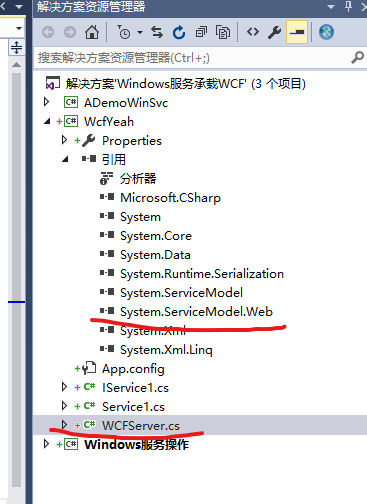
我们在原有解决方案上添加一个“WCF 服务库”,为名“WcfYeah”。
在WcfYeah中额外引用System.ServiceModel.Web.dll程序集。
修改IService1.cs:
using System.Runtime.Serialization;

using System.ServiceModel;

using System.ServiceModel.Web;

namespace WcfYeah

{

    // 注意: 使用“重构”菜单上的“重命名”命令,可以同时更改代码和配置文件中的接口名“IService1”。

    [ServiceContract]

    public interface IService1

    {

        [OperationContract]

        [WebInvoke(ResponseFormat = WebMessageFormat.Json, RequestFormat = WebMessageFormat.Json)]

        CompositeType geta(CompositeType composite);

    }

    // 使用下面示例中说明的数据约定将复合类型添加到服务操作。

    // 可以将 XSD 文件添加到项目中。在生成项目后,可以通过命名空间“WcfYeah.ContractType”直接使用其中定义的数据类型。

    [DataContract]

    public class CompositeType

    {

        bool boolValue = true;

        string stringValue = "Hello ";

        [DataMember]

        public bool BoolValue

        {

            get { return boolValue; }

            set { boolValue = value; }

        }

        [DataMember]

        public string StringValue

        {

            get { return stringValue; }

            set { stringValue = value; }

        }

    }

}
修改Service1.cs:
using System;

using System.ServiceModel;

namespace WcfYeah

{

    // 调整 ServiceBehavior,使其支持并发

    [ServiceBehavior(ConcurrencyMode = ConcurrencyMode.Multiple, InstanceContextMode = InstanceContextMode.PerCall, UseSynchronizationContext = false)]

    public class Service1 : IService1

    {

        public CompositeType geta(CompositeType composite)

        {

            CompositeType myret = new CompositeType();

            try

            {

                if(composite==null)

                    myret.StringValue = "[0]输入实体为空:" + DateTime.Now.ToString();

                else

                    myret.StringValue = "[1]输入实体不为空:" + DateTime.Now.ToString();

            }

            catch (Exception ex)

            {

                myret.StringValue = "发生异常:" + ex.Message;

            }

            return myret;

        }

    }

}
增加一个WCFServer.cs:
using System.Net;

using System.ServiceModel.Web;

using System.Threading;

namespace WcfYeah

{

    public class WCFServer

    {

        public WebServiceHost host = null;

        public WCFServer()

        {

            #region 优化调整

            //对外连接数,根据实际情况加大

            if (ServicePointManager.DefaultConnectionLimit < 100)

                System.Net.ServicePointManager.DefaultConnectionLimit = 100;

            int workerThreads;//工作线程数

            int completePortsThreads; //异步I/O 线程数

            ThreadPool.GetMinThreads(out workerThreads, out completePortsThreads);

            int blogCnt = 100;

            if (workerThreads < blogCnt)

            {

                // MinThreads 值不要超过 (max_thread /2  ),否则会不生效。要不然就同时加大max_thread

                ThreadPool.SetMinThreads(blogCnt, blogCnt);

            }

            #endregion

            //注意:这里是实现类,不是接口,否则会报:ServiceHost 仅支持类服务类型。

            host = new WebServiceHost( typeof(WcfYeah.Service1));

        }

        public void Start()

        {

            host.Open();

        }

        public void Close()

        {

            if (host != null)

            {

                host.Close();

            }

        }

    }

}
二、在Windows服务中调用WCF
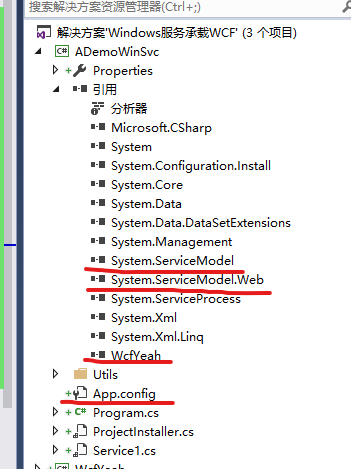
在windows服务库中引用WcfYeah这个项目,再引用System.ServiceModel.dll 和System.ServiceModel.Web.dll程序集。
修改windows服务的OnStart和OnStop方法,完整内容如下:
using CommonUtils;

using System;

using System.ServiceModel;

using System.ServiceProcess;

using WcfYeah;

namespace ADemoWinSvc

{

    public partial class Service1 : ServiceBase

    {

        WCFServer aw = null;

        public Service1()

        {

            InitializeComponent();

        }

        protected override void OnStart(string[] args)

        {

            try

            {

                if (aw == null)

                {

                    aw = new WCFServer();

                }

                if (aw.host.State == CommunicationState.Opening || aw.host.State == CommunicationState.Opened)

                {

                    GLog.WLog("[1]服务已启动。");

                    return;

                }

                aw.Start();

                GLog.WLog("[2]服务已启动");

            }

            catch (Exception ex)

            {

                GLog.WLog("OnStart ex:" + ex.Message);

            }

        }

        protected override void OnStop()

        {

            try

            {

                aw.Close();

                GLog.WLog("服务已停止");

            }

            catch (Exception ex)

            {

                GLog.WLog("OnStop ex:" + ex.Message);

            }

        }

    }

}
在windows服务库中添加一个应用配置文件(App.config),用来配置WCF服务,内容如下:
<?xml version="1.0" encoding="utf-8" ?>

<configuration>

  <system.serviceModel>

    <services>

      <service name="WcfYeah.Service1" behaviorConfiguration="behaviorThrottled">

        <host>

          <baseAddresses>

            <add baseAddress = "http://localhost:16110/myapi/" />

          </baseAddresses>

        </host>

        <!-- Service Endpoints -->

        <!-- 除非完全限定,否则地址相对于上面提供的基址-->

        <endpoint address="" binding="webHttpBinding" contract="WcfYeah.IService1" bindingConfiguration="WebHttpBinding_IService">

        </endpoint>

      </service>

    </services>

    <bindings>

      <webHttpBinding>

        <binding name="WebHttpBinding_IService"  maxBufferSize="2147483647" maxReceivedMessageSize="2147483647" maxBufferPoolSize="2147483647">

          <readerQuotas maxDepth="2147483647" maxStringContentLength="2147483647" maxArrayLength="2147483647" maxBytesPerRead="2147483647"

                maxNameTableCharCount="2147483647"/>

        </binding>

      </webHttpBinding>

    </bindings>

    <behaviors>

      <serviceBehaviors>

        <behavior name="behaviorThrottled">

          <serviceThrottling

            maxConcurrentCalls="96"

            maxConcurrentSessions="600"

            maxConcurrentInstances="696"

          />

          <!-- 为避免泄漏元数据信息,

          请在部署前将以下值设置为 false -->

          <serviceMetadata httpGetEnabled="False" httpsGetEnabled="False"/>

          <!-- 要接收故障异常详细信息以进行调试,

          请将以下值设置为 true。在部署前设置为 false

          以避免泄漏异常信息 -->

          <serviceDebug includeExceptionDetailInFaults="False" />

        </behavior>

      </serviceBehaviors>

    </behaviors>

  </system.serviceModel>

</configuration>
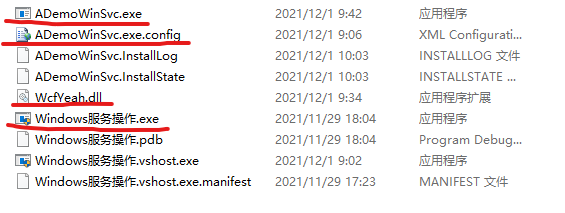
编译ADemoWinSvc项目,将编译好的ADemoWinSvc.exe、ADemoWinSvc.exe.config和WcfYeah.dll这3个文件复制到WINFORM程序编译输出目录,与Windows服务操作.exe文件放在一起。
用管理员权限启动Windows服务操作.exe,点击安装按钮。
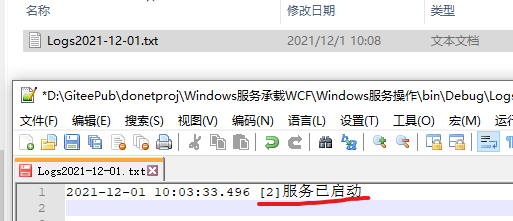
进入Logs文件夹,查看Logs文件,如果显示“[2]服务已启动”,说明windows服务安装成功,WCF正常启动。
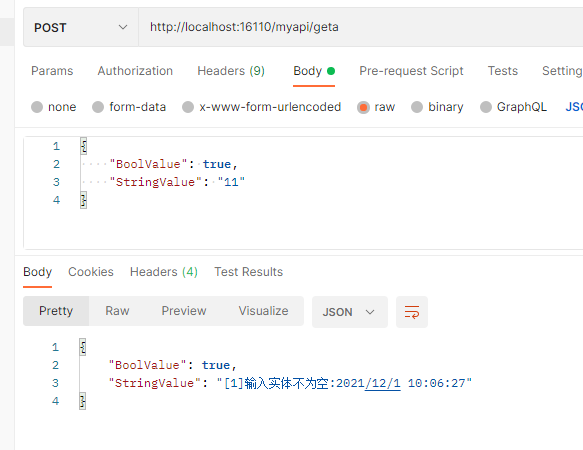
使用POSTMAN调用。
地址:http://localhost:16110/myapi/geta
方法:POST
请求报文:
C#.NET 操作Windows服务承载WCF的更多相关文章
- Windows服务承载WCF
Source文件 ------------------------- using System; using System.Collections.Generic; using System.Linq ...
- C# 操作windows服务[启动、停止、卸载、安装]
主要宗旨:不已命令形式操作windows服务 static void Main(string[] args) { var path = @"E:\开发辅助项目\WCF\WCF.Test\WC ...
- WCF开发实战系列四:使用Windows服务发布WCF服务
WCF开发实战系列四:使用Windows服务发布WCF服务 (原创:灰灰虫的家http://hi.baidu.com/grayworm) 上一篇文章中我们通过编写的控制台程序或WinForm程序来为本 ...
- C#通过SC命令和静态公共类来操作Windows服务
调用的Windows服务应用程序网址:http://www.cnblogs.com/pingming/p/5115304.html 一.引用 二.公共静态类:可以单独放到类库里 using Syste ...
- cmd命令行和bat批处理操作windows服务(转载)
一.cmd命令行---进行Windows服务操作 1.安装服务 sc create 服务名 binPath= "C:\Users\Administrator\Desktop\win32srv ...
- C#开发人员能够可视化操作windows服务
使用C#开发自己的定义windows服务是一个很简单的事.因此,当.我们需要发展自己windows它的服务.这是当我们需要有定期的计算机或运行某些程序的时候,我们开发.在这里,我有WCF监听案例,因为 ...
- SC命令---安装、开启、配置、关闭 cmd命令行和bat批处理操作windows服务
一.cmd命令行---进行Windows服务操作 1.安装服务 sc create 服务名 binPath= "C:\Users\Administrator\Desktop\win32s ...
- 基于Windows服务的WCF
(1)创建WCF 代码示例: [ServiceContract] public interface ILimsDBService { [OperationContract] int ExecuteSq ...
- 编写寄宿于windows服务的WCF服务
由于业务中有些任务需要在后台静默长期运行,或者有些服务队响应的要求比较苛刻,这样的WCF服务就不适合寄宿于IIS中.IIS每隔一段时间w3wp进程会闲置超时,造成服务的运行停止,因此这种耗时或者定时任 ...
随机推荐
- C#开发BIMFACE系列53 WinForm程序中使用CefSharp加载模型图纸1 简单应用
BIMFACE二次开发系列目录 [已更新最新开发文章,点击查看详细] 在我的博客<C#开发BIMFACE系列52 CS客户端集成BIMFACE应用的技术方案>中介绍了多种集成BIM ...
- 自动化运维利器Ansible要点汇总
由于大部分互联网公司服务器环境复杂,线上线下环境.测试正式环境.分区环境.客户项目环境等造成每个应用都要重新部署,而且服务器数量少则几十台,多则千台,若手工一台台部署效率低下,且容易出错,不利后期运维 ...
- Kettle的安装及简单使用
Kettle的安装及简单使用 目录 Kettle的安装及简单使用 一.kettle概述 二.kettle安装部署和使用 Windows下安装 案例1:MySQL to MySQL 案例2:使用作业执行 ...
- Java:LinkedList类小记
Java:LinkedList类小记 对 Java 中的 LinkedList类,做一个微不足道的小小小小记 概述 java.util.LinkedList 集合数据存储的结构是循环双向链表结构.方便 ...
- makedown笔记
makedown语法 表格 这个表格的主题 |姓名|性别|年龄|职业| | ----- | ----- | ----- | ----- | |张三|男|34|码农| |李四|男|27|代驾| 这个表格 ...
- Seata分布式事务失败通知
一.背景 在我们使用Seata作为分布式事务时,有些时候我们的分布式时候并不是每次都可以成功的,而对于这些失败的分布式事务就需要进行通知.这篇文章简单记录一下如何实现通知. 二.功能实现 此处模拟邮件 ...
- Python课程笔记(二)
1.格式化输出 print("%d %d %s" % (15, 3.14, 12.8)) 对比C语言 printf("%d,%d,%s",15, 3.14, 1 ...
- 实验5:开源控制器实践——POX
一.实验目的 1.能够理解 POX 控制器的工作原理: 2.通过验证POX的forwarding.hub和forwarding.l2_learning模块,初步掌握POX控制器的使用方法: 3.能够运 ...
- linux安装后ping不通局域网其他主机的解决方式
安装了linux后尝试进行机器间的相互通讯,发现自己虚拟机并不能查看ip地址,也不能够ping通任何一台局域网内的主机 上网查了一下发现是网卡并没有打开,需要进行如下配置 查看ls 一下/etc/sy ...
- HTML bootstrap 模态对话框添加用户
HTML 1 <!DOCTYPE html> 2 <html> 3 <head> 4 <meta charset="utf-8"> ...