
oauth2.0密码模式详解
oauth2.0密码模式
欢迎关注博主公众号「Java大师」, 专注于分享Java领域干货文章http://www.javaman.cn/sb2/oauth-password
如果你高度信任某个应用,RFC 6749 也允许用户把用户名和密码,直接告诉该应用。该应用就使用你的密码,申请令牌,这种方式称为"密码式"(password)。
1、密码模式流程
第一步,A 网站要求用户提供 B 网站的用户名和密码。拿到以后,A 就直接向 B 请求令牌。
https://oauth.b.com/token?

  grant_type=password&

  username=USERNAME&

  password=PASSWORD&

  client_id=CLIENT_ID
上面 URL 中,grant_type参数是授权方式,这里的password表示"密码式",username和password是 B 的用户名和密码。
第二步,B 网站验证身份通过后,直接给出令牌。注意,这时不需要跳转,而是把令牌放在 JSON 数据里面,作为 HTTP 回应,A 因此拿到令牌。
这种方式需要用户给出自己的用户名/密码,显然风险很大,因此只适用于其他授权方式都无法采用的情况,而且必须是用户高度信任的应用。
2、密码模式实现代码
2.1 创建pom.xml
<?xml version="1.0" encoding="UTF-8"?>

<project xmlns="http://maven.apache.org/POM/4.0.0" xmlns:xsi="http://www.w3.org/2001/XMLSchema-instance"

         xsi:schemaLocation="http://maven.apache.org/POM/4.0.0 https://maven.apache.org/xsd/maven-4.0.0.xsd">

    <modelVersion>4.0.0</modelVersion>

    <parent>

        <groupId>org.springframework.boot</groupId>

        <artifactId>spring-boot-starter-parent</artifactId>

        <version>2.2.6.RELEASE</version>

        <relativePath/> <!-- lookup parent from repository -->

    </parent>

    <groupId>com.dashi</groupId>

    <artifactId>springsecurity-oauth</artifactId>

    <version>0.0.1-SNAPSHOT</version>

    <name>springsecurity-oauth</name>

    <description>Demo project for Spring Boot</description>

    <properties>

        <java.version>1.8</java.version>

        <spring-cloud.version>Greenwich.SR5</spring-cloud.version>

    </properties>

    <dependencies>

        <dependency>

            <groupId>org.springframework.cloud</groupId>

            <artifactId>spring-cloud-starter-oauth2</artifactId>

        </dependency>

        <!--security依赖-->

        <dependency>

            <groupId>org.springframework.cloud</groupId>

            <artifactId>spring-cloud-starter-security</artifactId>

        </dependency>

        <!--boot依赖-->

        <dependency>

            <groupId>org.springframework.boot</groupId>

            <artifactId>spring-boot-starter</artifactId>

        </dependency>

        <!--boot依赖-->

        <dependency>

            <groupId>org.springframework.boot</groupId>

            <artifactId>spring-boot-starter-web</artifactId>

        </dependency>

        <!--test依赖-->

        <dependency>

            <groupId>org.springframework.boot</groupId>

            <artifactId>spring-boot-starter-test</artifactId>

            <scope>test</scope>

        </dependency>

    </dependencies>

    <build>

        <plugins>

            <plugin>

                <groupId>org.springframework.boot</groupId>

                <artifactId>spring-boot-maven-plugin</artifactId>

            </plugin>

        </plugins>

    </build>

    <dependencyManagement>

        <dependencies>

            <dependency>

                <groupId>org.springframework.cloud</groupId>

                <artifactId>spring-cloud-dependencies</artifactId>

                <version>${spring-cloud.version}</version>

                <type>pom</type>

                <scope>import</scope>

            </dependency>

        </dependencies>

    </dependencyManagement>

</project>
2.2 创建springsecurity配置文件
package com.dashi.springsecurityoauth.config;

import org.springframework.context.annotation.Bean;

import org.springframework.context.annotation.Configuration;

import org.springframework.security.config.annotation.web.builders.HttpSecurity;

import org.springframework.security.config.annotation.web.configuration.EnableWebSecurity;

import org.springframework.security.config.annotation.web.configuration.WebSecurityConfigurerAdapter;

import org.springframework.security.crypto.bcrypt.BCryptPasswordEncoder;

import org.springframework.security.crypto.password.PasswordEncoder;

@Configuration

@EnableWebSecurity

public class SecurityConfig extends WebSecurityConfigurerAdapter {

    @Bean

    public PasswordEncoder passwordEncoder(){

        return new BCryptPasswordEncoder();

    }

    @Bean

    public AuthenticationManager authenticationManager() throws Exception {

        return super.authenticationManager();

    }

}
2.3 创建UserService实现UserDetailService接口
package com.dashi.springsecurityoauth.model;

import org.springframework.security.core.GrantedAuthority;

import org.springframework.security.core.userdetails.UserDetails;

import java.util.Collection;

import java.util.List;

public class User implements UserDetails {

    private String username;

    private String password;

    private List<GrantedAuthority> authorities;

    public User(String username, String password, List<GrantedAuthority> authorities) {

        this.username = username;

        this.password = password;

        this.authorities = authorities;

    }

    @Override

    public Collection<? extends GrantedAuthority> getAuthorities() {

        return this.authorities;

    }

    @Override

    public String getPassword() {

        return this.password;

    }

    @Override

    public String getUsername() {

        return this.username;

    }

    @Override

    public boolean isAccountNonExpired() {

        return true;

    }

    @Override

    public boolean isAccountNonLocked() {

        return true;

    }

    @Override

    public boolean isCredentialsNonExpired() {

        return true;

    }

    @Override

    public boolean isEnabled() {

        return true;

    }

}
2.4 创建认证服务
package com.dashi.springsecurityoauth.config;

import com.dashi.springsecurityoauth.service.UserService;

import org.springframework.beans.factory.annotation.Autowired;

import org.springframework.beans.factory.annotation.Qualifier;

import org.springframework.context.annotation.Configuration;

import org.springframework.security.authentication.AuthenticationManager;

import org.springframework.security.crypto.password.PasswordEncoder;

import org.springframework.security.oauth2.config.annotation.configurers.ClientDetailsServiceConfigurer;

import org.springframework.security.oauth2.config.annotation.web.configuration.AuthorizationServerConfigurerAdapter;

import org.springframework.security.oauth2.config.annotation.web.configuration.EnableAuthorizationServer;

import org.springframework.security.oauth2.config.annotation.web.configurers.AuthorizationServerEndpointsConfigurer;

import org.springframework.security.oauth2.provider.token.TokenStore;

@Configuration

@EnableAuthorizationServer

public class AuthorizationServerConfig extends AuthorizationServerConfigurerAdapter {

    @Autowired

    private PasswordEncoder passwordEncoder;

    @Autowired

    private AuthenticationManager authenticationManager;

    @Autowired

    private UserService userService;

    /**

     * 密码模式采用AuthorizationServerEndpointsConfigurer配置

     * @param endpoints

     * @throws Exception

     */

    @Override

    public void configure(AuthorizationServerEndpointsConfigurer endpoints) throws Exception {

        endpoints.authenticationManager(authenticationManager)

                .userDetailsService(userService);

    }

    /**

     * @param clients

     * @throws Exception

     */

    @Override

    public void configure(ClientDetailsServiceConfigurer clients) throws Exception {

        clients.inMemory()

                .withClient("admin")

                .secret(passwordEncoder.encode("112233"))

                .accessTokenValiditySeconds(3600)

                .redirectUris("http://www.baidu.com")

                .scopes("all")

                //密码模式

                .authorizedGrantTypes("password");

    }

}
2.5 创建资源服务
package com.dashi.springsecurityoauth.config;

import org.springframework.context.annotation.Configuration;

import org.springframework.security.config.annotation.web.builders.HttpSecurity;

import org.springframework.security.oauth2.config.annotation.web.configuration.EnableResourceServer;

import org.springframework.security.oauth2.config.annotation.web.configuration.ResourceServerConfigurerAdapter;

@Configuration

@EnableResourceServer

public class ResourceServerConfig extends ResourceServerConfigurerAdapter {

    @Override

    public void configure(HttpSecurity http) throws Exception {

        http.authorizeRequests()

                .anyRequest()

                .authenticated()

                .and()

                .requestMatchers()

          		//以/user开头的地址根据token访问资源

                .antMatchers("/user/**");

    }

}
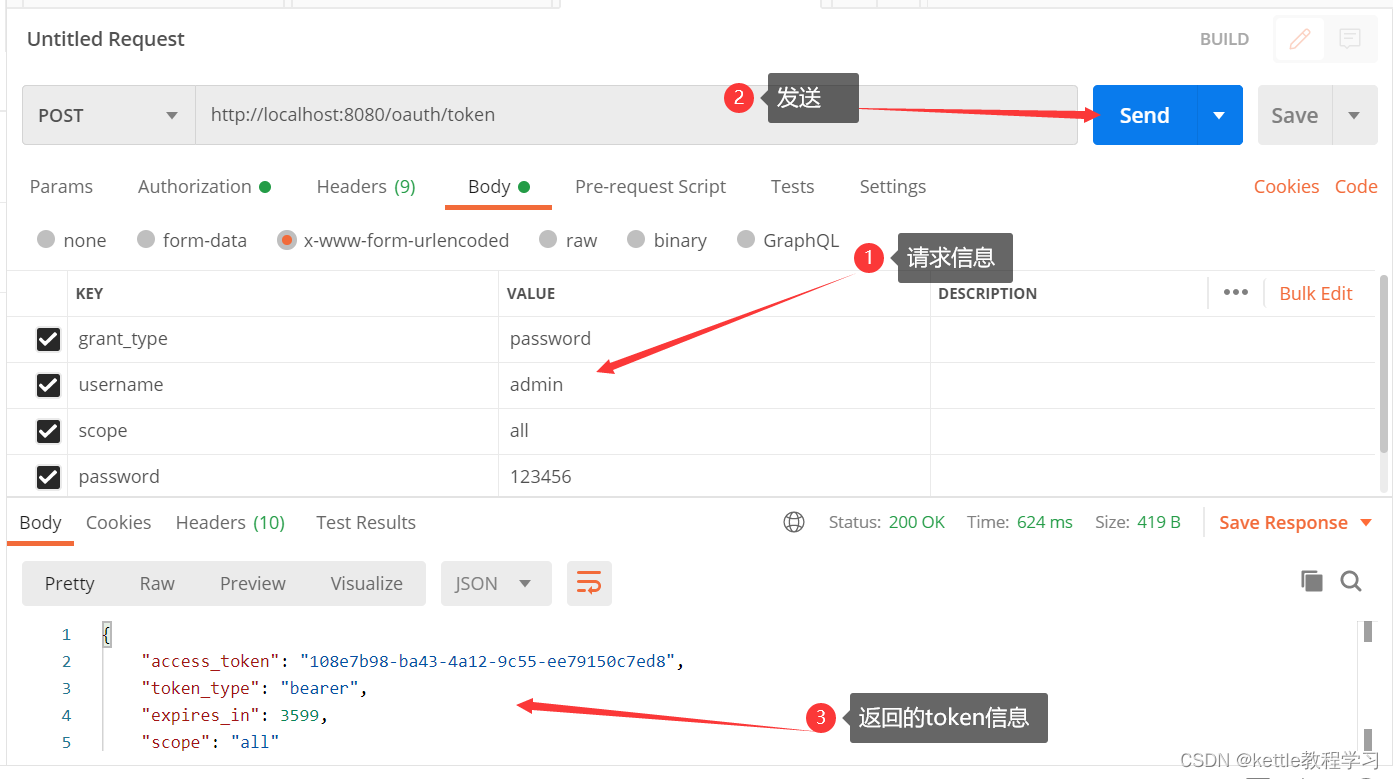
2.6 打开postman,填入下面内容获取token
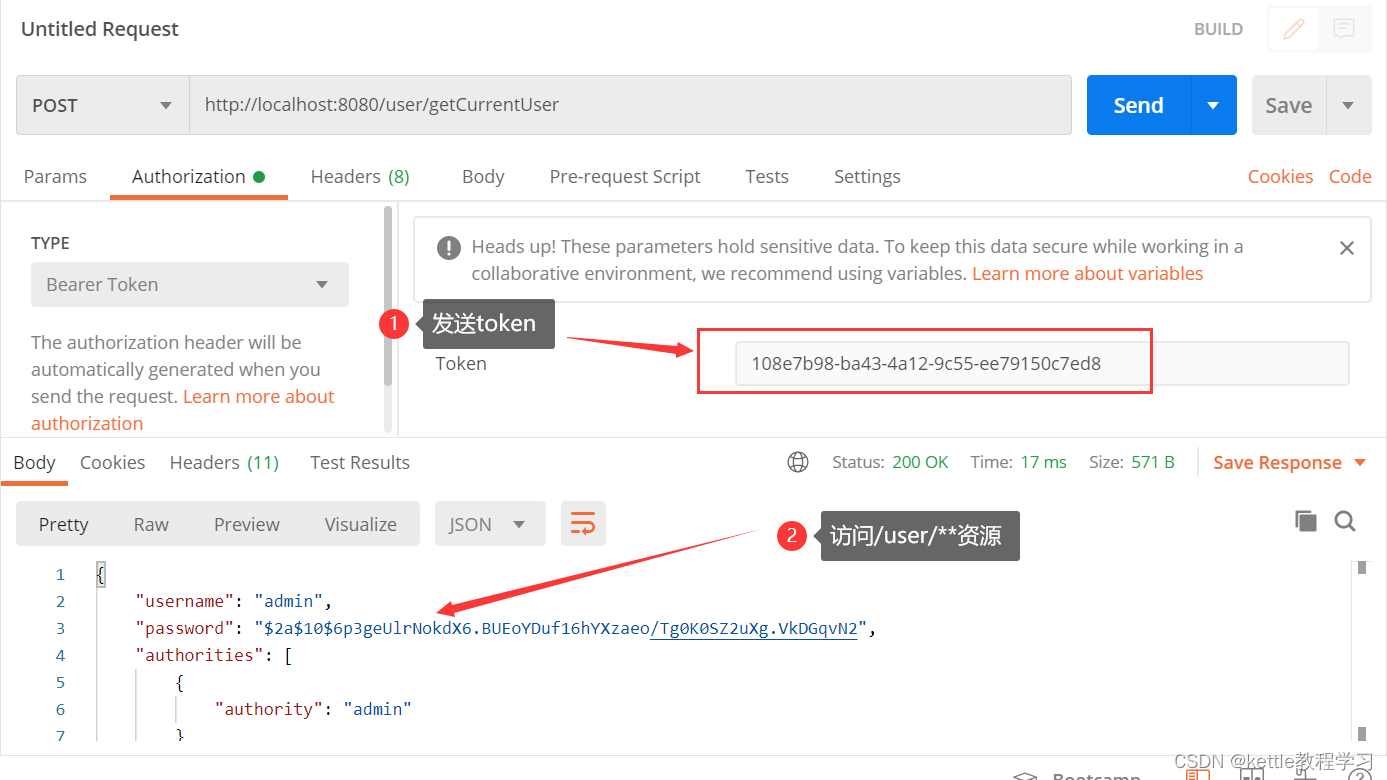
2.7 通过token访问授保护的资源
oauth2.0密码模式详解的更多相关文章
- IdentityServer4+OAuth2.0+OpenId Connect 详解
一 Oauth 2.0 1 定义 OAuth(开放授权)是一个开放标准,允许用户让第三方应用访问该用户在某一网站上存储的私密的资源(如照片,视频,联系人列表),而无需将用户名和密码提供给第三方应用. ...
- IdentityServer4:IdentityServer4+API+Client+User实践OAuth2.0密码模式(2)
一.密码模式实操 仍然使用第一节的代码:做如下改动: 1.授权服务端 前面我们使用项目:Practice.IdentityServer作为授权服务器 修改项目的Config.cs类: 添加测试用户,并 ...
- webapi之owin的oauth2.0密码模式_01概述
一般在webapi接口中,为了防止接口被随意调用,都会验证用户身份. 然而不能每次调用接口都需要用户输入用户名密码来验证,这时就需要授权颁发令牌了,持有令牌就可以访问接口,接口也能验证令牌身份. 简单 ...
- OAuth 2.0 授权认证详解
一.认识 OAuth 2.0 1.1 OAuth 2.0 应用场景 OAuth 2.0 标准目前被广泛应用在第三方登录场景中,以下是虚拟出来的角色,阐述 OAuth2 能帮我们干什么,引用阮一峰这篇理 ...
- Apache2.2+Tomcat7.0整合配置详解
一.简单介绍 Apache.Tomcat Apache HTTP Server(简称 Apache),是 Apache 软件基金协会的一个开放源码的网页服务器,可以在 Windows.Unix.Lin ...
- DES加密模式详解
DES加密模式详解 http://www.cnblogs.com/Lawson/archive/2012/05/20/2510781.html http://www.blogjava.net/wayn ...
- 转 OAuth 2.0授权协议详解
http://www.jb51.net/article/54948.htm 作者:阮一峰 字体:[增加 减小] 类型:转载 时间:2014-09-10我要评论 这篇文章主要介绍了OAuth 2.0授权 ...
- redis5.0.3配置文件详解
Redis最新版本5.0.3配置文件详解 单位 #当你需要为某个配置项指定内存大小的时候,必须要带上单位, #通常的格式就是 1k 5gb 4m 等: #1k => 1000 bytes #1k ...
- rabbitmq五种模式详解(含实现代码)
一.五种模式详解 1.简单模式(Queue模式) 当生产端发送消息到交换机,交换机根据消息属性发送到队列,消费者监听绑定队列实现消息的接收和消费逻辑编写.简单模式下,强调的一个队列queue只被一个消 ...
随机推荐
- Python标准库:datetime 时间和日期模块 —— 时间的获取和操作详解
datetime 时间和日期模块 datetime 模块提供了以简单和复杂的方式操作日期和时间的类.虽然支持日期和时间算法,但实现的重点是有效的成员提取以进行输出格式化和操作.该模块还支持可感知时区的 ...
- rabbitMq使用guest登录不上的问题总结
自己mac电脑上的mq在电脑关机(直接按电源键关机),在开机后,rabbitMq连不上了,报500错误. 1.在使用brew uninstall rabbitmq --force后; 2.我手动安装了 ...
- Linux命令date日期时间和Unix时间戳互转
A.将日期转换为Unix时间戳将当前时间以Unix时间戳表示: date +%s 输出如下: 1361542433 转换指定日期为Unix时间戳: date -d '2013-2-22 22:14' ...
- Visual Studio 下error C2471: 无法更新程序数据库
转载请注明来源:https://www.cnblogs.com/hookjc/ 解决方案:修改项目属性 右击项目 --> "属性" 1. "C/C++" ...
- 快速搭建ELK7.5版本的日志分析系统--搭建篇
title: 快速搭建ELK7.5版本的日志分析系统--搭建篇 一.ELK安装部署 官网地址:https://www.elastic.co/cn/ 官网权威指南:https://www.elastic ...
- python基础语法_9-1闭包 装饰器补充
1.闭包的概念 closure:内部函数中对enclosing作用域的变量进行引用,外部函数返回内部函数名 2.函数实质与属性 函数是一个对象:在内存中有一个存储空间 函数执行完成后内部变量回收: ...
- 为hade增加model自动生成功能
大家好,我是轩脉刃. 我们写业务的时候和db接触是少不了的,那么要生成model也是少不了的,如何自动生成model,想着要给hade框架增加个这样的命令. 看了下网上的几个开源项目,最终聚焦在两个项 ...
- 基于GDAL库,读取.grd文件(以海洋地形数据为例)Java版
技术背景 海洋地形数据主要是通过美国全球地形起伏数据(GMT)获得,数据格式为grd(GSBG)二进制数据,打开软件通过是Surfer软件,surfer软件可进行数据的编辑处理,以及进一步的可视化表达 ...
- 【论文考古】Training a 3-Node Neural Network is NP-Complete
今天看到一篇1988年的老文章谈到了训练一个简单网络是NPC问题[1].也就是下面的网络结构,在线性激活函数下,如果要找到参数使得输入数据的标签估计准确,这个问题是一个NPC问题.这个文章的意义在于宣 ...
- 我来教你如何用Docker部署最近火爆的人生重开模拟器
文章目录 获取项目源码包 Dockerfile 构建docker镜像 启动docerk容器 访问liferestart 如果人生可以重来... <可惜没如果> github项目地址:htt ...