
Spring Boot中使用Servlet与Filter
在Spring Boot中使用Servlet,根据Servlet注册方式的不同,有两种使用方式。若使用的是Servlet3.0+版本,则两种方式均可使用;若使用的是Servlet2.5版本,则只能使用配置类方式
一、Servlet3.0+版本方式
(1)创建工程07-servlet

(2)导入依赖
-
<?xml version="1.0" encoding="UTF-8"?>
-
<project xmlns="http://maven.apache.org/POM/4.0.0" xmlns:xsi="http://www.w3.org/2001/XMLSchema-instance"
-
xsi:schemaLocation="http://maven.apache.org/POM/4.0.0 http://maven.apache.org/xsd/maven-4.0.0.xsd">
-
<modelVersion>4.0.0</modelVersion>
-
<parent>
-
<groupId>org.springframework.boot</groupId>
-
<artifactId>spring-boot-starter-parent</artifactId>
-
<version>2.1.5.RELEASE</version>
-
<relativePath/> <!-- lookup parent from repository -->
-
</parent>
-
-
<groupId>com.abc</groupId>
-
<artifactId>07-servlet</artifactId>
-
<version>0.0.1-SNAPSHOT</version>
-
-
<properties>
-
<java.version>1.8</java.version>
-
</properties>
-
-
<dependencies>
-
<!--热部署依赖-->
-
<dependency>
-
<groupId>org.springframework.boot</groupId>
-
<artifactId>spring-boot-devtools</artifactId>
-
</dependency>
-
-
<dependency>
-
<groupId>org.springframework.boot</groupId>
-
<artifactId>spring-boot-starter-web</artifactId>
-
</dependency>
-
-
<dependency>
-
<groupId>org.springframework.boot</groupId>
-
<artifactId>spring-boot-starter-test</artifactId>
-
<scope>test</scope>
-
</dependency>
-
</dependencies>
-
-
<build>
-
<plugins>
-
<plugin>
-
<groupId>org.springframework.boot</groupId>
-
<artifactId>spring-boot-maven-plugin</artifactId>
-
</plugin>
-
</plugins>
-
</build>
-
-
</project>
(3)创建Servlet

(4)定义Filter

(5) 修改入口类
在入口类中添加Servlet扫描注解
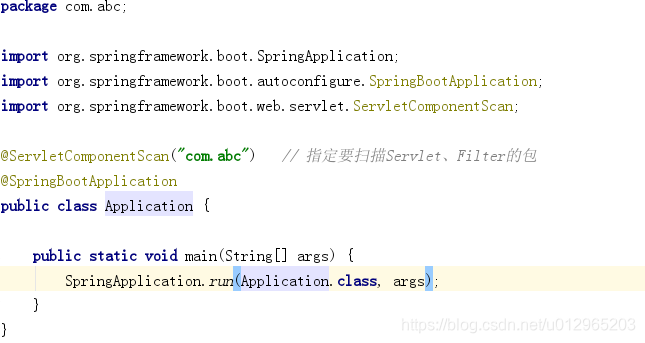
(6) 测试
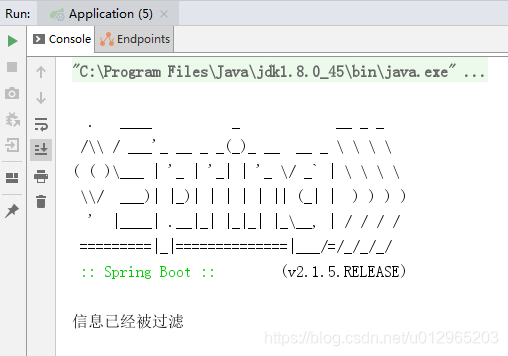
二、Servlet2.5版本方式
(1)创建工程07-servlet2
复制07-servlet,命名07-servlet2
(2)导入依赖
无需修改
(3) 定义Servlet

(4)定义Filter
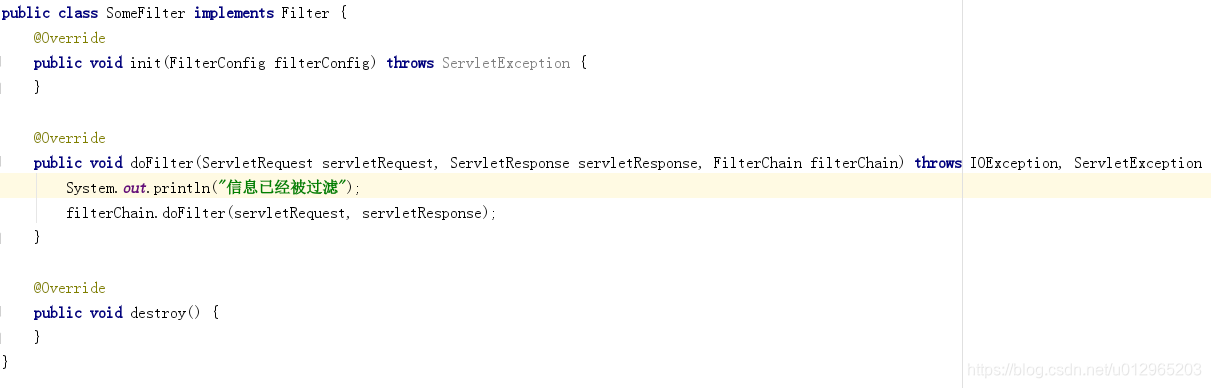
(5) 定义配置类

(6) 修改入口类

(7)测试

Spring Boot中使用Servlet与Filter的更多相关文章
- 从零开始的Spring Boot(2、在Spring Boot中整合Servlet、Filter、Listener的方式)
在Spring Boot中整合Servlet.Filter.Listener的方式 写在前面 从零开始的Spring Boot(1.搭建一个Spring Boot项目Hello World):http ...
- Spring boot中使用servlet filter
Spring boot中使用servlet filter liuyuhang原创,未经允许请勿转载! 在web项目中经常需要一些场景,如参数过滤防止sql注入,防止页面攻击,空参数矫正等, 也可以做成 ...
- Spring boot中注册Servlet
Spring boot中注册Servlet 如何在spring boot项目中注册Servlet呢? 如何在spring boot项目中注册Servlet呢? 由于没有web.xml,无法直接在xml ...
- spring boot中使用servlet、listener和filter
spring boot中支持使用java Web三大组件(servlet.listener和filter),但是坑比较多,主要是spring boot内嵌tomcat和独立tomcat服务器有一些细节 ...
- Spring Boot 自定义注册 Servlet、Filter、Listener
前言 在 Spring Boot 中已经移除了 web.xml 文件,如果需要注册添加 Servlet.Filter.Listener 为 Spring Bean,在 Spring Boot 中有两种 ...
- spring boot 中使用servlet
- Spring Boot中一个Servlet主动断开连接的方法
主动断开连接,从而返回结果给客户端,并且能够继续执行剩余代码. 对于一个HttpServletResponse类型的对象response来说,执行如下代码: response.getWriter(). ...
- 传统的Servlet在spring boot中怎么实现的?
传统的Servlet在spring boot中怎么实现的? 本文主要内容: 1:springboot一些介绍 2:传统的servlete项目在spring boot项目中怎么实现的?web.xml.u ...
- SpringBoot中使用Servlet,Filter,Listener
项目最近在替换之前陈旧的框架,改用SpringBoot进行重构,初接触,暂时还没有用到Servlet,Filter,Listener的地方,但在之前回顾Servlet的生命周期时,https://ww ...
随机推荐
- sm2加密
import java.math.BigInteger; import java.security.NoSuchAlgorithmException; import java.security.Sec ...
- Spark整合Hive
spark-sql 写代码方式 1.idea里面将代码编写好打包上传到集群中运行,上线使用 spark-submit提交 2.spark shell (repl) 里面使用sqlContext 测试使 ...
- MyBatis 中为什么不建议使用 where 1=1?
最近接手了一个老项目,"愉悦的心情"自然无以言表,做开发的朋友都懂,这里就不多说了,都是泪... 接手老项目,自然是要先熟悉一下业务代码,然而在翻阅 mapper 文件时,发现 ...
- Windows应用开发中程序窗口中的各种图标尺寸规划
为了让你的图标在各个视图模式下都能有合适的尺寸,需要制作4种尺寸16x16.32x32.48x48.256x256 在Windows系统中,几乎所有窗口都是ListView,其中的图标都按照指定的尺寸 ...
- 唯一id生成器
public static void main(String[] args) { Jedis jedis = new Jedis("127.0.0.1");//id自增 Long ...
- Go语言核心36讲(Go语言实战与应用十五)--学习笔记
37 | strings包与字符串操作 Go 语言不但拥有可以独立代表 Unicode 字符的类型rune,而且还有可以对字符串值进行 Unicode 字符拆分的for语句. 除此之外,标准库中的un ...
- 论文翻译:2021_Decoupling magnitude and phase optimization with a two-stage deep network
论文地址:两阶段深度网络的解耦幅度和相位优化 论文代码: 引用格式:Li A, Liu W, Luo X, et al. ICASSP 2021 deep noise suppression chal ...
- 洛谷 P4135 作诗(分块)
题目链接 题意:\(n\) 个数,每个数都在 \([1,c]\) 中,\(m\) 次询问,每次问在 \([l,r]\) 中有多少个数出现偶数次.强制在线. \(1 \leq n,m,c \leq 10 ...
- P5509 派遣
题面传送门. 数论小杂烩( 由题意,对于每个士兵 \(i\),要么选,对答案产生 \(a_i(\frac{x}{i-x})\) 倍的贡献,要么不选,对答案产生 \(1\) 倍的贡献. 由此可知每个士兵 ...
- azkaban执行任务长时间无法结束
问题显示: 由于一次执行较多的任务,导致azkaban的web程序崩溃,此时,关闭azkaban服务,重新启动azkaban 但是由于azkaban的exec程序无法关闭,这里采用kill的方式关掉e ...