
ASP.NET Core教程:ASP.NET Core中使用Redis缓存
参考网址:https://www.cnblogs.com/dotnet261010/p/12033624.html
一、前言
我们这里以StackExchange.Redis为例,讲解如何在ASP.NET Core中如何使用Redis实现缓存。首先需要安装Redis和RedisDesktopManager。RedisDesktopManager用来查看Redis缓存里面的数据。如何安装Redis这里不在讲述。
二、安装StackExchange.Redis
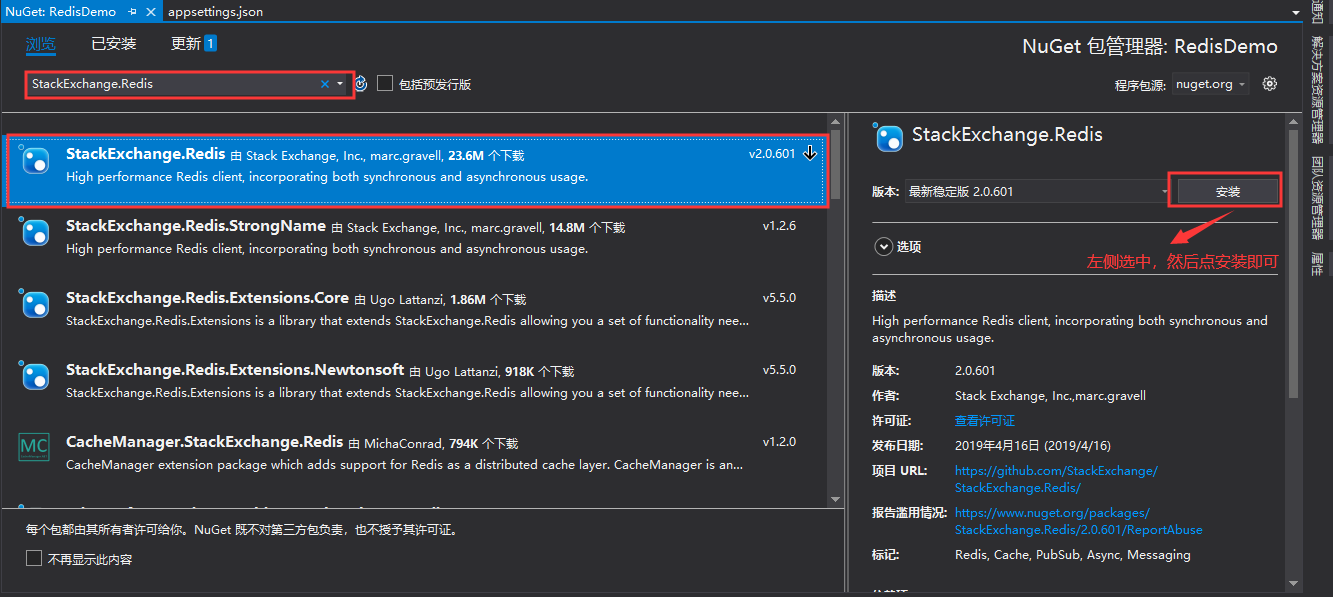
在NuGet上安装StackExchange.Redis,如下图所示:
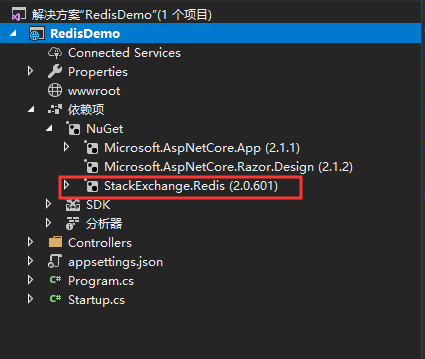
安装完成以后在依赖项里面就可以看到:
三、添加配置
在appsettings.json文件里面添加Redis相关配置信息:

{

  "Logging": {

    "LogLevel": {

      "Default": "Warning"

    }

  },

  "AllowedHosts": "*",

  "Redis": {

    "Default": {

      "Connection": "127.0.0.1:6379",

      "InstanceName": "local",

      "DefaultDB": 8

    }

  }

}
四、Redis帮助类
创建Redis帮助类,代码如下:
using StackExchange.Redis;

using System;

using System.Collections.Concurrent;

namespace RedisDemo

{

    public class RedisHelper : IDisposable

    {

        //连接字符串

        private string _connectionString;

        //实例名称

        private string _instanceName;

        //默认数据库

        private int _defaultDB;

        private ConcurrentDictionary<string, ConnectionMultiplexer> _connections;

        public RedisHelper(string connectionString, string instanceName, int defaultDB = 0)

        {

            _connectionString = connectionString;

            _instanceName = instanceName;

            _defaultDB = defaultDB;

            _connections = new ConcurrentDictionary<string, ConnectionMultiplexer>();

        }

        /// <summary>

        /// 获取ConnectionMultiplexer

        /// </summary>

        /// <returns></returns>

        private ConnectionMultiplexer GetConnect()

        {

            return _connections.GetOrAdd(_instanceName, p => ConnectionMultiplexer.Connect(_connectionString));

        }

        /// <summary>

        /// 获取数据库

        /// </summary>

        /// <param name="configName"></param>

        /// <param name="db">默认为0:优先代码的db配置,其次config中的配置</param>

        /// <returns></returns>

        public IDatabase GetDatabase()

        {

            return GetConnect().GetDatabase(_defaultDB);

        }

        public IServer GetServer(string configName = null, int endPointsIndex = 0)

        {

            var confOption = ConfigurationOptions.Parse(_connectionString);

            return GetConnect().GetServer(confOption.EndPoints[endPointsIndex]);

        }

        public ISubscriber GetSubscriber(string configName = null)

        {

            return GetConnect().GetSubscriber();

        }

        public void Dispose()

        {

            if (_connections != null && _connections.Count > 0)

            {

                foreach (var item in _connections.Values)

                {

                    item.Close();

                }

            }

        }

    }

}
五、添加服务依赖项
在Startup.cs类的ConfigureServices方法里面添加服务注入:
using Microsoft.AspNetCore.Builder;

using Microsoft.AspNetCore.Hosting;

using Microsoft.AspNetCore.Mvc;

using Microsoft.Extensions.Configuration;

using Microsoft.Extensions.DependencyInjection;

namespace RedisDemo

{

    public class Startup

    {

        public Startup(IConfiguration configuration)

        {

            Configuration = configuration;

        }

        public IConfiguration Configuration { get; }

        // This method gets called by the runtime. Use this method to add services to the container.

        public void ConfigureServices(IServiceCollection services)

        {

            //redis缓存

            var section = Configuration.GetSection("Redis:Default");

            //连接字符串

            string _connectionString = section.GetSection("Connection").Value;

            //实例名称

            string _instanceName = section.GetSection("InstanceName").Value;

            //默认数据库

            int _defaultDB = int.Parse(section.GetSection("DefaultDB").Value ?? "0");

            services.AddSingleton(new RedisHelper(_connectionString, _instanceName, _defaultDB));

            services.AddMvc().SetCompatibilityVersion(CompatibilityVersion.Version_2_1);

        }

        // This method gets called by the runtime. Use this method to configure the HTTP request pipeline.

        public void Configure(IApplicationBuilder app, IHostingEnvironment env)

        {

            if (env.IsDevelopment())

            {

                app.UseDeveloperExceptionPage();

            }

            app.UseMvc();

        }

    }

}
六、在控制器中使用
新建一个控制器,然后通过构造函数注入:
using Microsoft.AspNetCore.Mvc;

using StackExchange.Redis;

namespace RedisDemo.Controllers

{

    [Route("api/redis")]

    [ApiController]

    public class RedisController : ControllerBase

    {

        private readonly IDatabase _redis;

        public RedisController(RedisHelper client)

        {

            _redis = client.GetDatabase();

        }

        [HttpGet]

        public string Get()

        {

            // 往Redis里面存入数据

            _redis.StringSet("Name", "Tom");

            // 从Redis里面取数据

            string name = _redis.StringGet("Name");

            return name;

        }

    }

}
七、测试
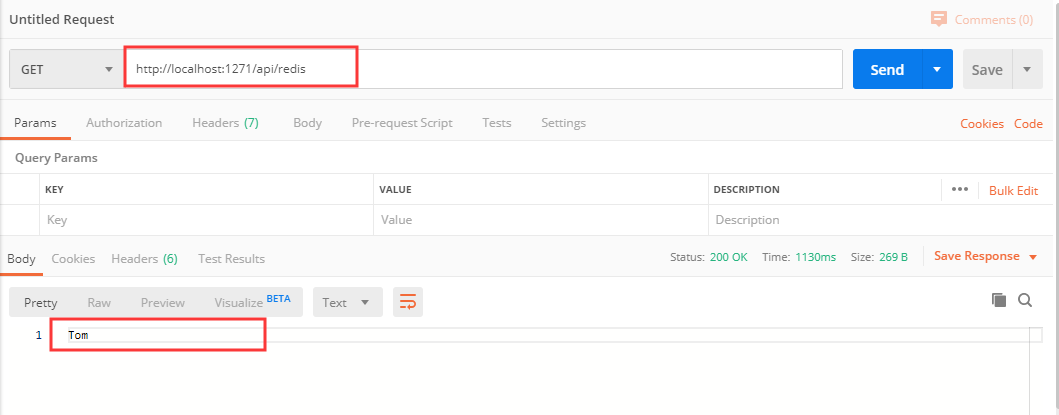
运行程序,使用Postman测试控制器:
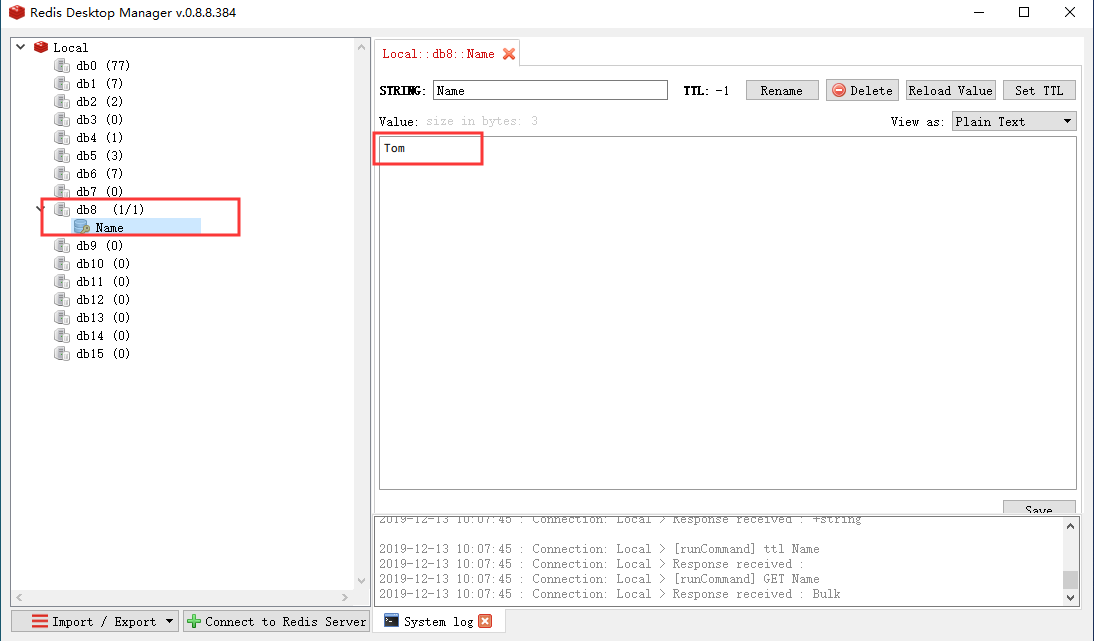
然后通过RedisDesktopManager查看Redis里面的数据,这里使用的Db8数据库:
ASP.NET Core教程:ASP.NET Core中使用Redis缓存的更多相关文章
- linux中的redis缓存服务器
Linux中的Redis缓存服务器 一.Redis基础部分: 1.redis介绍与安装比mysql快10倍以上 *****************redis适用场合**************** 1 ...
- 在springboot中使用redis缓存,将缓存序列化为json格式的数据
背景 在springboot中使用redis缓存结合spring缓存注解,当缓存成功后使用gui界面查看redis中的数据 原因 springboot缓存默认的序列化是jdk提供的 Serializa ...
- nopCommerce 3.9 大波浪系列 之 使用部署在Docker中的Redis缓存主从服务
一.概述 nop支持Redis作为缓存,Redis出众的性能在企业中得到了广泛的应用.Redis支持主从复制,HA,集群. 一般来说,只有一台Redis是不可行的,原因如下: 单台Redis服务器会发 ...
- redis的介绍与操作及Django中使用redis缓存
redis VS mysql的区别 """ redis: 内存数据库(读写快).非关系型(操作数据方便) mysql: 硬盘数据库(数据持久化).关系型(操作数据间关系) ...
- Java项目中使用Redis缓存案例
缓存的目的是为了提高系统的性能,缓存中的数据主要有两种: 1.热点数据.我们将经常访问到的数据放在缓存中,降低数据库I/O,同时因为缓存的数据的高速查询,加快整个系统的响应速度,也在一定程度上提高并发 ...
- 微信小程序大型系统架构中应用Redis缓存要点
在大型分布式系统架构中,必须选择适合的缓存技术以应对高并发,实现系统相应的高性能,酷客多小程序经过慎重选型,选择了采用基于腾讯云服务的Redis弹性缓存技术,结合Redis官方推荐的.NET驱动类库S ...
- 在NodeJS中使用Redis缓存数据
Redis数据库采用极简的设计思想,最新版的源码包还不到2Mb.其在使用上也有别于一般的数据库. node_redis redis驱动程序多使用 node_redis 此模块可搭载官方的 hiredi ...
- 在Window系统中使用Redis缓存策略
Redis是一个用的比较广泛的Key/Value的内存数据库,新浪微博.Github.StackOverflow 等大型应用中都用其作为缓存,Redis的官网为http://redis.io/. 最近 ...
- .NET Core教程--给API加一个服务端缓存啦
以前给API接口写缓存基本都是这样写代码: // redis key var bookRedisKey = ConstRedisKey.RecommendationBooks.CopyOne(book ...
随机推荐
- 「HEOI2016/TJOI2016」排序
「HEOI2016/TJOI2016」排序 题目大意 给定一个 \(1\) 到 \(n\) 的排列,每次可以对这个序列的一个区间进行升序/降序排序,求所有操作后第 \(q\) 个位置上的数字. 题解 ...
- gpasswd简单记录
gpasswd [option] GROUP 一切都是为了权限 gpasswd常用参数: -a, --add USER 将user用户加入到组中 -d, --delete USER 将user用户 ...
- PYD应用方法
1. 'ImportError: No module named xxx' 可能是xxx.pyd所在路径不在sys.path中. 解决方法:import之前用sys.path.append()方法加入 ...
- CocoaPods 私有化
一.创建所需要的代码仓库 创建 Spec 私有索引库(ZFSpec),用来存放本地spec 创建模块私有库(ZFPodProject),用来存放项目工程文件 二.私有索引库添加到本地 CocoaPod ...
- bash shell 遍历一个数组
var[@] 数组的一个元素 var=("first" "second" "three") for str in ${var[@]}; d ...
- Spring 学习笔记(2) Spring Bean
一.IoC 容器 IoC 容器是 Spring 的核心,Spring 通过 IoC 容器来管理对象的实例化和初始化(这些对象就是 Spring Bean),以及对象从创建到销毁的整个生命周期.也就是管 ...
- xhell、xftp、putty使用教程
作为远程登陆工具,上传代码登陆服务器工具 1.XSHELL Xshell是远程连接Linux服务器的工具,基于SSH协议,使用它可以更加方便的操作Linux操作系统,在刚使用时可能需要提前简单的设置下 ...
- Windows下删除顽固文件夹
参考链接: https://www.cnblogs.com/azbane/p/9808802.html 第一步:修改当前文件夹所有者为管理员 takeown /f * /a /r 第二步:修改管理员权 ...
- mysql中的with rollup得到group by的汇总信息
使用mysql中的with rollup可以得到每个分组的汇总级别的数据: 表如下: CREATE TABLE `test3` ( `id` int(5) unsigned NOT NULL AUT ...
- Thinkphp 生成的验证码不显示问题解决
在调用验证码之前加上 ob_clean(); 将: public function verify(){ $verify = new \Think\Verify(); ...