
java 工具类 验证码
第一步: 引入工具类
工具类一:
import java.awt.Color;

import java.awt.Font;

import java.awt.Graphics2D;

import java.awt.image.BufferedImage;

import java.io.File;

import java.io.FileOutputStream;

import java.io.IOException;

import java.util.Arrays;

import java.util.Random;

import javax.imageio.ImageIO;

public class ImageCodeUtil {

    public enum SecurityCodeLevel {

        Simple, Medium, Hard

    };

    public static String getSecurityCode() {

        return getSecurityCode(4, SecurityCodeLevel.Medium, false);

    }

    public static String getSecurityCode(int length, SecurityCodeLevel level, boolean isCanRepeat) {

        int len = length;

        char[] codes = { '0', '1', '2', '3', '4', '5', '6', '7', '8', '9', 'a', 'b', 'c', 'd', 'e', 'f', 'g', 'h', 'i',

                'j', 'k', 'l', 'm', 'n', 'o', 'p', 'q', 'r', 's', 't', 'u', 'v', 'w', 'x', 'y', 'z', 'A', 'B', 'C', 'D',

                'E', 'F', 'G', 'H', 'I', 'J', 'K', 'L', 'M', 'N', 'O', 'P', 'Q', 'R', 'S', 'T', 'U', 'V', 'W', 'X', 'Y',

                'Z' };

        if (level == SecurityCodeLevel.Simple) {

            codes = Arrays.copyOfRange(codes, 0, 10);

        } else if (level == SecurityCodeLevel.Medium) {

            codes = Arrays.copyOfRange(codes, 0, 36);

        }

        int n = codes.length;

        if (len > n && isCanRepeat == false) {

            throw new RuntimeException(String.format(

                    "调用SecurityCode.getSecurityCode(%1$s,%2$s,%3$s)出现异常�?" + "当isCanRepeat�?%3$s时,传入参数%1$s不能大于%4$s",

                    len, level, isCanRepeat, n));

        }

        char[] result = new char[len];

        if (isCanRepeat) {

            for (int i = 0; i < result.length; i++) {

                int r = (int) (Math.random() * n);

                result[i] = codes[r];

            }

        } else {

            for (int i = 0; i < result.length; i++) {

                int r = (int) (Math.random() * n);

                result[i] = codes[r];

                codes[r] = codes[n - 1];

                n--;

            }

        }

        return String.valueOf(result);

    }

    public static BufferedImage createImage(String securityCode) {

        int codeLength = securityCode.length();

        int fontSize = 18;

        int fontWidth = fontSize + 1;

        int width = codeLength * fontWidth + 6;

        int height = fontSize * 2 + 1;

        BufferedImage image = new BufferedImage(width, height, BufferedImage.TYPE_INT_RGB);

        Graphics2D g = image.createGraphics();

        g.setColor(Color.WHITE);

        g.fillRect(0, 0, width, height);

        g.setColor(Color.LIGHT_GRAY);

        g.setFont(new Font("Arial", Font.BOLD, height - 2));

        g.drawRect(0, 0, width - 1, height - 1);

        Random rand = new Random();

        g.setColor(Color.LIGHT_GRAY);

        for (int i = 0; i < codeLength * 6; i++) {

            int x = rand.nextInt(width);

            int y = rand.nextInt(height);

            g.drawRect(x, y, 1, 1);

        }

        int codeY = height - 10;

        g.setColor(new Color(19, 148, 246));

        g.setFont(new Font("宋体", Font.BOLD, fontSize));

        for (int i = 0; i < codeLength; i++) {

            double deg = new Random().nextDouble() * 20;

            g.rotate(Math.toRadians(deg), i * 16 + 13, codeY - 7.5);

            g.drawString(String.valueOf(securityCode.charAt(i)), i * 16 + 5, codeY);

            g.rotate(Math.toRadians(-deg), i * 16 + 13, codeY - 7.5);

        }

        g.dispose();

        return image;

    }

    public static void main(String[] args) throws IOException {

        String securityCode = getSecurityCode();

        System.out.println("====" + securityCode);

        BufferedImage image = createImage(securityCode);

        ImageIO.write(image, "png", new FileOutputStream(new File("D:\\4.png")));

    }

}
ImageCodeUtil
工具类二:
import java.awt.Color;

import java.awt.Font;

import java.awt.Graphics;

import java.awt.Graphics2D;

import java.awt.RenderingHints;

import java.awt.geom.AffineTransform;

import java.awt.image.BufferedImage;

import java.io.File;

import java.io.FileOutputStream;

import java.io.IOException;

import java.io.OutputStream;

import java.util.Arrays;

import java.util.Random;

import javax.imageio.ImageIO;

public class VerifyCodeUtil {

    public static final String VERIFY_CODES = "23456789ABCDEFGHJKMNPQRSTUVWXYZabcdefghjkmnpqrstuvwxyz";

    private static Random random = new Random();

    public static String generateVerifyCode(int verifySize) {

        return generateVerifyCode(verifySize, VERIFY_CODES);

    }

    public static String generateVerifyCode(int verifySize, String sources) {

        if (sources == null || sources.length() == 0) {

            sources = VERIFY_CODES;

        }

        int codesLen = sources.length();

        Random rand = new Random(System.currentTimeMillis());

        StringBuilder verifyCode = new StringBuilder(verifySize);

        for (int i = 0; i < verifySize; i++) {

            verifyCode.append(sources.charAt(rand.nextInt(codesLen - 1)));

        }

        return verifyCode.toString();

    }

    public static String outputVerifyImage(int w, int h, File outputFile, int verifySize) throws IOException {

        String verifyCode = generateVerifyCode(verifySize);

        outputImage(w, h, outputFile, verifyCode);

        return verifyCode;

    }

    public static String outputVerifyImage(int w, int h, OutputStream os, int verifySize) throws IOException {

        String verifyCode = generateVerifyCode(verifySize);

        outputImage(w, h, os, verifyCode);

        return verifyCode;

    }

    public static void outputImage(int w, int h, File outputFile, String code) throws IOException {

        if (outputFile == null) {

            return;

        }

        File dir = outputFile.getParentFile();

        if (!dir.exists()) {

            dir.mkdirs();

        }

        try {

            outputFile.createNewFile();

            FileOutputStream fos = new FileOutputStream(outputFile);

            outputImage(w, h, fos, code);

            fos.close();

        } catch (IOException e) {

            throw e;

        }

    }

    public static BufferedImage getImage(int w, int h, String code) {

        int verifySize = code.length();

        BufferedImage image = new BufferedImage(w, h, BufferedImage.TYPE_INT_RGB);

        Random rand = new Random();

        Graphics2D g2 = image.createGraphics();

        g2.setRenderingHint(RenderingHints.KEY_ANTIALIASING, RenderingHints.VALUE_ANTIALIAS_ON);

        Color[] colors = new Color[5];

        Color[] colorSpaces = new Color[] { Color.WHITE, Color.CYAN, Color.GRAY, Color.LIGHT_GRAY, Color.MAGENTA,

                Color.ORANGE, Color.PINK, Color.YELLOW };

        float[] fractions = new float[colors.length];

        for (int i = 0; i < colors.length; i++) {

            colors[i] = colorSpaces[rand.nextInt(colorSpaces.length)];

            fractions[i] = rand.nextFloat();

        }

        Arrays.sort(fractions);

        g2.setColor(Color.GRAY);

        g2.fillRect(0, 0, w, h);

        Color c = getRandColor(200, 250);

        g2.setColor(c);

        g2.fillRect(0, 2, w, h - 4);

        Random random = new Random();

        g2.setColor(getRandColor(160, 200));

        for (int i = 0; i < 20; i++) {

            int x = random.nextInt(w - 1);

            int y = random.nextInt(h - 1);

            int xl = random.nextInt(6) + 1;

            int yl = random.nextInt(12) + 1;

            g2.drawLine(x, y, x + xl + 40, y + yl + 20);

        }

        float yawpRate = 0.05f;

        int area = (int) (yawpRate * w * h);

        for (int i = 0; i < area; i++) {

            int x = random.nextInt(w);

            int y = random.nextInt(h);

            int rgb = getRandomIntColor();

            image.setRGB(x, y, rgb);

        }

        shear(g2, w, h, c);

        g2.setColor(getRandColor(100, 160));

        int fontSize = h - 4;

        Font font = new Font("Algerian", Font.ITALIC, fontSize);

        g2.setFont(font);

        char[] chars = code.toCharArray();

        for (int i = 0; i < verifySize; i++) {

            AffineTransform affine = new AffineTransform();

            affine.setToRotation(Math.PI / 4 * rand.nextDouble() * (rand.nextBoolean() ? 1 : -1),

                    (w / verifySize) * i + fontSize / 2, h / 2);

            g2.setTransform(affine);

            g2.drawChars(chars, i, 1, ((w - 10) / verifySize) * i + 5, h / 2 + fontSize / 2 - 10);

        }

        g2.dispose();

        return image;

    }

    public static void outputImage(int w, int h, OutputStream os, String code) throws IOException {

        BufferedImage image = getImage(w, h, code);

        ImageIO.write(image, "jpg", os);

    }

    private static Color getRandColor(int fc, int bc) {

        if (fc > 255)

            fc = 255;

        if (bc > 255)

            bc = 255;

        int r = fc + random.nextInt(bc - fc);

        int g = fc + random.nextInt(bc - fc);

        int b = fc + random.nextInt(bc - fc);

        return new Color(r, g, b);

    }

    private static int getRandomIntColor() {

        int[] rgb = getRandomRgb();

        int color = 0;

        for (int c : rgb) {

            color = color << 8;

            color = color | c;

        }

        return color;

    }

    private static int[] getRandomRgb() {

        int[] rgb = new int[3];

        for (int i = 0; i < 3; i++) {

            rgb[i] = random.nextInt(255);

        }

        return rgb;

    }

    private static void shear(Graphics g, int w1, int h1, Color color) {

        shearX(g, w1, h1, color);

        shearY(g, w1, h1, color);

    }

    private static void shearX(Graphics g, int w1, int h1, Color color) {

        int period = random.nextInt(2);

        boolean borderGap = true;

        int frames = 1;

        int phase = random.nextInt(2);

        for (int i = 0; i < h1; i++) {

            double d = (double) (period >> 1)

                    * Math.sin((double) i / (double) period + (6.2831853071795862D * (double) phase) / (double) frames);

            g.copyArea(0, i, w1, 1, (int) d, 0);

            if (borderGap) {

                g.setColor(color);

                g.drawLine((int) d, i, 0, i);

                g.drawLine((int) d + w1, i, w1, i);

            }

        }

    }

    private static void shearY(Graphics g, int w1, int h1, Color color) {

        int period = random.nextInt(40) + 10; // 50;

        boolean borderGap = true;

        int frames = 20;

        int phase = 7;

        for (int i = 0; i < w1; i++) {

            double d = (double) (period >> 1)

                    * Math.sin((double) i / (double) period + (6.2831853071795862D * (double) phase) / (double) frames);

            g.copyArea(i, 0, 1, h1, 0, (int) d);

            if (borderGap) {

                g.setColor(color);

                g.drawLine(i, (int) d, i, 0);

                g.drawLine(i, (int) d + h1, i, h1);

            }

        }

    }

    public static void main(String[] args) throws IOException {

        String generateVerifyCode = generateVerifyCode(4);

        System.out.println(generateVerifyCode);

        BufferedImage image = getImage(255, 80, generateVerifyCode);

        ImageIO.write(image, "png", new FileOutputStream(new File("D:\\1.png")));

    }

}
VerifyCodeUtil
第二步:前台页面 和 js 代码
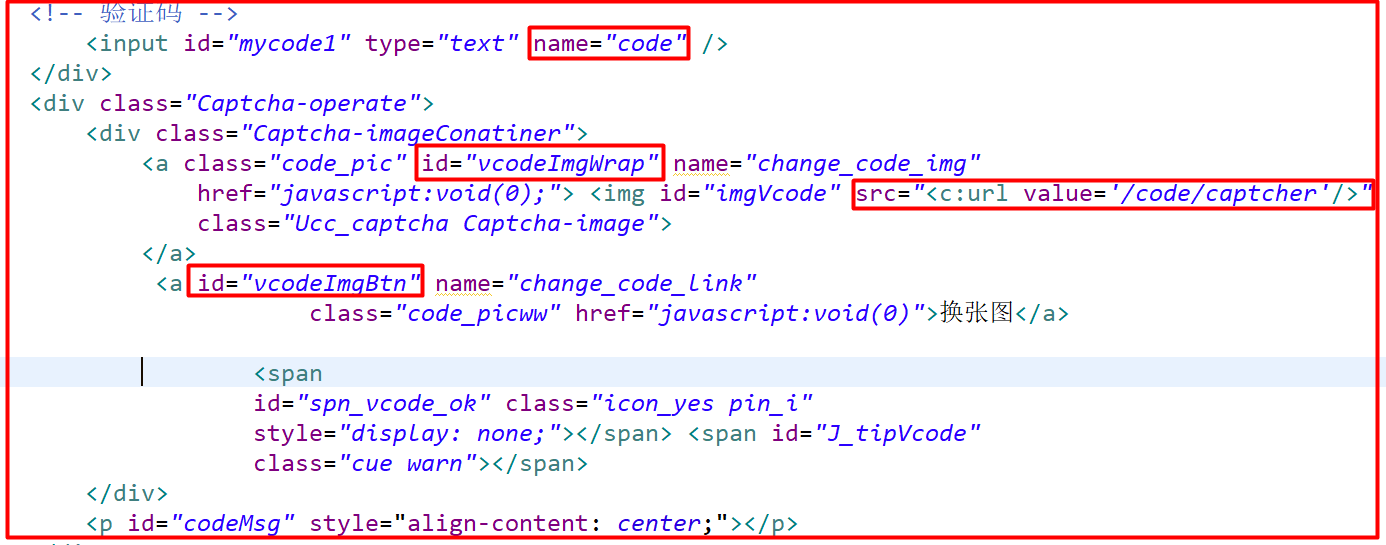
<!-- 验证码 -->

                                    <input id="mycode1" type="text" name="code" />

                                </div>

                                <div class="Captcha-operate">

                                    <div class="Captcha-imageConatiner">

                                        <a class="code_pic" id="vcodeImgWrap" name="change_code_img"

                                            href="javascript:void(0);"> <img id="imgVcode" src="<c:url value='/code/captcher'/>"

                                            class="Ucc_captcha Captcha-image">

                                        </a>

                                         <a id="vcodeImgBtn" name="change_code_link"

                                                    class="code_picww" href="javascript:void(0)">换张图</a>

                                                <span

                                                id="spn_vcode_ok" class="icon_yes pin_i"

                                                style="display: none;"></span> <span id="J_tipVcode"

                                                class="cue warn"></span>

                                    </div>
代码
js 代码
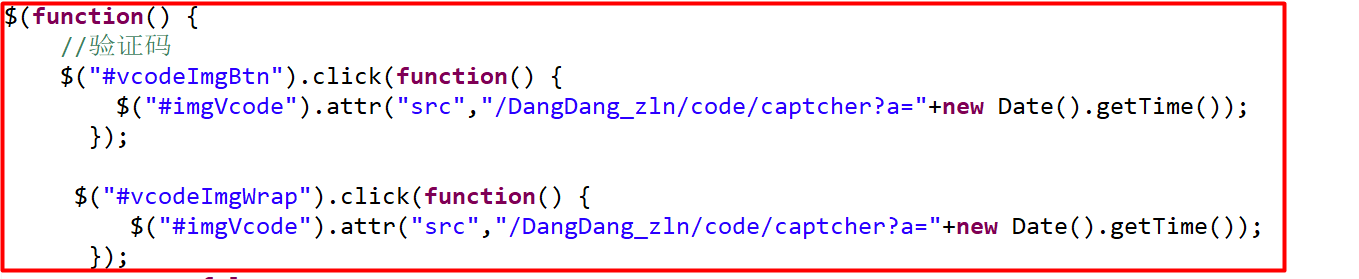
    //验证码

    $("#vcodeImgBtn").click(function() {

        $("#imgVcode").attr("src","/DangDang_zln/code/captcher?a="+new Date().getTime());

      });

     $("#vcodeImgWrap").click(function() {

         $("#imgVcode").attr("src","/DangDang_zln/code/captcher?a="+new Date().getTime());
第三步:验证码action 类 页面访问的地址就是这个类

    public String Captcher() {

        String code = VerifyCodeUtil.generateVerifyCode(4);

        HttpSession session = ServletActionContext.getRequest().getSession();

        System.out.println(code);

        session.setAttribute("mycode", code);

        BufferedImage image = VerifyCodeUtil.getImage(255, 80, code);

        ServletActionContext.getRequest().getSession().setAttribute("code", code);

        HttpServletResponse response = ServletActionContext.getResponse();

        response.setContentType("image/png");

        try {

            ImageIO.write(image, "png", response.getOutputStream());

        } catch (IOException e) {

            // TODO Auto-generated catch block

            e.printStackTrace();

        }

        return Action.NONE;

    }
验证码
java 工具类 验证码的更多相关文章
- Java工具类-验证码工具
1.工具类,生成随机验证码字符串 import java.util.Arrays; /** * 工具类,生成随机验证码字符串 * * @version 1.0 * @author * */ publi ...
- java工具类系列 (四.SerializationUtils)
java工具类系列 (四.SerializationUtils) SerializationUtils该类为序列化工具类,也是lang包下的工具,主要用于序列化操作 import java.io.Se ...
- Java工具类——通过配置XML验证Map
Java工具类--通过配置XML验证Map 背景 在JavaWeb项目中,接收前端过来的参数时通常是使用我们的实体类进行接收的.但是呢,我们不能去决定已经搭建好的框架是怎么样的,在我接触的框架中有一种 ...
- 排名前 16 的 Java 工具类
在Java中,工具类定义了一组公共方法,这篇文章将介绍Java中使用最频繁及最通用的Java工具类.以下工具类.方法按使用流行度排名,参考数据来源于Github上随机选取的5万个开源项目源码. 一. ...
- 排名前16的Java工具类
原文:https://www.jianshu.com/p/9e937d178203 在Java中,工具类定义了一组公共方法,这篇文章将介绍Java中使用最频繁及最通用的Java工具类.以下工具类.方法 ...
- 第一章 Java工具类目录
在这一系列博客中,主要是记录在实际开发中会常用的一些Java工具类,方便后续开发中使用. 以下的目录会随着后边具体工具类的添加而改变. 浮点数精确计算 第二章 Java浮点数精确计算 crc32将任意 ...
- java工具类之按对象中某属性排序
import java.lang.reflect.Field; import java.lang.reflect.InvocationTargetException; import java.lang ...
- 干货:排名前16的Java工具类
在Java中,工具类定义了一组公共方法,这篇文章将介绍Java中使用最频繁及最通用的Java工具类.以下工具类.方法按使用流行度排名,参考数据来源于Github上随机选取的5万个开源项目源码. 一. ...
- Java工具类:给程序增加版权信息
我们九天鸟的p2p网贷系统,基本算是开发完成了. 现在,想给后端的Java代码,增加版权信息. 手动去copy-paste,太没有技术含量. 于是,写了个Java工具类,给Java源文件 ...
随机推荐
- 真.OI宝典
记得取模%%%%%%%%%%%%%%%%%%%%%%%%%%%%%%%%%%%%%%%%%%%%%%%%%%%%%%%%%%%%%%%%%%%%%%%%%%%%%%%%%%%%%%%%%%%%%%%% ...
- 【转】新说Mysql事务隔离级别
作者:孤独烟 转自:https://www.cnblogs.com/rjzheng/p/9955395.html 引言 大家在面试中一定碰到过 说说事务的隔离级别吧? 老实说,事务隔离级别这个问题,无 ...
- 输入npm install 报错node-sass@4.13.0 postinstall:`node scripts/build.js` Failed at the node-sass@4.13.0
这个是因为sass安装时获取源的问题,先修改sass安装的源,再运行npm install就成功了 npm config set sass_binary_site=https://npm.taobao ...
- git rebase和git merge的区别
前言: 平时工作中发现一般同事在同步远程代码的时候都是用git pull,其实git pull包含有两个操作,一个是fetch远程的代码,一个是将本地当前的代码和远程代码进行merge,即git ...
- 分治算法:Tromino谜题,L型覆盖
1 public class Tromino { 2 3 static int num = 2; 4 //x 对应 第二维 5 //y 对应 第一维 6 static int[][] panel = ...
- 刷题-力扣-LCP 07. 传递信息
LCP 07. 传递信息 题目链接 来源:力扣(LeetCode) 链接:https://leetcode-cn.com/problems/chuan-di-xin-xi 著作权归领扣网络所有.商业转 ...
- MySQL主从不同步、数据不一致解决办法
第一种:通过sql_slave_skip_counter跳过同步错误,适用于一般异常如插入时主键冲突 这种情况一般是在从库进行了写操作,错误提示 Last_SQL_Errno: 1062 Last_S ...
- Linux常用命令(一)之文件处理命令
分时的多用户.多任务的操作系统 多数的网络协议的支持(unix和tcp/ip协议是同时发展起来的),方便的远程管理(可以通过图形.命令行) 强大的内存管理和文件管理系统 大量的可用软件和免费软件(游戏 ...
- 存储系统管理(一)——Linux系统的设备和分区管理
1.设备名称的理解 /dev/sda1? sata硬盘,a1表示第一块硬盘中的第一个分区 /dev/cdrom 光驱 /dev/mapper/*? 系统中的虚拟设备 2.发现系统中的设备 ? fdis ...
- SDOI2021集训 R1 半夜 题解
先贴两个博客:ajthreac yspm,建议结合起来看 \(O(n^3)\):对 \(XX\) 每个长度为 \(n\) 的字串与 \(Y\) 跑 LCS.设 \(f[i,j,k]\) 表示 \(X[ ...