
消息中间件-ActiveMQ高可用集群和持久化机制
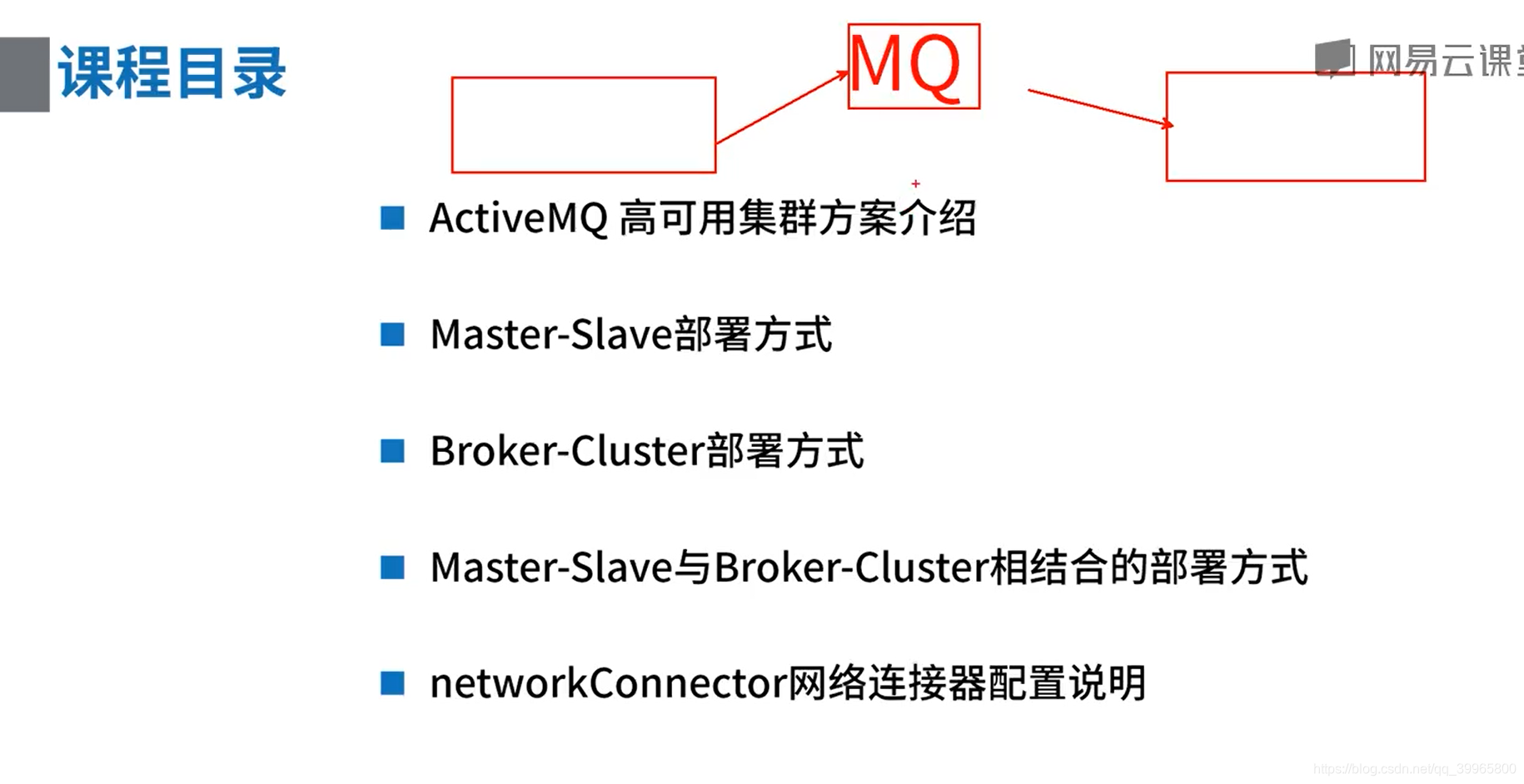
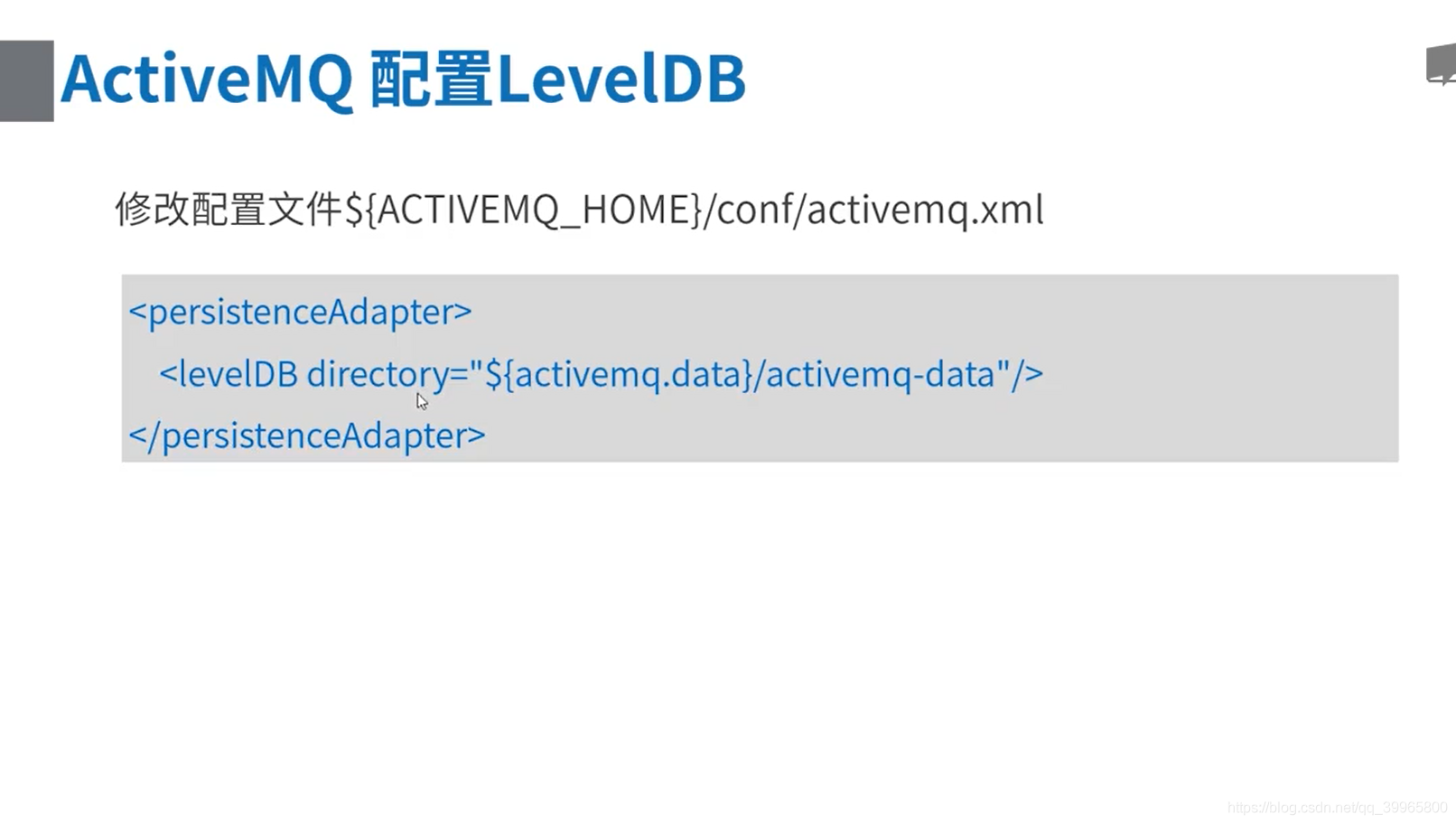
1、修改active.mq的xml文件
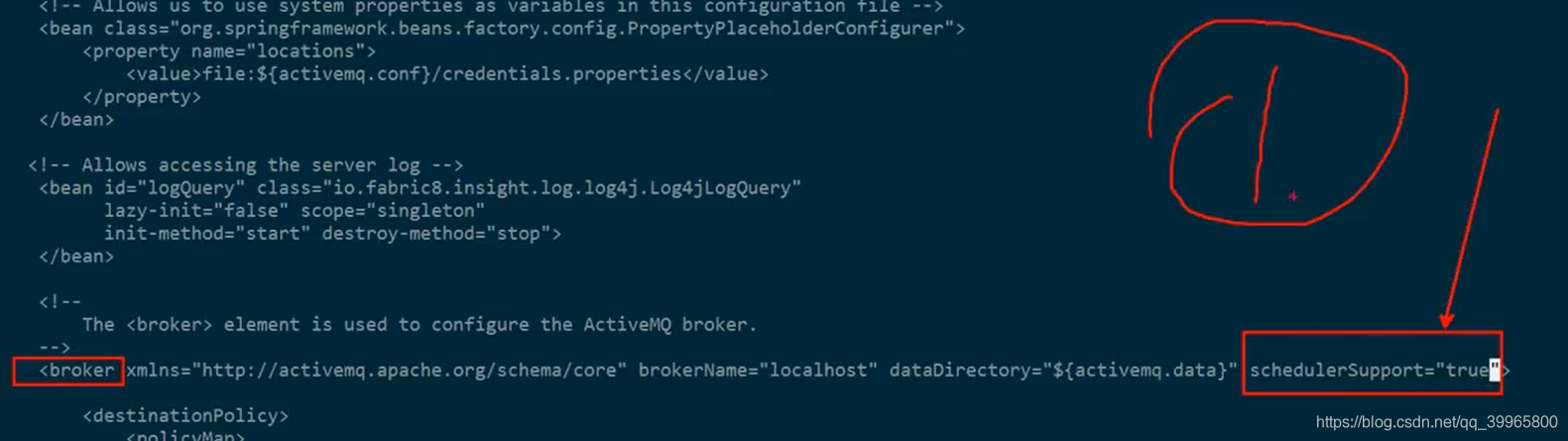
2、延时、调度消息
package com.study.mq.b1_message;

import org.apache.activemq.ActiveMQConnectionFactory;

import org.apache.activemq.ScheduledMessage;

import javax.jms.*;

// 延时、调度消息 http://activemq.apache.org/delay-and-schedule-message-delivery.html

// 定时发送邮件通知,或者触发代码执行

public class DelayScheduleMessageDemo {

    public static void main(String[] args) {

        new ProducerThread("tcp://activemq.tony.com:61616", "queue1").start();

    }

    static class ProducerThread extends Thread {

        String brokerUrl;

        String destinationUrl;

        public ProducerThread(String brokerUrl, String destinationUrl) {

            this.brokerUrl = brokerUrl;

            this.destinationUrl = destinationUrl;

        }

        @Override

        public void run() {

            ActiveMQConnectionFactory connectionFactory;

            Connection conn;

            Session session;

            try {

                // 1、创建连接工厂

                connectionFactory = new ActiveMQConnectionFactory(brokerUrl);

                // 2、创建连接对象md

                conn = connectionFactory.createConnection();

                conn.start();

                // 3、创建会话

                session = conn.createSession(false, Session.AUTO_ACKNOWLEDGE);

                // 4、创建点对点发送的目标

                Destination destination = session.createQueue(destinationUrl);

                // 5、创建生产者消息

                MessageProducer producer = session.createProducer(destination);

                // 设置生产者的模式,有两种可选 持久化 / 不持久化

                producer.setDeliveryMode(DeliveryMode.PERSISTENT);

                // 6、示例消息

                //  延时 5秒

                TextMessage message = session.createTextMessage("Hello world - 1!");

                message.setLongProperty(ScheduledMessage.AMQ_SCHEDULED_DELAY, 5 * 1000L);

                //  延时 5秒,投递3次,间隔10秒 (投递次数=重复次数+默认的一次)

                TextMessage message2 = session.createTextMessage("Hello world - 2!");

                message2.setLongProperty(ScheduledMessage.AMQ_SCHEDULED_DELAY, 5 * 1000L); // 延时

                message2.setLongProperty(ScheduledMessage.AMQ_SCHEDULED_PERIOD, 2 * 1000L); // 投递间隔

                message2.setIntProperty(ScheduledMessage.AMQ_SCHEDULED_REPEAT, 2); // 重复次数

                //  CRON 表达式的方式 以及 和上面参数的组合

                TextMessage message3 = session.createTextMessage("Hello world - 3!");

                message3.setStringProperty(ScheduledMessage.AMQ_SCHEDULED_CRON, "0 * * * *");

                // 7、发送消息

                producer.send(message);

                producer.send(message2);

                producer.send(message3);

                // 8、 关闭连接

                session.close();

                conn.close();

            } catch (JMSException e) {

                e.printStackTrace();

            }

        }

    }

}
package com.study.mq.b1_message;

import org.apache.activemq.ActiveMQConnectionFactory;

import javax.jms.*;

/**

 * 简单消费者

 */

// http://activemq.apache.org/consumer-features.html

public class Consumer {

    public static void main(String[] args) throws InterruptedException {

        ConsumerThread queue1 = new ConsumerThread("tcp://activemq.tony.com:61616", "queue1");

        queue1.start();

        queue1.join();

    }

}

class ConsumerThread extends Thread {

    String brokerUrl;

    String destinationUrl;

    public ConsumerThread(String brokerUrl, String destinationUrl) {

        this.brokerUrl = brokerUrl;

        this.destinationUrl = destinationUrl;

    }

    @Override

    public void run() {

        ActiveMQConnectionFactory connectionFactory;

        Connection conn;

        Session session;

        MessageConsumer consumer;

        try {

            // brokerURL http://activemq.apache.org/connection-configuration-uri.html

            // 1、创建连接工厂

            connectionFactory = new ActiveMQConnectionFactory(this.brokerUrl);

            // 2、创建连接对象

            conn = connectionFactory.createConnection();

            conn.start(); // 一定要启动

            // 3、创建会话(可以创建一个或者多个session)

            session = conn.createSession(false, Session.AUTO_ACKNOWLEDGE);

            // 4、创建点对点接收的目标,queue - 点对点

            Destination destination = session.createQueue(destinationUrl);

            // 5、创建消费者消息 http://activemq.apache.org/destination-options.html

            consumer = session.createConsumer(destination);

            // 6、接收消息

            consumer.setMessageListener(message -> {

                try {

                    if (message instanceof TextMessage) {

                        System.out.println("收到文本消息:" + ((TextMessage) message).getText());

                    } else {

                        System.out.println(message);

                    }

                } catch (JMSException e) {

                    e.printStackTrace();

                }

            });

        } catch (JMSException e) {

            e.printStackTrace();

        }

    }

}
1、ActiveMQ高可用集群方案介绍
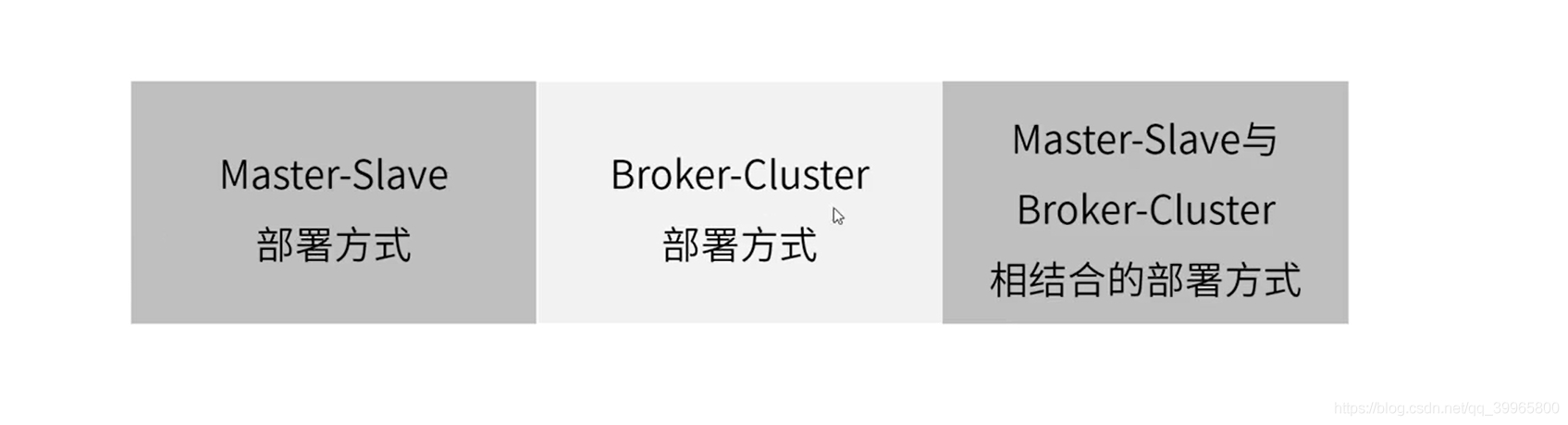
主从部署、多主部署
Master-Slave主从部署
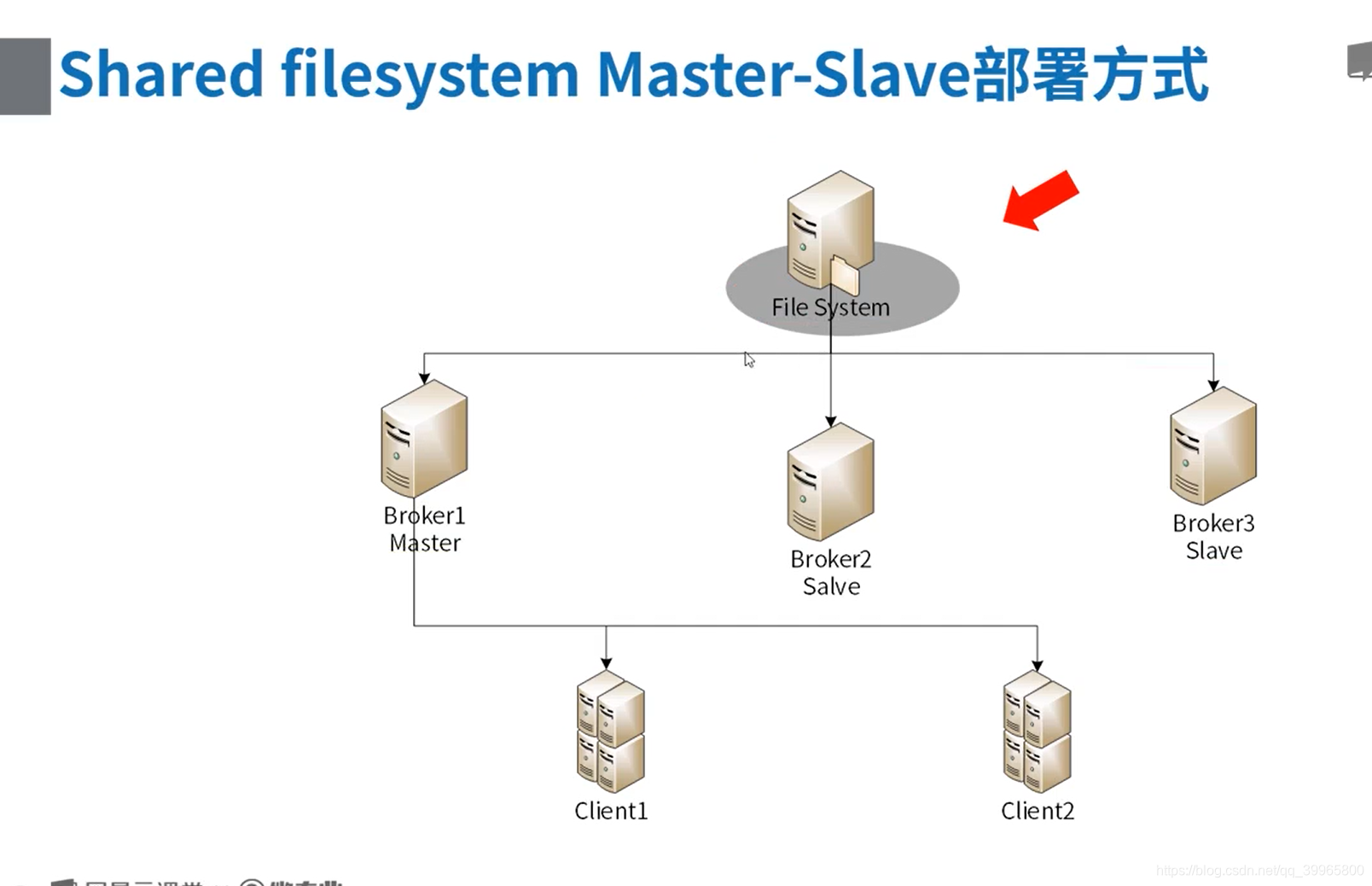
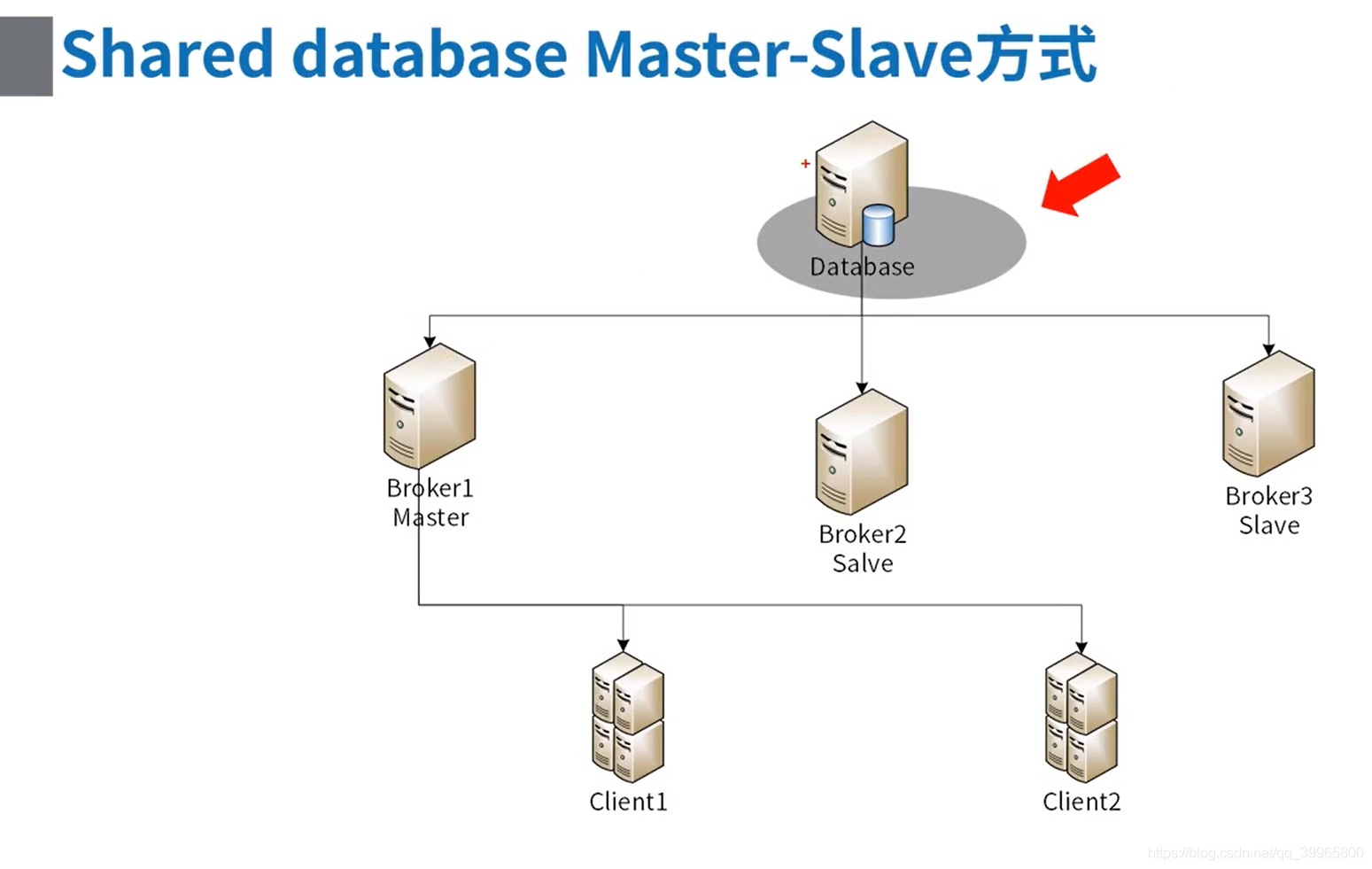
1、数据库集群的方案
配置mysql进行主从部署,以及持久化的操作

多个broker公用一个mysql
只有一个服务器可以修改数据库,会有lock进行锁住
package com.study.mq.b2_clustering;

import org.apache.activemq.ActiveMQConnectionFactory;

import javax.jms.*;

/**

 * 简单生产者

 */

public class Producer {

    public static void main(String[] args) {

        String brokerUrl = "failover:(tcp://activemq.tony.com:61616,tcp://activemq-slave.tony.com:61616)?initialReconnectDelay=100";

        new ProducerThread(brokerUrl, "queue1").start();

    }

    static class ProducerThread extends Thread {

        String brokerUrl;

        String destinationUrl;

        public ProducerThread(String brokerUrl, String destinationUrl) {

            this.brokerUrl = brokerUrl;

            this.destinationUrl = destinationUrl;

        }

        @Override

        public void run() {

            ActiveMQConnectionFactory connectionFactory;

            Connection conn;

            Session session;

            try {

                // 1、创建连接工厂

                connectionFactory = new ActiveMQConnectionFactory(brokerUrl);

                // 2、创建连接对象md

                conn = connectionFactory.createConnection();

                conn.start();

                // 3、创建会话

                session = conn.createSession(false, Session.AUTO_ACKNOWLEDGE);

                // 4、创建点对点发送的目标

                 Destination destination = session.createQueue(destinationUrl);

                // 5、创建生产者消息

                MessageProducer producer = session.createProducer(destination);

                // 设置生产者的模式,有两种可选 持久化 / 不持久化

                producer.setDeliveryMode(DeliveryMode.PERSISTENT);

                // 6、创建一条文本消息

                String text = "Hello world!";

                TextMessage message = session.createTextMessage(text);

                for (int i = 0; i < 1; i++) {

                    // 7、发送消息

                    producer.send(message);

                }

                // 8、 关闭连接

                session.close();

                conn.close();

            } catch (JMSException e) {

                e.printStackTrace();

            }

        }

    }

}
package com.study.mq.b2_clustering;

import org.apache.activemq.ActiveMQConnectionFactory;

import javax.jms.*;

// http://activemq.apache.org/failover-transport-reference.html

public class ConsumerFailover {

    public static void main(String[] args) throws InterruptedException {

        // 非failover的公共参数配置通过nested.*,例如 failover:(...)?nested.wireFormat.maxInactivityDuration=1000

        // ?randomize=false 随机选择,默认是顺序

        // 指定优先切换 failover:(tcp://host1:61616,tcp://host2:61616,tcp://host3:61616)?priorityBackup=true&priorityURIs=tcp://local1:61616,tcp://local2:61616

        // maxReconnectDelay重连的最大间隔时间(毫秒)

        String brokerUrl = "failover:(tcp://activemq.tony.com:61616,tcp://activemq-slave.tony.com:61616)?initialReconnectDelay=100";

        ConsumerThread queue1 = new ConsumerThread(brokerUrl, "queue1");

        queue1.start();

        queue1.join();

    }

}

class ConsumerThread extends Thread {

    String brokerUrl;

    String destinationUrl;

    public ConsumerThread(String brokerUrl, String destinationUrl) {

        this.brokerUrl = brokerUrl;

        this.destinationUrl = destinationUrl;

    }

    @Override

    public void run() {

        ActiveMQConnectionFactory connectionFactory;

        Connection conn;

        Session session;

        MessageConsumer consumer;

        try {

            // brokerURL http://activemq.apache.org/connection-configuration-uri.html

            // 1、创建连接工厂

            connectionFactory = new ActiveMQConnectionFactory(this.brokerUrl);

            // 2、创建连接对象

            conn = connectionFactory.createConnection();

            conn.start(); // 一定要启动

            // 3、创建会话(可以创建一个或者多个session)

            session = conn.createSession(false, Session.AUTO_ACKNOWLEDGE);

            // 4、创建点对点接收的目标,queue - 点对点

            Destination destination = session.createQueue(destinationUrl);

            // 5、创建消费者消息 http://activemq.apache.org/destination-options.html

            consumer = session.createConsumer(destination);

            // 6、接收消息

            consumer.setMessageListener(message -> {

                try {

                    if (message instanceof TextMessage) {

                        System.out.println("收到文本消息:" + ((TextMessage) message).getText());

                    } else {

                        System.out.println(message);

                    }

                } catch (JMSException e) {

                    e.printStackTrace();

                }

            });

        } catch (JMSException e) {

            e.printStackTrace();

        }

    }

}
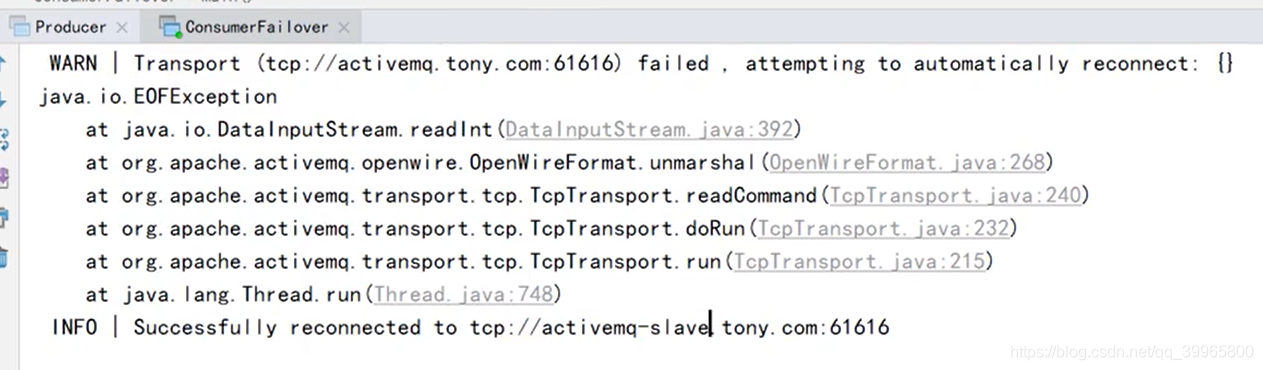
挂掉其中一个服务器,还是可以正常使用的,不支持负载均衡
非failover的公共参数配置通过nested.*,例如 failover:(...)?nested.wireFormat.maxInactivityDuration=1000

?randomize=false 随机选择,默认是顺序

指定优先切换 failover:(tcp://host1:61616,tcp://host2:61616,tcp://host3:61616)?priorityBackup=true&priorityURIs=tcp://local1:61616,tcp://local2:61616

maxReconnectDelay重连的最大间隔时间(毫秒)
http://activemq.apache.org/failover-transport-reference.html
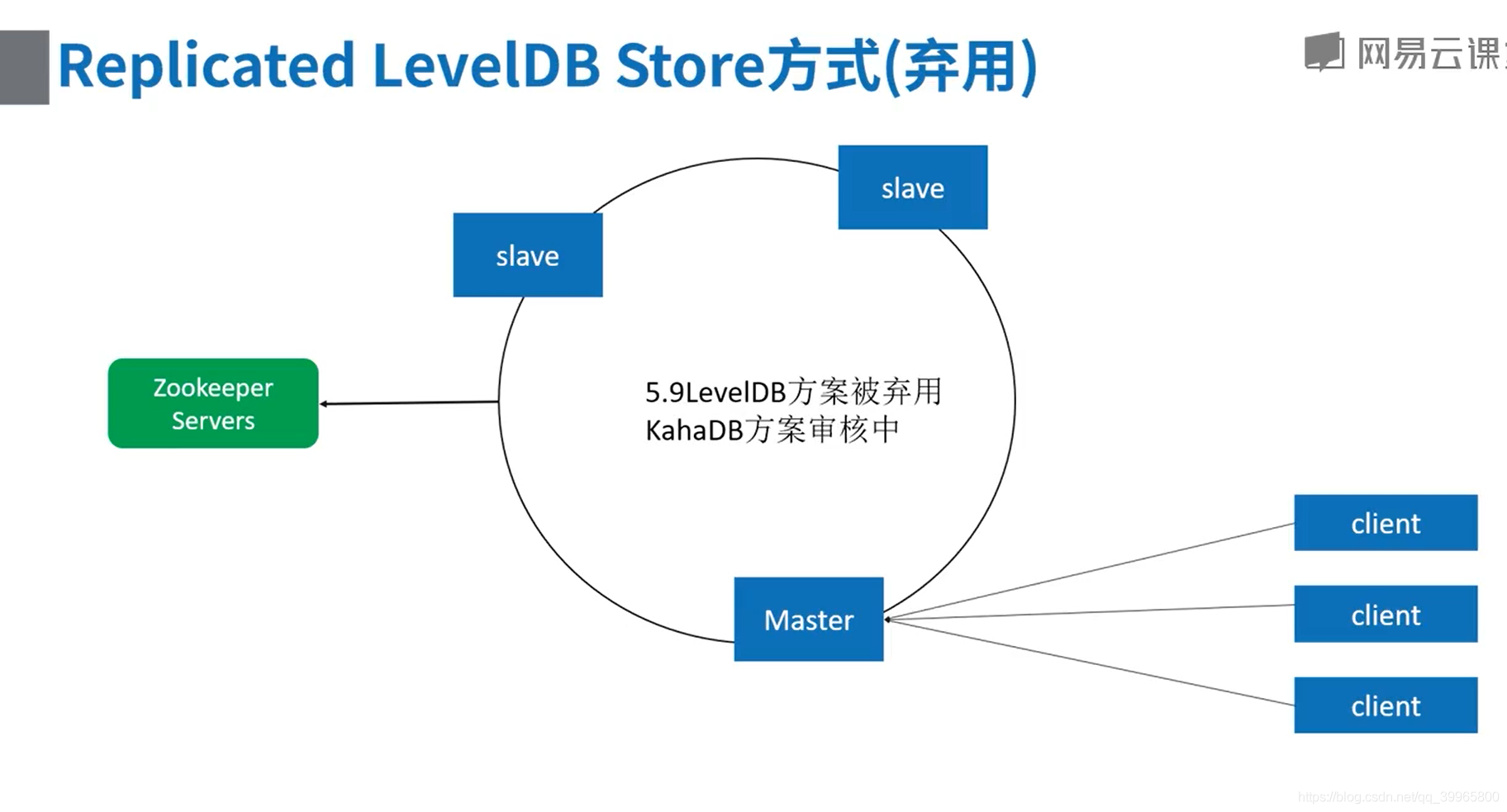
数据库层面进行副本复制
2、内置消费者
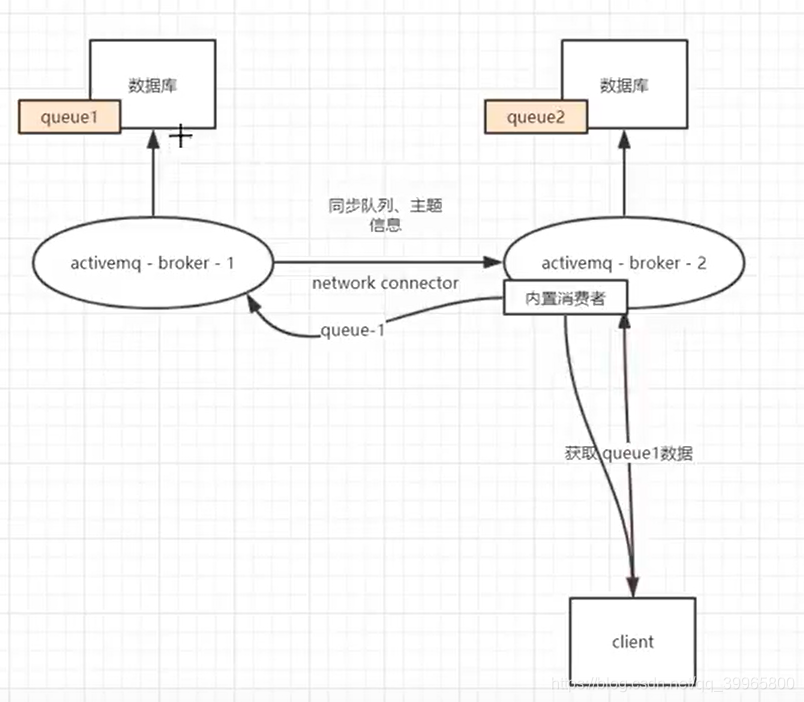
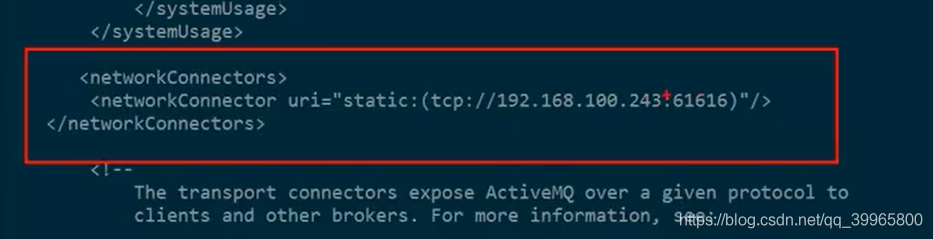
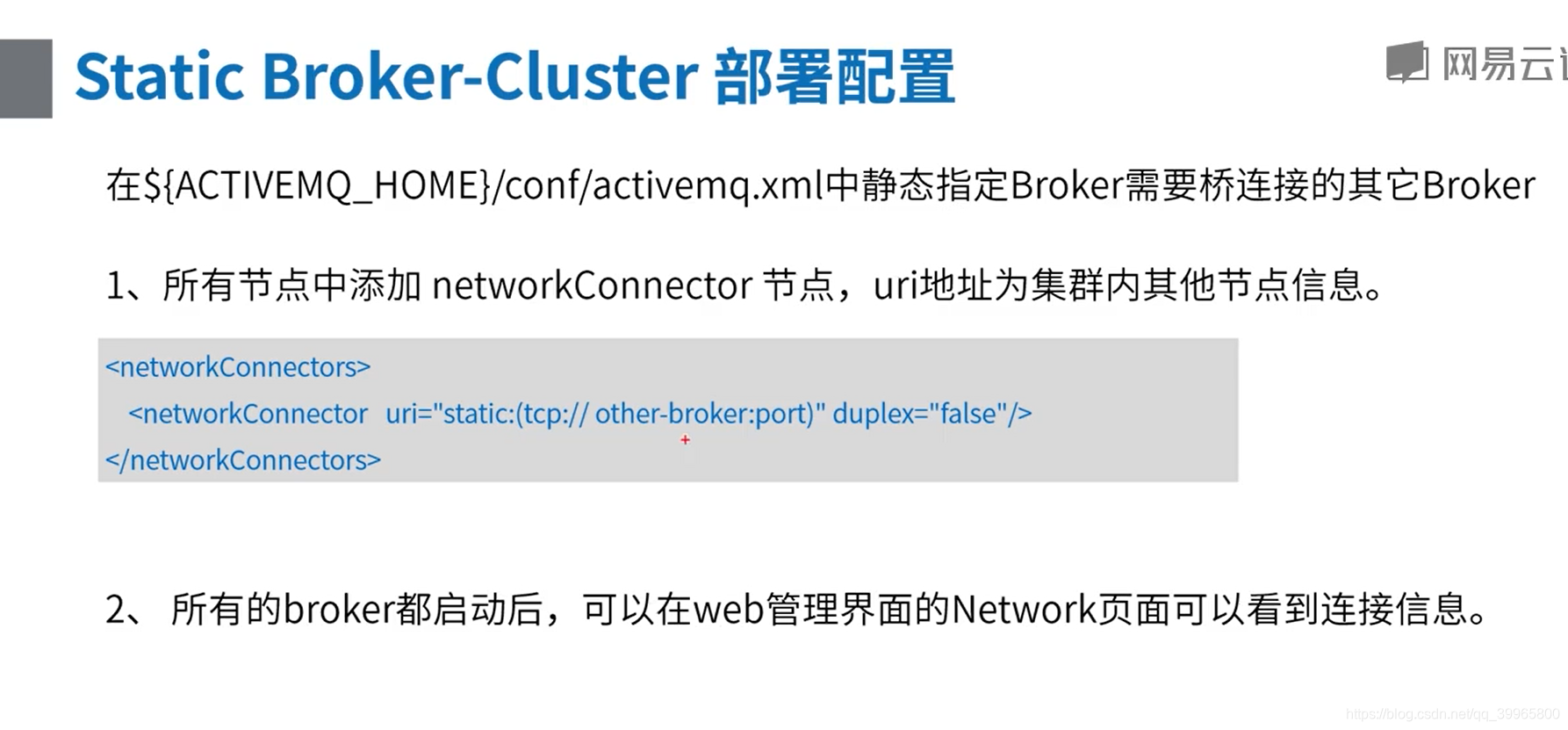
服务器242启动后需要连接243组成 网络集群
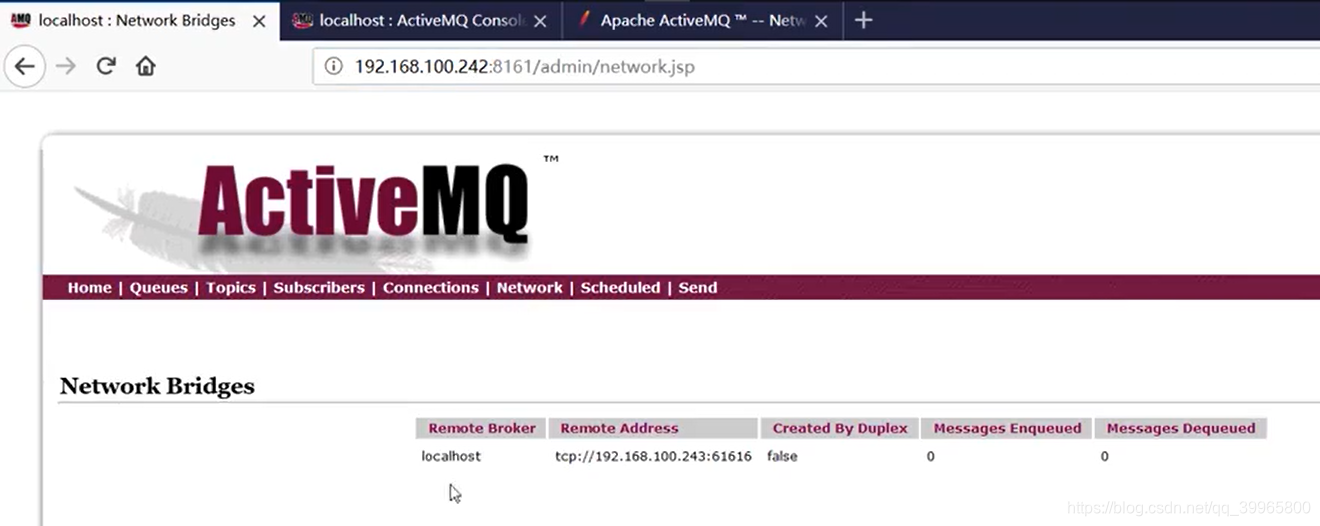
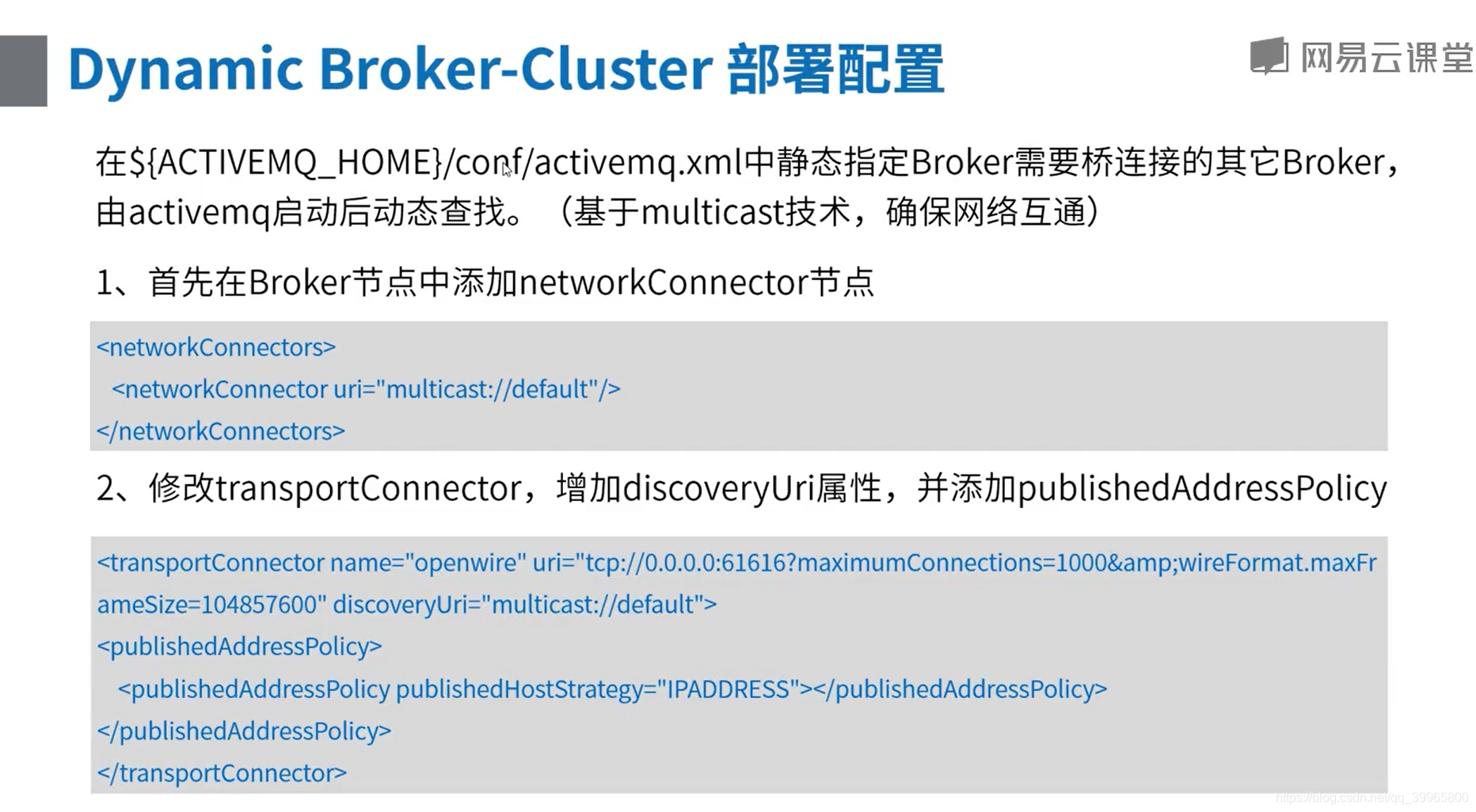
也可以使用网络组播的方式,动态定义
package com.study.mq.b2_clustering.network_connector;

import org.apache.activemq.ActiveMQConnectionFactory;

import javax.jms.*;

// http://activemq.apache.org/networks-of-brokers.html

public class ConsumerNetowork {

    public static void main(String[] args) throws InterruptedException {

        // 消费者用192.168,100.242

        String brokerUrl = "failover:(tcp://192.168.100.242:61616)?initialReconnectDelay=100";

        ConsumerThread queue1 = new ConsumerThread(brokerUrl, "queue1");

        queue1.start();

        queue1.join();

    }

}

class ConsumerThread extends Thread {

    String brokerUrl;

    String destinationUrl;

    public ConsumerThread(String brokerUrl, String destinationUrl) {

        this.brokerUrl = brokerUrl;

        this.destinationUrl = destinationUrl;

    }

    @Override

    public void run() {

        ActiveMQConnectionFactory connectionFactory;

        Connection conn;

        Session session;

        MessageConsumer consumer;

        try {

            // brokerURL http://activemq.apache.org/connection-configuration-uri.html

            // 1、创建连接工厂

            connectionFactory = new ActiveMQConnectionFactory(this.brokerUrl);

            // 2、创建连接对象

            conn = connectionFactory.createConnection();

            conn.start(); // 一定要启动

            // 3、创建会话(可以创建一个或者多个session)

            session = conn.createSession(false, Session.AUTO_ACKNOWLEDGE);

            // 4、创建点对点接收的目标,queue - 点对点

            Destination destination = session.createQueue(destinationUrl);

            // 5、创建消费者消息 http://activemq.apache.org/destination-options.html

            consumer = session.createConsumer(destination);

            // 6、接收消息

            consumer.setMessageListener(message -> {

                try {

                    if (message instanceof TextMessage) {

                        System.out.println("收到文本消息:" + ((TextMessage) message).getText());

                    } else {

                        System.out.println(message);

                    }

                } catch (JMSException e) {

                    e.printStackTrace();

                }

            });

        } catch (JMSException e) {

            e.printStackTrace();

        }

    }

}
package com.study.mq.b2_clustering.network_connector;

import org.apache.activemq.ActiveMQConnectionFactory;

import javax.jms.*;

/**

 * 简单生产者

 */

public class Producer {

    public static void main(String[] args) {

        // 生产者用192.168,100.243

        String brokerUrl = "failover:(tcp://192.168.100.243:61616)?initialReconnectDelay=100";

        new ProducerThread(brokerUrl, "queue1").start();

    }

    static class ProducerThread extends Thread {

        String brokerUrl;

        String destinationUrl;

        public ProducerThread(String brokerUrl, String destinationUrl) {

            this.brokerUrl = brokerUrl;

            this.destinationUrl = destinationUrl;

        }

        @Override

        public void run() {

            ActiveMQConnectionFactory connectionFactory;

            Connection conn;

            Session session;

            try {

                // 1、创建连接工厂

                connectionFactory = new ActiveMQConnectionFactory(brokerUrl);

                // 2、创建连接对象md

                conn = connectionFactory.createConnection();

                conn.start();

                // 3、创建会话

                session = conn.createSession(false, Session.AUTO_ACKNOWLEDGE);

                // 4、创建点对点发送的目标

                 Destination destination = session.createQueue(destinationUrl);

                // 5、创建生产者消息

                MessageProducer producer = session.createProducer(destination);

                // 设置生产者的模式,有两种可选 持久化 / 不持久化

                producer.setDeliveryMode(DeliveryMode.PERSISTENT);

                // 6、创建一条文本消息

                String text = "Hello world!";

                TextMessage message = session.createTextMessage(text);

                for (int i = 0; i < 1; i++) {

                    // 7、发送消息

                    producer.send(message);

                }

                // 8、 关闭连接

                session.close();

                conn.close();

            } catch (JMSException e) {

                e.printStackTrace();

            }

        }

    }

}
消费者和生产者连接不同的服务器,但是能互通数据,构成网络集群
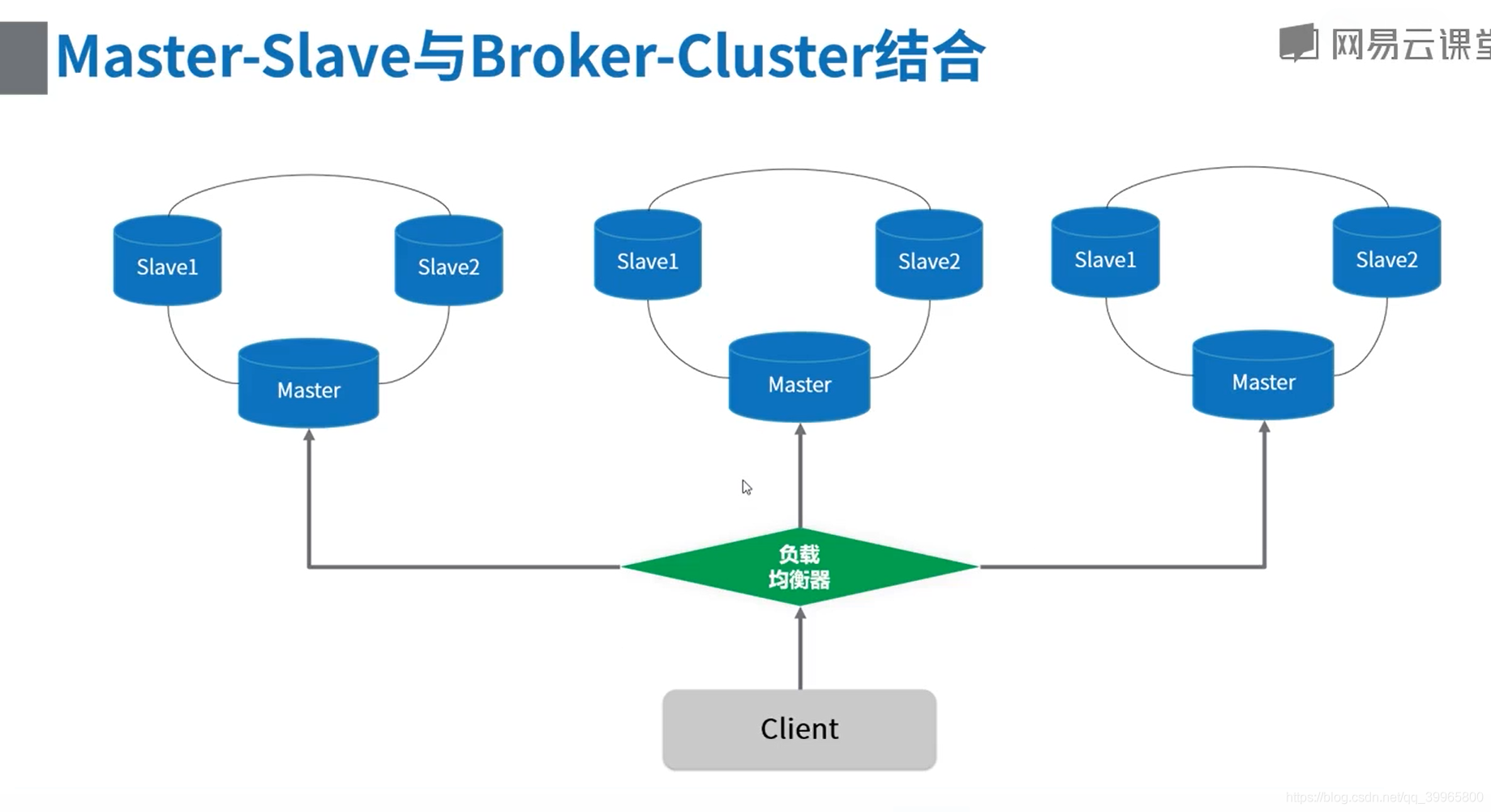
3、组合实现
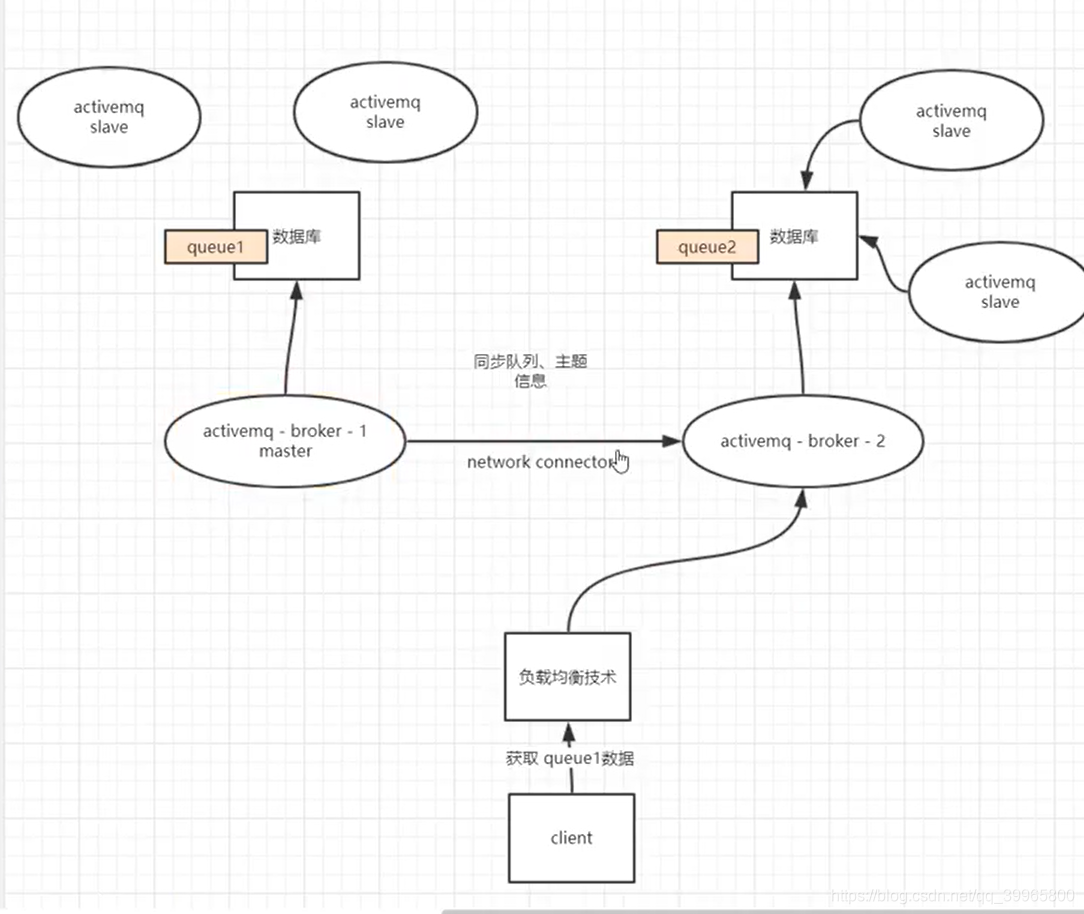
能负载均衡也能高可用
当出现宕机的情况,master连接挂了,继续连接slave中
使用集群

挂载负载均衡器
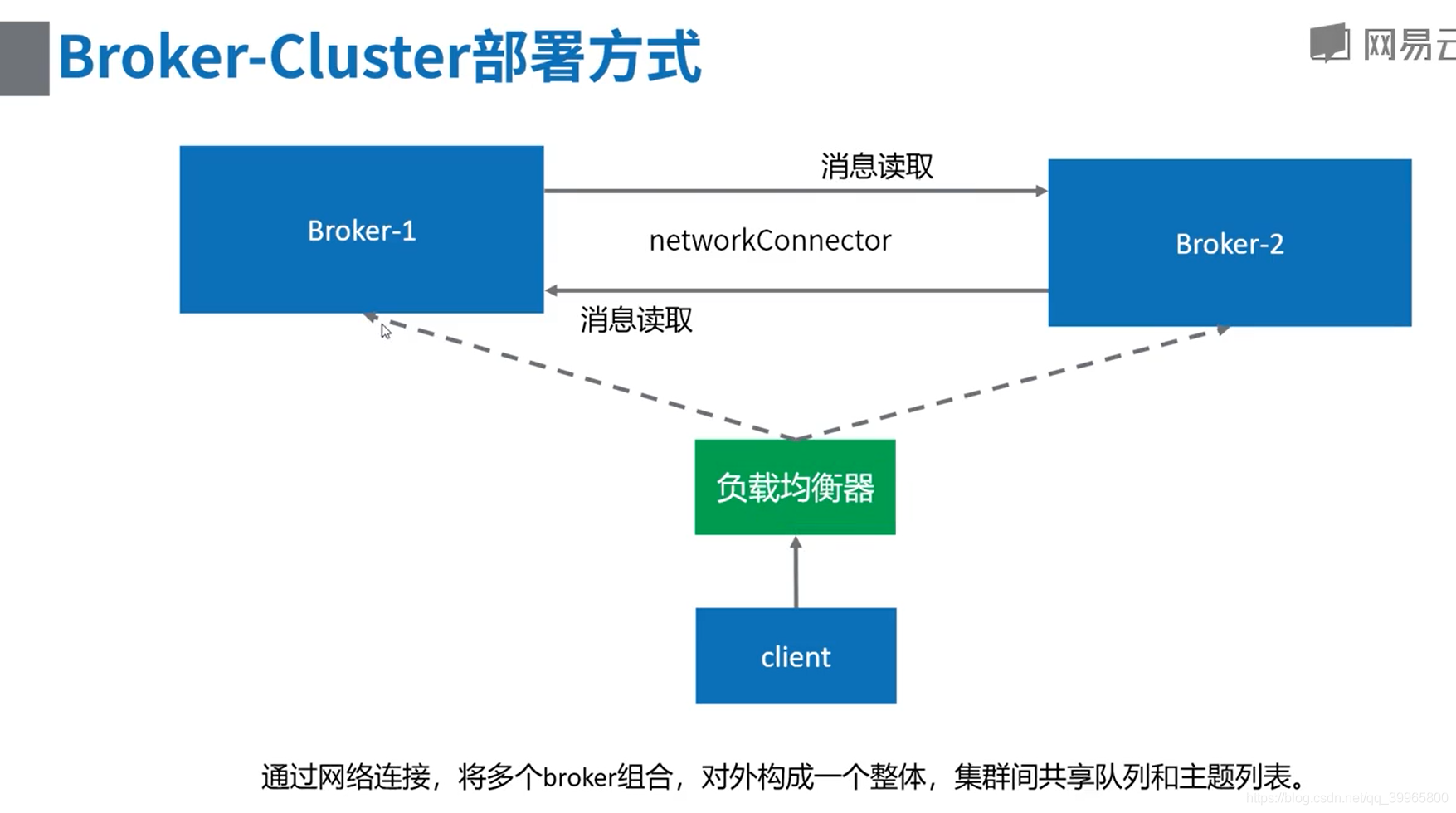

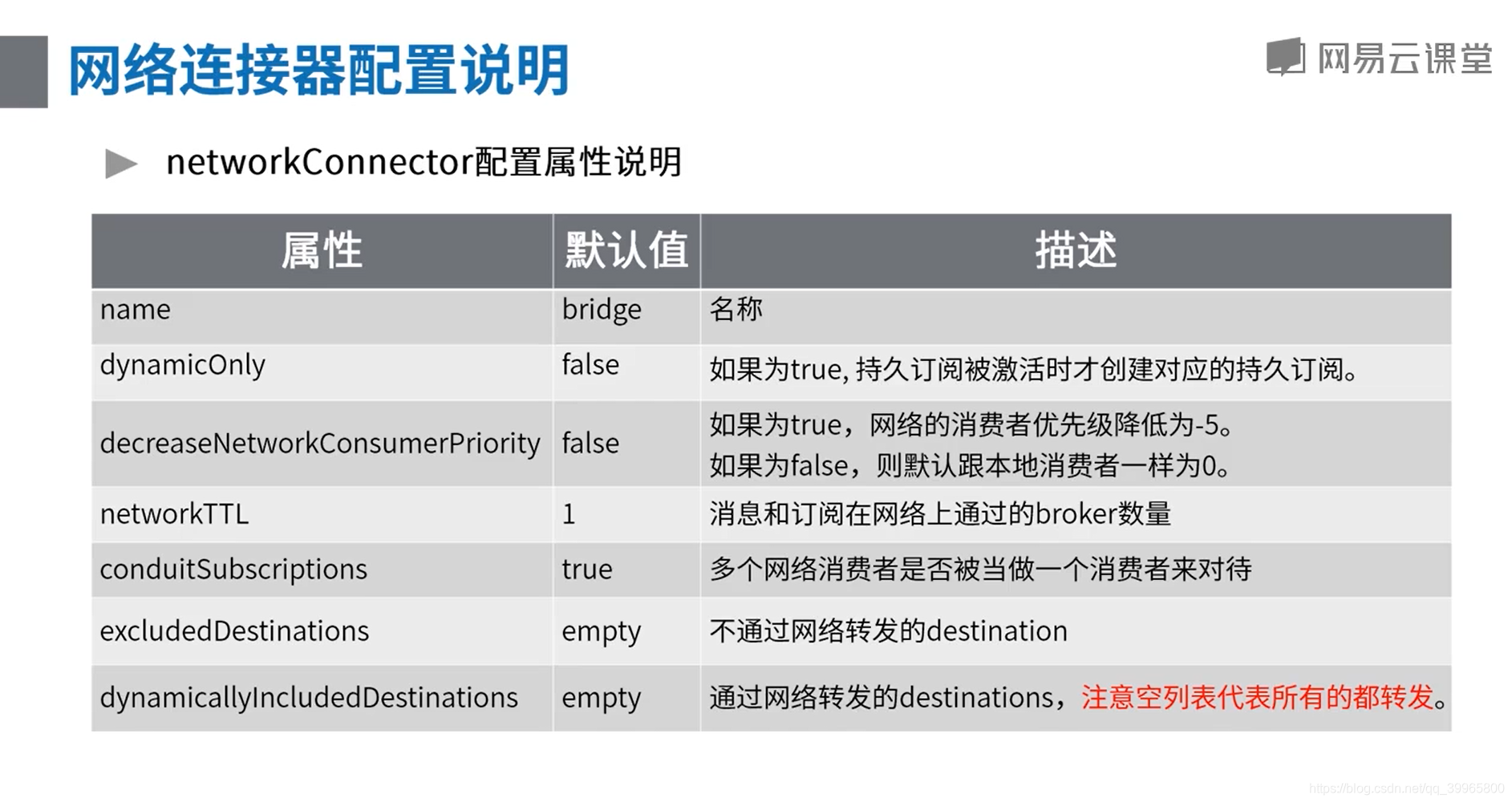
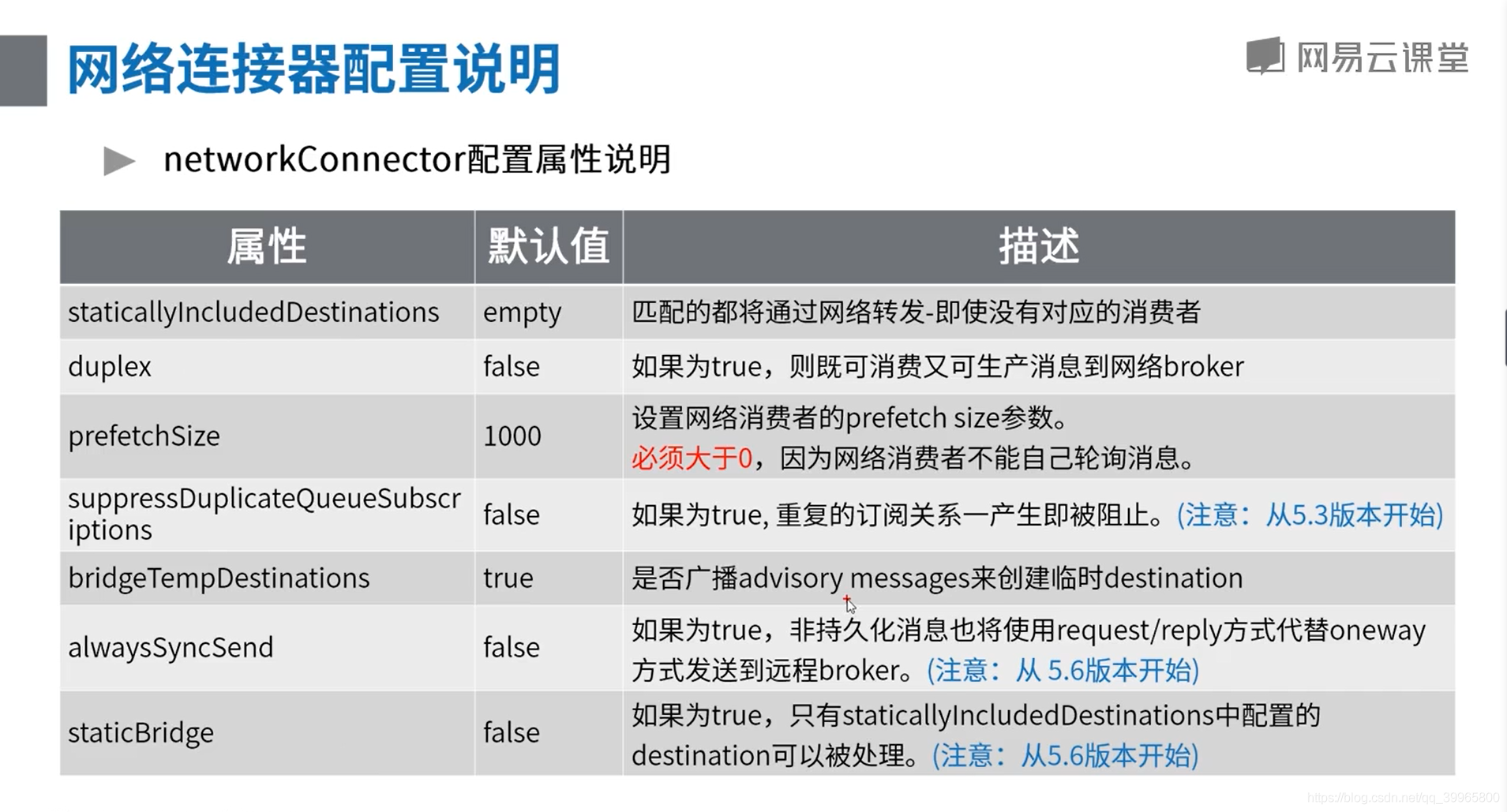
网络连接器配置说明
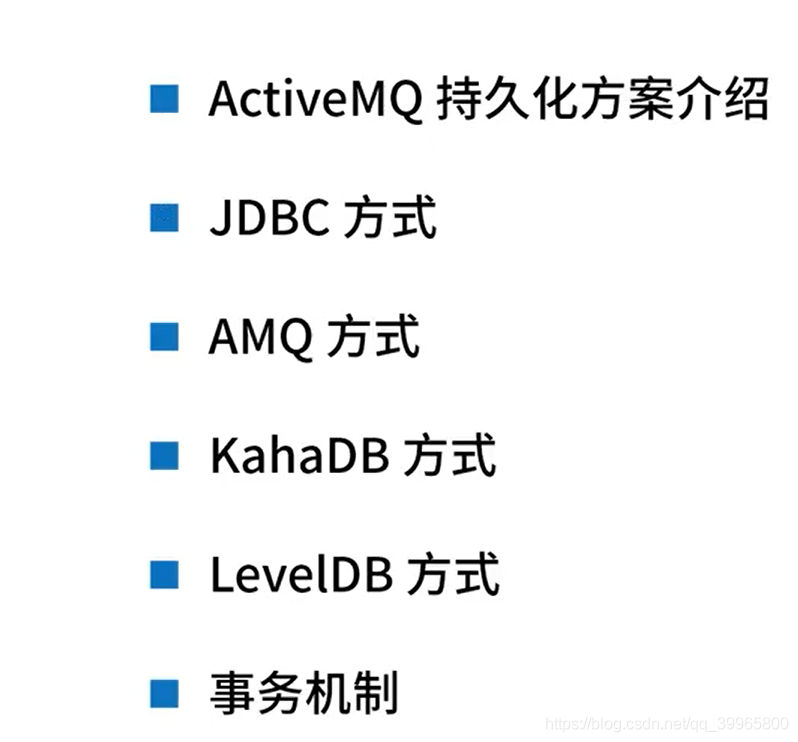
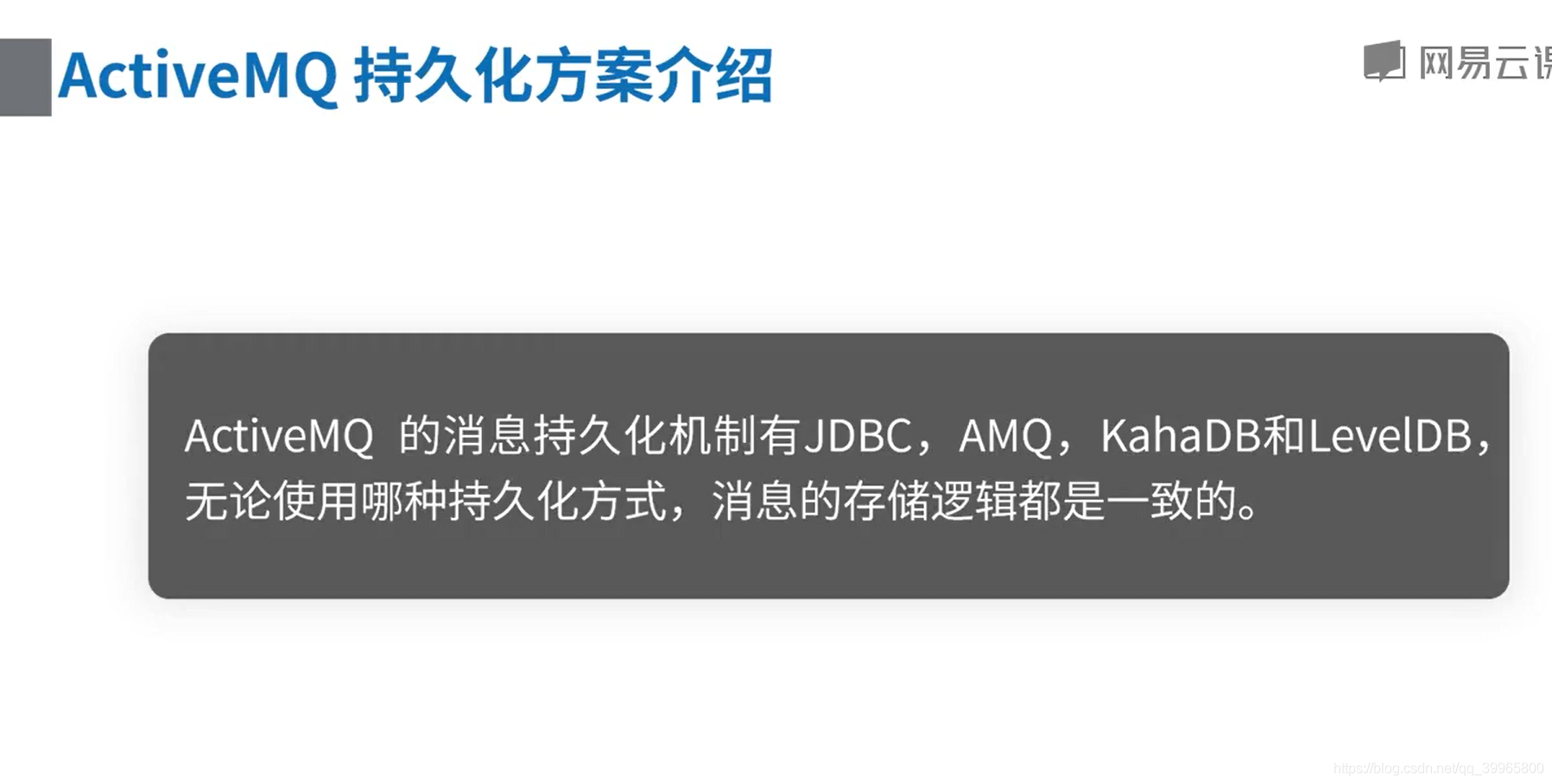
ActiveMQ 持久化原理以及事务机制
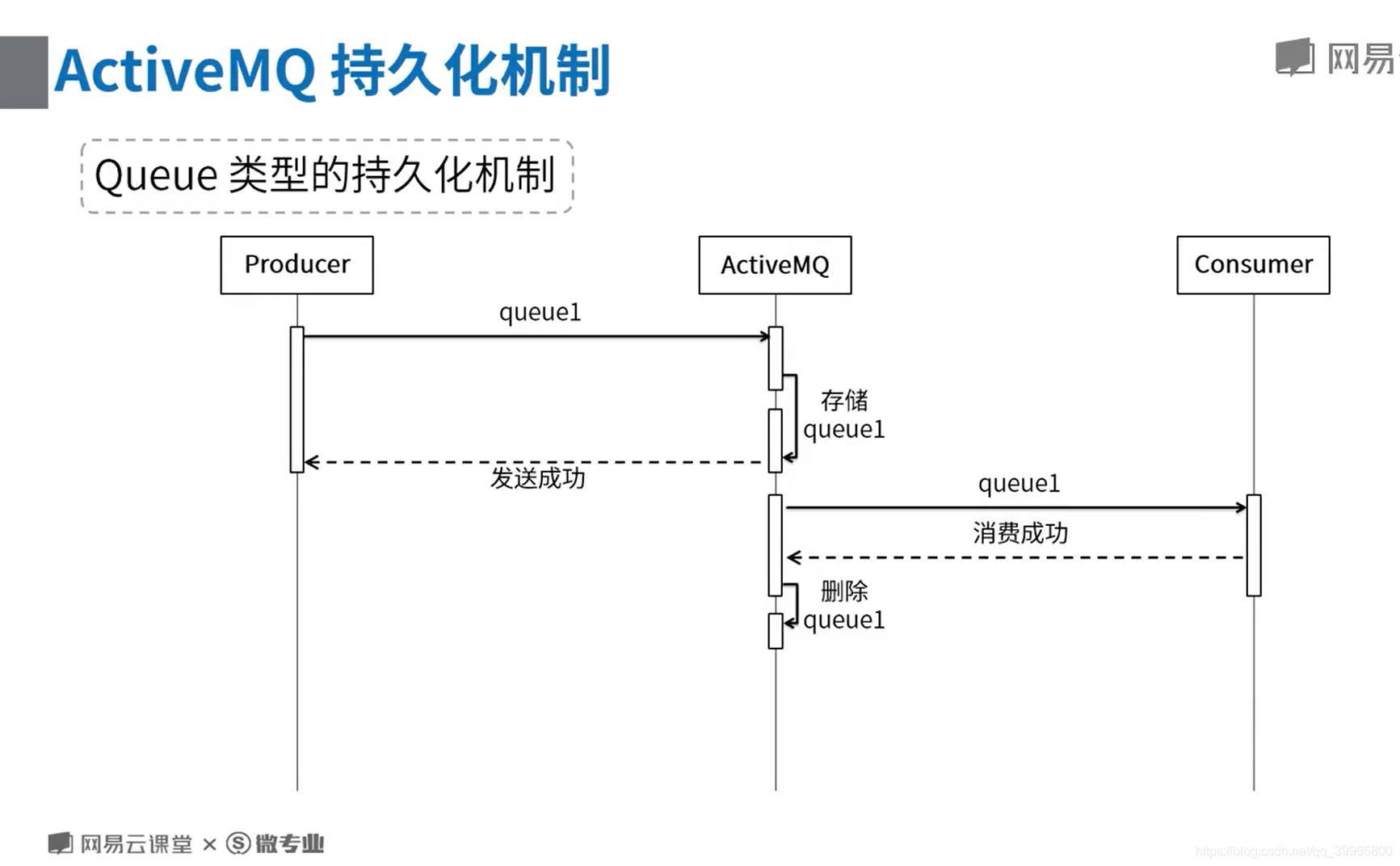
定期清除,会记录处理的进度

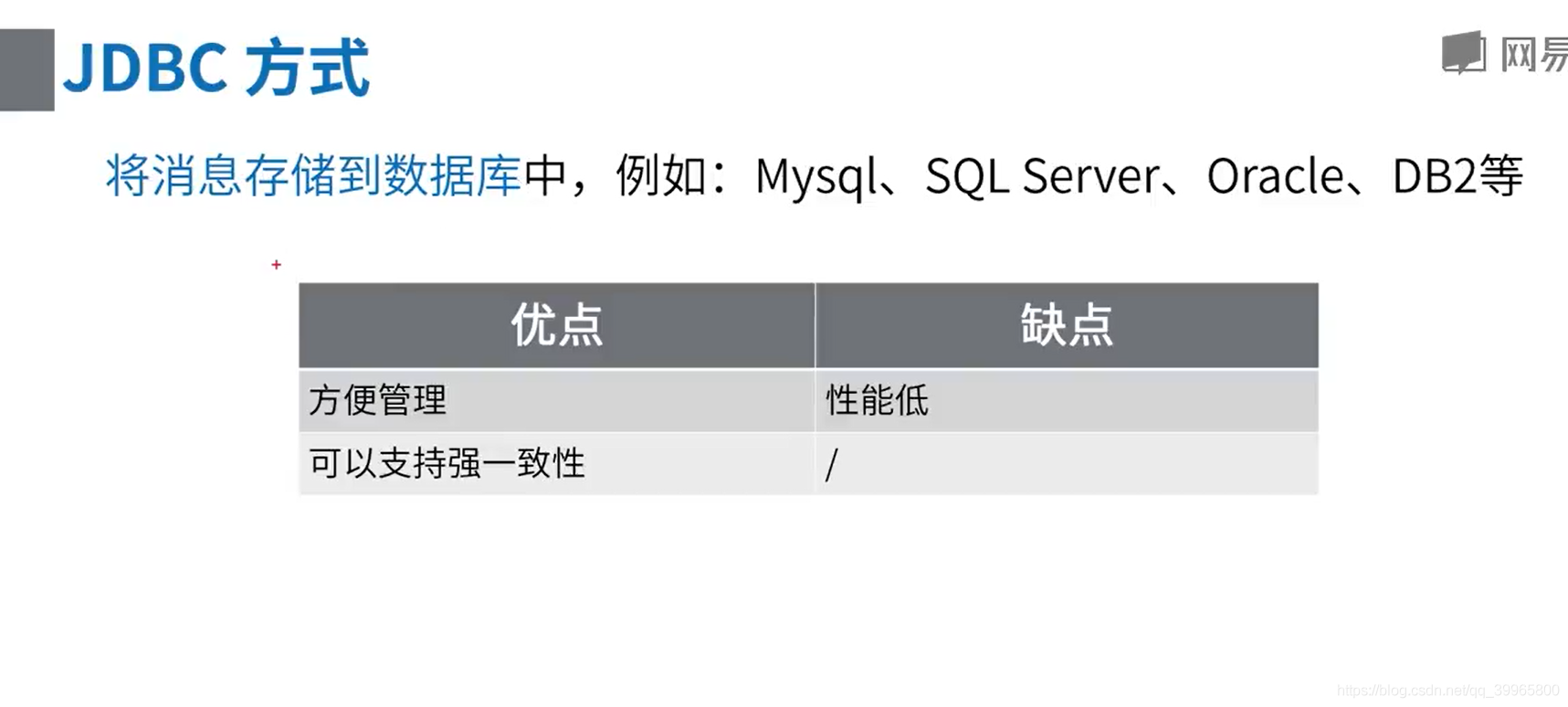
很笨的方法,用的是数据库的特性
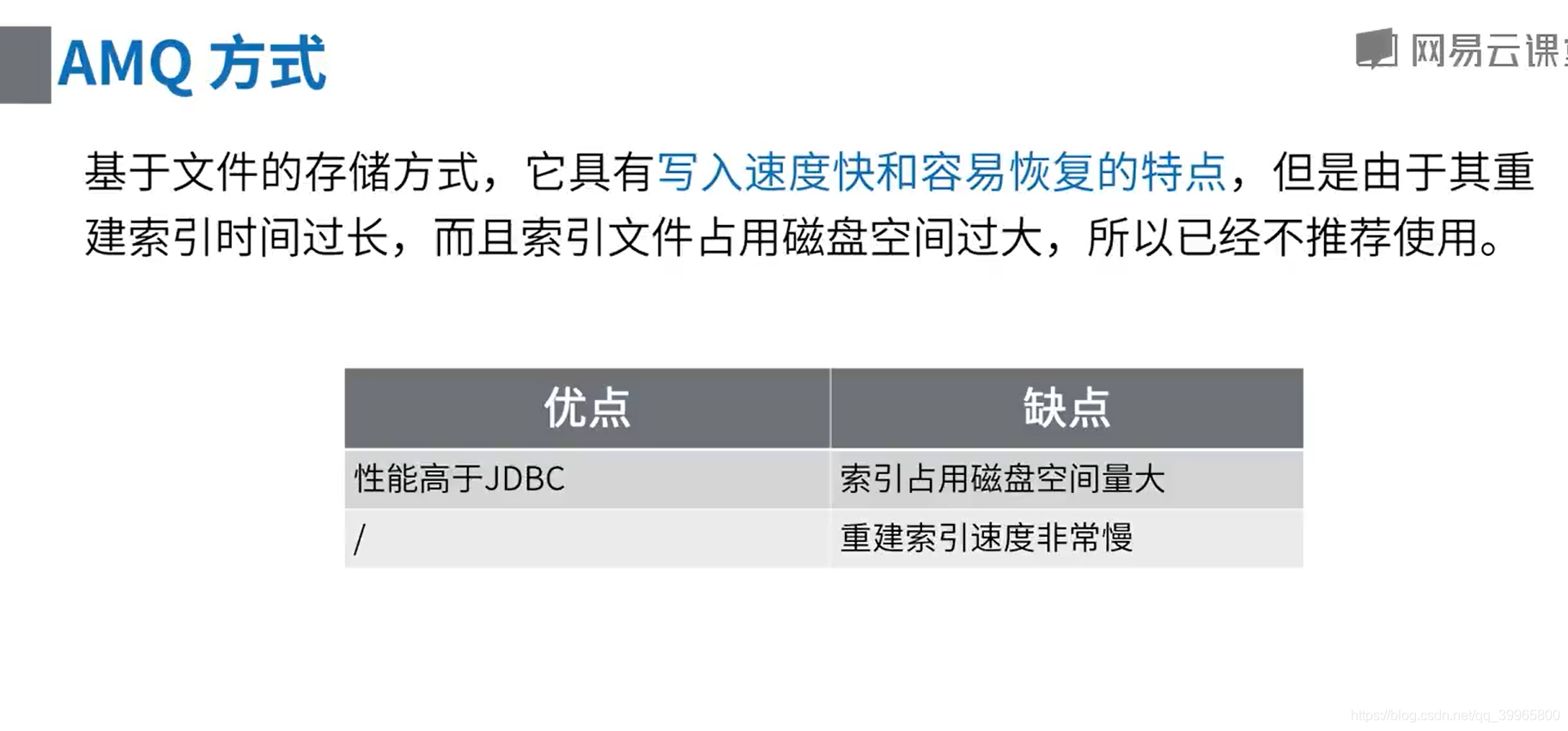
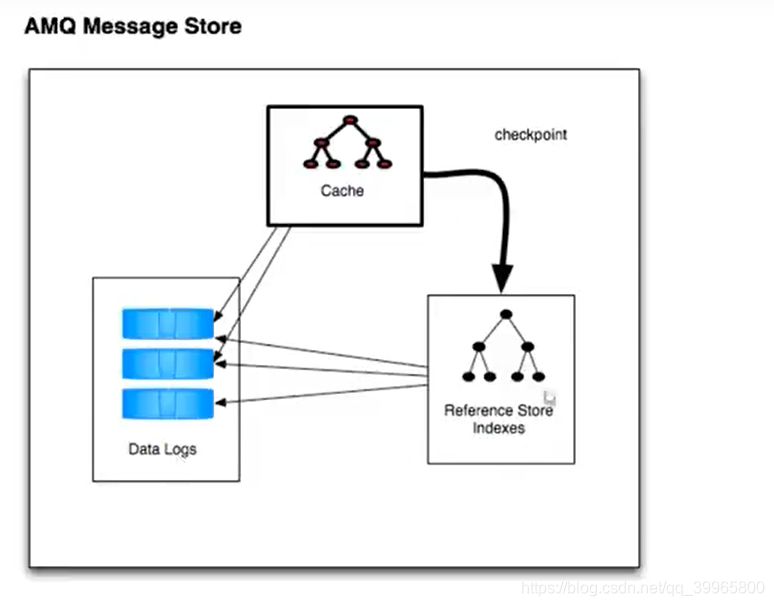
建立索引太麻烦了
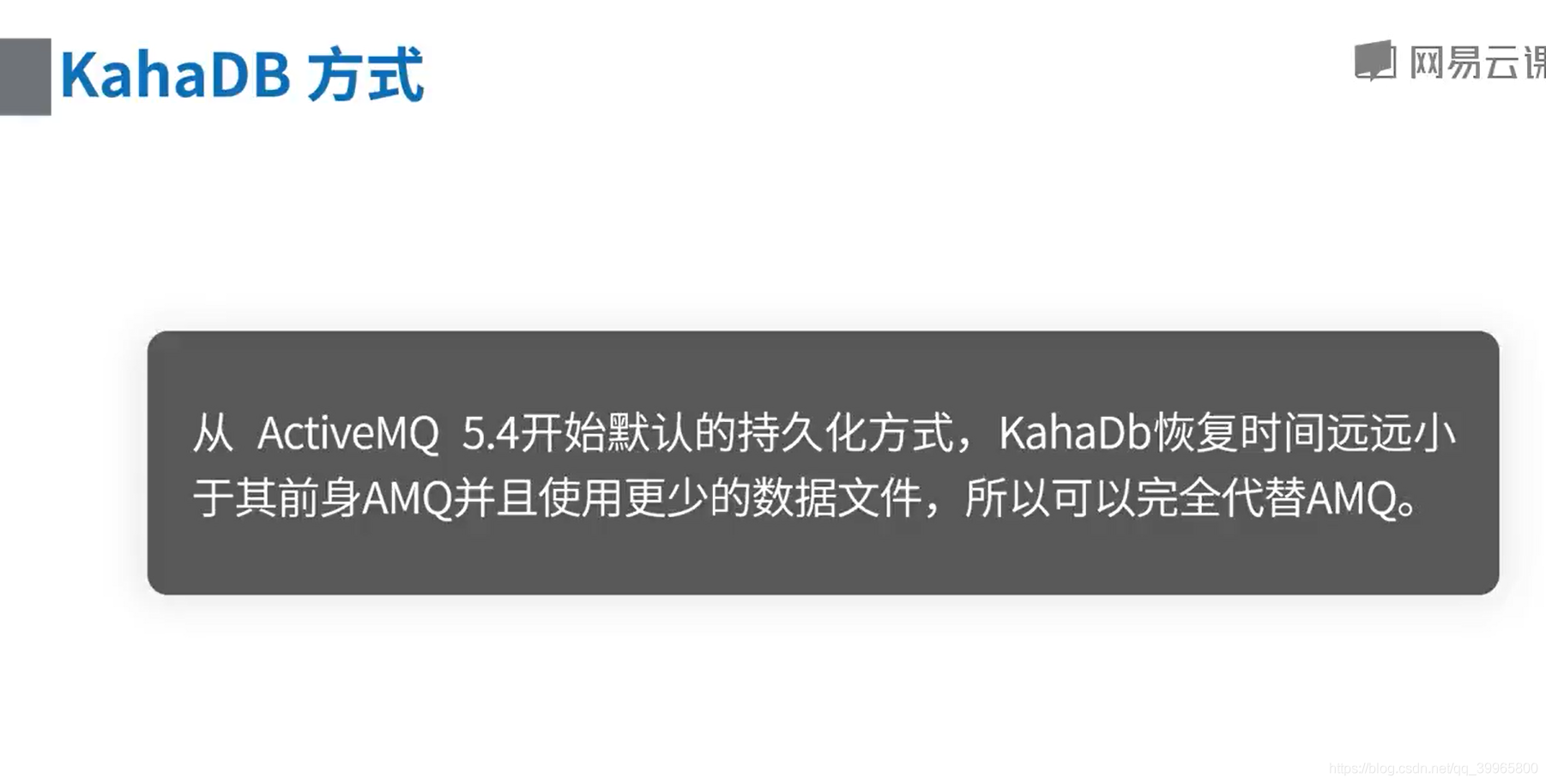
KahaDB是一个基于文件支持事务的消息存储器,是一个可靠,高性能,可扩展的消息存储器。
KahaDB的持久化机制同样是基于日志文件,索引和缓存。
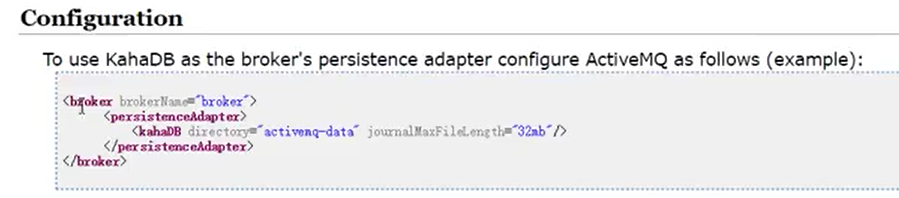

一个data文件只能存储32mb


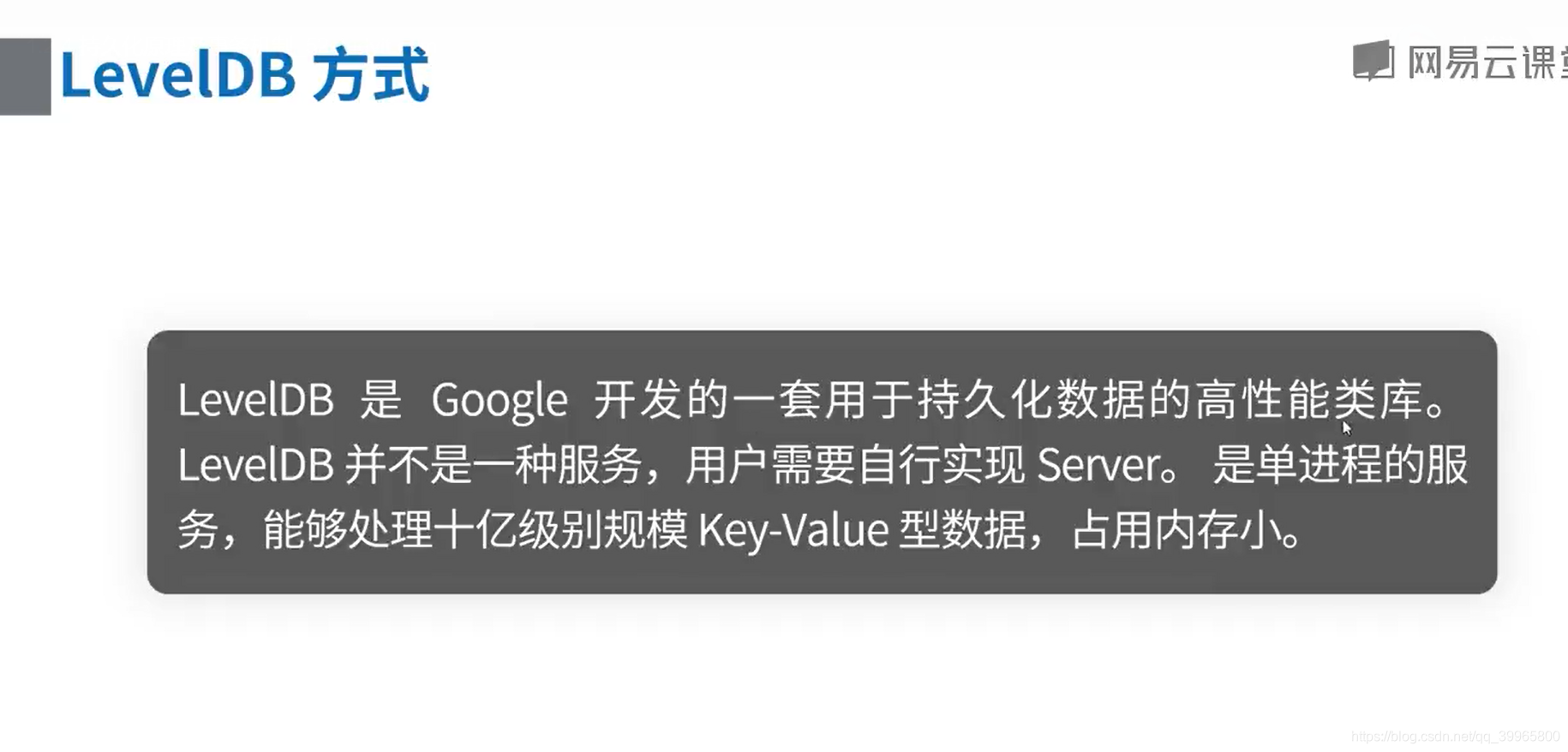
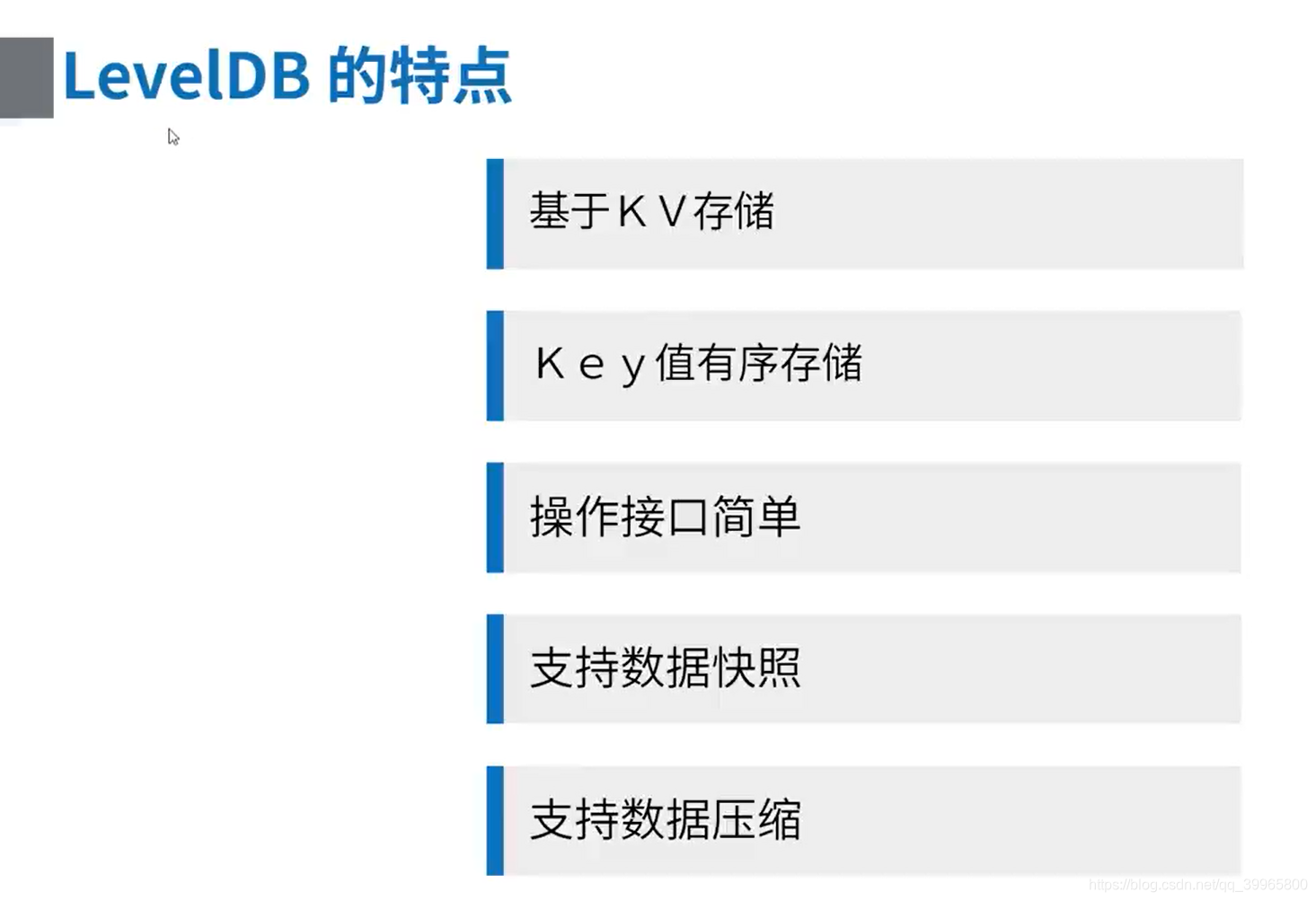
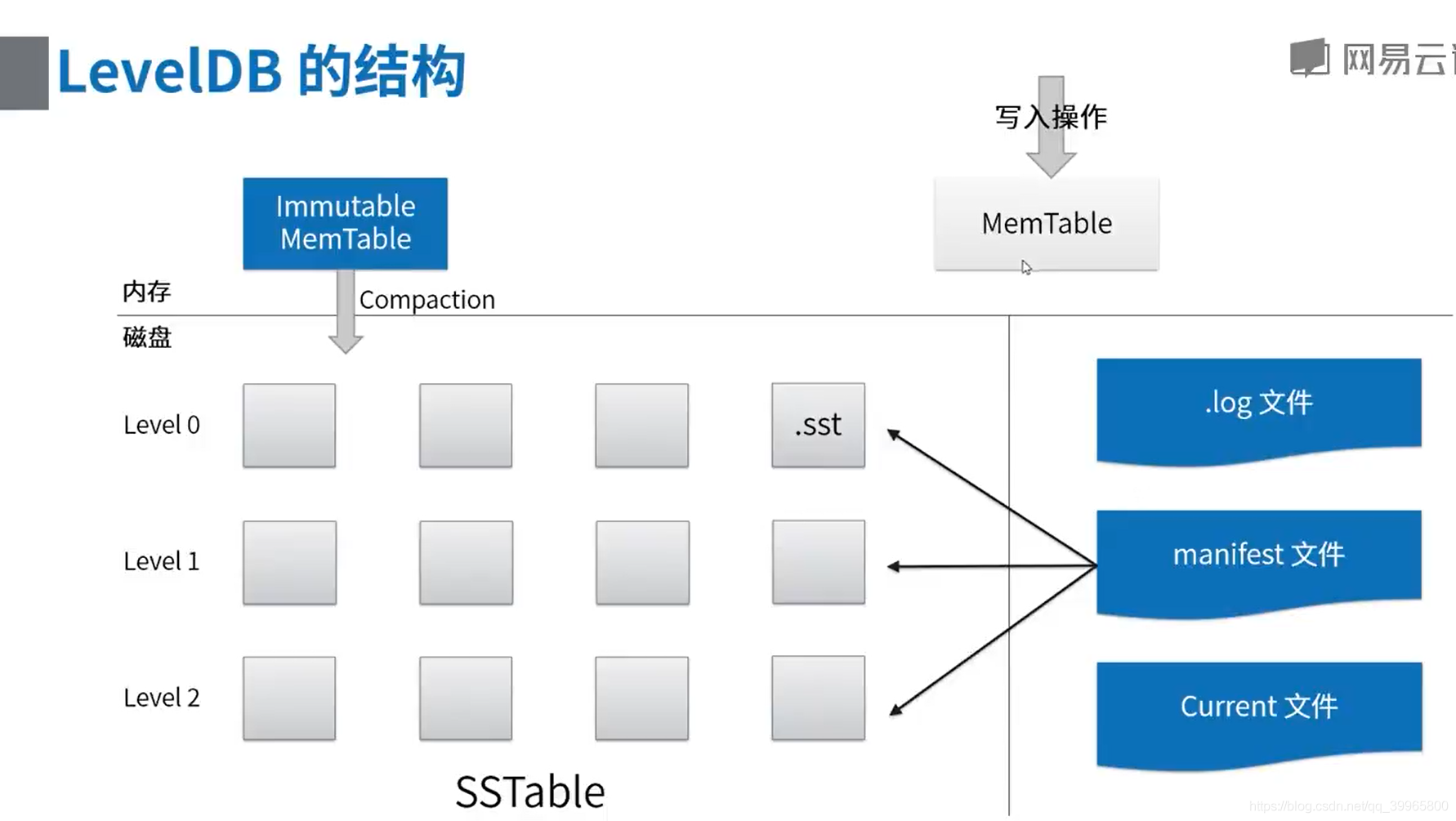
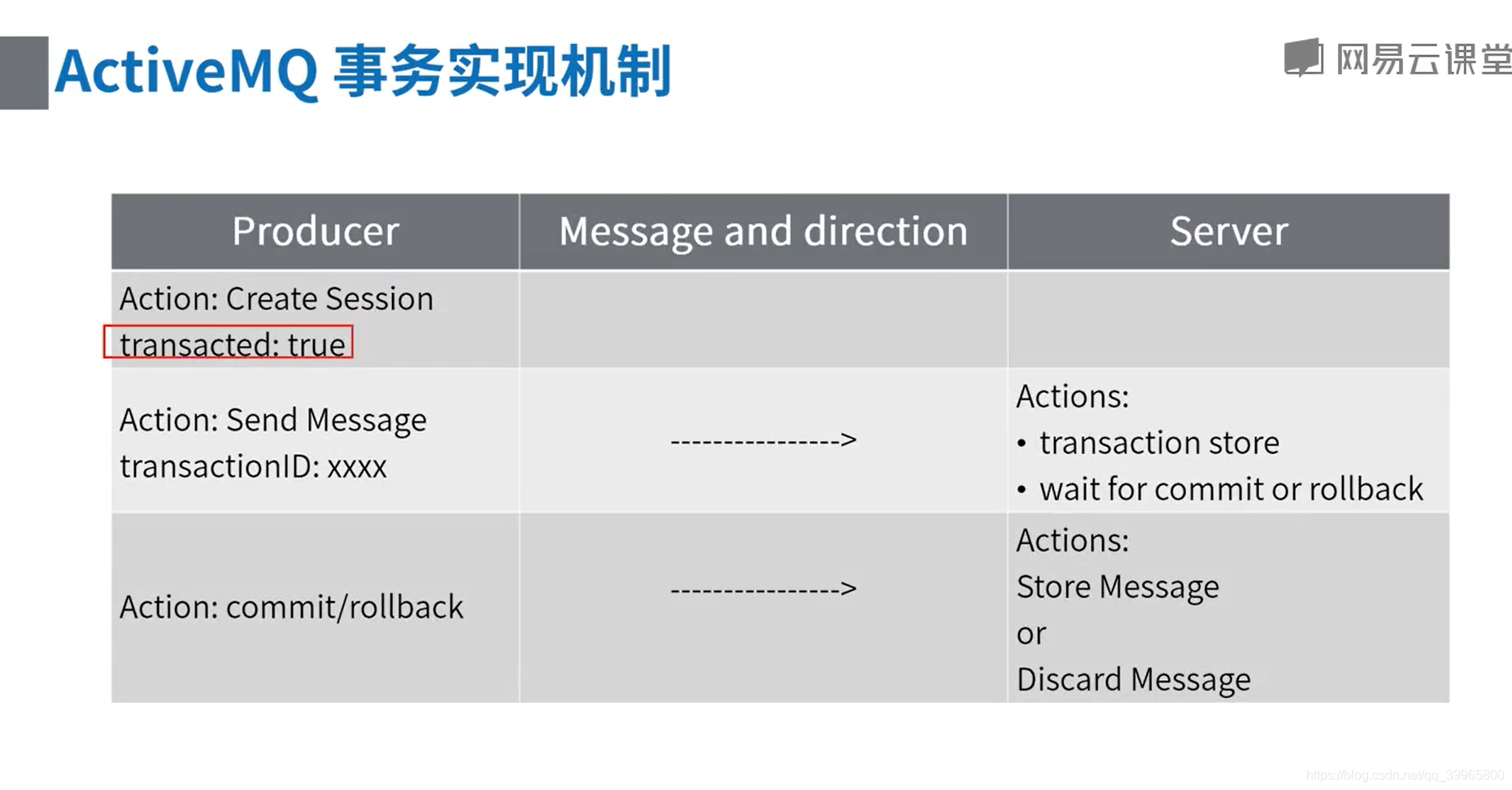
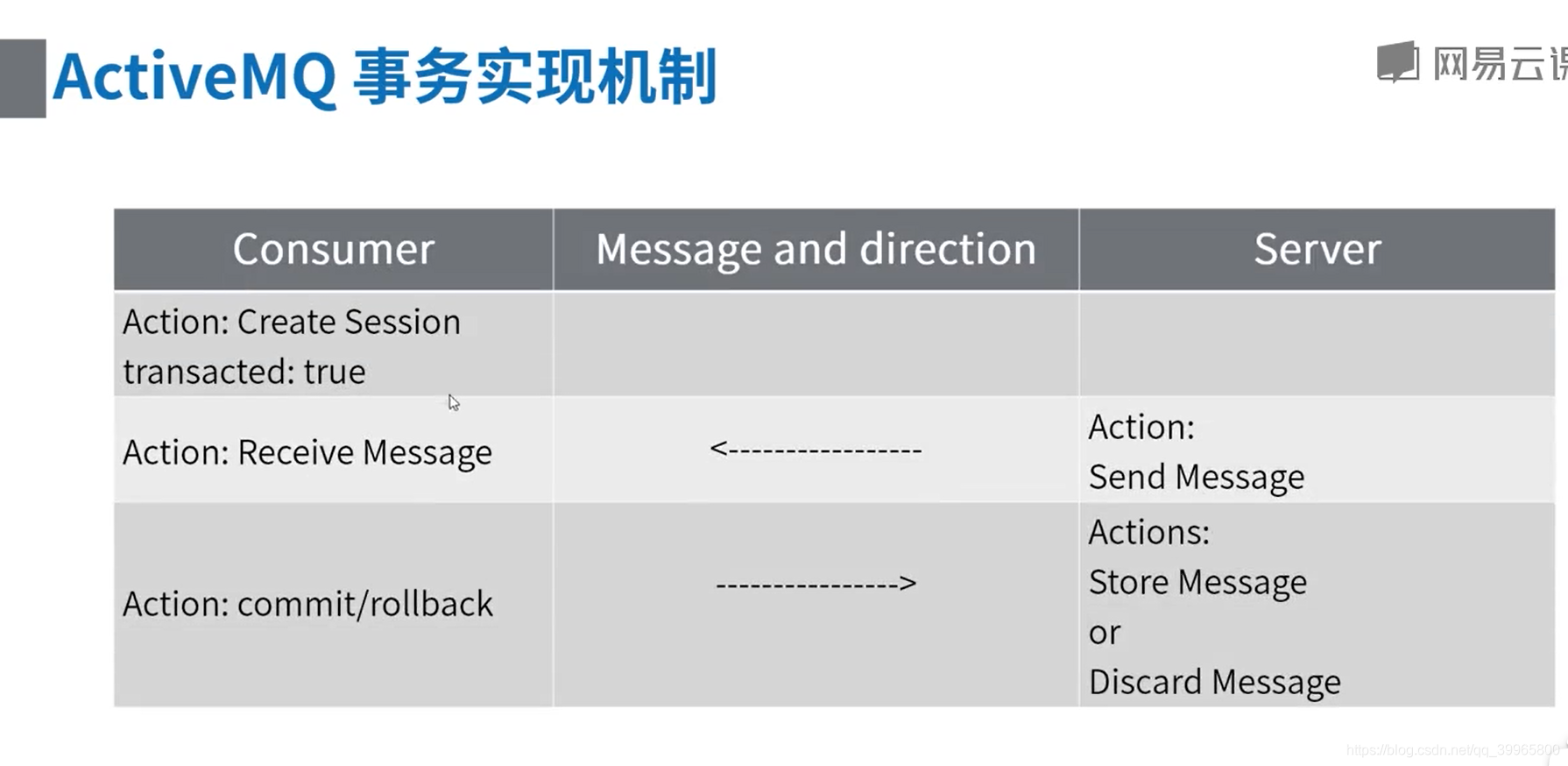
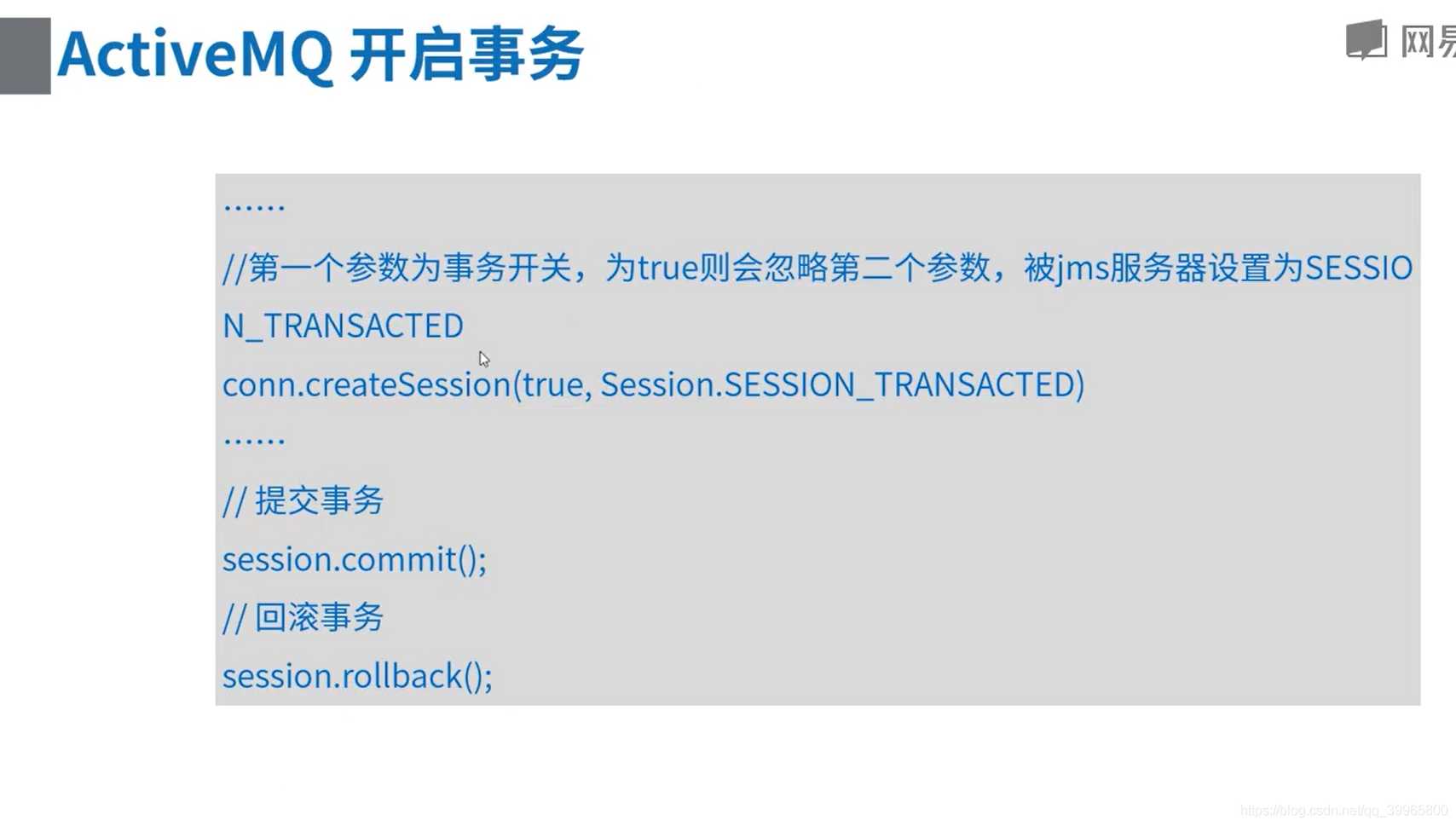
事务机制
package com.study.mq.b7_transaction;

import org.apache.activemq.ActiveMQConnectionFactory;

import javax.jms.*;

import java.io.IOException;

/**

 * 消费者事务

 *

 * 消费者开启事务后,接收到消息后,需要手动提交事务,否则broker上的消息不会真正被消费

 */

// http://activemq.apache.org/destination-options.html

public class Consumer {

    public static void main(String[] args) {

        ActiveMQConnectionFactory connectionFactory = null;

        Connection conn = null;

        Session session = null;

        MessageConsumer consumer = null;

        try {

            // brokerURL http://activemq.apache.org/connection-configuration-uri.html

            // 1、创建连接工厂

            connectionFactory = new ActiveMQConnectionFactory("tcp://192.168.100.242:61616");

            // 2、创建连接对象

            conn = connectionFactory.createConnection("admin", "admin");

            conn.start();

            // 3、创建会话

            // 第一个参数:是否支持事务,如果为true,则会忽略第二个参数,被jms服务器设置为SESSION_TRANSACTED

            // 第一个参数为false时,第二个参数的值可为Session.AUTO_ACKNOWLEDGE,Session.CLIENT_ACKNOWLEDGE,DUPS_OK_ACKNOWLEDGE其中一个。

            // Session.AUTO_ACKNOWLEDGE为自动确认,客户端发送和接收消息不需要做额外的工作。哪怕是接收端发生异常,也会被当作正常发送成功。

            // Session.CLIENT_ACKNOWLEDGE为客户端确认。客户端接收到消息后,必须调用javax.jms.Message的acknowledge方法。jms服务器才会当作发送成功,并删除消息。

            // DUPS_OK_ACKNOWLEDGE允许副本的确认模式。一旦接收方应用程序的方法调用从处理消息处返回,会话对象就会确认消息的接收;而且允许重复确认。

            session = conn.createSession(true, Session.AUTO_ACKNOWLEDGE);

            // 4、创建点对点接收的目标

            Destination destination = session.createQueue("queue2");

            // 创建订阅的目标

//            Destination b4_destination = session.createTopic("topic1");

            // 5、创建消费者消息 http://activemq.apache.org/destination-options.html

            consumer = session.createConsumer(destination);

            // 6、接收消息

            Session finalSession = session;

            consumer.setMessageListener(new MessageListener() {

                @Override

                public void onMessage(Message message) {

                    if (message instanceof TextMessage) {

                        try {

                            System.out.println("收到文本消息:" + ((TextMessage) message).getText());

                        } catch (JMSException e) {

                            e.printStackTrace();

                        }

                    } else {

                        System.out.println(message);

                    }

                    try {

                        finalSession.commit();

                       //finalSession.rollback();

                    } catch (JMSException e) {

                        e.printStackTrace();

                    }

                }

            });

            System.in.read();

        } catch (JMSException e) {

            e.printStackTrace();

        } catch (IOException e) {

            e.printStackTrace();

        } finally {

            if (consumer != null) {

                try {

                    consumer.close();

                } catch (JMSException e) {

                    e.printStackTrace();

                }

            }

            if (session != null) {

                try {

                    session.close();

                } catch (JMSException e1) {

                    e1.printStackTrace();

                }

            }

            if (conn != null) {

                try {

                    conn.close();

                } catch (JMSException e1) {

                    e1.printStackTrace();

                }

            }

        }

    }

}
package com.study.mq.b7_transaction;

import org.apache.activemq.ActiveMQConnectionFactory;

import javax.jms.*;

/**

 * 生产者事务

 *

 * 生产者开启事务后,消息发送后,提交事务后,broker上的消息才能发到消费者

 */

public class Producer {

    public static void main(String[] args) {

        ActiveMQConnectionFactory connectionFactory;

        Connection conn = null;

        Session session = null;

        try {

            // 1、创建连接工厂

//            connectionFactory = new ActiveMQConnectionFactory("admin", "admin", "udp://vm1.tony.com:61616");

            connectionFactory = new ActiveMQConnectionFactory("admin", "admin", "tcp://192.168.158.129:61616");

            // 2、创建连接对象

            conn = connectionFactory.createConnection();

            conn.start();

            // 3、创建会话

            // 第一个参数:是否支持事务,如果为true,则会忽略第二个参数,被jms服务器设置为SESSION_TRANSACTED

            // 第一个参数为false时,第二个参数的值可为Session.AUTO_ACKNOWLEDGE,Session.CLIENT_ACKNOWLEDGE,DUPS_OK_ACKNOWLEDGE其中一个。

            // Session.AUTO_ACKNOWLEDGE为自动确认,客户端发送和接收消息不需要做额外的工作。哪怕是接收端发生异常,也会被当作正常发送成功。

            // Session.CLIENT_ACKNOWLEDGE为客户端确认。客户端接收到消息后,必须调用javax.jms.Message的acknowledge方法。jms服务器才会当作发送成功,并删除消息。

            // DUPS_OK_ACKNOWLEDGE允许副本的确认模式。一旦接收方应用程序的方法调用从处理消息处返回,会话对象就会确认消息的接收;而且允许重复确认。

            session = conn.createSession(true, Session.AUTO_ACKNOWLEDGE);

            // 4、创建点对点发送的目标

            Destination destination = session.createQueue("queue2");

            // 创建发布的目标

//            Destination b4_destination = session.createTopic("topic1");

            // 5、创建生产者消息

            MessageProducer producer = session.createProducer(destination);

            // 设置生产者的模式,有两种可选

            // DeliveryMode.PERSISTENT 当activemq关闭的时候,队列数据将会被保存

            // DeliveryMode.NON_PERSISTENT 当activemq关闭的时候,队列里面的数据将会被清空

            producer.setDeliveryMode(DeliveryMode.NON_PERSISTENT);

            for (int i = 0; i < 10; i++) {

                // 6、创建一条消息

                // 有6中消息类型:

                // BytesMessage  用来传递字节

                // MapMessage    用来传递字节

                // ObjectMessage 用来传递序列化对象

                // StreamMessage 用来传递文件等

                // TextMessage   用来传递字符串

                String text = "Hello world! " + i;

                TextMessage message = session.createTextMessage(text);

                // 7、发送消息

                producer.send(message);

                if (i % 3 == 0) { // 3的倍数,发送,但回滚

                    session.rollback();

                } else {

                    // 在开启持久化模式时,commit后,会同步到磁盘

                    // 所以当一个原子步骤中发送大批量消息,不建议每条消息发送后提交,而是批量发送完后一次性提交,以最大限度地减少磁盘同步产生的延迟.

                    session.commit();

                }

            }

        } catch (JMSException e) {

            e.printStackTrace();

        } finally {

            if (conn != null) {

                try {

                    conn.close();

                } catch (JMSException e1) {

                    e1.printStackTrace();

                }

            }

            if (session != null) {

                try {

                    session.close();

                } catch (JMSException e1) {

                    e1.printStackTrace();

                }

            }

        }

    }

}
异步分发 http://activemq.apache.org/consumer-dispatch-async.html
 独占消费 http://activemq.apache.org/exclusive-consumer.html
 优先级消费 http://activemq.apache.org/consumer-priority.html
 持久订阅者 http://activemq.apache.org/manage-durable-subscribers.html
 消费分组 http://activemq.apache.org/message-groups.html
 消息重发 http://activemq.apache.org/redelivery-policy.html
 消息追溯 http://activemq.apache.org/retroactive-consumer.html
 消息过滤 http://activemq.apache.org/selectors.html
 慢消费者处理 http://activemq.apache.org/slow-consumer-handling.html
 订阅恢复策略 http://activemq.apache.org/subscription-recovery-policy.html
不通过事务进行重复提交
package com.study.mq.b3_consumer;

import org.apache.activemq.ActiveMQConnection;

import org.apache.activemq.ActiveMQConnectionFactory;

import org.apache.activemq.RedeliveryPolicy;

import org.apache.activemq.broker.region.policy.RedeliveryPolicyMap;

import org.apache.activemq.command.ActiveMQQueue;

import javax.jms.*;

import java.util.concurrent.CountDownLatch;

/**

 * 消息重发

 */

public class RedeliveryPolicyConsumer {

    public static void main(String[] args) {

        ActiveMQConnectionFactory connectionFactory;

        Connection conn = null;

        Session session = null;

        MessageConsumer consumer = null;

        String brokerUrl = "tcp://192.168.100.242:61616";

        String name = Thread.currentThread().getName();

        try {

            // 创建队列重发策略

            RedeliveryPolicy queuePolicy = new RedeliveryPolicy();

            queuePolicy.setInitialRedeliveryDelay(0); // 初始重发延迟时间,单位:毫秒

            queuePolicy.setRedeliveryDelay(5000); // 第一次以后的延迟时间

            queuePolicy.setUseExponentialBackOff(false);// 是否以指数递增的方式增加超时时间

            queuePolicy.setMaximumRedeliveries(3); // 最大重发次数,从0开始计数,为-1则不使用最大次数

            // brokerURL http://activemq.apache.org/consumer-dispatch-async.html

            // 1、创建连接工厂

            connectionFactory = new ActiveMQConnectionFactory(brokerUrl);

            // 设置重发策略

            connectionFactory.setRedeliveryPolicy(queuePolicy);

            // 2、创建连接对象

            conn = connectionFactory.createConnection();

            // 3、启动连接

            conn.start(); // 一定要启动

            // 4、创建会话(可以创建一个或者多个session)

            // 确认模式设置为客户端手动确认

            session = conn.createSession(false, Session.CLIENT_ACKNOWLEDGE);

            // 5、创建点对点接收的目标,即接收哪个队列的消息

            // http://activemq.apache.org/destination-options.html

            Destination destination = session.createQueue("queue2");

            // 6、创建消费者消息

            consumer = session.createConsumer(destination);

            // 7、监听消息

            Session finalSession = session;

            consumer.setMessageListener(new MessageListener() {

                @Override

                public void onMessage(Message message) {

                    try {

                        // 模拟消费者异常

                        if (((TextMessage) message).getText().endsWith("4")) {

                            throw new RuntimeException("消息重发");

                        }

                        if (message instanceof TextMessage) {

                            System.out.println(name + " 收到文本消息:" + ((TextMessage) message).getText());

                        } else {

                            System.out.println(name + " " + message);

                        }

                        // 8、确认收到消息

                        message.acknowledge();

                    } catch (JMSException e) {

                        e.printStackTrace();

                    } catch (RuntimeException e) {

                        System.out.println(e.getMessage());

                        try {

                            // 消息重发

                            finalSession.recover();

                        } catch (JMSException e1) {

                            e1.printStackTrace();

                        }

                    }

                }

            });

            System.out.println(name + " 已启动,等待接收消息!");

            // 阻塞程序

            new CountDownLatch(1).await();

        } catch (JMSException e) {

            e.printStackTrace();

        } catch (InterruptedException e) {

            e.printStackTrace();

        } finally {

            if (consumer != null) {

                try {

                    consumer.close();

                } catch (JMSException e) {

                    e.printStackTrace();

                }

            }

            if (session != null) {

                try {

                    session.close();

                } catch (JMSException e) {

                    e.printStackTrace();

                }

            }

            if (conn != null) {

                try {

                    conn.close();

                } catch (JMSException e) {

                    e.printStackTrace();

                }

            }

        }

    }

}
永久订阅者
package com.study.mq.b3_consumer.e4_durable_subscriber;

import org.apache.activemq.ActiveMQConnectionFactory;

import javax.jms.*;

// 永久订阅者

// 持久订阅时,客户端向JMS 注册一个识别自己身份的ID(clientId必须有)

// 当这个客户端处于离线时,JMS Provider 会为这个ID 保存所有发送到主题的消息

// 当客户再次连接到JMS Provider时,会根据自己的ID 得到所有当自己处于离线时发送到主题的消息。

// tips: ActiveMQ.Advisory开头的消息是activemq提供的一个管理消息推送

// http://activemq.apache.org/advisory-message.html

// 虚拟主题:https://www.cnblogs.com/jiangxiaoyaoblog/p/5659734.html

// http://activemq.apache.org/what-is-the-difference-between-a-virtual-topic-and-a-composite-destination.html

public class DurableSubscriber {

    public static void main(String[] args) {

        // brokerUrl参数: http://activemq.apache.org/connection-configuration-uri.html

        // 持久订阅者上生效

        // optimizedMessageDispatch 使用更大的预取限制 true

        new ConsumerThread("tcp://activemq.tony.com:61616?jms.clientID=x", "topic2").start();

        new ConsumerThread("tcp://activemq.tony.com:61616?jms.clientID=y", "topic2").start();

    }

    static class ConsumerThread extends Thread {

        String brokerUrl;

        String destinationUrl;

        public ConsumerThread(String brokerUrl, String destinationUrl) {

            this.brokerUrl = brokerUrl;

            this.destinationUrl = destinationUrl;

        }

        @Override

        public void run() {

            ActiveMQConnectionFactory connectionFactory;

            Connection conn;

            Session session;

            MessageConsumer consumer;

            try {

                // brokerURL http://activemq.apache.org/connection-configuration-uri.html

                // 1、创建连接工厂

                connectionFactory = new ActiveMQConnectionFactory(this.brokerUrl);

                // 2、创建连接对象

                conn = connectionFactory.createConnection();

                conn.start(); // 一定要启动

                // 3、创建会话(可以创建一个或者多个session)

                session = conn.createSession(false, Session.AUTO_ACKNOWLEDGE);

                // 4、创建订阅的目标 topic  一条消息,多个订阅者接收

                Topic topic = session.createTopic(destinationUrl);

                // 5、创建订阅者

                consumer = session.createDurableSubscriber(topic, "xxx");

                // 6、接收消息(没有消息就持续等待)

                consumer.setMessageListener(new MessageListener() {

                    @Override

                    public void onMessage(Message message) {

                        try {

                            if (message instanceof TextMessage) {

                                System.out.println("收到文本消息:" + ((TextMessage) message).getText());

                            } else {

                                System.out.println(message);

                            }

                        } catch (JMSException e) {

                            e.printStackTrace();

                        }

                    }

                });

                System.out.println(" 已启动,等待接收消息!");

                System.in.read();

                consumer.close();

                session.close();

                conn.close();

            } catch (Exception e) {

                e.printStackTrace();

            }

        }

    }

}
消费者异步调度package com.study.mq.b3_consumer;
import org.apache.activemq.ActiveMQConnection;
import org.apache.activemq.ActiveMQConnectionFactory;
import org.apache.activemq.ActiveMQMessageConsumer;
import javax.jms.*;
import java.io.IOException;
import java.util.concurrent.TimeUnit;
/**
* 消费者异步调度
* 从ActiveMQ v4开始,消费者异步调度的配置更加灵活,可以在连接URI、Connection和ConnectionFactory上进行配置,而在以前的版本中,只能在broker服务器上配置。<br/>
* 可以在broker的配置中,通过disableAsyncDispatch属性禁用transportConnector上的异步调度,禁用这个传输连接后,在客户端将无法开启。
* <transportConnector name="openwire" uri="tcp://0.0.0.0:61616" disableAsyncDispatch="true"/>
*
* 通过这种灵活的配置,可以实现为较慢的消费者提供异步消息传递,而为较快的消费者提供同步消息传递。<br/>
* 使用同步消息的缺点是:如果向较慢的消费者发送消息时,可能造成生产者阻塞。
*/
public class ConsumerDispatchAsync {
public static void main(String[] args) {
ActiveMQConnectionFactory connectionFactory;
Connection conn = null;
Session session = null;
MessageConsumer consumer = null;
String brokerUrl = "tcp://192.168.100.242:61616";
try {
// brokerURL http://activemq.apache.org/consumer-dispatch-async.html
// 1、创建连接工厂
connectionFactory = new ActiveMQConnectionFactory(brokerUrl);
// 在连接工厂设置是否异步分发,作用于通过此工厂创建的所有连接
// connectionFactory.setDispatchAsync(false);
// 2、创建连接对象
conn = connectionFactory.createConnection();
// 在连接上设置是否异步分发,作用于通过此链接创建的所有session
// ((ActiveMQConnection) conn).setDispatchAsync(false);
// 3、启动连接
conn.start(); // 一定要启动
// 4、创建会话(可以创建一个或者多个session)
// 确认模式设置为客户端手动确认
session = conn.createSession(false, Session.AUTO_ACKNOWLEDGE);
// 5、创建点对点接收的目标,即接收哪个队列的消息
// 在队列上设置consumer.dispatchAsync是否异步分发,将仅作用于此队列
// http://activemq.apache.org/destination-options.html
Destination destination = session.createQueue("queue1?consumer.dispatchAsync=false");
// 6、创建消费者消息
consumer = session.createConsumer(destination);
// 7、监听消息
consumer.setMessageListener(new MessageListener() {
@Override
public void onMessage(Message message) {
try {
if (message instanceof TextMessage) {
System.out.println("收到文本消息:" + ((TextMessage) message).getText());
} else {
System.out.println(message);
}
} catch (JMSException e) {
e.printStackTrace();
}
}
});
System.in.read();
} catch (JMSException e) {
e.printStackTrace();
} catch (IOException e) {
e.printStackTrace();
} finally {
if (consumer != null) {
try {
consumer.close();
} catch (JMSException e) {
e.printStackTrace();
}
}
if (session != null) {
try {
session.close();
} catch (JMSException e) {
e.printStackTrace();
}
}
if (conn != null) {
try {
conn.close();
} catch (JMSException e) {
e.printStackTrace();
}
}
}
}
}
消息中间件-ActiveMQ高可用集群和持久化机制的更多相关文章
- ActiveMQ 高可用集群安装、配置(ZooKeeper + LevelDB)
ActiveMQ 高可用集群安装.配置(ZooKeeper + LevelDB) 1.ActiveMQ 集群部署规划: 环境: JDK7 版本:ActiveMQ 5.11.1 ZooKeeper 集群 ...
- zookeeper+activemq高可用集群搭建
一.准备工作: 准备三台机器:192.168.35.111192.168.35.112192.168.35.113 二.搭建zookeeper 三台机器上均要搭建zookeeper服务// 下载zoo ...
- 基于zookeeper(集群)+LevelDB的ActiveMq高可用集群安装、配置、测试
一. zookeeper安装(集群):http://www.cnblogs.com/wangfajun/p/8692117.html √ 二. ActiveMq配置: 1. ActiveMq集群部署 ...
- activemq+Zookeper高可用集群方案配置
在高并发.对稳定性要求极高的系统中,高可用的是必不可少的,当然ActiveMQ也有自己的集群方案.从ActiveMQ 5.9开始,ActiveMQ的集群实现方式取消了传统的Master-Slave方式 ...
- 分布式架构高可用架构篇_02_activemq高可用集群(zookeeper+leveldb)安装、配置、高可用测试
参考: 龙果学院http://www.roncoo.com/share.html?hamc=hLPG8QsaaWVOl2Z76wpJHp3JBbZZF%2Bywm5vEfPp9LbLkAjAnB%2B ...
- RabbitMQ高级指南:从配置、使用到高可用集群搭建
本文大纲: 1. RabbitMQ简介 2. RabbitMQ安装与配置 3. C# 如何使用RabbitMQ 4. 几种Exchange模式 5. RPC 远程过程调用 6. RabbitMQ高可用 ...
- 分布式架构高可用架构篇_activemq高可用集群(zookeeper+leveldb)安装、配置、高可用测试
原文:http://www.iteye.com/topic/1145651 从 ActiveMQ 5.9 开始,ActiveMQ 的集群实现方式取消了传统的Master-Slave 方式,增加了基于Z ...
- RabbitMQ和Kafka的高可用集群原理
前言 小伙伴们,通过前边文章的阅读,相信大家已经对RocketMQ的基本原理有了一个比较深入的了解,那么大家对当前比较常用的RabbitMQ和Kafka是不是也有兴趣了解一些呢,了解的多一些也不是坏事 ...
- RabbitMQ学习系列(六): RabbitMQ 高可用集群
前面讲过一些RabbitMQ的安装和用法,也说了说RabbitMQ在一般的业务场景下如何使用.不知道的可以看我前面的博客,http://www.cnblogs.com/zhangweizhong/ca ...
随机推荐
- C++算法代码——级数求和[NOIP2002 普及组]
题目来自:http://218.5.5.242:9018/JudgeOnline/problem.php?id=1078 或者:https://www.luogu.com.cn/problem/P10 ...
- 力扣832. 翻转图像-C语言实现-简单题
题目 传送门 文本 给定一个二进制矩阵 A,我们想先水平翻转图像,然后反转图像并返回结果. 水平翻转图片就是将图片的每一行都进行翻转,即逆序.例如,水平翻转 [1, 1, 0] 的结果是 [0, 1, ...
- java算法题
1.下面输出结果是什么? public class Test { public static void main(String[] args) { Person person=new Person(& ...
- 解决异常: Execution default-cli of goal org.mybatis.generator:mybatis-generator-maven-plugin:1.3.7:generate failed: Cannot instantiate object of type tk.mybatis.mapper.generator.MapperPlugin -> [Help 1]
mybatis-generator整合通用mapper使用generator插件生成model.mapper时报错: 产生以下错误:↓↓↓↓↓↓↓↓↓↓↓↓↓↓↓↓↓↓↓↓↓↓↓↓↓↓↓↓ 解决办法: ...
- Linux就该这样学--之常用linux命令及bash基础
Linux就该这样学--之常用linux命令及bash基础 Linux命令 管道 重定向 环境变量 常用命令 常用系统工作命令 系统状态检测命令 工作目录切换命令 文本文件编辑命令 文件目录管理命令 ...
- 后端程序员之路 49、SSDB
正如Redis似乎是为替换memcached一样,SSSB是一个国人开发的旨在替换Redis的kv数据库. SSDB - 高性能的支持丰富数据结构的 NoSQL 数据库, 替代 Redishttp:/ ...
- 基于 react + electron 开发及结合爬虫的应用实践🎅
前言 Electron 是一个可以使用 Web 技术如 JavaScript.HTML 和 CSS 来创建跨平台原生桌面应用的框架.借助 Electron,我们可以使用纯 JavaScript 来调用 ...
- Java多态练习题
需求: 宠物饿了,需要铲屎官给宠物喂食. 不同宠物吃的东西不一样. 不同宠物恢复后体力值不一样. 铲屎官和狗狗玩接飞盘游戏,狗狗健康值减少10,与铲屎官亲密度增加5 铲屎官和 企鹅玩游泳游戏,企鹅健康 ...
- JavaScript中的事件循环机制跟函数柯里化
一.事件循环机制的理解 test();//按秒输出5个5 function test() { for (var i = 0; i < 5; i++) { setTimeout(() => ...
- 2020年HTML5考试模拟题整理(二)
1.以下是HTML5新增的标签是: AA.<aside>B.<isindex> C. <samp>D.<s>2.以下不是HTML5的新增的标签是: BA ...