
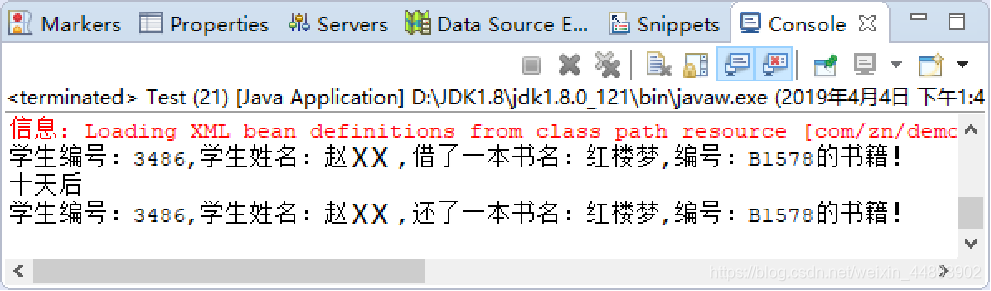
Spring练习,定义三个模块,使用<import>标签完成分模块配置开发,模拟实现学生借书和还书的过程,将结束输出到控制台。
实现要求:
在图书管理系统中,学生管理模块、书籍管理模块和借还书管理模块等其他模块,相互配合协作,促使系统的运行流畅。定义三个模块,使用<import>标签完成分模块配置开发,模拟实现学生借书和还书的过程,将结束输出到控制台。
要求如下:
- 定义学生管理模块、书籍管理模块和借还书管理模块。
- 使用<import>标签完成分模块配置开发
实现步骤:
在com.zn.demo.student包下创建Student类,添加stuId属性和stuName属性
package com.zn.mhys.demo.student;

public class Student {

	private String stuId;

	private String stuName;

	public String getStuId() {

		return stuId;

	}

	public void setStuId(String stuId) {

		this.stuId = stuId;

	}

	public String getStuName() {

		return stuName;

	}

	public void setStuName(String stuName) {

		this.stuName = stuName;

	}

}
在com.zn.demo.student包下创建applicationContext-student.xml配置文件,注册Student类到容器
<?xml version="1.0" encoding="UTF-8"?>

<beans xmlns:xsi="http://www.w3.org/2001/XMLSchema-instance"

	xmlns="http://www.springframework.org/schema/beans"

	xsi:schemaLocation="http://www.springframework.org/schema/beans http://www.springframework.org/schema/beans/spring-beans-4.2.xsd ">

	<bean id="student" class="com.zn.mhys.demo.student.Student"></bean>

</beans>
在com.zn.demo.book包下创建Book类,添加bookId属性和bookName属性
package com.zn.mhys.demo.book;

public class Book {

	private String bookId;

	private String bookName;

	public String getBookId() {

		return bookId;

	}

	public void setBookId(String bookId) {

		this.bookId = bookId;

	}

	public String getBookName() {

		return bookName;

	}

	public void setBookName(String bookName) {

		this.bookName = bookName;

	}

}
在com.zn.demo.book包下创建applicationContext-book.xml配置文件,注册Book类到容器。
<?xml version="1.0" encoding="UTF-8"?>

<beans xmlns:xsi="http://www.w3.org/2001/XMLSchema-instance"

	xmlns="http://www.springframework.org/schema/beans"

	xsi:schemaLocation="http://www.springframework.org/schema/beans http://www.springframework.org/schema/beans/spring-beans-4.2.xsd ">

	<bean id="book" class="com.zn.mhys.demo.book.Book"></bean>

</beans>
在com.zn.demo.service包下创建BorrowAndReturnService类,声明borrowBook()方法和returnBook()方法
package com.zn.mhys.demo.service;

import com.zn.mhys.demo.book.Book;

import com.zn.mhys.demo.student.Student;

public class BorrowAndReturnService {

	public void borrowBook(Student student,Book book){

		System.out.println("学生编号:"+student.getStuId()+",学生姓名:"+student.getStuName()

		+",借阅书名:"+book.getBookName()+",编号:"+book.getBookId()+"的书名");

	}

	public void returnBook(Student student,Book book){

		System.out.println("学生编号:"+student.getStuId()+",学生姓名:"+student.getStuName()

		+",归还书名:"+book.getBookName()+",编号:"+book.getBookId()+"的书名");

	}

}
在com.zn.demo.service包下创建applicationContext-service.xml配置文件,注册BorrowAndReturnService类到容器
<?xml version="1.0" encoding="UTF-8"?>

<beans  xmlns:xsi="http://www.w3.org/2001/XMLSchema-instance"

		xmlns="http://www.springframework.org/schema/beans"

		xmlns:p="http://www.springframework.org/schema/p"

		xmlns:context="http://www.springframework.org/schema/context"

		xsi:schemaLocation="http://www.springframework.org/schema/beans

		http://www.springframework.org/schema/beans/spring-beans-4.2.xsd

		http://www.springframework.org/schema/context

		http://www.springframework.org/schema/context/spring-context-4.2.xsd ">

	<!-- 2.1.4 -->

	<import resource="com/zn/mhys/demo/book/applicationContext-book.xml"/>

	<import resource="com/zn/mhys/demo/student/applicationContext-student.xml"/>

	<import resource="com/zn/mhys/demo/service/applicationContext-service.xml"/>

</beans>
在src目录下创建applicationContext.xml配置文件,引入3个模块的配置文件 在com.zn.demo.test包下创建Test测试类
package com.zn.mhys.demo.test;

import java.sql.Connection;

import org.springframework.beans.factory.xml.XmlBeanFactory;

import org.springframework.context.ApplicationContext;

import org.springframework.context.support.ClassPathXmlApplicationContext;

import org.springframework.core.io.ClassPathResource;

import com.zn.mhys.demo.book.Book;

import com.zn.mhys.demo.service.BorrowAndReturnService;

import com.zn.mhys.demo.service.JdbcService;

import com.zn.mhys.demo.student.Student;

public class Test {

	public static void main(String[] args) {

		ClassPathResource resource = new ClassPathResource("applicationContext.xml");

		XmlBeanFactory context = new XmlBeanFactory(resource);

//		2.1.4

		Student student = (Student)context.getBean("student");

		student.setStuId("003");

		student.setStuName("杨明金");

		Book book = (Book)context.getBean("book");

		book.setBookId("130006");

		book.setBookName("spring企业级开发");

		BorrowAndReturnService bars = (BorrowAndReturnService) context.getBean("service");

		bars.borrowBook(student, book);

		bars.returnBook(student, book);

	}

}
Spring练习,定义三个模块,使用<import>标签完成分模块配置开发,模拟实现学生借书和还书的过程,将结束输出到控制台。的更多相关文章
- Python——import与reload模块的区别
原创声明:本文系博主原创文章,转载或引用请注明出处. 1. 语法不同 import sys reload('sys') 2. 导入特性不同 import 和reload都可以对同一个模块多次加载, ...
- python 模块基础 和常用的模块
模块的定义 一个模块就是以.py结尾的python 文件,用来从逻辑上组织python代码.注意,模块名和变量名一样开头不能用数字,可以是双下划线和字母. 为什么要用模块? 将一些复杂的需要重复使用的 ...
- python day 8: re模块补充,导入模块,hashlib模块,字符串格式化,模块知识拾遗,requests模块初识
目录 python day 8 1. re模块补充 2. import模块导入 3. os模块 4. hashlib模块 5. 字符串格式:百分号法与format方法 6. 模块知识拾遗 7. req ...
- day16模块,导入模板完成的三件事,起别名,模块的分类,模块的加载顺序,环境变量,from...import语法导入,from...import *,链式导入,循环导入
复习 ''' 1.生成器中的send方法 -- 给当前停止的yield发生信息 -- 内部调用__next__()取到下一个yield的返回值 2.递归:函数的(直接,间接)自调用 -- 回溯 与 递 ...
- Spring 笔记(三)Bean 装配
前言 Spring 有两大核心,也就分成两份笔记分别记录. 其一是管理应用中对象之间的协作关系,实现方式是依赖注入(DI),注入依赖的过程也被称为装配(Wiring). 基于 JavaConfig 的 ...
- ECMAScript 6教程 (三) Class和Module(类和模块)
本文版权归作者和博客园共有,欢迎转载,但未经作者同意必须保留此段声明,且在文章页面明显位置给出 原文连接,博客地址为 http://www.cnblogs.com/jasonnode/ .该系列课程是 ...
- MyEclipse Spring 学习总结三 SpringMVC
MyEclipse Spring 学习总结三 SpringMVC 一.SpringMVC原理 1.Springmvc 框架介绍 1)Spring 框架停工了构建Web应用程序的全功能MVC模块.Spr ...
- 【死磕 Spring】—– IOC 之解析Bean:解析 import 标签
原文出自:http://cmsblogs.com 在博客[死磕Spring]----- IOC 之 注册 BeanDefinition中分析到,Spring 中有两种解析 Bean 的方式.如果根节点 ...
- Spring的第三天AOP之xml版
Spring的第三天AOP之xml版 ssm框架 spring AOP介绍 AOP(Aspect Oriented Programming),面向切面编程.它出来的目的并不是去取代oop,而是对它的 ...
随机推荐
- NuxtJS的AsyncData和Fetch使用详解
asyncData 简介 asyncData 可以用来在客户端加载 Data 数据之前对其做一些处理,也可以在此发起异步请求,提前设置数据,这样在客户端加载页面的时候,就会直接加载提前渲染好并带有数据 ...
- [php代码审计] 通读审计之shangfancms
前言 大部分的MVC框架,访问的控制器大部分是由外部参数来决定的,那么本篇文章所通读的MVC框架与之前的一系列MVC框架不太一样,它的路由是由程序本身的路由表来决定的. 源码下载 https://ww ...
- 【Swift】CoreData的使用
CoreData只是iOS数据持久化的其中一个方法,所有数据持久化如下 1.plist文件(属性列表),通常用于储存用户设置,也zhi可以用于存储捆绑的信息: 2.preference(偏好设置),常 ...
- C++ 素数对猜想
我的解法是先将2到n的所有素数全部列出来,再计算.将全部的素数列出来用了一个叫"埃拉托色尼筛法"的方法. 算法参照这里:https://www.sohu.com/a/2526745 ...
- 【Linux】【Services】【SaaS】Docker+kubernetes(13. 部署Jenkins/Maven实现代码自动化发布)
1. 简介 Jenkins: 官方网站:https://jenkins.io/ 下载地址:https://jenkins.io/download/ war包下载:http://mirrors.jenk ...
- Linux:sqlplus
[oracle@hb shell_test]$ cat echo_time #!/bin/sh 一.最简单的调用sqlplus sqlplus -S "sys/unimas as sysdb ...
- String直接赋值与使用new String的区别
在研究String直接赋值与new String的区别之前我们需要先了解java中的字符串常量池的概念 字符串常量池 String类是我们平常项目中使用频率非常高的一种对象类型,jvm为了提升性能和减 ...
- 9.Vue.js 监听属性
本章节,我们将为大家介绍 Vue.js 监听属性 watch,我们可以通过 watch 来响应数据的变化. 以下实例通过使用 watch 实现计数器: <div id = "app&q ...
- setsockopt()用法及参数详解
setsockopt()用法(参数详细说明) int setsockopt(SOCKET s,int level,int optname,const char* optval,int optlen); ...
- Xpath 使用技巧
使用xpath 简介 常见语法 选取节点 谓语 通配符 选取多个路径 运算符 其他用法 使用contains选取包含属性 使用tostring()将对象转换为字符串 使用starts-with 使用n ...