
[C#]使用IFormattable接口来实现字符串格式化
本文为原创文章、源代码为原创代码,如转载/复制,请在网页/代码处明显位置标明原文名称、作者及网址,谢谢!
开发工具:VS2017
语言:C#
DotNet版本:.Net FrameWork 4.0及以上
一、编写一个Person类,代码如下:
    class Person

    {

        public string FirstName { set; get; }

        public string LastName { set; get; }

    }
并让Person类继承IFormattable,代码如下:
    class Person:IFormattable

    {

        public string FirstName { set; get; }

        public string LastName { set; get; }

        public string ToString(string format, IFormatProvider formatProvider)

        {

           //关键代码,后面给出

        }

    }
这里将会列出需要实现IFormattable的方法ToString(string format, IFormatProvider formatProvider),这里是关键代码,用来格式字符串,暂时不给出,由后面给出。
二、编写 PersonFormatter类,让其继承IFormatProvider及ICustomFormatter,用于对字符串进行格式化,代码如下:
    class PersonFormatter : IFormatProvider,ICustomFormatter

    {

        public string Format(string format, object arg, IFormatProvider formatProvider)

        {

            //Format实现代码

        }

        public object GetFormat(Type formatType)

        {

            //GetFormat实现代码

        }

    }
Format:用于格式化字符串
Format的实现代码如下:
        Person person = arg as Person;

        switch(format)

        {

            case "CH":return $"{person.LastName} {person.FirstName}";

            case "EN":return $"{person.FirstName} {person.LastName}";

            default: return $"{person.LastName} {person.FirstName}";

        }
GetFormat的实现代码如下:
        if (formatType == typeof(ICustomFormatter)) return this;

        return null;
因此,PersonFormatter类的代码如下:
    class PersonFormatter : IFormatProvider,ICustomFormatter

    {

        public string Format(string format, object arg, IFormatProvider formatProvider)

        {

            Person person = arg as Person;

            switch(format)

            {

                case "CH":return $"{person.LastName} {person.FirstName}";

                case "EN":return $"{person.FirstName} {person.LastName}";

                default: return $"{person.LastName} {person.FirstName}";

            }

        }

        public object GetFormat(Type formatType)

        {

            if (formatType == typeof(ICustomFormatter)) return this;

            return null;

        }

    }
三、实现Person类IFormattable接口ToString方法,代码如下:
        ICustomFormatter customFormatter = formatProvider as ICustomFormatter;

        if (customFormatter == null) return this.ToString();

        return customFormatter.Format(format, this, null);
最终Person类代码如下:
    class Person:IFormattable

    {

        public string FirstName { set; get; }

        public string LastName { set; get; }

        public string ToString(string format, IFormatProvider formatProvider)

        {

            ICustomFormatter customFormatter = formatProvider as ICustomFormatter;

            if (customFormatter == null) return this.ToString();

            return customFormatter.Format(format, this, null);

        }

    }
四、使用Peson类的ToString方法,编写以下代码:
        Person p1 = new Person { FirstName = "XY", LastName = "CN" };

        PersonFormatter pf = new PersonFormatter();

        string s1 = p1.ToString("CN", pf);

        Console.WriteLine(s1);

        string s2 = p1.ToString("EN", pf);

        Console.WriteLine(s2);
五、运行结果:
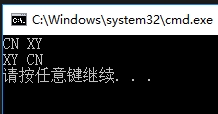
六、附上完整源码:
    class Program

    {

        static void Main(string[] args)

        {

            Person p1 = new Person { FirstName = "XY", LastName = "CN" };

            PersonFormatter pf = new PersonFormatter();

            string s1 = p1.ToString("CN", pf);

            Console.WriteLine(s1);

            string s2 = p1.ToString("EN", pf);

            Console.WriteLine(s2);

        }

    }

    class PersonFormatter : IFormatProvider,ICustomFormatter

    {

        public string Format(string format, object arg, IFormatProvider formatProvider)

        {

            Person person = arg as Person;

            switch(format)

            {

                case "CH":return $"{person.LastName} {person.FirstName}";

                case "EN":return $"{person.FirstName} {person.LastName}";

                default: return $"{person.LastName} {person.FirstName}";

            }

        }

        public object GetFormat(Type formatType)

        {

            if (formatType == typeof(ICustomFormatter)) return this;

            return null;

        }

    }

    class Person:IFormattable

    {

        public string FirstName { set; get; }

        public string LastName { set; get; }

        public string ToString(string format, IFormatProvider formatProvider)

        {

            ICustomFormatter customFormatter = formatProvider as ICustomFormatter;

            if (customFormatter == null) return this.ToString();

            return customFormatter.Format(format, this, null);

        }

    }
[C#]使用IFormattable接口来实现字符串格式化的更多相关文章
- C# 自定义类型通过实现IFormattable接口,来输出指定的格式和语言文化的字符串(例:DateTime)
常规的调用ToString()方法,存在两个问题. (1).调用者无法控制字符串的格式 (2).调用者不能方便的选择一种特定的语言文化来格式化字符串. 在开发一些国际化的应用时,应用程序需要调用与当前 ...
- 【C# IO 操作 】IFormatProvider接口|IFormattable 接口 格式化接口
IFormatProvider接口获取一个满足要求的个格式化器. 方法 object? GetFormat(Type? formatType);GetFormat方法主要提供一个满足指定要求的对象,该 ...
- 利用IFormattable接口自动参数化Sql语句
提要 string.Format("{0},{1}",a,b)的用法大家都不陌生了,在很多项目中都会发现很多sql语句存在这样拼接的问题,这种做法很多"懒"程序 ...
- Java 字符串格式化详解
Java 字符串格式化详解 版权声明:本文为博主原创文章,未经博主允许不得转载. 微博:厉圣杰 文中如有纰漏,欢迎大家留言指出. 在 Java 的 String 类中,可以使用 format() 方法 ...
- python-学习笔记之-Day5 双层装饰器 字符串格式化 python模块 递归 生成器 迭代器 序列化
1.双层装饰器 #!/usr/bin/env python # -*- coding: utf-8 -*- # author:zml LOGIN_INFO = False IS_ADMIN = Fal ...
- Python_Day_5装饰器、字符串格式化、序列化、内置模块、生成器、迭代器之篇
一.装饰器 为什么要用装饰器??? 在实际的开发环境中应遵循开发封闭原则,虽然在这个原则是用的面向对象开发,但也适用于函数式编程,简单地说,它规定已经实现的功能代码不是允许修改的,但是可以被扩展: 封 ...
- python的三种字符串格式化方法
1.最方便的 print 'hello %s and %s' % ('df', 'another df') 但是,有时候,我们有很多的参数要进行格式化,这个时候,一个一个一一对应就有点麻烦了,于是就有 ...
- python- 双层装饰器 字符串格式化 python模块 递归 生成器 迭代器 序列化
1.双层装饰器 #!/usr/bin/env python3 # -*- coding: utf-8 -*- # author:zml LOGIN_INFO = False IS_ADMIN = Fa ...
- PYDay10&11&12&13-常用模块:time|datetime|os|sys|pickle|json|xml|shutil|logging|paramiko、configparser、字符串格式化、py自动全局变量、生成器迭代器
1.py文件自动创建的全局变量 print(vars()) 返回值:{'__name__': '__main__', '__package__': None, '__loader__': <_f ...
随机推荐
- Line belt
Problem Description In a two-dimensional plane there are two line belts, there are two segments AB a ...
- Shape of HDU
Shape of HDU Time Limit: 3000/1000 MS (Java/Others) Memory Limit: 32768/32768 K (Java/Others) Total ...
- window10下的eclipse用java连接hadoop执行mapreduce任务
一.准备工作 1.eclipse连接hadoop的插件,需要版本匹配,这有几个常用的 2 版本的插件 hadoop2x-eclipse-plugin-master 密码:feg1 2.hadoop-c ...
- ASP.NET Core的身份认证框架IdentityServer4(9)-使用OpenID Connect添加用户认证
OpenID Connect OpenID Connect 1.0是OAuth 2.0协议之上的一个简单的身份层. 它允许客户端基于授权服务器执行的身份验证来验证最终用户的身份,以及以可互操作和类似R ...
- C#三大方法:虚方法、静态方法、实例方法
虚方法:使用virtual关键字定义,当子类继承父类时,可以对父类中的虚方法进行重写. 如下面代码中的类B,它继承类A,类A实现了接口I(实现了接口中的foo()方法).在类A中使用virtual将f ...
- java输出各种学生成绩
class stu { public String stuno; public String name; public float math; public float english; public ...
- activemq Linux下的编译
1.首先下载源码 ,网址:http://www.apache.org/dyn/closer.lua/activemq/activemq-cpp/3.9.4/activemq-cpp-library-3 ...
- OpenTSDB介绍
OpenTSDB 2.0, the scalable, distributed time series database可扩展.分布式时间序列数据库 1.背景 一些老的监控系统,它常常会出现这样的问题 ...
- MSSQL-并发控制-1-Transaction
MSSQL并发控制原先打算分为两个部分写:隔离级别及锁,写的过程中,发现需要提及下事务的相关内容,故加多一篇博文,共3篇. 如果转载,请注明博文来源: www.cnblogs ...
- 【YFMemoryLeakDetector】人人都能理解的 iOS 内存泄露检测工具类
背景 即使到今天,iOS 应用的内存泄露检测,仍然是一个很重要的主题.我在一年前,项目中随手写过一个简单的工具类,当时的确解决了大问题.视图和控制器相关的内存泄露,几乎都不存在了.后来想着一直就那个工 ...