
C++ IO操作API及注意事项(包含一个日志类的实现)
C++是一个抽象程度比C高很多的语言,在使用C++时,编译器做了很多工作,如果我们不对C++的某些特性的实现机制进行了解,那么编程时也许会有很多疑惑,我们也许知道怎样做才是正确的,但不知道为什么要这样做,所以,学习C++时,尽量多了解下底层实现机制,多看看操作系统相关方面的知识,对我们无论是学习某个编程语言,还是弄懂程序的运行原理都是非常有益的。IO操作是属于操作系统的,并不是属于C++的,C++只是提供了一个IO操作的编程接口的标准,不同的操作系统可能有着不同的IO操作接口,但是都可以根据这些操作提供一个符合C++ IO标准的库,这样就可以在不同的操作系统上,使用C++ 统一的IO操作。
C++ IO类之间的关系
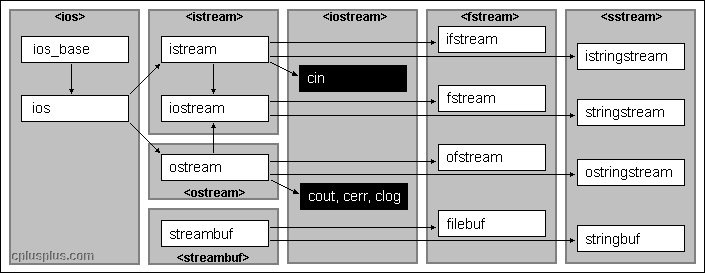
头文件 类型
iostream istream,wistream 从流中读取数据,w开头的针对wchar_t类型的
iostream ostream,wostream 向流写入数据
iostream iostream,wiostream 读写流
fstream ifstream,wifstream
fstream ofstream,wofstream
fstream fstream,wfstream
sstream istringstream,wistringstream
sstream ostringstream,wostringstream
sstream stringstream,wstringstream
输入流均继承自istream,输出流均继承自ostream,
IO对象无拷贝或赋值
ofstream out1,out2,
out1=out2; //错误,不能对IO对象赋值
ofstream out3(out2); //错误,不能用IO对象初始化IO对象
IO对象有条件状态
badbit 代表流已崩溃
failbit 代表IO操作失败
eofbit 代表流达到文件尾
goodbit 代表流未出错
s.eof() 若eofbit置位则返回true
s.fail()
s.bad()
s.good()
s.clear() 将流中所有条件状态位复位,使流有效,返回值为void
s.clear(flags) 根据flags将条件状态位置位 cin.clear(cin.rdstate() & ~cin.faibit & ~cin.badbit) 将failbit和badbit复位
s.setstate(flags) 设置流的状态
s.rdstate() 返 回流的当前状态 返回类型为strm::iostate
IO操作
#include <iostream>
#include <fstream>
using namespace std;
int main()
{
    ofstream myfile;
    myfile.open("example.txt");
    myfile<<"this is a statement!\n";
    myfile.close();
    return 0;
}
open (filename,mode)
文件模式
ios::in 以读的方式打开
ios::out 以写的方式打开
ios::app 以追加的方式打开,每次写操作均定位到文件末尾
ios::ate 打开文件后,立即定位到文件末尾
ios::trunc 截断文件
ios::binary 以二进制方式进行IO
out模式只能对ofstream或fstream设定
in模式只能对ifstream或fstream设定
默认情况下以out模式打开的文件同时包含trunc模式,即输出流若没指定app模式,文件中的内容会被清空。
app和ate模式有很大的区别,具体区别看这里
is_open() 可以用来判断打开文件是否成功,成功返回true;
设置流指针的位置
获得位置
streampos tellg(); //g代表该函数的操作对象是输入流,
streampos tellp(); //p代表该函数的操作对象是输出流设置位置
seekg(position);
seekp(position);
seekg(offset,direction); //相对于direction方向的偏移量,可以为:ios::end, ios::beg, ios::cur
seekp(offset,direction);
ios::beg offset counted from the beginning of the stream
ios::cur offset counted from the current position
ios::end offset counted from the end of the stream
#include <iostream>
#include <fstream>
using namespace std;

int main () {
  streampos begin,end;
  ifstream myfile ("example.bin", ios::binary);
  begin = myfile.tellg();
  myfile.seekg (0, ios::end);
  end = myfile.tellg();
  myfile.close();
  cout << "size is: " << (end-begin) << " bytes.\n";
  return 0;
}
read和write
read(memblock,size);
write(memblock,size);
#include <iostream>
#include <fstream>
using namespace std;

int main () {
  streampos size;
  char * memblock;

  ifstream file ("example.bin", ios::in|ios::binary|ios::ate);
  if (file.is_open())
  {
    size = file.tellg();
    memblock = new char [size];
    file.seekg (0, ios::beg);
    file.read (memblock, size);
    file.close();

    cout << "the entire file content is in memory";

    delete[] memblock;
  }
  else cout << "Unable to open file";
  return 0;
}
getline()
  输入流对象调用的函数
  #include <fstream>
  istream& getline( char* buffer, streamsize num );
  istream& getline( char* buffer, streamsize num, char delim );

  #include <string>
  istream& getline( istream& is, string& s, char delimiter = '\n' );
#include <iostream>
#define MAX 100
using namespace std;
int main()
{
    char cstr[MAX];
    string str;
    cin.getline(cstr,MAX);
    cout<<cstr<<endl;
    getline(cin,str);
    cout<<str<<endl;
    return 0;
}
自己实现一个日志类
#include <iostream>
#include <fstream>
#include <memory>
#include <ctime>
using namespace std;

class EasyLog{
public:
    static EasyLog* getInstance(){
        if(_instance==NULL){
            _instance=new EasyLog();
        }
        return _instance;
    }
    void Log(const string &str,const string& filepath);
private:
    EasyLog(){}
    virtual ~EasyLog(){delete _instance;}
    static EasyLog* _instance;
};

EasyLog* EasyLog::_instance;
void EasyLog::Log(const string& str,const string& filepath){
    time_t t;
    t=time(0);
    char tmp[100];
    strftime(tmp,sizeof(tmp),"[%Y.%m.%d %X %A]",localtime(&t));
    ofstream out(filepath,ios::app);
    out<<tmp<<" : "<<str<<endl;
    out.close();
    return ;
}

int main(){
    EasyLog::getInstance()->Log("This is a test statement","log.txt");
    return 0;
}
C++ IO操作API及注意事项(包含一个日志类的实现)的更多相关文章
- 一个Java文件至多包含一个公共类
编写一个java源文件时,该源文件又称为编译单元.一个java文件可以包含多个类,但至多包含一个公共类,作为编译时该java文件的公用接口,公共类的名字和源文件的名字要相同,源文件名字的格式为[公共类 ...
- 关于Django中的数据库操作API之distinct去重的一个误传
转载自http://www.360doc.com/content/18/0731/18/58287567_774731201.shtml django提供的数据库操作API中的distinct()函数 ...
- .NET中的IO操作基础介绍
关于IO简介 .NET中的IO操作,经常需要调用一下几个类. clipboard[] .FileStream类 文件流类,负责大文件的拷贝,读写. .Path类 Path类中方法,基本都是对字符串(文 ...
- Linux学习记录--文件IO操作相关系统编程
文件IO操作相关系统编程 这里主要说两套IO操作接口,各自是: POSIX标准 read|write接口.函数定义在#include<unistd.h> ISO C标准 fread|fwr ...
- springboot学习-jdbc操作数据库--yml注意事项--controller接受参数以及参数校验--异常统一管理以及aop的使用---整合mybatis---swagger2构建api文档---jpa访问数据库及page进行分页---整合redis---定时任务
springboot学习-jdbc操作数据库--yml注意事项--controller接受参数以及参数校验-- 异常统一管理以及aop的使用---整合mybatis---swagger2构建api文档 ...
- Pandas系列(十一)-文件IO操作
数据分析过程中经常需要进行读写操作,Pandas实现了很多 IO 操作的API,这里简单做了一个列举. 格式类型 数据描述 Reader Writer text CSV read_ csv to_cs ...
- 23_java之IO操作
01输入和输出 * A:输入和输出 * a: 参照物 * 到底是输入还是输出,都是以Java程序为参照 * b: Output * 把内存中的数据存储到持久化设备上这个动作称为输出(写)Output操 ...
- python之协程与IO操作
协程 协程,又称微线程,纤程.英文名Coroutine. 协程的概念很早就提出来了,但直到最近几年才在某些语言(如Lua)中得到广泛应用. 子程序,或者称为函数,在所有语言中都是层级调用,比如A调用B ...
- AI学习---数据IO操作&神经网络基础
数据IO操作 TF支持3种文件读取: 1.直接把数据保存到变量中 2.占位符配合feed_dict使用 3. QueueRunner(TF中特有的) 文件读取流程 文件读取流程(多线 ...
随机推荐
- Leetcode题解(二)
4.Median of Two Sorted Arrays(*) 题目 题目要求找到两个排序数组的中位数. 中位数的定义:当n为奇数时,median = array[n/2];当n为偶数时,media ...
- 利用wsdl.exe自动将wsdl文档转换为C#代码
1.获取完整的wsdl文档 获取下面这个博客中提到的wsdl http://www.cnblogs.com/LCCRNblog/p/3716406.html 将获取到的wsdl放到一个文本中,改后缀( ...
- Assignments
Assignments Time Limit: 4000/2000 MS (Java/Others) Memory Limit: 32768/32768 K (Java/Others) Tota ...
- Azkaban安装部署
在root的用户下搭建的 • Azkaban安装部署(可参照:http://azkaban.github.io/azkaban/docs/latest/) 1):前提 安装JDK,安装Hadoop,H ...
- Python爬虫入门:Cookie的使用
大家好哈,上一节我们研究了一下爬虫的异常处理问题,那么接下来我们一起来看一下Cookie的使用. 为什么要使用Cookie呢? Cookie,指某些网站为了辨别用户身份.进行session跟踪而储存在 ...
- MySQLbase
/*多行注释*/-- 单行注释-- 创建用户: CREATE USER '用户名'[@'主机名'] IDENTIFIED BY '密码'-- 主机名可以为空,省略主机名表示默认权限为%, 所有主机都可 ...
- [转载] Linux的Top命令解析
转载自http://www.jb51.net/LINUXjishu/34604.html.http://blog.csdn.net/hello_yang213/article/details/7455 ...
- springMVC+spring+MyBatis(SSM)的简单配置
SSM(Spring+SpringMVC+MyBatis)框架集由Spring.SpringMVC.MyBatis三个开源框架整合而成,常作为数据源较简单的web项目的框架. 其中: Spring是一 ...
- 使用dropwizard(5)--加入swagger
前言 Swagger已经成API service的规范了,本处在dropwizard中简单集成Swagger. Demo source https://github.com/Ryan-Miao/l4d ...
- 最全Jenkins+SVN+iOS+cocoapods环境搭建及其错误汇总
前言 持续集成是敏捷开发中重要的一部分,为保证新功能的开发,又保证旧功能的维护,从一个冲刺到下个冲刺.持续集成工具是我们保证开发和维护并行的护航者,现在流行的集成工具有很多,例如: 1.Jenkins ...