
Django App(三) View+Template
接着上一节(二)的内容,首先启动站点,通过界面添加Question和Choice两张表的数据,因为接下来,要向polls app里面添加views.
1.添加数据如下(这里是通过界面操作添加的数据)
Question

Choice
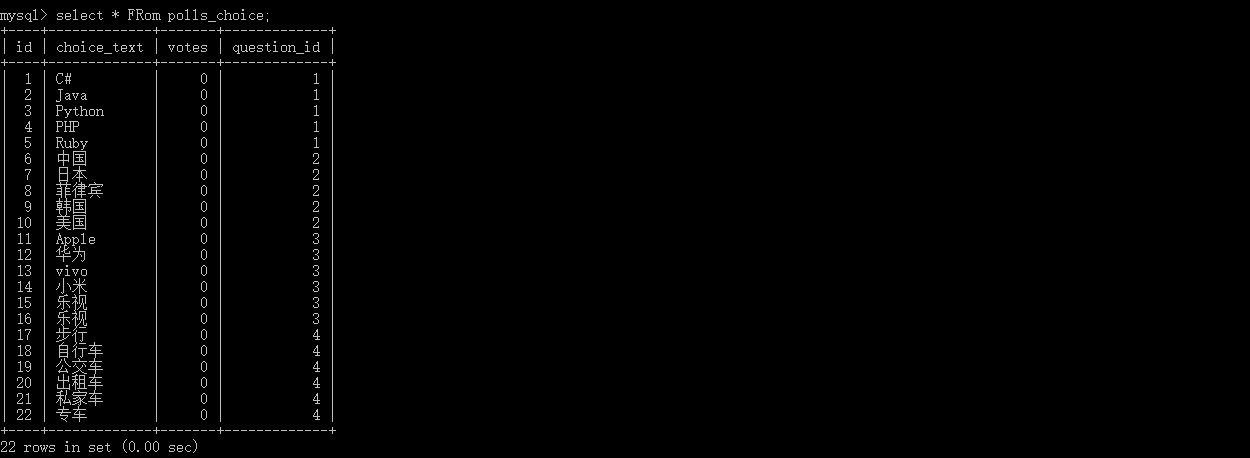
2.添加views
编写polls/views.py,添加detail(指定question的详情),results(指定question的投票结果),vote(指定question投票),每个view指定question_id作为参数,添加如下代码:
 def detail(request, question_id):

     return HttpResponse("You're looking at question %s." % question_id)

 def results(request, question_id):

     response = "You're looking at the results of question %s."

     return HttpResponse(response % question_id)

 def vote(request, question_id):

     return HttpResponse("You're voting on question %s." % question_id)
实际上这里所说的view,就是指polls/views.py中定义的一个一个的函数(action),python中函数名要全小写,如果必须有大写,不会报错,但是在路由体系中,是大小写敏感的,如果url中有大写自动转换成小写,但是如果,在定义urls.py中出现大写的定义,该view就无法访问,这个在下面会验证,这里全部采用小写.接下来把新定义的view添加到polls/urls.py路由中:
 from django.urls import path

 from . import views

 urlpatterns=[

     path('first/',views.index,name='index'),

     path('<int:question_id>/detail',views.detail,name="detail"), #定义detail view

     path('<int:question_id>/results',views.results,name='results'),#定义格式:/参数[参数类型为int]/results

     path('vote/<int:question_id>',views.vote,name='vote')  #定义格式:vote/参数[参数类型为int]

 ]
根据刚刚定义的路由格式,分别查看
http://localhost:8008/polls/1/detail

http://localhost:8008/polls/vote/1

http://lcoalhost:8008/polls/vote/abce

接下来验证路由大小写的问题,修改polls/urls.py如下:
    #这里将原来的vote/<int:question_id>改成<Vote/<int:question_id>

    path('Vote/<int:question_id>',views.vote,name='Vote')  #定义格式:vote/参数[参数类型为int]
http://localhost:8008/polls/vote/1 #url即使输入的有大写,也会自动转换成小写,所以在定义ulrs.py的时候 全部采用小写

3.添加views模板
上面用了大篇幅完成了向app polls中添加view(action),但是我们并不是每一次都希望view就返回一句话,更多时候我们需要他返回的是一个动态的,完整的页面
接下来的事情,view的主要任务是负责准备页面需要展示的数据,而由模板负责数据绑定和页面渲染,模板和view一般是一对一的
新建路径及文件 polls/templates/polls/index,现在polls目录如下:

改造polls/views.py view index 如下:
 from django.http import HttpResponse

 from django.template import loader

 from .models import Question

 def index(request):

     latest_question_list = Question.objects.order_by('-pub_date')[:5]

     template = loader.get_template('polls/index.html')

     context = {

         'latest_question_list': latest_question_list,

     }

     return HttpResponse(template.render(context, request))
通过上一节的配置,和本节开始部分的努力,models 中的Question的对象已经和数据库绑定,并且带有数据:
 latest_question_list = Question.objects.order_by('-pub_date')[:5]  #按照pub_date排序,取前五条

 template = loader.get_template('polls/index.html')  #加载模板

 HttpResponse(template.render(context, request))   #使用loader填充数据
编写polls/templates/polls/index.html如下:
{% if latest_question_list %}

    <ul>

    {% for question in latest_question_list %}

        <li><a href="/polls/{{ question.id }}/detail">{{ question.question_text }}</a></li>

    {% endfor %}

    </ul>

{% else %}

    <p>No polls are available.</p>

{% endif %}
在html中直接取出view中loader填充的数据:'latest_question_list': latest_question_list在界面循环展示出来

在绑定数据到界面的时候,也可以使用render(),似乎更简洁,便捷polls/views.py:
 from django.shortcuts import render

 from .models import Question

 def index(request):

     latest_question_list = Question.objects.order_by('-pub_date')[:5]

     context = {'latest_question_list': latest_question_list}

     return render(request, 'polls/index.html', context)
4.处理404的错误
上面通过模板生成的每一连接,连接到 http://localhost:8000/polls/(question_id)/detail,如果传入的question_id在数据库中不存在,我们就要在代码中提前处理,编辑polls/views.py/detail 如下:
 from django.http import Http404

 from django.shortcuts import render

 from .models import Question

 # ...

 def detail(request, question_id):

     try:

         question = Question.objects.get(pk=question_id)

     except Question.DoesNotExist:

         raise Http404("Question does not exist")

     return render(request, 'polls/detail.html', {'question': question})
官网后面还介绍了 Template System ,防止硬编码Url,Url命名空间等,请参考[https://docs.djangoproject.com/en/2.0/intro/tutorial03/]
Django App(三) View+Template的更多相关文章
- frist Django app — 三、 View
前面已经说过了Django中model的一些用法,包括orm,以及操作的api,接下来就是搭一些简单的界面学习view——Django中的view.主要介绍以下两个方面: url映射 请求处理 模板文 ...
- django notes 三:Template 的查找
django 中有 2种 Template Loader django.template.loaders.filesystem.Loader django.template.loaders.app_d ...
- django基础PROJECT APP View template
project 和 app 的区别就是一个是配置另一个是代码: 一个project包含很多个Django app以及对它们的配置. 一个project的作用是提供配置文件,比方说哪里定义数据库连接信息 ...
- Django 2.0.1 官方文档翻译: 编写你的第一个 Django app,第三部分(Page 8)
编写你的第一个 Django app,第三部分(Page 8)转载请注明链接地址 本页教程接前面的第二部分.我们继续开发 web-poll app,我们会专注于创建公共接口上 -- "视图& ...
- Django 基础二(View和urls)
上一篇博文已经成功安装了python环境和Django,并且新建了一个空的项目.接下来就可以正式开始进行Django下 的Web开发了.首先进入项目的主目录: cd ./DjangoLearn/hol ...
- Python-Django 第一个Django app
第一个Django app by:授客 QQ:1033553122 测试环境: Python版本:python-3.4.0.amd64 下载地址:https://www.python.org/do ...
- python django基础三 模版渲染
request对象 当一个页面被请求时,Django就会创建一个包含本次请求原信息的HttpRequest对象.Django会将这个对象自动传递给响应的视图函数,一般视图函数约定俗成地使用 reque ...
- Django基础三之视图函数
一 Django的视图函数view 一个视图函数(类),简称视图,是一个简单的Python 函数(类),它接受Web请求并且返回Web响应. 响应可以是一张网页的HTML内容,一个重定向,一个404错 ...
- python3开发进阶-Django视图(View)的常见用法
阅读目录 简述Django的View(视图) CBV和FBV Request对象和Response对象 Django组件(render,redirect)详解 一.简述Django的View(视图) ...
随机推荐
- Linux第三节整理 、增删改查、用户管理
帮助+基本文件管理+用户管理 1.怎么查看命令帮助 ls --help man ls :查看命令/man 5 file:查看配置文件 2.基本文件管理,通过{查,建,删,改} 四个维度介绍了不同的命令 ...
- Anti-pattern/反模式
常见的与"直觉"相背离的anti-pattern产生的实际原因是没有深入.全面地考虑问题,即只关注到自己关心的方面,忽略了其他重要的.起相反作用的因素. 所以这个"直 ...
- 原来你是这样的JAVA[02]-包、传参、构造器
一.包(package) 在java程序中,一个java源文件称为编译单元,以.java后缀命名.编译单元内可以有一个public类,类名必须与文件名相同.注意:每个编译单元只能有一个public类. ...
- centos 系统日志
Linux系统日志主要有三类:连接时间日志.进程统计日志和错误日志 连接时间日志 连接时间日志由多个程序执行,把记录写入到/var/og/wtmp和/var/run/utmp.ogin等程序更新wtm ...
- 【原创】Android AOP面向切面编程AspectJ
一.背景: 在项目开发中,对 App 客户端重构后,发现用于统计用户行为的友盟统计代码和用户行为日志记录代码分散在各业务模块中,比如在视频模块,要想实现对用户对监控点的实时预览和远程回放行为进行统计, ...
- Ubuntu16.04安装配置sublime text3
1.安装Sublime Text 3 首先添加sublime text 3的仓库: sudo add-apt-repository ppa:webupd8team/sublime-text-3 根据提 ...
- wtforms快速使用和源码分析(基于flask)
wtforms 和django的form组件大同小异,下面给出一个应用举例以便快速查询. 开始使用 from flask import Flask, render_template, request, ...
- 第十三章:Python の 网络编程进阶(二)
本課主題 SQLAlchemy - Core SQLAlchemy - ORM Paramiko 介紹和操作 上下文操作应用 初探堡垒机 SQLAlchemy - Core 连接 URL 通过 cre ...
- windows虚拟内存管理
内存管理是操作系统非常重要的部分,处理器每一次的升级都会给内存管理方式带来巨大的变化,向早期的8086cpu的分段式管理,到后来的80x86 系列的32位cpu推出的保护模式和段页式管理.在应用程序中 ...
- JAVA读取和写入properties文件
1.读取 Properties prop = new Properties(); try { //这个getResourceAsStream方法就是把文件转为inputStream的方式 prop.l ...