
asp.net core 教程(五)-配置
Asp.Net Core-配置
在这一章,我们将讨论 ASP.NET Core项目的相关的配置。在解决方案资源管理器中,您将看到 Startup.cs 文件。如果你有以前版本的 ASP.NET的工作经验,你可能希望看到一个 global.asax 文件,您可以在其中编写代码,它是一个编写程序启动时立即执行的代码的文件。
你可能也希望看到一个 web.config 文件,该文件包含您的应用程序执行所需的所有配置参数。
在 ASP.NET Core中,那些文件都没了,取而代之的是 Startup.cs文件.
Startup.cs里面是一个启动类文件,并在该类中您可以配置您的应用程序甚至配置您的配置资源。
这里是 Startup.cs 文件中的默认实现代码:
|
1
2
3
4
5
6
7
8
9
10
11
12
13
14
15
16
17
18
19
20
21
22
23
24
25
26
27
28
29
30
31
32
33
|
using System; using System.Collections.Generic; using System.Linq; using System.Threading.Tasks; using Microsoft.AspNetCore.Builder; using Microsoft.AspNetCore.Hosting; using Microsoft.AspNetCore.Http; using Microsoft.Extensions.DependencyInjection; using Microsoft.Extensions.Logging; namespace FirstAppDemo { public class Startup { // This method gets called by the runtime. // Use this method to add services to the container. // For more information on how to configure your application, public void ConfigureServices(IServiceCollection services) { } // This method gets called by the runtime. Use this method to configure // the HTTP request pipeline. public void Configure(IApplicationBuilder app, IHostingEnvironment env, ILoggerFactory loggerFactory) { loggerFactory.AddConsole(); if (env.IsDevelopment()) { app.UseDeveloperExceptionPage(); } app.Run(async (context) => { await context.Response.WriteAsync("Hello World!"); }); } } } |
在启动类中,我们的大部分工作将设计有两种方法。Configure 方法是构建HTTP处理管道的地方。
这定义了应用程序如何响应请求。目前该应用程序只能说“Hello World!”如果我们希望该应用程序具有不同的行为,我们需要通过添加额外的代码到这个Configure方法中来改变周围的管道。
例如,如果我们想要提供一个 index.html 文件的静态文件,我们将需要在Configure方法中添加一些代码。
你也可以有一个错误页面或Asp.Net Controller的异常请求的路由;这两个场景还需要在这个配置方法中做一些工作。
在启动类中,您还将看到 ConfigureServices() 方法。这可帮助您配置您的应用程序的组件。
现在,我们有一个硬编码的字符串“Hello World !”来响应每个请求。我们不希望每个请求都是硬编码的字符串,我们想从一些组件加载响应字符串。
其他组件可能会从数据库加载文本,或从一个web服务或一个JSON文件,我们不管这它是从什么地方加载。
我们会设置一个场景,这样我们就没有这个硬编码字符串了。
在解决方案资源管理器中,右键单击您的项目节点并选择Add→New Item。

在左侧窗格中,选择Installed → Code,然后在中间窗格中,选择JSON文件。给这个文件取名为AppSetting.json,并单击Add按钮如上面的截图。
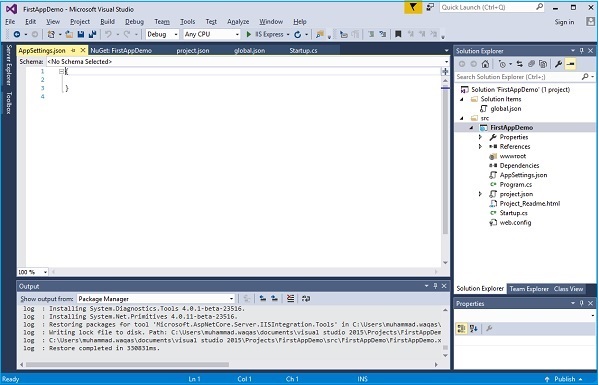
让我们在AppSettings中添加以下代码。
|
1
2
3
|
{ "message": "Hello, World! this message is from configuration file..." } |
现在我们需要从 Startup.cs 文件访问此消息。这里是 Startup.cs 文件从 JSON 文件阅读上面的消息的实现代码。
|
1
2
3
4
5
6
7
8
9
10
11
12
13
14
15
16
17
18
19
20
21
22
23
24
25
26
27
28
29
30
31
32
33
34
35
|
using Microsoft.AspNet.Builder; using Microsoft.AspNet.Hosting; using Microsoft.AspNet.Http; using Microsoft.Extensions.DependencyInjection; using Microsoft.Extensions.Configuration; namespace FirstAppDemo { public class Startup { public Startup() { var builder = new ConfigurationBuilder() .AddJsonFile("AppSettings.json"); Configuration = builder.Build(); } public IConfiguration Configuration { get; set; } // This method gets called by the runtime. // Use this method to add services to the container. // For more information on how to configure your application, public void ConfigureServices(IServiceCollection services) { } // This method gets called by the runtime. // Use this method to configure the HTTP request pipeline. public void Configure(IApplicationBuilder app) { app.UseIISPlatformHandler(); app.Run(async (context) => { var msg = Configuration["message"]; await context.Response.WriteAsync(msg); }); } // Entry point for the application. public static void Main(string[] args) =7gt; WebApplication.Run<Startup>(args); } } |
让我们现在运行应用程序。一旦您运行该应用程序,它会产生下面的输出。
asp.net core 教程(五)-配置的更多相关文章
- ASP.NET Core macOS 环境配置 - ASP.NET Core 基础教程 - 简单教程,简单编程
原文:ASP.NET Core macOS 环境配置 - ASP.NET Core 基础教程 - 简单教程,简单编程 ASP.NET Core 是对 ASP.NET 有重大意义的一次重新设计.本章节我 ...
- ASP.NET Core Windows 环境配置 - ASP.NET Core 基础教程 - 简单教程,简单编程
原文:ASP.NET Core Windows 环境配置 - ASP.NET Core 基础教程 - 简单教程,简单编程 ASP.NET Core Windows 环境配置 ASP.NET Core ...
- ASP.NET Core开发-如何配置Kestrel 网址Urls
ASP.NET Core中如何配置Kestrel Urls呢,大家可能都知道使用UseUrls() 方法来配置. 今天给介绍全面的ASP.NET Core 配置 Urls,使用多种方式配置Urls. ...
- ASP.NET Core教程【二】从保存数据看特有属性与服务端验证
前文索引: 在layout.cshtml文件中,我们可以看到如下代码: <a asp-page="/Index" class="navbar-brand" ...
- ASP.NET Core教程【三】实体字段属性、链接标签、并发数据异常、文件上传及读取
前文索引:ASP.NET Core教程[二]从保存数据看Razor Page的特有属性与服务端验证ASP.NET Core教程[一]关于Razor Page的知识 实体字段属性 再来看看我们的实体类 ...
- asp.net core 将配置文件配置迁移到数据库(一)
asp.net core 将配置文件配置迁移到数据库(一) Intro asp.net core 配置默认是项目根目录下的 appsettings.json 文件,还有环境变量以及 command l ...
- asp.net core 系列 10 配置configuration (上)
一. ASP.NET Core 中的配置概述 ASP.NET Core 中的应用配置是基于键值对,由configuration 程序提供. configuration 将从各种配置源提供程序操作键 ...
- ASP.NET Core教程【二】从保存数据看Razor Page的特有属性与服务端验证
前文索引:ASP.NET Core教程[一]关于Razor Page的知识 在layout.cshtml文件中,我们可以看到如下代码: <a asp-page="/Index" ...
- 小白开学Asp.Net Core 《五》
小白开学Asp.Net Core<五> —— 使用.Net Core MVC Filter 一.简介 今天在项目(https:/ ...
- (11)ASP.NET Core 中的配置一(Configuration)
1.前言 ASP.NET Core在应用程序上引入Microsoft.Extensions.Configuration配置,可以支持多种方式配置,包括命令行配置.环境变量配置.文件配置.内存配置,自定 ...
随机推荐
- Javascript 方法apply和call的差别
call与aplly都属于Function.prototype的一个方法.所以每一个function实例都有call.apply属性 同样点: call()方法和apply()方法的作用同样: 改变原 ...
- 查看和删除chrome浏览器缓存内容
平时用chrome开发更多,介绍一下如何清除和查看chrome浏览器的缓存内容,其他浏览器大同小异就不细说了 打开设置==>隐私设置和安全性==>内容设置==>cookie ==&g ...
- 理解Object.defineProperty()
理解Object.defineProperty() Object.defineProperty() 方法直接在一个对象上定义一个新属性,或者修改一个已经存在的属性, 并返回这个对象. 基本语法:Obj ...
- 《调试九法——软硬件错误的排查之道》【PDF】下载
<调试九法--软硬件错误的排查之道>[PDF]下载链接: https://u253469.ctfile.com/fs/253469-231196352 内容简介 <调试九法:软硬件错 ...
- 6.python内置函数
1. abs() 获取绝对值 >>> abs(-10) 10 >>> a = -10 >>> a.__abs__() 10 2. all() ...
- iOS sourceTree忽略掉必要的xcuserdata文件
1.找到git对应的文件 git status 结果 会得到已经修改的文件. modified: Zing.xcodeproj/xcuserdata/tiny.xcuserdatad/xcscheme ...
- NSQ之粗读浅谈
回顾: 以前一直是C++开发(客户端),最近听同事讲go语言不错,随后便决定先从go语法开始投向go的怀抱.由于历史原因学习go语法时,用了半天的时间看完了菜鸟教程上相关资料,后来又看了易百教程上的一 ...
- React的JSX语法及组件
最近一个同事很急没有做任何交接就请了陪产假,然后我来维护.说实在的我一开始是一脸懵逼的.因为MV*项目里用的最多的还是Vue:React听说也了解过,但毕竟不熟... 不过不管如何这也是工作:同事也恭 ...
- C 标准I/O库粗略实现
本文同时发表在 https://github.com/zhangyachen/zhangyachen.github.io/issues/123 写一下fopen/getc/putc等C库的粗略实现,参 ...
- redis咋么实现分布式锁,redis分布式锁的实现方式,redis做分布式锁 积极正义的少年
前言 分布式锁一般有三种实现方式:1. 数据库乐观锁:2. 基于Redis的分布式锁:3. 基于ZooKeeper的分布式锁.本篇博客将介绍第二种方式,基于Redis实现分布式锁.虽然网上已经有各种介 ...