
apidoc快速生成在线文档,apidoc生成静态文件的生成规则以及原理分析
在老大的指引下,需要将系统的json文件格式转换成apidoc的json格式,也就是json格式的重组,但是这个apidoc的生成格式是不固定的,因为apidoc有自己一套的生成规则,我需要研究一下是怎么生成的。
一、官方基础栗子
二、理解apidoc生成静态文档的结构解读
三、深入理解一下apidoc生成原理以及规则
一、apidoc基础栗子
全局安装apidoc
npm install apidoc -g
1、首先建立文件目录
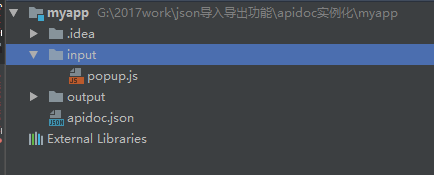
2、需要你在input文件夹里面写上你的js部分

这个是栗子的js部分。
/**

  @api {get} /user/:id Request User information

  @apiName GetUser

  @apiGroup User

  @apiParam {Number} id Users unique ID.

  @apiSuccess {String} firstname Firstname of the User.

  @apiSuccess {String} lastname  Lastname of the User.

 */

 /**

  @api {post} /user/:id Create User information

  @apiName CreateUser

  @apiGroup User

  @apiParam {Number} id Users unique ID.

  @apiSuccess {String} data

  @apiSuccess {String} data.firstname Firstname of the User.

  @apiSuccess {String} data.first.lastname  Lastname of the User.

  @apiSuccessExample {json} Success-Response:

 *     HTTP/1.1 200 OK

 *     {

 *       "firstname": "John",

 *       "lastname": "Doe"

 *     }

 */
3、新建apidoc.json文件
apidoc.json栗子
{

  "name": "example",

  "version": "0.1.0",

  "description": "apiDoc basic example",

  "title": "Custom apiDoc browser title",

  "url" : "https://api.github.com/v1"

}
4、在myapp文件夹下面运行
apidoc -i myapp/ -o apidoc/ -t mytemplate/
官网原文:Creates an apiDoc of all files within dir myapp/, uses template from dir mytemplate/ and put all output to dir apidoc/.
-i 是输入文件的路径 , -o 是输出文件的路径, -t是使用模板的路径(可缺省)

打开output文件夹,发现生成一个apidoc在线文档,直接打开html就可以看到
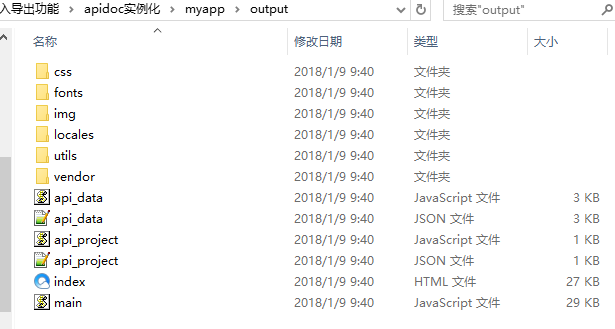
打开html文件
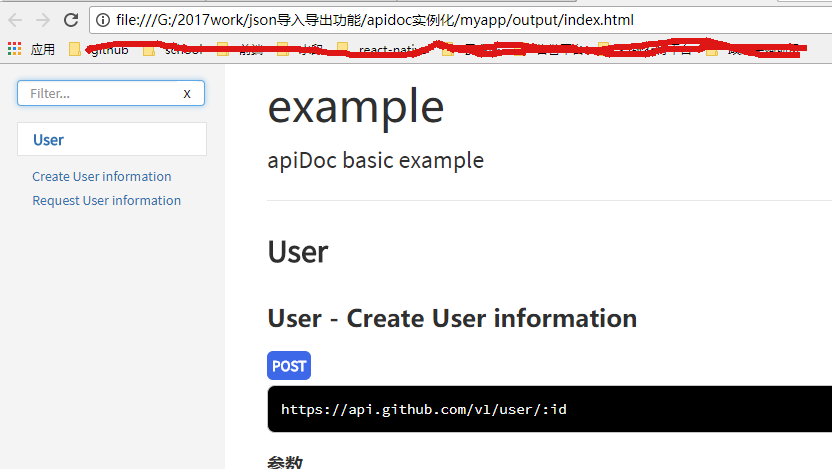
二、理解apidoc生成静态文档的结构解读
一个静态的文档很漂亮的生成了,但是实际控制这个现实的是api_data.js和api_project.js。但是实际上的数据显示是由api_data.json和api_project.json这两个json文件。
所以在支持将其他json格式转换成api_data.json和api_project.json,把apidoc生成的这两个文件进行替换,然后替换js文件,直接生产静态文档。
可以看一下api_data.json格式
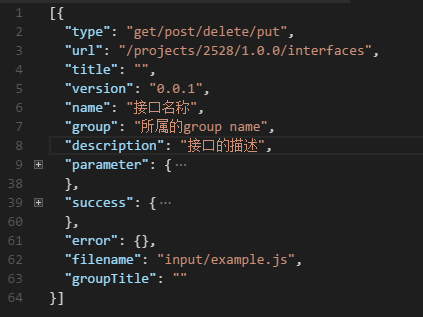
对比一下api_data.js格式
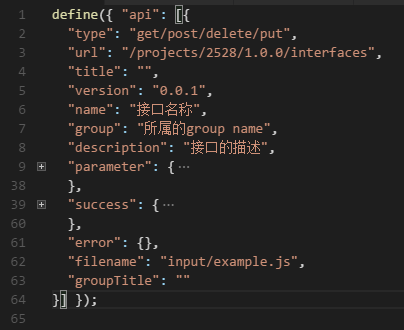
很明显就能看出来,就是在api_data.json的基础上,封装成了一层,加上define({ "api": api_data.json});
api_project.json和api_project.js也是使用相同的方法封装的。
三、深入理解一下apidoc生成原理以及规则
apidoc设计到如下的参数
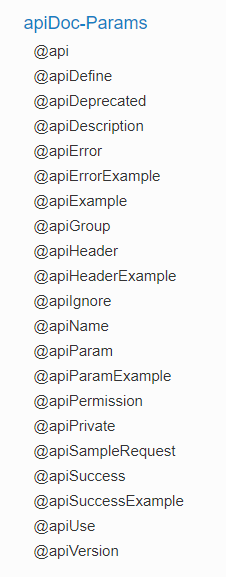
(1)第一个是@api
@api是必须的,
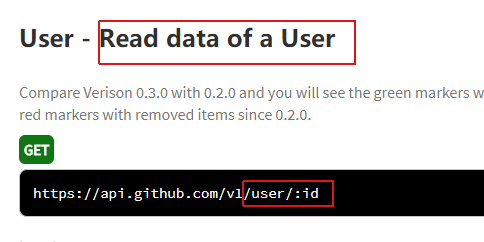
@api {method} path [title]
比如

method 包括请求的方式:get,post,put,delete,等
path 表示请求的路径。
title (可选项)表示分组的解释,导航。
对应的静态页面
(2)@apiDefine
@apiDefine name [title] [description]
表示的是:嵌入在api块或api中的文档块
没有找到对应的页面
(3)@apiDeprecated
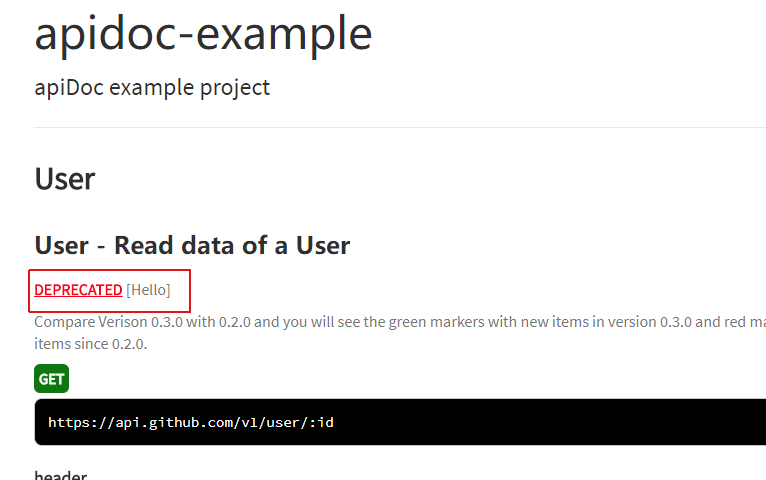
@apiDeprecated [text]
标志位api方法的反对(不对)的地方。
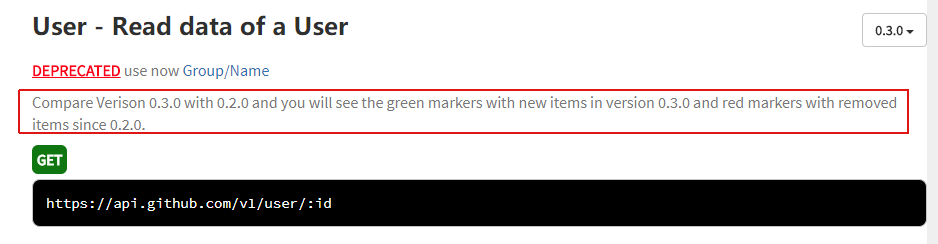
(4)@apiDescription
表示的是描述。
@apiDescription text

页面上显示的是:
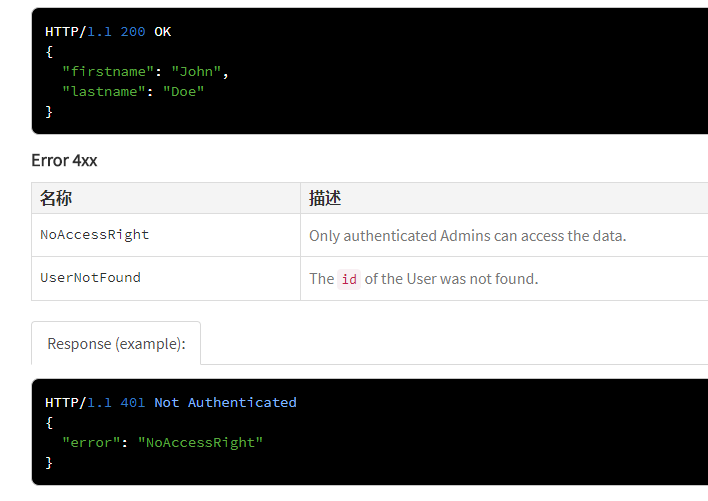
(5)@apiError和@apiErrorExample
表示的错误返回的参数
@apiError [(group)] [{type}] field [description]

页面的显示:
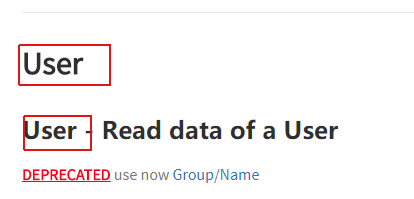
(6)@apiGroup
这个是必填项,表示的分组。

页面显示的是:
(7)@apiHeader
表示的是:传递给API头部的参数
@apiHeader [(group)] {type} [field=defaultValue] [description]
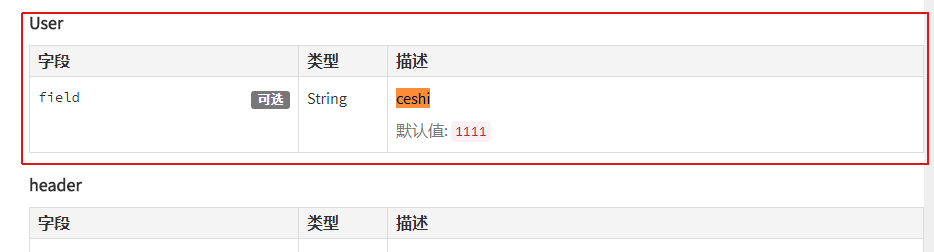
发现:@apiHeader与@apiParam用法显示上很像,但是在生成的api_data.json所在的树形结构不一致。
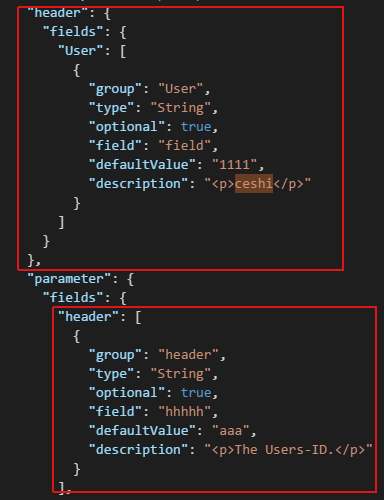 ,上面的红框是@apiHeader生成的,下面的红框是@apiParam生成的。
(8)@apiParam
表示的:传递给API方法的参数
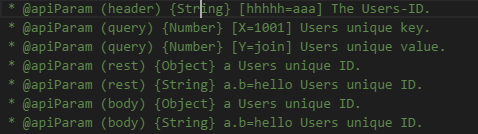
页面显示的是:
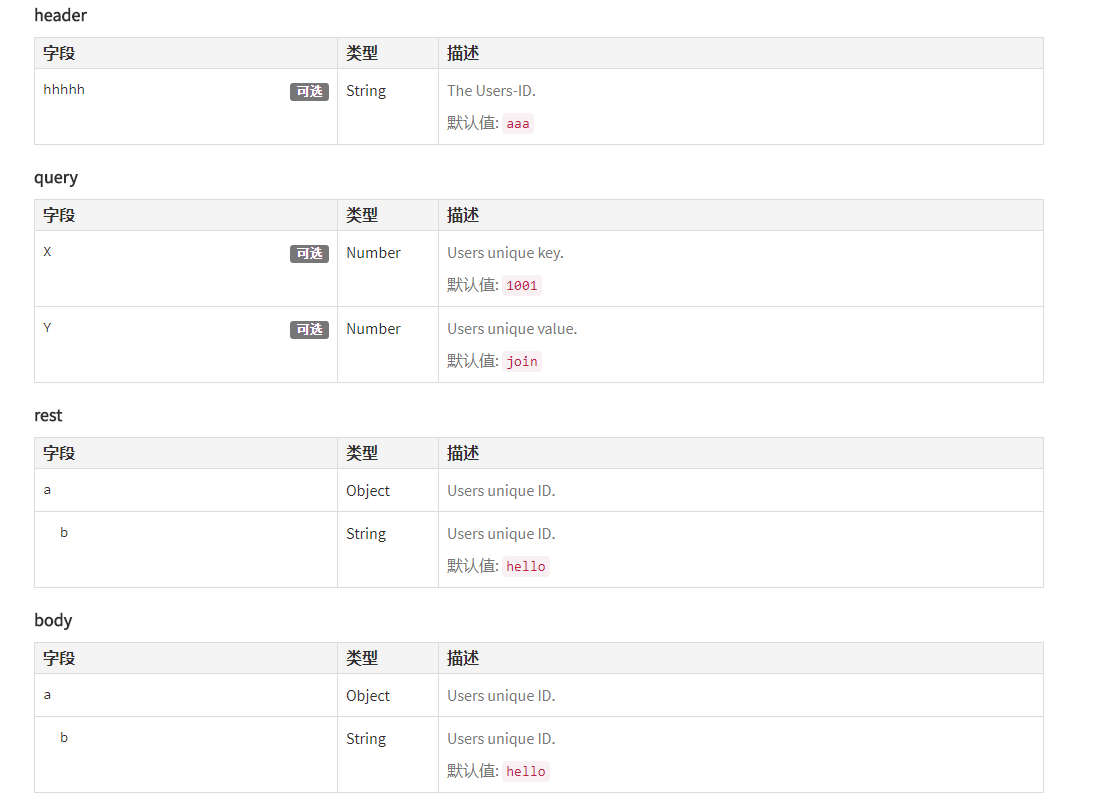
(9)@apiParamExample
表示的是:参数实例

页面上的显示:

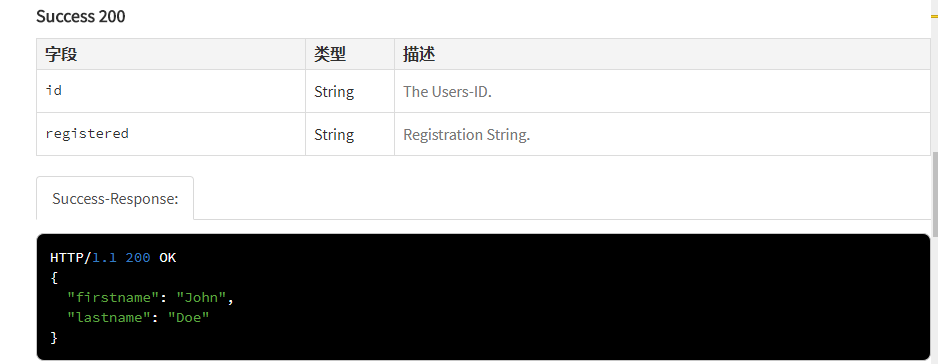
(10)@apiSuccess和@apiSuccessExample
表示的是:成功返回的参数。
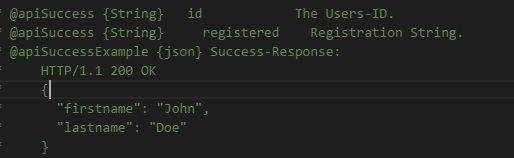
页面上的显示:
目前主要用到了这10多个参数,还是够完成老大要求的任务。
apidoc的输入的js文件
/**

 * @api {get} /user/:id Read data of a User

 * @apiVersion 0.3.0

 * @apiName GetUser

 * @apiGroup User

 * @apiDeprecated use now (#Group:Name)

 *

 * @apiDescription Compare Verison 0.3.0 with 0.2.0 and you will see the green markers with new items in version 0.3.0 and red markers with removed items since 0.2.0.

 *

 * @apiHeader (User) {String} [field=1111] ceshi

 * @apiParam (header) {String} [hhhhh=aaa] The Users-ID.

 * @apiParam (query) {Number} [X=1001] Users unique key.

 * @apiParam (query) {Number} [Y=join] Users unique value.

 * @apiParam (rest) {Object} a Users unique ID.

 * @apiParam (rest) {String} a.b=hello Users unique ID.

 * @apiParam (body) {Object} a Users unique ID.

 * @apiParam (body) {String} a.b=hello Users unique ID.

 * @apiParam (body) {String} a.b.c=world Users unique ID.

 * @apiParam (body) {String} a.c=ccccc Users unique ID.

 * @apiParamExample {json} Request-Example:

 *     {

 *       "id": 4711

 *     }

 *

 * @apiSuccess {String}   id            The Users-ID.

 * @apiSuccess {String}     registered    Registration String.

 * @apiSuccessExample {json} Success-Response:

 *     HTTP/1.1 200 OK

 *     {

 *       "firstname": "John",

 *       "lastname": "Doe"

 *     }

 *

 * @apiError NoAccessRight Only authenticated Admins can access the data.

 * @apiError UserNotFound   The <code>id</code> of the User was not found.

 *

 * @apiErrorExample Response (example):

 *     HTTP/1.1 401 Not Authenticated

 *     {

 *       "error": "NoAccessRight"

 *     }

 */

/**

 * @api {post} /user Create a new User

 * @apiVersion 0.3.0

 * @apiName PostUser

 * @apiGroup User

 *

 * @apiDescription In this case "apiUse" is defined and used.

 * Define blocks with params that will be used in several functions, so you dont have to rewrite them.

 *

 * @apiParam {String} name Name of the User.

 *

 * @apiSuccess {String} id         The new Users-ID.

 *

 * @apiUse CreateUserError

 */

/**

 * @api {put} /user/:id Change a new User

 * @apiVersion 0.3.0

 * @apiName PutUser

 * @apiGroup User

 *

 * @apiDescription This function has same errors like POST /user, but errors not defined again, they were included with "apiUse"

 *

 * @apiParam {String} name Name of the User.

 *

 * @apiUse CreateUserError

 */
apidoc.json文件
{

  "name": "apidoc-example",

  "version": "0.3.0",

  "description": "apiDoc example project",

  "title": "Custom apiDoc browser title",

  "url" : "https://api.github.com/v1",

  "order": [

    "GetUser",

    "PostUser"

  ],

  "template": {

      "withCompare": true,

      "withGenerator": true

  }

}
apidoc快速生成在线文档,apidoc生成静态文件的生成规则以及原理分析的更多相关文章
- asp.net webapi 生成在线文档--Swagger
第一步:使用nuget包获取Swashbule.swagger.net.ui的包并安装. 安装成功后 打开App_Start->SwaggerNet.cs 注释掉一下两行 //[assembly ...
- 第二十节:Asp.Net Core WebApi生成在线文档
一. 基本概念 1.背景 使用 Web API 时,了解其各种方法对开发人员来说可能是一项挑战. Swagger 也称为OpenAPI,解决了为 Web API 生成有用文档和帮助页的问题. 它具有诸 ...
- C#生成PDF文档,读取TXT文件内容
using System.IO;using iTextSharp.text;using iTextSharp.text.pdf; //需要在项目里引用ICSharpCode.SharpZipLib.d ...
- 使用apidocJs快速生成在线文档
https://blog.csdn.net/xialei199023/article/details/63251482 https://blog.csdn.net/qq_16142851/articl ...
- (转)WebApi自动生成在线文档Swashbuckle
原文地址:http://www.cnblogs.com/Arrays/p/5146194.html?utm_source=tuicool&utm_medium=referral 1.前言 1. ...
- (转)WebApi自动生成在线文档WebApiTestClient
原文链接:http://www.cnblogs.com/landeanfen/p/5210356.html 前言:这两天在整WebApi的服务,由于调用方是Android客户端,Android开发人员 ...
- 求你别再用swagger了,给你推荐几个在线文档生成神器
前言 最近公司打算做一个openapi开放平台,让我找一款好用的在线文档生成工具,具体要求如下: 必须是开源的 能够实时生成在线文档 支持全文搜索 支持在线调试功能 界面优美 说实话,这个需求看起来简 ...
- 基于数据库的自动化生成工具,自动生成JavaBean、自动生成数据库文档等(v4.1.2版)
目录: 第1版:http://blog.csdn.net/vipbooks/article/details/51912143 第2版:htt ...
- flask + apidoc 生成接口文档(附加一个坑)
具体使用方法见这里 https://blog.csdn.net/lynnyq/article/details/79254290 挺详细的,我就不抄了. 重点是一个坑: 执行 python manage ...
随机推荐
- Ext表单验证
//大家在很多的extjs代码中都看到了这两个,他们都起提示作用的Ext.QuickTips.init();//支持tips提示Ext.form.Field.prototype.msgTarget=' ...
- Java-----SSM(SpringMVC+Spring+mybaties)框架整合
在进行整合之前,首先了解这个框架的作用 Mybaties: 丰富的标签库,可写动态sql,并统一的在.XML文件中编写,方便统一管理,解耦 SpringMVC: 标准的MVC思想(mode,view, ...
- python 序列:字符串、列表、元组
python 序列:字符串.列表.元组 序列:包含一定顺序排列的对象的一个结构 内建函数:str() list() tuple() 可以使用str(obj)可以把对象obj转换成字符串 list( ...
- 关于O(logN)的正确理解
学计算机的或许对O(logN)这个符号并不陌生,快排.堆排.归并等等排序的平均时间复杂度. 问题来了,之前一直有个歧义就是:logN的底数到底是多少? 这个问题搁置着并没有去深究,仅仅是想应该是2吧. ...
- map对象拷贝问题
map对象赋值: HashMap<String,Object> hm = new HashMap(); HashMap<String,Object> hmCopy = new ...
- 「mysql优化专题」详解引擎(InnoDB,MyISAM)的内存优化攻略?(9)
注意:以下都是在MySQL目录下的my.ini文件中改写(技术文). 一.InnoDB内存优化 InnoDB用一块内存区域做I/O缓存池,该缓存池不仅用来缓存InnoDB的索引块,而且也用来缓存Inn ...
- utf8、unicode与gbk
中国人民通过对 ASCII 编码(对于英文字母8位)的中文扩充改造,产生了 GB2312 编码,可以表示6000多个常用汉字. 汉字实在是太多了,包括繁体和各种字符,于是产生了 GBK (汉字:两个字 ...
- Java之路上,让我们Stand Up Again
在开始之前,先发表一下个人想法吧. 在读书的时候每天忙的不可开交,也就没有了所谓的自由,突然参加工作,传统的朝八晚五,标准的八小时工作制,每天都是两点一线,工作中涉及商业机密,公司的东西也不能带回家, ...
- 《设计模式:可复用面向对象软件的基础》【PDF】下载
<设计模式:可复用面向对象软件的基础>[PDF]下载链接: https://u253469.pipipan.com/fs/253469-230382288 内容介绍 <设计模式:可复 ...
- 我是这样学习使用google学术的
本科期间一直在cnki上面检索论文,随着科研能力的需要,部分论文在cnki的局限性就体现出来了,我就开始培养自己的文献检索能力.现在的各种开发工具,各种论文检索网站再加上文献检索的形式越来越复杂,我们 ...