
Version 1.7.0_80 of the JVM is not suitable for this product.Version: 1.8 or greater is required.
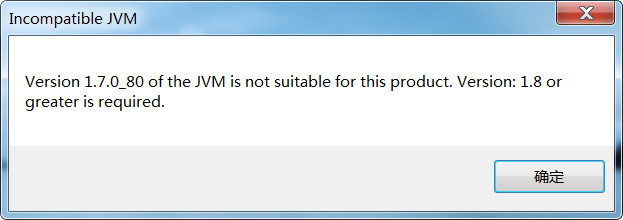
Eclipse启动失败,设置eclipse启动jdk有2种方法
第一种:
直接安装eclipse对应的jdk版本,并设置环境变量
--配置环境变量(下面是我原来的环境变量,JAVA_HOME处需要配置新下载的高版本的JDK)
//JAVA_HOME

E:\java-tools\Java\JDK7_64\jdk1..0_80

//path

%JAVA_HOME%\bin;%SystemRoot%\system32;%SystemRoot%;%SystemRoot%\System32\Wbem;%SYSTEMROOT%\System32\WindowsPowerShell\v1.\;

//安装完数据库的path

D:\oracle\product\10.2.0\client_1\bin;D:\oracle\product\10.2.0\db_2\bin;%JAVA_HOME%\bin;%SystemRoot%\system32;%SystemRoot%;%SystemRoot%\System32\Wbem;%SYSTEMROOT%\System32\WindowsPowerShell\v1.0\;D:\MySQL\MySQL Server 5.0\bin
第二种:
修改eclipse配置文件eclipse.ini
在-startup上面加入以下内容(根据自己JDK的安装目录)
-vm
E:\java-tools1\JDK8_64\jdk1.8.0\bin
-vm

E:\java-tools1\JDK8_64\jdk1.8.0\bin

-startup

plugins/org.eclipse.equinox.launcher_1.3.200.v20160318-1642.jar

--launcher.library

plugins/org.eclipse.equinox.launcher.win32.win32.x86_64_1.1.400.v20160518-1444

-product

org.eclipse.epp.package.jee.product

--launcher.defaultAction

openFile

-showsplash

org.eclipse.platform

--launcher.defaultAction

openFile

--launcher.appendVmargs

-vmargs

-Dosgi.requiredJavaVersion=1.8

-XX:+UseG1GC

-XX:+UseStringDeduplication

-Dosgi.requiredJavaVersion=1.8

-Xms256m

-Xmx1024m
Version 1.7.0_80 of the JVM is not suitable for this product.Version: 1.8 or greater is required.的更多相关文章
- eclipse 报错Version 1.6.0_45 of the JVM is not suitable for this product. Version:1.7 or greater is required
最近离职来了一家新公司,之前的公司的开发IDE用的是IntelliJIDEA和SpringSourceToolSuit,自己在家里用的也是MyEclipse,所以使用eclipse的经验还是不足.结果 ...
- version 1.5.2-04 of the jvm is not suitable for this product. version:1.6 or greater is required
这里仅仅说明一个可能造成该问题的解决办法,也是我遇到的原因. 这句话的意思是说,eclipse须要至少1.6版本号或以上的JVM ,而你仅仅有1.5.2版本号的JVM.想想就认为非常奇怪,我装的但是J ...
- 启动eclipse弹出提示Version 1.7.0_79 of the JVM is not suitable for this product. Version: 1.8 or greater is required怎样解决
启动eclipse时弹出如下弹出框: 解决办法: 在eclipse安装目录下找到eclipse.ini文件,并在 -vmargs-Dosgi.requiredJavaVersion=1.8 前面加上 ...
- Version 1.5 of the JVM is not suitable for this product.Version:1.6 or greater is required
近期在公司涉及到了服务器等的扩展,smartfoxserver扩展使用的Eclipse,尽管没学过java.可是咱毕竟是C++起价的,其它语言看看也就会了,项目依然做着,近期看到某同学有一些java的 ...
- Version 1.6.0 of the JVM is not suitable for the this product.Version:1.8 or greater is required
这个问题时在打开eclipse时报的一个错误,报这个问题的意思我们都明白,说的就是当前版本的jdk版本太低,eclipse需要更高版本的jdk. 那就下一个更高版本的jdk就可以啦,这里我要说说我当时 ...
- 奇葩问题:This file could not be checked in because the original version of the file on the server was moved or deleted. A new version of this file has been saved to the server, but your check-in comments were not saved
"This file could not be checked in because the original version of the file on the server was m ...
- RabbitMQ 安装 Your installed version of Erlang (6.2) is too old. Please install a more recent version.
windows安装RabbitMQ时在安装完Erlang语言开发包后,再安装RabbitMQ时报错: Your installed version of Erlang (6.2) is too old ...
- 运行TensorFlow报错,“This program requires version 3.6.1 of the Protocol Buffer runtime library, but the installed version is 3.0.0.”
报错信息: [libprotobuf FATAL google/protobuf/src/google/protobuf/stubs/common.cc:67] This program requir ...
- There's no Qt version assigned to this project for platform Win32. Please use the 'change Qt version' feature and choose a valid Qt version for this platform.
这个是用在vs2015时爆出的问题. 解决方法是: 1.鼠标放置在解决方案中的工程名处,用鼠标右键点击(右击). 2.选择Qt Project Settings,在弹出的对话框中的version栏处填 ...
随机推荐
- CPP--关于long的争议和思考
先普及一下VS开发Linux的知识点 VS2017的安装:https://www.cnblogs.com/dunitian/p/8051985.html 创建项目在这 第一次运行的时候会让输入服务器信 ...
- Golang 中的坑 一
Golang 中的坑 短变量声明 Short variable declarations 考虑如下代码: package main import ( "errors" " ...
- MySQL数据库学习: 01 —— 数据库的概述
壹 概述 一 了解SQL 1.1 数据库基础 1.1.1 什么是数据库 数据库(database)保存有组织的数据的容器(通常是一个文件或一组文件). 易混淆:人们常常用“数据库”这个词语来代表他们使 ...
- Zabbix Agent端配置文件说明
Zabbix Agent端配置文件说明 由于工作中经常接触到zabbix,所以将agent配置整理一下,方便日常查看. # This is a config file for the Zabbix a ...
- sed中引用变量
sed 中引用变量 eval sed 's/string/$REPLACE/g' file awk 中引用变量 awk 在匹配字符串的时候,有时候需要需要引用变量. $pid= eval " ...
- SecureCRT 历史版本下载
最近在使用SecureCRT时,存在网络卡顿现象,然而.同事的SecureCRT工具却一点都不卡,我的SecureCRT是比较老的版本6,同事使用的是版本7,所以就更换下自己的SecureCRT版本. ...
- 一步步实现滑动验证码,Java图片处理关键代码
最近滑动验证码在很多网站逐步流行起来,一方面对用户体验来说,比较新颖,操作简单,另一方面相对图形验证码来说,安全性并没有很大的降低.当然到目前为止,没有绝对的安全验证,只是不断增加攻击者的绕过成本. ...
- 又趟一个坑,IO卡信号DI和DO的信号类型
工控IO卡可以感应到各种电信号,传感器的状态变化. DI信号包括数字开关信号(ture,false\0,1),光信号的变化(上升沿,下降沿). DO信号包括脉宽和数字开关信号(ture,false\0 ...
- IOS10.3上传照片只能拍照不能选择解决办法
升级IOS10.3正式版以后可能会出现上传文件的控件只能拍照而不能选择现有图片的问题. 正好被我们碰到了,于是找了找解决思路,发现如下解决思路: 原代码为: <input type=" ...
- 利用appium-1.5.3.dmg安装Appium. doctors时,提示 Could not detect Mac OS X Version from sw_vers output: '10.12'
发生这种错误的原因是因为:appium不支持mac 10.12版本. 解决方法: https://stackoverflow.com/questions/40129794/how-to-fix-err ...