
Version 1.7.0_80 of the JVM is not suitable for this product.Version: 1.8 or greater is required.
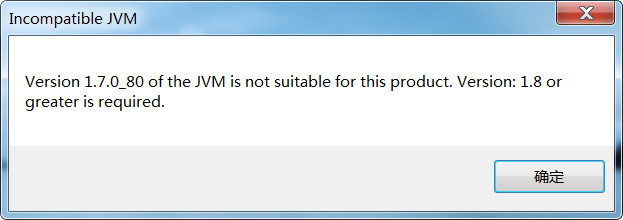
Eclipse启动失败,设置eclipse启动jdk有2种方法
第一种:
直接安装eclipse对应的jdk版本,并设置环境变量
--配置环境变量(下面是我原来的环境变量,JAVA_HOME处需要配置新下载的高版本的JDK)
//JAVA_HOME

E:\java-tools\Java\JDK7_64\jdk1..0_80

//path

%JAVA_HOME%\bin;%SystemRoot%\system32;%SystemRoot%;%SystemRoot%\System32\Wbem;%SYSTEMROOT%\System32\WindowsPowerShell\v1.\;

//安装完数据库的path

D:\oracle\product\10.2.0\client_1\bin;D:\oracle\product\10.2.0\db_2\bin;%JAVA_HOME%\bin;%SystemRoot%\system32;%SystemRoot%;%SystemRoot%\System32\Wbem;%SYSTEMROOT%\System32\WindowsPowerShell\v1.0\;D:\MySQL\MySQL Server 5.0\bin
第二种:
修改eclipse配置文件eclipse.ini
在-startup上面加入以下内容(根据自己JDK的安装目录)
-vm
E:\java-tools1\JDK8_64\jdk1.8.0\bin
-vm

E:\java-tools1\JDK8_64\jdk1.8.0\bin

-startup

plugins/org.eclipse.equinox.launcher_1.3.200.v20160318-1642.jar

--launcher.library

plugins/org.eclipse.equinox.launcher.win32.win32.x86_64_1.1.400.v20160518-1444

-product

org.eclipse.epp.package.jee.product

--launcher.defaultAction

openFile

-showsplash

org.eclipse.platform

--launcher.defaultAction

openFile

--launcher.appendVmargs

-vmargs

-Dosgi.requiredJavaVersion=1.8

-XX:+UseG1GC

-XX:+UseStringDeduplication

-Dosgi.requiredJavaVersion=1.8

-Xms256m

-Xmx1024m
Version 1.7.0_80 of the JVM is not suitable for this product.Version: 1.8 or greater is required.的更多相关文章
- eclipse 报错Version 1.6.0_45 of the JVM is not suitable for this product. Version:1.7 or greater is required
最近离职来了一家新公司,之前的公司的开发IDE用的是IntelliJIDEA和SpringSourceToolSuit,自己在家里用的也是MyEclipse,所以使用eclipse的经验还是不足.结果 ...
- version 1.5.2-04 of the jvm is not suitable for this product. version:1.6 or greater is required
这里仅仅说明一个可能造成该问题的解决办法,也是我遇到的原因. 这句话的意思是说,eclipse须要至少1.6版本号或以上的JVM ,而你仅仅有1.5.2版本号的JVM.想想就认为非常奇怪,我装的但是J ...
- 启动eclipse弹出提示Version 1.7.0_79 of the JVM is not suitable for this product. Version: 1.8 or greater is required怎样解决
启动eclipse时弹出如下弹出框: 解决办法: 在eclipse安装目录下找到eclipse.ini文件,并在 -vmargs-Dosgi.requiredJavaVersion=1.8 前面加上 ...
- Version 1.5 of the JVM is not suitable for this product.Version:1.6 or greater is required
近期在公司涉及到了服务器等的扩展,smartfoxserver扩展使用的Eclipse,尽管没学过java.可是咱毕竟是C++起价的,其它语言看看也就会了,项目依然做着,近期看到某同学有一些java的 ...
- Version 1.6.0 of the JVM is not suitable for the this product.Version:1.8 or greater is required
这个问题时在打开eclipse时报的一个错误,报这个问题的意思我们都明白,说的就是当前版本的jdk版本太低,eclipse需要更高版本的jdk. 那就下一个更高版本的jdk就可以啦,这里我要说说我当时 ...
- 奇葩问题:This file could not be checked in because the original version of the file on the server was moved or deleted. A new version of this file has been saved to the server, but your check-in comments were not saved
"This file could not be checked in because the original version of the file on the server was m ...
- RabbitMQ 安装 Your installed version of Erlang (6.2) is too old. Please install a more recent version.
windows安装RabbitMQ时在安装完Erlang语言开发包后,再安装RabbitMQ时报错: Your installed version of Erlang (6.2) is too old ...
- 运行TensorFlow报错,“This program requires version 3.6.1 of the Protocol Buffer runtime library, but the installed version is 3.0.0.”
报错信息: [libprotobuf FATAL google/protobuf/src/google/protobuf/stubs/common.cc:67] This program requir ...
- There's no Qt version assigned to this project for platform Win32. Please use the 'change Qt version' feature and choose a valid Qt version for this platform.
这个是用在vs2015时爆出的问题. 解决方法是: 1.鼠标放置在解决方案中的工程名处,用鼠标右键点击(右击). 2.选择Qt Project Settings,在弹出的对话框中的version栏处填 ...
随机推荐
- iOS使用带字体图标的UIButton(支持各种方向)
简书地址:http://www.jianshu.com/p/1c288440754d demo地址:https://github.com/Brances/ZMProject
- Xamarin~Android篇~监听返回键,单击返回某个webView,双击退出
https://www.cnblogs.com/lori/p/5088627.html DateTime? lastBackKeyDownTime; public override bool OnKe ...
- .Net WinForm 控件键盘消息处理剖析
在WinForm控件上我们可以看到很多关于键盘消息处理的方法,比如OnKeyDown, OnKeyPress, ProcessCmdKey, ProcessDialogKey,IsInputKey等等 ...
- SQL Server CPU
解决数据库系统的性能问题可能是一项艰巨的任务.了解如何找到问题很重要,但是了解系统对特定请求作出特定反应的原因更加重要.影响数据库服务器上的 CPU 利用率 的因素有很多:SQL 语句的编译和重新编译 ...
- golang 用tar打包文件或文件夹
打包文件用到了tar包,其中tar包的用法可以参考API golang提供了个函数用来遍历文件夹 filepath.Walk 函数具体描述如下: func Walk(root string, walk ...
- Sublime Text3注册码,亲测可用
将以下复制在输入框即可 ,亲测可用 . 不过还是希望大家多多支持正版 . -– BEGIN LICENSE -– TwitterInc 200 User License EA7E-890007 1D7 ...
- 【HTTP协议】
一.简介 HTTP协议是Hyper Text Transfer Protocol(超文本传输协议)的缩写,是用于从万维网(WWW:World Wide Web )服务器传输超文本到本地浏览器的传送协议 ...
- Pandas库的使用--Series
一.概念 Series相当于一维数组. 1.调用Series的原生方法创建 import pandas as pd s1 = pd.Series(data=[1,2,4,6,7],index=['a' ...
- 【转】 Git——如何将本地项目提交至远程仓库
1.(先进入项目文件夹)通过命令 git init 把这个目录变成git可以管理的仓库 git init 2.把文件添加到版本库中,使用命令 git add .添加到暂存区里面去,不要忘记后面的小数点 ...
- Spring Cloud Consul入门
1. Consul介绍 Consul是一套开源的分布式服务发现和配置管理系统,支持多数据中心分布式高可用.Consul是HashiCorp( Vagrant的创建者)开发的一个服务发现与配置项目,用G ...