
C#Winform设计的通用标签设计器
技术看点
- PropertyGrid的使用
- 自定义控件的使用
- 对象序列化成XML
- GDI+Windows驱动打印
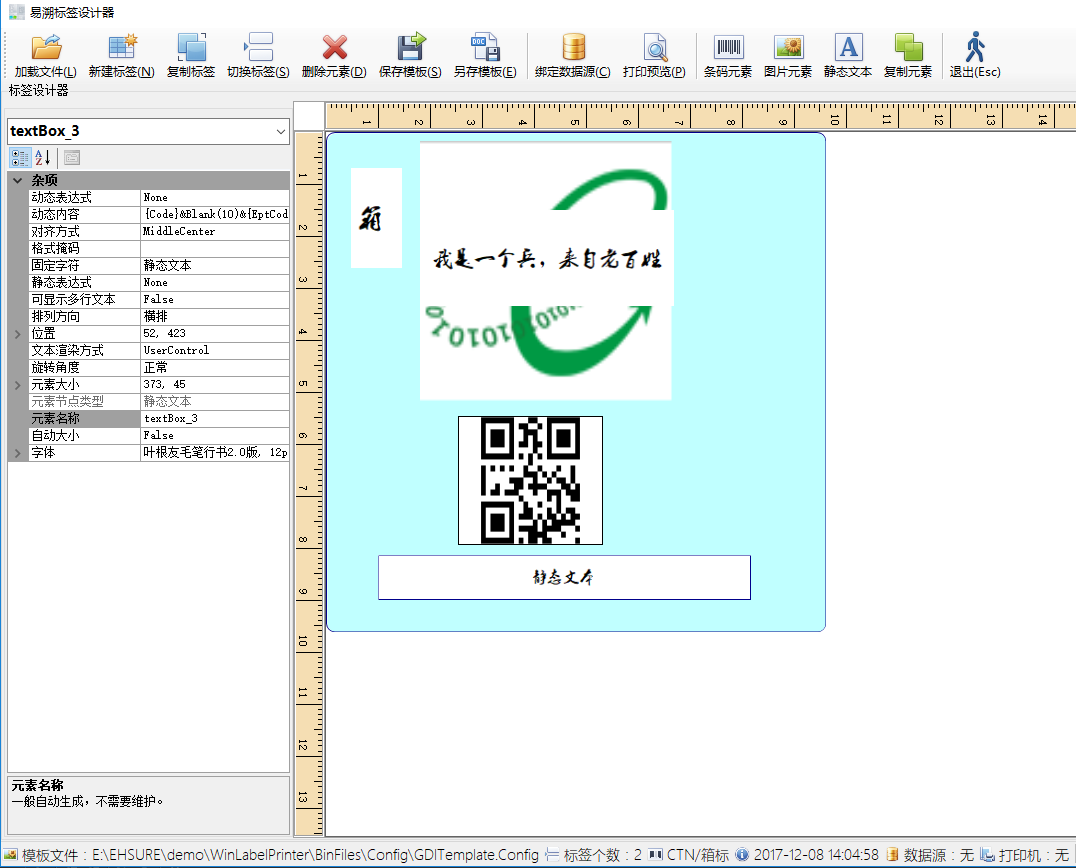
前言
是的,一不小心把公司名称透露了。索性帮公司打一下广告。公司(上海易溯信息科技)是中国奶制品行业追溯生产管理方面的龙头。最近也是准备把业务拓展到东南亚地区,筹备走出国门。由于老系统的Windows驱动打印部分出现打印速度不够快,绘图精度不高,标签设计器简陋等问题。于是开始了重构,当然只是参考老程序的实现方式,程序是重新实现的。程序是用很零散的空闲时间写的,效果还需要在项目中实际运用,进行检验。
设计
由于一发现不熟悉的技术点就上网搜索,其实大部分技术难题都是搜索解决的。这里就不申明版权问题了,“如有雷同,纯属意外!”。哈哈
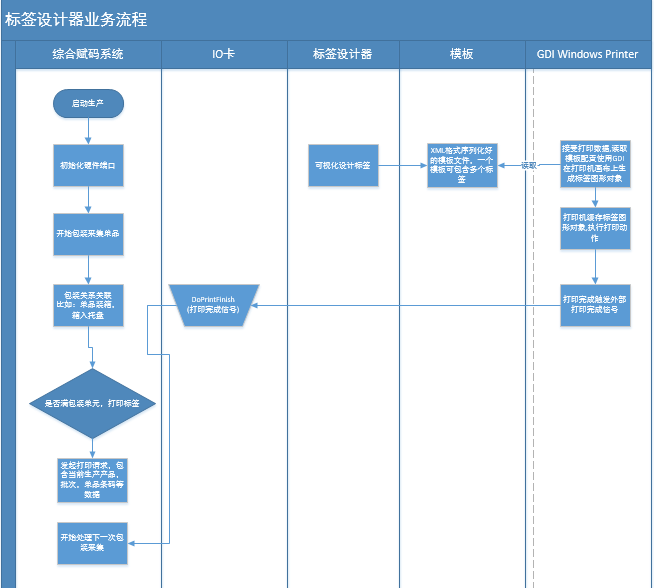
运行时读取模板数据,模板里标签的元素的设计
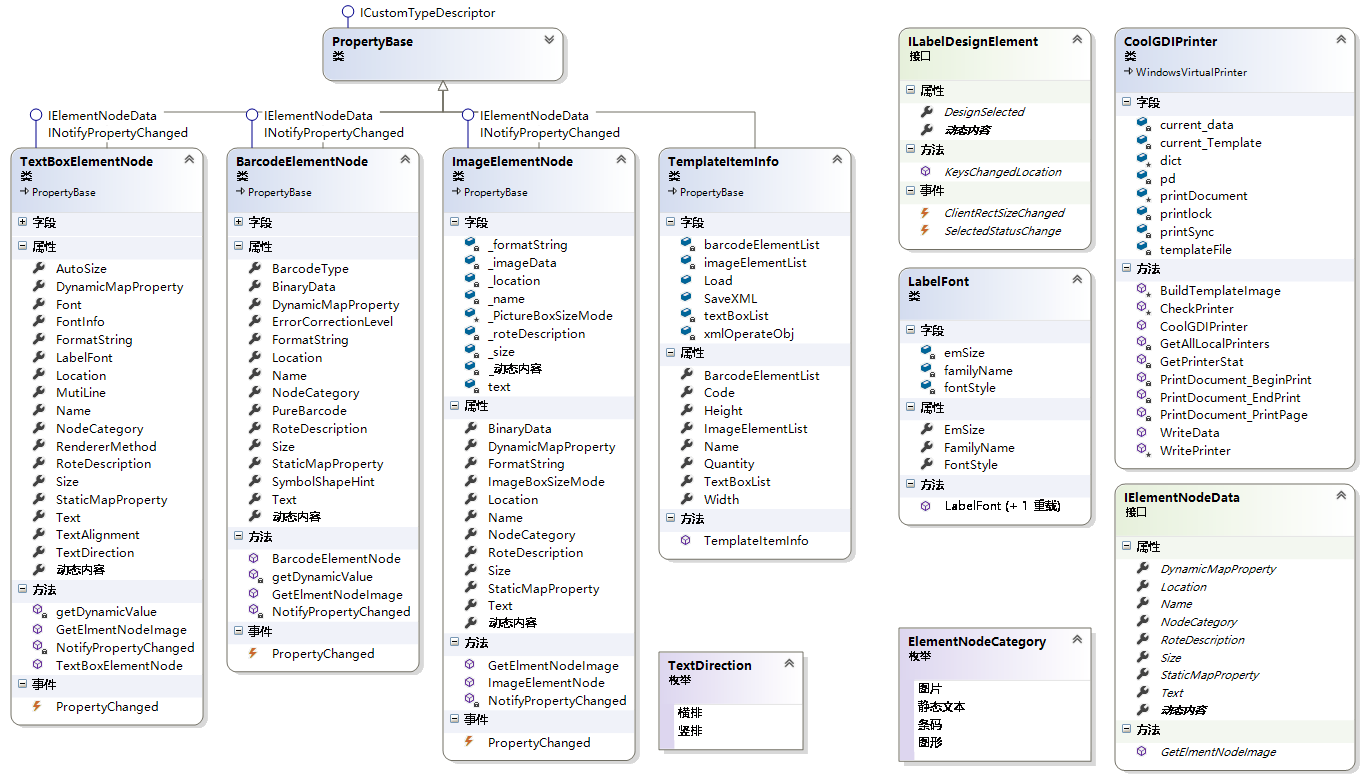
设计时可视化自定义控件的设计类图
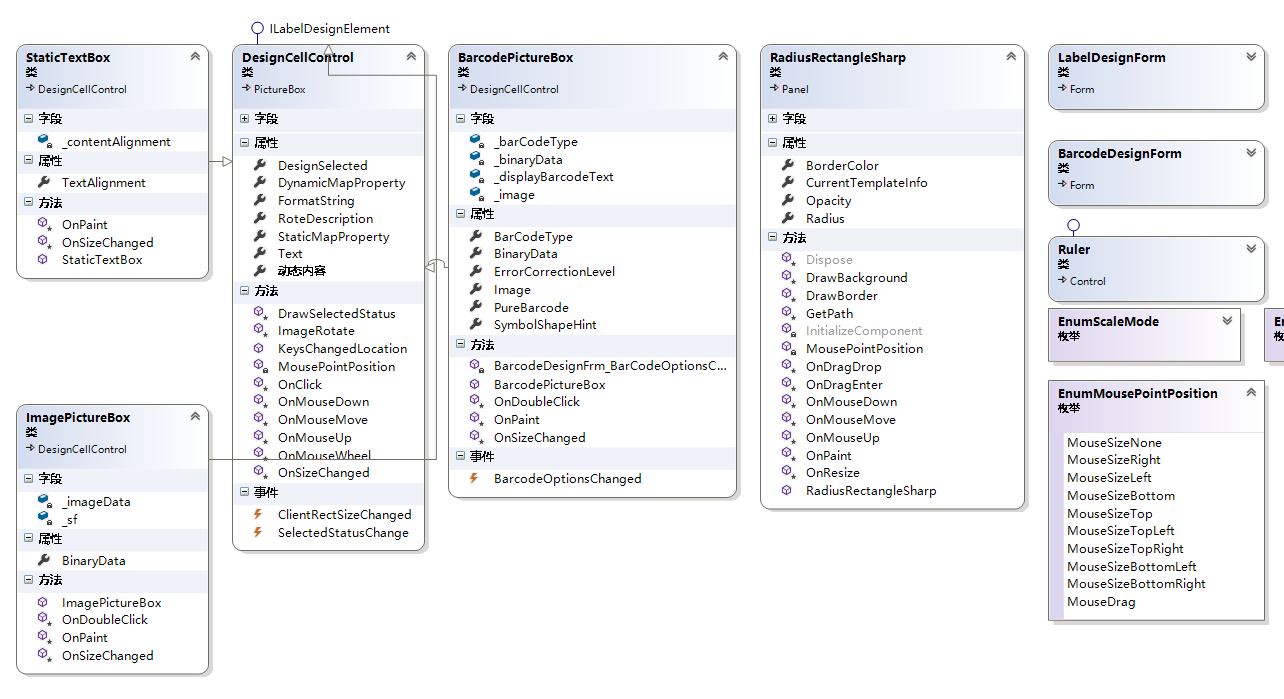
编码实现
1)PropertyGrid的使用
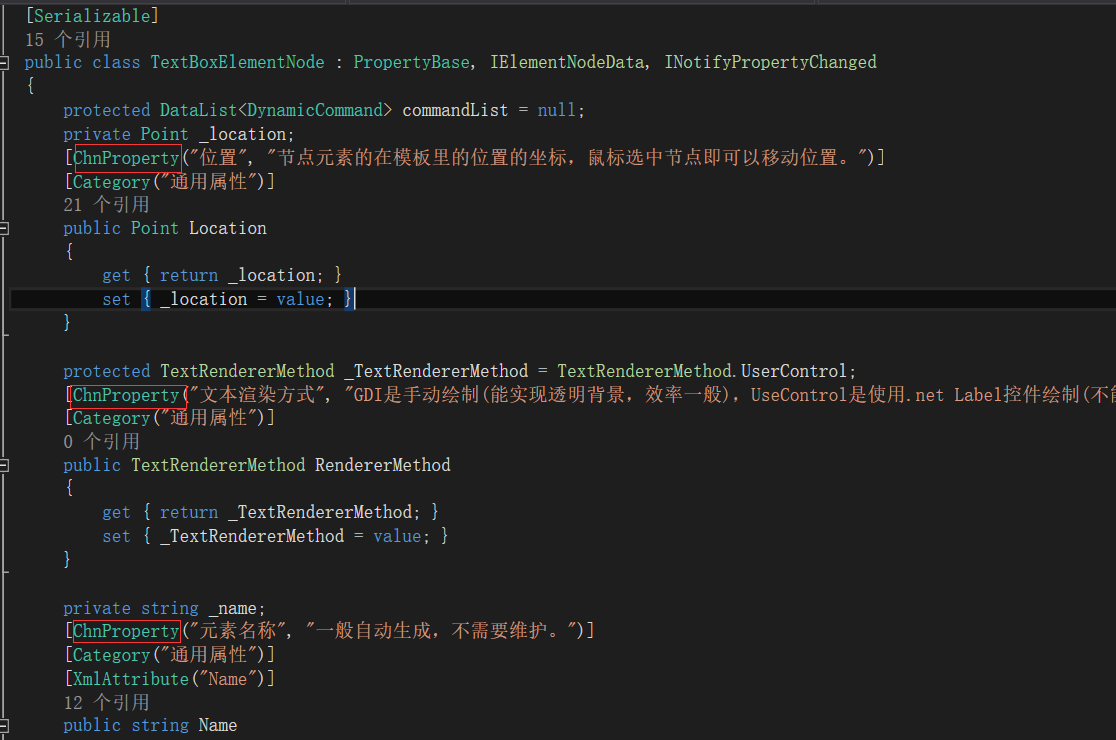
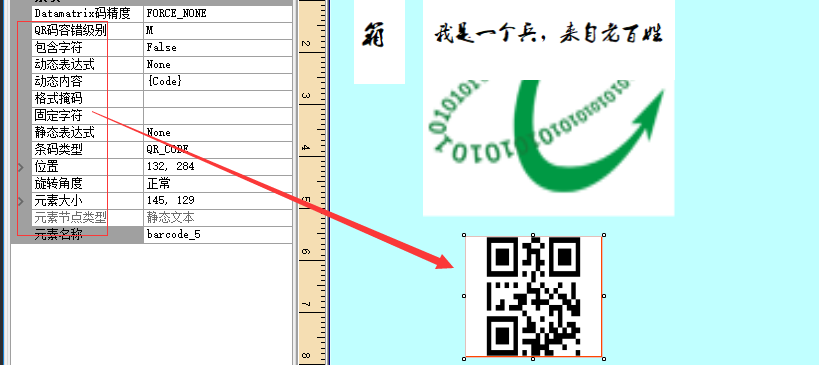
代码都来自网络,主要就是属性名使用中文。使用英文对实施的电器工程师来说不太友好。
public delegate void PropertyChanged(object Value);

    /// <summary>

    /// 主要是实现中文化属性显示

    /// </summary>

    public class PropertyBase : ICustomTypeDescriptor

    {

        AttributeCollection ICustomTypeDescriptor.GetAttributes()

        {

            return TypeDescriptor.GetAttributes(this, true);

        }

        string ICustomTypeDescriptor.GetClassName()

        {

            return TypeDescriptor.GetClassName(this, true);

        }

        string ICustomTypeDescriptor.GetComponentName()

        {

            return TypeDescriptor.GetComponentName(this, true);

        }

        TypeConverter ICustomTypeDescriptor.GetConverter()

        {

            return TypeDescriptor.GetConverter(this, true);

        }

        EventDescriptor ICustomTypeDescriptor.GetDefaultEvent()

        {

            return TypeDescriptor.GetDefaultEvent(this, true);

        }

        PropertyDescriptor ICustomTypeDescriptor.GetDefaultProperty()

        {

            return null;

        }

        object ICustomTypeDescriptor.GetEditor(Type editorBaseType)

        {

            return TypeDescriptor.GetEditor(this, editorBaseType, true);

        }

        EventDescriptorCollection ICustomTypeDescriptor.GetEvents()

        {

            return TypeDescriptor.GetEvents(this, true);

        }

        EventDescriptorCollection ICustomTypeDescriptor.GetEvents(Attribute[] attributes)

        {

            return TypeDescriptor.GetEvents(this, attributes, true);

        }

        PropertyDescriptorCollection ICustomTypeDescriptor.GetProperties()

        {

            return ((ICustomTypeDescriptor)this).GetProperties(new Attribute[]);

        }

        PropertyDescriptorCollection ICustomTypeDescriptor.GetProperties(Attribute[] attributes)

        {

            ArrayList props = new ArrayList();

            Type thisType = this.GetType();

            PropertyInfo[] pis = thisType.GetProperties();

            foreach (PropertyInfo p in pis)

            {

                if (p.DeclaringType == thisType || p.PropertyType.ToString() == "System.Drawing.Color")

                {

                    //判断属性是否显示

                    BrowsableAttribute Browsable = (BrowsableAttribute)Attribute.GetCustomAttribute(p, typeof(BrowsableAttribute));

                    if (Browsable != null)

                    {

                        if (Browsable.Browsable == true || p.PropertyType.ToString() == "System.Drawing.Color")

                        {

                            PropertyStub psd = new PropertyStub(p, attributes);

                            props.Add(psd);

                        }

                    }

                    else

                    {

                        PropertyStub psd = new PropertyStub(p, attributes);

                        props.Add(psd);

                    }

                }

            }

            PropertyDescriptor[] propArray = (PropertyDescriptor[])props.ToArray(typeof(PropertyDescriptor));

            return new PropertyDescriptorCollection(propArray);

        }

        object ICustomTypeDescriptor.GetPropertyOwner(PropertyDescriptor pd)

        {

            return this;

        }

    }

    /// <summary>

    /// 自定义属性拦截器

    /// </summary>

    public class PropertyStub : PropertyDescriptor

    {

        PropertyInfo info;

        public PropertyStub(PropertyInfo propertyInfo, Attribute[] attrs)

            : base(propertyInfo.Name, attrs)

        {

            info = propertyInfo;

        }

        public override Type ComponentType

        {

            get { return info.ReflectedType; }

        }

        public override bool IsReadOnly

        {

            get { return info.CanWrite == false; }

        }

        public override Type PropertyType

        {

            get { return info.PropertyType; }

        }

        public override bool CanResetValue(object component)

        {

            return false;

        }

        public override object GetValue(object component)

        {

            try

            {

                return info.GetValue(component, null);

            }

            catch

            {

                return null;

            }

        }

        public override void ResetValue(object component)

        {

        }

        public override void SetValue(object component, object value)

        {

            info.SetValue(component, value, null);

        }

        public override bool ShouldSerializeValue(object component)

        {

            return false;

        }

        //通过重载下面这个属性,可以将属性在PropertyGrid中的显示设置成中文

        public override string DisplayName

        {

            get

            {

                if (info != null)

                {

                    ChnPropertyAttribute uicontrolattibute = (ChnPropertyAttribute)Attribute.GetCustomAttribute(info, typeof(ChnPropertyAttribute));

                    if (uicontrolattibute != null)

                        return uicontrolattibute.PropertyName;

                    else

                    {

                        return info.Name;

                    }

                }

                else

                    return "";

            }

        }

        public override string Description

        {

            get

            {

                if (info != null)

                {

                    ChnPropertyAttribute uicontrolattibute = (ChnPropertyAttribute)Attribute.GetCustomAttribute(info, typeof(ChnPropertyAttribute));

                    if (uicontrolattibute != null)

                        return uicontrolattibute.PropertyDescription;

                }

                return string.Empty;

            }

        }

    }
自定义属性拦截器
/// <summary>

    /// 中文方式自定义属性标识

    /// </summary>

    public class ChnPropertyAttribute : Attribute

    {

        private string _PropertyName;

        private string _PropertyDescription;

        public ChnPropertyAttribute(string Name, string Description)

        {

            _PropertyName = Name;

            _PropertyDescription = Description;

        }

        public ChnPropertyAttribute(string Name)

        {

            _PropertyName = Name;

            _PropertyDescription = "";

        }

        public string PropertyName

        {

            get { return _PropertyName; }

        }

        public string PropertyDescription

        {

            get { return _PropertyDescription; }

        }

    }
自定义中文属性的Attribute
实际使用中文属性
2)自定义控件的使用
/// <summary>
/// 标签最顶层容器,标签设计时容器
/// </summary>
[Serializable]
public partial class RadiusRectangleSharp : Panel
{
#region 鼠标移动和缩放
const int Band = ;
const int MinWidth = ;
const int MinHeight = ;
private EnumMousePointPosition _mMousePointPosition;
private Point _p, _p1;
private EnumMousePointPosition MousePointPosition(Size size, System.Windows.Forms.MouseEventArgs e)
{ if ((e.X >= - * Band) | (e.X <= size.Width) | (e.Y >= - * Band) | (e.Y <= size.Height))
{
if (e.X < Band)
{
if (e.Y < Band) { return EnumMousePointPosition.MouseSizeTopLeft; }
else
{
if (e.Y > - * Band + size.Height)
{ return EnumMousePointPosition.MouseSizeBottomLeft; }
else
{ return EnumMousePointPosition.MouseSizeLeft; }
}
}
else
{
if (e.X > - * Band + size.Width)
{
if (e.Y < Band)
{ return EnumMousePointPosition.MouseSizeTopRight; }
else
{
if (e.Y > - * Band + size.Height)
{ return EnumMousePointPosition.MouseSizeBottomRight; }
else
{ return EnumMousePointPosition.MouseSizeRight; }
}
}
else
{
if (e.Y < Band)
{ return EnumMousePointPosition.MouseSizeTop; }
else
{
if (e.Y > - * Band + size.Height)
{ return EnumMousePointPosition.MouseSizeBottom; }
else
{ return EnumMousePointPosition.MouseDrag; }
}
}
}
}
else
{ return EnumMousePointPosition.MouseSizeNone; }
}
#endregion
#region Local Variables
private Color _borderColor = Color.White;
private int _radius = ;
private int _opacity = ;
private Color _dimmedColor = Color.LightGray;
protected Rectangle IRect = new Rectangle();
#endregion
#region Properties
public Color BorderColor
{
get { return _borderColor; }
set { _borderColor = value; Invalidate(); }
}
public int Opacity
{
get { return _opacity; }
set { _opacity = value; this.Invalidate(); }
}
public int Radius
{
get { return _radius; }
set { _radius = value; this.Invalidate(); }
}
/// <summary>
/// 当前模板信息
/// </summary>
public TemplateItemInfo CurrentTemplateInfo
{
get
{
return _currentTempletInfo;
}
set
{
_currentTempletInfo = value;
}
}
private TemplateItemInfo _currentTempletInfo = new TemplateItemInfo();
#endregion
public RadiusRectangleSharp()
{
InitializeComponent();
AllowDrop = true;
BackColor = Color.White;
SetStyle(ControlStyles.AllPaintingInWmPaint | ControlStyles.OptimizedDoubleBuffer | ControlStyles.ResizeRedraw | ControlStyles.SupportsTransparentBackColor | ControlStyles.UserPaint, true);
SetStyle(ControlStyles.Opaque, true);
Margin = new Padding(, , , );
Padding = new Padding(, , , );
BorderColor = Color.DarkBlue;
UpdateStyles();
SendToBack();
}
protected override void OnPaint(PaintEventArgs e)
{
SmoothingMode sm = e.Graphics.SmoothingMode;
e.Graphics.SmoothingMode = SmoothingMode.HighQuality;
e.Graphics.Clear(Color.White);
DrawBorder(e.Graphics);
DrawBackground(e.Graphics);
e.Graphics.SmoothingMode = sm;
}
protected void DrawBorder(Graphics g)
{
Rectangle rect = ClientRectangle;
rect.Width--;
rect.Height--;
using (GraphicsPath bp = GetPath(rect, _radius))
{
using (Pen p = new Pen(_borderColor))
{
g.DrawPath(p, bp);
}
}
}
protected void DrawBackground(Graphics g)
{
Rectangle rect = ClientRectangle;
IRect = rect;
rect.X++;
rect.Y++;
rect.Width -= ;
rect.Height -= ;
using (GraphicsPath bb = GetPath(rect, _radius))
{
using (Brush br = new SolidBrush(Color.FromArgb(_opacity, BackColor)))
{
g.FillPath(br, bb);
}
}
}
protected GraphicsPath GetPath(Rectangle rc, int r)
{
int x = rc.X, y = rc.Y, w = rc.Width, h = rc.Height;
r = r << ;
GraphicsPath path = new GraphicsPath();
if (r > )
{
if (r > h) { r = h; }; //Rounded
if (r > w) { r = w; }; //Rounded
path.AddArc(x, y, r, r, , ); //Upper left corner
path.AddArc(x + w - r, y, r, r, , ); //Upper right corner
path.AddArc(x + w - r, y + h - r, r, r, , ); //Lower right corner
path.AddArc(x, y + h - r, r, r, , ); //Lower left corner
path.CloseFigure();
}
else
{
path.AddRectangle(rc);
}
return path;
}
protected override void OnMouseDown(MouseEventArgs e)
{
_p.X = e.X;
_p.Y = e.Y;
_p1.X = e.X;
_p1.Y = e.Y;
}
protected override void OnMouseUp(MouseEventArgs e)
{
_mMousePointPosition = EnumMousePointPosition.MouseSizeNone;
this.Cursor = Cursors.Arrow;
}
protected override void OnMouseMove(MouseEventArgs e)
{
if (e.Button == MouseButtons.Left)
{
//本控件是顶层容器,不允许位移
switch (_mMousePointPosition)
{
#region 位置计算
case EnumMousePointPosition.MouseDrag:
break;
case EnumMousePointPosition.MouseSizeBottom:
Height = Height + e.Y - _p1.Y;
_p1.X = e.X;
_p1.Y = e.Y; //'记录光标拖动的当前点
break;
case EnumMousePointPosition.MouseSizeBottomRight:
Width = Width + e.X - _p1.X;
Height = Height + e.Y - _p1.Y;
_p1.X = e.X;
_p1.Y = e.Y; //'记录光标拖动的当前点
break;
case EnumMousePointPosition.MouseSizeRight:
Width = Width + e.X - _p1.X;
Height = Height + e.Y - _p1.Y;
_p1.X = e.X;
_p1.Y = e.Y; //'记录光标拖动的当前点
break;
case EnumMousePointPosition.MouseSizeTop:
Height = Height - (e.Y - _p.Y);
break;
case EnumMousePointPosition.MouseSizeLeft:
Width = Width - (e.X - _p.X);
break;
case EnumMousePointPosition.MouseSizeBottomLeft:
Width = Width - (e.X - _p.X);
Height = Height + e.Y - _p1.Y;
_p1.X = e.X;
_p1.Y = e.Y; //'记录光标拖动的当前点
break;
case EnumMousePointPosition.MouseSizeTopRight:
Width = Width + (e.X - _p1.X);
Height = Height - (e.Y - _p.Y);
_p1.X = e.X;
_p1.Y = e.Y; //'记录光标拖动的当前点
break;
case EnumMousePointPosition.MouseSizeTopLeft:
Width = Width - (e.X - _p.X);
Height = Height - (e.Y - _p.Y);
break;
default:
break;
#endregion
}
if (Width < MinWidth) Width = MinWidth;
if (Height < MinHeight) Height = MinHeight;
}
else
{
_mMousePointPosition = MousePointPosition(Size, e);
switch (_mMousePointPosition)
{
#region 改变光标
case EnumMousePointPosition.MouseSizeNone:
this.Cursor = Cursors.Arrow; //'箭头
break;
case EnumMousePointPosition.MouseDrag:
this.Cursor = Cursors.SizeAll; //'四方向
break;
case EnumMousePointPosition.MouseSizeBottom:
this.Cursor = Cursors.SizeNS; //'南北
break;
case EnumMousePointPosition.MouseSizeTop:
this.Cursor = Cursors.SizeNS; //'南北
break;
case EnumMousePointPosition.MouseSizeLeft:
this.Cursor = Cursors.SizeWE; //'东西
break;
case EnumMousePointPosition.MouseSizeRight:
this.Cursor = Cursors.SizeWE; //'东西
break;
case EnumMousePointPosition.MouseSizeBottomLeft:
this.Cursor = Cursors.SizeNESW; //'东北到南西
break;
case EnumMousePointPosition.MouseSizeBottomRight:
this.Cursor = Cursors.SizeNWSE; //'东南到西北
break;
case EnumMousePointPosition.MouseSizeTopLeft:
this.Cursor = Cursors.SizeNWSE; //'东南到西北
break;
case EnumMousePointPosition.MouseSizeTopRight:
this.Cursor = Cursors.SizeNESW; //'东北到南西
break;
default:
break;
#endregion
}
}
}
protected override void OnResize(EventArgs eventargs)
{
if (CurrentTemplateInfo != null)
{
CurrentTemplateInfo.Width = Size.Width;
CurrentTemplateInfo.Height = Size.Height;
Invalidate();
}
}
protected override void OnDragEnter(DragEventArgs drgevent)
{
drgevent.Effect = DragDropEffects.Copy;
base.OnDragEnter(drgevent);
}
protected override void OnDragDrop(DragEventArgs drgevent)
{
try
{
string[] strs = (string[])drgevent.Data.GetData(typeof(string[])); //获取拖拽数据
PictureBox ctrl = null;
#region 实例化元素控件
switch (strs.FirstOrDefault())
{
case "Barcode":
ctrl = new BarcodePictureBox();
break;
case "Image":
ctrl = new ImagePictureBox();
break;
case "Text":
ctrl = new StaticTextBox();
break;
default:
break;
}
#endregion
ctrl.Location = PointToClient(new Point(drgevent.X, drgevent.Y)); //屏幕坐标转换成控件容器坐标
ctrl.BringToFront();
Controls.Add(ctrl);
}
catch (Exception ex)
{
string msg = "初始化控件出错!错误码:" + ex.Message + Environment.NewLine + ex.StackTrace;
MessageTip.ShowError(this, msg, );
}
base.OnDragDrop(drgevent);
}
}
整体上来说就是GDI+的使用,其中用了Base64编码来序列化图片。
3)对象序列化成XML
使用的是标准的方式:
/// <summary>

        /// 把对象序列化成xml文件

        /// </summary>

        /// <typeparam name="T">对象的类</typeparam>

        /// <param name="outFile">输出的文件和路径</param>

        /// <param name="t">对象的实例</param>

        public static void SerializerToXML<T>(string outFile, T t) where T : class

        {

            using (System.IO.FileStream fs = new System.IO.FileStream(outFile, System.IO.FileMode.Create))

            {

                XmlSerializerNamespaces ns = new XmlSerializerNamespaces();

                ns.Add("", "");

                XmlSerializer xs = new XmlSerializer(typeof(T));

                xs.Serialize(fs, t, ns);

                fs.Flush();

            }

        }

        /// <summary>

        /// 从XML文件反序列化成集合对象

        /// </summary>

        /// <typeparam name="T">对象</typeparam>

        /// <param name="inXMLFile">xml的文件,全路径</param>

        /// <returns>对象集合</returns>

        public static T LoadFromXML<T>(string inXMLFile) where T : class

        {

            var t = default(T);

            using (System.IO.FileStream fs = new System.IO.FileStream(inXMLFile, System.IO.FileMode.Open))

            {

                XmlSerializer xs = new XmlSerializer(typeof(T));

                t = (T)xs.Deserialize(fs);

                fs.Close();

            }

            return t;

        }
 /// <summary>

    /// 图形元素

    /// </summary>

    [Serializable]

    public class ImageElementNode : PropertyBase, IElementNodeData, INotifyPropertyChanged

    {

        protected PictureBoxSizeMode _PictureBoxSizeMode = PictureBoxSizeMode.StretchImage;

        [ChnProperty("缩放模式", "图片原始尺寸和元素大小不一致时需要对原始图片进行缩放,设置缩放模式。")]

        [Category("通用属性")]

        public PictureBoxSizeMode ImageBoxSizeMode

        {

            get { return _PictureBoxSizeMode; }

            set { _PictureBoxSizeMode = value; }

        }

        private Point _location;

        [ChnProperty("位置", "节点元素的在模板里的位置的坐标,鼠标选中节点即可以移动位置。")]

        [Category("通用属性")]

        public Point Location

        {

            get { return _location; }

            set { _location = value; }

        }

        private string _name;

        [ChnProperty("元素名称", "一般自动生成,不需要维护。")]

        [Category("通用属性")]

        [XmlAttribute("Name")]

        public string Name

        {

            get { return _name; }

            set { _name = value; NotifyPropertyChanged("Name"); }

        }

        [ChnProperty("元素节点类型", "模板元素节点类型,元素产生时根据添加时自动确定,设计时不要修改类型。"), Category("通用属性")]

        [XmlAttribute("NodeCategory")]

        public ElementNodeCategory NodeCategory

        {

            get { return ElementNodeCategory.静态文本; }

        }

        private ImageRoteType _roteDescription = ImageRoteType.正常;

        [ChnProperty("旋转角度", "变形的形态描述,比如顺时针旋转90度。"), Category("通用属性")]

        public ImageRoteType RoteDescription

        {

            get { return _roteDescription; }

            set { _roteDescription = value; NotifyPropertyChanged("RoteDescription"); }

        }

        private Size _size;

        [ChnProperty("元素大小", "包括高度和宽度,单位是像素。使用鼠标可调节大小,滚轮进行缩放。"), Category("通用属性")]

        public Size Size

        {

            get { return _size; }

            set { _size = value; }

        }

        [ChnProperty("静态表达式", @"可以从‘ProductName,ProductCode,ProductSpec,

                       CorpCode,BatchCode,LineCode,DepartCode,TeamCode,WorkerCode,

                       PackDate,ValidateDate,ProductFullName,CustomerCode,CustomerName’字段中获取值。"),

         Category("表达式")]

        public StaticMapProperty StaticMapProperty { get; set; }

        [ChnProperty("动态表达式", @"可以从‘Code,EncryptCode,ParentCode,CipherFieldCode,Seqence,

                                   VersionCode,VersionName,BatchCode,CorpCode,LineCode,PackDate,ProductCode,WorkPointInt,

                                   WorkPointAZ,Dynamic,’字段中获取值。"),

         Category("表达式")]

        public DynamicMapProperty DynamicMapProperty { get; set; }

        private string text;

        [ChnProperty("固定字符", "在不写任何表达式的情况下设置的固定字符"), Category("通用属性")]

        [XmlAttribute("Text")]

        public string Text

        {

            get { return text; }

            set { text = value; NotifyPropertyChanged("Text"); }

        }

        private string _动态内容;

        [ChnProperty("动态内容", @"格式:{PropertyName[(Start[,Length])]}[&Blank[(Length)]]&{PropertyName[(Start[,Length])]}

                                    PropertyName:动态属性里的选项

                                    Start:动态属性对应内容的开始位置

                                    Length:截取内容的长度

                                    Blank:空格

                                    Length:空格的个数

                                    &:为分隔符

                                    设置此内容的时候,请务必小心,设置时系统不检测其值的合法性,在执行的时候可能会报错"), Category("表达式")]

        public string 动态内容

        {

            get { return _动态内容; }

            set { _动态内容 = value; NotifyPropertyChanged("动态内容"); }

        }

        [ChnProperty("图形数据", "Base64编码的图形数据,缩放后序列化的字节码。双击图像元素进行选择和预览。"), Category("图形属性")]

        private string _imageData;

        [Browsable(false)]

        public string BinaryData

        {

            get { return _imageData; }

            set { _imageData = value; NotifyPropertyChanged("BinaryData"); }

        }

        private string _formatString = string.Empty;

        [ChnProperty("格式掩码", "如yyyyMMdd,HH:MM:SS。"), Category("表达式")]

        public string FormatString

        {

            get

            {

                return _formatString;

            }

            set

            {

                _formatString = value;

                NotifyPropertyChanged("FormatString");

            }

        }

        public event PropertyChangedEventHandler PropertyChanged;

        public Image GetElmentNodeImage(PrintData data)

        {

            if (string.IsNullOrEmpty(BinaryData))

                throw new Exception("图片元素没有绑定图片资源!");

            Bitmap bmp = new Bitmap(Size.Width-, Size.Height-);

            Graphics g = Graphics.FromImage(bmp);

            g.Clear(Color.White);

            g.SmoothingMode = SmoothingMode.HighQuality;

            byte[] arr = Convert.FromBase64String(BinaryData);

            using (MemoryStream ms = new MemoryStream(arr))

            {

                Bitmap tempBmp = new Bitmap(ms);

                using (PictureBox pb = new PictureBox())

                {

                    pb.Size = Size;

                    pb.SizeMode = ImageBoxSizeMode;

                    pb.Image = tempBmp;

                    return ImageRote.RoteImage(RoteDescription, pb.Image);

                }

            }

        }

        private void NotifyPropertyChanged(string property)

        {

            PropertyChanged?.Invoke(this, new PropertyChangedEventArgs(property));

        }

        public ImageElementNode()

        {

            StaticMapProperty = StaticMapProperty.None;

            DynamicMapProperty = DynamicMapProperty.None;

            动态内容 = "";

        }

    }
4)GDI+Windows驱动打印
/// <summary>

    /// GDI Printer驱动类

    /// </summary>

    public class CoolGDIPrinter : WindowsVirtualPrinter

    {

        protected PrintDocument printDocument;

        protected Dictionary<string, TemplateItemInfo> dict = new Dictionary<string, TemplateItemInfo>();

        private object printSync = new object();

        private string templateFile = AppDomain.CurrentDomain.BaseDirectory + "Config\\GDITemplate.Config";

        private string current_data = string.Empty;

        private PrintData pd = null;

        private string current_Template = string.Empty;

        public CoolGDIPrinter(HardwarePort port, ILog log) : base(port, log)

        {

            if (!System.IO.File.Exists(templateFile))

            {

                throw new Exception(string.Format("模板文件{0}不存在!", templateFile));

            }

            DataList<TemplateItemInfo> list = WinFormHelper.LoadFromXML<DataList<TemplateItemInfo>>(templateFile);

            if (list != null && list.Count > )

            {

                foreach (TemplateItemInfo template in list)

                {

                    dict.Add(template.Code, template);

                }

            }

            if (string.IsNullOrEmpty(port.PortName))

            {

                throw new Exception("打印机名称不能为空!");

            }

            var findPrinter = GetAllLocalPrinters().Find(obj => obj.Contains(port.PortName));

            if (string.IsNullOrEmpty(findPrinter))

            {

                throw new Exception(string.Format("本地没有打印机{0},请检查打印机驱动是否正确安装。", port.PortName));

            }

            if (dict.Count == )

            {

                throw new Exception(string.Format("模板文件{0}内容为空,或者格式不符!", templateFile));

            }

            #region PrintDocument

            printDocument = new PrintDocument

            {

                PrinterSettings =

                {

                    PrinterName = PortName,

                }

            };

            printDocument.PrintController = new StandardPrintController();

            printDocument.BeginPrint += PrintDocument_BeginPrint;

            printDocument.PrintPage += PrintDocument_PrintPage;

            printDocument.EndPrint += PrintDocument_EndPrint;

            #endregion

            var isvali = printDocument.PrinterSettings.IsValid;

            if (!isvali)

            {

                throw new Exception(string.Format("没有指定有效的打印机,{0}不可用!", PortName));

            }

        }

        /// <summary>

        /// 获取本机所有打印机列表

        /// </summary>

        /// <returns>本机所有打印机列表</returns>

        private List<string> GetAllLocalPrinters()

        {

            var fPrinters = new List<string>();

            foreach (string fPrinterName in PrinterSettings.InstalledPrinters)

            {

                if (!fPrinters.Contains(fPrinterName))

                {

                    fPrinters.Add(fPrinterName);

                }

            }

            return fPrinters;

        }

        /// <summary>

        /// 获取打印机的当前状态

        /// </summary>

        /// <param name="PrinterDevice">打印机设备名称</param>

        /// <returns>打印机状态</returns>

        private PrinterStatus GetPrinterStat(string PrinterDevice)

        {

            PrinterStatus ret = ;

            string path = @"win32_printer.DeviceId='" + PrinterDevice + "'";

            ManagementObject printerMgrObj = new ManagementObject(path);

            printerMgrObj.Get();

            ret = (PrinterStatus)Convert.ToInt32(printerMgrObj.Properties["PrinterStatus"].Value);

            return ret;

        }

        /// <summary>

        /// WMI检测指定的打印机是否可用

        /// </summary>

        /// <param name="printerNameIn">指定的打印机名称</param>

        /// <returns></returns>

        protected bool CheckPrinter(string printerNameIn)

        {

            var scope = new ManagementScope(@"\root\cimv2");

            scope.Connect();

            ManagementObjectSearcher searcher = new ManagementObjectSearcher("SELECT * FROM Win32_Printer");

            string printerName = "";

            foreach (ManagementObject printer in searcher.Get())

            {

                printerName = printer["Name"].ToString().ToLower();

                if (printerName.IndexOf(printerNameIn.ToLower()) > -)

                {

                    if (printer["WorkOffline"].ToString().ToLower().Equals("true"))

                    {

                        return false;

                    }

                    else

                    {

                        return true;

                    }

                }

            }

            return false;

        }

        private object printlock = new object();

        /// <summary>

        /// 内部执行打印

        /// </summary>

        /// <param name="data"></param>

        /// <param name="templateKey"></param>

        protected override void WritePrinter(PrintData data, string templateKey)

        {

            var template = dict[templateKey];

            if (template == null)

            {

                throw new Exception(string.Format("不存在打印机模板[{0}]的配置文件", templateKey));

            }

            lock (printlock)

            {

                try

                {

                    printDocument.PrinterSettings.Copies = (short)template.Quantity;

                    printDocument.PrinterSettings.DefaultPageSettings.PaperSize = new PaperSize("GDI_LableSize", template.Width + , template.Height + );

                    printDocument.OriginAtMargins = true;

                    printDocument.DefaultPageSettings.Margins = new Margins(, , , );

                    var printerIsonline = CheckPrinter(printDocument.PrinterSettings.PrinterName);

                    if (!printerIsonline)

                    {

                        RaiseException(new Exception(string.Format("打印机状态{0},请稍候进行打印!", "离线,请检查打印机是否正常开启")));

                        return;

                    }

                    current_data = data.Code;

                    pd = data;

                    current_Template = templateKey;

                    PostData(data);

                    printDocument.Print();

                }

                catch (Exception ex)

                {

                    RaiseReceived(ex, null);

                    RaiseException(new Exception(current_data + "打印失败,原因:" + ex.Message));

                }

            }

        }

        /// <summary>

        /// 外部调用驱动程序,发送打印数据

        /// </summary>

        /// <param name="data">打印数据</param>

        /// <param name="templateKey">模板键</param>

        public override void WriteData(PrintData data, string templateKey)

        {

            base.WriteData(data, templateKey);

            IsPrinting = true;

            WritePrinter(data, templateKey);

            IsPrinting = false;

        }

        /// <summary>

        /// 启动生成标签图形

        /// </summary>

        /// <param name="sender"></param>

        /// <param name="e"></param>

        private void PrintDocument_BeginPrint(object sender, PrintEventArgs e)

        {

            Log.Info(string.Format("开始打印数据:[{0}],[{1}]", PortName, current_data));

        }

        /// <summary>

        /// 执行标签图形生成产生画布

        /// </summary>

        /// <param name="sender"></param>

        /// <param name="e"></param>

        private void PrintDocument_PrintPage(object sender, PrintPageEventArgs e)

        {

            lock (printSync)

            {

                try

                {

                    var imgData = BuildTemplateImage(pd, current_Template);

                    if (imgData != null)

                    {

                        e.Graphics.SmoothingMode = SmoothingMode.HighQuality;

                        e.Graphics.DrawImage(imgData, , , imgData.Width, imgData.Height);

                        if (IsDebug)

                        {

                            string debugPath = AppDomain.CurrentDomain.BaseDirectory + "output";

                            if (!System.IO.Directory.Exists(debugPath))

                            {

                                System.IO.Directory.CreateDirectory(debugPath);

                            }

                            string bmpFile = System.IO.Path.Combine(debugPath, current_data + DateTime.Now.Ticks + ".PNG");

                            imgData.Save(bmpFile, ImageFormat.Png);

                        }

                    }

                }

                catch (Exception ex)

                {

                    Log.Error(ex);

                    throw new Exception("构建标签图形失败,错误描述:" + ex.Message + Environment.NewLine + ex.StackTrace);

                }

            }

        }

        /// <summary>

        /// 结束打印绘图,发送给打印机打印数据

        /// </summary>

        /// <param name="sender"></param>

        /// <param name="e"></param>

        private void PrintDocument_EndPrint(object sender, PrintEventArgs e)

        {

            Log.Info(string.Format("[{0}],[{1}],发送打印数据完成", PortName, current_data));

        }

        /// <summary>

        /// 内部通过模板生成图形

        /// </summary>

        /// <param name="data"></param>

        /// <param name="templateKey"></param>

        /// <returns></returns>

        protected override Bitmap BuildTemplateImage(PrintData data, string templateKey)

        {

            var template = dict[templateKey];

            Bitmap bmp = new Bitmap(template.Width, template.Height);

            Graphics graphics = Graphics.FromImage(bmp);

            graphics.SmoothingMode = SmoothingMode.HighQuality;

            graphics.Clear(Color.White);

            //1、画图片元素节点

            foreach (var bmpElement in template.ImageElementList)

            {

                Rectangle rect = new Rectangle(bmpElement.Location.X, bmpElement.Location.Y, bmpElement.Size.Width, bmpElement.Size.Height);

                graphics.DrawImage(bmpElement.GetElmentNodeImage(data), rect);

            }

            //2、画条码元素节点

            foreach (var barcodeElement in template.BarcodeElementList)

            {

                Rectangle rect = new Rectangle(barcodeElement.Location.X, barcodeElement.Location.Y, barcodeElement.Size.Width, barcodeElement.Size.Height);

                graphics.DrawImage(barcodeElement.GetElmentNodeImage(data), rect);

            }

            //3、画静态文本元素节点

            foreach (var txtElement in template.TextBoxList)

            {

                Rectangle rect = new Rectangle(txtElement.Location.X, txtElement.Location.Y, txtElement.Size.Width, txtElement.Size.Height);

                graphics.DrawImage(txtElement.GetElmentNodeImage(data), rect);

            }

            return bmp;

        }

    }
PrintDocument对象就是对打印机画布进行的封装,主要就是GDI+的操作了。
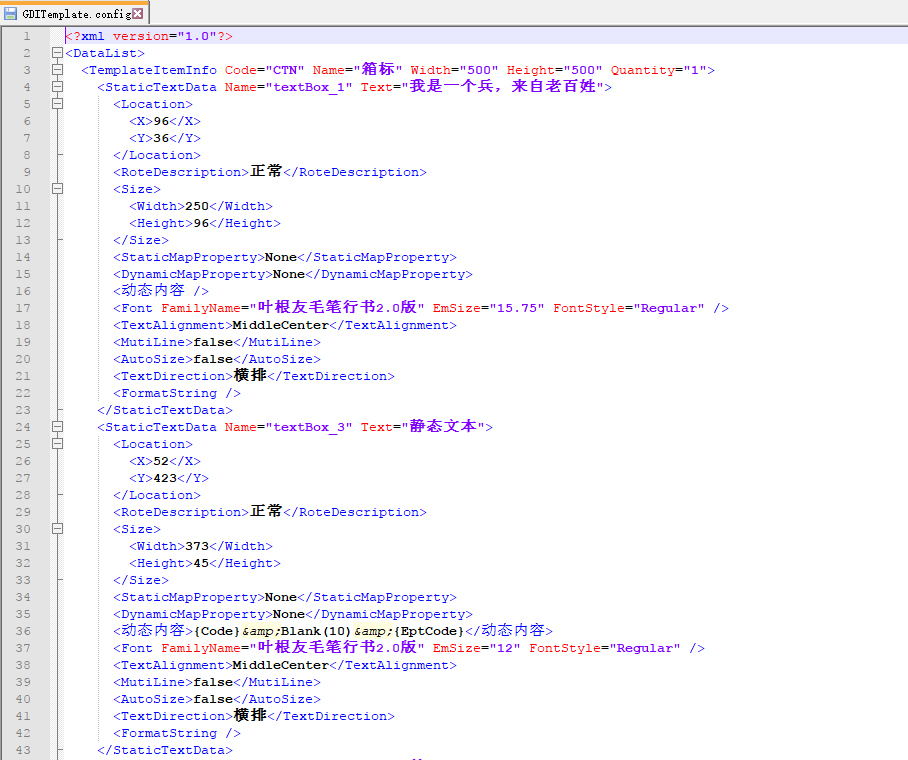
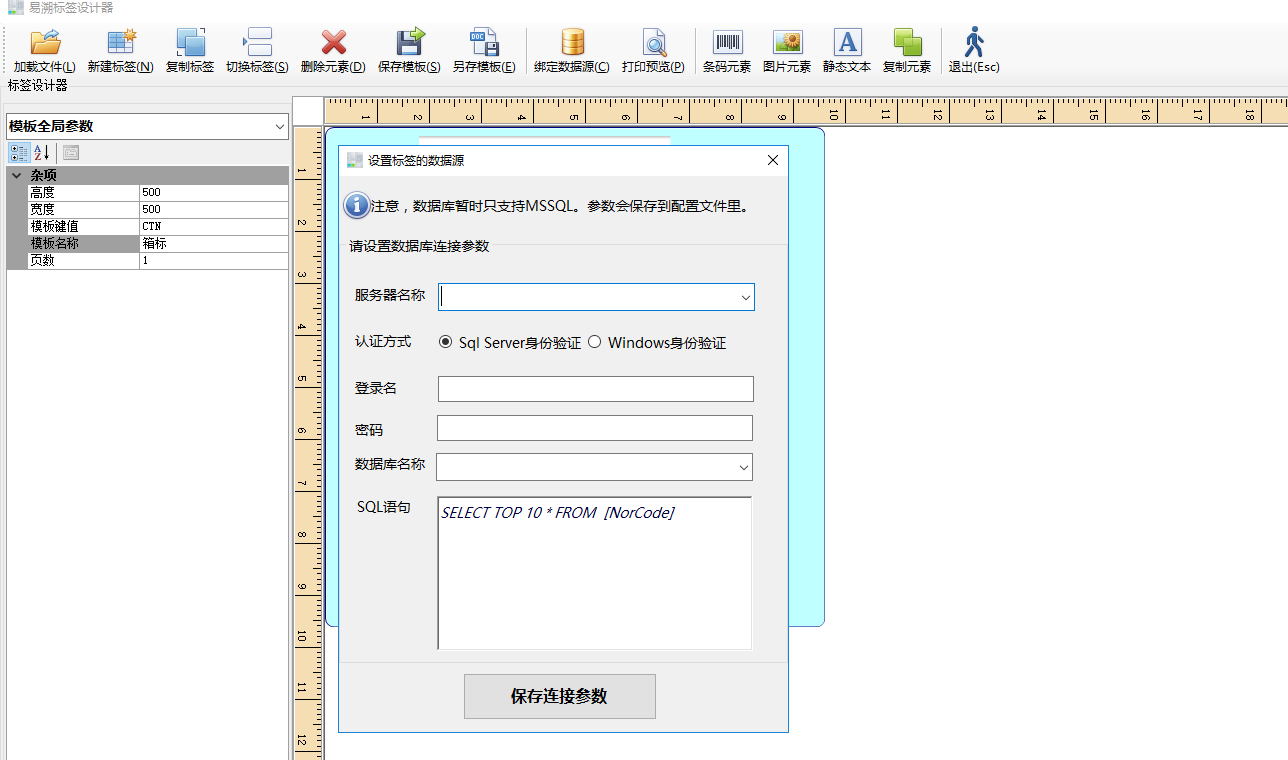
成果物

C#Winform设计的通用标签设计器的更多相关文章
- WinForm编程时窗体设计器中ComboBox控件大小的设置
问题描述: 在VS中的窗体设计器中拖放一个ComboBox控件后想调整控件的大小.发现在控件上用鼠标只能拖动宽度(Width)无法拖动(Height). 解决过程: 1.控件无法拖动,就在属性窗口中设 ...
- C# 报表设计器 (winform 设计端)开发与实现生成网页的HTML报表
记得2010年之前,公司的项目基本上都要用到报表,以前我们常用的方法就是针对客户的需求来定制化开发(基本上是死写代码)来实现,经常导致项目经常性的延期,因为客户的需求经常会变化,随着用户的使用认知度的 ...
- [转]Uipath、BluePrism、AA产品对比之设计器篇
本文转自:https://www.jianshu.com/p/53d0d33a1a35 版本说明: Uipath V2018.3.2,BluePrism V6.3,Automation Anywher ...
- C# winform 若要在加载设计器前避免可能发生的数据丢失,必须纠正以下错误
winform中有时添加了新控件之后编译会报错: 若要在加载设计器前避免可能发生的数据丢失,必须纠正以下错误,如图: 解决方案: 1.“解决方案”→“批生成”→“清理”→“确定”: 2.“解决方案”→ ...
- Winform开发框架之图表报表在线设计器2-图表-SNF.EasyQuery项目--SNF快速开发平台3.3-Spring.Net.Framework
上一篇讲到,如何快速创建报表程序了.这篇教大家如何快速制作图表报表. 继上一篇,Winform开发框架之图表报表在线设计器-报表 上一篇讲到如何了创建数据源,这里就不在介绍了.那我们就直接从图表设计器 ...
- Winform开发框架之图表报表在线设计器-报表-SNF.EasyQuery项目--SNF快速开发平台3.3-+Spring.Net.Framework
带过项目和做过项目的人都知道,在客户现场客户的需求是百般多样的,今天要查销售出库情况,明天要看整个月的各部门销售情况,后天要查全年每个客户的项目金额.一直以前都有新需求,虽然会有售后收益,但如果有一个 ...
- winform窗体继承泛型类时,设计器无法使用解决办法
当我们使用winform程序时,winform窗体程序和控件程序都是可以通过设计器进行控件拖拽的,但如果我们继承了一个带有泛型的form基类.那么设计器是无法使用的. 目前我没有找到根本解决的办法,但 ...
- 基于Extjs的web表单设计器 第七节——取数公式设计之取数公式的使用
基于Extjs的web表单设计器 基于Extjs的web表单设计器 第一节 基于Extjs的web表单设计器 第二节——表单控件设计 基于Extjs的web表单设计器 第三节——控件拖放 基于Extj ...
- 基于Extjs的web表单设计器 第六节——界面框架设计
基于Extjs的web表单设计器 基于Extjs的web表单设计器 第一节 基于Extjs的web表单设计器 第二节——表单控件设计 基于Extjs的web表单设计器 第三节——控件拖放 基于Extj ...
随机推荐
- Akka(32): Http:High-Level-Api,Route exception handling
Akka-http routing DSL在Route运算中抛出的异常是由内向外浮出的:当内层Route未能捕获异常时,外一层Route会接着尝试捕捉,依次向外扩展.Akka-http提供了Excep ...
- MySQL索引(1)
所有MySQL列类型都可以被索引,对相关列使用索引是提高SELECT操作性能的最佳途径.根据存储引擎可以定义 每个表的最大索引数和最大索引长度,每种存储引擎(如MyISAM.InnoDB.BDB.ME ...
- LeetCode 152. Maximum Product Subarray (最大乘积子数组)
Find the contiguous subarray within an array (containing at least one number) which has the largest ...
- abapGit分支策略
各位ABAP公民们.特别是使用abapGit的各位,你们好. 我的团队和我将向大家分享我公司内引入abapGit后产生的某些开发问题.我所在的公司是一家创作SAP第三方软件的公司,目前主要使用ABAP ...
- 菱形开合的实现 IOS
实现的原理: 利用了自动布局和形变 核心代码块: @implementation JHMainView { UILabel *label1,*label2,*label3,*label4; UIBut ...
- Java基础笔记6
OOP(Object Oriented Programmer) 面向对象编程 面向对象编程的语言:JAVA,C#,PHP,ASP 用途:把现实中的任何对象描述成java语言. java面向对象 ...
- Muduo阅读笔记---入门(一)
第一步:下载源码和文档 下载muduo项目的源码.<muduo-manual.pdf>文档,以及<Linux多线程服务端编程:使用muduo C++网络库.pdf>,这些是前期 ...
- 一个简单的MVC框架的实现
1.Action接口 package com.togogo.webtoservice; import javax.servlet.http.HttpServletRequest; import jav ...
- python迭代器以及itertools模块
迭代器 在python中,迭代器协议就是实现对象的__iter()方法和next()方法,其中前者返回对象本身,后者返回容器的下一个元素.实现了这两个方法的对象就是可迭代对象.迭代器是有惰性的,只有在 ...
- Java web 引入wangEditor编辑器
最近项目需要我做些前端的事,这让我这个半吊子前端很是痛苦.项目中需要一个编辑器,之前找了个ueditor,插件比较多,需要改源码等等不说,最后弄好了,发现需要flash插件.没办法,只有推到重来,在网 ...