
MVC+EF 入门教程(三)
一、前言
上一节,我们将了生成数据库,那么这张我就将操作设计库。
二、在 Aplication 定义服务
在 Application 中添加文件夹(Blog)和 操作类(BlogServer)。实例如下:

结果有报错,提示是如下:
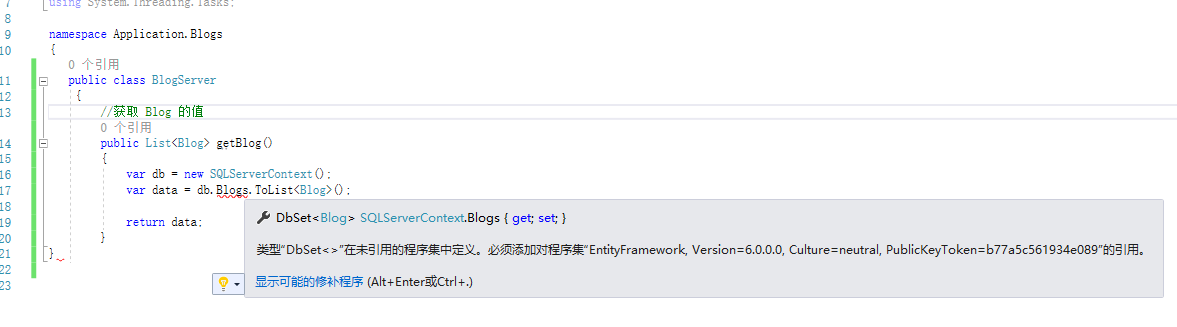
那么我们的解决方案是:在 Application 中也加入 EntityFramework 的程序集。
在找到 引用 -->管理NuGet重新包 实例如下:

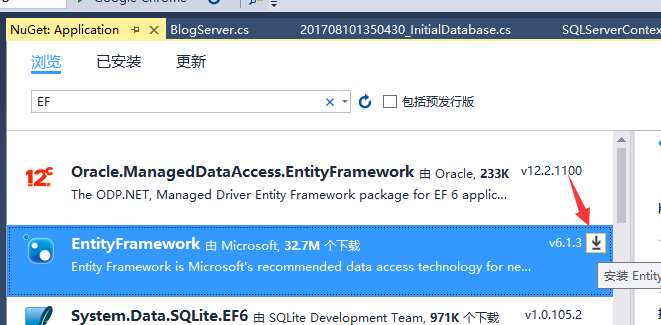
然后安装它,代码就不报错了。

实现对 Blog 的 CRUD 的代码如下:
using Core.Blogs;

using EntityFrameworkDome.EFramework;

using System;

using System.Collections.Generic;

using System.Linq;

using System.Text;

using System.Threading.Tasks;

namespace Application.Blogs

{

    public class BlogServer

    {

        //获取 Blog 数据

        public List<Blog> getBlog()

        {

            var db = new SQLServerContext();

            var data = db.Blogs.ToList<Blog>();

            return data;

        }

        //删除 Blog 数据

        public Boolean DeleteBlog(int id)

        {

            Boolean b = false;

            var db = new SQLServerContext();

            try

            {

                Blog blog = db.Blogs.Find(id);

                db.Blogs.Remove(blog);

                db.SaveChanges();

                b = true;

            }

            catch (Exception e) { }

            return b;

        }

        //编辑 Blog 数据

        public Blog getEditBlog(int id)

        {

            Blog blog = null;

            var db = new SQLServerContext();

            blog = db.Blogs.Find(id);

            return blog;

        }

        //保存 Blog 数据

        public Boolean seveBlog(Blog blog)

        {

            Boolean b = false;

            var db = new SQLServerContext();

            try

            {

                Blog a = db.Blogs.First(r => r.Id == blog.Id);

                a.Contect = blog.Contect;

                a.Title = blog.Title;

                a.CreatedTime = blog.CreatedTime;

                db.SaveChanges();

                b = true;

            }

            catch (Exception)

            {

                throw;

            }

            return b;

        }

        //创建 Blog 数据

        public Boolean createNewBlog(Blog blog)

        {

            Boolean b = false;

            var db = new SQLServerContext();

            try

            {

                db.Blogs.Add(blog);

                db.SaveChanges();

                b = true;

            }

            catch (Exception e)

            {

                throw;

            }

            return b;

        }

    }

}
服务代码也编写完成,那么我们开始操作服务代码。
三、在 web 中页面实现
在 web 中,首先我们去修改路由,路由在什么地方?这个很好找
web / App_Start / RouteConfig
修改方式如下:
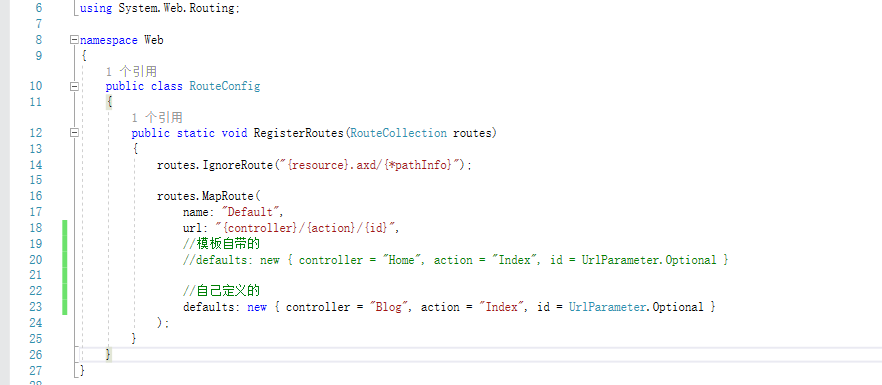
然后再 Controller 中,新建 BlogController 控制器。
具体添加方式:Controllers --> 添加 --> 控制器 --> MVC 5 控制器 - 空
将默认的控制器该为 BlogController
实例如下:
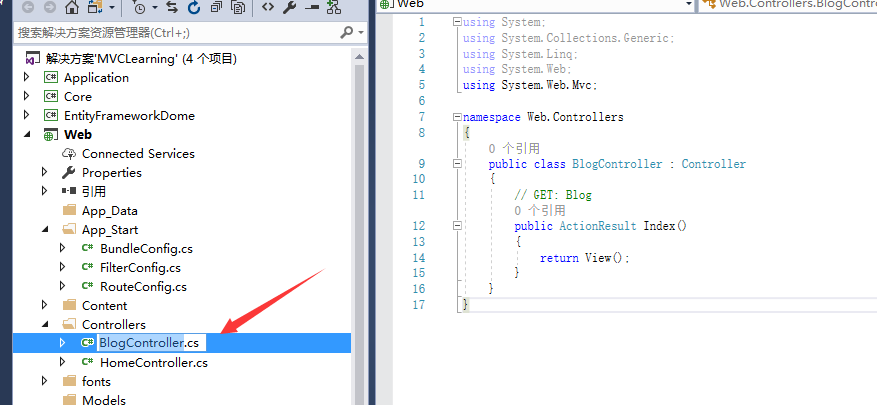
然后在 Index 作用域 中,右键添加 -->添加视图
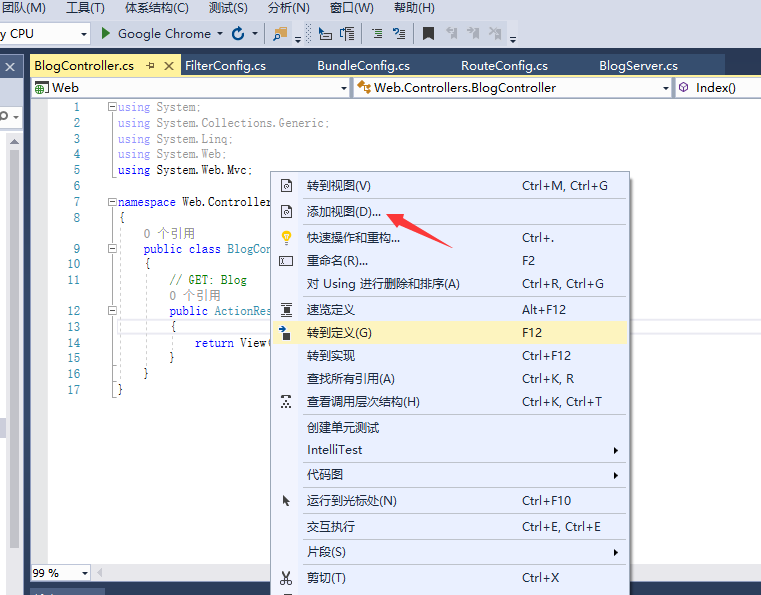
在BlogController 完成的代码如下:
using Application.Blogs;

using Core.Blogs;

using System;

using System.Collections.Generic;

using System.Linq;

using System.Web;

using System.Web.Mvc;

namespace Web.Controllers

{

    public class BlogController : Controller

    {

        // GET: Blog

        public ActionResult Index(string key)

        {

            BlogServer db = new BlogServer();

           List<Blog> data = db.getBlog(key);

            return View(data);

        }

        public ActionResult ErrorPage()

        {

            return View();

        }

        public ActionResult CreateBlog()

        {

            return View();

        }

        [HttpPost]

        public ActionResult CreateNewBlog(string Title, string Contect)

        {

            Blog b = new Blog();

            b.Contect = Request.Form["Contect"];

            b.Title = Request.Form["Title"];

            b.CreatedTime = System.DateTime.Now;

            BlogServer bs = new BlogServer();

            if (bs.createNewBlog(b))

            {

                return RedirectToAction("Index");

            }

            return RedirectToAction("ErrorPage");

        }

        public ActionResult DeleteBlog(int id)

        {

            BlogServer db = new BlogServer();

            if (db.DeleteBlog(id))

            {

                return RedirectToAction("Index");

            }

            return RedirectToAction("ErrorPage");

        }

        public ActionResult getEditBlog(int id)

        {

            BlogServer db = new BlogServer();

            Blog blog = db.getEditBlog(id);

            return View(blog);

        }

        [HttpPost]

        public ActionResult seveBlog(Blog b)

        {

            BlogServer db = new BlogServer();

            if (db.seveBlog(b))

            {

                return RedirectToAction("Index");

            }

            return RedirectToAction("ErrorPage");

        }

    }

}
在BlogController 中涉及到的视图如下:
CreateBlog.cshtml
@{

    ViewBag.Title = "CreateBlog";

}

<script src="~/Scripts/jquery-1.10.2.js"></script>

<script type="text/javascript">

    //提交表单

    function Submit() {

        $("#frmRegist").submit();

    }

    //重置数据

    function Reset() {

        $("#frmReset").click(

            function(){

                $("#textTitle").val("");

                $("#textContect").val("");

            }

        );

    }

</script>

<h2>CreateBlog</h2>

<form id="frmRegist" method="post" action="CreateNewBlog">

    <div class="form-group">

        <label for="exampleInputEmail1">Title</label>

        <input type="text" class="form-control" placeholder="Title" name="Title" id="textTitle">

    </div>

    <div class="form-group">

        <label for="exampleInputEmail1">Contect</label>

        <input type="text" class="form-control" placeholder="Contect" name="Contect" id="textContect">

    </div>

    <input type="reset" id="frmReset" value="reset" onclick="Reset()">

    <input type="button" id="frmSubmit" value="Submit" onclick="Submit()">

</form>
ErrorPage.cshtml
@{

    ViewBag.Title = "ErrorPage";

}

<h2>找不到页面</h2>
getEditBlog.cshtml
@{

    ViewBag.Title = "getEditBlog";

}

<h2>编辑Blog</h2>

<script src="~/Scripts/jquery-1.10.2.js"></script>

<script type="text/javascript">

    function Submit() {

        $("#frmSubmit1").submit();

    }

</script>

<form id="frmSubmit1" method="post" action="seveBlog">

    <div class="form-group">

        <label>Id</label>

        <input type="text" class="form-control" value="@Model.Id" name="Id">

    </div>

    <div class="form-group">

        <label>Title</label>

        <input type="text" class="form-control" value="@Model.Title" name="Title">

    </div>

    <div class="form-group">

        <label>Contect</label>

        <input type="text" class="form-control" value="@Model.Contect" name="Contect">

    </div>

    <div class="form-group">

        <label>CreatedTime</label>

        <input type="datetime" class="form-control" value="@Model.CreatedTime" name="CreatedTime">

    </div>

    <button type="reset" class="btn btn-default">Reset</button>

    <input type="button" value="Submit" onclick="Submit()">

</form>
Index.cshtml
@using Core.Blogs;

<h2>Blog表单</h2>

<div style="width:100%; height:20px; ">

    <span style="float:right;"><a href="Blog/CreateBlog">创建Blog</a></span>

</div>

<!--用Requert 只能获取Get的参数-->

<form method="get" action="/Blog/Index">

    <input type="text" name="key" value="@Request.QueryString["key"]" placeholder="查询" />

    <input type="submit" value="查询" />

</form>

<table border="1" width="100%" cellpadding="0" cellspacing="10">

    <tr>

        <th>ID</th>

        <th>Title</th>

        <th>Contect</th>

        <th>CreatedTime</th>

        <th>操作</th>

    </tr>

    @foreach (Blog item in Model)

    {

        <tr>

            <td>@item.Id</td>

            <td>@item.Title</td>

            <td>@item.Contect</td>

            <td>@item.CreatedTime</td>

            <td><a href="Blog/getEditBlog?id=@item.Id">修改</a> | <a href="Blog/DeleteBlog?id=@item.Id">删除</a></td>

        </tr>

    }

</table>
实现了你会发现,运行不起来,原因是你还需要添加 EntityFramework 程序集。
同时在查询的getBlog() 的时候,使用的 WhereIf 会报错,原因是EF中没有包含,所以我们自己写了一个类了对它进行泛化。
代码如下:
using System;

using System.Collections.Generic;

using System.Linq;

using System.Text;

using System.Threading.Tasks;

namespace System.Linq

{

    public static class Extent

    {

        public static IQueryable<T> WhereIf<T>(this IQueryable<T> source, System.Linq.Expressions.Expression<Func<T, bool>> predicate, bool condition)

        {

            return condition ? source.Where(predicate) : source;

        }

        public static IQueryable<T> WhereIf<T>(this IQueryable<T> source, System.Linq.Expressions.Expression<Func<T, int, bool>> predicate, bool condition)

        {

            return condition ? source.Where(predicate) : source;

        }

        public static IEnumerable<T> WhereIf<T>(this IEnumerable<T> source, Func<T, bool> predicate, bool condition)

        {

            return condition ? source.Where(predicate) : source;

        }

        public static IEnumerable<T> WhereIf<T>(this IEnumerable<T> source, Func<T, int, bool> predicate, bool condition)

        {

            return condition ? source.Where(predicate) : source;

        }

    }

}
代码的位置在这里:

慢慢的你会发现很多的好东西,如 为什么要回填查询的Key?是怎么样实现?
MVC+EF 入门教程(三)的更多相关文章
- MVC+EF 入门教程(一)
一.前言 本人小白,写这篇博客是为了记录今天一天所学的知识,可能表达不是那么的准确和清楚,欢迎在留言区写下您的建议,欢迎纠错.希望这篇文章对你有所帮助学习 .Net MVC有所帮助.废话不多说了,我们 ...
- MVC+EF 入门教程(二)
一.前沿 为了使以后项目分开,所以我会添加3个类库.用于存储 实体.数据库迁移.服务.这种思路是源于我使用的一个框架 ABP.有兴趣的您,可以去研究和使用这个框架. 二.修改本地连接 在项目中,找到 ...
- mvc+ef入门(三)
(1)新建一个DAL层用来放置Accountcontext.cs和Accountinitializer.新建一个models层用来归放sysuser,sysrole和sysuserrole,三个类.( ...
- MVC+EF 入门教程(四)
一.前言 写了那么久,那么现在给大家看效果了 二.效果展示 点击创建Blog 显示 编辑 编辑成功,是不是很酷. 删除 终于完成了,准备睡觉!虽然有很多不足的地方,我会慢慢的去改的.感谢累了一天的自己 ...
- ASP.NET MVC 5 入门教程 (2) 控制器Controller
文章来源: Slark.NET-博客园 http://www.cnblogs.com/slark/p/mvc-5-get-started-controller.html 上一节:ASP.NET MVC ...
- ASP.NET MVC 5 入门教程 (4) View和ViewBag
文章来源: Slark.NET-博客园 http://www.cnblogs.com/slark/p/mvc-5-get-started-view.html 上一节:ASP.NET MVC 5 入门教 ...
- 无废话ExtJs 入门教程三[窗体:Window组件]
无废话ExtJs 入门教程三[窗体:Window组件] extjs技术交流,欢迎加群(201926085) 1.代码如下: 1 <!DOCTYPE html PUBLIC "-//W3 ...
- ASP.NET MVC 5 入门教程 (3) 路由route
文章来源: Slark.NET-博客园 http://www.cnblogs.com/slark/p/mvc-5-get-started-route.html 上一节:ASP.NET MVC 5 入门 ...
- ASP.NET MVC 5 入门教程 (1) 新建项目
文章来源: Slark.NET-博客园 http://www.cnblogs.com/slark/p/mvc-5-get-started-create-project.html 下一节:ASP.NET ...
随机推荐
- jstree 获取选中节点的所有子子点
//加载功能树 function initTree() { $.jstree.destroy(); $.ajax({ type: "Get", url: "/Depart ...
- 【S】SQL SERVER检查临时表占用空间情况
--检查已标记为需要删除的临时表select * from T_BAS_TEMPORARYTABLENAME; --所有系统创建的临时表及视图SELECT * FROM sys.tables WHER ...
- [转]ORACLE分区表的使用和管理
转自:http://love-flying-snow.iteye.com/blog/573303 废话少说,直接讲分区语法. Oracle表分区分为四种:范围分区,散列分区,列表分区和复合分区. 一: ...
- Android 使用GangSDK创建第三方家族公会系统经验分享
由于需要对之前的游戏加入一个家族系统,想到这块儿可能会有大量的工作需要自己做,就偷了个懒去网上搜罗了一波,有没有类似现成的系统?结果让我惊奇的发现,目前市面上居然真的有类似的服务,虽然是小公司开发的, ...
- cookie 操作(转载)
/** * Create a cookie with the given name and value and other optional parameters. * * @example $.co ...
- Java精选笔试题
合抱之木,生于毫末:九层之台,起于垒土:千里之行:始于足下.赶快测测你的Java基础知识掌握的如何? 1,下列说法正确的是() A.一个文件里可以同时存在两个public修饰的类 B.构造函数可以被重 ...
- Javascript 常用类型检测
1.判断变量是否为数组的数据类型? 方法一 :判断其是否具有"数组性质",如slice()方法.可自己给该变量定义slice方法,故有时会失效. 方法二 :obj instance ...
- IOS 修改UIImage大小
在iOS中,uiimage没有用于修改大小的属性,要在代码中改变uiimage图片的大小,需要扩展UIImage类,如下: 头文件: #import<UIKit/UIKit.h> @int ...
- PostgreSQL启动main函数都干了什么(一)
DB Version:9.5.3 环境:CentOS7.x 调试工具:GDB source:src/backend/main/main.c 56 /* 57 * Any Postgres server ...
- 网页设计——7.css的入门
css的介绍 div+css的设计: 什么是div? 理解示意图: 实例操作: 这里就要用到div+css的布局操作 先写一个html文件,见下图: <html><head>& ...