
ElasticSearch 5学习(2)——Kibana+X-Pack介绍使用(全)
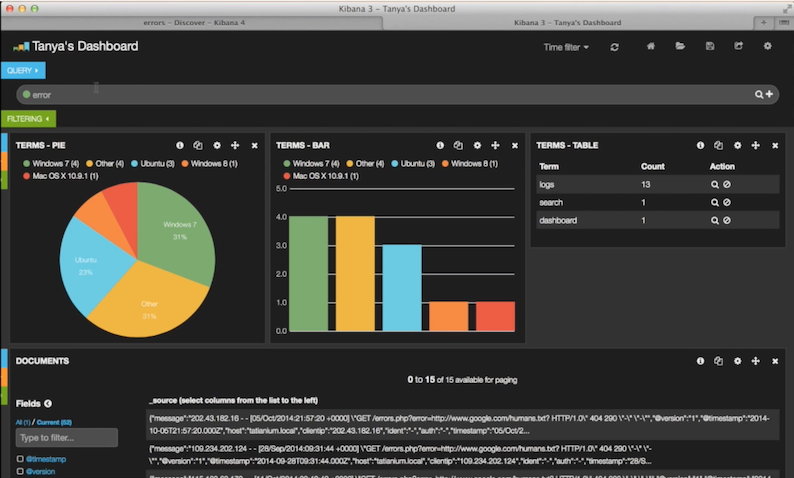
Kibana是一个为 ElasticSearch 提供的数据分析的 Web 接口。可使用它对日志进行高效的搜索、可视化、分析等各种操作。Kibana目前最新的版本5.0.2,回顾一下Kibana 3和Kibana 4的界面。
下面的图展示的是Kibana 3的界面,所有的仪表盘直接放置主页。
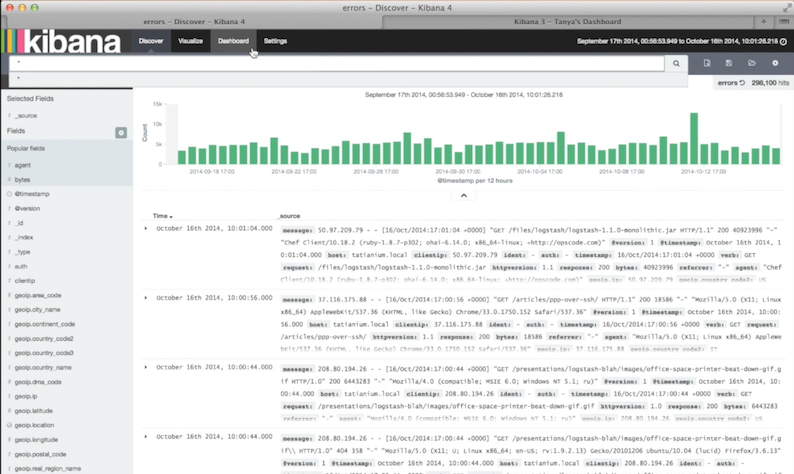
下面的图展示的是Kibana 4的界面,和Kibana 3最大的区别是将原来的主体分成三个部分,分别是发现页、可视化、仪表盘。
下面是目前Kibana 5最新版本的界面。相比较Kibana 4除了界面的风格变化,最主要是功能栏上添加了Timeline、Management和Dev Tools选项。

Discover
You can interactively explore your data from the Discover page. You have access to every document in every index that matches the selected index pattern. You can submit search queries, filter the search results, and view document data. You can also see the number of documents that match the search query and get field value statistics. If a time field is configured for the selected index pattern, the distribution of documents over time is displayed in a histogram at the top of the page.
从发现页可以交互地探索ES的数据。可以访问与所选索引模式相匹配的每一个索引中的每一个文档。您可以提交搜索查询、筛选搜索结果和查看文档数据。还可以看到匹配搜索查询和获取字段值统计的文档的数量。如果一个时间字段被配置为所选择的索引模式,则文档的分布随着时间的推移显示在页面顶部的直方图中。

Visualize
Visualize enables you to create visualizations of the data in your Elasticsearch indices. You can then build dashboards that display related visualizations.Kibana visualizations are based on Elasticsearch queries. By using a series of Elasticsearch aggregations to extract and process your data, you can create charts that show you the trends, spikes, and dips you need to know about.You can create visualizations from a search saved from Discover or start with a new search query.
可视化能使你创造你的Elasticsearch指标数据的可视化。然后你可以建立仪表板显示相关的可视化。Kibana的可视化是基于Elasticsearch查询。通过一系列的Elasticsearch聚合提取和处理您的数据,您可以创建图表显示你需要知道的关于趋势,峰值和骤降。您可以从搜索保存的搜索中创建可视化或从一个新的搜索查询开始。

Dashboard
A Kibana dashboard displays a collection of saved visualizations. You can arrange and resize the visualizations as needed and save dashboards so they be reloaded and shared.
一个仪表板显示Kibana保存的一系列可视化。你可以根据需要安排和调整可视化,并保存仪表盘,可以被加载和共享。

Monitoring
从图中可以发现,默认Kibana是没有该选项的。其实,Monitoring是由X-Pack集成提供的。
The X-Pack monitoring components enable you to easily monitor Elasticsearch through Kibana. You can view cluster health and performance in real time as well as analyze past cluster, index, and node metrics. In addition, you can monitor the performance of Kibana itself.When you install X-Pack on your cluster, a monitoring agent runs on each node to collect and index metrics from Elasticsearch. With X-Pack installed in Kibana, you can then view the monitoring data through a set of specialized dashboards.
该X-pack监控组件使您可以通过Kibana轻松地监控ElasticSearch。您可以实时查看集群的健康和性能,以及分析过去的集群、索引和节点度量。此外,您可以监视Kibana本身性能。当你安装X-pack在群集上,监控代理运行在每个节点上收集和指数指标从Elasticsearch。安装在X-pack在Kibana上,您可以查看通过一套专门的仪表板监控数据。
我们可以回顾安装过程:ElasticSearch 5学习——安装Elasticsearch、Kibana和X-Pack,可以发现,在安装X-pack的时候分别在ElasticSearch根目录和Kibana根目录下操作。

Graph
The X-Pack graph capabilities enable you to discover how items in an Elasticsearch index are related. You can explore the connections between indexed terms and see which connections are the most meaningful. This can be useful in a variety of applications, from fraud detection to recommendation engines.For example, graph exploration could help you uncover website vulnerabilities that hackers are targeting so you can harden your website. Or, you might provide graph-based personalized recommendations to your e-commerce customers.X-Pack provides a simple, yet powerful graph exploration API, and an interactive graph visualization tool for Kibana. Both work with out of the box with existing Elasticsearch indices—you don’t need to store any additional data to use the X-Pack graph features.
X-Pack图的能力使你发现一个Elasticsearch索引项是如何相关联的。你可以探索索引条款之间的连接,看看哪些连接是最有意义的。从欺诈检测到推荐引擎,对各种应用中这都是有用的,例如,图的探索可以帮助你发现网站上黑客的目标的漏洞,所以你可以硬化你的网站。或者,您可以为您的电子商务客户提供基于图表的个性化推荐。X-pack提供简单,但功能强大的图形开发API,和Kibana交互式图形可视化工具。使用X-pack图有工作与开销与现有Elasticsearch指标你不需要任何额外的数据存储的特征。

Timelion
Timelion is a time series data visualizer that enables you to combine totally independent data sources within a single visualization. It’s driven by a simple expression language you use to retrieve time series data, perform calculations to tease out the answers to complex questions, and visualize the results.
Timelion是一个时间序列数据的可视化,可以结合在一个单一的可视化完全独立的数据源。它是由一个简单的表达式语言驱动的,你用来检索时间序列数据,进行计算,找出复杂的问题的答案,并可视化的结果。
这个功能由一系列的功能函数组成,同样的查询的结果,也可以通过Dashboard显示查看。

Management
The Management application is where you perform your runtime configuration of Kibana, including both the initial setup and ongoing configuration of index patterns, advanced settings that tweak the behaviors of Kibana itself, and the various "objects" that you can save throughout Kibana such as searches, visualizations, and dashboards.This section is pluginable, so in addition to the out of the box capabitilies, packs such as X-Pack can add additional management capabilities to Kibana.
管理中的应用是在你执行你的运行时配置kibana,包括初始设置和指标进行配置模式,高级设置,调整自己的行为和Kibana,各种“对象”,你可以查看保存在整个Kibana的内容如发现页,可视化和仪表板。
这部分是pluginable,除此之外,X-pack可以给Kibana增加额外的管理能力。
You can use X-Pack Security to control what Elasticsearch data users can access through Kibana.When you install X-Pack, Kibana users have to log in. They need to have the kibana_user role as well as access to the indices they will be working with in Kibana.If a user loads a Kibana dashboard that accesses data in an index that they are not authorized to view, they get an error that indicates the index does not exist. X-Pack Security does not currently provide a way to control which users can load which dashboards.
你可以使用X-pack安全控制哪些用户可以访问Elasticsearch数据通过Kibana。当你安装X-pack,Kibana用户登录。他们需要有kibana_user作用以及获得的指标,他们将在Kibana的工作。如果用户加载Kibana仪表板,访问数据的一个索引,他们未被授权查看,他们得到一个错误,表明指数不存在。X-pack安全目前并不提供一种方法来控制哪些用户可以负荷的仪表板。

Dev Tools
原先的交互式控制台Sense,使用户方便的通过浏览器直接与Elasticsearch进行交互。从Kibana 5开始改名并直接内建在Kibana,就是Dev Tools选项。
注意如果是Kibana 5以上,不能通过以下命令安装Sense。(踩过的坑)
./bin/kibana plugin --install elastic/sense
或者
./bin/kibana-plugin install elastic/sense instead

总结
内容比较简单,主要是对Kibana工具的整体功能总结,方便接下来对ElasticSearch 5的学习,其中X-Pack主要是添加身份权限的验证,以及原先需要安装其他各种Marvel、Hand等各种功能插件添加到Kibana上使用才能使用的功能。
学习链接:
X-Pack:https://www.elastic.co/guide/en/x-pack/current/xpack-introduction.html
Kibana:https://www.elastic.co/guide/en/kibana/current/introduction.html
转载请注明出处。
作者:wuxiwei
出处:http://www.cnblogs.com/wxw16/p/6156335.html
ElasticSearch 5学习(2)——Kibana+X-Pack介绍使用(全)的更多相关文章
- ElasticSearch 5学习(1)——安装Elasticsearch、Kibana和X-Pack
安装准备: 安装Elasticsearch唯一的要求是安装官方新版的Java,包括对应的Jdk. 安装Elasticsearch 首先到官网下载最新版本的Elasticsearch压缩包. 可以使用命 ...
- ElasticSearch 5学习(10)——结构化查询(包括新特性)
之前我们所有的查询都属于命令行查询,但是不利于复杂的查询,而且一般在项目开发中不使用命令行查询方式,只有在调试测试时使用简单命令行查询,但是,如果想要善用搜索,我们必须使用请求体查询(request ...
- ElasticSearch 5学习(9)——映射和分析(string类型废弃)
在ElasticSearch中,存入文档的内容类似于传统数据每个字段一样,都会有一个指定的属性,为了能够把日期字段处理成日期,把数字字段处理成数字,把字符串字段处理成字符串值,Elasticsearc ...
- ElasticSearch 5学习(7)——分布式集群学习分享2
前面主要学习了ElasticSearch分布式集群的存储过程中集群.节点和分片的知识(ElasticSearch 5学习(6)--分布式集群学习分享1),下面主要分享应对故障的一些实践. 应对故障 前 ...
- ElasticSearch 5学习(6)——分布式集群学习分享1
在使用中我们把文档存入ElasticSearch,但是如果能够了解ElasticSearch内部是如何存储的,将会对我们学习ElasticSearch有很清晰的认识.本文中的所使用的ElasticSe ...
- ElasticSearch 5学习(5)——第一个例子(很实用)
想要知道ElasticSearch是如何使用的,最快的方式就是通过一个简单的例子,第一个例子将会包括基本概念如索引.搜索.和聚合等,需求是关于公司管理员工的一些业务. 员工文档索引 业务首先需要存储员 ...
- ElasticSearch、Logstash、Kibana 搭建高效率日志管理系统
ELK (ElasticSearch.LogStash以及Kibana)三者组合是一个非常强大的工具,这里我们来实现监控日志文件并且收到日志到ElasticSearch搜索引擎,利用Kibana可视化 ...
- 【ELK】【docker】【elasticsearch】1. 使用Docker和Elasticsearch+ kibana 5.6.9 搭建全文本搜索引擎应用 集群,安装ik分词器
系列文章:[建议从第二章开始] [ELK][docker][elasticsearch]1. 使用Docker和Elasticsearch+ kibana 5.6.9 搭建全文本搜索引擎应用 集群,安 ...
- (转)如何在CentOS / RHEL 7上安装Elasticsearch,Logstash和Kibana(ELK)
原文:https://www.howtoing.com/install-elasticsearch-logstash-and-kibana-elk-stack-on-centos-rhel-7 如果你 ...
随机推荐
- Android中手机录屏并转换GIF的两种方式
之前在博文中为了更好的给大家演示APP的实现效果,本人了解学习了几种给手机录屏的方法,今天就给大家介绍两种我个人用的比较舒服的两种方法: (1)配置adb环境后,使用cmd命令将手机界面操作演示存为视 ...
- Spring框架概述
Spring是最流行的Java企业级应用开发框架,全球数以百万的开发者在使用Spring框架创建高性能.易测试.可重用的代码. Spring框架的核心特性可以应用于任何Java应用,但扩展的JavaE ...
- centos7+mono4+jexus5.6.2安装过程中的遇到的问题
过程参考: http://www.linuxdot.net/ http://www.jexus.org/ http://www.mono-project.com/docs/getting-starte ...
- 23种设计模式--工厂模式-Factory Pattern
一.工厂模式的介绍 工厂模式让我们相到的就是工厂,那么生活中的工厂是生产产品的,在代码中的工厂是生产实例的,在直白一点就是生产实例的类,代码中我们常用new关键字,那么这个new出来的实例 ...
- jQuery学习之路(6)- 简单的表格应用
▓▓▓▓▓▓ 大致介绍 在CSS技术之前,网页的布局基本都是依靠表格制作,当有了CSS之后,表格就被很多设计师所抛弃,但是表格也有他的用武之地,比如数据列表,下面以表格中常见的几个应用来加深对jQue ...
- 手动导入swift三方danielgindi/Charts到OC工程中教程
1.到github网址上下载zip压缩包https://github.com/danielgindi/Charts 2.然后将解压后的文件夹整个拖到自己的工程文件夹下(很多教程只让拖xcodeproj ...
- atitit.attilax的软件 架构 理念.docx
atitit.attilax的软件 架构 理念.docx 1. 预先规划.1 2. 全体系化1 3. 跨平台2 4. 跨语言2 5. Dsl化2 5.1. 界面ui h5化2 6. 跨架构化2 7. ...
- 在开源中国(oschina)git中新建标签(tags)
我今天提交代码到主干上面,本来想打个标签(tags)的. 因为我以前新建过标签(tags),但是我现在新建的时候不知道入库在哪了.怎么找也找不到了. 从网上找资料也没有,找客服没有人理我,看到一个交流 ...
- [转] 从知名外企到创业公司做CTO是一种怎样的体验?
这是我近期接受51CTO记者李玲玲采访的一篇文章,分享给大家. 作者:李玲玲来源:51cto.com|2016-12-30 15:47 http://cio.51cto.com/art/201612/ ...
- BZOJ 3894: 文理分科 [最小割]
3894: 文理分科 Time Limit: 10 Sec Memory Limit: 512 MBSubmit: 674 Solved: 392[Submit][Status][Discuss] ...