
springboot2.0+redis实现消息队列+redis做缓存+mysql
本博客仅供参考,本人实现没有问题。
1、环境
先安装redis、mysql
2、springboot2.0的项目搭建(请自行完成),本人是maven项目,因此只需配置,获取相应的jar包,配置贴出。
<dependencies>

        <dependency>

            <groupId>org.springframework.boot</groupId>

            <artifactId>spring-boot-starter-data-jpa</artifactId>

        </dependency>

        <dependency>

            <groupId>org.springframework.boot</groupId>

            <artifactId>spring-boot-starter-web</artifactId>

        </dependency>

        <!--配置mybatis-->

        <dependency>

            <groupId>org.mybatis.spring.boot</groupId>

            <artifactId>mybatis-spring-boot-starter</artifactId>

            <version>1.3.2</version>

        </dependency>

        <dependency>

            <groupId>mysql</groupId>

            <artifactId>mysql-connector-java</artifactId>

            <scope>runtime</scope>

        </dependency>

        <dependency>

            <groupId>org.springframework.boot</groupId>

            <artifactId>spring-boot-starter-test</artifactId>

            <scope>test</scope>

        </dependency>

        <!--配置数据源-->

        <dependency>

            <groupId>com.alibaba</groupId>

            <artifactId>druid</artifactId>

            <version>1.1.0</version>

        </dependency>

        <!-- 配置redis-->

        <dependency>

            <groupId>org.springframework.boot</groupId>

            <artifactId>spring-boot-starter-redis</artifactId>

            <version>1.4.3.RELEASE</version>

        </dependency>

        <!--  配置fastjson,用于redis转换-->

        <dependency>

            <groupId>com.alibaba</groupId>

            <artifactId>fastjson</artifactId>

            <version>1.2.7</version>

        </dependency>

</dependencies>
3、如果相应的springboot可以正常启动,同时mysql和redis已安装,相应的数据库配置如下(#本人使用了mysql做数据库,redis做缓存和消息队列)。
#默认使用配置

spring:

  profiles:

    active: dev

#公共配置与profiles选择无关

mybatis:

  typeAliasesPackage: com.cn.commodity.entity

  mapperLocations: classpath:mapper/*.xml

---

#开发配置

spring:

  profiles: dev

  datasource:

    url: jdbc:mysql://localhost:3306/test?useUnicode=true&characterEncoding=utf8

    username: root

    password: yang156122

    driver-class-name: com.mysql.jdbc.Driver

    # 使用druid数据源

    type: com.alibaba.druid.pool.DruidDataSource

#redis配置

redis:

  host: 127.0.0.1

  port: 6379

  password:

  pool:

    max-active: 100

    max-idle: 10

    max-wait: 100000

  timeout: 0
4、mysql数据库表如下图所示:
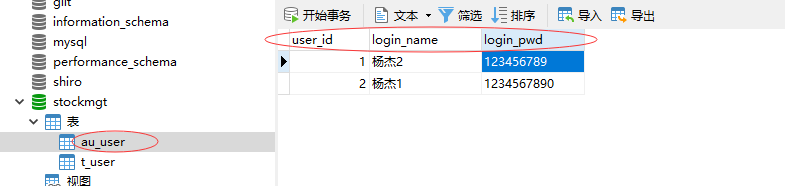
到此,环境和数据库都已准备。项目代码如下:
controller层
1、UserController
import com.alibaba.fastjson.JSONObject;

import com.cn.commodity.entity.User;

import com.cn.commodity.service.RedisService;

import com.cn.commodity.service.UserService;

import org.springframework.beans.factory.annotation.Autowired;

import org.springframework.stereotype.Controller;

import org.springframework.web.bind.annotation.RequestMapping;

import org.springframework.web.bind.annotation.ResponseBody;

import javax.annotation.Resource;

import javax.servlet.http.HttpServletRequest;

import java.util.List;

@Controller

@RequestMapping("/user")

public class UserController {

    @Resource

    private UserService userService;

    @Autowired

    private RedisService redisService;

    private JSONObject json = new JSONObject();

    @RequestMapping("/showUser")

    @ResponseBody

    public User showUser(HttpServletRequest request){

        User user = null;

        int userId = Integer.parseInt(request.getParameter("id"));

        String result = redisService.get("user");

        if(result==null) {

            user = this.userService.getUserById(userId);

            System.out.println("来自数据库:"+user.getUserName());

            redisService.set("user",json.toJSONString(user));

        }else {

            user = json.parseObject(result, User.class);

            System.out.println("来自redis缓存:"+user.getUserName());

        }

        return user;

    }

    @RequestMapping("/showListUser")

    @ResponseBody

    public List<User> showListUser(HttpServletRequest request) {

        List<User> userList = null;

        String result = redisService.get("userList");

        if(result==null){

            userList = userService.selectAllUser();

            System.out.println("来自数据库:"+userList);

            redisService.set("userList",json.toJSONString(userList));

        }else {

            userList = json.parseArray(result, User.class);

            System.out.println("来自redis缓存:"+userList);

        }

        System.out.println(userList);

        return  userList;

    }

}
2、PublisherController.java
import com.cn.commodity.service.PublisherService;

import org.springframework.beans.factory.annotation.Autowired;

import org.springframework.web.bind.annotation.PathVariable;

import org.springframework.web.bind.annotation.RequestMapping;

import org.springframework.web.bind.annotation.RestController;

import java.util.ArrayList;

import java.util.List;

@RestController

@RequestMapping("publisher")

public class PublisherController {

    @Autowired

    private PublisherService publisherService;

    @RequestMapping("{name}")

    public String sendMessage(@PathVariable("name") String name) {

        List<String> strLists = new ArrayList<>();

        for(int i =0 ;i<10;i++){

            String result =  publisherService.sendMessage(name+i);

            strLists.add(result);

        }

         return strLists.toString();

    }

}
config层
1、RedisConfig.java
import org.springframework.boot.autoconfigure.EnableAutoConfiguration;

import org.springframework.boot.context.properties.ConfigurationProperties;

import org.springframework.context.annotation.Bean;

import org.springframework.context.annotation.Configuration;

import org.springframework.data.redis.connection.jedis.JedisConnectionFactory;

import org.springframework.data.redis.core.RedisTemplate;

import org.springframework.data.redis.core.StringRedisTemplate;

import redis.clients.jedis.JedisPoolConfig;

@Configuration

@EnableAutoConfiguration

public class RedisConfig {

    @Bean

    @ConfigurationProperties(prefix = "spring.redis.pool")

    public JedisPoolConfig getRedisConfig(){

        JedisPoolConfig config = new JedisPoolConfig();

        return config;

    }

    @Bean

    @ConfigurationProperties(prefix = "spring.redis")

    public JedisConnectionFactory getConnectionFactory() {

        JedisConnectionFactory factory = new JedisConnectionFactory();

        factory.setUsePool(true);

        JedisPoolConfig config = getRedisConfig();

        factory.setPoolConfig(config);

        return factory;

    }

    @Bean

    public RedisTemplate<?, ?> getRedisTemplate() {

        JedisConnectionFactory factory = getConnectionFactory();

        RedisTemplate<?, ?> template = new StringRedisTemplate(factory);

        return template;

    }

}
2、SubscriberConfig.java
import com.cn.commodity.entity.Receiver;

import org.springframework.beans.factory.annotation.Autowired;

import org.springframework.boot.autoconfigure.AutoConfigureAfter;

import org.springframework.context.annotation.Bean;

import org.springframework.context.annotation.Configuration;

import org.springframework.data.redis.connection.RedisConnectionFactory;

import org.springframework.data.redis.listener.PatternTopic;

import org.springframework.data.redis.listener.RedisMessageListenerContainer;

import org.springframework.data.redis.listener.adapter.MessageListenerAdapter;

@Configuration

@AutoConfigureAfter({Receiver.class})

public class SubscriberConfig {

    /**

     * 消息监听适配器,注入接受消息方法,输入方法名字 反射方法

     *

     * @param receiver

     * @return

     */

    @Bean

    public MessageListenerAdapter getMessageListenerAdapter(Receiver receiver) {

        return new MessageListenerAdapter(receiver, "receiveMessage"); //当没有继承MessageListener时需要写方法名字

    }

    /**

     * 创建消息监听容器

     *

     * @param redisConnectionFactory

     * @param messageListenerAdapter

     * @return

     */

    @Bean

    public RedisMessageListenerContainer getRedisMessageListenerContainer(RedisConnectionFactory redisConnectionFactory, MessageListenerAdapter messageListenerAdapter) {

        RedisMessageListenerContainer redisMessageListenerContainer = new RedisMessageListenerContainer();

        redisMessageListenerContainer.setConnectionFactory(redisConnectionFactory);

        redisMessageListenerContainer.addMessageListener(messageListenerAdapter, new PatternTopic("TOPIC_USERNAME"));

        return redisMessageListenerContainer;

    }

}
3、Dao层
1、UserDao.java
import com.cn.commodity.entity.User;

import java.util.List;

public interface UserDao {

    int deleteByPrimaryKey(Integer id);

    int insert(User record);

    int insertSelective(User record);

    User selectByPrimaryKey(Integer id);

    int updateByPrimaryKeySelective(User record);

    int updateByPrimaryKey(User record);

    List<User> selectAllUser();

}
4、entity层
1、Receiver.java
import org.slf4j.Logger;

import org.slf4j.LoggerFactory;

import org.springframework.beans.factory.annotation.Autowired;

import org.springframework.data.redis.connection.Message;

import org.springframework.data.redis.connection.MessageListener;

import org.springframework.data.redis.core.StringRedisTemplate;

import org.springframework.data.redis.serializer.RedisSerializer;

import org.springframework.stereotype.Component;

@Component

public class Receiver implements MessageListener {

    private static Logger logger = LoggerFactory.getLogger(Receiver.class);

    @Autowired

    private StringRedisTemplate redisTemplate;

    @Override

    public void onMessage(Message message, byte[] pattern) {

        RedisSerializer<String> valueSerializer = redisTemplate.getStringSerializer();

        String deserialize = valueSerializer.deserialize(message.getBody());

        logger.info("收到的mq消息" + deserialize);

    }

}
2、User.java
public class User {

    private Integer id;

    private String userName;

    private String password;

    private Integer age;

    public Integer getId() {

        return id;

    }

    public void setId(Integer id) {

        this.id = id;

    }

    public String getUserName() {

        return userName;

    }

    public void setUserName(String userName) {

        this.userName = userName == null ? null : userName.trim();

    }

    public String getPassword() {

        return password;

    }

    public void setPassword(String password) {

        this.password = password == null ? null : password.trim();

    }

    public Integer getAge() {

        return age;

    }

    public void setAge(Integer age) {

        this.age = age;

    }

    @Override

    public String toString() {

        return "User{" +

                "id=" + id +

                ", userName='" + userName + '\'' +

                ", password='" + password + '\'' +

                ", age=" + age +

                '}';

    }

}
5、Service层
1、UserService.java
import com.cn.commodity.entity.User;

import java.util.List;

public interface UserService {

    /**

     * 通过id查找用户

     * @param userId

     * @return

     */

    public User getUserById(int userId);

    /**

     * 添加用户

     * @param record

     * @return

     */

    boolean addUser(User record);

    /**

     * 查询所有用户

     * @return

     */

    List<User> selectAllUser();

}
2、RedisService.java
public interface RedisService {

    /**

     * set存数据

     * @param key

     * @param value

     * @return

     */

    boolean set(String key, String value);

    /**

     * get获取数据

     * @param key

     * @return

     */

    String get(String key);

    /**

     * 设置有效天数

     * @param key

     * @param expire

     * @return

     */

    boolean expire(String key, long expire);

    /**

     * 移除数据

     * @param key

     * @return

     */

    boolean remove(String key);

}
3、PublisherService .java
public interface PublisherService {

     String sendMessage(String name);

}
6、ServiceImp实现层
1、UserServiceImpl.java
import com.cn.commodity.dao.UserDao;

import com.cn.commodity.entity.User;

import com.cn.commodity.service.UserService;

import org.springframework.beans.factory.annotation.Autowired;

import org.springframework.stereotype.Service;

import javax.annotation.Resource;

import java.util.List;

import java.util.Map;

@Service("userService")

public class UserServiceImpl implements UserService {

    @Resource

    private UserDao userDao;

    @Override

    public User getUserById(int userId) {

        return userDao.selectByPrimaryKey(userId);

    }

    @Override

    public boolean addUser(User record){

        boolean result = false;

        try {

            userDao.insertSelective(record);

            result = true;

        } catch (Exception e) {

            e.printStackTrace();

        }

        return result;

    }

    @Override

    public List<User> selectAllUser() {

        return userDao.selectAllUser();

    }

}
2、RedisServiceImpl.java
import com.cn.commodity.service.RedisService;

import org.springframework.dao.DataAccessException;

import org.springframework.data.redis.connection.RedisConnection;

import org.springframework.data.redis.core.RedisCallback;

import org.springframework.data.redis.core.RedisTemplate;

import org.springframework.data.redis.serializer.RedisSerializer;

import org.springframework.stereotype.Service;

import javax.annotation.Resource;

import java.util.concurrent.TimeUnit;

@Service("redisService")

public class RedisServiceImpl implements RedisService {

    @Resource

    private RedisTemplate<String, ?> redisTemplate;

    @Override

    public boolean set(final String key, final String value) {

        boolean result = redisTemplate.execute(new RedisCallback<Boolean>() {

            @Override

            public Boolean doInRedis(RedisConnection connection) throws DataAccessException {

                RedisSerializer<String> serializer = redisTemplate.getStringSerializer();

                connection.set(serializer.serialize(key), serializer.serialize(value));

                return true;

            }

        });

        return result;

    }

    @Override

    public String get(final String key) {

        String result = redisTemplate.execute(new RedisCallback<String>() {

            @Override

            public String doInRedis(RedisConnection connection) throws DataAccessException {

                RedisSerializer<String> serializer = redisTemplate.getStringSerializer();

                byte[] value = connection.get(serializer.serialize(key));

                return serializer.deserialize(value);

            }

        });

        return result;

    }

    @Override

    public boolean expire(final String key, long expire) {

        return redisTemplate.expire(key, expire, TimeUnit.SECONDS);

    }

    @Override

    public boolean remove(final String key) {

        boolean result = redisTemplate.execute(new RedisCallback<Boolean>() {

            @Override

            public Boolean doInRedis(RedisConnection connection) throws DataAccessException {

                RedisSerializer<String> serializer = redisTemplate.getStringSerializer();

                connection.del(key.getBytes());

                return true;

            }

        });

        return result;

    }

}
3、PublisherServiceImpl.java
import com.cn.commodity.service.PublisherService;

import org.slf4j.Logger;

import org.slf4j.LoggerFactory;

import org.springframework.beans.factory.annotation.Autowired;

import org.springframework.data.redis.core.StringRedisTemplate;

import org.springframework.stereotype.Service;

@Service("publisherService")

public class PublisherServiceImpl implements PublisherService {

    private static final Logger log = LoggerFactory.getLogger(PublisherServiceImpl.class);

    @Autowired

    private StringRedisTemplate redisTemplate;

    @Override

    public String sendMessage(String name) {

        try {

            redisTemplate.convertAndSend("TOPIC_USERNAME", name);

            return "消息发送成功了";

        } catch (Exception e) {

            e.printStackTrace();

            return "消息发送失败了";

        }

    }

}
7、UserMapper.xml
<?xml version="1.0" encoding="UTF-8" ?>

<!DOCTYPE mapper PUBLIC "-//mybatis.org//DTD Mapper 3.0//EN" "http://mybatis.org/dtd/mybatis-3-mapper.dtd" >

<mapper namespace="com.cn.commodity.dao.UserDao" >

    <resultMap id="BaseResultMap" type="com.cn.commodity.entity.User" >

        <id column="id" property="id" jdbcType="INTEGER" />

        <result column="user_name" property="userName" jdbcType="VARCHAR" />

        <result column="password" property="password" jdbcType="VARCHAR" />

        <result column="age" property="age" jdbcType="INTEGER" />

    </resultMap>

    <sql id="Base_Column_List" >

        id, user_name, password, age

    </sql>

    <select id="selectByPrimaryKey" resultMap="BaseResultMap" parameterType="java.lang.Integer" >

        select

        <include refid="Base_Column_List" />

        from user_t

        where id = #{id,jdbcType=INTEGER}

    </select>

    <delete id="deleteByPrimaryKey" parameterType="java.lang.Integer" >

        delete from user_t

        where id = #{id,jdbcType=INTEGER}

    </delete>

    <insert id="insert" parameterType="com.cn.commodity.entity.User" >

        insert into user_t (id, user_name, password,

        age)

        values (#{id,jdbcType=INTEGER}, #{userName,jdbcType=VARCHAR}, #{password,jdbcType=VARCHAR},

        #{age,jdbcType=INTEGER})

    </insert>

    <insert id="insertSelective" parameterType="com.cn.commodity.entity.User" >

        insert into user_t

        <trim prefix="(" suffix=")" suffixOverrides="," >

            <if test="id != null" >

                id,

            </if>

            <if test="userName != null" >

                user_name,

            </if>

            <if test="password != null" >

                password,

            </if>

            <if test="age != null" >

                age,

            </if>

        </trim>

        <trim prefix="values (" suffix=")" suffixOverrides="," >

            <if test="id != null" >

                #{id,jdbcType=INTEGER},

            </if>

            <if test="userName != null" >

                #{userName,jdbcType=VARCHAR},

            </if>

            <if test="password != null" >

                #{password,jdbcType=VARCHAR},

            </if>

            <if test="age != null" >

                #{age,jdbcType=INTEGER},

            </if>

        </trim>

    </insert>

    <update id="updateByPrimaryKeySelective" parameterType="com.cn.commodity.entity.User" >

        update user_t

        <set >

            <if test="userName != null" >

                user_name = #{userName,jdbcType=VARCHAR},

            </if>

            <if test="password != null" >

                password = #{password,jdbcType=VARCHAR},

            </if>

            <if test="age != null" >

                age = #{age,jdbcType=INTEGER},

            </if>

        </set>

        where id = #{id,jdbcType=INTEGER}

    </update>

    <update id="updateByPrimaryKey" parameterType="com.cn.commodity.entity.User" >

        update user_t

        set user_name = #{userName,jdbcType=VARCHAR},

        password = #{password,jdbcType=VARCHAR},

        age = #{age,jdbcType=INTEGER}

        where id = #{id,jdbcType=INTEGER}

    </update>

    <select id="selectAllUser" resultMap="BaseResultMap" >

        select

        <include refid="Base_Column_List" />

        from user_t

    </select>

</mapper>
8、主程序CommodityApplication
import org.mybatis.spring.annotation.MapperScan;

import org.springframework.boot.SpringApplication;

import org.springframework.boot.autoconfigure.SpringBootApplication;

import org.springframework.boot.web.servlet.support.SpringBootServletInitializer;

@MapperScan("com.cn.commodity.dao")

@SpringBootApplication

public class CommodityApplication extends SpringBootServletInitializer {

    public static void main(String[] args) {

        SpringApplication.run(CommodityApplication.class, args);

    }

}
注意:@MapperScan("com.cn.commodity.*")是错误的,必要要到dao包,即@MapperScan("com.cn.commodity.dao"),本人在开发过程就犯了这个错误,找了很久。
到此,所有代码都已贴上,准确无误。
开始运行:
1、启动redis:
  redis-server.exe redis.windows.conf #服务端

  redis-cli.exe  #客服端
2、执行
  http://localhost:8080/publisher/杨123   #这个是现实消息队列

  http://localhost:8080/user/showUser?id=1  #这个是实现redis做缓存
springboot2.0+redis实现消息队列+redis做缓存+mysql的更多相关文章
- Redis除了做缓存--Redis做消息队列/Redis做分布式锁/Redis做接口限流
1.用Redis实现消息队列 用命令lpush入队,rpop出队 Long size = jedis.lpush("QueueName", message);//返回存放的数据条数 ...
- PHP使用Redis实现消息队列
消息队列可以使用MySQL来实现,可以参考博客PHP使用MySQL实现消息队列,虽然用MySQL可以实现,但是一般不这么用,因为MySQL的数据都存在硬盘中,而从硬盘中对MySQL的操作,I/O花费的 ...
- redis实现消息队列&发布/订阅模式使用
在项目中用到了redis作为缓存,再学习了ActiveMq之后想着用redis实现简单的消息队列,下面做记录. Redis的列表类型键可以用来实现队列,并且支持阻塞式读取,可以很容易的实现一个高性 ...
- sping+redis实现消息队列的乱码问题
使用spring支持redis实现消息队列,参考官方样例:https://spring.io/guides/gs/messaging-redis/ 实现后在运行过程中发现消费者在接收消息时会出现乱码的 ...
- Redis作为消息队列服务场景应用案例
NoSQL初探之人人都爱Redis:(3)使用Redis作为消息队列服务场景应用案例 一.消息队列场景简介 “消息”是在两台计算机间传送的数据单位.消息可以非常简单,例如只包含文本字符串:也可以更 ...
- redis resque消息队列
Resque 目前正在学习使用resque .resque-scheduler来发布异步任务和定时任务,为了方便以后查阅,所以记录一下. resque和resque-scheduler其优点在于功能比 ...
- 【Redis】php+redis实现消息队列
在项目中使用消息队列一般是有如下几个原因: 把瞬间服务器的请求处理换成异步处理,缓解服务器的压力 实现数据顺序排列获取 redis实现消息队列步骤如下: 1).redis函数rpush,lpop 2) ...
- Lumen开发:结合Redis实现消息队列(1)
1.简介 Lumen队列服务为各种不同的后台队列提供了统一的API.队列允许你推迟耗时任务(例如发送邮件)的执行,从而大幅提高web请求速度. 1.1 配置 .env文件的QUEUE_DRIVER选项 ...
- 【springboot】【redis】springboot+redis实现发布订阅功能,实现redis的消息队列的功能
springboot+redis实现发布订阅功能,实现redis的消息队列的功能 参考:https://www.cnblogs.com/cx987514451/p/9529611.html 思考一个问 ...
随机推荐
- 【异常】warning: refname 'feature1.3.0' is ambiguous.导致git merge失败
1 现象 自己git merge --no-ff feature1.3.0 无法合并代码到develop,代码还是停留在feature1.3.0的分支 并提示一下错误 warning: refname ...
- nginx解决浏览器跨域问题
1.跨域问题 浏览器出于安全方面的考虑,只允许与本域下的接口交互.不同源的客户端脚本在没有明确授权的情况下,不能读写对方的资源. 例如访问www.test1.com 页面, 返回的文件中需要ajax向 ...
- 01_日志采集框架Flume简介及其运行机制
离线辅助系统概览: 1.概述: 在一个完整的大数据处理系统中,除了hdfs+mapreduce+hive组成分析系统的核心之外,还需要数据采集.结果数据导出. 任务调度等不可或缺的辅助系统,而这些辅助 ...
- 12_Hive实战案例_累计报表_级联求和
注:Hive面试题:累积报表 数据文件: 有如下访客访问次数统计表 t_access_times 需要输出报表:t_access_times_accumulate 实现步骤: 创建表,并将数据加载到表 ...
- shell脚本编程进阶及RAID和LVM应用1
bash脚本编程 脚本文件格式: 第一行,顶格写: #!/bin/bash 注释行:#开头 代码注释:写清楚注释 规范写脚本:适度缩进,添加空白行 编程语言:有编程语法格式,库,算法和数据结构 编程思 ...
- 深入理解Java虚拟机——读书笔记
首先 强烈推荐周志明老师的这本书,真的可以说是(起码中文出版界)新手了解Java虚拟机必须人手一本的教科书!!! 第二部分自动内存管理机制 由于Java虚拟机的多线程是通过线程轮流切换并分配处理器 ...
- git远程分支创建,本地分支关联远程分支,第一次发布、更新分支
git远程分支创建,本地分支关联远程分支,第一次发布.更新分支 github托管服务器地址为https://github.com git提交更新代码示意图: 本地与远程进行免密码配置(本地与远程关联) ...
- Access viewchild from another component
https://stackoverflow.com/questions/50935728/access-viewchild-from-another-component =============== ...
- JS 时间差计算 XX秒前、XX小时前、XX天前
//时间差 function GetTime(time) {//di作为一个变量传进来 //如果时间格式是正确的,那下面这一步转化时间格式就可以不用了 var dateBegin = new Date ...
- jenkins"控制台输出"乱码问题解决
今天在搭建Jenkins环境时,安装完Tomcat.Jenkins.创建项目进行构建后,在查看控制台输出时,结果中文全部显示乱码.然后呢,就是漫长的解决历程,最终呢,解决乱码问题的时间终于超过了环境搭 ...