
Web UI开发速速种草—Kendo UI for jQuery网格编辑操作概述
Kendo UI目前最新提供Kendo UI for jQuery、Kendo UI for Angular、Kendo UI Support for React和Kendo UI Support for Vue四个控件。Kendo UI for jQuery是创建现代Web应用程序的最完整UI库。
编辑是Kendo UI网格的基本功能,可让您操纵其数据的显示方式。
Kendo UI Grid提供以下编辑模式:
- 批量编辑
- 内联编辑
- 弹出式编辑
- 自定义编辑
入门指南
要启用编辑:
- 熟悉Kendo UI中常见编辑概念
- 配置Grid的数据源
- 通过schema配置定义字段
- 设置editable选项
配置数据源
下面的示例演示如何为CRUD(创建、读取、更新、销毁)数据操作配置数据源。
var dataSource = new kendo.data.DataSource({

transport: {

read:   "/Products",

update: {

url: "/Products/Update",

type: "POST"

},

destroy: {

url: "/Products/Destroy",

type: "POST"

},

create: {

url: "/Products/Create",

type: "POST"

}

},

// Determines if changes will be send to the server individually or as batch.

batch: true

//...

});
通过schema定义字段
下面的示例演示如何通过DataSource schema.model声明字段定义。
注意:
- 在schema.model.id中定义数据项的id字段,这样可以确保正确添加、编辑和删除项目。
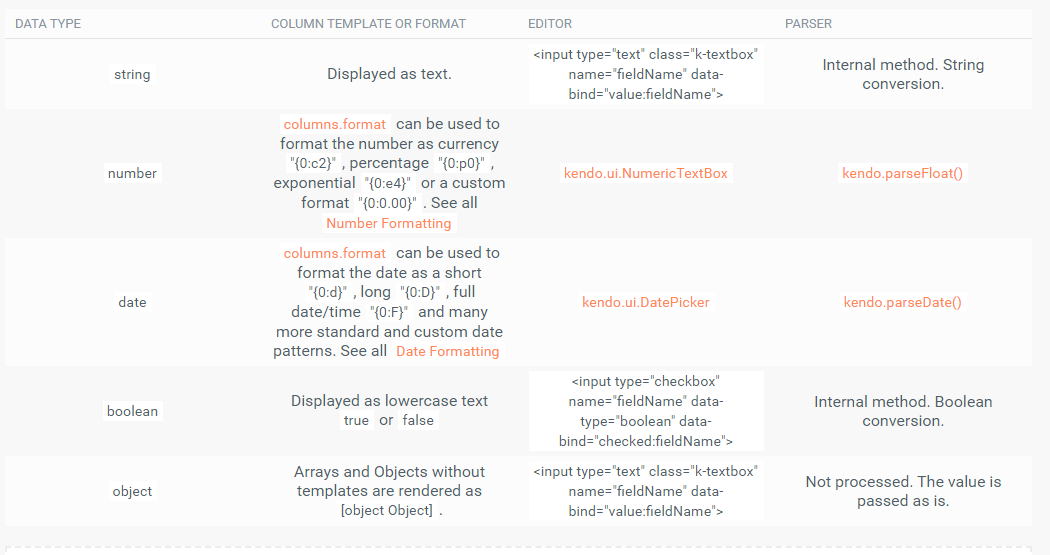
- 定义字段的数据类型来利用内置编辑器、可过滤的UI以及正确的排序、过滤和分组功能。
下图列出了可用的数据类型:
var dataSource = new kendo.data.DataSource({

schema: {

model: {

id: "id",

fields: {

id: {

editable: false,

// a defaultValue will not be assigned (default value is false)

nullable: true

},

name: {

type: "string",

validation: { required: true }

},

price: {

// A NumericTextBox editor will be initialized in edit mode.

type: "number",

// When a new model is created, this default will be used.

defaultValue: 42

},

discontinued:{

// A checkbox editor will be initialized in edit mode.

type: "boolean"

},

created: {

// A date picker editor will be initialized in edit mode.

type: "date"

},

supplier: {

type: "object" ,

defaultValue: { companyName: "Progress", companyId: 1 }

}

}

}

}

});
设置可编辑选项
默认情况下,Grid是不可编辑的。要启用编辑功能,请添加所需的编辑类型。Kendo UI jQuery Grid支持单元内、内联和弹出编辑模式。为了使编辑功能完全起作用,请添加带有Create按钮和用于更新、销毁操作的命令列工具栏。
下面的示例演示如何在incell编辑模式下为CRUD操作配置基本Grid。
// Incell editing.

  $("#grid").kendoGrid({

// To enable the insertion of new records, save or cancel changes.

toolbar: [ "create", "save", "cancel" ],

columns: [ "name",

// To trigger the in-cell destroy operation.

{ command: [ "destroy" ] }

],

dataSource: dataSource,

editable: true

});
以下示例演示如何以内联或弹出编辑模式为CRUD操作配置基本Grid。
// Inline OR Popup editing.

  $("#grid").kendoGrid({

// To enable the insertion of new records.

toolbar: [ "create" ],

columns: [ "name",

// To trigger the inline or popup edit and destroy operations.

{ command: [ "edit", "destroy" ] }

],

dataSource: dataSource,

editable: "inline" // OR editable: { mode : "popup" }

});
了解最新Kendo UI最新资讯,请关注Telerik中文网!
扫描关注慧聚IT微信公众号,及时获取最新动态及最新资讯

Web UI开发速速种草—Kendo UI for jQuery网格编辑操作概述的更多相关文章
- Web界面开发必看!Kendo UI for jQuery编辑功能指南第二弹
Kendo UI for jQuery最新试用版下载 Kendo UI目前最新提供Kendo UI for jQuery.Kendo UI for Angular.Kendo UI Support f ...
- Web界面开发必看!Kendo UI for jQuery编辑功能指南第一弹
Kendo UI for jQuery最新试用版下载 Kendo UI目前最新提供Kendo UI for jQuery.Kendo UI for Angular.Kendo UI Support f ...
- Web UI开发神器—Kendo UI for jQuery数据管理网格编辑操作
Kendo UI for jQuery最新试用版下载 Kendo UI目前最新提供Kendo UI for jQuery.Kendo UI for Angular.Kendo UI Support f ...
- [置顶] Kendo UI开发教程: Kendo UI 示例及总结
前面基本介绍完Kendo UI开发的基本概念和开发步骤,Kendo UI的示例网站为http://demos.kendoui.com/ ,包含了三个部分 Web DemoMobile DemoData ...
- Web UI开发推荐!Kendo UI for jQuery自定义小部件——使用MVVM
Kendo UI for jQuery最新试用版下载 Kendo UI目前最新提供Kendo UI for jQuery.Kendo UI for Angular.Kendo UI Support f ...
- Web UI开发推荐!Kendo UI for jQuery自定义小部件——处理事件
Kendo UI for jQuery最新试用版下载 Kendo UI目前最新提供Kendo UI for jQuery.Kendo UI for Angular.Kendo UI Support f ...
- Web UI开发神器—Kendo UI for jQuery数据管理之过滤操作
Kendo UI for jQuery最新试用版下载 Kendo UI目前最新提供Kendo UI for jQuery.Kendo UI for Angular.Kendo UI Support f ...
- Kendo UI开发教程(9): Kendo UI Validator 概述
Kendo UI Validator 支持了客户端校验的便捷方法,它基于HTML 5 的表单校验功能,支持很多内置的校验规则,同时也提供了自定义规则的便捷方法. 完整的Kendo UI 的Valida ...
- 关于Kendo UI 开发教程
Kendo UI 开发教程 jQuery UI 是一套 JavaScript 函式库,提供抽象化.可自订主题的 GUI 控制项与动画效果.基于 jQuery JavaScript 函式库,可用来建构互 ...
随机推荐
- springboot和solr结合测试使用
首先新建springboot项目 新建webapp目录 springboot没有webapp目录——手动添加 web.xml <?xml version="1.0" enco ...
- 使用使用nltk 和 spacy进行命名实体提取/识别
1. 什么是 命名实体提取? 参考:https://towardsdatascience.com/named-entity-recognition-with-nltk-and-spacy-8c4a7d ...
- Stream入门及Stream在JVM中的线程表现
继上次学习过Java8中的非常重要的Lambda表达式之后,接下来就要学习另一个也比较重要的知识啦,也就如标题所示:Stream,而它的学习是完全依赖于之前学习的Lambda表达式. 小实验引入: 这 ...
- Appium 基于控件左滑操作
def swipe_ele_left(self, ele, dur=800): """ 基于控件元素左滑操作 :param ele: 控件元素 :param dur: 在 ...
- (十)EL表达式和JSTL标签快速入门
目录 什么是 el 表达式 示例:使用EL表达式获取pageContext .request.session.application域中的数据: 示例:使用EL表达式获取Bean属性 获取当前WEB应 ...
- AlgorithmMap Dev Log
Log 2019.08.29 ------------------------------------------------------------------------------------- ...
- Django 1.8.2 admin 数据库操作按下保存按钮出错
Django报错:Runtimeerror: generator raised StopIteration python版本太新不兼容照成,下载python3.6就行了
- Django导出数据为Excel,调用浏览器下载
1. 环境 Django (2.1.10) + Python3.6 + xlwt (1.3.0) 操作系统使用的为:Windows 7 2. 接口代码 def now_export(request): ...
- SAS学习笔记29 logistic回归
变量筛选 当对多个自变量建立logistic回归模型时,并不是每一个自变量对模型都有贡献.通常我们希望所建立的模型将具有统计学意义的自变量都包含在内,而将没有统计学意义的自变量排除在外,即进行变量筛选 ...
- .net core partial view的一些心得
原文:.net core partial view的一些心得 版权声明:本文为博主原创文章,遵循CC 4.0 BY-SA版权协议,转载请附上原文出处链接和本声明. 本文链接:https://blog. ...