
Angular5 自定义scrollbar样式之 ngx-perfect-scollbar
版本
- angular 5.0
- ngx-perfect-scrollbar ^5.3.5
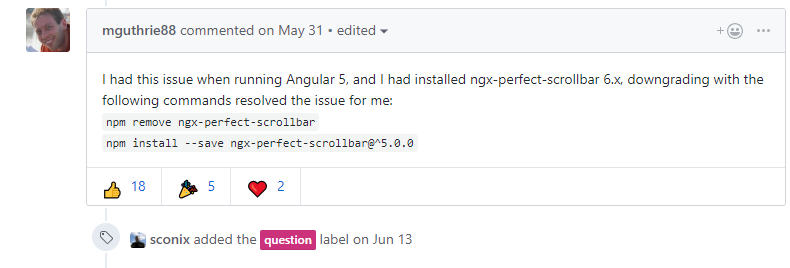
为什么不用 ngx-perfect-scrollbar 最新的版本 v7 呢?
因为它报错啊!!! 每次init的时候,就报一个Object() is not a function。 根据GitHub上热心网友的建议,就downgrade了。
详见:https://github.com/zefoy/ngx-perfect-scrollbar/issues/189
安装
npm 安装没啥好说的
npm install --save ngx-perfect-scrollbar@^5.0.0
使用
1. 导入module
// app.module.ts

import { PerfectScrollbarModule, PerfectScrollbarConfigInterface, PERFECT_SCROLLBAR_CONFIG } from 'ngx-perfect-scrollbar';

const DEFAULT_PERFECT_SCROLLBAR_CONFIG: PerfectScrollbarConfigInterface = {

  wheelPropagation: true

};

@NgModule({

  bootstrap: [

    AppComponent

  ],

  declarations: [

    ...

  ],

  imports: [

    ...,

    PerfectScrollbarModule

  ],

  exports: [

  ],

  providers: [

    {

      provide: PERFECT_SCROLLBAR_CONFIG,

      useValue: DEFAULT_PERFECT_SCROLLBAR_CONFIG

    }

  ]

})

export class AppModule {}
Providing the global configuration is optional and when used you should only provide the configuration in your root module.
提供全局配置是可选的,但是如果你需要使用,那么只需要在应用的root module中配置。
2. 在模板中使用
API 提供了两种使用方式,一种是 Component 使用方式,一种是 Derective使用方式。我在项目中用的后者。
<ul *ngIf="nodeList.length" class="indented mTop scroll"  [style.max-height.px]="treeContentHeight" [perfectScrollbar]="config">

        <li class="no_line" *ngFor="let node of nodeList"></li>

</ul>
import { PerfectScrollbarConfigInterface, PerfectScrollbarDirective } from 'ngx-perfect-scrollbar';

public config: PerfectScrollbarConfigInterface = {};

@ViewChild(PerfectScrollbarDirective) directiveRef?: PerfectScrollbarDirective;
3. 导入CSS
// styles.scss

@import '~perfect-scrollbar/css/perfect-scrollbar.css';
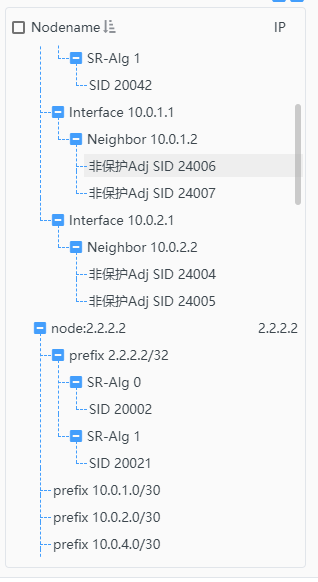
效果:
遇到的问题
上中下结构中,只让 content部分有滚动条,但是路由跳转后,滚动条的高度没有重新计算。
解决方案:
// home.component.html

<div class="container">

    <div class="header">

        <app-header></app-header>

    </div>

    <div class="content" [perfectScrollbar]="config">

        <router-outlet></router-outlet>

    </div>

    <div class="footer">

        <app-footer></app-footer>

    </div>

</div>
在路由跳转后,需要调用update()更新scrollbar的size 和 position
import { Component, OnInit, ViewChild } from '@angular/core';

import { Router} from '@angular/router';

import { PerfectScrollbarConfigInterface, PerfectScrollbarDirective } from 'ngx-perfect-scrollbar';

@Component({

    selector: 'app-home',

    templateUrl: './home.component.html',

    styleUrls: ['./home.component.scss']

})

export class HomeComponent implements OnInit {

    public config: PerfectScrollbarConfigInterface = {};

    @ViewChild(PerfectScrollbarDirective) directiveRef?: PerfectScrollbarDirective;

    constructor(public _router: Router) { }

    ngOnInit() {

        this._router.events.subscribe((event) => {

            // update the scrollbar

            this.directiveRef.update();

          });

    }

}
Angular5 自定义scrollbar样式之 ngx-perfect-scollbar的更多相关文章
- Angular5 自定义scrollbar样式之 ngx-malihu-scrollbar
简介 此插件是 Malihu jQuery Scrollbar 为了在 Angular2+ 环境下使用,封装的一个ts的版本.提供directive和service. 从安装量来看,它比不过 perf ...
- Android必知必会-自定义Scrollbar样式
如果移动端访问不佳,请使用–>GitHub版 背景 设计师给的设计图完全依照 IOS 的标准来的,导致很多细节的控件都得自己重写,最近的设计图中有显示滚动条,Android 默认的滚动条样式(带 ...
- jQuery自定义滚动条样式插件mCustomScrollbar
如果你构建一个很有特色和创意的网页,那么肯定希望定义网页中的滚动条样式,这方面的 jQuery 插件比较不错的,有两个:jScrollPane 和 mCustomScrollbar. 关于 jScro ...
- 自定义scrollbar
Chrome ::-webkit-scrollbar 整体部分 ::-webkit-scrollbar-track 轨道 ::-webkit-scrollbar-track-piece 内层轨道 :: ...
- WPF 自定义滚动条样式
先看一下效果: 先分析一下滚动条有哪儿几部分组成: 滚动条总共有五部分组成: 两端的箭头按钮,实际类型为RepeatButton Thumb 两端的空白,实际也是RepeatButton 最后就是Th ...
- scrollbar样式设置
转载:https://segmentfault.com/a/1190000012800450?utm_source=tag-newest author:specialCoder 一 前言 在CSS 中 ...
- 自定义滚动条样式-transition无效
问题 需求是自定义滚动条样式,然后2秒内无操作隐藏滚动条. 2s内隐藏比较麻烦,不能用css实现,只能监听容器的touch事件,然后给滚动条加个opacity: 0的class. .class::-w ...
- CSS3:scrollbar样式设置
CSS3:scrollbar样式设置 1. 设置出现滚动条的方式 overflow:scroll --- x和y方向都会出现滚动条 或者 overflow-x:scroll --- 只有x方向出现滚动 ...
- Siteserver-stl:searchOutput(搜索结果)自定义显示样式
stl:searchOutput 自定义显示样式 自定义搜索提交表单需要在<stl:searchOutput>中嵌入显示搜索结果的标签,必须包含的标签 有<stl:pageConte ...
随机推荐
- Codeforces Round #590 (Div. 3) D. Distinct Characters Queries(线段树, 位运算)
链接: https://codeforces.com/contest/1234/problem/D 题意: You are given a string s consisting of lowerca ...
- MULTIPOLYGON、POLYGON 封装为echart geoJson 数据封装
一.环境.问题简述: 1.采用的事前后端分离,后端需要封装将点位获取的点位信息封装为geoJson数据类型,供前端利用echart 绘制地图: 2.思路:简单理解geoJson,将对应坐标点位封装为g ...
- 09 深科技相关表结构 (未完成)、git
1.深科技相关 1. 深科技表结构(6表) 深科技4张+2张用户表 - 深科技 用户表 用户Token 文章来源 文章表 通用评论表 通用收藏表 # ######################## ...
- luogu 2294 [HNOI2005]狡猾的商人 差分约束
一个差分约束模型,只需判一下有没有负环即可. #include <bits/stdc++.h> #define N 103 #define M 2004 #define setIO(s) ...
- 小米oj 组长偏头痛(二分)
组长偏头痛 序号:#28难度:非常难时间限制:1000ms内存限制:10M 描述 临近年底,组长突然患上了偏头痛的毛病,因为他最近从产品经理那里收到了好多需求,需要按排组员尽快完成. 现在用一个数组 ...
- layer是一款近年来备受青睐的web弹层组件
layer.closeAll(); //疯狂模式,关闭所有层 layer.closeAll('dialog'); //关闭信息框 layer.closeAll('page'); //关闭所有页面层 l ...
- 如何使用SendGrid发送邮件
特别提示:本人博客部分有参考网络其他博客,但均是本人亲手编写过并验证通过.如发现博客有错误,请及时提出以免误导其他人,谢谢!欢迎转载,但记得标明文章出处:http://www.cnblogs.com/ ...
- jquery+ajax 实现搜索框提示
<!DOCTYPE html> <html lang="en"> <head> <meta charset="UTF-8&quo ...
- HSBToolBox
HSBToolBox.exe Unzip all files to the folder where Hearthbuddy.exeThen just run HSBToolBox.exe [asse ...
- Golang 空指针nil的方法和数据成员
golang中,有一个特殊的指针值nil. 如何使用nil没有方法和成员变量呢? 下面来看下具体例子. 程序中,定义结构体类型Plane, 将Plane类型的指针作为函数的参数,然后传入nil作为实参 ...