
Java-基于 Instrument 的 Agent
Agent 为 JVMTI 的客户端。
这里记录的是基于Java Instrument 的 Agent 实现,还有直接基于 JVMTI 的 Agent 实现。
在 JDK1.5 以后,我们可以使用 Agent 技术构建一个独立于应用程序的代理程序,用来协助监测、运行甚至替换其他 JVM 上的程序。使用它可以实现虚拟机级别的 AOP 功能。
Agent 分为两种,一种是在主程序之前运行的 Agent,一种是在主程序之后运行的 Agent(JDK1.6 以后)。
一、在主程序运行之前的代理程序
1.编写 agent 程序
package before;

import java.lang.instrument.Instrumentation;

public class AgentApplication {

    public static void premain(String arg, Instrumentation instrumentation) {

        System.err.println("agent startup , args is " + arg);

    }

}
2.添加 MANIFEST.MF 文件
路径为 META-INF/MANIFEST.MF
Manifest-Version: 1.0

Premain-Class: before.AgentApplication

Can-Redefine-Classes: true

Can-Retransform-Classes: true
若使用的是 Maven 编译就不用手动添加,配置 pom.xml 即可
<build>

    <plugins>

        <plugin>

            <groupId>org.apache.maven.plugins</groupId>

            <artifactId>maven-compiler-plugin</artifactId>

            <configuration>

                <source>1.8</source>

                <target>1.8</target>

                <encoding>UTF-8</encoding>

            </configuration>

        </plugin>

        <plugin>

            <groupId>org.apache.maven.plugins</groupId>

            <artifactId>maven-jar-plugin</artifactId>

            <configuration>

                <archive>

                    <manifest>

                        <addClasspath>true</addClasspath>

                    </manifest>

                    <manifestEntries>

                        <Premain-Class>before.AgentApplication</Premain-Class>

                        <Can-Redefine-Classes>true</Can-Redefine-Classes>

                        <Can-Retransform-Classes>true</Can-Retransform-Classes>

                    </manifestEntries>

                </archive>

            </configuration>

        </plugin>

    </plugins>

</build>
3.运行
新建一个测试类并编译为 class 文件
package com;

public class Main {

    public static void main(String[] args) {

        System.out.println("123");

    }

}
使用命令运行
java -javaagent:..\mahout-1.0-SNAPSHOT.jar=abc com.Main

可以看到 premain 方法在 main 之前运行了
二、在主程序运行之后的代理程序
关于动态 attach:https://openjdk.java.net/groups/hotspot/docs/Serviceability.html#battach
https://juejin.im/post/5b0d020d518825153f10403f
1.编写 agent 程序
由于是在主程序运行后再执行,意味着我们可以获取主程序运行时的信息,这里我们打印出来主程序中加载的类名。
package after;

import java.lang.instrument.Instrumentation;

public class AgentApplication {

    public static void agentmain(String arg, Instrumentation instrumentation) {

        System.err.println("agent startup , args is " + arg);

        Class<?>[] classes = instrumentation.getAllLoadedClasses();

        for (Class<?> cls : classes) {

            System.out.println(cls.getName());

        }

    }

}
2.添加 MANIFEST.MF 文件
路径为 META-INF/MANIFEST.MF
Manifest-Version: 1.0

Agent-Class: after.AgentApplication

Can-Redefine-Classes: true

Can-Retransform-Classes: true
若使用的是 Maven 编译就不用手动添加,配置 pom.xml 即可
<build>

    <plugins>

        <plugin>

            <groupId>org.apache.maven.plugins</groupId>

            <artifactId>maven-compiler-plugin</artifactId>

            <configuration>

                <source>1.8</source>

                <target>1.8</target>

                <encoding>UTF-8</encoding>

            </configuration>

        </plugin>

        <plugin>

            <groupId>org.apache.maven.plugins</groupId>

            <artifactId>maven-jar-plugin</artifactId>

            <configuration>

                <archive>

                    <manifest>

                        <addClasspath>true</addClasspath>

                    </manifest>

                    <manifestEntries>

                        <Agent-Class>after.AgentApplication</Agent-Class>

                        <Can-Redefine-Classes>true</Can-Redefine-Classes>

                        <Can-Retransform-Classes>true</Can-Retransform-Classes>

                    </manifestEntries>

                </archive>

            </configuration>

        </plugin>

    </plugins>

</build>
3.运行
由于是在程序运行之后运行,需要先有一个 Java 进程,直接用 IDE 运行即可,不用使用命令行。
package com;

public class Main {

    public static void main(String[] args) throws InterruptedException {

        for (; ; ) {

            System.out.println("123");

            Thread.sleep(1000);

        }

    }

}
运行后查看改程序的进程号,这里为 9084
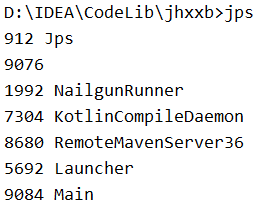
然后将 agent 程序附加到上面程序的进程中
com.sun.tools.attach.VirtualMachine 在 JAVA_HOME 路径下 lib/tools.jar 中,如果 IDE 报找不到,可以手动将 tools.jar 添加进来,或配置 CLASSPATH 环境变量。
package com;

import com.sun.tools.attach.AgentInitializationException;

import com.sun.tools.attach.AgentLoadException;

import com.sun.tools.attach.AttachNotSupportedException;

import com.sun.tools.attach.VirtualMachine;

import java.io.IOException;

public class Attach {

    public static void main(String[] args) throws IOException, AttachNotSupportedException, AgentLoadException, AgentInitializationException {

        VirtualMachine vm = VirtualMachine.attach("9084");

        vm.loadAgent("D:\\IDEA\\CodeLib\\jhxxb\\mahout\\target\\mahout-1.0-SNAPSHOT.jar");

    }

}
直接 IDE 运行即可,执行完毕后回到 Main 程序的打印控制台

三、使用相关
其中 -javaagent 可以有多个,但如果把 -javaagent 放在 -jar 后面,则不会生效。也就是放在主程序后面的 agent 是无效的。
如:java -javaagent:D:\myagent-1.jar=ABC -javaagent:D:\myagent-2.jar=DEF -jar myapp.jar -javaagent:D:\myagent-3.jar=GHI,其中 myagent-3.jar 是无效的。
其中 premain(agentmain) 方法有两个:
- public static void premain(String agentArgs, Instrumentation inst)
- public static void premain(String agentArgs)
JVM 会优先加载 1,加载成功则忽略 2,如没有 1,则加载 2。加载逻辑在 sun.instrument.InstrumentationImpl 类中:
private void loadClassAndStartAgent(String classname, String methodname, String optionsString) throws Throwable {

    ClassLoader mainAppLoader = ClassLoader.getSystemClassLoader();

    Class<?> javaAgentClass = mainAppLoader.loadClass(classname);

    Method m = null;

    NoSuchMethodException firstExc = null;

    boolean twoArgAgent = false;

    // The agent class must have a premain or agentmain method that

    // has 1 or 2 arguments. We check in the following order:

    //

    // 1) declared with a signature of (String, Instrumentation)

    // 2) declared with a signature of (String)

    // 3) inherited with a signature of (String, Instrumentation)

    // 4) inherited with a signature of (String)

    //

    // So the declared version of either 1-arg or 2-arg always takes

    // primary precedence over an inherited version. After that, the

    // 2-arg version takes precedence over the 1-arg version.

    //

    // If no method is found then we throw the NoSuchMethodException

    // from the first attempt so that the exception text indicates

    // the lookup failed for the 2-arg method (same as JDK5.0).

    try {

        m = javaAgentClass.getDeclaredMethod(methodname, new Class<?>[]{String.class, java.lang.instrument.Instrumentation.class});

        twoArgAgent = true;

    } catch (NoSuchMethodException x) {

        // remember the NoSuchMethodException

        firstExc = x;

    }

    if (m == null) {

        // now try the declared 1-arg method

        try {

            m = javaAgentClass.getDeclaredMethod(methodname, new Class<?>[]{String.class});

        } catch (NoSuchMethodException x) {

            // ignore this exception because we'll try

            // two arg inheritance next

        }

    }

    if (m == null) {

        // now try the inherited 2-arg method

        try {

            m = javaAgentClass.getMethod(methodname, new Class<?>[]{String.class, java.lang.instrument.Instrumentation.class});

            twoArgAgent = true;

        } catch (NoSuchMethodException x) {

            // ignore this exception because we'll try

            // one arg inheritance next

        }

    }

    if (m == null) {

        // finally try the inherited 1-arg method

        try {

            m = javaAgentClass.getMethod(methodname, new Class<?>[]{String.class});

        } catch (NoSuchMethodException x) {

            // none of the methods exists so we throw the

            // first NoSuchMethodException as per 5.0

            throw firstExc;

        }

    }

    // the premain method should not be required to be public,

    // make it accessible so we can call it

    // Note: The spec says the following:

    //     The agent class must implement a public static premain method...

    setAccessible(m, true);

    // invoke the 1 or 2-arg method

    if (twoArgAgent) {

        m.invoke(null, new Object[]{optionsString, this});

    } else {

        m.invoke(null, new Object[]{optionsString});

    }

    // don't let others access a non-public premain method

    setAccessible(m, false);

}
Instrument premain、agentmain 方法执行时机:
premain 执行时机:在 JVM 启动时(所有的 Java 类都未被初始化,所有的对象实例都未被创建),初始化函数 eventHandlerVMinit 会调用 sun.instrument.instrumentationImpl 类的 loadClassAndCallPremain 方法去执行 Premain-Class 指定类的 premain 方法。
agentmain 执行时机:在 JVM 启动后,通过 VirtualMachine 附着一个 Instrument,如:vm.loadAgent(jar),会调用 sun.instrument.instrumentationImpl 类的 loadClassAndCallAgentmain 方法去执行 Agentmain-Class 指定类的 agentmain 方法。
premain、agentmain 方法中两个参数:
agentArgs:代理程序命令行中输入参数,随同 “-javaagent” 一起传入,与 main 函数不同的是,这个参数是一个字符串而不是一个字符串数组。
inst:java.lang.instrument.Instrumentation 实例,由 JVM 自动传入,集中了几乎所有功能方法,如:类操作、classpath 操作等。
META-INF/MAINFEST.MF 参数:
- Premain-Class:指定包含 premain 方法的类名。
- Agent-Class:指定包含 agentmain 方法的类名。
- Boot-Class-Path:指定引导类加载器搜索的路径列表。查找类的特点于平台的机制失败后,引导类加载器会搜索这些路径。
- Can-Redefine-Class:是否能重新定义此代理所需的类,默认为 false。
- Can-Retransform-Class:是否能重新转换此代理所需的类,默认为 false。
- Can-Set-Native-Method-Prefix:是否能设置此代理所需的本机方法前缀,默认值为 false。
https://www.jianshu.com/p/63c328ca208d
https://yq.aliyun.com/articles/658806
https://www.jianshu.com/p/9f4e8dcb3e2f
https://juejin.im/post/5b0925ec51882538aa1ee248
https://www.ibm.com/developerworks/cn/java/j-lo-jpda2
Java-基于 Instrument 的 Agent的更多相关文章
- 基于Java Instrument的Agent实现
使用 Instrumentation,使得开发者可以构建一个独立于应用程序的代理程序(Agent),用来监测和协助运行在 JVM 上的程序,甚至能够替换和修改某些类的定义.有了这样的功能,开发者就可以 ...
- java.lang.instrument 中的premain 实现类的个性化加载(附源代码)
背景 想调用ASM API (用于字节码处理的开源API)对字节码进行处理,目标是实现对java程序运行时各种对象的动态跟踪,并进一步分析各个对象之间的关系(研究前提是目前的UML锁阐释的whole- ...
- java.lang.instrument.Instrumentation
java.lang.instrument.Instrumentation 看完文档之后,我们发现这么两个接口:redefineClasses和retransformClasses.一个是重新定义cla ...
- java.lang.instrument使用
Java在1.5引入java.lang.instrument,你可以由此实现一个Javaagent,通过此agent来修改类的字节码即改变一个类. 程序启动之时启动代理(pre-main) 通过jav ...
- Golang、Php、Python、Java基于Thrift0.9.1实现跨语言调用
目录: 一.什么是Thrift? 1) Thrift内部框架一瞥 2) 支持的数据传输格式.数据传输方式和服务模型 3) Thrift IDL 二.Thrift的官方网站在哪里? 三.在哪里下载?需要 ...
- J2SE 1.6 特性:java.lang.instrument
1. import java.lang.instrument.Instrumentation; public class ObjectSizeFetcher { private static Inst ...
- Java基于opencv实现图像数字识别(五)—投影法分割字符
Java基于opencv实现图像数字识别(五)-投影法分割字符 水平投影法 1.水平投影法就是先用一个数组统计出图像每行黑色像素点的个数(二值化的图像): 2.选出一个最优的阀值,根据比这个阀值大或小 ...
- Java基于opencv实现图像数字识别(四)—图像降噪
Java基于opencv实现图像数字识别(四)-图像降噪 我们每一步的工作都是基于前一步的,我们先把我们前面的几个函数封装成一个工具类,以后我们所有的函数都基于这个工具类 这个工具类呢,就一个成员变量 ...
- Java基于opencv实现图像数字识别(三)—灰度化和二值化
Java基于opencv实现图像数字识别(三)-灰度化和二值化 一.灰度化 灰度化:在RGB模型中,如果R=G=B时,则彩色表示灰度颜色,其中R=G=B的值叫灰度值:因此,灰度图像每个像素点只需一个字 ...
随机推荐
- jQuery事件绑定和委托实例
本文实例讲述了jQuery事件绑定和委托.分享给大家供大家参考.具体方法如下: jQuery事件的绑定和委托可以用多种方法实现,on() . bind() . live() . delegate ...
- 【Hibernate】检索方式
一.概述 二.HQL 2.1 简介 2.2 查询所有记录 2.3 查询使用别名 2.4 排序 2.5 分页查询 2.6 单个对象查询 2.7 参数绑定 2.8 投影操作 2.9 模糊查询 2.10 S ...
- adb使用时出现unanthorized问题
adb使用时出现unanthorized问题 ADB 启动时,adb devices出现unanthorized问题. 检查USB调试是否开启. 重新拔插USB数据线是否有授权提示 重启adb :ad ...
- MySQL数据库用户和权限管理
一.视图 视图:VIEW,虚表,保存有实表的查询结果,在视图插入的内容都会存入表中.创建方法: CREATE VIEW view_name [(column_list)] AS select_st ...
- 虚拟机mysql报错的问题
Can't connect to local MySQL server through socket '/var/lib/mysql/mysql.sock' (111)解决方法 登陆mysql的时 ...
- 网络分类及OSI七层模型
一.网络分类: 局域网(LAN)是指在某一区域内由多台计算机互联成的计算机组.一般是方圆几千米以内.局域网可以实现文件管理.应用软件共享.打印机共享.工作组内的日程安排.电子邮件和传真通信服务等功能. ...
- linux /etc/shadow文件详解
struct spwd { char *sp_namp; /* user login name */ char *sp_pwdp; /* encrypted password */ long int ...
- lvs+keepalived+application部署(只使用两台机器)
目前大家用LVS+Keepalived + APP 架构都是 2台LVS +Keepalived 然后后端跟着 应用设备 然而针对小客户来说, 2台LVS平常没什么压力 还有一台备着(虽然可以跑双主 ...
- idou老师教你学Istio 09: 如何用Istio实现K8S Ingress流量管理
前言 在Istio的世界里,如果想把外部的请求流量引入网格,你需要认识并会学会配置Istio Ingress Gateway 什么是Ingress Gateway 由于Kubernetes Ingr ...
- 用js刷剑指offer(二进制中一的个数)
题目描述 输入一个整数,输出该数二进制表示中1的个数.其中负数用补码表示. 牛客网链接 思路 如果一个整数不为0,那么这个整数至少有一位是1.如果我们把这个整数减1,那么原来处在整数最右边的1就会变为 ...