
ubuntu搭建ssh服务
本人在ubuntu16.4.4.0-13下测试
#man uname//用于打印系统信息
sudo apt install update
sudo apt install openssh-server
若是出现:

解决方法:

gedit /ect/ssh/sshd-config
# Package generated configuration file
# See the sshd_config(5) manpage for details
# What ports, IPs and protocols we listen for
Port 22 #可以更改端口,但ssh链接是要指明端口号
# Use these options to restrict which interfaces/protocols sshd will bind to
#ListenAddress ::
#ListenAddress 0.0.0.0#可以指点某个地址,出于某个安全需要
Protocol 2
# HostKeys for protocol version 2
HostKey /etc/ssh/ssh_host_rsa_key
HostKey /etc/ssh/ssh_host_dsa_key
HostKey /etc/ssh/ssh_host_ecdsa_key
HostKey /etc/ssh/ssh_host_ed25519_key
#Privilege Separation is turned on for security
UsePrivilegeSeparation yes
# Lifetime and size of ephemeral version 1 server key
KeyRegenerationInterval 3600
ServerKeyBits 1024
# Logging
SyslogFacility AUTH
LogLevel INFO
# Authentication:
LoginGraceTime 120
#PermitRootLogin prohibit-password#要把这一项注释,才能远程登录root用户
PermitRootLogin yes#增加这一项,
StrictModes yes
RSAAuthentication yes
PubkeyAuthentication yes#是否允许密钥链接
#AuthorizedKeysFile %h/.ssh/authorized_keys
# Don't read the user's ~/.rhosts and ~/.shosts files
IgnoreRhosts yes
# For this to work you will also need host keys in /etc/ssh_known_hosts
RhostsRSAAuthentication no
# similar for protocol version 2
HostbasedAuthentication no
# Uncomment if you don't trust ~/.ssh/known_hosts for RhostsRSAAuthentication
#IgnoreUserKnownHosts yes
# To enable empty passwords, change to yes (NOT RECOMMENDED)
PermitEmptyPasswords no
# Change to yes to enable challenge-response passwords (beware issues with
# some PAM modules and threads)
ChallengeResponseAuthentication no
# Change to no to disable tunnelled clear text passwords
#PasswordAuthentication yes
# Kerberos options
#KerberosAuthentication no
#KerberosGetAFSToken no
#KerberosOrLocalPasswd yes
#KerberosTicketCleanup yes
# GSSAPI options
#GSSAPIAuthentication no
#GSSAPICleanupCredentials yes
X11Forwarding yes
X11DisplayOffset 10
PrintMotd no
PrintLastLog yes
TCPKeepAlive yes
#UseLogin no
#MaxStartups 10:30:60
#Banner /etc/issue.net
# Allow client to pass locale environment variables
AcceptEnv LANG LC_*
Subsystem sftp /usr/lib/openssh/sftp-server
# Set this to 'yes' to enable PAM authentication, account processing,
# and session processing. If this is enabled, PAM authentication will
# be allowed through the ChallengeResponseAuthentication and
# PasswordAuthentication. Depending on your PAM configuration,
# PAM authentication via ChallengeResponseAuthentication may bypass
# the setting of "PermitRootLogin without-password".
# If you just want the PAM account and session checks to run without
# PAM authentication, then enable this but set PasswordAuthentication
# and ChallengeResponseAuthentication to 'no'.
UsePAM yes
修改完后,启动服务
先查看端口开启情况
ss -antpl
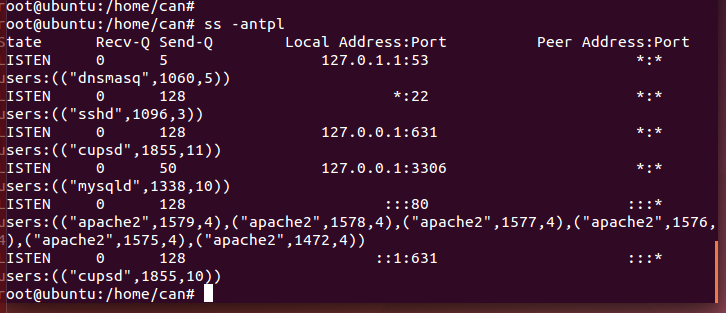
sudo service ssh start (如果是kail linux >> systemctl start ssh )
查看进程
sudo ps -e |grep ssh
看到有sshd服务就可以啦
ubuntu搭建ssh服务的更多相关文章
- Ubuntu 开启SSH服务以及有关设置:安装,指定端口号、免密登录、远程拷贝
本文所用系统为 Ubuntu 18.04 什么是SSH? 简单说,SSH是一种网络协议,用于计算机之间的加密登录.全名为:安全外壳协议.为Secure Shell的缩写.SSH为建立在应用 ...
- 在windows上搭建SSH服务踩过的坑
前两天安装了windows操作系统,想在windows上做内网穿透,所以就想在windows下启用ssh服务,今天就来讲一下我在搭建ssh服务中遇到的坑. 我显示在Mac下搭建了ssh服务,并且测试通 ...
- ubuntu开启SSH服务远程登录
http://blog.csdn.net/jackghq/article/details/54974141 ubuntu开启SSH服务远程登录
- Ubuntu配置SSH服务
本文主要解决Ubuntu配置SSH服务的问题 1.1.修改可用的agt源 sudo vim /etc/apt/sources.list 1.2.更新代码包 sudo apt-get update 2. ...
- ubuntu 搭建Mercurial 服务(nginx)
ubuntu 搭建Mercurial 服务(nginx) 环境:ubuntu 12.05 Mercurial 步骤: (1)安装nginx 和 Mercurial: sudo apt-get ins ...
- ubuntu开启SSH服务
SSH分客户端openssh-client和openssh-server 如果你只是想登陆别的机器的SSH只需要安装openssh-client(ubuntu有默认安装,如果没有则sudo apt-g ...
- 如何开启ubuntu的SSH服务
buntu默认并没有安装ssh服务,如果通过ssh链接ubuntu,需要自己手动安装ssh-server,然而SSH分客户端openssh-client和服务端openssh-server,opens ...
- [转] ubuntu开启SSH服务
点击阅读原文 SSH分客户端openssh-client和openssh-server如果你只是想登陆别的机器的SSH只需要安装openssh-client(ubuntu有默认安装,如果没有则sudo ...
- Ubuntu安装SSH服务
1 SSH服务 Ubuntu默认并没有安装ssh服务,如果通过ssh远程连接到Ubuntu,需要自己手动安装ssh-server(openssh-server). 1.1 检测是否安装SSH服务 出现 ...
随机推荐
- div 可滚动但不显示滚动条
(原) 首先有3个div, 第1个,固定大小是200*200(单位为px,下同) 第2个,不固定大小,其大小要用第3个div把个撑开,但是这个div必需要有滚动条, 第3个,固定大小与第1个div保持 ...
- 开启防火墙如何部署k8s
你可以不关闭防火墙,只需要开启这些端口就行了MASTER节点6443* Kubernetes API server 2379-2380 etcd server client API 10250 Kub ...
- ${filename}用法二:
假设:filename=/dir1/dir2/dir3/my.filename.txt 1.单一符号是最小匹配﹔两个符号是最大匹配. ${filename::}:提取最左边的5个字节:/dir1 ${ ...
- github高速下载的方法
windows修改host文件: C:\Windows\System32\drivers\etc\hostslinux 修改host文件: /etc/hosts 在文件后面加上这两行 151.101. ...
- Python 网络编程Ⅱ
客户端 接下来我们写一个简单的客户端实例连接到以上创建http://www.weixiu3721.com/的服务.端口号为 12345. socket.connect(hosname, port ) ...
- PHP回顾(2)
print_r()打印输出原格式,就加上标签<pre>.例子:echo '<pre>'; print_r($arr); echo '<pre>'; 添加数组的时候, ...
- LibreOffice/Calc:带条件判断的求和
本文适用于LibreOffice Calc 5.1.6.2 + Ubuntu 16.04,熊猫帮帮主@cnblogs 2018/3/7 以下图为例,假设要根据C列对D列中被选中单元进行求和,即对D列中 ...
- Linux和其他机器共享文件
在实际当中,Linux服务器在公网上,我们的windows电脑在局域网中,因此这个共享并不实际. 安装vsftpd 注:安装之后需要验证ftp是否工作,这时应该在本机验证,而不应该在windows电脑 ...
- hdu 5761 Rower Bo 微分方程
Rower Bo Time Limit: 2000/1000 MS (Java/Others) Memory Limit: 131072/131072 K (Java/Others)Total ...
- codevs 2804 最大最小数质因数 x
题目描述 Description 先输入n,n<=20;再依次输入n个不同的数,每个数<=1000000;找出最大数和最小数,并输出最大最小数的质 ...