
Vs2017 NetCode Mvc EF Mysql 整合2
1 NetCode EF整合 代码
3 源代码 https://github.com/chxl800/EFMysqlDemo
1.1 项目文件结构

1.2 NuGet MySql.Data.EntityFrameworkCore 8.0.18
1.3 appsettings.json 增加数据库字符串链接ConnectionStrings
{

    "Logging": {

        "IncludeScopes": false,

        "LogLevel": {

            "Default": "Warning"

        }

    },

    "ConnectionStrings": { "MysqlConnection": "Data Source=localhost;Database=demodb;User ID=root;Password=root;pooling=true;CharSet=utf8;port=3306;sslmode=none" }

}
1.4 DBEntities.cs 添加数据库上下文
using EFMysqlNetCodeMvc.Models;

using Microsoft.EntityFrameworkCore;

namespace EFMysqlNetCodeMvc

{

    public class DBEntities : DbContext

    {

        public DBEntities(DbContextOptions<DBEntities> options) : base(options)

        {

        }

        ////这里也可以

        //string str = @"Data Source=localhost;Database=demodb;User ID=root;Password=root;pooling=true;CharSet=utf8;port=3306;sslmode=none";

        //protected override void OnConfiguring(DbContextOptionsBuilder optionsBuilder) =>

        //    optionsBuilder.UseMySQL(str);

        public DbSet<User> User { get; set; }

    }

}
1.5 User.cs 增加数据库表实体类
1.6 Startup.cs 配置重点 有中文注释的新加的
using System;

using System.Collections.Generic;

using System.Linq;

using System.Threading.Tasks;

using EFMysqlNetCodeMvc;

using Microsoft.AspNetCore.Builder;

using Microsoft.AspNetCore.Hosting;

using Microsoft.EntityFrameworkCore;

using Microsoft.Extensions.Configuration;

using Microsoft.Extensions.DependencyInjection;

using Newtonsoft.Json.Serialization;

namespace EFMysqlNetCodeMvc

{

    public class Startup

    {

        public Startup(IConfiguration configuration)

        {

            Configuration = configuration;

        }

        public IConfiguration Configuration { get; }

        // This method gets called by the runtime. Use this method to add services to the container.

        public void ConfigureServices(IServiceCollection services)

        {

            //json格式化

            services.AddMvc()

            .AddJsonOptions(options =>

            {

                //忽略循环引用

                //options.SerializerSettings.ReferenceLoopHandling = ReferenceLoopHandling.Ignore;

                //设置序列化时key为驼峰样式,开头字母小写输出  controller调用Josn(对象)

                options.SerializerSettings.ContractResolver = new CamelCasePropertyNamesContractResolver();

                //原样输出

                //options.SerializerSettings.ContractResolver = new DefaultContractResolver();

                //时间格式

                options.SerializerSettings.DateFormatString = "yyyy-MM-dd HH:mm:ss";

                //空值的字段不显示

                //options.SerializerSettings.NullValueHandling = NullValueHandling.Ignore;

            });

            //ef mysql 配置IOC

            services.AddDbContext<DBEntities>(options => options.UseMySQL(Configuration.GetConnectionString("MySqlConnection")));

            services.AddMvc();

        }

        // This method gets called by the runtime. Use this method to configure the HTTP request pipeline.

        public void Configure(IApplicationBuilder app, IHostingEnvironment env)

        {

            if (env.IsDevelopment())

            {

                app.UseBrowserLink();

                app.UseDeveloperExceptionPage();

            }

            else

            {

                app.UseExceptionHandler("/Home/Error");

            }

            app.UseStaticFiles();

            // 跨域策略

            app.UseCors(builder => builder.AllowAnyOrigin().AllowAnyMethod().AllowAnyHeader().AllowCredentials());

            //app.UseMvc();

            app.UseMvc(routes =>

            {

                routes.MapRoute(

                    name: "default",

                    template: "{controller=Home}/{action=Index}/{id?}");

            });

        }

    }

}
1.7 HomeController.cs mvc 代码用于测试
public class HomeController : Controller{
DBEntities db;
public HomeController(DBEntities db)
{
this.db = db;
}
      public IActionResult Test()

        {

            //查询

            List<User> list = db.User.ToList();

            //json序列化

            //var userJson = JsonConvert.SerializeObject(list);

            //var userList = JsonConvert.DeserializeObject<List<User>>(userJson);

            return Json(list);

        }

        public IActionResult Add([FromBody] User user)

        {

            //新增

            //User user = new User();

            //user.Id = Guid.NewGuid().ToString().Replace("-", "");

            //db.User.Add(user);

            //db.SaveChanges();

            return Json(user);

        }
}
1.8 运行结果
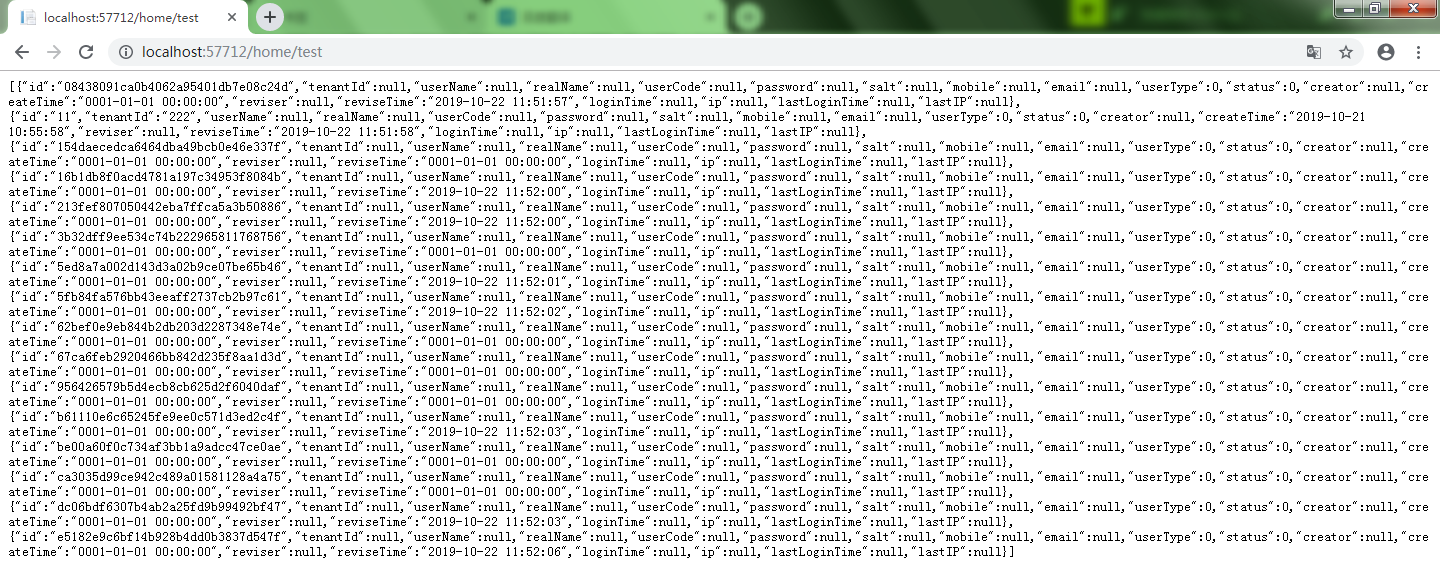
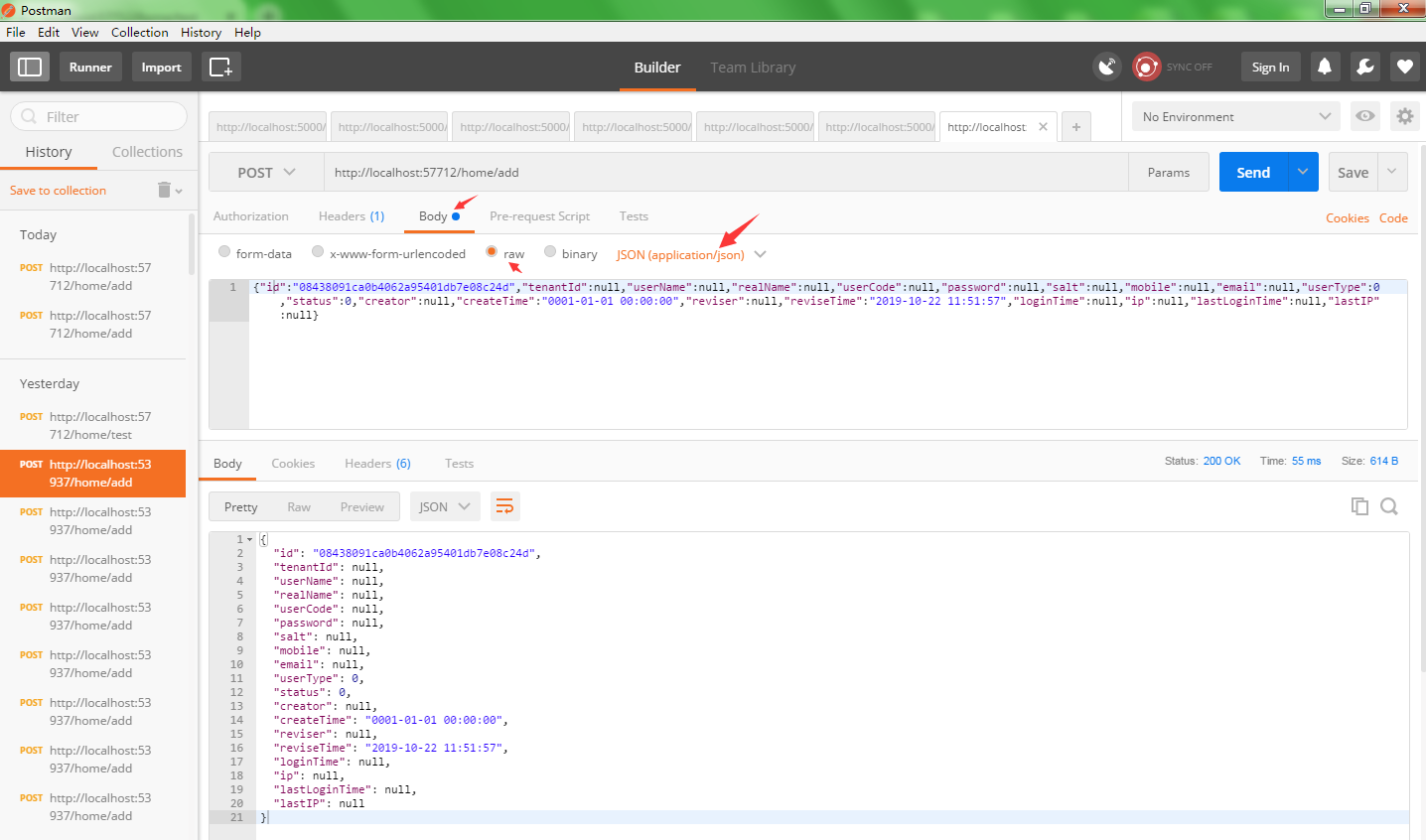
1.9 重点代码说明
1.9.1 URL:/home/test 实体User.cs首字母大写 输出首字母变小写
            //json格式化

            services.AddMvc()

            .AddJsonOptions(options =>

            {

                //忽略循环引用

                //options.SerializerSettings.ReferenceLoopHandling = ReferenceLoopHandling.Ignore;

                //设置序列化时key为驼峰样式,开头字母小写输出  controller调用Josn(对象)

                options.SerializerSettings.ContractResolver = new CamelCasePropertyNamesContractResolver();

                //原样输出

                //options.SerializerSettings.ContractResolver = new DefaultContractResolver();

                //时间格式

                options.SerializerSettings.DateFormatString = "yyyy-MM-dd HH:mm:ss";

                //空值的字段不显示

                //options.SerializerSettings.NullValueHandling = NullValueHandling.Ignore;

            });
1.9.2 URL:/home/add 输入参数首字母小写 自动转化为实体User.cs首字母大写
public IActionResult Add([FromBody] User user)
2.0 User.cs
using System;

namespace EFMysqlNetCodeMvc.Models

{

    /// <summary>

    /// 账号表

    /// </summary>

    public class User

    {

        /// <summary>

        ///

        /// </summary>

        public string Id { get; set; }

        /// <summary>

        ///

        /// </summary>

        public string TenantId { get; set; }

        /// <summary>

        ///

        /// </summary>

        public string UserName { get; set; }

        /// <summary>

        ///

        /// </summary>

        public string RealName { get; set; }

        /// <summary>

        ///

        /// </summary>

        public string UserCode { get; set; }

        /// <summary>

        ///

        /// </summary>

        public string Password { get; set; }

        /// <summary>

        ///

        /// </summary>

        public string Salt { get; set; }

        /// <summary>

        ///

        /// </summary>

        public string Mobile { get; set; }

        /// <summary>

        ///

        /// </summary>

        public string Email { get; set; }

        /// <summary>

        ///

        /// </summary>

        public int UserType { get; set; }

        /// <summary>

        ///

        /// </summary>

        public int Status { get; set; }

        /// <summary>

        ///

        /// </summary>

        public string Creator { get; set; }

        /// <summary>

        ///

        /// </summary>

        public DateTime CreateTime { get; set; }

        /// <summary>

        ///

        /// </summary>

        public string Reviser { get; set; }

        /// <summary>

        ///

        /// </summary>

        public DateTime ReviseTime { get; set; }

        /// <summary>

        ///

        /// </summary>

        public DateTime? LoginTime { get; set; }

        /// <summary>

        ///

        /// </summary>

        public string IP { get; set; }

        /// <summary>

        ///

        /// </summary>

        public DateTime? LastLoginTime { get; set; }

        /// <summary>

        ///

        /// </summary>

        public string LastIP { get; set; }

    }

}
Vs2017 NetCode Mvc EF Mysql 整合2的更多相关文章
- Vs2017 NetCode Mvc EF Mysql 整合1
1 运行环境 vs2017 NetCode2.0 2 NuGet MySql.Data.EntityFrameworkCore 8.0.18 3 源代码 https://github.c ...
- VS2017+EF+Mysql生成实体数据模型(解决闪退的坑) 版本对应才行
最近要使用VS2017+EF+Mysql,在生成实体数据模型踏过一些坑,在此做个总结. 1.先下载并安装 mysql-connector-net-6.9.10.msi 和 mysql-for-vi ...
- VS2017 + EF + MySQL 我使用过程中遇到的坑
原文:VS2017 + EF + MySQL 我使用过程中遇到的坑 写在前面: 第一次使用MySQL连接VS的时候本着最新版的应该就是最好的,在MySQL官网下载了最新版的MySQL没有并且安装完成之 ...
- VS2017+EF+Mysql生成实体数据模型(解决闪退的坑)
原文:VS2017+EF+Mysql生成实体数据模型(解决闪退的坑) 最近要使用VS2017+EF+Mysql,在生成实体数据模型踏过一些坑,在此做个总结. 1.先下载并安装 mysql-connec ...
- spring mvc + mybaties + mysql 完美整合cxf 实现webservice接口 (服务端、客户端)
spring-3.1.2.cxf-3.1.3.mybaties.mysql 整合实现webservice需要的完整jar文件 地址:http://download.csdn.net/detail/xu ...
- Asp.Net MVC EF各版本区别
2009年發行ASP.NET MVC 1.0版 2010年發行ASP.NET MVC 2.0版,VS2010 2011年發行ASP.NET MVC 3.0版+EF4,需要.Net4.0支持,VS2 ...
- [转帖]Asp.Net MVC EF各版本区别
Asp.Net MVC EF各版本区别 https://www.cnblogs.com/liangxiaofeng/p/5840754.html 2009年發行ASP.NET MVC 1.0版 201 ...
- [转]Asp.Net MVC EF各版本区别
本文转自:http://www.cnblogs.com/liangxiaofeng/p/5840754.html 2009年發行ASP.NET MVC 1.0版 2010年發行ASP.NET MVC ...
- vs2012 + web api + OData + EF + MYsql
vs2012 + web api + OData + EF + MYsql 开发及部署 先说下我的情况,b/s开发这块已经很久没有搞了,什么web api .MVC.OData都只是听过,没有实际开发 ...
随机推荐
- django模板--循环控制标签
循环控制标签 在django模板中可以通过循环控制标签对列表进行迭代,循环控制标签又称for标签,语法格式如下: {% for value in value_list %} {{ value }} { ...
- php关于文件上传的两个配置项说明
; Maximum allowed size for uploaded files.; http://php.net/upload-max-filesizeupload_max_filesize = ...
- react 打印页面怎么实现?
2017-11-10 react 打印页面怎么实现?
- TCP使用
TCP使用注意事项总结 目录 发送或者接受数据过程中对端可能发生的情况汇总 本端TCP发送数据时对端进程已经崩溃 本端TCP发送数据时对端主机已经崩溃 本端TCP发送数据时对端主机已经关机 某个连 ...
- Mybatis映射文件sql语句注意事项
1.插入
- layui监听复选按钮点击
layui.form.on('checkbox(resultQuery)', function(data){ console.log(data.elem); //得到checkbox原始DOM对象 c ...
- 关于UBOOT,LINUX内核编译,根文件系统的15个小问题
(1)内核默认运行地址和加载地址在哪里设置? 由 arch/arm/kernel/vmlinux.lds.S 生成的 arch/armkernel/vmlinux.lds决定 (2)从FLASH什 ...
- css之实现下拉框自上而下展开动画效果&&自下而上收起动画效果
HTML代码: <div className={CX('font-size-selector-sub-list', { show: shouldSubListShow === true, hid ...
- phc-winner-argon2、argon2-cffi安装使用方法
Argon2 is a password-hashing function created by by Alex Biryukov, Daniel Dinu, and Dmitry Khovratov ...
- substr函数索引创建测试
技术群里小伙伴,沟通说一条经常查询的SQL缓慢,单表SQL一个列作为条件,列是int数值类型,索引类型默认创建. 一.SQL文本substr函数索引创建测试 ,) nm1 ')需求,将上述SQL执行速 ...