
Devexpress WinForm TreeList的三种数据绑定方式(DataSource绑定、AppendNode添加节点、VirtualTreeGetChildNodes(虚拟树加载模式))
第一种:DataSource绑定,这种绑定方式需要设置TreeList的ParentFieldName和KeyFieldName两个属性,这里需要注意的是KeyFieldName的值必须是唯一的。
代码如下:
 private void Form1_Load(object sender, EventArgs e)

        {

            try

            {

                //构建一个DataTable数据源

                DataTable table = new DataTable();

                table.Columns.Add("parentId");

                table.Columns.Add("Id");

                table.Columns.Add("parentName");

                table.Columns.Add("Name");

                DataRow row = table.NewRow();

                row["parentId"] = "";

                row["Id"] = "*";

                row["Name"] = "所有颜色";

                table.Rows.Add(row);

                row = table.NewRow();

                row["parentId"] = "*";

                row["Id"] = "";

                row["Name"] = "红色";

                table.Rows.Add(row);

                row = table.NewRow();

                row["parentId"] = "*";

                row["Id"] = "";

                row["Name"] = "黄色";

                table.Rows.Add(row);

                row = table.NewRow();

                row["parentId"] = "*";

                row["Id"] = "";

                row["Name"] = "绿色";

                table.Rows.Add(row);

                row = table.NewRow();

                row["parentId"] = "";

                row["Id"] = "";

                row["Name"] = "粉红色";

                table.Rows.Add(row);

                row = table.NewRow();

                row["parentId"] = "";

                row["Id"] = "";

                row["Name"] = "鹅黄色";

                table.Rows.Add(row);

                treeList1.ParentFieldName = "parentId";

                treeList1.KeyFieldName = "Id";

                treeList1.DataSource = table;

                treeList1.ExpandAll();

            }

            catch (Exception ex)

            {

                MessageBox.Show(ex.Message);

            }

        }

        private void treeList1_BeforeCheckNode(object sender, DevExpress.XtraTreeList.CheckNodeEventArgs e)

        {

            e.State = (e.PrevState == CheckState.Checked ? CheckState.Unchecked : CheckState.Checked);

        }

        private void treeList1_AfterCheckNode(object sender, DevExpress.XtraTreeList.NodeEventArgs e)

        {

            try

            {

                SetCheckedChildNodes(e.Node, e.Node.CheckState);

                SetCheckedParentNodes(e.Node, e.Node.CheckState);

            }

            catch (Exception ex)

            {

                MessageBox.Show(ex.Message);

            }

        }

        /// <summary>

        /// 设置子节点的状态

        /// </summary>

        /// <param name="node"></param>

        /// <param name="check"></param>

        private void SetCheckedChildNodes(TreeListNode node, CheckState check)

        {

            for (int i = ; i < node.Nodes.Count; i++)

            {

                node.Nodes[i].CheckState = check;

                SetCheckedChildNodes(node.Nodes[i], check);

            }

        }

        /// <summary>

        /// 设置父节点的状态

        /// </summary>

        /// <param name="node"></param>

        /// <param name="check"></param>

        private void SetCheckedParentNodes(TreeListNode node, CheckState check)

        {

            if (node.ParentNode != null)

            {

                bool b = false;

                CheckState state;

                for (int i = ; i < node.ParentNode.Nodes.Count; i++)

                {

                    state = (CheckState)node.ParentNode.Nodes[i].CheckState;

                    if (!check.Equals(state))

                    {

                        b = !b;

                        break;

                    }

                }

                node.ParentNode.CheckState = b ? CheckState.Checked : check;

                SetCheckedParentNodes(node.ParentNode, check);

            }

        }
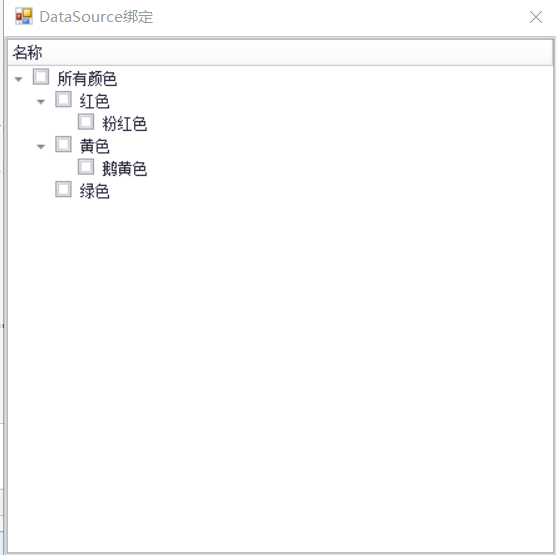
运行效果图:
第二种:AppendNode添加节点
代码如下:
        private void LoadTree()

        {

            //清空节点

            treeList1.BeginUnboundLoad();

            treeList1.ClearNodes();

            arrayList = new List<TreeListNode>();

            //绑定部位树树的第一层

            TreeListNode Node = treeList1.Nodes.Add(new object[] { "所有颜色", "*"});

            Node.Tag = "*";

            arrayList.Add(Node);

            //绑定第二层

            DataSet ds = SqlHelper.Query(@"select ctc.colorId as ParentNodeID,ctc.childcolorId as NodeID, cc.names as NodeName

            from C_colorTocolor ctc(nolock)

            inner join C_color cc(nolock) on ctc.childcolorId=cc.id");

            if (ds != null && ds.Tables.Count > 0)

            {

                table = ds.Tables[0];

                DataRow[] rows = table.Select("ParentNodeID='*'");

                foreach (DataRow row in rows)

                {

                    TreeListNode tn = treeList1.AppendNode(new object[] { row["NodeName"].ToString(), row["NodeID"].ToString() }, Node.Id);

                    tn.Tag = row["NodeID"].ToString();

                    arrayList.Add(tn);

                    BindNode(row["NodeID"].ToString(), tn);

                }

            }

            treeList1.EndUnboundLoad();

            treeList1.ExpandAll();

        }

        private void BindNode(string nodeId, TreeListNode tn)

        {

            DataRow[] rows = table.Select("ParentNodeID='" + nodeId + "'");

            foreach (DataRow row in rows)

            {

                TreeListNode tns = treeList1.AppendNode(new object[] { row["NodeName"].ToString(), row["NodeID"].ToString()}, tn.Id);

                tns.Tag = row["NodeID"].ToString();

                arrayList.Add(tns);

                BindNode(row["NodeID"].ToString(), tns);

            }

        }

        private void Form2_Load(object sender, EventArgs e)

        {

            //绑定树

            LoadTree();

        }
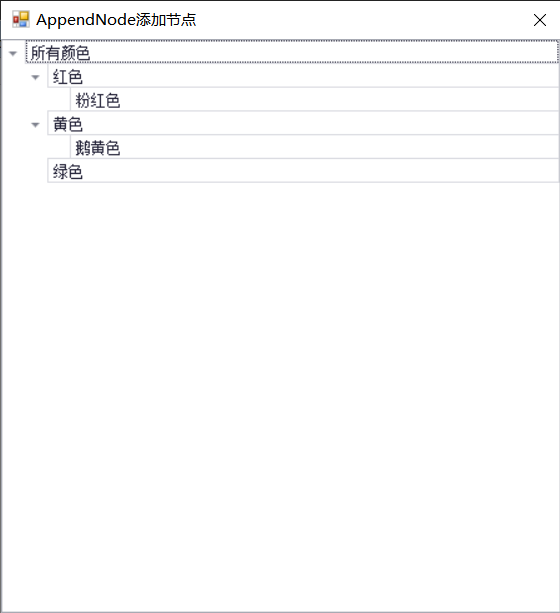
运行效果图:
第三种:VirtualTreeGetChildNodes虚拟树加载。这种模式主要用于数据量过多,打开界面比较慢的情况。
private void Form3_Load(object sender, EventArgs e)

        {

            //初始化树

            InitData();

        }

        bool isload = false;

        void InitData()

        {

            isload = false;

            treeList1.ClearNodes();

            treeList1.DataSource = new object();

        }

        private void treeList1_VirtualTreeGetChildNodes(object sender, DevExpress.XtraTreeList.VirtualTreeGetChildNodesInfo e)

        {

            Cursor current = Cursor.Current;

            Cursor.Current = Cursors.WaitCursor;

            if (!isload)

            {

                List<O_node> roots = new List<O_node> { new O_node() { id= "*", names= "所有颜色",parentid="" } };

                e.Children = roots;

                isload = true;

            }

            else

            {

                try

                {

                    O_node on = e.Node as O_node;

                    if(on!=null)

                    {

                        string sql = string.Format(@"select ctc.colorId as parentid,ctc.childcolorId as id, cc.names as names

                        from C_colorTocolor ctc(nolock)

                        inner join C_color cc(nolock) on ctc.childcolorId = cc.id

                        where ctc.colorId = '{0}'", on.id);

                        DataSet ds  = SqlHelper.Query(sql);

                        if (ds != null && ds.Tables.Count > 0)

                        {

                            List<O_node> lst = (List<O_node>)DataTableToList<O_node>(ds.Tables[0]);

                            e.Children = lst;

                        }

                        else

                        {

                            e.Children = new object[] { };

                        }

                    }

                    else

                    {

                        e.Children = new object[] { };

                    }

                }

                catch

                {

                    e.Children = new object[] { };

                }

            }

            Cursor.Current = current;

        }

        private void treeList1_VirtualTreeGetCellValue(object sender, DevExpress.XtraTreeList.VirtualTreeGetCellValueInfo e)

        {

            string name = string.Empty;

            if (e.Node is O_node)

            {

                name = (e.Node as O_node).names;

            }

            if (e.Column == treeListColumn1) e.CellData = name;

        }

        public static IList<T> DataTableToList<T>(DataTable table)

            where T : class

        {

            if (!IsHaveRows(table))

                return new List<T>();

            IList<T> list = new List<T>();

            T model = default(T);

            foreach (DataRow dr in table.Rows)

            {

                model = Activator.CreateInstance<T>();

                foreach (DataColumn dc in dr.Table.Columns)

                {

                    object drValue = dr[dc.ColumnName];

                    PropertyInfo pi = model.GetType().GetProperty(dc.ColumnName);

                    if (pi != null && pi.CanWrite && (drValue != null && !Convert.IsDBNull(drValue)))

                    {

                        pi.SetValue(model, drValue, null);

                    }

                }

                list.Add(model);

            }

            return list;

        }

        /// <summary>

        /// 检查DataTable 是否有数据行

        /// </summary>

        /// <param name="dt">DataTable</param>

        /// <returns></returns>

        public static bool IsHaveRows(DataTable dt)

        {

            if (dt != null && dt.Rows.Count > 0)

            {

                return true;

            }

            else

            {

                return false;

            }

        }

    }

    #region 节点

    public class O_node

    {

        public string id { get; set; }

        public string names { get; set; }

        public string parentid { get; set; }

    }

    #endregion
运行效果图:


完整示例代码:https://download.csdn.net/download/u012026245/11986777
csdn现在资源积分上传时都是固定积分为5分了,如果需要完整代码的可以去下载一下。
Devexpress WinForm TreeList的三种数据绑定方式(DataSource绑定、AppendNode添加节点、VirtualTreeGetChildNodes(虚拟树加载模式))的更多相关文章
- ListView 的三种数据绑定方式
ListView 的三种数据绑定方式 1.最原始的绑定方式: public ObservableCollection<object> ObservableObj; public Mai ...
- C#Xml的三种创建方式(或者是两种?)和增删改查
一.Xml的创建方式 Xmlwriter(流式读取,Stream) 写过了:https://www.cnblogs.com/dengzhekaihua/p/15438493.html 这种方法虽然快, ...
- C# 三种打印方式含代码
一:C#代码直接打印pdf文件(打印质保书pdf文件) 引用: 代码注释很详细了. private void btn_pdf_Click(object sender, RoutedEventArgs ...
- 【转】vue.js三种安装方式
Vue.js(读音 /vjuː/, 类似于 view)是一个构建数据驱动的 web 界面的渐进式框架.Vue.js 的目标是通过尽可能简单的 API 实现响应的数据绑定和组合的视图组件.它不仅易于上手 ...
- vue.js三种安装方式
Vue.js(读音 /vjuː/, 类似于 view)是一个构建数据驱动的 web 界面的渐进式框架.Vue.js 的目标是通过尽可能简单的 API 实现响应的数据绑定和组合的视图组件.它不仅易于上手 ...
- 通过三个DEMO学会SignalR的三种实现方式
一.理解SignalR ASP .NET SignalR 是一个ASP .NET 下的类库,可以在ASP .NET 的Web项目中实现实时通信(即:客户端(Web页面)和服务器端可以互相实时的通知消息 ...
- Hive metastore三种配置方式
http://blog.csdn.net/reesun/article/details/8556078 Hive的meta数据支持以下三种存储方式,其中两种属于本地存储,一种为远端存储.远端存储比较适 ...
- django 模板语法和三种返回方式
模板 for循环 {% for athlete in athlete_list %} <li>{{ athlete.name }}</li> {% endfor %} if语句 ...
- js的三种继承方式及其优缺点
[转] 第一种,prototype的方式: //父类 function person(){ this.hair = 'black'; this.eye = 'black'; this.skin = ' ...
随机推荐
- 应用fluent二维单向流泥沙冲刷作用下河床变形代码【转载】
本代码转载自:http://www.codeforge.cn/read/260028/keti_2d_b.c__html #include "udf.h" #define Rho ...
- LinkedBlockingQueue和ArrayBlockingQueue的异同
相同: 1.LinkedBlockingQueue和ArrayBlockingQueue都实现了BlockingQueue接口: 2.LinkedBlockingQueue和ArrayBlocking ...
- 浅述不同版本ios系统有什么特点 ios 1 -ios 12
版本记录 版本号 时间 V2.0 2019.08.20 前言 到目前为止,ios的版本已经发到了ios11的测试版,今年正式版马上就会出来,ios发布了这么多的版本,到底每个版本都有什么显著的特点?用 ...
- fastadmin 后台管理中,权限设置,不同管理员,显示不同的数据
1.https://doc.fastadmin.net/docs/controller.html
- web前端——实例中学习css,javascript
最近闲暇时候在研究前端的样式和js,以前都是从w3school上看看那些选择器和DOM操作方法很少去实际做demo来研究,做的过程当中才真切感觉到纸上得来终觉浅,看得懂跟能做出东西完全两码事,尤其在定 ...
- 记录学习Linux遇到的问题
shl@shl-tx:~$ ifconfig Command 'ifconfig' not found, but can be installed with: sudo apt install net ...
- 012-Spring Boot web【一】web项目搭建、请求参数、RestController、使用jsp、freemarker,web容器tomcat和jetty
一.项目搭建 同:http://www.cnblogs.com/bjlhx/p/8324971.html 1)新建maven项目→使用默认配置即可 定义好项目名称等 2)修改jdk版本 <pro ...
- 依靠MySQL(frm、MYD、MYI)数据文件恢复
该方法并不是适用于所有MySQL数据库 此次恢复是朋友那边的数据查不了了,请求我支援,出于各种心理原因,我答应试试,于是就有了这篇文章和这次经历,废话不多说.... 物理条件:宿机是Ubuntu16. ...
- Java NIO学习笔记八 Pipe
Java NIO Pipe Java NIO管道是两个线程之间的单向数据连接.Pipe 具有源信道和接受通道.您将数据写入sink通道.然后可以从源通道读取该数据. 这是一个原理的Pipe流程图: J ...
- mvn安装
先安装jdk.jre,maven需要jdk.jre支持 1.安装 jdk 卸载自带jdk rpm -qa | grep jdk rpm -e --nodeps 下载 JDK JDK 下载地址:http ...