
Android笔记(五十九)Android总结:四大组件——Service篇
什么是服务?
服务(service)是Android中实现程序后台运行的解决方案,适用于去执行那些不需要和用户交互并且还需要长期运行的任务。服务的运行不依赖于任何用户界面。
服务运行在主线程中,所以在service不能用来做一些耗时操作。
服务的用法
1.新建一个继承自Service的类,并实现其抽象方法
2.构建一个Intent
3.使用startService(intent)启动服务
4.使用stopService(intent)停止服务
服务在创建的时候会调用其onCreate()方法,而在每次启动服务的时候都会调用onStartCommand()方法,在服务销毁的时候会调用onDestroy()方法。
Service和Activity的通信
在现实编程中,我们除了要开启关闭Service之外,我们往往还需要获取Service执行的步骤、进度等等,这就需要Service和Activity之间进行通信。
想要Activity和Service之间进行通信,需要使用bindService()和unbindService()方法启动、关闭Service。
bindService()方法有三个参数,分别是:
1.service:通过Intent指定要启动的Service
2.conn:一个ServiceConnection对象,该对用用于监听访问者与Service之间的连接情况。当访问者与Service之间连接成功时将回调该ServiceConnection的onServiceConnectioned方法,当Service所在的宿主进程终止,导致Service与访问者之间断开连接的时回调该ServiceConnection的onServiceDesconnected方法
3.flags:指定绑定时是否自动创建Service(如果该Service还没有创建)。可指定为0(不自动创建),BIND_AUTO_CREATE(自动创建)。
Activity传值给Service
MainActivity.java
package com.example.servicedemo;

import com.example.servicedemo.MyService.MyBinder;

import android.app.Activity;

import android.content.ComponentName;

import android.content.Intent;

import android.content.ServiceConnection;

import android.os.Bundle;

import android.os.IBinder;

import android.util.Log;

import android.view.View;

import android.view.View.OnClickListener;

import android.widget.Button;

import android.widget.TextView;

public class MainActivity extends Activity implements OnClickListener {

    private Button start_service_button, stop_service_button, bind_service_button, unbind_service_button,

            pass_on_message;

    private TextView tvOut;

    private Intent intent;

    private MyBinder myBinder;

    @Override

    protected void onCreate(Bundle savedInstanceState) {

        super.onCreate(savedInstanceState);

        setContentView(R.layout.activity_main);

        start_service_button = (Button) findViewById(R.id.start_service_button);

        stop_service_button = (Button) findViewById(R.id.stop_service_button);

        bind_service_button = (Button) findViewById(R.id.bind_service_button);

        unbind_service_button = (Button) findViewById(R.id.unbind_service_button);

        pass_on_message = (Button) findViewById(R.id.pass_on_message);

        tvOut = (TextView) findViewById(R.id.tvOut);

        start_service_button.setOnClickListener(this);

        stop_service_button.setOnClickListener(this);

        bind_service_button.setOnClickListener(this);

        unbind_service_button.setOnClickListener(this);

        pass_on_message.setOnClickListener(this);

    }

    @Override

    public void onClick(View v) {

        switch (v.getId()) {

        case R.id.start_service_button:

            start();

            break;

        case R.id.stop_service_button:

            stop();

            break;

        case R.id.bind_service_button:

            bind();

            break;

        case R.id.unbind_service_button:

            unbind();

            break;

        case R.id.pass_on_message:

            passOnMessage();

            break;

        }

    }

    // 传递数据

    private void passOnMessage() {

        myBinder.setData("BBBBB");

    }

    // 解除绑定Service

    private void unbind() {

        Intent intent = new Intent(this, MyService.class);

        Log.d("TTTT", "===========点击了unbind按钮============");

        unbindService(conn);

    }

    // 绑定启动service

    private void bind() {

        Intent intent = new Intent(this, MyService.class);

        Log.d("TTTT", "===========点击了bind按钮============");

        bindService(intent, conn, BIND_AUTO_CREATE);

    }

    // 使用stopService关闭Service

    private void stop() {

        Intent intent = new Intent(this, MyService.class);

        Log.d("TTTT", "===========点击了stop按钮============");

        stopService(intent);

    }

    // 使用startService启动Service

    private void start() {

        Intent intent = new Intent(this, MyService.class);

        Log.d("TTTT", "===========点击了start按钮============");

        startService(intent);

    }

    ServiceConnection conn = new ServiceConnection() {

        @Override

        public void onServiceDisconnected(ComponentName name) {

            // TODO Auto-generated method stub

        }

        @Override

        public void onServiceConnected(ComponentName name, IBinder service) {

            myBinder = (MyBinder) service;

        }

    };

}
MyService.java
package com.example.servicedemo;

import android.app.Service;

import android.content.Intent;

import android.os.Binder;

import android.os.IBinder;

import android.util.Log;

public class MyService extends Service {

    private String data = "AAAAA";

    @Override

    public IBinder onBind(Intent intent) {

        Log.d("TTTT", "IBind方法运行了...");

        return new MyBinder();

    }

    @Override

    public void onCreate() {

        Log.d("TTTT", "onCreate方法运行了...");

        new Thread(new Runnable() {

            @Override

            public void run() {

                int j = 0;

                for (int i = 0; i < 30; i++) {

                    try {

                        j++;

                        String str = j + ":" + data;

                        Log.d("TTTT", str);

                        Thread.sleep(1000 * 1);

                    } catch (InterruptedException e) {

                        // TODO Auto-generated catch block

                        e.printStackTrace();

                    }

                }

            }

        }).start();

        super.onCreate();

    }

    @Override

    public void onStart(Intent intent, int startId) {

        // TODO Auto-generated method stub

        super.onStart(intent, startId);

        Log.d("TTTT", "onStart方法运行了...");

    }

    @Override

    public int onStartCommand(Intent intent, int flags, int startId) {

        Log.d("TTTT", "onStartCommand方法运行了...");

        return super.onStartCommand(intent, flags, startId);

    }

    @Override

    public void onDestroy() {

        super.onDestroy();

        Log.d("TTTT", "onDestroy方法运行了...");

    }

    @Override

    public boolean onUnbind(Intent intent) {

        Log.d("TTTT", "onUnbind方法运行了...");

        return super.onUnbind(intent);

    }

    public class MyBinder extends Binder {

        public void setData(String str) {

            data = str;

        }

        public MyService getService() {

            return MyService.this;

        }

    }

}
activity_main.xml
<LinearLayout xmlns:android="http://schemas.android.com/apk/res/android"

    xmlns:tools="http://schemas.android.com/tools"

    android:layout_width="match_parent"

    android:layout_height="match_parent"

    android:orientation="vertical"

    android:paddingBottom="@dimen/activity_vertical_margin"

    android:paddingLeft="@dimen/activity_horizontal_margin"

    android:paddingRight="@dimen/activity_horizontal_margin"

    android:paddingTop="@dimen/activity_vertical_margin"

    tools:context="com.example.servicedemo.MainActivity" >

    <TextView

        android:id="@+id/tvOut"

        android:layout_width="match_parent"

        android:layout_height="wrap_content" />

    <Button

        android:id="@+id/start_service_button"

        android:layout_width="match_parent"

        android:layout_height="wrap_content"

        android:text="开启服务" />

    <Button

        android:id="@+id/stop_service_button"

        android:layout_width="match_parent"

        android:layout_height="wrap_content"

        android:text="关闭服务" />

    <Button

        android:id="@+id/bind_service_button"

        android:layout_width="match_parent"

        android:layout_height="wrap_content"

        android:text="绑定服务" />

    <Button

        android:id="@+id/unbind_service_button"

        android:layout_width="match_parent"

        android:layout_height="wrap_content"

        android:text="解除绑定" />

    <Button

        android:id="@+id/pass_on_message"

        android:layout_width="match_parent"

        android:layout_height="wrap_content"

        android:text="传递数据" />

</LinearLayout>
Service传值给Activity
MainActivity.java
package com.example.passupmessageforservice;

import com.example.passupmessageforservice.MyService.Callback;

import com.example.passupmessageforservice.MyService.MyBinder;

import android.app.Activity;

import android.content.ComponentName;

import android.content.Intent;

import android.content.ServiceConnection;

import android.os.Bundle;

import android.os.Handler;

import android.os.IBinder;

import android.os.Message;

import android.util.Log;

import android.view.View;

import android.view.View.OnClickListener;

import android.widget.Button;

import android.widget.EditText;

import android.widget.TextView;

public class MainActivity extends Activity implements OnClickListener {

    private Button bt_bindService, bt_unbindService, bt_sync;

    private TextView showtext;

    private EditText et_str;

    private Intent intent;

    private MyBinder myBinder;

    @Override

    protected void onCreate(Bundle savedInstanceState) {

        super.onCreate(savedInstanceState);

        setContentView(R.layout.activity_main);

        initView();

        bt_bindService.setOnClickListener(this);

        bt_unbindService.setOnClickListener(this);

        bt_sync.setOnClickListener(this);

    }

    // 初始化view组件

    private void initView() {

        bt_bindService = (Button) findViewById(R.id.bt_bindService);

        bt_unbindService = (Button) findViewById(R.id.bt_unbindService);

        bt_sync = (Button) findViewById(R.id.bt_sync);

        showtext = (TextView) findViewById(R.id.showtext);

        et_str = (EditText) findViewById(R.id.et_str);

    }

    // 响应点击事件

    @Override

    public void onClick(View v) {

        switch (v.getId()) {

        case R.id.bt_bindService:

            bind();

            break;

        case R.id.bt_unbindService:

            unbind();

            break;

        case R.id.bt_sync:

            sync();

            break;

        }

    }

    // 绑定服务

    private void bind() {

        Log.d("TTTT", "=========执行bind方法=========");

        intent = new Intent(this, MyService.class);

        bindService(intent, conn, BIND_AUTO_CREATE);

    }

    // 解除绑定

    private void unbind() {

        Log.d("TTTT", "=========执行unbind方法=========");

        unbindService(conn);

    }

    // 同步数据方法

    private void sync() {

        myBinder.setData(et_str.getText().toString());

    }

    ServiceConnection conn = new ServiceConnection() {

        @Override

        public void onServiceDisconnected(ComponentName name) {

            Log.d("TTTT", "=========执行onServiceDisconnected方法=========");

        }

        @Override

        public void onServiceConnected(ComponentName name, IBinder service) {

            Log.d("TTTT", "=========执行onServiceConnected方法=========");

            myBinder = (MyBinder) service;

            myBinder.getService().setCallback(new Callback() {

                public void change(String str) {

                    Log.d("TTTT", "~~~~~");

                    Message msg = new Message();

                    msg.obj = str;

                    handler.sendMessage(msg);

                }

            });

        }

    };

    Handler handler = new Handler() {

        public void handleMessage(android.os.Message msg) {

            String str = (String) msg.obj;

            showtext.setText(str);

        };

    };

}
MyService.java
package com.example.passupmessageforservice;

import android.app.Service;

import android.content.Intent;

import android.os.Binder;

import android.os.IBinder;

import android.util.Log;

public class MyService extends Service {

    private String logStr = "AAAA";

    private Callback callback = null;

    private boolean status = false;

    @Override

    public IBinder onBind(Intent intent) {

        Log.d("TTTT", "~~~~~~~~~~~~执行onBind方法~~~~~~~~~~~~");

        return new MyBinder();

    }

    @Override

    public boolean onUnbind(Intent intent) {

        Log.d("TTTT", "~~~~~~~~~~~~执行onUnbind方法~~~~~~~~~~~~");

        status = true;

        return super.onUnbind(intent);

    }

    @Override

    public void onCreate() {

        super.onCreate();

        new Thread(new Runnable() {

            @Override

            public void run() {

                for (int i = 0; i < 15; i++) {

                    if (!status) {

                        if (callback != null) {

                            callback.change(i + ":" + logStr);

                            Log.d("TTTT", "================================");

                        }

                        try {

                            Thread.sleep(1000);

                        } catch (InterruptedException e) {

                            // TODO Auto-generated catch block

                            e.printStackTrace();

                        }

                    }

                }

            }

        }).start();

        Log.d("TTTT", "~~~~~~~~~~~~执行onCreate方法~~~~~~~~~~~~");

    }

    @Override

    public int onStartCommand(Intent intent, int flags, int startId) {

        Log.d("TTTT", "~~~~~~~~~~~~执行onStartCommand方法~~~~~~~~~~~~");

        return super.onStartCommand(intent, flags, startId);

    }

    @Override

    public void onDestroy() {

        Log.d("TTTT", "~~~~~~~~~~~~执行onDestroy方法~~~~~~~~~~~~");

        super.onDestroy();

    }

    public class MyBinder extends Binder {

        public void setData(String str) {

            logStr = str;

        }

        public MyService getService() {

            return MyService.this;

        }

    }

    public interface Callback {

        void change(String str);

    }

    public Callback getCallback() {

        return callback;

    }

    public void setCallback(Callback callback) {

        this.callback = callback;

    }

}
activity_main.xml
<LinearLayout xmlns:android="http://schemas.android.com/apk/res/android"

    xmlns:tools="http://schemas.android.com/tools"

    android:layout_width="match_parent"

    android:layout_height="match_parent"

    android:orientation="vertical"

    android:paddingBottom="@dimen/activity_vertical_margin"

    android:paddingLeft="@dimen/activity_horizontal_margin"

    android:paddingRight="@dimen/activity_horizontal_margin"

    android:paddingTop="@dimen/activity_vertical_margin"

    tools:context="com.example.passupmessageforservice.MainActivity" >

    <EditText

        android:id="@+id/et_str"

        android:layout_width="match_parent"

        android:layout_height="wrap_content"

        android:hint="输入要传入的文字" />

    <Button

        android:id="@+id/bt_bindService"

        android:layout_width="match_parent"

        android:layout_height="wrap_content"

        android:text="绑定服务" />

    <Button

        android:id="@+id/bt_unbindService"

        android:layout_width="match_parent"

        android:layout_height="wrap_content"

        android:text="解除绑定" />

    <Button

        android:id="@+id/bt_sync"

        android:layout_width="match_parent"

        android:layout_height="wrap_content"

        android:text="同步数据" />

    <TextView

        android:id="@+id/showtext"

        android:layout_width="match_parent"

        android:layout_height="wrap_content" />

</LinearLayout>
Service的生命周期
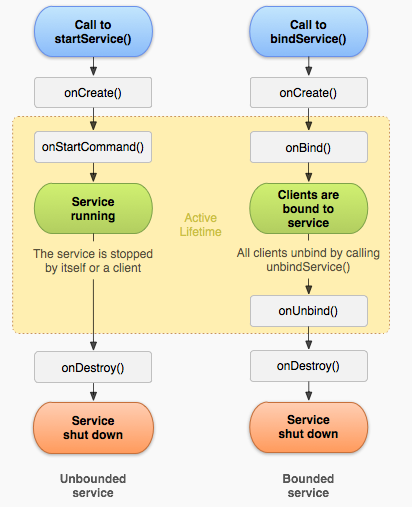
Service的生命周期,从创建到销毁,有两条不同的路径。
直接启动
使用startService()启动Service,初次启动会先调用onCreate()方法,然后调用onStartCommand()方法,创建Service之后,之后不会再调用onCreate()方法
这种Service可以无限的运行下去,必须调用stopSelf()方法或者其他组件调用stopService()方法来停止它
停止时会调用其onDestroy()方法来销毁这个Service
绑定启动
被绑定的Service是当其他组件调用bindService来创建的
初次绑定会调用onCreate()方法,之后便不会再调用
紧接着会调用onBind()方法
当别的组件调用unbindService()时候,会调用Service的unbind方法,紧接着调用onDestroy()方法。
Android笔记(五十九)Android总结:四大组件——Service篇的更多相关文章
- Android笔记(六十九) 仿微信界面(一)
综合之前的Fragment和自定义组件的知识,实现微信界面 MainActivity.java package cn.lixyz.test; import android.app.Acti ...
- Android笔记(十九) Android中的Fragment
通常我们使用Activity来展示界面,但是在手机上界面可能显示的很好看,但在平板上,因为平板的屏幕非常大,手机的界面放在平板上可能会出现控件被拉长.控件之间间距变大等问题.为了更好的体验效果,在Ac ...
- Android笔记二十四.Android基于回调的事件处理机制
假设说事件监听机制是一种托付式的事件处理,那么回调机制则与之相反,对于基于回调的事件处理模型来说,事件源和事件监听器是统一的,或者说事件监听器全然消失了,当用户在GUI控件上激发某个事件时,控 ...
- Android笔记(六十六) android中的动画——XML文件定义属性动画
除了直接在java代码中定义动画之外,还可以使用xml文件定义动画,以便重用. 如果想要使用XML来编写动画,首先要在res目录下面新建一个animator文件夹,所有属性动画的XML文件都应该存放在 ...
- Android笔记(六十四) android中的动画——补间动画(tweened animation)
补间动画就是只需要定义动画开始和结束的位置,动画中间的变化由系统去补齐. 补间动画由一下四种方式: 1.AplhaAnimation——透明度动画效果 2.ScaleAnimation ——缩放动画效 ...
- Android笔记(十) Android中的布局——表格布局
TableLayout运行我们使用表格的方式来排列控件,它的本质依然是线性布局.表格布局采用行.列的形式来管理控件,TableLayout并不需要明确的声明包含多少行多少列,而是通过添加TableRo ...
- 论文阅读笔记五十九:Res2Net: A New Multi-scale Backbone Architecture(CVPR2019)
论文原址:https://arxiv.org/abs/1904.01169 摘要 视觉任务中多尺寸的特征表示十分重要,作为backbone的CNN的对尺寸表征能力越强,性能提升越大.目前,大多数多尺寸 ...
- Android Studio(五):修改Android Studio项目包名
Android Studio相关博客: Android Studio(一):介绍.安装.配置 Android Studio(二):快捷键设置.插件安装 Android Studio(三):设置Andr ...
- Android实训案例(六)——四大组件之一BroadcastReceiver的基本使用,拨号,短信,SD卡,开机,应用安装卸载监听
Android实训案例(六)--四大组件之一BroadcastReceiver的基本使用,拨号,短信,SD卡,开机,应用安装卸载监听 Android中四大组件的使用时重中之重,我这个阶段也不奢望能把他 ...
随机推荐
- Node add Test1
root_group->addChild(node22); osg::Vec3f vec3f1 = node22->getBound().center(); osg::NodePathLi ...
- (obj) error: LNK2019: 无法解析的外部符号解决方法
利用VS2010 C++ 调用 labview生成的动态库编程时无法生成exe 报错信息: Cjj_32.obj : error LNK2019: 无法解析的外部符号 _GetPXIResource@ ...
- LinQ中合并、连接、相交、与非查询
LinQ中Union合并查询:连接不同的集合,自动过滤相同项:延迟.即是将两个集合进行合并操作,过滤相同的项 var cities = (from p in mylinq.System_Places ...
- [LeetCode] 482. License Key Formatting 注册码格式化
You are given a license key represented as a string S which consists only alphanumeric character and ...
- Component 'TABCTL32.OCX'错误的处理方法
错误:Component 'TABCTL32.OCX' or one of its dependencies not correctyly registered:a file is missing o ...
- nrm -- npm镜像源管理
nrm nrm(npm registry manager )是npm的镜像源管理工具,有时候国外资源太慢,使用这个就可以快速地在 npm 源间切换 安装nrm 在命令行执行命令,npm install ...
- java内存泄露/溢出等常见问题模拟及原因分析
Java 8:从持久代到metaspace 系统稳定性--OutOfMemoryError 常见原因及解决方法 java各种异常问题示例(附pdf下载): java.lang.OutOfMemoryE ...
- elasticsearch的数据写入流程及优化
Elasticsearch 写入流程及优化 一. 集群分片设置:ES一旦创建好索引后,就无法调整分片的设置,而在ES中,一个分片实际上对应一个lucene 索引,而lucene索引的读写会占用很多的系 ...
- 对QT多线程以及事件投递的理解
1.使用QObject子类的movetothread方法 代替 QThread子类的run 实现多线程. 使用原始QThread对象的start方法启动线程==>连接原始QThread对象的st ...
- linux服务器通过X11实现图形化界面显示
1 背景描述 有些LINUX服务器出于性能和效率的考虑,通常都是没有安装图形化界面的,那么图形化程序在服务器上压根儿就跑不起来,或者无法直接显示出来,这就很尴尬了!那么如何解决这个问题呢?可以基于X1 ...