
prometheus自定义监控指标——实战
上一节介绍了pushgateway的作用、优劣以及部署使用,本机通过几个实例来重温一下自定义监控指标是如何使用的。
一、监控容器启动时间(shell)
使用prometheus已经两个月了,但从未找到容器运行时间的指标(有一个类似的指标是容器创建时间)。学会自定义监控指标后,第一个实例就应该来搞定它。
前提条件是,部署好pushagateway!
在被监控机器上(linux),创建以下脚本
#!/bin/bash

allname=`docker ps --format "{{.Names}}"`              #获取所有运行的容器名称

function dockerruntime(){

    t=`docker inspect -f '{{.State.StartedAt}}' $1`          #获取各个容器的启动时间

    t1=`date +%s -d "$t"`                                    #将时间转成时间戳

    t2=`date +%s`                                            #获取当前时间的时间戳

    let tt=t2-t1                                             #计算运行时间

    echo $tt

}

sudo rm -f a

echo """# TYPE docker_runtime gauge

# HELP docker_runtime time sec""" >> a                       #将往pushgateway上传的数据写入a文件

for i in ${allname}

do

    t=`dockerruntime $i`

    echo "docker_runtime{name=\"$i\"} $t" >> a               #格式化写入数据  不能使用单引号  会屏蔽$i的

done

curl --data-binary "@a" http://pushgatewayIP:9091/metrics/job/docker_runtime/instance/xa-lsr-billubuntu       #修改地址和参数名向特定的url上传数据 数在a文件中

sudo rm -f a    #清空临时文件
给该脚本加执行权限,执行后,登陆pushgateway的webUI
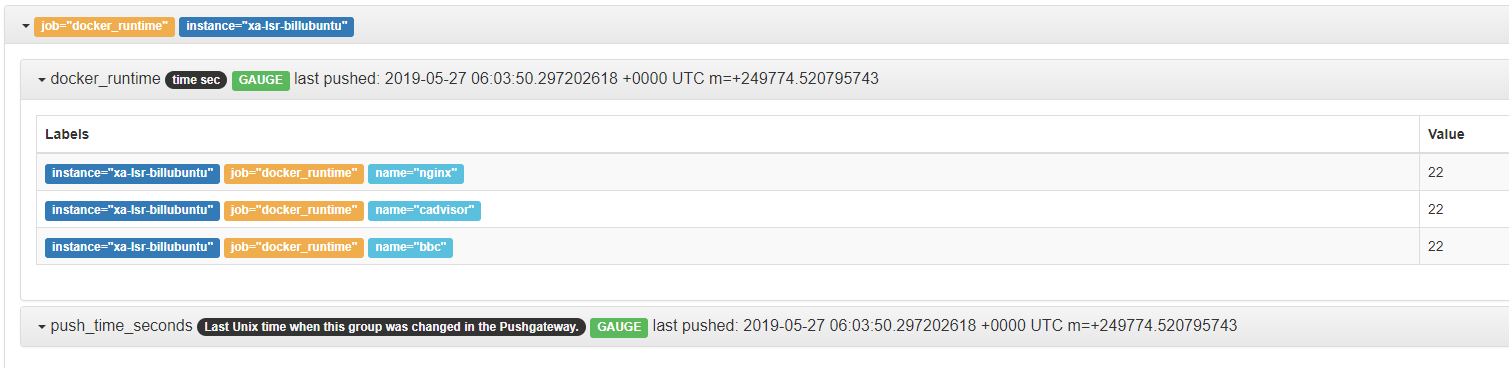
可以看到被监控机器给pushgateway,PUSH了数据,意思是在被监控机器上搜索到了三个容器,每个job的名称叫“docker_runtime”
将该脚本加入周期性计划任务中,每分钟执行一次,若对时间有要求,可以将上述脚本稍加修改,每15s或30s执行一次。
此时在prometheus中的query的查询框中输入“docker_runtime”便可获取上述数据。
【注意】
注意上传数据的类型
如果上传的数据类型是 UNTYPE 那么 prometheus将无法识别,导致整个pushgateway数据无法接受!因此需要格外关注发送的数据格式。
数据类型只有四种 counter gauge summary histogram
二、python向pushgateway发送数据
安装prometheus客户端
pip install prometheus_client
1、counter类型
#counter是可增长的,重启时候会被置成0,用于任务个数,只增不减
#使用flask构建一个建议的网页
     import prometheus_client

	from prometheus_client import Counter

	from prometheus_client.core import CollectorRegistry

	from flask import Response, Flask

	app = Flask(__name__)

	requests_total = Counter("request_count", "Total request cout of the host")

	@app.route("/metrics")

	def requests_count():

	    requests_total.inc()

	    # requests_total.inc(2)	每一次刷新会增加2

	    return Response(prometheus_client.generate_latest(requests_total),

	                    mimetype="text/plain")

	@app.route('/')

	def index():

	    requests_total.inc()

	    return "Hello World"

	if __name__ == "__main__":

	    app.run(host="0.0.0.0")
结果:
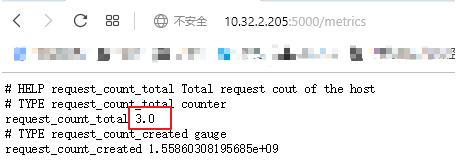
2、gauage类型
	import prometheus_client

	from prometheus_client import Counter,Gauge

	from prometheus_client.core import CollectorRegistry

	from flask import Response, Flask

	app = Flask(__name__)

	g = Gauge("random_value", "Random value of the request")

	@app.route("/metrics")

	def s():

	    with open("a.txt",'r') as f:

	        num=f.read()

	    g.set(num)

	    return Response(prometheus_client.generate_latest(g),

	                    mimetype="text/plain")

	@app.route('/')

	def index():

	    requests_total.inc()

	    return "Hello World"

	if __name__ == "__main__":

    app.run(host="0.0.0.0")
结果:
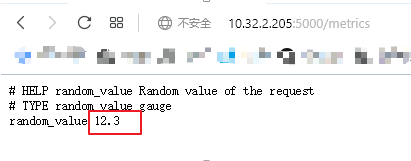
以上作用是在本地生成一个小型网站,下一步是将选定的数据发送到pushgateway
#在被监控机上写python代码

#CollectorRegistry可以同时注册多个自定义指标并返回给prometheus

importprometheus_client

fromprometheus_clientimportGauge

fromprometheus_client.coreimportCollectorRegistry

importrequests

defv1(): #获取监控数据的值

	return2.3

defv2():

	return3.60

n1=v1()

n2=v2()

REGISTRY=CollectorRegistry(auto_describe=False)

#自定义指标必须利用CollectorRegistry进行注册,注册后返回给prometheus

#CollectorRegistry必须提供register,一个指标收集器可以注册多个collectoryregistry

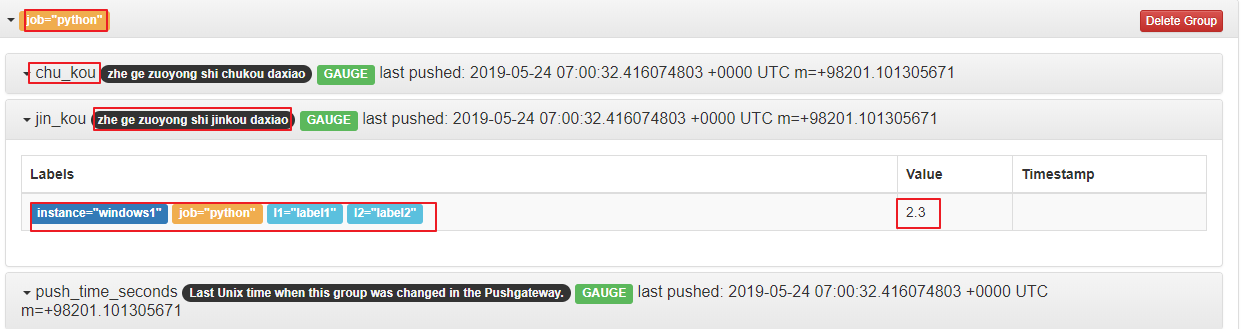
jin=Gauge("jin_kou","zhegezuoyongshijinkoudaxiao",["l1",'l2','instance'],registry=REGISTRY)

chu=Gauge("chu_kou","zhegezuoyongshichukoudaxiao",["l1",'l2','instance'],registry=REGISTRY)

	#“jin_kou” 指标名称

	# "zhegezuoyongshichukoudaxiao"  指标的注释信息

	# "[]"  定义标签的类别及个数

jin.labels(l1="label1",l2="label2",instance="windows1").inc(n1)

chu.labels(l1="label1",l2="label2",instance="windows1").inc(n2)

	#“[]”中有几个,就需要写几个个数要完全一致

requests.post("http://pushgatewayIP:9091/metrics/job/python/",data=prometheus_client.generate_latest(REGISTRY))

	#向指定的API发送post信息,将注册的信息发过去

	#API中的 “python”是 job的名字
结果:
prometheus自定义监控指标——实战的更多相关文章
- prometheus自定义监控指标——入门
grafana结合prometheus提供了大量的模板,虽然这些模板几乎监控到了常见的监控指标,但是有些特殊的指标还是没能提供(也可能是我没找到指标名称).受zabbix的影响,自然而然想到了自定义监 ...
- Prometheus自定义监控内容
Prometheus自定义监控内容 一.io.micrometer的使用 1.1 Counter 1.2 Gauge 1.3 Timer 1.4 Summary 二.扩展 相关内容原文地址: 博客园: ...
- Prometheus自定义监控告警项-3
prometheus 编写告警规则 将自定义的告警规则写到独立的文件中,prometheus.yml中引用如下: rule_files: - "rules/*.yml" [root ...
- .NetCore下使用Prometheus实现系统监控和警报 (六)进阶Grafana集成自定义收集指标
Prometheus中包含了很多收集指标,那么我们怎来在Grafana中来使用呢? 接下来我们还是以之前自定义的来演示如图:我们在Prometheus中已经可以看到这个之前我们自定义的类型了 关于Gr ...
- Spring cloud微服务安全实战-7-6自定义metrics监控指标(1)
自己写代码来定义一个metrics,然后让prmetheus收走,在grafana里面定义一个panel并展示出来. prometheus的四种metrics指标.虽然所有的metrics都是数字,但 ...
- 实战 Prometheus 搭建监控系统
实战 Prometheus 搭建监控系统 Prometheus 是一款基于时序数据库的开源监控告警系统,说起 Prometheus 则不得不提 SoundCloud,这是一个在线音乐分享的平台,类似于 ...
- Prometheus Operator自定义监控项
Prometheus Operator默认的监控指标并不能完全满足实际的监控需求,这时候就需要我们自己根据业务添加自定义监控.添加一个自定义监控的步骤如下: 1.创建一个ServiceMonitor对 ...
- Spring Boot 揭秘与实战(九) 应用监控篇 - 自定义监控端点
文章目录 1. 继承 AbstractEndpoint 抽象类 2. 创建端点配置类 3. 运行 4. 源代码 Spring Boot 提供的端点不能满足我们的业务需求时,我们可以自定义一个端点. 本 ...
- Docker下实战zabbix三部曲之三:自定义监控项
通过上一章<Docker下实战zabbix三部曲之二:监控其他机器>的实战,我们了解了对机器的监控是通过在机器上安装zabbix agent来完成的,zabbix agent连接上zabb ...
随机推荐
- 第一次有人把 5G 讲的这么简单明了
一个简单且神奇的公式 今天的故事,从一个公式开始讲起.这是一个既简单又神奇的公式.说它简单,是因为它一共只有 3 个字母.而说它神奇,是因为这个公式蕴含了博大精深的通信技术奥秘,这个星球上有无数 ...
- Kafka学习笔记之K8S内filebeat传输到kafka报错带解决方案
0x00 概述 filebeat非常轻量级,正常情况下占用的资源几乎都能忽略不计,但是部署后发现资源占用很大,所以怀疑是filebeat本身出了问题. 第一时间查看filebeat日志(默认路径/va ...
- .NET MVC 支付宝支付(即时到账)
已经好久没有搞过.NET了,朋友有一个网站 ,需要接入支付宝功能,重新对接了一下. 1.开发前,需要一个企业支付宝账号登录,获取 PID和 配置密钥 官方文档:https://docs.open.al ...
- asp.net 路由注册
webapi的路由注册 mvc的路由注册 urlRoutingModule路由
- Salesforce LWC学习(一)Salesforce DX配置
LWC: Create a Salesforce DX Project and Lightning Web Component:https://www.youtube.com/watch?v=p268 ...
- v-on 事件触发
1.v-on 绑定事件 2.methods: 事件绑定语法. 3.v-on:click 可以简写成@click 但是在mvc中会有问题 <!DOCTYPE html> <html&g ...
- win10桌面左下角搜索框无法搜索解决办法
方法1.首先看下window search服务是不是被禁止或者停止运行了,如果停止了,就重新启动看看. 方法2.如果上面的方法还没有解决的话:任务管理器-详细信息--结束explorer.exe进程- ...
- Kubernetes概念之RC
感觉自己浪费了一年的时间,种一棵树最好的时间是十年前,还有就是现在,虽然这颗树种了又种,种了又种,这次真的要种了...... 本文通过<Kubernetes权威指南>的概念部分学习总结 ...
- .net web api 权限验证
做一个登录权限验证. 开始吧. using System; using System.Collections.Generic; using System.Drawing; using System.D ...
- windows系统DOC命令启动或停止服务
-- 启动服务 -- net start Mysql -- 停止服务 -- net stop Mysql-- 说明:MysqL没有大小写区分.可以直接小写mysql. -- 启动报错(net star ...