
kubernetes 1.14安装部署EFK日志收集系统
简单介绍:
EFK 组合插件是k8s项目的一个日志解决方案,它包括三个组件:Elasticsearch, Fluentd, Kibana。相对于ELK这样的架构,k8s官方推行了EFK,可能Fluentd相对于Logstash更加轻量级吧。
Elasticsearch 是日志存储和日志搜索引擎,Fluentd 负责把k8s集群的日志发送给 Elasticsearch, Kibana 则是可视化界面查看和检索存储在 Elasticsearch 的数据。
GitHub官网:https://github.com/kubernetes/kubernetes/tree/master/cluster/addons/fluentd-elasticsearch
特别补充:
Kubernetes官方推荐的EFK组合,其实对于我们大多数公司来说并不合适,其中一点原因就是这个组合需要应用日志打印到标准输出。
推荐做法:还是使用传统的ELK组合,ELK可以部署在K8S集群之外,日志写入指定存储目录文件中,并采用filebeat方式采集。
测试环境:
| System | Hostname | IP |
| CentOS 7.6 | k8s-master | 138.138.82.14 |
| CentOS 7.6 | k8s-node1 | 138.138.82.15 |
| CentOS 7.6 | k8s-node2 | 138.138.82.16 |
注:以下是简单的安装部署操作,实际用于生产环境的话还要根据不同的后端存储进而修改yaml中的相应存储路径。
操作步骤:
1. 获取yaml文件
从github官网下载:https://github.com/kubernetes/kubernetes/tree/master/cluster/addons/fluentd-elasticsearch
解压后yanl文件位置: kubernetes/cluster/addons/fluentd-elasticsearch/
复制yaml文件到另一处进行修改操作:
[root@k8s-master ~]# mkdir efk

[root@k8s-master ~]# cp kubernetes/cluster/addons/fluentd-elasticsearch/*.yaml  efk/

[root@k8s-master ~]# cd efk/

[root@k8s-master efk]# ll

总用量 36

-rw-r--r-- 1 root root   382 5月   5 13:55 es-service.yaml

-rw-r--r-- 1 root root  2906 5月   5 14:44 es-statefulset.yaml

-rw-r--r-- 1 root root 16124 5月   5 13:55 fluentd-es-configmap.yaml

-rw-r--r-- 1 root root  2702 5月   5 13:55 fluentd-es-ds.yaml

-rw-r--r-- 1 root root  1052 5月   5 13:55 kibana-deployment.yaml

-rw-r--r-- 1 root root   354 5月   5 13:55 kibana-service.yaml
2. 准备镜像(在所有主机上)
注:因为被墙的缘故,加上镜像文件比较大,启动会费时,可以提前单独下载好所需镜像。
①修改 es-statefulset.yaml (https://www.docker.elastic.co/#)

②修改 fluentd-es-ds.yaml

③无需修改 kibana-deployment.yaml

说明:关于kibana镜像以-oss结尾的版本好奇(default release that contains the commercially licensed code. The release that contains only open source will have the -oss appended to it.):
https://www.elastic.co/guide/en/kibana/6.0/docker.html
附上镜像拉取文本:
~]# docker pull docker.elastic.co/elasticsearch/elasticsearch:6.6.

~]# docker pull registry.cn-hangzhou.aliyuncs.com/google_containers/fluentd-elasticsearch:v2.4.0

~]# docker pull docker.elastic.co/kibana/kibana-oss:6.6.
3. 发布yaml文件到k8s中
[root@k8s-master efk]# kubectl apply -f .
4. 查看各pod状态
[root@k8s-master efk]# kubectl get po -n kube-system -o wide

NAME                                    READY   STATUS    RESTARTS   AGE     IP              NODE         NOMINATED NODE   READINESS GATES

calico-node-b78m4                       /     Running             7d1h    138.138.82.16   k8s-node2    <none>           <none>

calico-node-r5mlj                       /     Running             7d1h    138.138.82.14   k8s-master   <none>           <none>

calico-node-z5tdh                       /     Running             7d1h    138.138.82.15   k8s-node1    <none>           <none>

coredns-fb8b8dccf-6mgks                 /     Running             7d1h    192.168.0.7     k8s-master   <none>           <none>

coredns-fb8b8dccf-cbtlx                 /     Running             7d1h    192.168.0.6     k8s-master   <none>           <none>

elasticsearch-logging-0                 /     Running             10m     192.168.2.11    k8s-node2    <none>           <none>

elasticsearch-logging-1                 /     Running             10m     192.168.1.17    k8s-node1    <none>           <none>

etcd-k8s-master                         /     Running             7d1h    138.138.82.14   k8s-master   <none>           <none>

fluentd-es-v2.4.0-fm9n2                 /     Running             10m     192.168.1.16    k8s-node1    <none>           <none>

fluentd-es-v2.4.0-xjx6h                 /     Running             10m     192.168.2.10    k8s-node2    <none>           <none>

kibana-logging-f4d99b69f-hc4h9          /     Running             10m     192.168.1.15    k8s-node1    <none>           <none>

kube-apiserver-k8s-master               /     Running             7d1h    138.138.82.14   k8s-master   <none>           <none>

kube-controller-manager-k8s-master      /     Running             7d1h    138.138.82.14   k8s-master   <none>           <none>

kube-proxy-c9xd2                        /     Running             7d1h    138.138.82.14   k8s-master   <none>           <none>

kube-proxy-fp2r2                        /     Running             7d1h    138.138.82.15   k8s-node1    <none>           <none>

kube-proxy-lrsw7                        /     Running             7d1h    138.138.82.16   k8s-node2    <none>           <none>

kube-scheduler-k8s-master               /     Running             7d1h    138.138.82.14   k8s-master   <none>           <none>

kubernetes-dashboard-5f7b999d65-45vlk   /     Running             6d7h    192.168.1.14    k8s-node1    <none>           <none>

metrics-server-7579f696d8-pgcc4         /     Running             6d22h   192.168.1.12    k8s-node1    <none>           <none>
顺利的话,稍等一小会就成功running状态了。如果有问题,就查看容器日志,基本上可以定位到所有错误原因。
5. 查看kibana
留意kibana的日志输出,这里给出我的实际一段:
[root@k8s-master efk]# kubectl logs -n kube-system kibana-logging-f4d99b69f-hc4h9 -f

{"type":"log","@timestamp":"2019-05-05T08:02:58Z","tags":["warning","config","deprecation"],"pid":,"message":"You should set server.basePath along with server.rewriteBasePath. Starting in 7.0, Kibana will expect that all requests start with server.basePath rather than expecting you to rewrite the requests in your reverse proxy. Set server.rewriteBasePath to false to preserve the current behavior and silence this warning."}

{"type":"log","@timestamp":"2019-05-05T08:02:58Z","tags":["plugin","warning"],"pid":,"path":"/usr/share/kibana/src/legacy/core_plugins/ems_util","message":"Skipping non-plugin directory at /usr/share/kibana/src/legacy/core_plugins/ems_util"}

{"type":"log","@timestamp":"2019-05-05T08:02:59Z","tags":["warning","elasticsearch","config","deprecation"],"pid":,"message":"Config key \"url\" is deprecated. It has been replaced with \"hosts\""}

{"type":"log","@timestamp":"2019-05-05T08:03:00Z","tags":["status","plugin:kibana@6.6.1","info"],"pid":,"state":"green","message":"Status changed from uninitialized to green - Ready","prevState":"uninitialized","prevMsg":"uninitialized"}

{"type":"log","@timestamp":"2019-05-05T08:03:00Z","tags":["status","plugin:elasticsearch@6.6.1","info"],"pid":,"state":"yellow","message":"Status changed from uninitialized to yellow - Waiting for Elasticsearch","prevState":"uninitialized","prevMsg":"uninitialized"}

{"type":"log","@timestamp":"2019-05-05T08:03:00Z","tags":["status","plugin:console@6.6.1","info"],"pid":,"state":"green","message":"Status changed from uninitialized to green - Ready","prevState":"uninitialized","prevMsg":"uninitialized"}

{"type":"log","@timestamp":"2019-05-05T08:03:00Z","tags":["error","elasticsearch","admin"],"pid":,"message":"Request error, retrying\nHEAD http://elasticsearch-logging:9200/ => connect ECONNREFUSED 10.100.54.183:9200"}

{"type":"log","@timestamp":"2019-05-05T08:03:00Z","tags":["warning","elasticsearch","admin"],"pid":,"message":"Unable to revive connection: http://elasticsearch-logging:9200/"}

{"type":"log","@timestamp":"2019-05-05T08:03:00Z","tags":["warning","elasticsearch","admin"],"pid":,"message":"No living connections"}

{"type":"log","@timestamp":"2019-05-05T08:03:00Z","tags":["status","plugin:elasticsearch@6.6.1","error"],"pid":,"state":"red","message":"Status changed from yellow to red - Unable to connect to Elasticsearch.","prevState":"yellow","prevMsg":"Waiting for Elasticsearch"}

{"type":"log","@timestamp":"2019-05-05T08:03:01Z","tags":["status","plugin:interpreter@6.6.1","info"],"pid":,"state":"green","message":"Status changed from uninitialized to green - Ready","prevState":"uninitialized","prevMsg":"uninitialized"}

{"type":"log","@timestamp":"2019-05-05T08:03:01Z","tags":["status","plugin:metrics@6.6.1","info"],"pid":,"state":"green","message":"Status changed from uninitialized to green - Ready","prevState":"uninitialized","prevMsg":"uninitialized"}

{"type":"log","@timestamp":"2019-05-05T08:03:01Z","tags":["status","plugin:timelion@6.6.1","info"],"pid":,"state":"green","message":"Status changed from uninitialized to green - Ready","prevState":"uninitialized","prevMsg":"uninitialized"}

{"type":"log","@timestamp":"2019-05-05T08:03:03Z","tags":["warning","elasticsearch","admin"],"pid":,"message":"Unable to revive connection: http://elasticsearch-logging:9200/"}

{"type":"log","@timestamp":"2019-05-05T08:03:03Z","tags":["warning","elasticsearch","admin"],"pid":,"message":"No living connections"}

{"type":"log","@timestamp":"2019-05-05T08:03:06Z","tags":["warning","elasticsearch","admin"],"pid":,"message":"Unable to revive connection: http://elasticsearch-logging:9200/"}

{"type":"log","@timestamp":"2019-05-05T08:03:06Z","tags":["warning","elasticsearch","admin"],"pid":,"message":"No living connections"}

{"type":"log","@timestamp":"2019-05-05T08:03:08Z","tags":["warning","elasticsearch","admin"],"pid":,"message":"Unable to revive connection: http://elasticsearch-logging:9200/"}

{"type":"log","@timestamp":"2019-05-05T08:03:08Z","tags":["warning","elasticsearch","admin"],"pid":,"message":"No living connections"}

{"type":"log","@timestamp":"2019-05-05T08:03:11Z","tags":["warning","elasticsearch","admin"],"pid":,"message":"Unable to revive connection: http://elasticsearch-logging:9200/"}

{"type":"log","@timestamp":"2019-05-05T08:03:11Z","tags":["warning","elasticsearch","admin"],"pid":,"message":"No living connections"}

{"type":"log","@timestamp":"2019-05-05T08:03:13Z","tags":["warning","elasticsearch","admin"],"pid":,"message":"Unable to revive connection: http://elasticsearch-logging:9200/"}

{"type":"log","@timestamp":"2019-05-05T08:03:13Z","tags":["warning","elasticsearch","admin"],"pid":,"message":"No living connections"}

{"type":"log","@timestamp":"2019-05-05T08:03:16Z","tags":["warning","elasticsearch","admin"],"pid":,"message":"Unable to revive connection: http://elasticsearch-logging:9200/"}

{"type":"log","@timestamp":"2019-05-05T08:03:16Z","tags":["warning","elasticsearch","admin"],"pid":,"message":"No living connections"}

{"type":"log","@timestamp":"2019-05-05T08:03:18Z","tags":["warning","elasticsearch","admin"],"pid":,"message":"Unable to revive connection: http://elasticsearch-logging:9200/"}

{"type":"log","@timestamp":"2019-05-05T08:03:18Z","tags":["warning","elasticsearch","admin"],"pid":,"message":"No living connections"}

{"type":"log","@timestamp":"2019-05-05T08:03:21Z","tags":["warning","elasticsearch","admin"],"pid":,"message":"Unable to revive connection: http://elasticsearch-logging:9200/"}

{"type":"log","@timestamp":"2019-05-05T08:03:21Z","tags":["warning","elasticsearch","admin"],"pid":,"message":"No living connections"}

{"type":"log","@timestamp":"2019-05-05T08:03:23Z","tags":["warning","elasticsearch","admin"],"pid":,"message":"Unable to revive connection: http://elasticsearch-logging:9200/"}

{"type":"log","@timestamp":"2019-05-05T08:03:23Z","tags":["warning","elasticsearch","admin"],"pid":,"message":"No living connections"}

{"type":"log","@timestamp":"2019-05-05T08:03:26Z","tags":["warning","elasticsearch","admin"],"pid":,"message":"Unable to revive connection: http://elasticsearch-logging:9200/"}

{"type":"log","@timestamp":"2019-05-05T08:03:26Z","tags":["warning","elasticsearch","admin"],"pid":,"message":"No living connections"}

{"type":"log","@timestamp":"2019-05-05T08:03:28Z","tags":["warning","elasticsearch","admin"],"pid":,"message":"Unable to revive connection: http://elasticsearch-logging:9200/"}

{"type":"log","@timestamp":"2019-05-05T08:03:28Z","tags":["warning","elasticsearch","admin"],"pid":,"message":"No living connections"}

{"type":"log","@timestamp":"2019-05-05T08:03:31Z","tags":["warning","elasticsearch","admin"],"pid":,"message":"Unable to revive connection: http://elasticsearch-logging:9200/"}

{"type":"log","@timestamp":"2019-05-05T08:03:31Z","tags":["warning","elasticsearch","admin"],"pid":,"message":"No living connections"}

{"type":"log","@timestamp":"2019-05-05T08:03:33Z","tags":["warning","elasticsearch","admin"],"pid":,"message":"Unable to revive connection: http://elasticsearch-logging:9200/"}

{"type":"log","@timestamp":"2019-05-05T08:03:33Z","tags":["warning","elasticsearch","admin"],"pid":,"message":"No living connections"}

{"type":"log","@timestamp":"2019-05-05T08:03:36Z","tags":["warning","elasticsearch","admin"],"pid":,"message":"Unable to revive connection: http://elasticsearch-logging:9200/"}

{"type":"log","@timestamp":"2019-05-05T08:03:36Z","tags":["warning","elasticsearch","admin"],"pid":,"message":"No living connections"}

{"type":"log","@timestamp":"2019-05-05T08:03:38Z","tags":["warning","elasticsearch","admin"],"pid":,"message":"Unable to revive connection: http://elasticsearch-logging:9200/"}

{"type":"log","@timestamp":"2019-05-05T08:03:38Z","tags":["warning","elasticsearch","admin"],"pid":,"message":"No living connections"}

{"type":"log","@timestamp":"2019-05-05T08:03:41Z","tags":["warning","elasticsearch","admin"],"pid":,"message":"Unable to revive connection: http://elasticsearch-logging:9200/"}

{"type":"log","@timestamp":"2019-05-05T08:03:41Z","tags":["warning","elasticsearch","admin"],"pid":,"message":"No living connections"}

{"type":"log","@timestamp":"2019-05-05T08:03:44Z","tags":["warning","elasticsearch","admin"],"pid":,"message":"Unable to revive connection: http://elasticsearch-logging:9200/"}

{"type":"log","@timestamp":"2019-05-05T08:03:44Z","tags":["warning","elasticsearch","admin"],"pid":,"message":"No living connections"}

{"type":"log","@timestamp":"2019-05-05T08:03:46Z","tags":["warning","elasticsearch","admin"],"pid":,"message":"Unable to revive connection: http://elasticsearch-logging:9200/"}

{"type":"log","@timestamp":"2019-05-05T08:03:46Z","tags":["warning","elasticsearch","admin"],"pid":,"message":"No living connections"}

{"type":"log","@timestamp":"2019-05-05T08:03:49Z","tags":["warning","elasticsearch","admin"],"pid":,"message":"Unable to revive connection: http://elasticsearch-logging:9200/"}

{"type":"log","@timestamp":"2019-05-05T08:03:49Z","tags":["warning","elasticsearch","admin"],"pid":,"message":"No living connections"}

{"type":"log","@timestamp":"2019-05-05T08:03:51Z","tags":["warning","elasticsearch","admin"],"pid":,"message":"Unable to revive connection: http://elasticsearch-logging:9200/"}

{"type":"log","@timestamp":"2019-05-05T08:03:51Z","tags":["warning","elasticsearch","admin"],"pid":,"message":"No living connections"}

{"type":"log","@timestamp":"2019-05-05T08:03:54Z","tags":["warning","elasticsearch","admin"],"pid":,"message":"Unable to revive connection: http://elasticsearch-logging:9200/"}

{"type":"log","@timestamp":"2019-05-05T08:03:54Z","tags":["warning","elasticsearch","admin"],"pid":,"message":"No living connections"}

{"type":"log","@timestamp":"2019-05-05T08:03:56Z","tags":["warning","elasticsearch","admin"],"pid":,"message":"Unable to revive connection: http://elasticsearch-logging:9200/"}

{"type":"log","@timestamp":"2019-05-05T08:03:56Z","tags":["warning","elasticsearch","admin"],"pid":,"message":"No living connections"}

{"type":"log","@timestamp":"2019-05-05T08:03:59Z","tags":["error","elasticsearch","admin"],"pid":,"message":"Request error, retrying\nHEAD http://elasticsearch-logging:9200/ => connect ECONNREFUSED 10.100.54.183:9200"}

{"type":"log","@timestamp":"2019-05-05T08:03:59Z","tags":["warning"],"pid":,"kibanaVersion":"6.6.1","nodes":[{"version":"6.6.2","http":{"publish_address":"192.168.2.11:9200"},"ip":"192.168.2.11"}],"message":"You're running Kibana 6.6.1 with some different versions of Elasticsearch. Update Kibana or Elasticsearch to the same version to prevent compatibility issues: v6.6.2 @ 192.168.2.11:9200 (192.168.2.11)"}

{"type":"log","@timestamp":"2019-05-05T08:03:59Z","tags":["status","plugin:elasticsearch@6.6.1","info"],"pid":,"state":"green","message":"Status changed from red to green - Ready","prevState":"red","prevMsg":"Unable to connect to Elasticsearch."}

{"type":"log","@timestamp":"2019-05-05T08:03:59Z","tags":["info","migrations"],"pid":,"message":"Creating index .kibana_1."}

{"type":"log","@timestamp":"2019-05-05T08:04:00Z","tags":["info","migrations"],"pid":,"message":"Pointing alias .kibana to .kibana_1."}

{"type":"log","@timestamp":"2019-05-05T08:04:00Z","tags":["info","migrations"],"pid":,"message":"Finished in 994ms."}

{"type":"log","@timestamp":"2019-05-05T08:04:00Z","tags":["listening","info"],"pid":,"message":"Server running at http://0:5601"}
以上显示了启动成功的一段过程。
查看kibana地址
[root@k8s-master ~]# kubectl cluster-info |grep kibana

Kibana is running at https://138.138.82.14:6443/api/v1/namespaces/kube-system/services/kibana-logging/proxy
在浏览器中输入以上链接即可,效果如下:
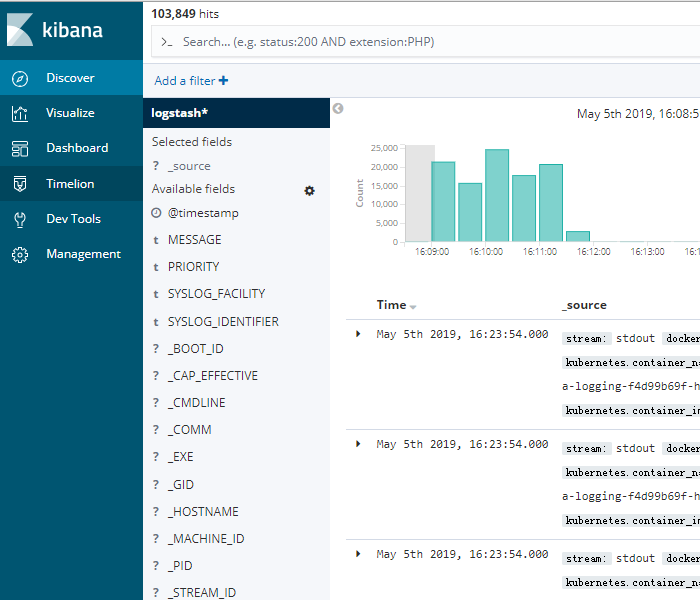
EFK插件简单部署到此结束,实际生产应用还需修改yaml文件相关参数。
结束.
kubernetes 1.14安装部署EFK日志收集系统的更多相关文章
- Kubernetes 系列(八):搭建EFK日志收集系统
Kubernetes 中比较流行的日志收集解决方案是 Elasticsearch.Fluentd 和 Kibana(EFK)技术栈,也是官方现在比较推荐的一种方案. Elasticsearch 是一个 ...
- 十九,基于helm搭建EFK日志收集系统
目录 EFK日志系统 一,EFK日志系统简介: 二,EFK系统部署 1,EFK系统部署方式 2,基于Helm方式部署EFK EFK日志系统 一,EFK日志系统简介: 关于系统日志收集处理方案,其实有很 ...
- Docker搭建EFK日志收集系统,并自定义es索引名
EFK架构图 一.EFK简介 EFK不是一个软件,而是一套解决方案,并且都是开源软件,之间互相配合使用,完美衔接,高效的满足了很多场合的应用,是目前主流的一种日志系统. EFK是三个开源软件的缩写,分 ...
- kubernetes 1.14安装部署dashboard
简单介绍: Dashboard是一个基于web的Kubernetes用户界面.您可以使用Dashboard将容器化应用程序部署到Kubernetes集群,对容器化应用程序进行故障诊断,并管理集群资源. ...
- kubernetes 1.14安装部署metrics-server插件
简单介绍: 如果使用kubernetes的自动扩容功能的话,那首先得有一个插件,然后该插件将收集到的信息(cpu.memory..)与自动扩容的设置的值进行比对,自动调整pod数量.关于该插件,在ku ...
- kubernetes 1.14安装部署helm插件
简单介绍: Helm其实就是一个基于Kubernetes的程序包(资源包)管理器,它将一个应用的相关资源组织成为Charts,并通过Charts管理程序包.再简单点说,可以当做RHEL/CentOS系 ...
- kubernetes 1.14安装部署ingress
简单介绍: Ingress是Kubernetes API的标准资源类型之一,它其实就是一组基于DNS名称或URL路径把请求转发至指定的Service资源的规则,用来将集群外部的请求流量转发至集群内部. ...
- 用fabric部署维护kle日志收集系统
最近搞了一个logstash kafka elasticsearch kibana 整合部署的日志收集系统.部署参考lagstash + elasticsearch + kibana 3 + kafk ...
- 容器云平台No.9~kubernetes日志收集系统EFK
EFK介绍 EFK,全称Elasticsearch Fluentd Kibana ,是kubernetes中比较常用的日志收集方案,也是官方比较推荐的方案. 通过EFK,可以把集群的所有日志收集到El ...
随机推荐
- js 的七大原则--单一原则、开闭原则、替换原则(一)
一.前言: js 的七大设计原则: 1.单一原则 2.开闭原则 3.里氏替换原则 4.依赖倒转原则 5.接口隔离原则 6.合成复用原则 7.迪米尔法则 二.单一原则 1.定义:单一原则就是一个对象或者 ...
- jQuery.each的function中有哪些参数
1.没有参数 $("img").each(function(){ $(this).toggleClass("example"); }); 2.有一个参数,这个参 ...
- Qt ListWidget item 发起拖放
第一步:重写类 MyListWidget 继承自 QListWidget 第二步:重写 mousePressEvent 函数 和 mouseMoveEvent 函数 void mousePressEv ...
- 如何基于Restful ABAP Programming模型开发并部署一个支持增删改查的Fiori应用
Jerry之前的文章30分钟用Restful ABAP Programming模型开发一个支持增删改查的Fiori应用 发布之后,有朋友问我,"没错, 我是在你的文章里看到了Fiori应用的 ...
- Redis 学习-Redis 的其他功能
一.慢查询 找到 系统中瓶颈的命令 1. 客户端请求的生命周期: ①. 慢查询通常发生在第三阶段. ②. 客户端超时不一定是慢查询,但慢查询是客户端超时的一个可能因素. 2. 相关配置 慢查询命令会存 ...
- iptables-1基本知识和工作原理
一.简介1.iptables的定义:防火墙分为硬件防火墙和软件防火墙.iptables是软件防火墙,工作在OSI的第三.四层,是从操作系统层面对网络流量进行监控和防护.延伸:(1)Linux系统内核集 ...
- ASP.NET 取得 Request URL 的各个部分和通过ASP.NET获取URL地址的方法
网址:http://localhost:1897/News/Press/Content.aspx/123?id=1#toc Request.ApplicationPath / Request.Phys ...
- consul-服务发现、服务隔离、服务配置
一.服务发现 服务发现组件记录了(大规模)分布式系统中所有服务的信息,其它服务可以据此找到这些服务.DNS 就是一个简单的例子.当然,复杂系统的服务发现组件要提供更多的功能,例如,服务元数据存储.健康 ...
- yolov3---报"段错误"的可能原因及解决方法
参考: ************************************************************************************************ ...
- JavaScript类型转换总结与常见情况解析
类型转换是将值从一种类型转换为另一种类型的过程(比如字符串转数字,对象转布尔值等) 一.类型转换的分类 类型转换可以分为隐式类型转换和显式类型转换. 二者的区别显而易见:我们能够从代码中看出哪些地方是 ...