
Java-Maven(十一):Maven 项目出现pom.xml错误:Plugin execution not covered by lifecycle configuration: org.apache.maven.plugins:maven-compiler-plugin
Maven项目出现ERROR:
eclipse更新了Maven插件后,让后就出现了以下错误:
| Description | Resource | Path | Location | Type |
Conflicting lifecycle mapping (plugin execution "org.apache.maven.plugins:maven-compiler-plugin:3.8.0:compile (execution: default-compile, phase: compile)"). To enable full functionality, remove the conflicting mapping and run Maven->Update Project Configuration. |
pom.xml |
/icos-mrfingerlib-common |
line 1 |
Maven Project Build Lifecycle Mapping Problem |
Plugin execution not covered by lifecycle configuration: org.apache.maven.plugins:maven-compiler-plugin:3.8.0:compile (execution: default-compile, phase: compile) |
pom.xml |
/icos-mrfingerlib-common |
line 35 |
Maven Project Build Lifecycle Mapping Problem |
解决方案1:
1)Window --> Perferences --> Maven --> Lifecycle Mapping
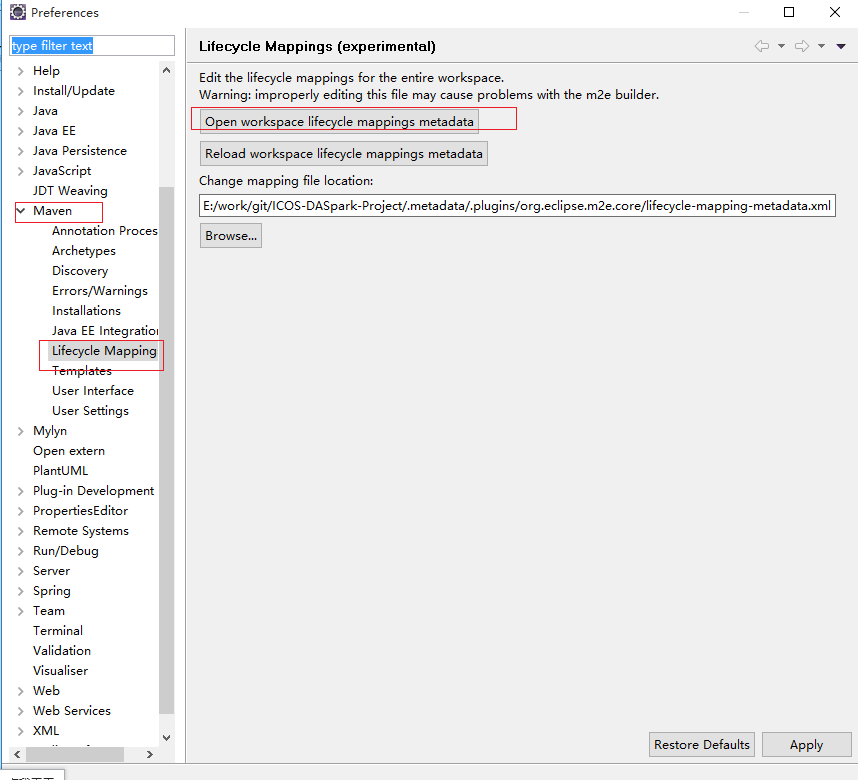
发现目录:E:\work\git\ICOS-DASpark-Project\.metadata\.plugins\org.eclipse.m2e.core下并没有“lifecycle-mapping-metadata.xml”文件。
新建文件lifecycle-mapping-metadata.xml,并填写内容为:
<?xml version="1.0" encoding="UTF-8"?>

<lifecycleMappingMetadata>

  <pluginExecutions>

    <pluginExecution>

      <pluginExecutionFilter>

        <groupId>org.apache.maven.plugins</groupId>

        <artifactId>maven-compiler-plugin</artifactId>

        <versionRange>2.5.1</versionRange>

        <goals>

          <goal>testCompile</goal>

          <goal>compile</goal>

        </goals>

      </pluginExecutionFilter>

      <action>

        <ignore />

      </action>

    </pluginExecution>

  </pluginExecutions>

</lifecycleMappingMetadata>
2)记得点击 ”Reload workspace lifecycle mappings metadata“按钮

3)update Project 就可以了
解决方案2:
直接在pom.xml文件中加入如
    <build>

        <pluginManagement>

            <plugins>

                <plugin>

                    <groupId>org.eclipse.m2e</groupId>

                    <artifactId>lifecycle-mapping</artifactId>

                    <version>1.0.0</version>

                    <configuration>

                        <lifecycleMappingMetadata>

                            <pluginExecutions>

                                <pluginExecution>

                                    <pluginExecutionFilter>

                                        <groupId>org.apache.maven.plugins</groupId>

                                        <artifactId>maven-compiler-plugin</artifactId>

                                        <versionRange>[2.5,)</versionRange>

                                        <goals>

                                            <goal>compile</goal>

                                            <goal>testCompile</goal>

                                        </goals>

                                    </pluginExecutionFilter>

                                    <action>

                                        <ignore />

                                    </action>

                                </pluginExecution>

                            </pluginExecutions>

                        </lifecycleMappingMetadata>

                    </configuration>

                </plugin>

            </plugins>

        </pluginManagement>

    </build>
记得保存之后在项目上右击Maven -> Update Project...
Java-Maven(十一):Maven 项目出现pom.xml错误:Plugin execution not covered by lifecycle configuration: org.apache.maven.plugins:maven-compiler-plugin的更多相关文章
- Maven项目POM文件错误,提示“Plugin execution not covered by lifecycle configuration”的解决方案
一. 问题 Plugin execution not covered by lifecycle configuration: org.apache.maven.plugins:maven-depend ...
- Maven在导入其他项目时报错:Plugin execution not covered by lifecycle configuration
这几天想把Spring 攻略第二版完整的学习下,所以就在网上下载了该教材的源码,寻思边看书边练习!之前有过一些Maven开发的相关经验,觉得Maven在引入jar包上的配置还是很方便的,所以这次源码的 ...
- 在POM配置Maven plugin提示错误“Plugin execution not covered by lifecycle configuration”的解决方案
eclipse在其POM文件的一处提示出错如下: Plugin execution not covered by lifecycle configuration: org.apache.maven.p ...
- 解决 在POM配置Maven plugin提示错误“Plugin execution not covered by lifecycle configuration”
eclipse在其POM文件的一处提示出错如下: Plugin execution not covered by lifecycle configuration: org.apache.maven.p ...
- Maven项目:Plugin execution not covered by lifecycle configuration 解决方案
这个是eclipse中配置文件pom.xml报的错.具体错误信息: Plugin execution not covered by lifecycle configuration: org.apach ...
- 解决Maven报Plugin execution not covered by lifecycle configuration问题
问题: 在eclipse neon 中引入maven项目时,弹出两个错误,一个是jacco-maven-plugin,一个是项目中的插件ota-schema-plugin 如果忽略这两个错误,点击fi ...
- [转]解决Maven报错"Plugin execution not covered by lifecycle configuration"
[转]解决Maven报错"Plugin execution not covered by lifecycle configuration" 导入Myabtis源码后,POM文件会报 ...
- Maven plugin提示错误“Plugin execution not covered by lifecycle configuration”
myeclipse在其POM文件的一处提示出错如下: Plugin execution not covered by lifecycle configuration: org.apache.maven ...
- maven项目-修复Plugin execution not covered by lifecycle configuration: org.codehaus.mojo:build-helper-maven-plugin:1.8:add-resource (execution: add-resource, phase: generate-resources) pom.xml报错
1:pom.xml代码 <plugin> <groupId>org.codehaus.mojo</groupId> <artifactId>build- ...
随机推荐
- pip笔记(译)
从PyPI中安装包 >>> pip install SomePackage [...] Successfully installed SomePackage 从PyPI或其他地方安装 ...
- JAVA - @WebServlet的使用方法
在servlet3.0以后,我们可以不用再web.xml里面配置servlet,只需要加上@WebServlet注解就可以修改该servlet的属性了. 下面是@WebServlet的属性列表. 属性 ...
- maven设定项目编码
今天在DOS下执行mvn compile命令时报错说缺少必要符号,事实上根本就没有缺少,但何以如此呢,为啥eclipse在编译时就没有这问题呢? 原因是编码的问题造成的! eclipse在编译的使用使 ...
- 推荐一个去除图片人物背景的工具Removebg
可以在线使用,url:https://www.remove.bg/users/sign_in 用邮箱免注册一个免费账号: 注册的邮箱会收到一封激活账号的邮件: 点击Activate account后激 ...
- python(读取excel操作-xlrd模块)
一.安装xlrd模块 到python官网下载http://pypi.python.org/pypi/xlrd模块安装,前提是已经安装了python 环境. 或者在cmd窗口 pip install ...
- ubuntu18上解决Qt无法输入中文
系统:Ubuntu 18.04.3 64bit 软件: QtCreator 4.8 安装Ubuntu18.04 时已经安装fcitx框架的搜狗输入法,在此不再安装fcitx及搜狗输入法 只需要安装fc ...
- c#2.0锐利体验《泛型编程》读书笔记
1.c#泛型及机制 Class Stack<T> { } T 其实为type的缩小,不过也可为其他字符代替T ,被称为“泛型类型” T为晚绑定的,在编译的时候还不能确定T的确切类型. 2 ...
- 代码编辑器与IDE(集成开发环境)
编辑器就是轻量级的只用于编辑代码: nodepad++, sublime, ...... IDE就是包含很多例如调试, 编译,UI界面的功能更为完善的软件: Pycharm(python用的多), V ...
- ARDUIN人体检测模块
http://henrysbench.capnfatz.com/henrys-bench/arduino-sensors-and-input/arduino-hc-sr501-motion-senso ...
- Git的基本使用方法(受益匪浅)
git指令介绍,下面有详解指令可以先跳过直接看下面的详解 $ mkdir learngit //创建一个learngit文件夹 $ cd learngit //进入learng ...