
springboot+https+http
http访问不安全,使用https相对好些。
参考网址:https://blog.csdn.net/bock1984/article/details/90116965
操作如下:
- 1. 使用JDK自带keytool工具,创建本地SSL证书
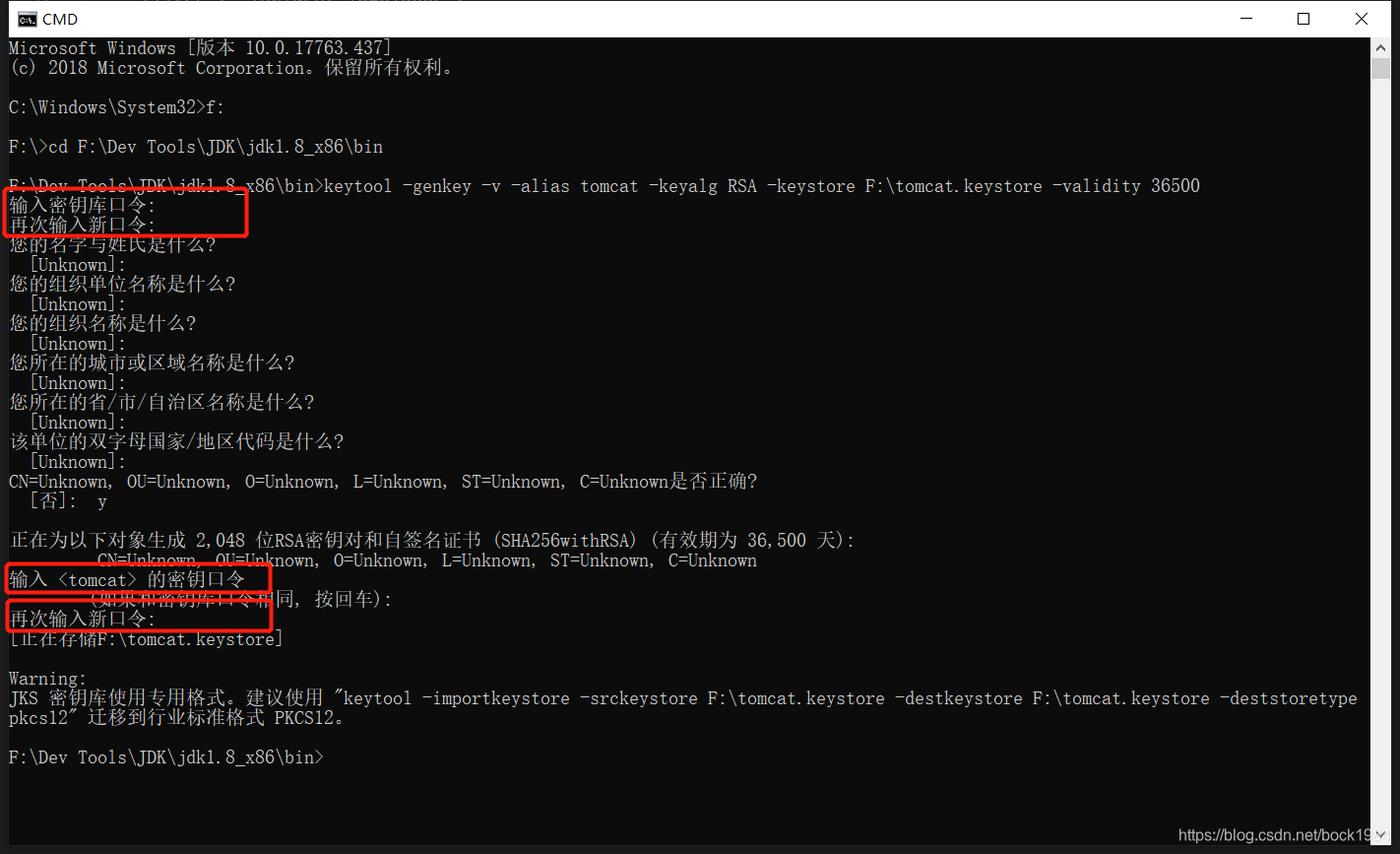
启动命令行工具,进入jdk的bin目录执行以下命令:
keytool -genkey -v -alias tomcat -keyalg RSA -keystore F:\tomcat.keystore -validity 36500

1.-keyalg 生证书的算法名称,RSA是一种非对称加密算法

.-keystore 生成的证书文件的存储路径

.-validity 证书的有效期
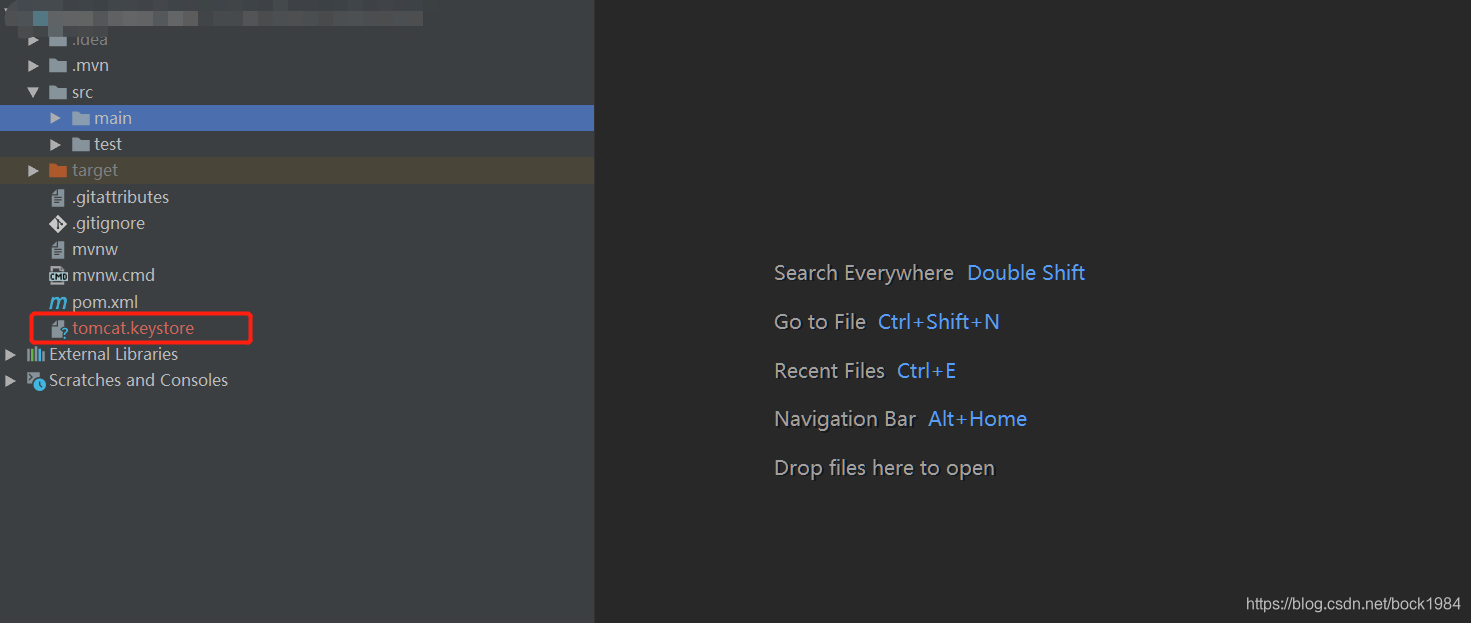
- 2.将生成的tomcat.keystore文件拷贝到springboot项目根目录下:
- 3.修改application.properties文件
·
- 4.启动服务即可访问 https://localhost:8443。
看application.properties配置文件可知,后面只能用https协议访问了。
1) http访问自动转https
(用户前期用http协议,突然改成只用https访问,这样有的客户还用http访问时就访问不到服务器了,针对这种情况可做http访问自动转到https)
package com.nsoft.gkzp.syscore.config;

import org.apache.catalina.Context;

import org.apache.catalina.connector.Connector;

import org.apache.tomcat.util.descriptor.web.SecurityCollection;

import org.apache.tomcat.util.descriptor.web.SecurityConstraint;

import org.springframework.beans.factory.annotation.Value;

import org.springframework.boot.web.embedded.tomcat.TomcatServletWebServerFactory;

import org.springframework.context.annotation.Bean;

import org.springframework.context.annotation.Configuration;

import org.springframework.context.annotation.PropertySource;

/**

 * 监听http端口,如访问网址为http协议的,自动转换为Https

 */

@Configuration

@PropertySource(value="classpath:application.properties")

public class HttpsComponent {

    //读取application.properties配置文件配置的https访问端口号

    @Value("${server.port}")

    public  int SYSTEM_HTTPS_PORT;

    //读取application.properties配置文件配置的http监控端口(自动转换为https)

    @Value("${server.http.port}")

    public  int SYSTEM_HTTP_PORT;

    @Bean

    public Connector connector(){

        Connector connector=new Connector("org.apache.coyote.http11.Http11NioProtocol");

        connector.setScheme("http");

        connector.setPort(SYSTEM_HTTP_PORT);//Connector监听的http的端口号

        connector.setSecure(false);

        connector.setRedirectPort(SYSTEM_HTTPS_PORT);//监听到http的端口号后转向到的https的端口号(一般会用443端口)

        return connector;

    }

    @Bean

    public TomcatServletWebServerFactory tomcatServletWebServerFactory(){

        TomcatServletWebServerFactory tomcat =new TomcatServletWebServerFactory(){

            @Override

            protected void postProcessContext(Context context) {

                SecurityConstraint securityConstraint=new SecurityConstraint();

                securityConstraint.setUserConstraint("CONFIDENTIAL");

                SecurityCollection collection=new SecurityCollection();

                collection.addPattern("/*");

                securityConstraint.addCollection(collection);

                context.addConstraint(securityConstraint);

            }

        };

        tomcat.addAdditionalTomcatConnectors(connector());

        return tomcat;

    }

}
package com.nsoft.gkzp.syscore.config;

import org.apache.catalina.Context;

import org.apache.catalina.connector.Connector;

import org.apache.tomcat.util.descriptor.web.SecurityCollection;

import org.apache.tomcat.util.descriptor.web.SecurityConstraint;

import org.springframework.boot.web.embedded.tomcat.TomcatServletWebServerFactory;

import org.springframework.context.annotation.Bean;

import org.springframework.context.annotation.Configuration;

/**

 * 监听http端口,如访问网址为http协议的,自动转换为Https

 */

@Configuration

public class HttpsComponent {

    @Bean

    public Connector connector(){

        Connector connector=new Connector("org.apache.coyote.http11.Http11NioProtocol");

        connector.setScheme("http");

        connector.setPort(8082);//Connector监听的http的端口号

        connector.setSecure(false);

        connector.setRedirectPort(8443);//监听到http的端口号后转向到的https的端口号(一般会用443端口)

        return connector;

    }

    @Bean

    public TomcatServletWebServerFactory tomcatServletWebServerFactory(){

        TomcatServletWebServerFactory tomcat =new TomcatServletWebServerFactory(){

            @Override

            protected void postProcessContext(Context context) {

                SecurityConstraint securityConstraint=new SecurityConstraint();

                securityConstraint.setUserConstraint("CONFIDENTIAL");

                SecurityCollection collection=new SecurityCollection();

                collection.addPattern("/*");

                securityConstraint.addCollection(collection);

                context.addConstraint(securityConstraint);

            }

        };

        tomcat.addAdditionalTomcatConnectors(connector());

        return tomcat;

    }

}
直接写端口号,理解更直观些
另:
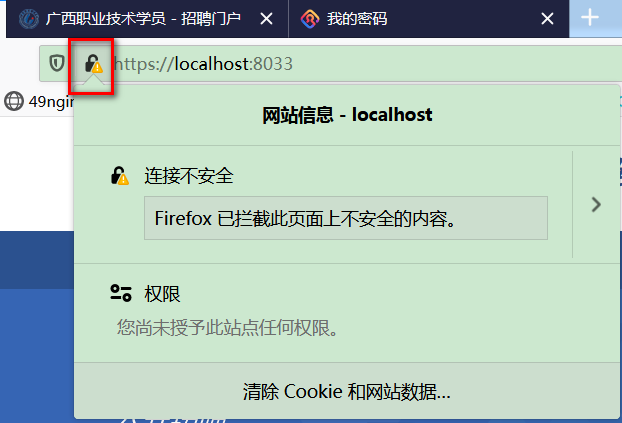
这边自己生成的证书,是不被公网认证的。如下图。要想公网认证,需要去网上相关机构的去买(将域名提供给他们,他们生成公网可认证的证书),便宜点的大约一年一千多块钱吧。
2) 同时支持http和https访问
(参考 : https://blog.csdn.net/qq_38288606/article/details/89478353)
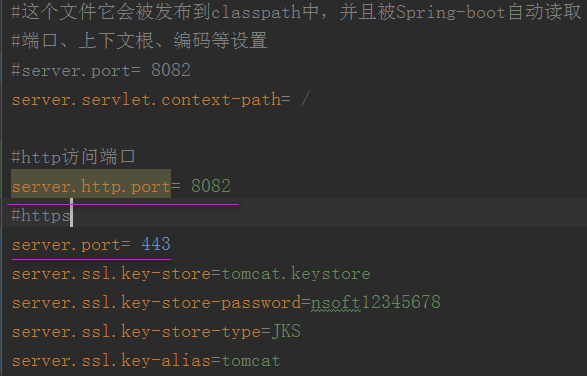
注意:Spring Boot不支持通过application.properties同时配置HTTP连接器和HTTPS连接器
故我在application.properties配置了https相关配置,然后添加了一个自定义的server.http.port参数,然后新建httpComponent.java配置java类,来启动http端口访问
application.properties
新建类D:\workspace-gzy-gkzp\src\main\java\com\nsoft\gkzp\syscore\config\httpComponent.java
package com.nsoft.gkzp.syscore.config;

import org.apache.catalina.connector.Connector;

import org.springframework.beans.factory.annotation.Value;

import org.springframework.boot.web.embedded.tomcat.TomcatServletWebServerFactory;

import org.springframework.boot.web.servlet.server.ServletWebServerFactory;

import org.springframework.context.annotation.Bean;

import org.springframework.context.annotation.Configuration;

import org.springframework.context.annotation.PropertySource;

/**

 * 监听http端口,使http访问端口生效

 */

@Configuration

@PropertySource(value="classpath:application.properties")

public class httpComponent {

    //读取application.properties配置文件配置的http监控端口

    @Value("${server.http.port}")

    public  int SYSTEM_HTTP_PORT;

    @Bean

    public ServletWebServerFactory servletContainer() {

        TomcatServletWebServerFactory tomcat = new TomcatServletWebServerFactory();

        tomcat.addAdditionalTomcatConnectors(createStandardConnector()); // 添加http

        return tomcat;

    }

    private Connector createStandardConnector() {

        Connector connector = new Connector("org.apache.coyote.http11.Http11NioProtocol");

        connector.setPort(SYSTEM_HTTP_PORT);

        return connector;

    }

}
至此,就可以用 https://localhost 和 http://localhost:8082 访问了。这是spring2.x的配法。

注意: 上面在application.properties配置文件中配置访问端口号,是因为工程用了内置的tomcat容器(如下图pom.xml引入的tomcat依赖)。如果是用外部的tomcat,则直接在tomcat的\conf\server.xml配置文件里配置相关参数。

参考文章:
springboot+https+http的更多相关文章
- springboot https证书配置
如果公司有提供证书如: 拿到证书秘钥可直接在springboot 的配置文件中配置: server.ssl.key-store=classpath:cert.pfx server.ssl.key-st ...
- https证书制作及springboot配置https
1.生成秘钥 openssl genrsa -out private.key 2048 2.生成用于申请请求的证书文件csr,一般会将该文件发送给CA机构进行认证,本例使用自签名证书 openssl ...
- springBoot+springSecurity 数据库动态管理用户、角色、权限
使用spring Security3的四种方法概述 那么在Spring Security3的使用中,有4种方法: 一种是全部利用配置文件,将用户.权限.资源(url)硬编码在xml文件中,已经实现过, ...
- SpringBoot开发案例之打造私有云网盘
前言 最近在做工作流的事情,正好有个需求,要添加一个附件上传的功能,曾找过不少上传插件,都不是特别满意.无意中发现一个很好用的开源web文件管理器插件 elfinder,功能比较完善,社区也很活跃,还 ...
- springCloud、springBoot学习
http://projects.spring.io/spring-cloud/ 官网https://springcloud.cc/spring-cloud-netflix.htmlhttp://cl ...
- SpringBoot 使用Mybatis-Plus
简介 Mybatis-Plus(简称MP)是一个 Mybatis 的增强工具,在 Mybatis 的基础上只做增强不做改变,为简化开发.提高效率而生. 特性 无侵入:Mybatis-Plus 在 My ...
- springboot 有用网址收集
http://www.ityouknow.com/spring-boot.html springboot多数据源配置: https://blog.csdn.net/neosmith/article/d ...
- redis 安装使用 & SpringBoot Redis配置
1.安装 https://www.cnblogs.com/dingguofeng/p/8709476.html https://www.runoob.com/redis/redis-keys.html ...
- java客户端验证https连接(忽略证书验证和证书验证两种方式)
首先根据如下操作生成证书,配置springboot https,生成一个简单的https web服务 https://www.cnblogs.com/qq931399960/p/11889349.ht ...
随机推荐
- PHP读取文件内容的五种方式
-----第一种方法-----fread()-------- <?php $file_path = "test.txt"; if(file_exists($file_path ...
- springmvc,controller层在接收浏览器url传来的参数带中文乱码问题。
请求地址:http://localhost:8080/saveFlashSale?fsRemark=哈哈哈哈哈 接收方法:@RequestMapping("/saveFlashSale&qu ...
- Salesforce 开发整理(六) Visualforce分页
分页的实现总体上分真分页和假分页. 所谓真分页指页面上列出来的数据就是实际查询的数据,假分页则是无论页面上一次显示多少条记录,实际上后台已经加载了所有的记录,分页只是为了展示给用户查看.今天分享一个V ...
- cocos:C++ 导出到lua, genbindings.py修改
cocos:C++ 导出到lua, genbindings.py修改 1. 准备 把tools目录下的cocos2dx_extension.ini, genbindings.py, userconf. ...
- pyhon项目之后pexpect使用
pyhon项目之后pexpect使用1.安装pip3.6 install pexpect 实例1 ssh 登陆linux 服务器,并且执行命令 #!/usr/bin/env python3.6# -* ...
- SEDA 架构
参考文档: https://blog.csdn.net/zhihui1017/article/details/50502825
- Spring JDBC最佳实践(1)
原文地址:https://my.oschina.net/u/218421/blog/38513 Spring提供了两种使用JDBC API的最佳实践,一种是以JdbcTemplate为核心的基于Tem ...
- CUDA C编程入门
最近想用cuda来加速三维重建的算法,就先入门了一下cuda. CUDA C 编程 cuda c时对c/c++进行拓展后形成的变种,兼容c/c++语法,文件类型为'.cu',编译器为nvcc.cuda ...
- docker 学习操作记录 1
记录1 Xshell (Build ) Copyright (c) NetSarang Computer, Inc. All rights reserved. Type `help' to learn ...
- SpringBoot与PageHelper的整合示例详解
SpringBoot与PageHelper的整合示例详解 1.PageHelper简介 PageHelper官网地址: https://pagehelper.github.io/ 摘要: com.gi ...