
prometheus学习系列六: Prometheus relabel配置
relabel_config
重新标记是一个功能强大的工具,可以在目标的标签集被抓取之前重写它,每个采集配置可以配置多个重写标签设置,并按照配置的顺序来应用于每个目标的标签集。
目标重新标签之后,以__开头的标签将从标签集中删除的。
如果使用只需要临时的存储临时标签值的,可以使用_tmp作为前缀标识。
relabel的action类型
- replace: 对标签和标签值进行替换。
- keep: 满足特定条件的实例进行采集,其他的不采集。
- drop: 满足特定条件的实例不采集,其他的采集。
- hashmod: 这个我也没看懂啥意思,囧。
- labelmap: 这个我也没看懂啥意思,囧。
- labeldrop: 对抓取的实例特定标签进行删除。
- labelkeep: 对抓取的实例特定标签进行保留,其他标签删除。
常用action的测试
在测试前,同步下配置文件如下。
scrape_configs:

  # The job name is added as a label `job=<job_name>` to any timeseries scraped from this config.

  - job_name: 'prometheus'

    # metrics_path defaults to '/metrics'

    # scheme defaults to 'http'.

    static_configs:

    - targets: ['localhost:9090']

  - job_name: "node"

    file_sd_configs:

    - refresh_interval: 1m

      files:

      - "/usr/local/prometheus/prometheus/conf/node*.yml"

[root@node00 prometheus]# cat conf/node-dis.yml
- targets:
  - "192.168.100.10:20001"
  labels:
    __hostname__: node00
    __businees_line__: "line_a"
    __region_id__: "cn-beijing"
    __availability_zone__: "a"
- targets:
  - "192.168.100.11:20001"
  labels:
    __hostname__: node01
    __businees_line__: "line_a"
    __region_id__: "cn-beijing"
    __availability_zone__: "a"
- targets:
  - "192.168.100.12:20001"
  labels:
    __hostname__: node02
    __businees_line__: "line_c"
    __region_id__: "cn-beijing"
    __availability_zone__: "b"
此时如果查看target信息,如下图。
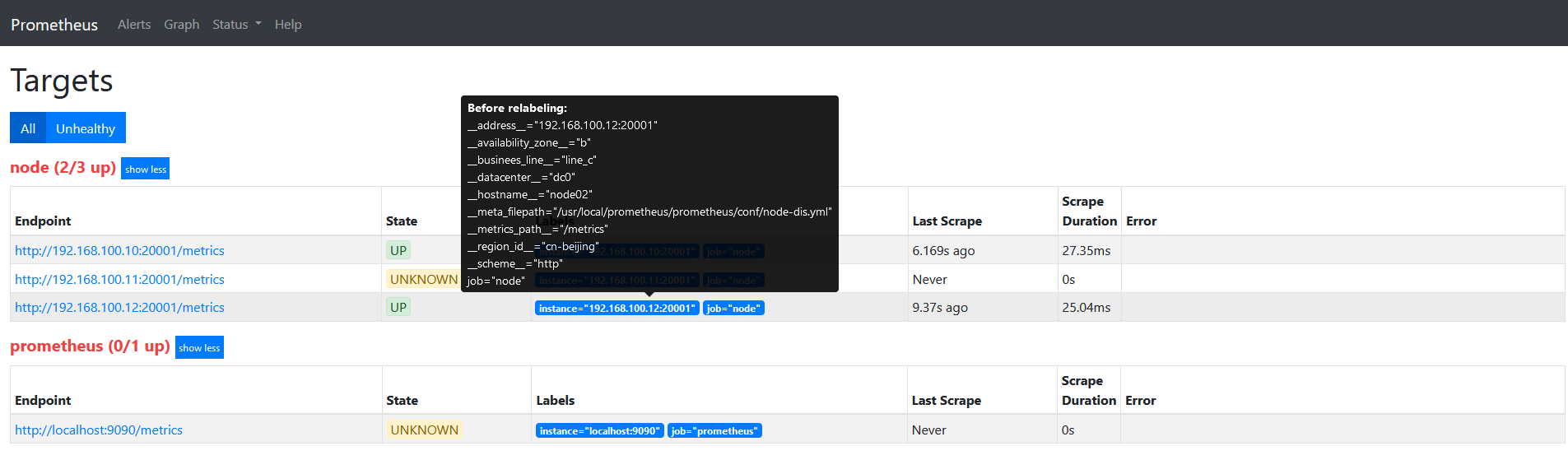
因为我们的label都是以__开头的,目标重新标签之后,以__开头的标签将从标签集中删除的。
一个简单的relabel设置
将labels中的__hostname__替换为node_name。
scrape_configs:

  # The job name is added as a label `job=<job_name>` to any timeseries scraped from this config.

  - job_name: 'prometheus'

    # metrics_path defaults to '/metrics'

    # scheme defaults to 'http'.

    static_configs:

    - targets: ['localhost:9090']

  - job_name: "node"

    file_sd_configs:

    - refresh_interval: 1m

      files:

      - "/usr/local/prometheus/prometheus/conf/node*.yml"

    relabel_configs:

    - source_labels:

      - "__hostname__"

      regex: "(.*)"

      target_label: "nodename"

      action: replace

      replacement: "$1"
重启服务查看target信息如下图:
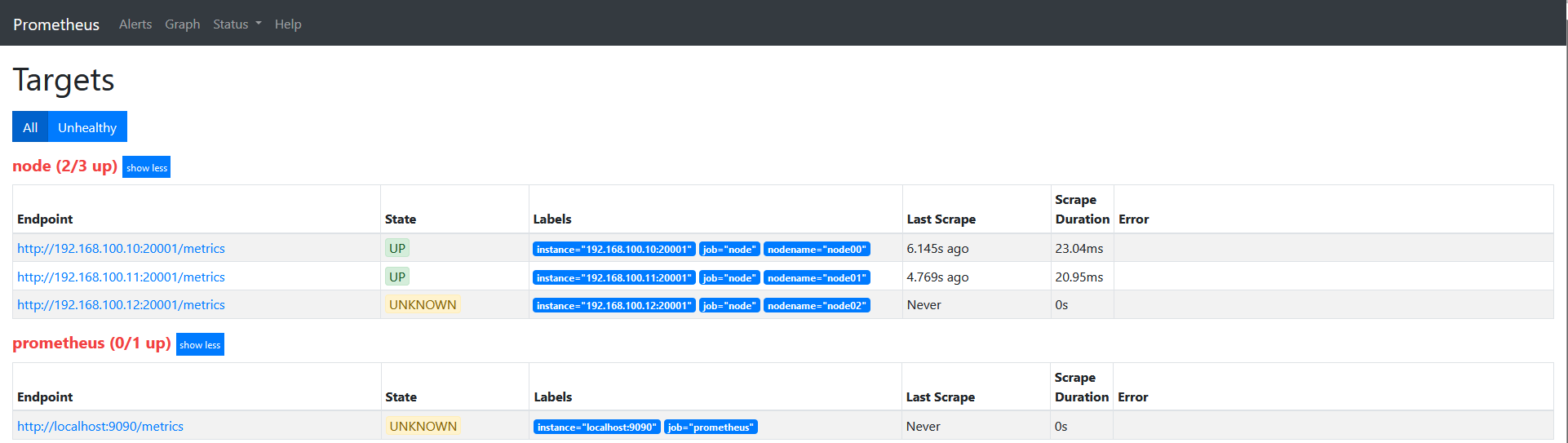
说下上面的配置: source_labels指定我们我们需要处理的源标签, target_labels指定了我们要replace后的标签名字, action指定relabel动作,这里使用replace替换动作。 regex去匹配源标签(__hostname__)的值,"(.*)"代表__hostname__这个标签是什么值都匹配的,然后replacement指定的替换后的标签(target_label)对应的数值。采用正则引用方式获取的。
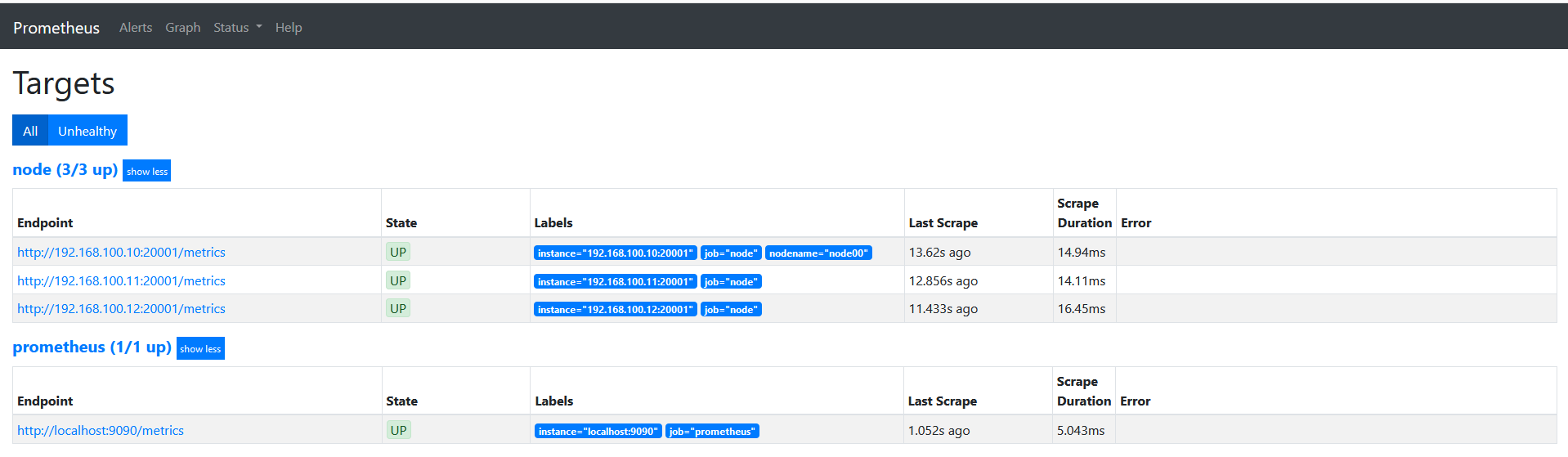
这里修改下上面的正则表达式为 ‘’regex: "(node00)"'的时候可以看到如下图。
keep
修改配置文件
scrape_configs:

  # The job name is added as a label `job=<job_name>` to any timeseries scraped from this config.

  - job_name: 'prometheus'

    # metrics_path defaults to '/metrics'

    # scheme defaults to 'http'.

    static_configs:

    - targets: ['localhost:9090']

  - job_name: "node"

    file_sd_configs:

    - refresh_interval: 1m

      files:

      - "/usr/local/prometheus/prometheus/conf/node*.yml"
target如下图
修改配置文件如下
scrape_configs:

  # The job name is added as a label `job=<job_name>` to any timeseries scraped from this config.

  - job_name: 'prometheus'

    # metrics_path defaults to '/metrics'

    # scheme defaults to 'http'.

    static_configs:

    - targets: ['localhost:9090']

  - job_name: "node"

    file_sd_configs:

    - refresh_interval: 1m

      files:

      - "/usr/local/prometheus/prometheus/conf/node*.yml"

    relabel_configs:

    - source_labels:

      - "__hostname__"

      regex: "node00"

      action: keep
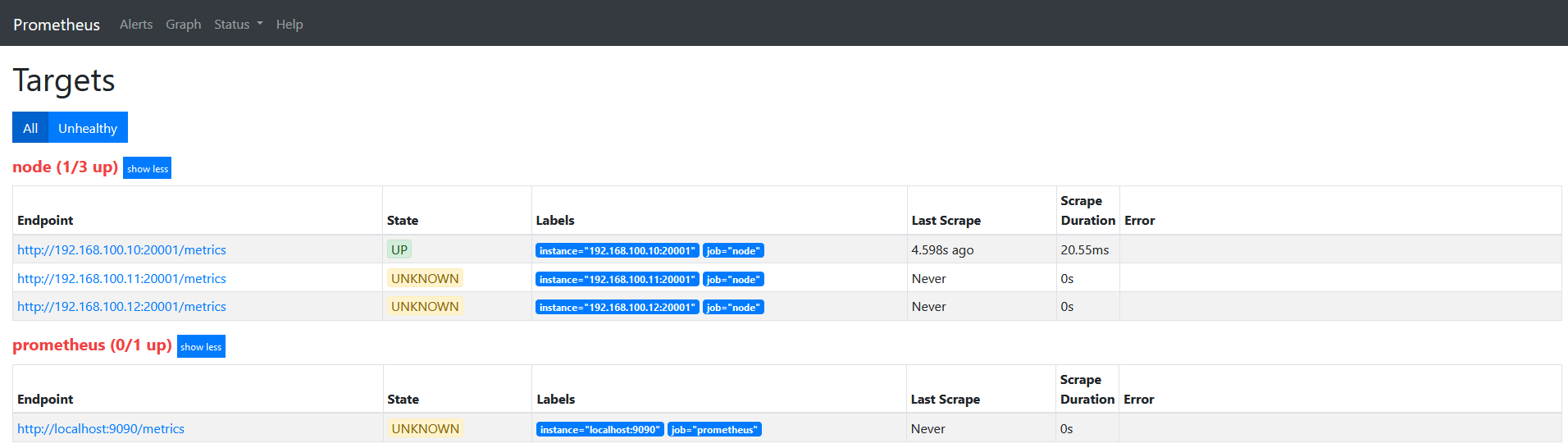
target如下图
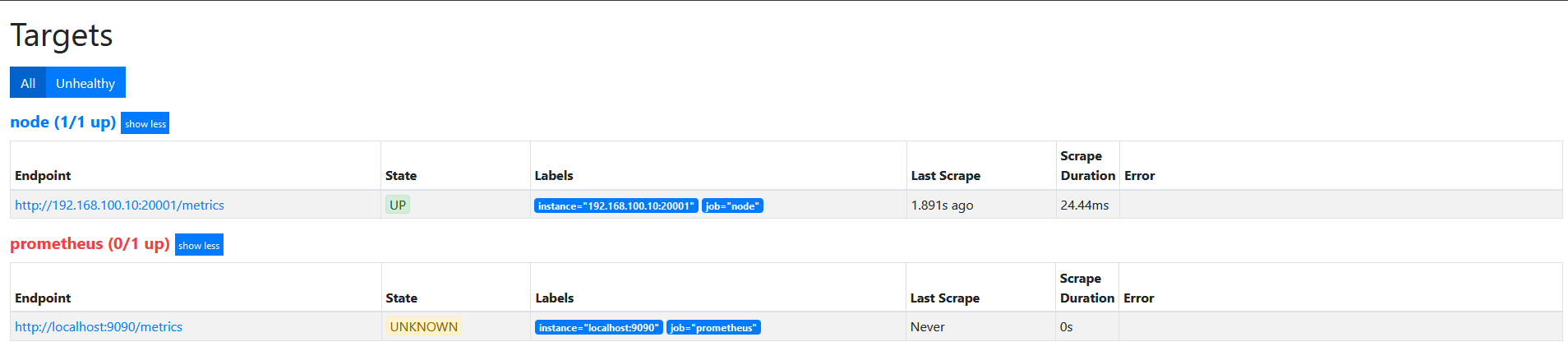
action为keep,只要source_labels的值匹配regex(node00)的实例才能会被采集。 其他的实例不会被采集。
drop
在上面的基础上,修改action为drop。
target如下图
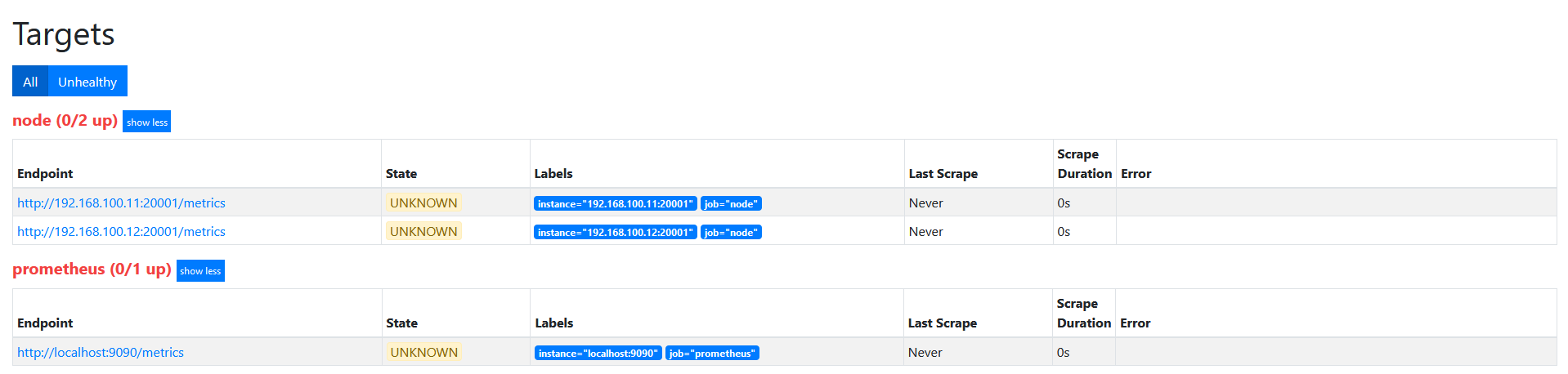
action为drop,其实和keep是相似的, 不过是相反的, 只要source_labels的值匹配regex(node00)的实例不会被采集。 其他的实例会被采集。
replace
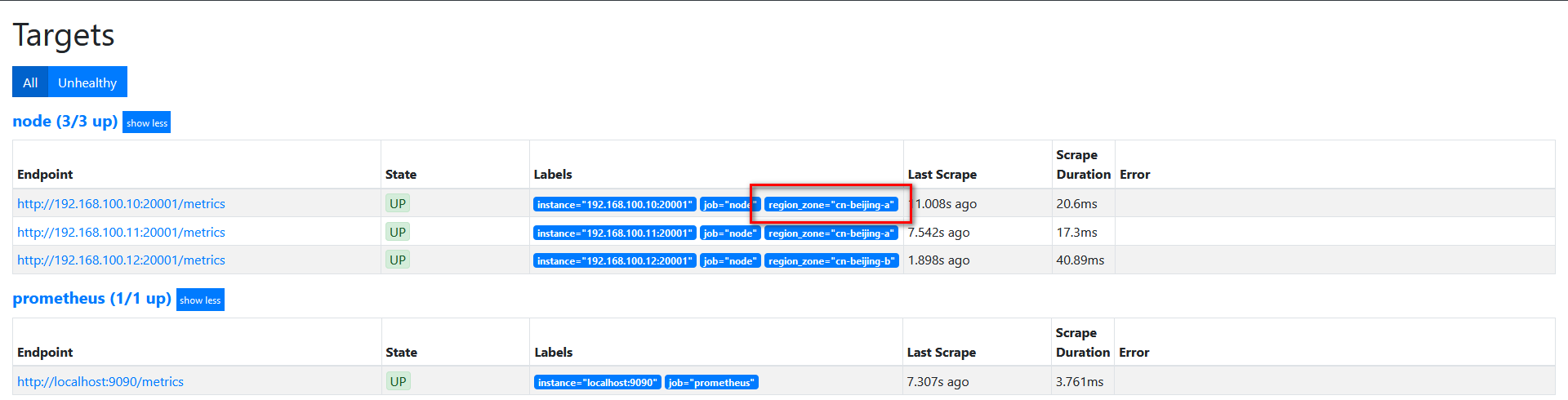
我们的基础信息里面有__region_id__和__availability_zone__,但是我想融合2个字段在一起,可以通过replace来实现。
修改配置如下
scrape_configs:

  # The job name is added as a label `job=<job_name>` to any timeseries scraped from this config.

  - job_name: 'prometheus'

    # metrics_path defaults to '/metrics'

    # scheme defaults to 'http'.

    static_configs:

    - targets: ['localhost:9090']

  - job_name: "node"

    file_sd_configs:

    - refresh_interval: 1m

      files:

      - "/usr/local/prometheus/prometheus/conf/node*.yml"

    relabel_configs:

    - source_labels:

      - "__region_id__"

      - "__availability_zone__"

      separator: "-"

      regex: "(.*)"

      target_label: "region_zone"

      action: replace

      replacement: "$1"
target如下图:
labelkeep
配置文件如下
scrape_configs:

  # The job name is added as a label `job=<job_name>` to any timeseries scraped from this config.

  - job_name: 'prometheus'

    # metrics_path defaults to '/metrics'

    # scheme defaults to 'http'.

    static_configs:

    - targets: ['localhost:9090']

  - job_name: "node"

    file_sd_configs:

    - refresh_interval: 1m

      files:

      - "/usr/local/prometheus/prometheus/conf/node*.yml"

    relabel_configs:

    - source_labels:

      - "__hostname__"

      regex: "(.*)"

      target_label: "nodename"

      action: replace

      replacement: "$1"

    - source_labels:

      - "__businees_line__"

      regex: "(.*)"

      target_label: "businees_line"

      action: replace

      replacement: "$1"

    - source_labels:

      - "__datacenter__"

      regex: "(.*)"

      target_label: "datacenter"

      action: replace

      replacement: "$1"
target如下图

修改配置文件如下
scrape_configs:

  # The job name is added as a label `job=<job_name>` to any timeseries scraped from this config.

  - job_name: 'prometheus'

    # metrics_path defaults to '/metrics'

    # scheme defaults to 'http'.

    static_configs:

    - targets: ['localhost:9090']

  - job_name: "node"

    file_sd_configs:

    - refresh_interval: 1m

      files:

      - "/usr/local/prometheus/prometheus/conf/node*.yml"

    relabel_configs:

    - source_labels:

      - "__hostname__"

      regex: "(.*)"

      target_label: "nodename"

      action: replace

      replacement: "$1"

    - source_labels:

      - "__businees_line__"

      regex: "(.*)"

      target_label: "businees_line"

      action: replace

      replacement: "$1"

    - source_labels:

      - "__datacenter__"

      regex: "(.*)"

      target_label: "datacenter"

      action: replace

      replacement: "$1"

    - regex: "(nodename|datacenter)"

      action: labeldrop
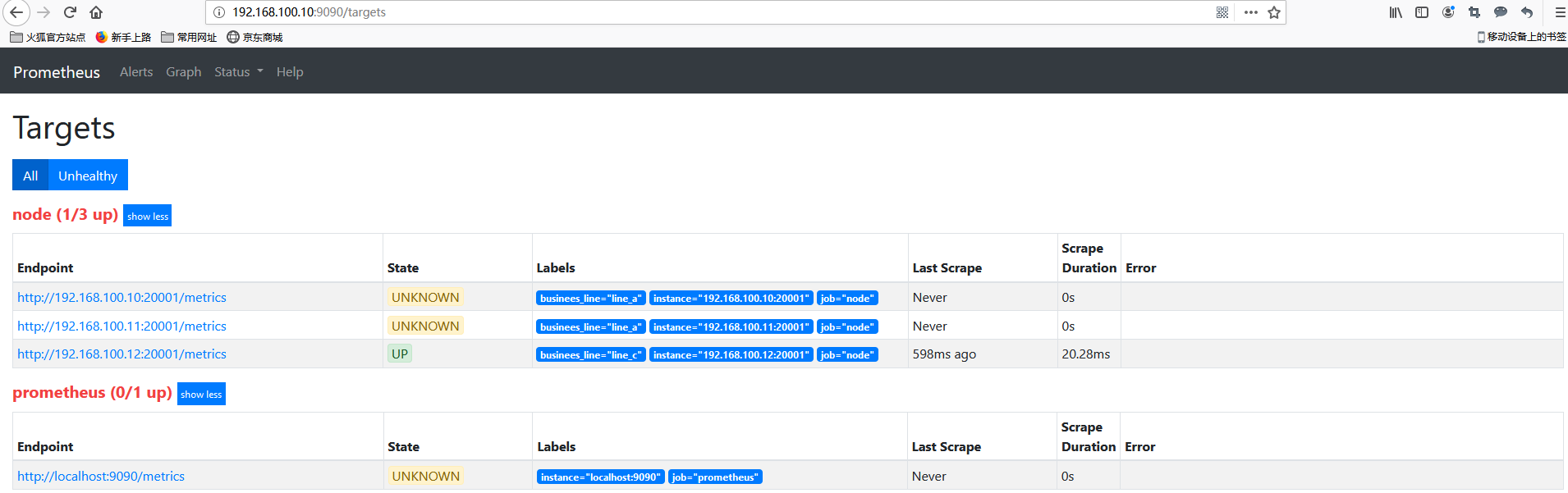
target如下图
prometheus学习系列六: Prometheus relabel配置的更多相关文章
- 源码学习系列之SpringBoot自动配置(篇一)
源码学习系列之SpringBoot自动配置源码学习(篇一) ok,本博客尝试跟一下Springboot的自动配置源码,做一下笔记记录,自动配置是Springboot的一个很关键的特性,也容易被忽略的属 ...
- 源码学习系列之SpringBoot自动配置(篇二)
源码学习系列之SpringBoot自动配置(篇二)之HttpEncodingAutoConfiguration 源码分析 继上一篇博客源码学习系列之SpringBoot自动配置(篇一)之后,本博客继续 ...
- SpringBoot源码学习系列之SpringMVC自动配置
目录 1.ContentNegotiatingViewResolver 2.静态资源 3.自动注册 Converter, GenericConverter, and Formatter beans. ...
- SpringBoot源码学习系列之异常处理自动配置
SpringBoot源码学习系列之异常处理自动配置 1.源码学习 先给个SpringBoot中的异常例子,假如访问一个错误链接,让其返回404页面 在浏览器访问: 而在其它的客户端软件,比如postm ...
- Prometheus学习系列(六)之Prometheus 查询说明
前言 本文来自Prometheus官网手册和 Prometheus简介 Prothetheus查询 Prometheus提供一个函数式的表达式语言PromQL (Prometheus Query La ...
- Prometheus学习系列(五)之Prometheus 规则(rule)、模板配置说明
前言 本文来自Prometheus官网手册1.2.3.4和 Prometheus简介1.2.3.4 记录规则 一.配置规则 Prometheus支持两种类型的规则,这些规则可以定期配置,然后定期评估: ...
- Prometheus学习系列(九)之Prometheus 联盟、迁移
前言 本文来自Prometheus官网手册 和 Prometheus简介 FEDERATION 允许Prometheus服务器从另一台Prometheus服务器抓取选定的时间序列. 一,用例 联盟有不 ...
- Prometheus学习系列(二)之Prometheus FIRST STEPS
前言 本文来自Prometheus官网手册 和 Prometheus简介 说明 Prometheus是一个监控平台,通过在监控目标上的HTTP端点来收集受监控目标的指标.本指南将向您展示如何使用Pro ...
- prometheus学习系列十一: Prometheus exporter详解
exporter详解 前面的系列中,我们在主机上面安装了node_exporter程序,该程序对外暴露一个用于获取当前监控样本数据的http的访问地址, 这个的一个程序成为exporter,Expor ...
随机推荐
- 【CF573E】Bear and Bowling
[CF573E]Bear and Bowling 题面 洛谷 题解 首先有一个贪心的结论: 我们一次加入每个数,对于\(\forall i\),位置\(i\)的贡献为\(V_i = k_i\times ...
- 原生js给同一对象绑定多个事件
事件监听 var son = document.querySelector(".son"); son.addEventListener('click', once1); funct ...
- 深度学习之ResNet网络
介绍 Resnet分类网络是当前应用最为广泛的CNN特征提取网络. 我们的一般印象当中,深度学习愈是深(复杂,参数多)愈是有着更强的表达能力.凭着这一基本准则CNN分类网络自Alexnet的7层发展到 ...
- 【BigData】Java基础_构造方法的使用
需求描述 实现上图需求,根据输入的三个人的信息,分别计算出这个三个客户的平均年龄和最大年龄 涉及知识点: ①构造方法 ②字符串切割 ③对象数组 代码实现 代码结构图: package cn.test. ...
- 线程那些坑 - HttpContext
之前记录Log的时候,直接把经常用过的Log帮助类拷贝过来直接用,其中日志的填写路径要么是固定值,然后读取配置文件,要么就是用上下文动态获 System.Web.HttpContext.Current ...
- button 在chrome浏览器下被点击时会出现一个橙色的边框
问题描述: button在chrome浏览器下被点击时会出现一个橙色的边框 在button上添加 :focus{outline:none;}也无法解决. 解决办法: 在button上添加 :focus ...
- C# 文件搬运(从一个文件夹Copy至另一个文件夹)
时常我们会遇到文件的复制.上传等问题.特别是自动化生产方面,需要对机台抛出的档案进行搬运.收集,然后对资料里的数据等进行分析,等等. Winform下,列举集中较常见的档案的搬运. 1 private ...
- SQL工具 Red Gate
Red Gate提供了很多对于sql server的工具. 这边介绍两个:Sql Prompt和Sql doc Sql Prompt:智能提示sql语句等等 Sql doc:生成数据库文档页面 Red ...
- JavaSE 笔试题: 自增变量
JavaSE 笔试题 自增变量 public class Test { public static void main(String[] args) { int i = 1; i = i++; int ...
- 最新修改Oracle10gscott用户
1.以system登录及输入自己设置口令; 2.更换sysdba身份: conn system/orcl as sysdba; 3.解锁scott用户(因装好默认是锁定的): alter user s ...