
JanusGraph安装graphexp
准备:JanusGraph环境,graphexp源码,nginx
本文采用的环境:JanusGraph + cassandra + ES + GraphExp(cassandra 或者HBase作为后端存储都是可以的,配置方式类似)
目的:为了给JanusGraph 安装可视化工具,方便过程中的学习。
一:下载graphexp源码
下载地址(官方文档): https://github.com/bricaud/graphexp
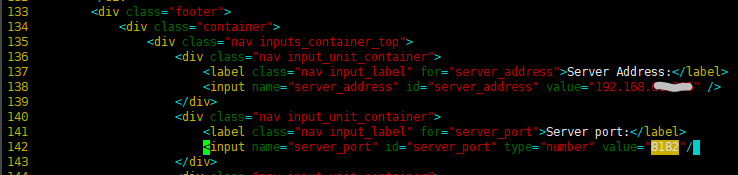
并且修改graphexp.html中的 :localhost改为服务器地址(192.168.--.--)

二:安装和配置 nginx
参考 https://www.runoob.com/linux/nginx-install-setup.html
另外也可参考 https://blog.csdn.net/qq_38872310/article/details/79805445
另外也可参考 https://blog.csdn.net/lyzf0413/article/details/82378972
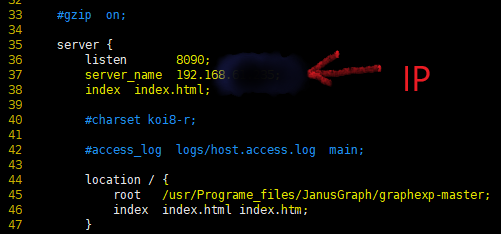
1.修改配置文件: /usr/local//webserver/nginx/conf/
( /usr/local/src/nginx-1.6.2/conf 中文件暂时不改)
[root@tdh01 conf]# pwd /usr/local/webserver/nginx/conf # 当前路径

[root@tdh01 conf]# vim nginx.conf
2:启动nginx命令:/usr/local/webserver/nginx/sbin/nginx
或者进入nginx安装目录sbin下,输入命令 ./nginx
启动之后查看是否成功启动nginx;
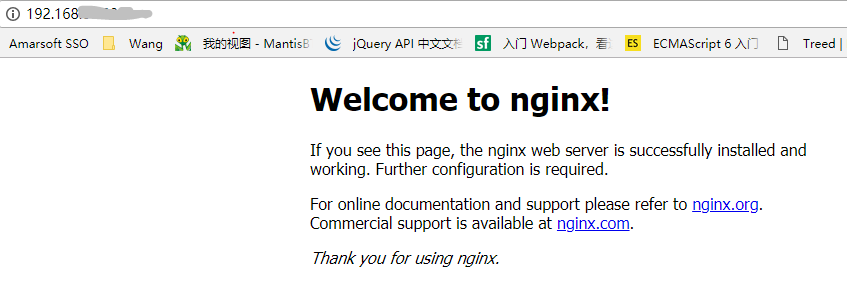
$ 如果成功的话,浏览器访问能看到欢迎页面:(http://服务器的IP:80)
三、配置JanusGraph Server作为WebSocket节点
参考文章:https://blog.csdn.net/zg_hover/article/details/89365799
说明:本例子的后台存储系统和索引系统都是安装在同一台机器上。这里后台外部存储系统使用的是cassandra,另外配置外部索引系统ES。
1.查看配置文件:conf/janusgraph-cassandra.properties 中的以下配置项是否正确:
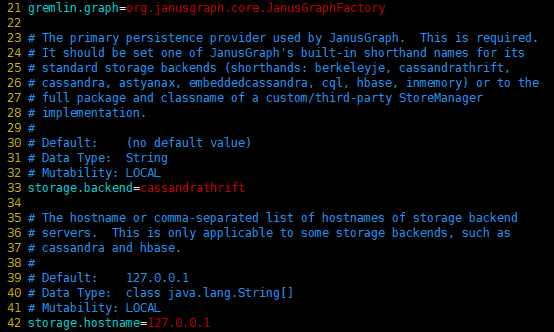
复制conf/janusgraph-cassandra.properties配置文件到./conf/gremlin-server目录下:
cp janusgraph-cassandra.properties gremlin-server/socket-janusgraph-cassandra-server.properties
2.准备gremlin-server.yaml配置文件:
cp conf/gremlin-server/gremlin-server.yaml conf/gremlin-server/socket-gremlin-server.yaml
编辑 socket-gremlin-server.yaml 文件:
host和graph都需要自己调整:

3:启动 JanusGraph Server:
[root@tdh01 janusgraph-0.3.]# pwd /usr/Programe_files/JanusGraph/janusgraph-0.3.

[root@tdh01 janusgraph-0.3.]# bin/gremlin-server.sh ./conf/gremlin-server/socket-gremlin-server.yaml
再开启一个终端,并在终端中输入以下命令:
[root@tdh01 janusgraph-0.3.2]# pwd /usr/Programe_files/JanusGraph/janusgraph-0.3.2

[root@tdh01 janusgraph-0.3.2]# bin/gremlin.sh
注意:这里只是开启了一个Gremlin的终端,并没有连接JanusGraph Server。
(1) 连接JanusGraph Server(也就是Gremlin Server)
gremlin> :remote connect tinkerpop.server conf/remote.yaml
其中配置文件remote.yaml是JanusGraph Server的地址和端口。
注意:conf/remote.yaml配置文件需要更改IP地址:

(2) 添加一个顶点,并获取顶点列表
gremlin> :> graph.addVertex("name", "stephen") ==>v[256]
gremlin> :> g.V().values('name') ==>stephen
四:浏览器中访问
确定nginx已经启动,并且8090端口已经打开被开启,就可以在浏览器中查看graphexp界面了。点击”Get graph info”按钮,可以获取到 JanusGraph 中的图数据。地址:192.168.--.---:8090/graphexp.html
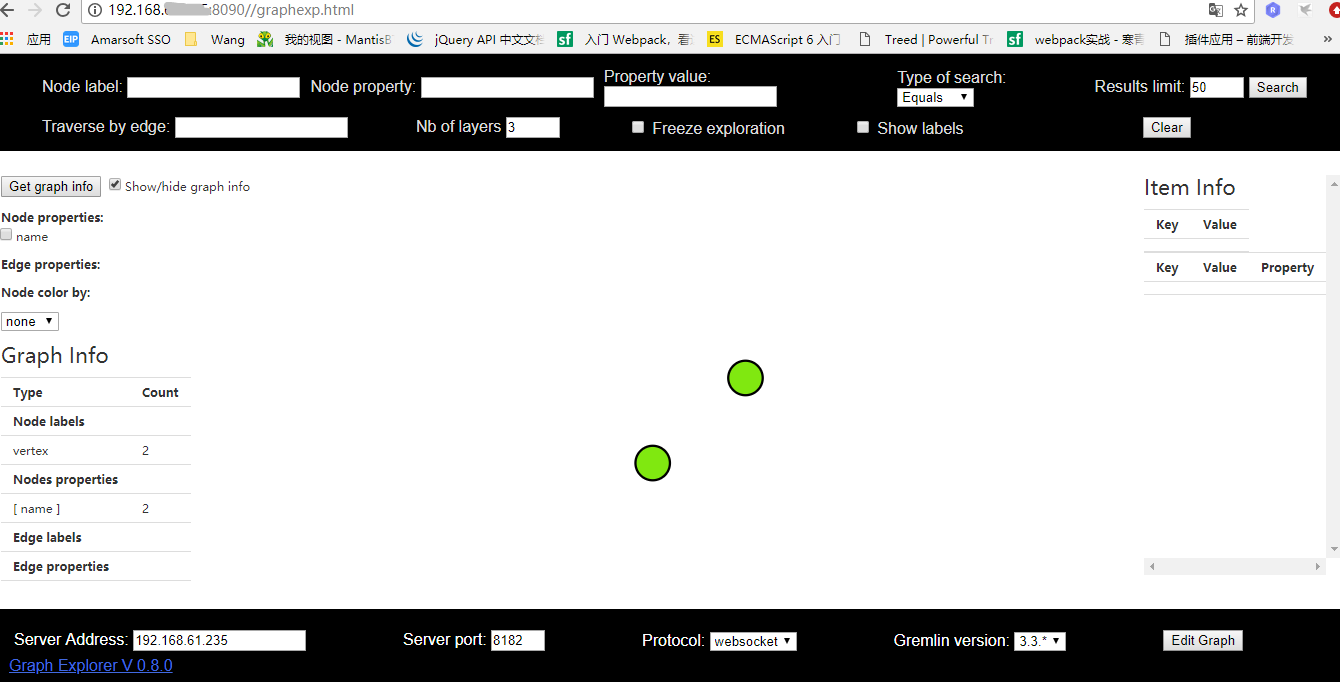
注:graphexp 是和gremlin server 绑定的,只要支持gremlin server的图数据库都可以用(例如janusgraph,hugegraph)
五、总结
整个安装graphexp可视化插件过程中主要还是在修改一些配置文件,注意修改的正确,并且所需环境完备,就可以安装成功了。
参考文章:
JanusGraph实战-多种方式使用JanusGraph Server:https://blog.csdn.net/zg_hover/article/details/89365799
JanusGraph Server配置:https://www.cnblogs.com/jiyuqi/p/320267ff0b5052fad4613945e58ea1f1.html
图数据库JanusGraph与neo4j对比:https://blog.csdn.net/sinat_35045195/article/details/91387632
JanusGraph安装graphexp的更多相关文章
- JanusGraph 图数据库安装小记 ——以 JanusGraph 0.3.0 为例
由于近期项目中有使用图数据的需求,经过对比,我们选择尝试使用 JanusGraph.本篇小记记录了我们安装 JanusGraph 以及需要一起集成的 Cassandra + Elasticsearch ...
- JanusGraph :Cassandra作为存储后端的情况下,JanusGraph的安装方法
Cassandra作为存储后端的情况下,JanusGraph的安装方法 Cassandra作为存储后端的情况下,JanusGraph的安装分为四种方式. 分别是: 1.本地服务器模式(这里的服务器指的 ...
- janusgraph单机版安装
注:本次安装janusgraph基于es和hbse,所以先安装es和hbase 1.安装jdk 2.安装janusgraph 解压安装文件至/usr/janusgraph-0.3.1 unzip ja ...
- JanusGraph : 图和图数据库的简介
JanusGraph:图数据库系统简介 图(graph)是<数据结构>课中第一次接触到的一个概念,它是一种用来描述现实世界中个体和个体之间网络关系的数据结构. 为了在计算机中存储图,< ...
- 主流图库对比以及JanusGraph入门
1.Overall Comparison Name Neo4j JanusGraph Giraph Jena 1.Compute Framework Yes Yes Yes 2.External Co ...
- yugabyte 集成JanusGraph测试
yugabyte 集成图数据库JanusGraph,原理比较简单就是yugabyte 内置Cassandra,配置好JanusGraph 的访问就可以了. 使用docker 模式部署 创建yugaby ...
- 通过使用JanusGraph索引提高性能
翻译整理:纪玉奇 Extending JanusGraph Server JanusGraph支持两种类型的索引:graph index和vertex-centric index.graph inde ...
- JanusGraph多图配置 (cassandra)
JanusGraph多图配置目的 :一个端口开启后可根据句柄操作多个图 .(cassandra存储后端) 1.GremlinServer多图配置 服务器gremlin-server.yaml中可以设置 ...
- JanusGraph 创建索引步骤(composite index)踩坑总结
前言 JanusGraph是一个图数据库引擎,安装及入门可以参考 JanusGraph 图数据库安装小记.为了提高查询速度,在使用过程中一般要为某些属性创建索引.这篇随笔主要是记录创建索引过程中踩过的 ...
随机推荐
- 洛谷 p1516 青蛙的约会 题解
dalao们真是太强了,吊打我无名蒟蒻 我连题解都看不懂,在此篇题解中,我尽量用语言描述,不用公式推导(dalao喜欢看公式的话绕道,这篇题解留给像我一样弱的) 进入正题 如果不会扩展欧里几德的话请先 ...
- SqlServer事务语法及使用方法(转)
原博:http://blog.csdn.net/xiaouncle/article/details/52891563 事务是关于原子性的.原子性的概念是指可以把一些事情当做一个不可分割的单元来看待.从 ...
- 使用jackson转换xml格式数据进行响应
最近在做微信扫码支付的功能,按照微信开发文档与支付平台进行数据交互只能使用XML格式的数据,调用别人定义的接口就需要按规则来嘛,没办法.自己之前使用jackson,主要是因为SpringMVC默认将j ...
- 深度学习之ResNet网络
介绍 Resnet分类网络是当前应用最为广泛的CNN特征提取网络. 我们的一般印象当中,深度学习愈是深(复杂,参数多)愈是有着更强的表达能力.凭着这一基本准则CNN分类网络自Alexnet的7层发展到 ...
- sublime插件开发: 文件说明
sublime插件开发 文件 .sublime-settings 设置文件 Main.sublime-menu 主菜单按钮配置文件 Side Bar.sublime-menu 侧边栏菜单文件列表,选中 ...
- java IO流读取图片供前台显示
最近项目中需要用到IO流来读取图片以提供前台页面展示,由于以前一直是用url路径的方式进行图片展示,一听说要项目要用IO流读取图片感觉好复杂一样,但任务下达下来了,做为程序员只有选择去执行喽,于是找了 ...
- ASP.NET Core使用Docker-Swarm集群部署实现负载均衡实战演练
一.需求背景 人生苦短,我用.NET Core!阿笨对Docker是这样评价的:Docker在手,环境我有!Docker出手,集群我有!前面的Doc基础课程我们学习了如何使用Docker来部署搭建单机 ...
- pycharm安装pytorch失败的问题
在无GPU的情况下,打算安装pytorch跑几个demo练练手,但是pycharm发现总是失败,无法安装成功.错误显示如下: 无奈之下,只能够使用官方推荐的命令pip3安装,命令如下: pip3 in ...
- 小米win10+kali 双系统
1.下载kali linux 系统镜像,用windisk32imager 制作启动盘,制作好后千万不要格式化u盘,其他的启动盘制作工具不好用,无法加载系统镜像 2.将u盘插入电脑,重启,电脑重启时按 ...
- 【RS】Wide & Deep Learning for Recommender Systems - 广泛和深度学习的推荐系统
[论文标题]Wide & Deep Learning for Recommender Systems (DLRS'16) [论文作者] Heng-Tze Cheng, Levent Koc, ...