
.NET Core 配置文件
老一代配置系统
1,XML格式 格式单一。
2,配置信息Kye,只能一维化配置
3,框架信息和应用程序信息混合到一起
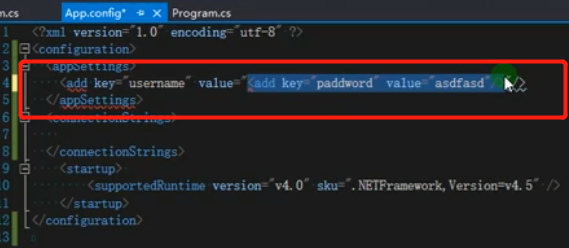
应用程序中是 App.config
web项目中 web.config
使用程序集 System.Configuration
新一代配置系统
1支持配置文件格式 json xml init 环境变量 memory
2参数热加载
3参数多维
nuget包
Microsoft.Extensions.Configuration
主要是用上面的
下面的是对应不同文件类型的扩展 都是扩展方法
Microsoft.Extensions.Configuration.Json
Microsoft.Extensions.Configuration.Xml
Microsoft.Extensions.Configuration.Init
Microsoft.Extensions.Configuration.EnvironmentVariables
下面的是进行模型转换的
Microsoft.Extensions.Configuration.Binder
数据读取
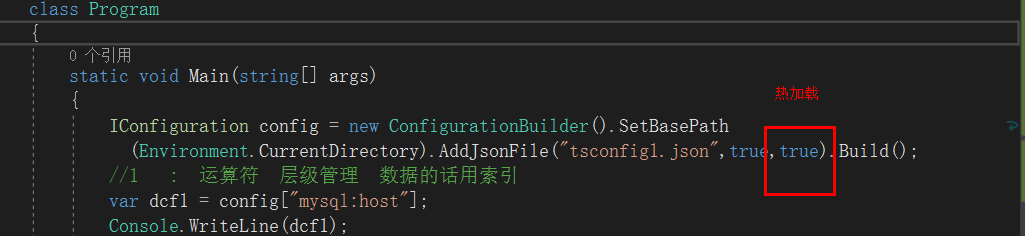
//1   :  运算符  层级管理  数据的话用索引

var dcf1 = config["mysql:host"];

Console.WriteLine(dcf1);

var dcf11 = config["shopidlist:1:entid"];

Console.WriteLine(dcf11);

//2   getsection              getsection("")[""]

var dcf2 = config.GetSection("mysql").GetSection("host").Value;

Console.WriteLine(dcf2);

var dcf21 = config.GetSection("mysql:host").Value;

Console.WriteLine(dcf21);

var dcf3 = config.GetSection("mysql")["host"];

Console.WriteLine(dcf3);

var dcf4 = config.GetSection("shopidlist").GetSection("")["entid"];

Console.WriteLine(dcf4);

var dcf5 = config.GetSection("shopidlist").GetSection("").GetSection("entid").Value;

Console.WriteLine(dcf5);

//3强类型读取       Microsoft.Extensions.Configuration.Binder

//开发中常用强类型

var dcf6 = config.GetValue<int>("shopidlist:1:entid");

Console.WriteLine(dcf6);

Rootobject dcf7 = new Rootobject();

config.Bind(dcf7);

Console.WriteLine(dcf7.mysql.host);
弱类型方式读取
<1>: ':'运算符 mysql:host
IConfiguration configuration = new ConfigurationBuilder().SetBasePath(Environment.CurrentDirectory)
.AddJsonFile($"appsettings.json", optional: true, reloadOnChange: true)
//.AddXmlFile("appsettings.xml")
//.AddEnvironmentVariables()
.Build();
var info = configuration["shopidlist:0:entid"];
{
"mysql": {
"host": "192.168.23.1",
"port": 3306
},
"shopidlist": [
{ "entid": 20 },
{ "entid": 25 }
]
}
<2> GetSection (不同的人,不同的使用习惯) getSection("mysql")["host"]
//var info = configuration.GetSection("shopidlist").GetSection("1").GetSection("entid").Value;
var info = configuration.GetSection("shopidlist").GetSection("1")["entid"];
public IConfigurationSection GetSection(string key)
{
string[] textArray1 = new string[] { this.Path, key };
return this._root.GetSection(ConfigurationPath.Combine(textArray1));
}
强类型方式读取 : Microsoft.Extensions.Configuration.Binder
<1> GetValue
var info = configuration.GetValue<int>("mysql:port");
public static object GetValue(this IConfiguration configuration, Type type, string key, object defaultValue)
{
string str = configuration.GetSection(key).Value;
if (str != null)
{
return ConvertValue(type, str);
}
return defaultValue;
}
<2> 配置映射为实体类Bind,Get<T>
Rootobject rootobject = new Rootobject();
configuration.Bind(rootobject);
Configuration.GetSection("Position").Get<PositionOptions>();
StartUp类中

public void ConfigureServices(IServiceCollection services)

{

    services.Configure<PositionOptions>(Configuration.GetSection("Position"));

    services.AddRazorPages();

}

其他类注入

public class Test2Model : PageModel

{

    private readonly PositionOptions _options;

    public Test2Model(IOptions<PositionOptions> options)

    {

        _options = options.Value;

    }

    public ContentResult OnGet()

    {

        return Content($"Title: {_options.Title} \n" +

                       $"Name: {_options.Name}");

    }

}
.NET Core 配置文件的更多相关文章
- .NET Core配置文件加载与DI注入配置数据
.NET Core配置文件 在以前.NET中配置文件都是以App.config / Web.config等XML格式的配置文件,而.NET Core中建议使用以JSON为格式的配置文件,因为使用起来更 ...
- net core体系-web应用程序-4net core2.0大白话带你入门-6asp.net core配置文件
asp.net core配置文件 读取配置文件 asp.net core使用appsettings.json代替传统.net framework的web.config中的<appSettin ...
- [转].NET Core配置文件加载与DI注入配置数据
本文转自:http://www.cnblogs.com/skig/p/6079187.html .NET Core配置文件 在以前.NET中配置文件都是以App.config / Web.config ...
- .Net Core配置文件
.Net Core下如何管理配置文件 一.前言 根据该issues来看,System.Configuration在.net core中已经不存在了,那么取而代之的是由Microsoft.Extensi ...
- .Net Core配置文件介绍
Net Core中的配置文件介绍 1 简单回顾.Net Framework配置文件 .Net Core中的配置文件操作较.Net Framework有了很大的改动.介绍.Net Core中配置文件操作 ...
- asp.net core配置文件
读取配置文件 asp.net core使用appsettings.json代替传统.net framework的web.config中的<appSettings>节点.它的数据格式变成了j ...
- .NET 黑魔法 - asp.net core 配置文件的"对象存储"
来,全都是干货. 我们都知道在Framework版本的mvc项目中,配置数据是通过web.config里的appSettings节点配置,我们不得不写一些读取配置文件字符串的类,比如保存在静态的变量中 ...
- .Net Core配置文件读取整理
一 .配置文件说明 1.配置,主要是 指在程序中使用的一些特殊参数,并且大多数 仅在程序启动的之后指定不需要修改. 2.在以前.Net项目中配置文件主要指app.config或web.config,但 ...
- ASP.NET Core 配置文件(无处不在的依赖注入)
前烟: .NET Core 中取消了以往的 XML 节点配置文件,改用了 *.json 格式. 在 Startup.cs 文件中,构造方法 build appsetting.json 文件, 本文主要 ...
- ASP.NET Core 配置文件
在ASP.NET Core 中,应用程序配置数据可以使用JSON, XML 和 INI格式 和内置环境变量,命令行参数或内存中的集合. 1.如何获取和设置配置 ASP.NET Core配置系统针对以前 ...
随机推荐
- MySQL 获得 当前日期时间 函数
mysql> select now(); 输出 -- :: 例子 mysql> ), now(); +---------------------+----------+---------- ...
- andriod studio连接SQLite
SQLite SQLite是一种嵌入式的数据库引擎,以文件的形式保存数据的,专门适用于资源有限的设备上进行适量的数据存储. 从本质上来看,SQLite的操作方式只是一种更为便捷的文件操作,当应用程序创 ...
- エンジニア死滅シタ世界之高層ビル [MISSION LEVEL: B]-Python3
n = input() pre="" next_str = "" new_str = "" for i in range(int(n)): ...
- 关于SQL中的ROWNUM问题
前言 昨天改小程序的后台,看见之前写的分页很奇怪,startIndex和endIndex两个下标, endIndex 总是在里面层,而startIndex总是在外层,我随后改了,直接Where row ...
- SpringContextHolder 作用
以静态变量保存Spring ApplicationContext, 可在任何代码任何地方任何时候取出ApplicaitonContext. 使用方式.在启动类里添加Bean package com.y ...
- php手记之05-tp5获取器与修改器
获取器 命名规范为: getFieldNameAttr 例如,我们需要对状态值进行转换,可以使用: <?php class User extends Model { public functio ...
- [Vue warn]: Avoid using non-primitive value as key
<el-select v-model="addform.province" placeholder="请选择省份" multiple> ...
- laravel修改了配置文件不生效,修改了数据库配置文件不生效
Laravel缓存配置文件,因此您可能只需要清除缓存: php artisan config:clear 转: http://www.voidcn.com/article/p-sgcusrjp-bxw ...
- Linux_CentOS软件安装yum
在 Linux 操作系统下,几乎所有的软件均通过 RPM 进行安装.卸载及管理等操作.RPM 的 全称为 Redhat Package Manager ,是由 Redhat 公司提出的,用于管理 Li ...
- Vue动态路由 Get传值
<template> <!-- 所有的内容要被根节点包含起来 --> <div id="home"> 我是首页组件 <ul> < ...