
.NET Core 配置文件
老一代配置系统
1,XML格式 格式单一。
2,配置信息Kye,只能一维化配置
3,框架信息和应用程序信息混合到一起
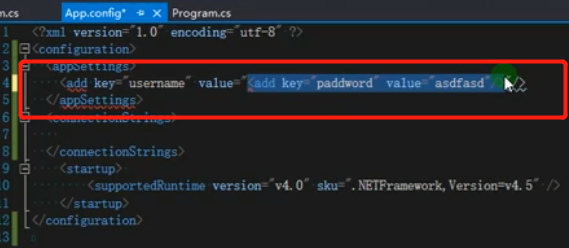
应用程序中是 App.config
web项目中 web.config
使用程序集 System.Configuration
新一代配置系统
1支持配置文件格式 json xml init 环境变量 memory
2参数热加载
3参数多维
nuget包
Microsoft.Extensions.Configuration
主要是用上面的
下面的是对应不同文件类型的扩展 都是扩展方法
Microsoft.Extensions.Configuration.Json
Microsoft.Extensions.Configuration.Xml
Microsoft.Extensions.Configuration.Init
Microsoft.Extensions.Configuration.EnvironmentVariables
下面的是进行模型转换的
Microsoft.Extensions.Configuration.Binder
数据读取
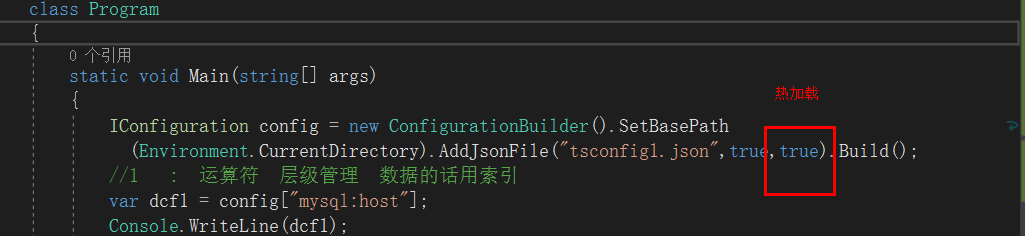
//1   :  运算符  层级管理  数据的话用索引

var dcf1 = config["mysql:host"];

Console.WriteLine(dcf1);

var dcf11 = config["shopidlist:1:entid"];

Console.WriteLine(dcf11);

//2   getsection              getsection("")[""]

var dcf2 = config.GetSection("mysql").GetSection("host").Value;

Console.WriteLine(dcf2);

var dcf21 = config.GetSection("mysql:host").Value;

Console.WriteLine(dcf21);

var dcf3 = config.GetSection("mysql")["host"];

Console.WriteLine(dcf3);

var dcf4 = config.GetSection("shopidlist").GetSection("")["entid"];

Console.WriteLine(dcf4);

var dcf5 = config.GetSection("shopidlist").GetSection("").GetSection("entid").Value;

Console.WriteLine(dcf5);

//3强类型读取       Microsoft.Extensions.Configuration.Binder

//开发中常用强类型

var dcf6 = config.GetValue<int>("shopidlist:1:entid");

Console.WriteLine(dcf6);

Rootobject dcf7 = new Rootobject();

config.Bind(dcf7);

Console.WriteLine(dcf7.mysql.host);
弱类型方式读取
<1>: ':'运算符 mysql:host
IConfiguration configuration = new ConfigurationBuilder().SetBasePath(Environment.CurrentDirectory)
.AddJsonFile($"appsettings.json", optional: true, reloadOnChange: true)
//.AddXmlFile("appsettings.xml")
//.AddEnvironmentVariables()
.Build();
var info = configuration["shopidlist:0:entid"];
{
"mysql": {
"host": "192.168.23.1",
"port": 3306
},
"shopidlist": [
{ "entid": 20 },
{ "entid": 25 }
]
}
<2> GetSection (不同的人,不同的使用习惯) getSection("mysql")["host"]
//var info = configuration.GetSection("shopidlist").GetSection("1").GetSection("entid").Value;
var info = configuration.GetSection("shopidlist").GetSection("1")["entid"];
public IConfigurationSection GetSection(string key)
{
string[] textArray1 = new string[] { this.Path, key };
return this._root.GetSection(ConfigurationPath.Combine(textArray1));
}
强类型方式读取 : Microsoft.Extensions.Configuration.Binder
<1> GetValue
var info = configuration.GetValue<int>("mysql:port");
public static object GetValue(this IConfiguration configuration, Type type, string key, object defaultValue)
{
string str = configuration.GetSection(key).Value;
if (str != null)
{
return ConvertValue(type, str);
}
return defaultValue;
}
<2> 配置映射为实体类Bind,Get<T>
Rootobject rootobject = new Rootobject();
configuration.Bind(rootobject);
Configuration.GetSection("Position").Get<PositionOptions>();
StartUp类中

public void ConfigureServices(IServiceCollection services)

{

    services.Configure<PositionOptions>(Configuration.GetSection("Position"));

    services.AddRazorPages();

}

其他类注入

public class Test2Model : PageModel

{

    private readonly PositionOptions _options;

    public Test2Model(IOptions<PositionOptions> options)

    {

        _options = options.Value;

    }

    public ContentResult OnGet()

    {

        return Content($"Title: {_options.Title} \n" +

                       $"Name: {_options.Name}");

    }

}
.NET Core 配置文件的更多相关文章
- .NET Core配置文件加载与DI注入配置数据
.NET Core配置文件 在以前.NET中配置文件都是以App.config / Web.config等XML格式的配置文件,而.NET Core中建议使用以JSON为格式的配置文件,因为使用起来更 ...
- net core体系-web应用程序-4net core2.0大白话带你入门-6asp.net core配置文件
asp.net core配置文件 读取配置文件 asp.net core使用appsettings.json代替传统.net framework的web.config中的<appSettin ...
- [转].NET Core配置文件加载与DI注入配置数据
本文转自:http://www.cnblogs.com/skig/p/6079187.html .NET Core配置文件 在以前.NET中配置文件都是以App.config / Web.config ...
- .Net Core配置文件
.Net Core下如何管理配置文件 一.前言 根据该issues来看,System.Configuration在.net core中已经不存在了,那么取而代之的是由Microsoft.Extensi ...
- .Net Core配置文件介绍
Net Core中的配置文件介绍 1 简单回顾.Net Framework配置文件 .Net Core中的配置文件操作较.Net Framework有了很大的改动.介绍.Net Core中配置文件操作 ...
- asp.net core配置文件
读取配置文件 asp.net core使用appsettings.json代替传统.net framework的web.config中的<appSettings>节点.它的数据格式变成了j ...
- .NET 黑魔法 - asp.net core 配置文件的"对象存储"
来,全都是干货. 我们都知道在Framework版本的mvc项目中,配置数据是通过web.config里的appSettings节点配置,我们不得不写一些读取配置文件字符串的类,比如保存在静态的变量中 ...
- .Net Core配置文件读取整理
一 .配置文件说明 1.配置,主要是 指在程序中使用的一些特殊参数,并且大多数 仅在程序启动的之后指定不需要修改. 2.在以前.Net项目中配置文件主要指app.config或web.config,但 ...
- ASP.NET Core 配置文件(无处不在的依赖注入)
前烟: .NET Core 中取消了以往的 XML 节点配置文件,改用了 *.json 格式. 在 Startup.cs 文件中,构造方法 build appsetting.json 文件, 本文主要 ...
- ASP.NET Core 配置文件
在ASP.NET Core 中,应用程序配置数据可以使用JSON, XML 和 INI格式 和内置环境变量,命令行参数或内存中的集合. 1.如何获取和设置配置 ASP.NET Core配置系统针对以前 ...
随机推荐
- 6、httpd2.4 编译安装LAMP
www.itjc8.com 新特性: MPM支持运营DSO机制(动态共享对象),以模块形式按需加载 支持event MPM 支持异步读写 支持每模块及每个目录分别使用各自的日志级别 每请求配置 增强版 ...
- [SDOI2009][BZOJ 1226]学校食堂
Description 小F 的学校在城市的一个偏僻角落,所有学生都只好在学校吃饭.学校有一个食堂,虽然简陋,但食堂大厨总能做出让同学们满意的菜肴.当然,不同的人口味也不一定相同,但每个人的口味都可以 ...
- Java8 LocalDateTime的补充工具方法
import java.time.*;import java.time.format.DateTimeFormatter;import java.time.format.DateTimeFormatt ...
- mongo最大连接数查看
进入客户端 mongo 输入查看命令 db.serverStatus().connections
- 项目管理工具_maven的配置
<parent> <groupId>cn.itcast.maven</groupId> <artifactId>Parent</artifactI ...
- php手记之07-tp5 cookie与session
ThinkPHP采用 01-think\facade\Cookie类提供Cookie支持. 02-think\Cookie 配置文件位于 config/cookie.php中,一般会配置一个超时时间. ...
- ORA-39142: incompatible version number 5.1 in dump file
ORA-39142: incompatible version number 5.1 in dump file http://blog.itpub.net/26664718/viewspace-214 ...
- Gis基础知识,坐标 投影
1. 大地测量学 (Geodesy) 大地测量学是一门量测和描绘地球表面的学科,也包括确定地球重力场和海底地形. 1.1 大地水准面 (geoid) 大地水准面是海洋表面在排除风力.潮汐等其它影响,只 ...
- Js-事件分发与DOM事件流
原文地址:https://www.jianshu.com/p/dc1520327022 Js事件分发与DOM事件流 对JavaScript分发事件不熟悉,网上查阅相关资料整理后,记录一下对Javasc ...
- vim脚本判断操作系统
Linux 和 Windows 通用配置 其实在配置文件中是可以通过逻辑代码判断平台做条件处理的,这样就可以实现一个配置文件两个个平台下共用了,判断逻辑如下: " ============= ...