
.NET Core中 实现H5微信登录(静默授权方式)
需求
假设现在有一个H5需要有微信登录、手机号登录、邮箱登录 三种登录方式。让我们一起来看看微信登录如何实现吧
界面:
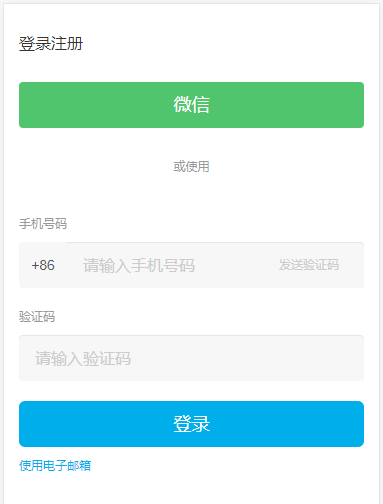
最终实现的效果图(登录成功后返回个人页):

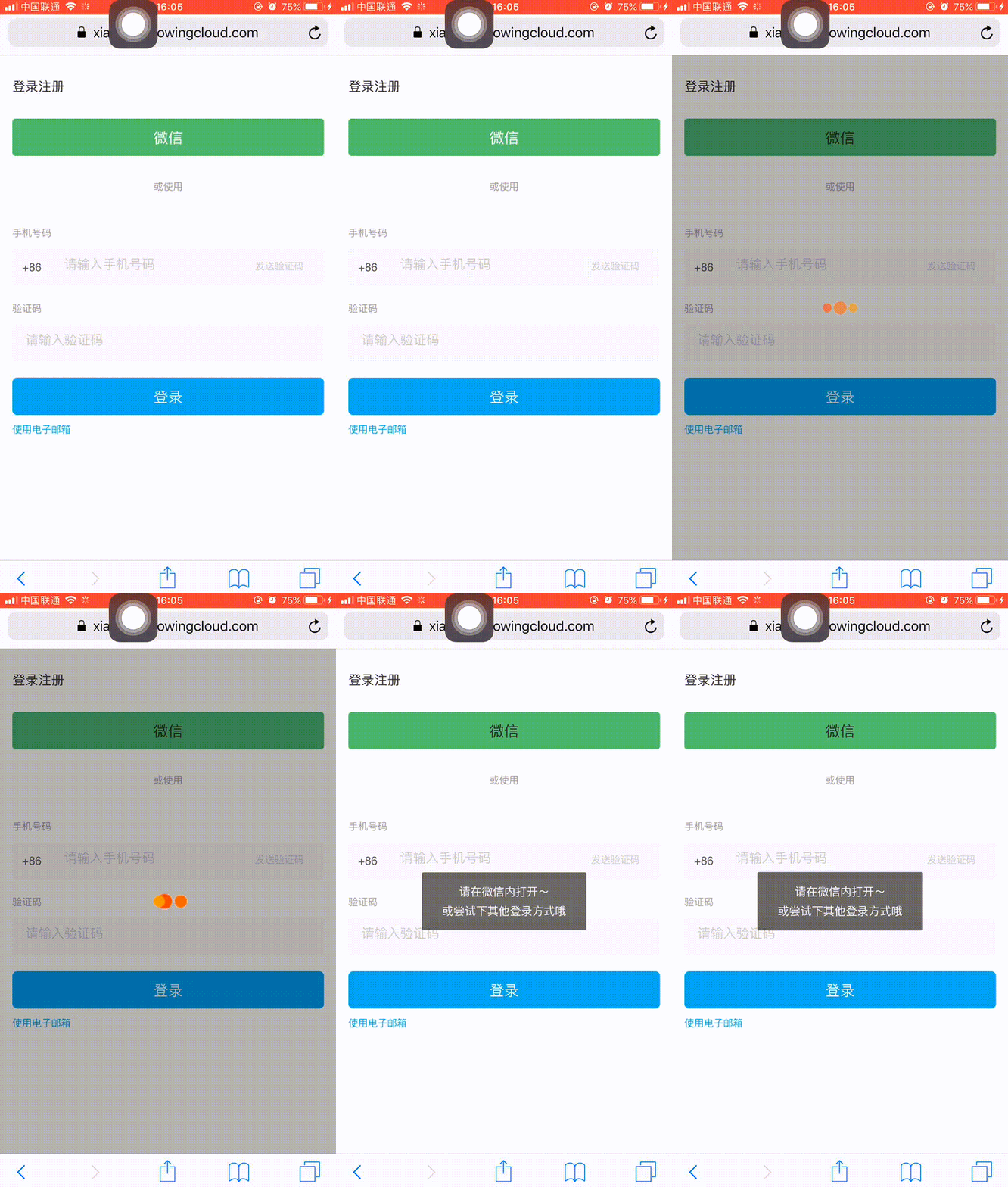
因为微信登录目前没有实现移动端的其他浏览器授权登录,所以,再用除微信以外的浏览器操作登录时,我们需要给出用户提醒,比如这样:
实现
准备工作
登录服务号或订阅号的微信公众号后台,找到AppId以及AppSecret。后面会用到

在公众号设置中,设置安全域名、js域名以及网页授权域名
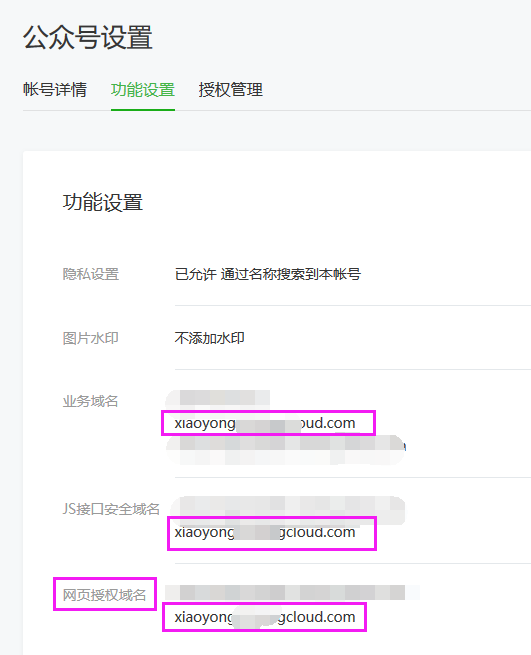
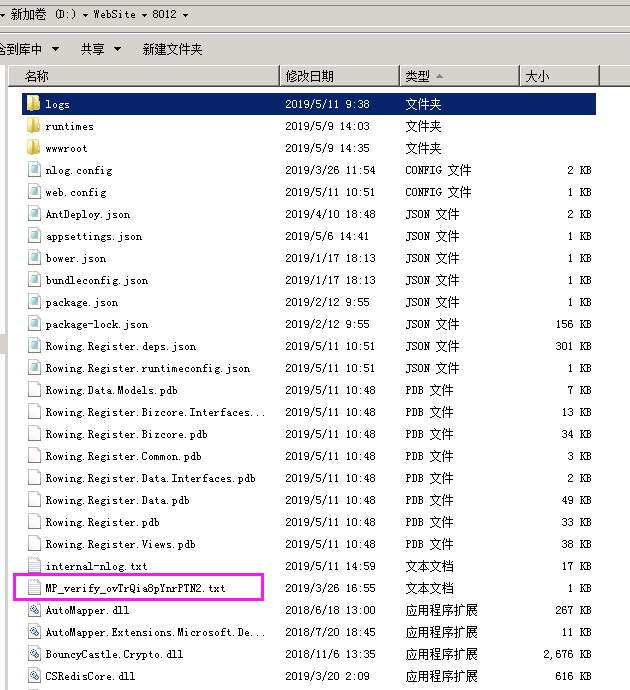
其中再网页授权域名设置的时候需要注意,将腾讯提供的一个唯一标识文件存放于项目根目录下

 、
、
数据库部分
新建一张Login表,用于存放用户登录信息
CREATE TABLE `NewTable` (

`id`  int(11) NOT NULL AUTO_INCREMENT ,

`loginaccount`  varchar(100) CHARACTER SET utf8 COLLATE utf8_bin NOT NULL ,

`password`  varchar(45) CHARACTER SET utf8 COLLATE utf8_bin NULL DEFAULT NULL ,

`type`  tinyint(4) NOT NULL ,

`userid`  int(11) NULL DEFAULT 0 ,

`isvalid`  tinyint(2) NULL DEFAULT 1 ,

PRIMARY KEY (`id`)

)

ENGINE=InnoDB

DEFAULT CHARACTER SET=utf8 COLLATE=utf8_bin

AUTO_INCREMENT=28

ROW_FORMAT=DYNAMIC

;

前端部分
前端要做的 比较简单,放置一个button按钮,以及js处理判断是否是微信内点击即可:
<div class="row">

    <div class="col-xs-12">

        <button type="button" class="btn  btn-lg btn-block wechatBtn" id="weChatLogin">微信</button>

    </div>

</div>
对应的js部分为:
$("#weChatLogin").on("click",

        function () {

            var layerLoading = layer.load(1, {

                icon: 0,

                shade: [0.3, 'black']

            });

            var result = isWeiXin();

            if (result === 0) {

                setTimeout(function () {

                    layer.closeAll();

                    var local = "回调地址";

                    window.location.href =

                        'https://open.weixin.qq.com/connect/oauth2/authorize?appid=服务号的appId&redirect_uri=' +

                        encodeURIComponent(local) +

                        '&response_type=code&scope=snsapi_base&state=a#wechat_redirect';

                },

                    500);

            } else {

                setTimeout(function () {

                    layer.closeAll();

                    layer.msg("请在微信内打开~<br/>或尝试下其他登录方式哦");

                },500);

            }

        });
上面这段js代码中,有两个黄色背景的代码需要注意,函数isWeiXin是用于判断当前用户打开的浏览器是否是微信浏览器,而参数snsapi_base则表示微信登录时采取的静默授权方式(即这样 只能获取到用户的Openid,无法获取到其他资料).
isWeiXin函数如下
 //判断是否是微信浏览器的函数

    function isWeiXin() {

        //window.navigator.userAgent属性包含了浏览器类型、版本、操作系统类型、浏览器引擎类型等信息,这个属性可以用来判断浏览器类型

        if (browser.versions.mobile) {//判断是否是移动设备打开。browser代码在下面

            var ua = navigator.userAgent.toLowerCase();//获取判断用的对象

            if (ua.match(/MicroMessenger/i) == "micromessenger") {

                return 0;

            } else {

                return 1;

            }

        } else {

            //否则就是PC浏览器打开

            return 2;

        }

    }

    var browser = {

        versions: function () {

            var u = navigator.userAgent, app = navigator.appVersion;

            return {         //移动终端浏览器版本信息

                trident: u.indexOf('Trident') > -1, //IE内核

                presto: u.indexOf('Presto') > -1, //opera内核

                webKit: u.indexOf('AppleWebKit') > -1, //苹果、谷歌内核

                gecko: u.indexOf('Gecko') > -1 && u.indexOf('KHTML') == -1, //火狐内核

                mobile: !!u.match(/AppleWebKit.*Mobile.*/), //是否为移动终端

                ios: !!u.match(/\(i[^;]+;( U;)? CPU.+Mac OS X/), //ios终端

                android: u.indexOf('Android') > -1 || u.indexOf('Linux') > -1, //android终端或uc浏览器

                iPhone: u.indexOf('iPhone') > -1, //是否为iPhone或者QQHD浏览器

                iPad: u.indexOf('iPad') > -1, //是否iPad

                webApp: u.indexOf('Safari') == -1 //是否web应该程序,没有头部与底部

            };

        }(),

        language: (navigator.browserLanguage || navigator.language).toLowerCase()

    }
后端部分
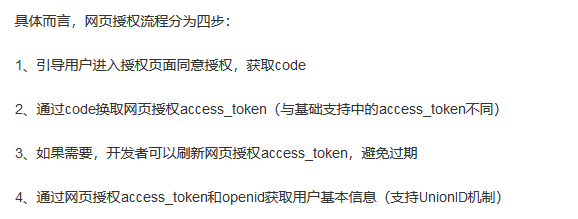
其中code和state是微信服务器发起请求的时候会带过来。code有效期为5分钟,state为自定义的一个参数,具体可参考微信网页授权文档:https://mp.weixin.qq.com/wiki?t=resource/res_main&id=mp1421140842
 public async Task<IActionResult> Index()

 {

            var code = Request.Query["code"];

            var state = Request.Query["state"];

            OAuthToken tokenModel = new OAuthToken();

            if (!string.IsNullOrEmpty(code) && !string.IsNullOrEmpty(state))

            {

                tokenModel = await _dataServices.LoginWeChat(code, _config[ConfigurationKeys.PAY_APPID]);//调取接口
           _logger.LogError($"微信登录:{tokenModel.Openid}");
           code = string.Empty;
                if (tokenModel.errmsg.Contains("success"))

                {

                    var model = await _dataServices.GetUserByIdAccount(tokenModel.Openid);//具体可根据自己的项目业务来操作
                    //TODO

                }

            }

        return View("~/Views/Home/Index.cshtml");

 }
上述代码中从第一个OAuthToken说起,它是一个自定义存放微信授权的实体类,内容如下
public class OAuthToken:BaseRes

    {

        /// <summary>

        /// 网页授权接口调用凭证。注意:此access_token与基础支持的access_token不同

        /// </summary>

        [JsonProperty("access_token")]

        public string AccessToken { get; set; }

        private int _expiresIn;

        /// <summary>

        /// access_token接口调用凭证超时时间,单位(秒)

        /// </summary>

        [JsonProperty("expires_in")]

        public int ExpiresIn

        {

            get { return _expiresIn; }

            set

            {

                ExpiresTime = DateTime.Now.AddSeconds(value);

                _expiresIn = value;

            }

        }

        /// <summary>

        /// 用于刷新access_token

        /// </summary>

        [JsonProperty("refresh_token")]

        public string RefreshToken { get; set; }

        /// <summary>

        /// 用户唯一标识。请注意,在未关注公众号时,用户访问公众号的网页,也会产生一个用户和公众号唯一的openid

        /// </summary>

        [JsonProperty("openid")]

        public string Openid { get; set; }

        /// <summary>

        /// 用户授权的作用域,使用逗号(,)分隔

        /// </summary>

        [JsonProperty("scope")]

        public string Scope { get; set; }

        [JsonProperty("expires_time")]

        public DateTime ExpiresTime { get; set; }

        [JsonProperty("unionid")]

        public string Unionid { get; set; }

    }
其中BaseRes,是返回的错误实体类
public class BaseRes

{

   public BaseRes()

   {

     errmsg = "success";

   }

   public int errcode { get; set; }

   public string errmsg { get; set; }

}
第二个ConfigurationKeys.PAY_APPID是获取配置项
第三个LoginWeChat,我们来看看这个接口中是如何实现的
首先我们看到这个接口接收两个参数,和上面我们请求的参数与对应,一个是code,另一个是appId
        [Route("[controller]/LoginByWeChat")]

        [HttpGet]

        public async Task<OAuthTokenDto> LoginByWeChat(string code, string appid = "")

        {

            return await _authenticationService.LoginByWeChat(code, appid);

        }
请求微信登录:
/// <summary>

        /// 通过code换取网页授权access_token

        /// </summary>

        /// <param name="appid">公众号的唯一标识</param>

        /// <param name="code">填写第一步获取的code参数</param>

        /// <returns></returns>

        public  async Task<OAuthTokenModel> LoginByWeChat(string code, string appid = "")

        {

            var config = OpenApi.GetConfig(appid, PlatformType.Mp);

            var url =

                $"https://api.weixin.qq.com/sns/oauth2/access_token?appid={config.AppId}&secret={config.AppSecret}&code={code}&grant_type=authorization_code";

            return await HttpUtil.GetResultAsync<OAuthTokenModel>(url);

        }
        /// <summary>

        /// 根据appid,获取对应的接口参数信息

        /// </summary>

        /// <param name="appid"></param>

        /// <returns></returns>

        public static ApiConfig GetConfig(string appid = "", PlatformType platform = PlatformType.Mp)

        {

            if (string.IsNullOrEmpty(appid) && apiConfigs?.Count > )

            {

                return apiConfigs.FirstOrDefault(a => a.Platform == platform);

            }

            return apiConfigs.FirstOrDefault(a => a.AppId == appid);

        }
    public class ApiConfig

    {

        public string AppId { get; set; }

        public string AppSecret { get; set; }

        public PlatformType Platform { get; set; } = PlatformType.Mp;

    }
    public enum PlatformType

    {

        /// <summary>

        /// 公众号

        /// </summary>

        Mp,

        /// <summary>

        /// 小程序

        /// </summary>

        Mini,

        /// <summary>

        /// 开放平台

        /// </summary>

        Open,

        /// <summary>

        /// 企业号

        /// </summary>

        Qy

    }
        /// <summary>

        /// 发起GET请求,并获取请求返回值

        /// </summary>

        /// <typeparam name="T">返回值类型</typeparam>

        /// <param name="url">接口地址</param>

        public static async Task<T> GetResultAsync<T>(string url)

        {

            var retdata = await HttpGetAsync(url);

            return JsonConvert.DeserializeObject<T>(retdata);

        }
这里我们调用了Get异步请求:
        public static async Task<string> HttpGetAsync(string url)

        {

            var request = CreateRequest(url, HttpMethod.GET);

            return await GetResponseStringAsync(request);

        }

        private static HttpWebRequest CreateRequest(string url, HttpMethod method, string postData = "", string certpath = "", string certpwd = "")

        {

            var request = (HttpWebRequest)WebRequest.Create(url);

            request.Method = method.ToString();

            request.ContentType = "application/x-www-form-urlencoded";

            request.Accept = "*/*";

            request.Timeout = ;

            request.AllowAutoRedirect = false;

            ServicePointManager.ServerCertificateValidationCallback = new RemoteCertificateValidationCallback((a, b, c, d) => true);

            if (!string.IsNullOrEmpty(certpath) && !string.IsNullOrEmpty(certpwd))

            {

                X509Certificate2 cer = new X509Certificate2(certpath, certpwd,

                    X509KeyStorageFlags.PersistKeySet | X509KeyStorageFlags.MachineKeySet);

                request.ClientCertificates.Add(cer);

            }

            if (method == HttpMethod.POST)

            {

                using (var sw = new StreamWriter(request.GetRequestStream()))

                {

                    sw.Write(postData);

                }

            }

            return request;

        }

       private static async Task<string> GetResponseStringAsync(HttpWebRequest request)

        {

            using (var response = await request.GetResponseAsync() as HttpWebResponse)

            {

                using (StreamReader reader = new StreamReader(response.GetResponseStream(), Encoding.UTF8))

                {

                    return reader.ReadToEnd();//获取响应

                }

            }

        }
    public enum HttpMethod

    {

        GET,

        POST

    }
这样,我们就可以拿到返回的响应结果了
 OAuthToken resultDto = JsonConvert.DeserializeObject<OAuthToken>(resultDetail);

  _logger.LogError($"OpenId:{resultDto.Openid},ErrorMsg:{resultDto.errmsg}");

 return Task.FromResult(resultDto);
我们查看日志,可以看到OpenId已经被打印出来了

这样,我们只需要将我们的Openid 再数据库中进行查找,就可以知道是否存在此用户,若不存在,则可以操作新增
//判断是否数据库有登录记录 ,若无则新增

                if (!string.IsNullOrEmpty(model.Openid))

                {

                    var result = await _authenticationDataServices.FindAccountById(model.Openid);

                    if (string.IsNullOrEmpty(result.LoginAccount))

                    {

                        LoginUserModel userData = new LoginUserModel

                        {

                            LoginAccount = model.Openid,

                            Password = string.Empty,

                            Type = (int) LoginType.Wexin,

                            UserId = ,

                            IsValid = true

                        };

                        var res =await _authenticationDataServices.AddLoginUser(userData);

                        if (res <= ) logger.Error(res);

                    }

                }
查找用户的实现
public async Task<LoginUserModel> FindAccountById(string account)

        {

            using (var conn = GetMySqlConnection())

            {

                if (conn.State == ConnectionState.Closed)

                {

                    await conn.OpenAsync();

                }

                try

                {

                    string sql =

                        @"select Loginaccount,Password,Type,Userid,Isvalid from centraldb.login  where loginaccount=@recordId;";

                    var user = conn.Query<LoginUserModel>(sql, new { recordId = account }, commandType: CommandType.Text).FirstOrDefault();

                    return user ?? new LoginUserModel();

                }

                catch (Exception e)

                {

                    throw;

                }

            }

        }
新增的实现
 public async Task<int> AddLoginUser(LoginUserModel loginUser)

        {

            using (var conn = GetMySqlConnection())

            {

                if (conn.State == ConnectionState.Closed)

                {

                    await conn.OpenAsync();

                }

                const string sql =

                    @"insert into centraldb.login(loginaccount, `password`, `type`, userid, isvalid)

                            values(@loginaccount, @password, @type, @userid, @isvalid);

                      select max(id) from centraldb.login;";

                try

                {

                    var userId = (await conn.QueryAsync<int>(sql, new

                    {

                        loginaccount = loginUser.LoginAccount, password = loginUser.Password,

                        type = loginUser.Type, userid = loginUser.UserId, isvalid = loginUser.IsValid

                    }, commandType: CommandType.Text)).FirstOrDefault();

                    return userId;

                }

                catch (Exception e)

                {

                    return -;

                }

            }

        }
这样,运行项目之后,数据库中就会插入相应的数据:

.NET Core中 实现H5微信登录(静默授权方式)的更多相关文章
- 转:【微信公众号】微信snsapi_base静默授权与snsapi_userinfo网页授权的实现(不建议使用静默,直接用主动比较方便)
版权声明:本文为CSDN博主「小璐謌」的原创文章,遵循CC 4.0 by-sa版权协议,转载请附上原文出处链接及本声明. 原文链接:https://blog.csdn.net/qq_37462176/ ...
- ASP.NET CORE中使用Cookie身份认证
大家在使用ASP.NET的时候一定都用过FormsAuthentication做登录用户的身份认证,FormsAuthentication的核心就是Cookie,ASP.NET会将用户名存储在Cook ...
- 关于微信登录授权获取unionid的方法
前言:微信登录授权是目前普遍存在于小程序的,还有一种静默授权方式是微信提供的但是不推荐使用,由于不同设备登录openid是不同的那么我们应该怎样拿到一个唯一的ID呢,下面做分享 wxml代码 < ...
- web登录与授权
web开发已经流行了很多年,登录与授权也基本有一套通用的流程,下面是我自己常用的登录与授权方式,欢迎大家讨论与吐槽. 概念: 登录是过程,授权是结果.登录只是为了获得页面的访问权限 or 操作权限 o ...
- H5微信授权登录
这里介绍H5微信授权登录,采用了微信公众号授权原理,是oauth2的登录授权方式,简单的来讲,就是用户通过手机微信确认登录之后,微信方会返回一个授权码code给回第三方(接入方),这个授权码code一 ...
- 【公众号】微信第三方登录(静默授权和非静默授权)(具体代码:U盘 新浪云SAE)
一.微信联合登录是怎么登录的,有几种登录方式:微信联合登录和微信授权登录[授权登录(非静默授权)与静默授权] [主动授权]:需要用户确认登录,这样可以通过用户的个人确认,获取用户全面的信息,无论是否关 ...
- [转]ASP.NET Core集成微信登录
本文转自:http://www.cnblogs.com/early-moon/p/5819760.html 工具: Visual Studio 2015 update 3 Asp.Net Core 1 ...
- ASP.NET Core集成微信登录
工具: Visual Studio 2015 update 3 Asp.Net Core 1.0 1 准备工作 申请微信公众平台接口测试帐号,申请网址:(http://mp.weixin.qq.com ...
- 公众号H5页面接入微信登录流程
公众号H5页面接入微信登录流程 源码地址 https://gitee.com/szxio/h5_weixin 起步 首先创建一个项目,我们采用uni-app来作为我们的前端框架 环境安装 全局安装vu ...
随机推荐
- 201871010128-杨丽霞《面向对象程序设计(java)》第十三周学习总结
201871010128-杨丽霞<面向对象程序设计(java)>第十三周学习总结 项目 内容 这个作业属于哪个课程 https://www.cnblogs.com/nwnu-daizh/ ...
- python27期day15:自定义模块、模块导入、模块的路径、模块的查找顺序、time、datetime、random、os、sys、作业题
1.模块的介绍: py文件就是一个模块 2.模块的分类:内置模块:python标准库 200 第三方模块 自定义模块 3.为什么学习模块? 开发效率高,内置函数和模块 减少重复代码,分文件管理,有助于 ...
- 理解Javascript执行过程
Javascript是一种解释型的动态语言. 在程序中,有编译型语言和解释型语言.那么什么是编译型语言,什么是解释型语言呢? 编译型语言: 它首先将源代码编译成机器语言,再由机器运行机器码(二进制). ...
- 利用nodejs识别二维码内容的方法
const decodeImage = require('jimp').read; const qrcodeReader = require('qrcode-reader'); qrDecode(&q ...
- tornado之获取参数
self.write() # 返回字符串 self.redirect() # 重定向 self.render() # 返回html页面 一. 获取url中携带的参数, 如: 127.0.0.1: ...
- cf1208G Polygons 欧拉函数
链接 cf 给你两个正整数\(n\)和\(k\),询问在一个圆上你最少需要几个点构才能造出\(k\)个边数小于等于\(n\)的正多边形 思路 深受迫害,所以写的详细一点,不会请留言. 性质1 考虑加进 ...
- vijos2055 移动金币
题目链接 思路 首先这是一个阶梯博弈. 我们将金币两两组合,如果对方移动前一个,那么我们把后一个移动相同的距离,局面相当于没有变化.如果对方移动后一个,就相当于\(NIM\)游戏中,取走了一些石子. ...
- win10安装docker并结合Idea2018.1部署springboot项目
一.准备工作 1..工具:win10,idea2018,maven3.5,jdk8 二.win10安装docker 1.win10安装docker:http://www.runoob.com/dock ...
- idea插件篇之java内存分析工具(JProfiler)
前言在运行java的时候有时候想测试云运行时占用内存情况,这时候就需要使用测试工具查看了.在eclipse里面有 Eclipse Memory Analyzer tool(MAT)插件可以测试,而在i ...
- java OutOfMemorry
首先需要明确OOM并不一定会导致程序挂掉,导致服务不可用的是堆内存被耗尽,从而使得主线程直接退出,或者所有工作线程频繁因为OOM异常终止,java分配数组会直接消耗内存,一个对象引用会占用四个字节. ...