
ElasticSearch(十一):Spring Data ElasticSearch 的使用(一)
1、环境准备
我本地使用的环境为:
虚拟机版本:Centos 7.3 两台 IP 分别为:192.168.56.12, 192.168.56.13
Elasticsearch版本:6.4.0 (已安装IK分词器)
虚拟机中JDK版本:12.0.1
宿主机系统:Windows 10
宿主机JDK版本:1.8
Idea版本: 2019.1.3
2、创建工程
1)、在Idea中创建一个Maven工程,并导入Spring Data Elasticsearch依赖。
Spring Data Elasticsearch依赖(pom.xml):
 <?xml version="1.0" encoding="UTF-8"?>

 <project xmlns="http://maven.apache.org/POM/4.0.0"

          xmlns:xsi="http://www.w3.org/2001/XMLSchema-instance"

          xsi:schemaLocation="http://maven.apache.org/POM/4.0.0 http://maven.apache.org/xsd/maven-4.0.0.xsd">

     <modelVersion>4.0.0</modelVersion>

     <groupId>com.Aiden</groupId>

     <artifactId>SpringData-elasticsearch</artifactId>

     <version>1.0-SNAPSHOT</version>

     <dependencies>

         <dependency>

             <groupId>org.elasticsearch</groupId>

             <artifactId>elasticsearch</artifactId>

             <version>5.6.8</version>

         </dependency>

         <dependency>

             <groupId>org.elasticsearch.client</groupId>

             <artifactId>transport</artifactId>

             <version>5.6.8</version>

         </dependency>

         <dependency>

             <groupId>org.apache.logging.log4j</groupId>

             <artifactId>log4j-to-slf4j</artifactId>

             <version>2.9.1</version>

         </dependency>

         <dependency>

             <groupId>org.slf4j</groupId>

             <artifactId>slf4j-api</artifactId>

             <version>1.7.24</version>

         </dependency>

         <dependency>

             <groupId>org.slf4j</groupId>

             <artifactId>slf4j-simple</artifactId>

             <version>1.7.21</version>

         </dependency>

         <dependency>

             <groupId>log4j</groupId>

             <artifactId>log4j</artifactId>

             <version>1.2.12</version>

         </dependency>

         <dependency>

             <groupId>junit</groupId>

             <artifactId>junit</artifactId>

             <version>4.12</version>

         </dependency>

         <dependency>

             <groupId>com.fasterxml.jackson.core</groupId>

             <artifactId>jackson-core</artifactId>

             <version>2.8.1</version>

         </dependency>

         <dependency>

             <groupId>com.fasterxml.jackson.core</groupId>

             <artifactId>jackson-databind</artifactId>

             <version>2.8.1</version>

         </dependency>

         <dependency>

             <groupId>com.fasterxml.jackson.core</groupId>

             <artifactId>jackson-annotations</artifactId>

             <version>2.8.1</version>

         </dependency>

         <dependency>

             <groupId>org.springframework.data</groupId>

             <artifactId>spring-data-elasticsearch</artifactId>

             <version>3.0.5.RELEASE</version>

             <exclusions>

                 <exclusion>

                     <groupId>org.elasticsearch.plugin</groupId>

                     <artifactId>transport-netty4-client</artifactId>

                 </exclusion>

             </exclusions>

         </dependency>

         <dependency>

             <groupId>org.springframework</groupId>

             <artifactId>spring-test</artifactId>

             <version>5.0.4.RELEASE</version>

         </dependency>

     </dependencies>

 </project>
2)、创建配置文件
在maven工程的resource目录下创建Spring Data Elasticsearch的配置文件 ApplicationContext.xml,并引入Elasticsearch命名空间
ApplicationContext.xml文件内容:
 <?xml version="1.0" encoding="UTF-8"?>

 <beans xmlns="http://www.springframework.org/schema/beans"

        xmlns:xsi="http://www.w3.org/2001/XMLSchema-instance"

        xmlns:context="http://www.springframework.org/schema/context"

        xmlns:elasticsearch="http://www.springframework.org/schema/data/elasticsearch"

        xsi:schemaLocation="

         http://www.springframework.org/schema/beans

         http://www.springframework.org/schema/beans/spring-beans.xsd

         http://www.springframework.org/schema/context

         http://www.springframework.org/schema/context/spring-context.xsd

         http://www.springframework.org/schema/data/elasticsearch

         http://www.springframework.org/schema/data/elasticsearch/spring-elasticsearch-1.0.xsd

         ">

 </beans>
3)、创建实体Film
在maven工程中创建包com.Aiden.doamin,并在此包下创建实体类Film
 package com.Aiden.domain;

 import org.springframework.data.annotation.Id;

 import org.springframework.data.elasticsearch.annotations.Document;

 import org.springframework.data.elasticsearch.annotations.Field;

 import org.springframework.data.elasticsearch.annotations.FieldType;

 public class Film {

     private Long id;

     private String title;

     private String content;

     private String date;

     private String price;

     private String director;

     public Long getId() {

         return id;

     }

     public void setId(Long id) {

         this.id = id;

     }

     public String getTitle() {

         return title;

     }

     public void setTitle(String title) {

         this.title = title;

     }

     public String getContent() {

         return content;

     }

     public void setContent(String content) {

         this.content = content;

     }

     public String getDate() {

         return date;

     }

     public void setDate(String date) {

         this.date = date;

     }

     public String getPrice() {

         return price;

     }

     public void setPrice(String price) {

         this.price = price;

     }

     public String getDirector() {

         return director;

     }

     public void setDirector(String director) {

         this.director = director;

     }

     @Override

     public String toString() {

         return "Film{" +

                 "id=" + id +

                 ", title='" + title + '\'' +

                 ", content='" + content + '\'' +

                 ", date='" + date + '\'' +

                 ", price='" + price + '\'' +

                 ", director='" + director + '\'' +

                 '}';

     }

 }
4)、创建Dao
在maven工程中创建com.Aiden.dao包,并在包中创建仓库 FilmRepository
 package com.Aiden.dao;

 import com.Aiden.domain.Film;

 import org.springframework.data.elasticsearch.repository.ElasticsearchRepository;

 import org.springframework.stereotype.Repository;

 @Repository

 public interface FilmRepository extends ElasticsearchRepository<Film,Long> {

 }
5)、创建Service
在maven工程中创建com.Aiden.service包,并在包中创建 FilmService 接口,并在其中添加save方法
 package com.Aiden.service;

 import com.Aiden.domain.Film;

 public interface FilmService {

     public void save(Film film);

 }
在刚创建的service包下创建Impl包(即com.Aiden.service.Impl包),并在此包中创建FilmServiceImpl类并实现FilmService接口,实现其方法
 package com.Aiden.service.impl;

 import com.Aiden.dao.FilmRepository;

 import com.Aiden.domain.Film;

 import com.Aiden.service.FilmService;

 import org.springframework.beans.factory.annotation.Autowired;

 import org.springframework.stereotype.Service;

 @Service

 public class FilmServiceImpl implements FilmService {

     @Autowired

     private FilmRepository filmRepository;

     public void save(Film film) {

         filmRepository.save(film);

     }

 }
6)、修改Spring Data Elasticsearch配置文件ApplicationContext.xml,完成项目配置
 <?xml version="1.0" encoding="UTF-8"?>

 <beans xmlns="http://www.springframework.org/schema/beans"

        xmlns:xsi="http://www.w3.org/2001/XMLSchema-instance"

        xmlns:context="http://www.springframework.org/schema/context"

        xmlns:elasticsearch="http://www.springframework.org/schema/data/elasticsearch"

        xsi:schemaLocation="

         http://www.springframework.org/schema/beans

         http://www.springframework.org/schema/beans/spring-beans.xsd

         http://www.springframework.org/schema/context

         http://www.springframework.org/schema/context/spring-context.xsd

         http://www.springframework.org/schema/data/elasticsearch

         http://www.springframework.org/schema/data/elasticsearch/spring-elasticsearch-1.0.xsd

         ">

     <!-- 扫描Dao包,自动创建实例 -->

     <elasticsearch:repositories base-package="com.Aiden.dao"/>

     <!-- 扫描Service包,创建Service的实体 -->

     <context:component-scan base-package="com.Aiden.service"/>

     <!-- 配置elasticSearch的连接 -->

     <elasticsearch:transport-client id="client" cluster-nodes="192.168.56.12:9300,192.168.56.13:9300" cluster-name="my-application"/>

     <!-- ElasticSearch模版对象 -->

     <bean id="elasticsearchTemplate" class="org.springframework.data.elasticsearch.core.ElasticsearchTemplate">

         <constructor-arg name="client" ref="client"/>

     </bean>

 </beans>
7)、配置实体类
基于spring data elasticsearch注解配置索引、映射和实体的关系
 package com.Aiden.domain;

 import org.springframework.data.annotation.Id;

 import org.springframework.data.elasticsearch.annotations.Document;

 import org.springframework.data.elasticsearch.annotations.Field;

 import org.springframework.data.elasticsearch.annotations.FieldType;

 @Document(indexName = "film",type = "action")

 public class Film {

     @Id

     private Long id;

     @Field(index = true,analyzer = "ik_max_word",store = true,searchAnalyzer = "ik_max_word",type = FieldType.text)

     private String title;

     @Field(index = true,analyzer = "ik_max_word",store = true,searchAnalyzer = "ik_max_word",type = FieldType.text)

     private String content;

     @Field(index = true,analyzer = "ik_max_word",store = true,searchAnalyzer = "ik_max_word",type = FieldType.text)

     private String date;

     @Field(index = true,analyzer = "ik_max_word",store = true,searchAnalyzer = "ik_max_word",type = FieldType.text)

     private String price;

     @Field(index = true,analyzer = "ik_max_word",store = true,searchAnalyzer = "ik_max_word",type = FieldType.text)

     private String director;

     public Long getId() {

         return id;

     }

     public void setId(Long id) {

         this.id = id;

     }

     public String getTitle() {

         return title;

     }

     public void setTitle(String title) {

         this.title = title;

     }

     public String getContent() {

         return content;

     }

     public void setContent(String content) {

         this.content = content;

     }

     public String getDate() {

         return date;

     }

     public void setDate(String date) {

         this.date = date;

     }

     public String getPrice() {

         return price;

     }

     public void setPrice(String price) {

         this.price = price;

     }

     public String getDirector() {

         return director;

     }

     public void setDirector(String director) {

         this.director = director;

     }

     @Override

     public String toString() {

         return "Film{" +

                 "id=" + id +

                 ", title='" + title + '\'' +

                 ", content='" + content + '\'' +

                 ", date='" + date + '\'' +

                 ", price='" + price + '\'' +

                 ", director='" + director + '\'' +

                 '}';

     }

 }
8)、创建测试类
在maven工程的test文件夹下创建测试类 SpringDataElasticSearchTest,并添加测试方法
 package com.Aiden.Test;

 import com.Aiden.domain.Film;

 import com.Aiden.service.FilmService;

 import org.junit.Test;

 import org.junit.runner.RunWith;

 import org.springframework.beans.factory.annotation.Autowired;

 import org.springframework.data.elasticsearch.core.ElasticsearchTemplate;

 import org.springframework.test.context.ContextConfiguration;

 import org.springframework.test.context.junit4.SpringJUnit4ClassRunner;

 import java.util.List;

 @RunWith(SpringJUnit4ClassRunner.class)

 @ContextConfiguration(locations = "classpath:ApplicationContext.xml")

 public class SpringDataElasticSearchTest {

     @Autowired

     private FilmService filmService;

     @Autowired

     private ElasticsearchTemplate elasticsearchTemplate;

     @Test

     public void createIndex() throws Exception {

         elasticsearchTemplate.createIndex(Film.class);

         elasticsearchTemplate.putMapping(Film.class);

     }

     @Test

     public void saveFilm1() {

         Film film = new Film();

         film.setTitle("蜘蛛侠:英雄远征 Spider-Man: Far from Home");

         film.setContent("在复仇者联盟众英雄的努力下,于灭霸无限手套事件中化作为灰烬的人们,重新回到了人世间,曾经消失的蜘蛛侠 彼得帕克 也回归到了普通的生活之中,数月后,蜘蛛侠彼得帕克所在的学校举行了欧洲旅游,帕克也在其中, 在欧州威尼斯旅行时,一个巨大无比的水怪袭击了威尼斯,不敌敌人的蜘蛛侠幸得一位自称神秘客的男子搭救才击退敌人,之后 神盾局局长找上正在旅游的彼得帕克并要求其加入神盾局,并安排神秘客协助帕克,神秘客自称来自其他宇宙,并告知一群名为元素众的邪恶势力已经入侵这个宇宙了,为了守护来之不易的和平,蜘蛛侠决定与神秘客联手,然而在神秘客那头罩之中,似乎隐藏着什么不为人知的真相……");

         film.setDate("2019-06-28");

         film.setDirector("乔·沃茨");

         film.setPrice("78");

         film.setId(1L);

         filmService.save(film);

     }

 }
9)、运行测试
执行SpringDataElasticSearchTest中的测试方法 createIndex 、saveFilm1,创建索引及加入文档。
测试方法执行完毕,在head插件中查看Elasticsearch集群中索引情况:
索引创建成功:

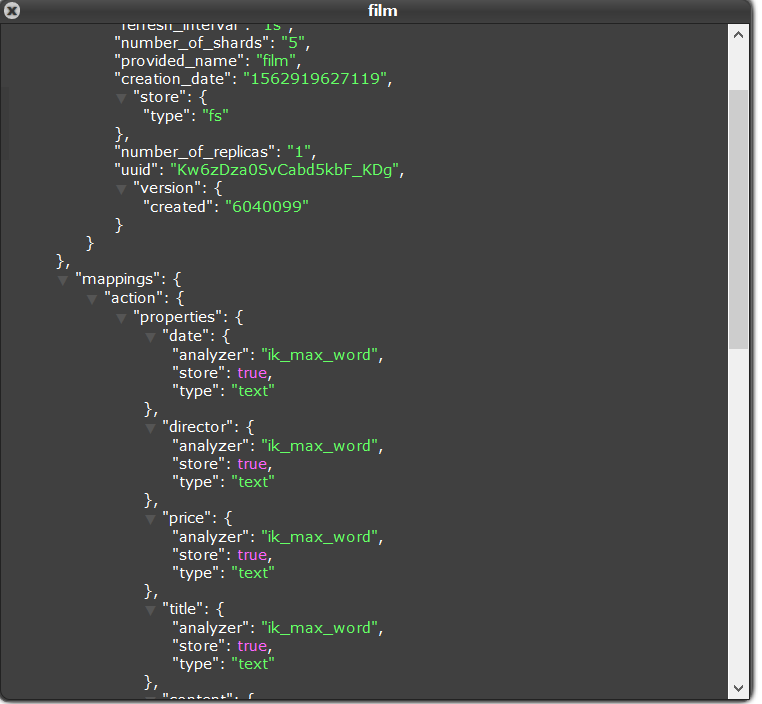
查看索引信息中的mapping信息,创建正常:
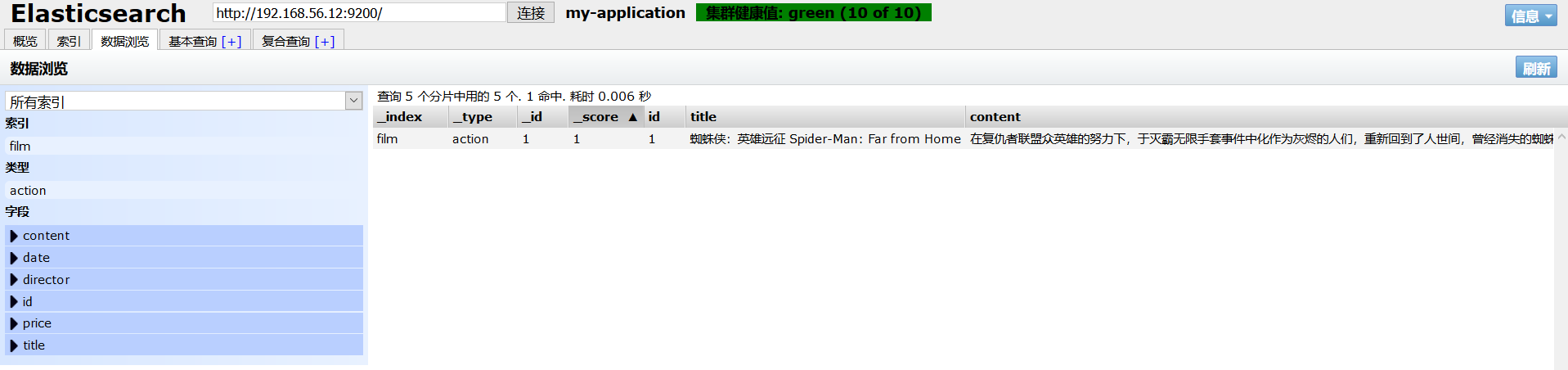
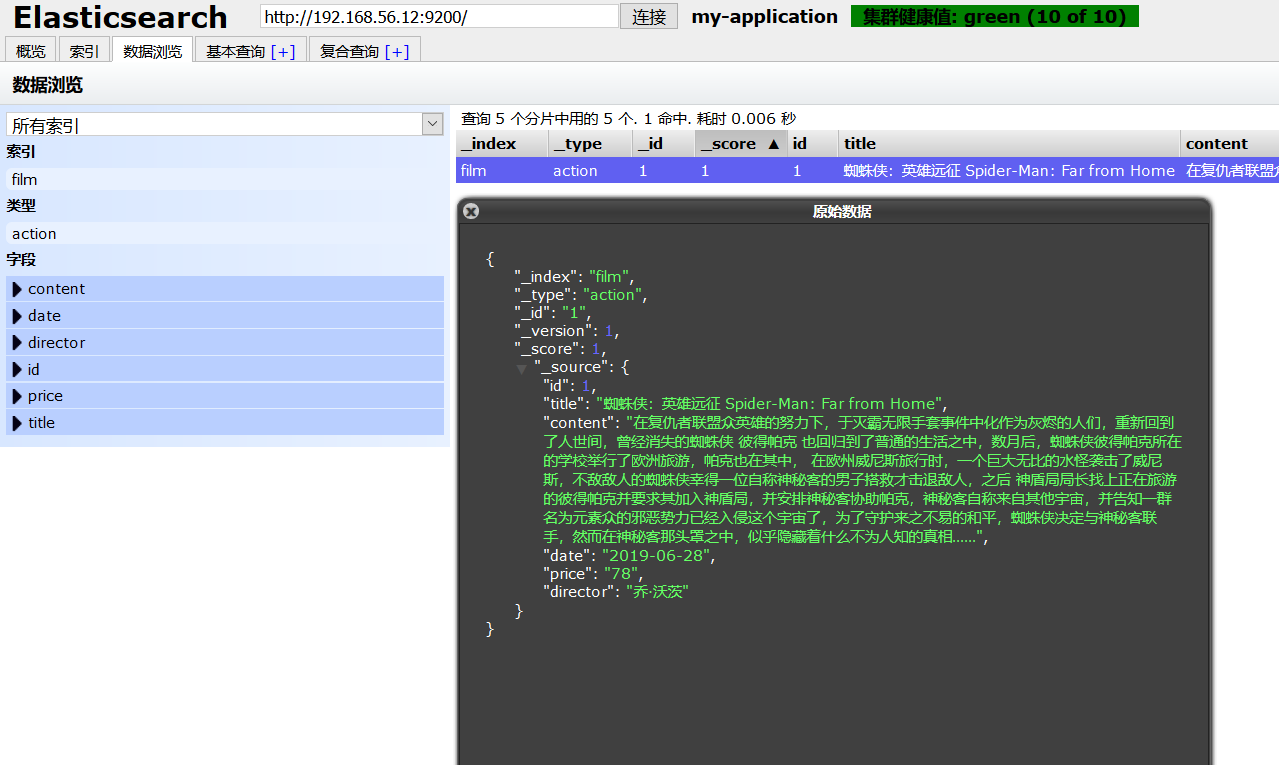
执行saveFilm1加入文档,文档加入成功:
至此Spring Data Elasticsearch工程创建成功!
ElasticSearch(十一):Spring Data ElasticSearch 的使用(一)的更多相关文章
- elasticsearch系列七:ES Java客户端-Elasticsearch Java client(ES Client 简介、Java REST Client、Java Client、Spring Data Elasticsearch)
一.ES Client 简介 1. ES是一个服务,采用C/S结构 2. 回顾 ES的架构 3. ES支持的客户端连接方式 3.1 REST API ,端口 9200 这种连接方式对应于架构图中的RE ...
- Elasticsearch基本用法(2)--Spring Data Elasticsearch
Spring Data Elasticsearch是Spring Data项目下的一个子模块. 查看 Spring Data的官网:http://projects.spring.io/spring-d ...
- Elasticsearch Java client(ES Client 简介、Java REST Client、Java Client、Spring Data Elasticsearch)
elasticsearch系列七:ES Java客户端-Elasticsearch Java client(ES Client 简介.Java REST Client.Java Client.Spri ...
- spring data elasticsearch 使用
很久之前就安装了elasticsearch,一直没用java用过,最近看了一下spring data系列的elasticsearch,这里写一篇心得. 如果尚未安装elasticsearch,可以 参 ...
- Spring Boot + Spring Data + Elasticsearch实例
Spring Boot + Spring Data + Elasticsearch实例 学习了:https://blog.csdn.net/huangshulang1234/article/detai ...
- elasticsearch 拼音+ik分词,spring data elasticsearch 拼音分词
elasticsearch 自定义分词器 安装拼音分词器.ik分词器 拼音分词器: https://github.com/medcl/elasticsearch-analysis-pinyin/rel ...
- How to provide highlighting with Spring data elasticsearch
How to provide highlighting with Spring data elasticsearch @Test public void shouldReturnHighlighted ...
- springboot集成spring data ElasticSearch
ES支持SpringBoot使用类似于Spring Data Jpa的方式查询,使得查询更加方便. 1.依赖引入 compile “org.springframework.boot:spring-bo ...
- 031 Spring Data Elasticsearch学习笔记---重点掌握第5节高级查询和第6节聚合部分
Elasticsearch提供的Java客户端有一些不太方便的地方: 很多地方需要拼接Json字符串,在java中拼接字符串有多恐怖你应该懂的 需要自己把对象序列化为json存储 查询到结果也需要自己 ...
随机推荐
- mysqldump导出完整sql脚本
#导出某个数据库--结构+数据 shell>mysqldump -h192.168.161.124 -uroot -pxxxxxx --opt db_name |gzip -9 > /db ...
- kubernetes之Scheduler原理分析
scheduler在整个系统承担了承上启下的重要功能 承上值负责接受Controller Manager创建新的pod,安排目标Node 旗下指安置工作完成后,目标Node上的kubelet服务进程接 ...
- 使用 Nginx 阻止恶意 IP 访问
找到具有明显特征的访问记录,比如: /Dec/::: +] "-" "Ouija_x.86/2.0" "-" 也许是某个开源框架的漏洞,执行 ...
- CentOS7 初始化硬盘分区、挂载、重启自动挂载
挂载硬盘设备到本地有一下步骤: 1.通过fdisk -l命令,查看硬盘信息 可以看到有两块磁盘/dev/vda和/dev/vdb vda是系统盘,vdb使我们新增的数据盘,在上图中其实已经挂载完成(设 ...
- (CSDN 迁移) JAVA循环删除List的某个元素
若列表中只可能存在一个则可以用简单的循环删除,不多说. 若列表中可能存在多个,尤其是可能有多个连续的需要删除,用简单循环有可能发生异常. 需要使用迭代器(Iterator),两种具体实现: 逻辑上是一 ...
- csu 1984: LXX的能力值
1984: LXX的能力值 Submit Page Summary Time Limit: 3 Sec Memory Limit: 128 Mb Submitted: 17 ...
- Redis实现实时热点查询
Redis内存淘汰 定义: 指的是用户存储的一些键被可以被Redis主动地从实例中删除,从而产生读miss的情况 机制存在原因: Redis最常见的两种应用场景为缓存和持久存储 首先要明确的一个问题是 ...
- PHP Imagick文字加阴影(外发光)
PHP Imagick文字加阴影(外发光)<pre>$canvas = new \Imagick(); $canvas->newImage(500, 200, 'white'); $ ...
- jquery实现比较靠谱的手风琴代码
比较靠谱的手风琴代码<pre><!DOCTYPE html><html><head> <meta charset="utf-8" ...
- Java数组操作类
最近又重新在看慕课网的数据结构,然后把示例代码整理一下. public class Array<E> { private E[] data; private int count = 0; ...