
元素定位方法之Uiautomator方法
这个方法只能用于安卓系统,方法通过类UiSelector()来构造对象的
官网地址:https://developer.android.google.cn/topic/libraries/testing-support-library/index.html#UIAutomator
打开链接到UiSelector类https://developer.android.com/reference/android/support/test/uiautomator/UiSelector.html
定位方法:driver.find_element_by_android_uiautomator('new UiSelector().text("9")') 返回元素对象
通过元素文本进行定位:
1、根据文本定位
text(String text)
new UiSelector().text("9")
2、模糊匹配文本
textContains(文本)
3、以某个文本开头来匹配
textStartsWith(文本)
4、正则匹配
textMatches(正则表达式)
new UiSelector().textMatches("^D.*")
根据resourceId定位元素:
resourceId(id)
new UiSelector().resourceId("com.ibox.calculators:id/digit6")
根据className定位元素:
注意:className不是唯一的,在Android页面为元素的类型
new UiSelector().className("android.widget.Button")
根据contenet-des属性定位:
description(contenet-des属性值)
new UiSelector().description("cramp fast")
组合定位:
className 和text组合定位
new UiSelector().className("android.widget.TextView").text("上升最快")
其他类推
根据元素关系定位:
1、后代元素定位
使用条件:子元素属性不定,不唯一,只能通过父元素来定位
通过父元素来找后代元素,不一定是父子关系
new UiSelector().resourceId("com.ibox.calculators:id/cv").childSelector(className("android.widget.TextView"))
new UiSelector().resourceId("io.manong.developerdaily:id/tab_bar").childSelector(text("我的"))
2、兄弟元素定位
使用条件:兄弟元素定位容易
通过子元素找到父元素,然后通过父元素再去找兄弟元素
new UiSelector().resourceId(id).fromParent(text("9"))
instance与index区别:
都是从0开始计数,但是:
其中instance是匹配的结果所有元素里面 的第几个元素
而index则是其父元素的几个节点,类似xpath 里面的*[n]
instance用法:
xml: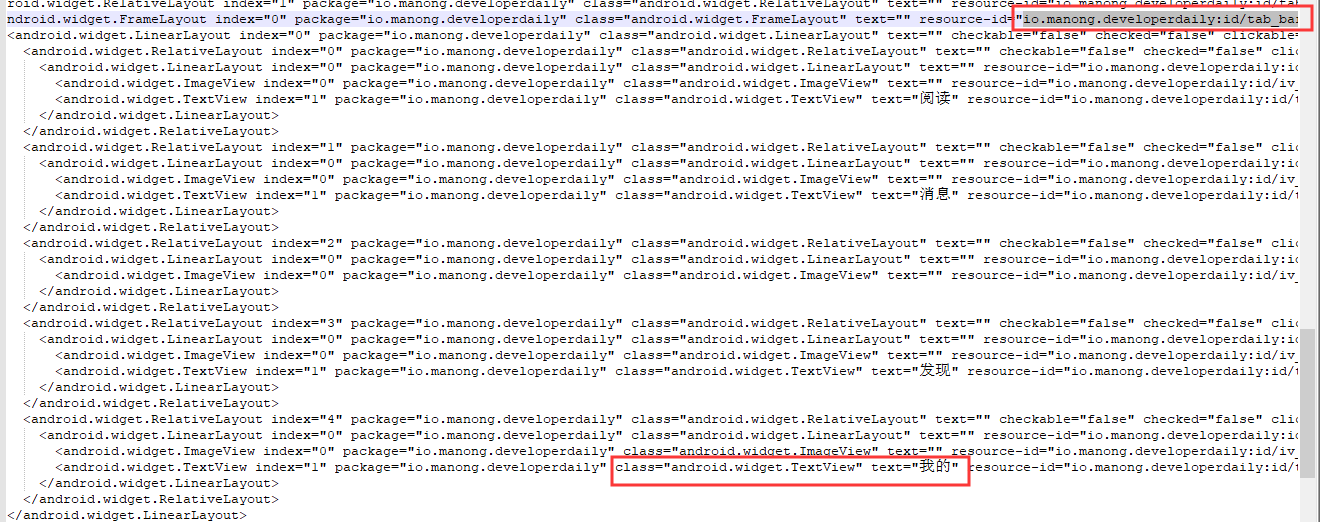
new UiSelector().resourceId("io.manong.developerdaily:id/tab_bar").childSelector(className("android.widget.TextView").instance(3))
元素定位方法之Uiautomator方法的更多相关文章
- selenium的定位方法-单元素定位
selenium自动化测试中,提供了单个元素定位方法,多个元素定位方法,2种方式都是根据元素属性:ID.NAME.CLASS_NAME.TAG_NAME.CSS_SELECTOR.XPATH.LINK ...
- Selenium八种元素定位方法源码阅读
接触过Selenium的都知道元素定位有八种方法,但用不同的方法在执行时有什么区别呢? 元素定位8种方法(Python版),当然还有每一个方法对应的find_elements方法 find_eleme ...
- Appium自动化(10) - appium高级元素定位方式之 UI Automator API 的详解
如果你还想从头学起Appium,可以看看这个系列的文章哦! https://www.cnblogs.com/poloyy/category/1693896.html 前言 前面介绍过根据id,clas ...
- Selenium2学习-009-WebUI自动化实战实例-007-Selenium 8种元素定位实战实例源代码(百度首页搜索录入框及登录链接)
此 文主要讲述用 Java 编写 Selenium 自动化测试脚本编写过程中,通过 ID.name.xpath.cssSelector.linkText.className.partialLinkTe ...
- Robot Framework 教程 (2) - 页面元素定位
上一篇文章中,简单模拟了一个baidu搜索并截图的过程,在搜索过程中,我们需要对搜索框.搜索按钮进行定位.本篇文章主要介绍一下具体的定位方法. 我们的脚本如下: *** Settings *** Li ...
- 我是这么学习Selenium元素定位操作的
写在前面 做web自动化测试都有体会,本质也就是通过操作页面元素对象来模拟用户操作行为,那么首先我们先找到这些元素对象,然后才能进行一系列操作. 我们得先告诉自动化工具或者说代码要操作那个元素,毕竟代 ...
- Python自动化学习--元素定位
from selenium import webdriver import time driver = webdriver.Chrome() driver.get("https://www. ...
- Appium脚本(4) 使用uiautomator方法定位元素
from app.find_element.capability import driver from time import sleep # 使用uiautomator方法定位元素 accunt_i ...
- 不支持find_element_by_name元素定位方法,抛不支持find_element_by_name元素定位方法,会抛如下错误 org.openqa.selenium.InvalidSelectorException: Locator Strategy 'name' is not supported for this session的解决
appium1.5后不支持find_element_by_name元素定位方法,会抛如下错误 org.openqa.selenium.InvalidSelectorException: Locator ...
随机推荐
- 使用innobackupex进行mysql的差异备份还原和延迟复制
使用innobackupex进行mysql的差异备份还原和延迟复制 背景: 有同事执行update语句没有添加where条件,导致大量脏数据,需要将这张表恢复到前一天 数据库上有备份,每周一次完整备份 ...
- 解决SQL Server 阻止了对组件Ad Hoc Distributed Queries访问的方法
来源:http://www.htmer.com/article/922.htm 今天单位一ASP.NET网站,里面有个功能是导出数据,发现一导出就报错,报错内容是:SQL Server 阻止了对组件 ...
- openvswitch2.11.0修改源码后重新编译
一:推文 https://www.jianshu.com/p/923f49c290f5(可以删除运行当中的DataPath内核) https://github.com/ebiken/doc-netwo ...
- matlab学习笔记13_2匿名函数
一起来学matlab-matlab学习笔记13函数 13_2 匿名函数 觉得有用的话,欢迎一起讨论相互学习~Follow Me 参考文献 https://ww2.mathworks.cn/help/m ...
- 123456123456----updateV#%#1%#%---pinLv###20%%%----com.zzj.ChildEnglis698---前show后广--儿童英语-111111111
com.zzj.ChildEnglis698---前show后广--儿童英语-111111111
- 【翻译】Flink Table Api & SQL — SQL客户端Beta 版
本文翻译自官网:SQL Client Beta https://ci.apache.org/projects/flink/flink-docs-release-1.9/dev/table/sqlCl ...
- PowerShell学习笔记
1,ps7官方文档 2,使用脚本生成帮助文档 function Add-Node { param ( $selectedNode, $name, $tag ) $newNode = new-objec ...
- Spring的@Autowired和@Resource注入
@Autowired的原理 Spring@Autowired注解与自动装配 @Autowired 与@Resource的区别(详细) spring不但支持自己定义的@Autowired注解,还支持几个 ...
- SQL Server表分区(转)
什么是表分区 一般情况下,我们建立数据库表时,表数据都存放在一个文件里. 但是如果是分区表的话,表数据就会按照你指定的规则分放到不同的文件里,把一个大的数据文件拆分为多个小文件,还可以把这些小文件放在 ...
- bridge和原生交互的简单用法
首先获取当前环境是ios还是Android var u = navigator.userAgent; var isAndroid = u.indexOf('Android') > -1 || u ...